Seedream 5.5 is the stronger choice for multi-round editing and native transparent assets, while GPT Image 2.6 offers faster iteration with Flare, detailed creation with Sunburst, and SVG and GIF output. For commercial image production, the better model depends on whether you prioritize editing consistency, creative control, or production-ready formats.
The cost of choosing the wrong model goes beyond the first image. Our research into published tests found meaningful differences in 20-round editing stability, text accuracy, and generation costs. Distorted labels, drifting product details, and repeated revisions can increase your cost per usable image, even when the first result looks impressive.
LinkModel makes both choices more affordable: Seedream 5.5 costs 20% less than the corresponding official image rates, while GPT Image 2.6 offers 35% lower standard token rates through November 30, 2026. With $0 minimum spend, $0 monthly platform fee, and a unified API workflow, you can evaluate supported image models without a recurring platform subscription. New users automatically receive $1 in free Credits with no card or recharge required. This one-time signup gift never expires and applies to every model currently available on LinkModel.
Seedream 5.5 vs GPT Image 2.6: Key Differences and Model Variants
Seedream 5.5 and GPT Image 2.6 target different image-production challenges. Seedream 5.5 focuses on preserving details during successive edits and generating reusable transparent assets. GPT Image 2.6 provides two model variants, Flare and Sunburst, with different creative priorities and additional output capabilities.
| Comparison | Seedream 5.5 | GPT Image 2.6 |
|---|---|---|
| Developer | ByteDance Seed | OpenAI |
| Model variants | Seedream 5.5 | Flare and Sunburst |
| Multi-round editing | Official demonstration of 100 successive edits | Supports iterative image editing |
| Unedited-region preservation | Pixel-level preservation is a core design objective | Sunburst emphasizes consistency at medium and high quality |
| Transparency | Native RGBA | Transparent background support |
| Text rendering | Improved Chinese, English, and dense small-text rendering | Complexity control and markup-guided editing |
| Editing controls | Multi-turn instruction-based editing | Markup-guided edits and complexity |
| SVG | Not listed in the reviewed official materials | Supported through the API |
| GIF | Not listed in the reviewed official materials | Supported through the API |
| Primary strength | Repeated editing and reusable assets | Fast iteration, detailed creation, and multiple output formats |
Seedream 5.5: Multi-Round Editing and Native Assets
Seedream 5.5's central improvement is its focus on changing requested elements without unnecessarily regenerating the rest of an image.
A common problem in image editing is that a small requested change can affect surrounding details. A prompt to change someone's clothing color, for example, may also alter facial features, background lighting, or the original composition. For commercial projects that depend on consistent products and recognizable characters, these changes create additional editing work.
ByteDance highlights three main improvements in Seedream 5.5:
- Multi-round editing stability: Targeted training aims to preserve unedited regions at the pixel level and reduce accumulated changes across successive edits. The model supports workflows involving up to 100 editing rounds.
- Native RGBA output: Images can be generated with an alpha channel, including fully transparent and partially transparent regions.
- Realism and text rendering: Improvements target skin texture, material rendering, lighting, and densely arranged small text.
The official demonstrations go beyond portrait and clothing changes. They also show repeated editing of floral arrangements and interior spaces. In one evolving study-room scene, moving a box requires the model to update perspective, occlusion, and cast shadows while maintaining a coherent spatial layout.
ByteDance's 100-round demonstration is particularly relevant to professional image production. It illustrates how a single image can undergo numerous changes to clothing, accessories, and scene details without rebuilding the entire composition from the beginning.
These capabilities are valuable for e-commerce teams updating product photos, designers producing multiple variations of one asset, and advertisers maintaining recognizable characters across campaigns.
GPT Image 2.6 Flare vs Sunburst: Which Variant Should You Use?
GPT Image 2.6 is not a single API model. It includes two variants with different priorities.
| Model | Official positioning | Best-fit workflows |
|---|---|---|
| Flare | Faster iteration | Rapid concepts, drafts, frequent creative experiments |
| Sunburst | Detailed visual work | Fine composition, complex visuals, high-quality editing |
Both variants share the same published standard token rates, although actual token consumption can differ between tasks and settings.
GPT Image 2.6 also introduces a complexity parameter with three levels: low, medium, and high. Complexity is separate from quality. It controls how much planning the model performs before generating an image, while quality controls the visual detail of the output.
For clearly defined changes, such as replacing a background or modifying a sign, low complexity is a practical starting point. For dense text, multiple objects, and complex spatial relationships, medium or high complexity may be more suitable.
OpenAI recommends starting with low complexity for many editing tasks, then increasing it when the request requires more planning.
The practical distinction is straightforward: Flare is positioned for faster creative iteration, while Sunburst is better aligned with demanding visual compositions and detailed image editing.
Seedream 5.5 vs GPT Image 2.6: Image Quality, Realism, and Text Accuracy
For image quality, Seedream 5.5's official strengths center on text structure and realism, while GPT Image 2.6 needs to be evaluated across its different variants and task requirements. Correct text in a first-generation image does not automatically mean that the text will remain accurate after multiple edits.
Official Text and Realism Evaluations
ByteDance evaluated Seedream 5.5 across six professional production scenarios:
- E-commerce
- Marketing
- Film and television
- Gaming
- Office productivity
- Fashion design
Compared with Seedream 5.0 Pro, Seedream 5.5 improved both quality scores and usability rates across all six scenarios. In film and television and office productivity, usability rates were more than twice those of the previous version.
In ByteDance's published paired-image evaluation, Seedream 5.5 recorded a +55.62% GSB preference score for image-to-image realism against Seedream 5.0 Pro. The metric reflects expert preference comparisons, not an image-generation success rate.
ByteDance also published the following text-rendering results:
| Official evaluation metric | Seedream 5.5 |
|---|---|
| Severe text corruption rate | 0.4% |
| Minor text corruption rate | 1.7% |
The evaluation covers Chinese and English text, including densely arranged small characters. Official examples include a Shakespeare newspaper layout and a blue morpho butterfly infographic, demonstrating English paragraphs and compact Chinese labels.
There is an important version distinction: ByteDance's published cross-model comparison includes GPT Image 2.5 Sunburst, not GPT Image 2.6. These results demonstrate Seedream 5.5's official evaluation performance, but they do not establish a direct head-to-head victory over the latest GPT Image model.
For designers creating posters, product packaging, menus, or infographics, the most useful takeaway is to evaluate both text accuracy and visual layout. Correct spelling alone does not guarantee that a design meets its delivery requirements.
Five-Prompt Comparison: Text, Portraits, Products, Counting, and Illustration
A five-task comparison published on November 10, 2026, evaluated Seedream 5.5, GPT Image 2.6 Flare, and another image model using identical prompts.
The test used 1K, 1:1 default settings, retained the first output for each prompt, and did not use additional generations or editing.
| Test | Seedream 5.5 | GPT Image 2.6 Flare |
|---|---|---|
| Neon sign text | Correct spelling | Correct spelling |
| Elderly fisherman portrait | Realistic, but framed wider | Followed the close-up instruction more closely |
| Perfume product label | Correct AURA text and requested bottle appearance | Correct AURA text, but changed the liquid color |
| Object counting | Correctly generated 5 lemons, 3 limes, and 1 orange | Generated only 3 lemons |
| Watercolor illustration | Complete scene | Good result |
Two findings are particularly useful.
First, GPT Image 2.6 followed the close-up portrait instruction more accurately. Second, it failed the exact-counting task, while Seedream 5.5 generated the requested quantities correctly.
The perfume test reveals another important distinction. Both models rendered the AURA label correctly, but GPT Image 2.6 changed the clear liquid to gold. This shows why correct text does not necessarily mean accurate product details.
Commercial image evaluation should therefore check text, colors, quantities, materials, and composition together.
Our review of these tasks suggests that different image requirements can produce different winners. A model that handles typography well may still alter a product's color, while a model producing realistic photography may not follow a close-up framing instruction as precisely.
Real-Photo Editing: Strong Text Does Not Guarantee Perfect Preservation
A separate 16-test evaluation of GPT Image 2.6 used four real photographs for editing: a portrait, a cluttered desk, an autumn house, and a Japanese storefront.
The four real-photo edits used Sunburst at high quality. Each input was 2048 pixels wide, each output was approximately 1536×1024, and individual editing times ranged from 39 to 60 seconds.
Two cases are particularly revealing.
Removing objects from a desk: The model successfully removed a hand, phone, earphone cable, and chocolate wrapper, reconstructing the wooden desk convincingly. However, it also rewrote handwritten notes in a notebook, introducing spelling errors in content that was not supposed to change.
Relighting a house: The model transformed an ordinary daylight photograph into a golden-hour scene approximately 20 minutes before sunset. Window panes, curtains, door panels, fence details, and a small outdoor sign remained visually coherent.
The text evaluation included an exposure-triangle infographic and a camera-settings sheet containing 29 separate text strings. GPT Image 2.6 and GPT Image 2.5 both achieved zero spelling and number errors across the 29 strings.
However, some table cells sat too close to their borders, and the generated image dimensions did not match the requested 1024×1536 portrait format.
This demonstrates why text accuracy, layout accuracy, and output dimensions must be treated as separate production checks.
For commercial image production, a successful output must satisfy all three requirements, not merely produce attractive visual results.
Seedream 5.5 vs GPT Image 2.6: Multi-Round Editing and Character Consistency
Multi-round editing is one of the most important differences between these models. A single generation can be repeated, but when a project has already gone through ten or twenty revisions, unintended changes to untouched areas can force an entire asset to be reviewed again.
The 20-Round Editing Test: Measuring Color Drift
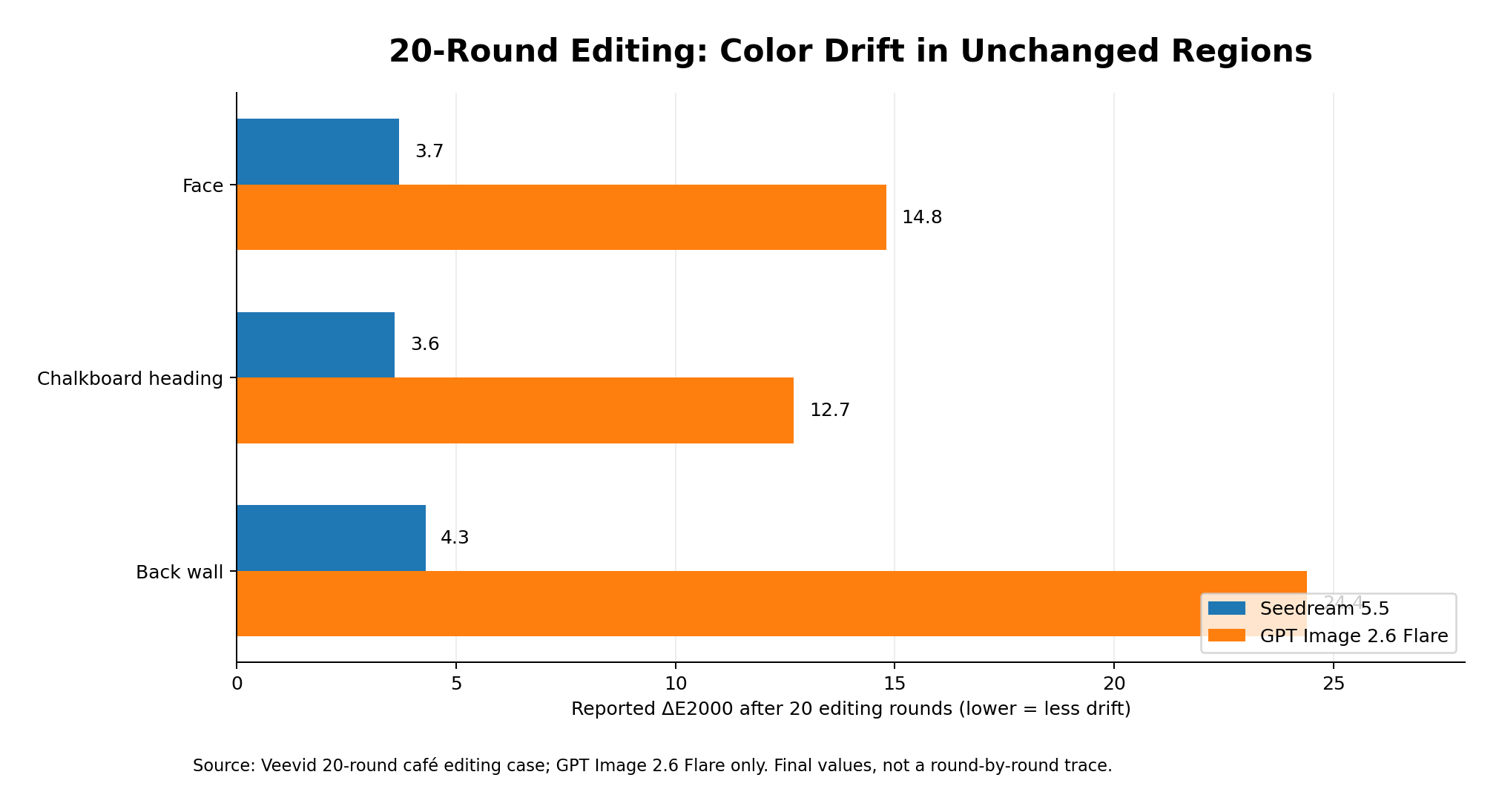
In a November 11, 2026 test published by Veevid, both models received the same 20 sequential editing instructions on a café image. The measured results showed lower drift across all three unchanged regions with Seedream 5.5 than with GPT Image 2.6 Flare.
The test used 1K square PNG settings. Each new edit was applied to the previous output, creating a continuous editing chain rather than 20 separate edits from the original image.
The instructions included:
- Changing a red mug to a cobalt-blue ceramic mug.
- Adding a croissant and a white plate.
- Replacing a potted plant with a vase of flowers.
- Changing the woman's apron from mustard yellow to forest green.
- Updating the coffee price on a chalkboard.
- Adding coffee jars, steam, and small decorative objects.
- Replacing an espresso machine and other items.
- Making successive changes to the chalkboard text.
The evaluation tracked three regions that were never supposed to change: the woman's face, the chalkboard heading, and a teal wall. Their differences from the original were measured using ΔE2000.
| Unchanged region | Seedream 5.5 | GPT Image 2.6 Flare |
|---|---|---|
| Face | 3.7 | 14.8 |
| Chalkboard heading | 3.6 | 12.7 |
| Back wall | 4.3 | 24.4 |
Lower ΔE2000 values indicate smaller color differences. A value around 2–3 may already be noticeable when two images are compared side by side.
Seedream 5.5 showed relatively gradual changes across all three regions. GPT Image 2.6 Flare began drifting from the first edit, with the back wall eventually reaching 24.4.
The test also revealed several concrete editing problems:
- Seedream 5.5 completed all three requested chalkboard text changes correctly.
- GPT Image 2.6 Flare misspelled ICED MOCHA during round 15.
- The previously corrected OAT LATTE price of 4.95 became blurred in later rounds.
- GPT Image 2.6 Flare changed the overall framing within the first few rounds, with a noticeably wider composition by round 10.
Average editing time was approximately 17 seconds per edit for Seedream 5.5 and 31 seconds for GPT Image 2.6 Flare.
Seedream 5.5 did not remain perfectly unchanged either. Its drift accumulated gradually, and replacing the espresso machine in round 14 produced a noticeable jump across all three untouched regions.
The practical conclusion is not that Seedream 5.5 eliminates editing drift. Rather, it preserved untouched regions more consistently in this particular 20-round editing sequence.
Character Identity: Preserving the Same Person Across Different Styles
Character consistency should also be evaluated separately from ordinary color stability.
Another image-editing case began with a fictional portrait and assigned five recognizable identity features:
- Teal bob haircut.
- Crescent-shaped beauty mark.
- Facial freckles.
- Yellow jacket.
- Silver star earring.
In a documented character-transformation test comparing GPT Image 2.6 with Nano Banana 2.1, GPT Image 2.6 preserved five distinctive character features across several visual styles. The case illustrates identity preservation across transformations, rather than proving superiority over Seedream 5.5.
The original image plus eight edits cost $0.409. Individual edits took approximately 27–90 seconds, while running all eight edits together took about 90 seconds.
This case shows that character consistency is not simply about keeping the same face. It also involves preserving hairstyle, clothing, accessories, and recognizable identity features.
These details matter when the same character must appear across advertising, illustration, and different visual styles.
What Editing Drift Means for Commercial Production
Editing drift can affect commercial workflows in three distinct ways:
| Drift type | What changes | Commercial consequence |
|---|---|---|
| Identity drift | Facial features, hairstyle, and character details | Brand characters become inconsistent |
| Text drift | Prices, labels, and brand wording | Advertisements and product images require rechecking |
| Composition drift | Camera framing, position, and scale | A series of assets loses visual consistency |
For example, a product photograph might look acceptable after a background change, but the model may subtly modify the label color or bottle shape.
If that photograph is intended for a product catalog containing hundreds of variations, such changes can create additional quality-control work.
For workflows involving many revisions, compare the current image with the original at regular intervals. With GPT Image 2.6, Sunburst's medium- and high-quality positioning and markup-guided editing are also worth evaluating for more controlled changes.
The most useful measure of editing quality is not simply whether the requested change succeeds, but whether everything else remains correct.
Seedream 5.5 vs GPT Image 2.6: Transparency, SVG, GIF, and Output Formats
The final value of an AI-generated image also depends on whether its output can enter a design, web, or advertising workflow without additional conversion.
Seedream 5.5 Native RGBA and Transparent Assets
Native RGBA is one of Seedream 5.5's most important workflow improvements.
An RGBA image contains an alpha channel that controls the transparency of individual pixels. Unlike an image with a white or black background, a transparent asset can be placed directly over other design elements.
ByteDance's official snowy owl demonstration illustrates this capability. The model generates an owl with outstretched wings while preserving feather tips, tiny gaps between feathers, and the complex outlines of its claws.
This is useful for:
- Standalone e-commerce product assets.
- Transparent characters and people.
- Advertising stickers and decorative elements.
- Brand visual assets.
- Multi-background compositions.
ByteDance also demonstrates how the same set of character assets can be reused across different scenes. The characters retain their defining features and textures while their poses, groupings, and compositions change.
This approach is particularly valuable for producing a consistent collection of visuals without rebuilding each character from scratch.
For e-commerce teams, native transparent assets can simplify the creation of product banners, seasonal promotional backgrounds, and marketplace images.
GPT Image 2.6 SVG and Animated GIF Output
GPT Image 2.6 offers two output capabilities that are especially relevant to designers and developers.
SVG is useful for projects requiring vector paths, scalable graphics, and web-ready visual assets.
GIF is suitable for simple animations, brand characters, social media visuals, and animated advertisements.
A published ChatGPT Images 2.6 test produced a 12-frame mascot animation at 345 × 810 pixels, with a file size of approximately 491 KB. It demonstrates a practical animation workflow, while API output configuration should follow the documented capabilities of the selected model and endpoint.
The animation sequence involved a mascot raising a camera, taking a photograph with a flash, lowering the camera, and waving.
This demonstrates that GIF output can represent sequential character movement rather than simply applying a filter to a static image.
However, resolution, frame count, and animation detail still need to be checked against the final delivery requirements.
| Output requirement | Model worth evaluating first |
|---|---|
| Standalone transparent assets | Seedream 5.5 |
| Complex semi-transparent edges | Seedream 5.5 |
| Editable vector graphics | GPT Image 2.6 |
| Simple looping animations | GPT Image 2.6 |
| Consistent character asset collections | Seedream 5.5 |
| Multi-format developer workflows | GPT Image 2.6 |
If your final deliverable specifically requires SVG or GIF, GPT Image 2.6 has the more directly relevant documented API capabilities.
If you primarily need transparent static assets, Seedream 5.5's native RGBA output deserves priority.
Seedream 5.5 vs GPT Image 2.6: Speed, API Pricing, and Cost per Image
Seedream 5.5 and GPT Image 2.6 use different pricing structures. On LinkModel, Seedream 5.5 starts at $0.016 per standard-tier output image, while GPT Image 2.6 uses token-based billing with image output priced at $19.50 per million tokens during its current promotion.
However, speed and pricing should not be evaluated separately. For teams producing large numbers of images, the important questions are how long a successful task takes, how many inputs and outputs it requires, and how many editing rounds are needed.
Seedream 5.5 vs GPT Image 2.6 Generation Speed
OpenAI states that GPT Image 2.6 generates images 50% faster than its predecessor, while Flare can produce an image in as little as approximately six seconds at low quality.
Actual workflows can produce different results.
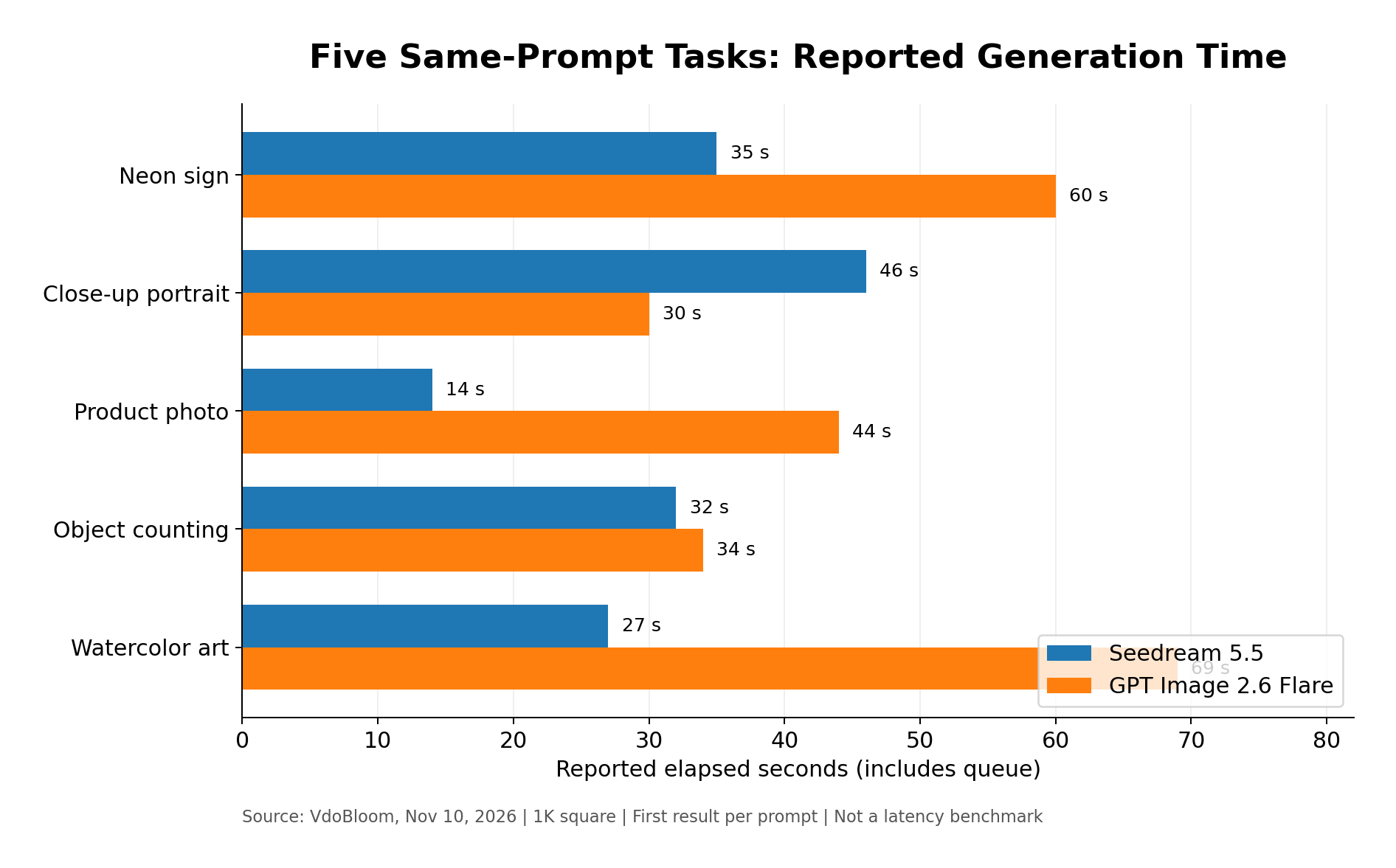
In the five-prompt comparison, Seedream 5.5 took 14–46 seconds per image, while GPT Image 2.6 Flare took 30–69 seconds. The difference varied considerably by task.
| Test task | Seedream 5.5 | GPT Image 2.6 Flare |
|---|---|---|
| Neon sign | 35 s | 60 s |
| Close-up portrait | 46 s | 30 s |
| Product photo | 14 s | 44 s |
| Counting objects | 32 s | 34 s |
| Watercolor illustration | 27 s | 69 s |
These timings include queue waiting in the evaluation environment.
A separate 16-test real-photo evaluation measured GPT Image 2.6 Sunburst high at an average of 30.1 seconds, compared with 31.9 seconds for GPT Image 2.5. Flare low averaged 31.2 seconds, compared with 29.3 seconds for its predecessor.
These results illustrate why official speed improvements and actual production latency can differ across model variants, quality settings, and access routes.
A useful comparison should consider both generation time and the number of revisions needed to finish a task.
Seedream 5.5 vs GPT Image 2.6: LinkModel Pricing and Billing Differences
Seedream 5.5 and GPT Image 2.6 both offer cost-saving opportunities through LinkModel, but their billing structures are different.
Seedream 5.5 Pricing on LinkModel
Seedream 5.5 uses image-based pricing on LinkModel, with output charges determined by actual pixel count.
Standard output images cost $0.016 for 921,600–2,601,123 pixels, compared with the corresponding official rate of $0.020.
Higher-resolution outputs in the 2,601,124–4,624,220 pixel range cost $0.028 instead of $0.035.
| Billing category | Official price | LinkModel price | Savings |
|---|---|---|---|
| Input image | $0.008 | $0.0064 | 20% |
| Output: 921,600–2,601,123 pixels | $0.020 | $0.016 | 20% |
| Output: 2,601,124–4,624,220 pixels | $0.035 | $0.028 | 20% |
Input images are charged separately. Each delivered output layer, including the background layer, is billed according to its actual pixel count.
For layers below 921,600 pixels, LinkModel lists a $0.016 charge, while the corresponding official rate has not been confirmed.
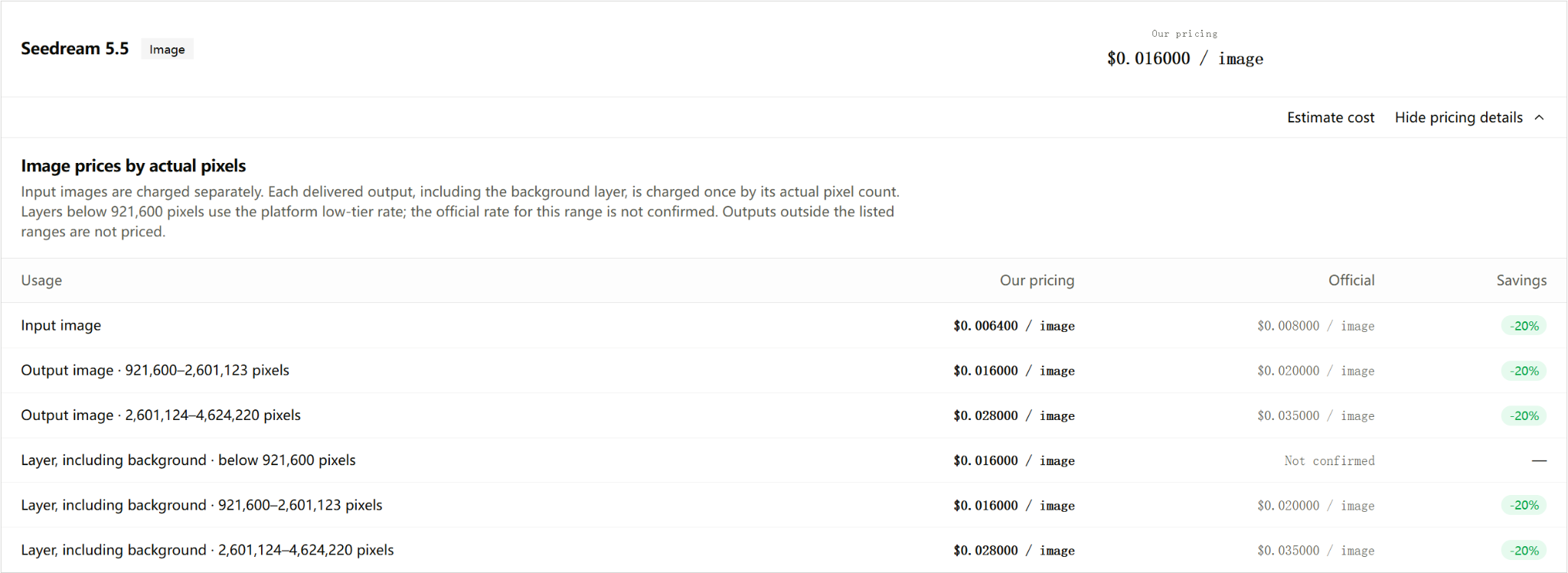
For a workload of 1,000 standard-tier output images, the output charges would be $16 on LinkModel versus $20 at the corresponding official rate, saving $4.
At the higher listed resolution tier, the same number of outputs would cost $28 instead of $35, saving $7.
This gives teams producing product catalogs, advertising assets, and reusable transparent elements a clear way to estimate output costs based on image dimensions and the number of delivered layers.
GPT Image 2.6 Official API Pricing vs LinkModel
GPT Image 2.6 uses token-based billing rather than one fixed price for every generated image.
OpenAI's standard rates are:
| Billing category | OpenAI standard price / 1M tokens |
|---|---|
| Text input | $5.00 |
| Cached text input | $1.25 |
| Image input | $8.00 |
| Cached image input | $2.00 |
| Image output | $30.00 |
LinkModel's current GPT Image 2.6 promotional rates are 65% of OpenAI's corresponding standard rates, representing a 35% reduction through November 30, 2026.
| Billing category | OpenAI | LinkModel |
|---|---|---|
| Text input | $5.00 | $3.25 |
| Cached text input | $1.25 | $0.8125 |
| Image input | $8.00 | $5.20 |
| Cached image input | $2.00 | $1.30 |
| Image output | $30.00 | $19.50 |
All prices are in USD per million tokens.
The difference is $10.50 per million image output tokens.
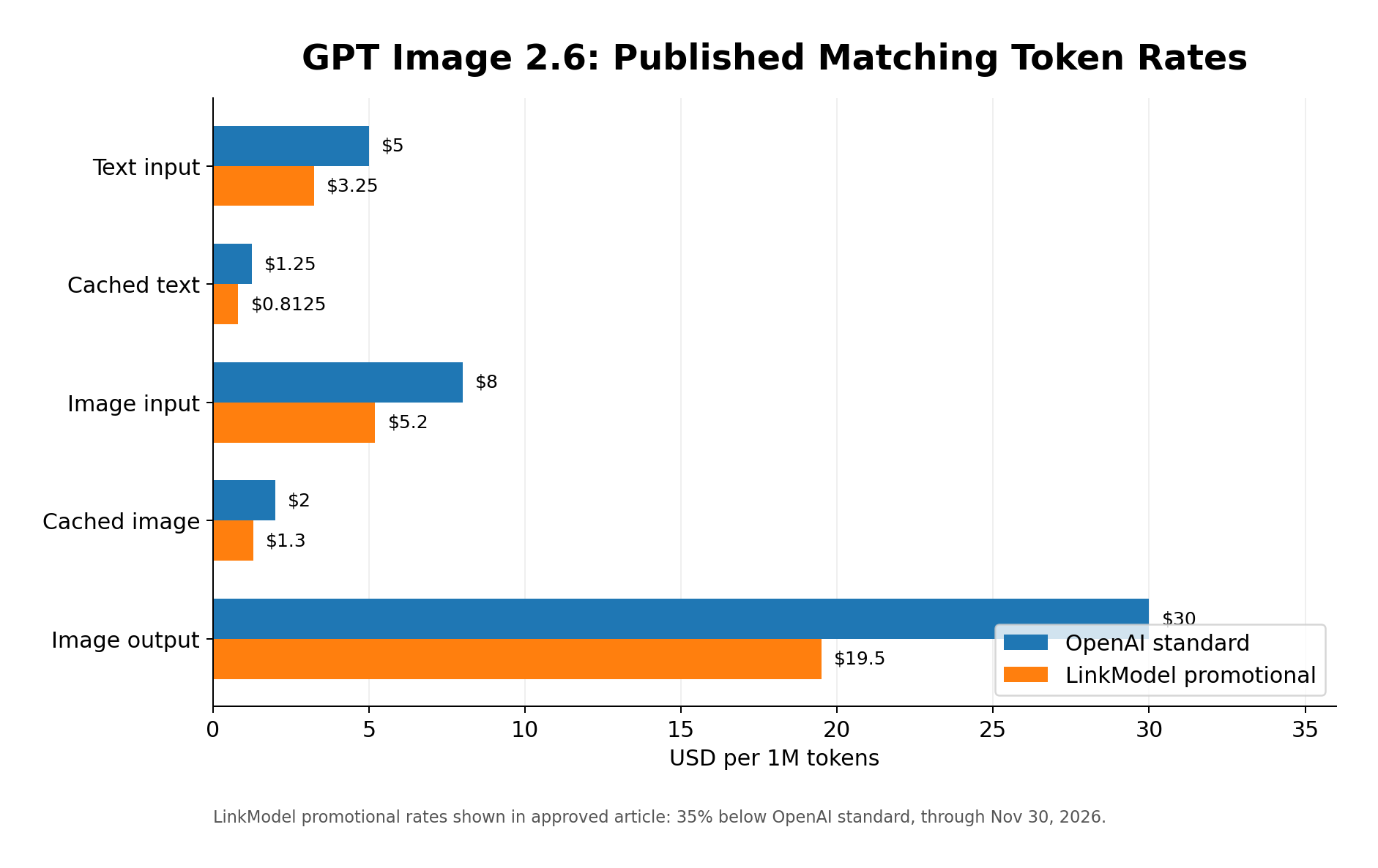
For image-intensive workloads, this rate difference can be applied directly to token budgets.
Developers can also use LinkModel's unified API key and Playground to evaluate supported models, manage requests, and compare different image-generation workflows.
Image-Based Pricing vs Token-Based Pricing
Seedream 5.5 and GPT Image 2.6 use different billing structures, so comparing their advertised starting prices alone does not establish which model is cheaper for every project.
Seedream 5.5 costs can be estimated from the number of input images, output dimensions, and delivered layers.
GPT Image 2.6 costs depend on text input, image input, image output, and applicable cached-input tokens.
For a project generating 1,000 standard-tier Seedream 5.5 images without additional inputs or layers, LinkModel's listed output charge is $16.
For GPT Image 2.6, the budget depends on the actual token consumption of those 1,000 requests.
The more useful comparison is the cost per approved image after accounting for editing rounds, rejected outputs, and final delivery requirements.
A model that preserves product details across revisions may reduce corrective work even when its initial generation price is not the lowest.
Why GPT Image 2.6 Can Cost More Per Image Than GPT Image 2.5
The actual cost of one image depends on both the token rate and the number of tokens consumed.
On November 5, 2026, a developer shared API usage from the same prompt at 1536×1024:
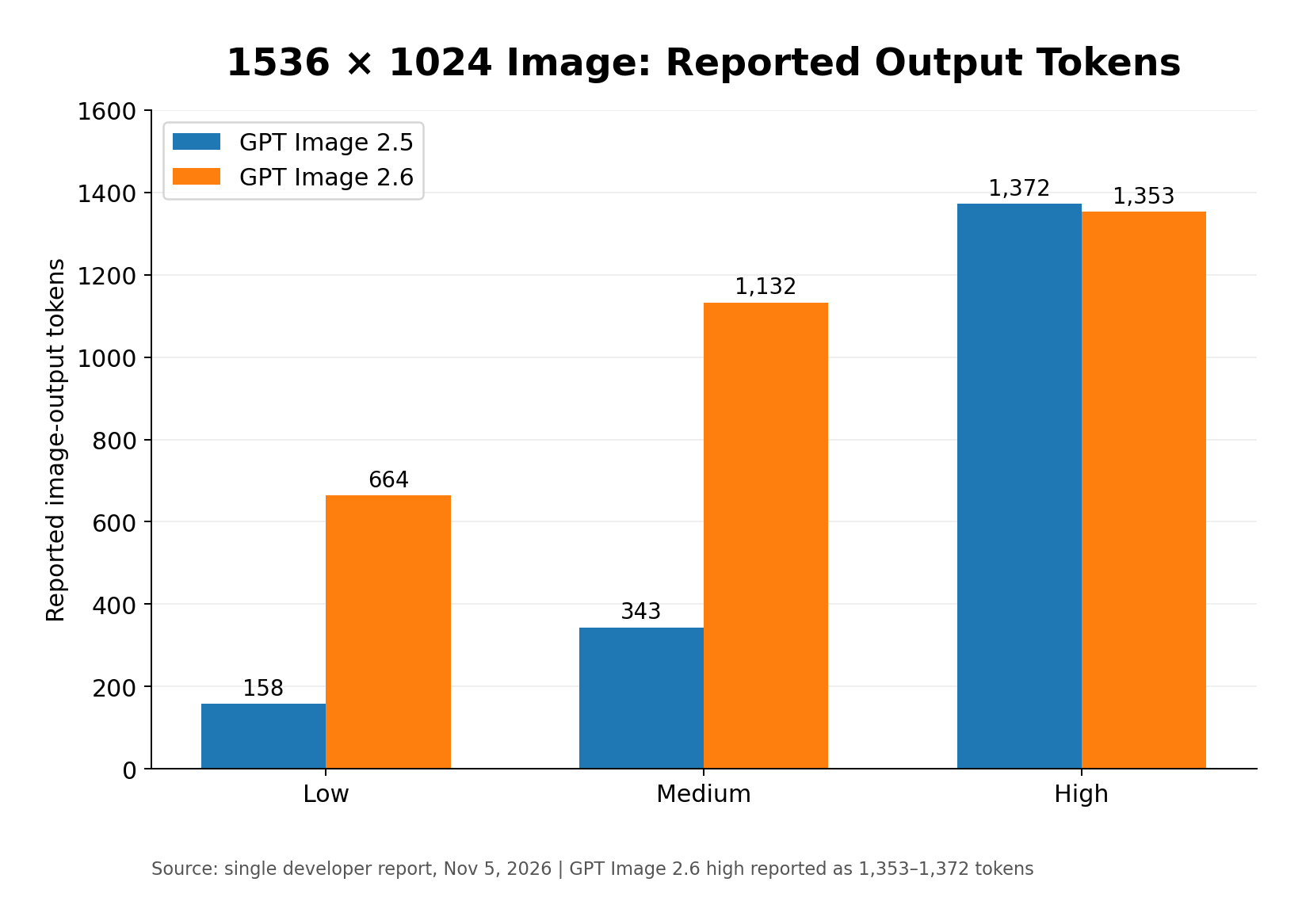
| Quality | GPT Image 2.5 | GPT Image 2.6 |
|---|---|---|
| Low | 158 tokens | 664 tokens |
| Medium | 343 tokens | 1,132 tokens |
| High | 1,372 tokens | 1,353–1,372 tokens |
Using a uniform $30 per million image-output-token rate, the calculated image-output charges per 1,000 images are:
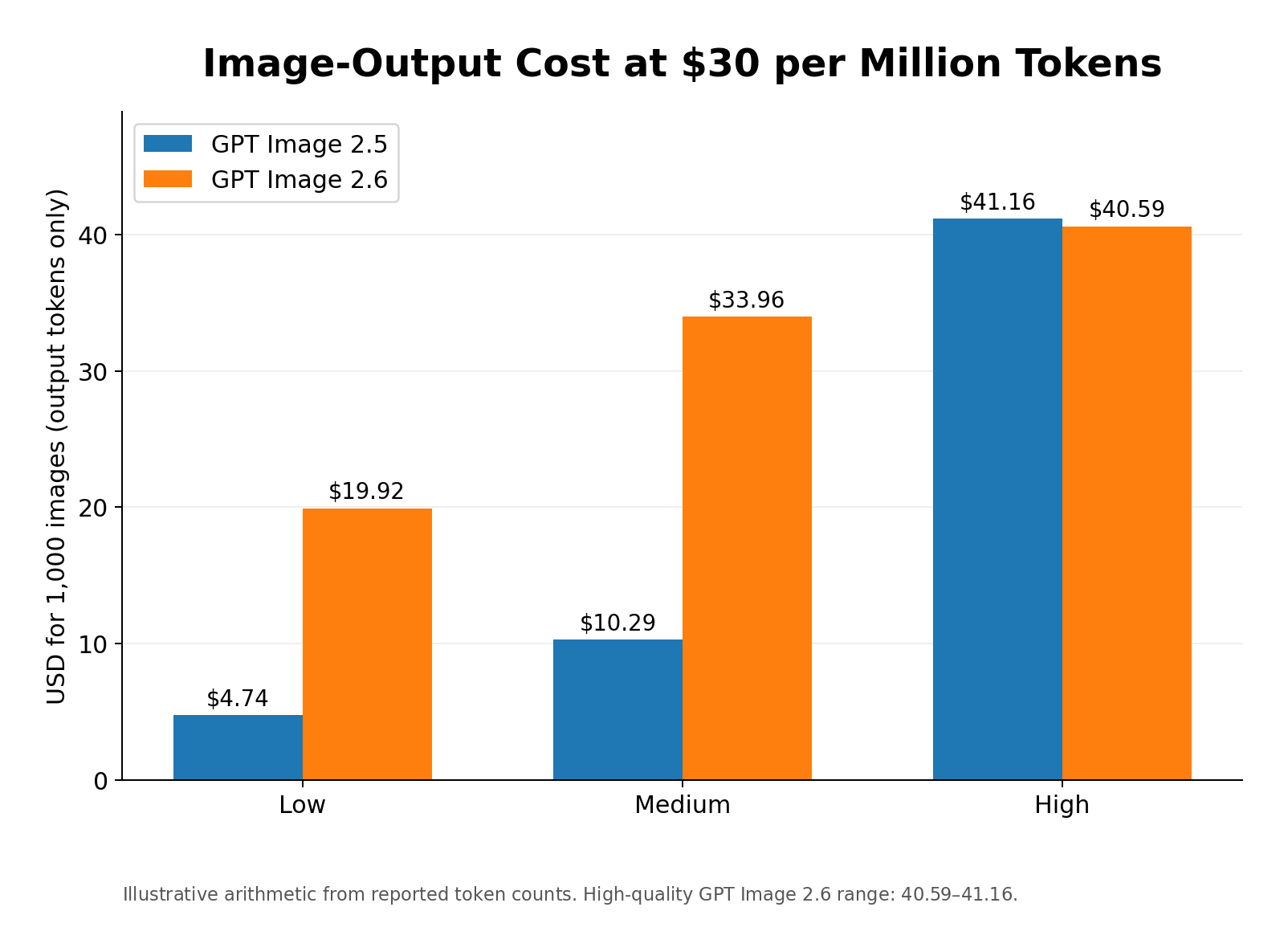
| Quality | GPT Image 2.5 / 1,000 images | GPT Image 2.6 / 1,000 images |
|---|---|---|
| Low | $4.74 | $19.92 |
| Medium | $10.29 | $33.96 |
| High | $41.16 | $40.59–$41.16 |
These figures isolate image-output-token charges and use the reported output-token counts for the specified resolution.
In this particular record, GPT Image 2.6 consumed approximately 4.2 times as many output tokens at low quality and 3.3 times as many at medium quality. High-quality usage was nearly identical.
This explains why the cost of an individual image can differ substantially even when two generations share the same published price per million tokens.
OpenAI's official image-cost calculator also provides concrete estimates. For example, a 1024×1024 low-quality GPT Image 2.6 output uses an estimated 823 image-output tokens, equivalent to approximately $0.02469 in output charges at the standard rate. Text input and reference-image input are additional.
Therefore, developers should compare actual token consumption as well as published token prices.
Cost per Usable Image: The Better Production Metric
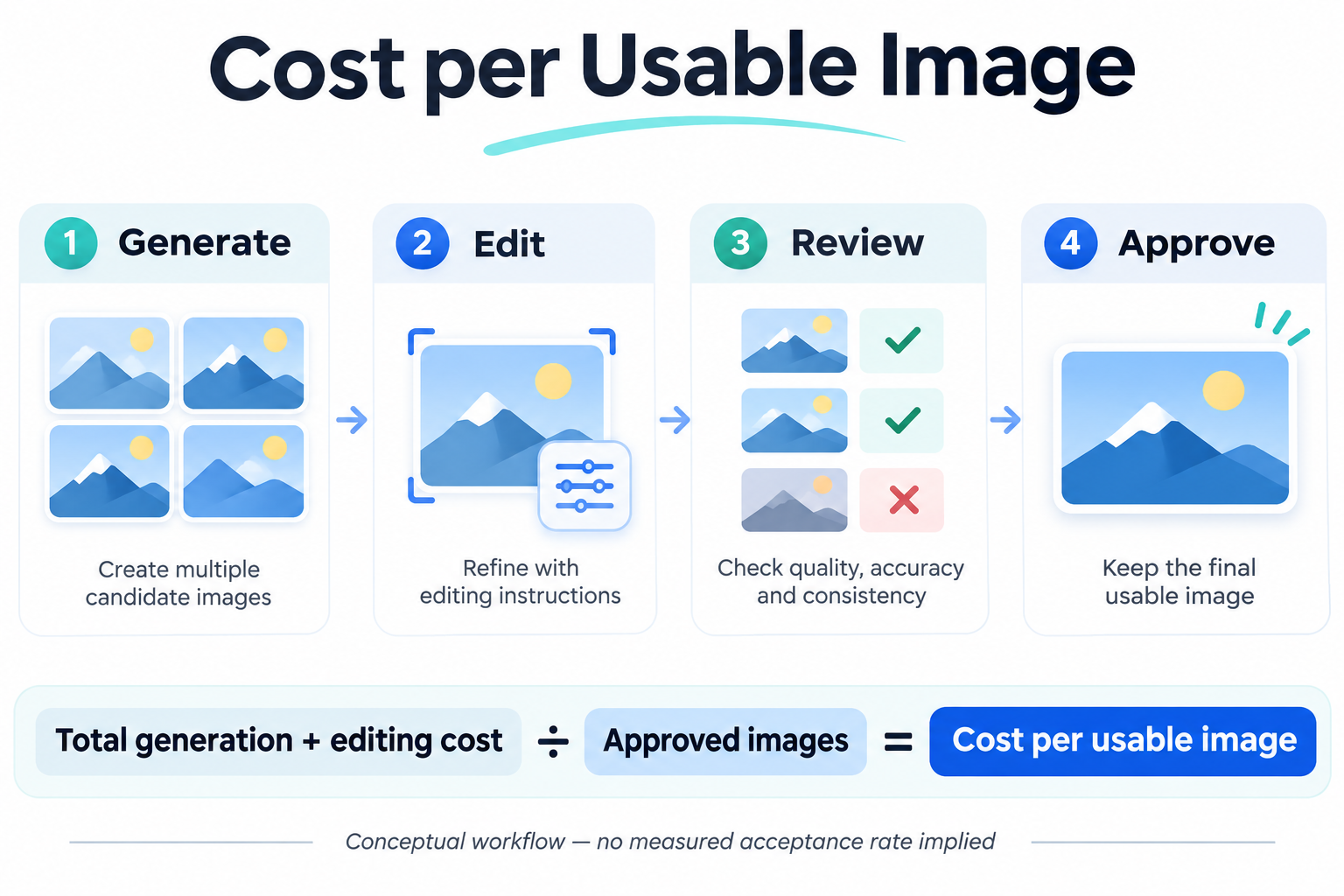
For commercial projects, a more meaningful metric is:
Cost per usable image = Total generation and editing cost / Number of approved images
Suppose a project needs 1,000 approved product images. If each approved image requires an average of two generation attempts, the project will need 2,000 generation requests.
Its budget should account for the actual requests, reference images, output tokens, and editing requirements rather than multiplying the number of final assets by one advertised image price.
This approach is particularly useful for:
- E-commerce product catalogs.
- Bulk social media advertisements.
- Brand character collections.
- Large-scale product packaging.
- Commercial visuals requiring repeated revisions.
Editing stability directly affects production cost. If one model preserves product labels, colors, and composition across revisions, fewer corrective edits may be needed before an image is approved.
A lower API price is valuable, but the strongest production economics come from combining lower rates with fewer revisions per approved image.
Seedream 5.5's predictable image-based pricing is useful for projects with consistent output dimensions. GPT Image 2.6's token-based model offers flexibility across different quality and generation requirements.
LinkModel helps reduce the corresponding model charges through 20% lower Seedream 5.5 image rates and 35% lower GPT Image 2.6 standard token rates through November 30, 2026.
For production teams, tracking the cost of approved final images offers a more useful decision metric than comparing starting prices alone.
Seedream 5.5 vs GPT Image 2.6: Which Model Should You Choose?
The right choice depends on your workload rather than which model wins one particular evaluation.
| Use case | Model to evaluate first | Main reason |
|---|---|---|
| Multi-round product editing | Seedream 5.5 | Successive-edit preservation |
| Transparent product assets | Seedream 5.5 | Native RGBA |
| Character asset collections | Seedream 5.5 | Official character-reuse demonstrations |
| Fast creative exploration | GPT Image 2.6 Flare | Faster iteration positioning |
| Detailed commercial visuals | GPT Image 2.6 Sunburst | Medium- and high-quality visual work |
| SVG graphics | GPT Image 2.6 | Official API output |
| GIF animations | GPT Image 2.6 | Official API output |
| Dense text layouts | Evaluate both | Specific layout requirements determine accuracy |
| Large-scale API production | Compare cost per approved image | Token usage, image charges, and rework all matter |
Best Model for E-commerce and Marketing
For e-commerce and advertising teams, the most important factors are product details, brand marks, labels, and background consistency across revisions.
Seedream 5.5's native transparent assets and multi-round editing focus make it suitable for producing reusable product elements.
Its image-based pricing also makes output costs relatively straightforward to estimate when image sizes and the number of delivered layers are known.
At LinkModel's standard output tier, 1,000 Seedream 5.5 images cost $16 in output charges, compared with $20 at the corresponding official rate.
If the workload emphasizes advertising concepts, animated assets, SVG designs, and multiple visual formats, GPT Image 2.6 offers a broader set of documented output capabilities.
Best Model for Designers and Creative Teams
Designers should choose models according to the stage of the creative process.
Flare is positioned for quickly exploring visual directions, while Sunburst is designed for detailed work and complex compositions.
Seedream 5.5 is worth prioritizing when the same asset needs repeated changes or when a series of images must retain consistent visual details.
For example, a designer producing multiple product banners may benefit more from reliable background and label preservation than from generating a completely new composition every time.
Meanwhile, a team developing animated brand characters or editable SVG illustrations may find GPT Image 2.6's output formats more relevant.
The best model is the one that produces an approved deliverable with the least unnecessary rework.
Best Model for Developers and API Users
For API developers, LinkModel combines access to supported image models, lower published rates, and unified billing. Seedream 5.5 is already available through LinkModel under the API model ID seedream-5.5, allowing developers to integrate it into their image-generation workflows while comparing its costs and capabilities with GPT Image 2.6.
Seedream 5.5 offers 20% savings on the corresponding listed image charges, making it attractive for repeatable image and transparent-asset workflows.
GPT Image 2.6 offers 35% lower standard token rates through November 30, 2026, making it a compelling option for detailed image generation, editing, SVG, and GIF workflows.
LinkModel's unified API and Playground help developers evaluate supported models without managing separate platform subscriptions.
Instead of choosing a model based only on its headline generation price, developers can assess image quality, output requirements, token consumption, and editing costs within a broader production workflow.
Frequently Asked Questions
### is Seedream 5.5 better than GPT Image 2.6?
Seedream 5.5 is particularly strong in multi-round editing and native RGBA output. GPT Image 2.6 offers Flare and Sunburst, complexity control, SVG, and GIF generation. The better choice depends on your production requirements.
### Which model is better for multi-round image editing?
Seedream 5.5 performed better in a published 20-round comparison with GPT Image 2.6 Flare, showing less color drift in three untouched regions. Sunburst was not included in that particular test, so its editing performance should be evaluated separately.
### Can Seedream 5.5 generate transparent PNGs?
Yes. Seedream 5.5 supports native RGBA output, including full and partial transparency, allowing creators to generate reusable standalone assets.
### Does GPT Image 2.6 support SVG and GIF?
Yes. GPT Image 2.6 supports SVG generation and animated GIF output through its documented image-generation workflows. GIF is suitable for short animations, while SVG is intended for scalable vector graphics.
### Is Seedream 5.5 or GPT Image 2.6 cheaper on LinkModel?
Seedream 5.5 starts at **$0.016 per standard-tier output image** on LinkModel, 20% below the corresponding official rate, with input images and additional output layers charged separately. GPT Image 2.6 uses token-based billing, with LinkModel offering **35% lower standard token rates through November 30, 2026**. The cheaper option for a complete project depends on image dimensions, token usage, editing rounds, and the number of approved images.
Conclusion
Seedream 5.5 is the better starting point for multi-round editing and reusable transparent assets, while GPT Image 2.6 offers more flexibility for rapid iteration, detailed visual creation, and SVG or GIF output. Published editing tests highlight Seedream 5.5's stronger preservation of unchanged regions against GPT Image 2.6 Flare in a 20-round workflow, while Sunburst remains an important option for demanding creative tasks. Ultimately, the best model depends on editing consistency, final delivery requirements, and cost per usable image. With 20% lower corresponding Seedream 5.5 image rates and 35% lower GPT Image 2.6 standard token rates through November 30, 2026, LinkModel gives developers a cost-effective way to work with either model.