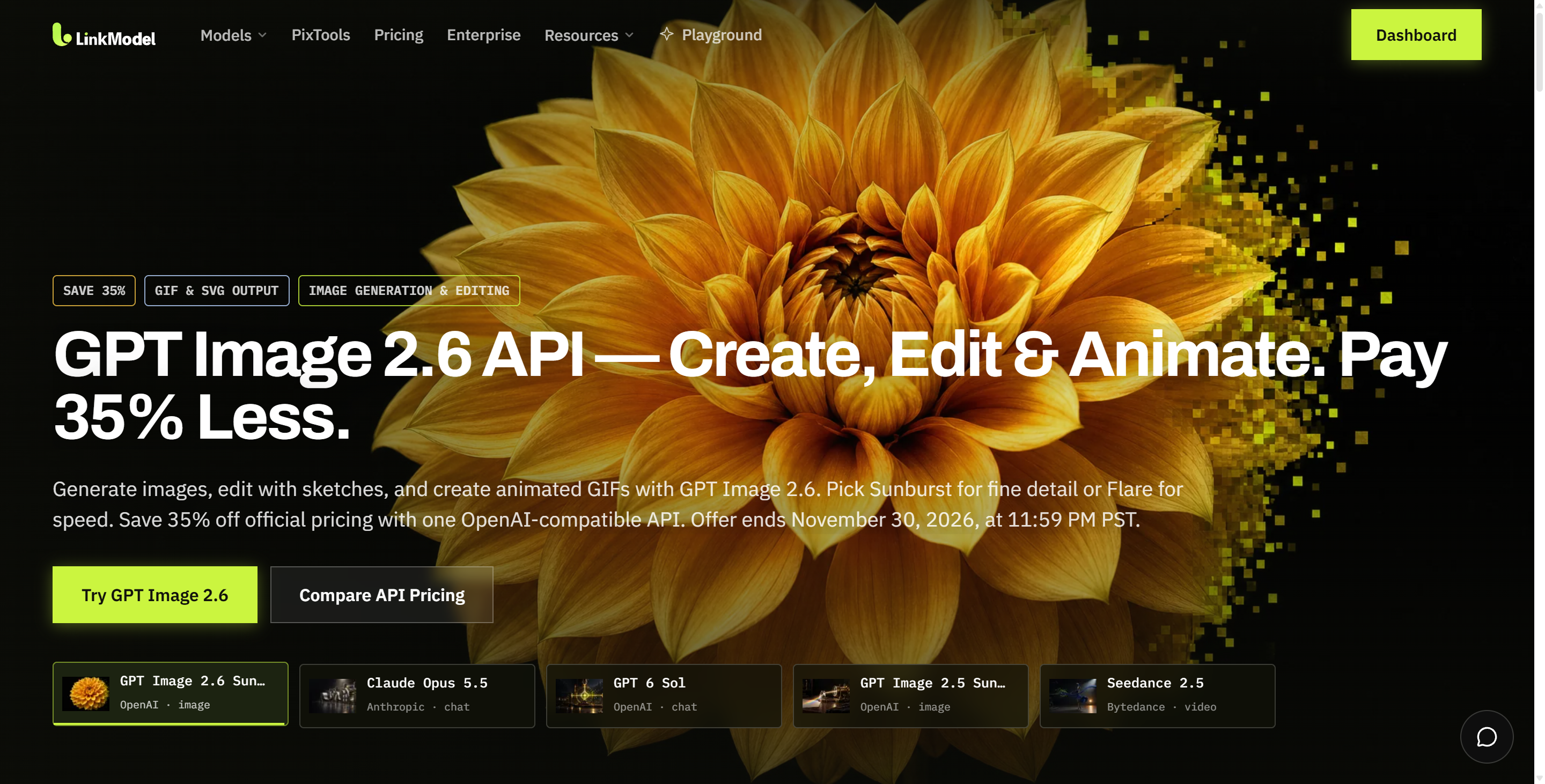
GPT Image 2.6 API costs depend on text input, image input, image output tokens, quality settings, and generation attempts. OpenAI charges $30 per million image output tokens for both Sunburst and Flare. For example, a request using 100 text input tokens and 824 image output tokens costs $0.02522 at OpenAI's standard rates. Through November 30, 2026, the same billable usage costs $0.016393 through LinkModel, saving 35%.
Accurate budgeting matters even more as OpenAI prepares to merge ChatGPT and Codex usage allowances for Plus, Pro, and Business subscribers in December 2026. The announcement has prompted criticism from some users questioning the value of their subscriptions. Although subscription allowances and API billing are separate, developers producing product images, marketing assets, or AI-powered image applications face a common challenge: controlling costs before scaling. A single generation price rarely represents the full budget because producing one usable image may require several attempts.
LinkModel offers 35% lower promotional GPT Image 2.6 token rates through November 30, 2026, together with $0 minimum spend, $0 monthly platform fee, and pay-as-you-go billing. New users automatically receive $1 in free Credits after registration, with no payment card or recharge required. The offer is available once to new users only, cannot be claimed repeatedly by existing users, never expires, and applies to all models currently available in the LinkModel model library. Use the budget worksheet, formulas, and batch-cost examples below to estimate your image-generation expenses and compare potential savings.
How Much Does GPT Image 2.6 API Cost per Image?
GPT Image 2.6 does not have a universal fixed price per image. The total depends on billable token consumption, including text input, reference-image input, and generated image output.
For text-to-image generation, image output tokens generally account for most of the bill. Editing workflows can introduce additional image input charges and further generation attempts.
Estimated Cost per Image by Quality
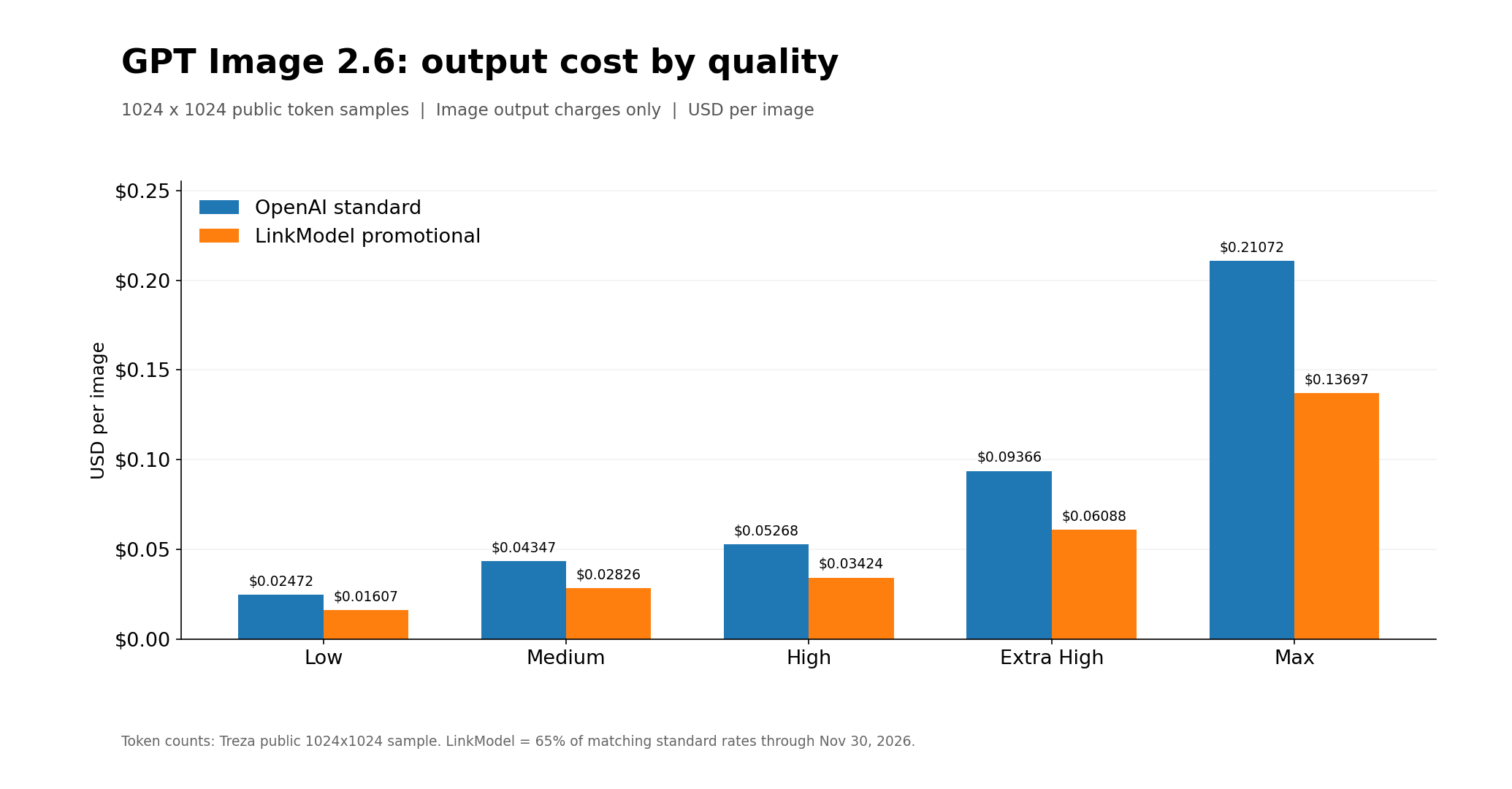
In a November 5, 2026 public test, Treza measured GPT Image 2.6 output-token usage through an OpenRouter-based workflow using one prompt across five quality settings. The 1:1 images were 1024×1024 pixels.
The following table applies OpenAI's published standard rates and LinkModel's promotional rates to those observed token counts.
| Quality | Image Output Tokens | OpenAI Output Cost | LinkModel Output Cost |
|---|---|---|---|
| Low | 824 | $0.02472 | $0.01607 |
| Medium | 1,449 | $0.04347 | $0.02826 |
| High | 1,756 | $0.05268 | $0.03424 |
| Extra High | 3,122 | $0.09366 | $0.06088 |
| Max | 7,024 | $0.21072 | $0.13697 |
These figures represent image output charges only. Text inputs, reference images, and additional operations contribute to the complete request cost.
In this sample, Max-quality image output cost approximately 8.5 times as much as Low-quality output.
The figures are measured examples rather than fixed prices for every prompt. Actual costs should be calculated using the token usage associated with the requested settings.
Sunburst vs Flare: Which Costs Less?
GPT Image 2.6 Sunburst and Flare have identical published standard token rates.
Sunburst focuses on detailed compositions and precision-sensitive image editing, while Flare emphasizes faster generation and iterative creative workflows.
If both models consume the same number of billable tokens, their token charges are the same. In practice, developers should compare actual usage, response time, and the proportion of outputs that satisfy the task.
For rapid creative drafts, Flare is worth evaluating. For complex commercial graphics or detailed edits, Sunburst may be a better starting point.
GPT Image 2.6 API Cost Calculator
To estimate a GPT Image 2.6 project budget, calculate the cost of one request, determine how many generation attempts are required to produce usable images, and multiply the relevant costs by the expected workload.
You can do this using the worksheet and formulas below, without installing software or running code.
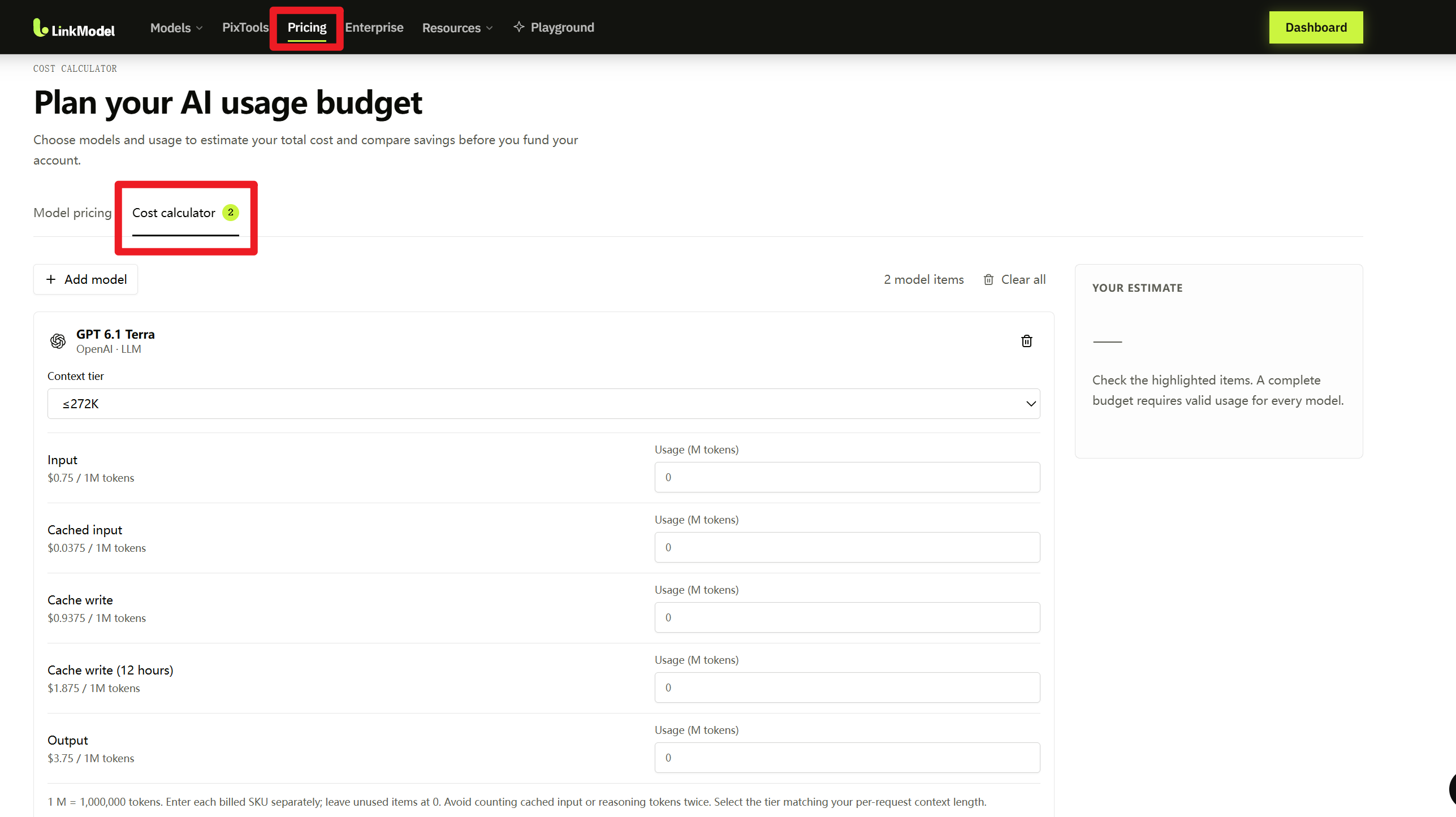
LinkModel provides a Cost Calculator to help developers estimate API expenses and compare model pricing before committing to a budget. To access it, open the Pricing page and select the Cost calculator tab. For GPT Image 2.6 Sunburst and Flare, the token pricing table, budget worksheet, and formulas below provide a practical way to estimate image-generation costs by quality, usage, and generation volume.
Step 1: Check GPT Image 2.6 Token Pricing
Both Sunburst and Flare share the same official standard token rates.
| Billing Category | OpenAI per 1M Tokens | LinkModel per 1M Tokens |
|---|---|---|
| Text Input | $5.00 | $3.25 |
| Cached Text Input | $1.25 | $0.8125 |
| Image Input | $8.00 | $5.20 |
| Cached Image Input | $2.00 | $1.30 |
| Image Output | $30.00 | $19.50 |
LinkModel prices reflect its 35% promotion through November 30, 2026.
Cached rates apply only when the relevant API workflow qualifies for cached-input billing. Do not count cached tokens again at the standard input rate.
Step 2: Fill In Your Image Cost Worksheet
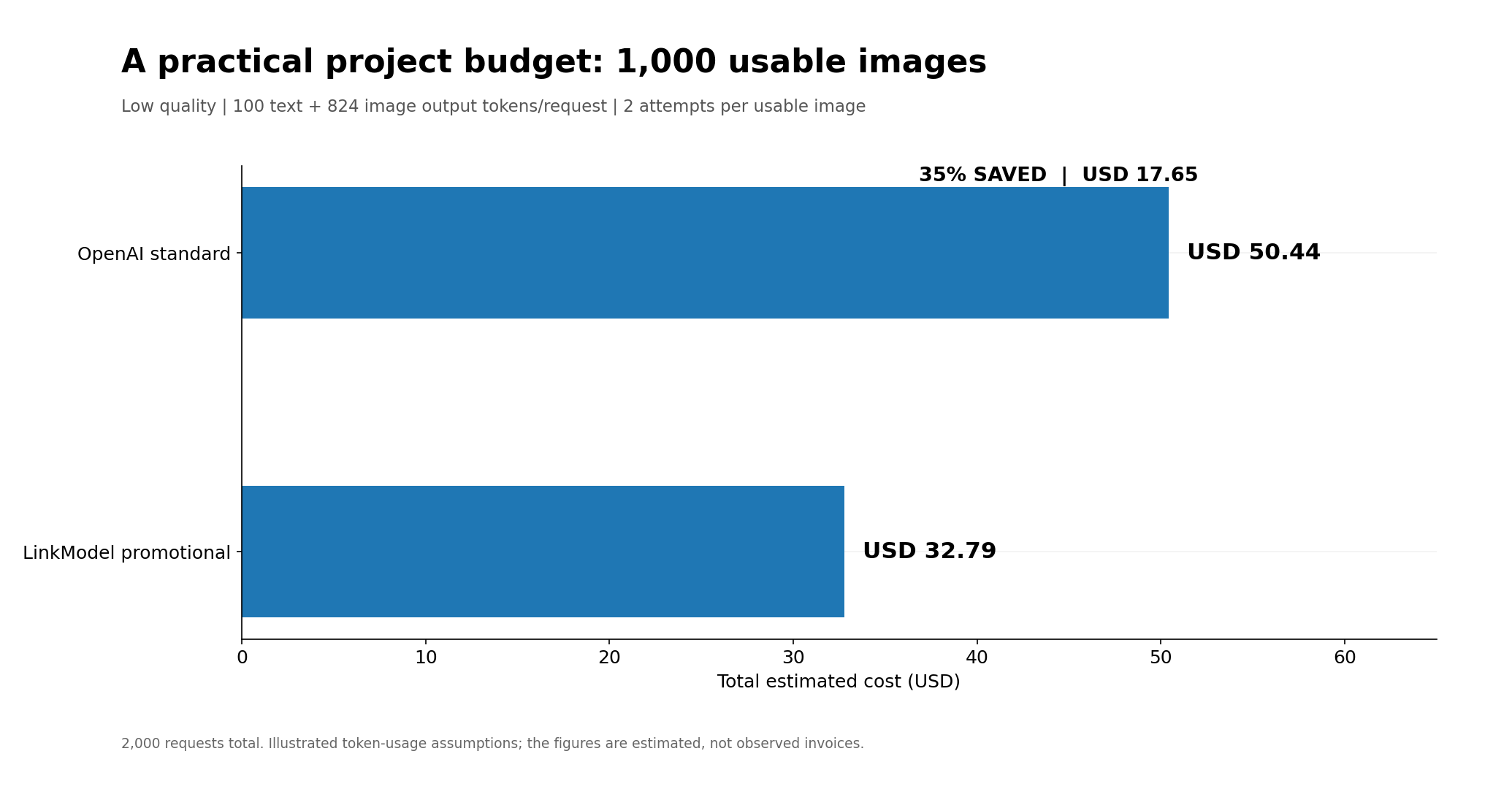
The following worksheet illustrates a Low-quality image-generation project with an estimated 1,000 accepted images and an average of two attempts per accepted image.
| Budget Variable | Example Value |
|---|---|
| Model | GPT Image 2.6 Sunburst |
| Image Quality | Low |
| Resolution | 1024×1024 |
| Text Input Tokens per Request | 100 |
| Image Input Tokens per Request | 0 |
| Image Output Tokens per Request | 824 |
| Target Usable Images | 1,000 |
| Average Attempts per Usable Image | 2 |
| Total Generation Requests | 2,000 |
| OpenAI Estimated Budget | $50.44 |
| LinkModel Estimated Budget | $32.79 |
| Estimated Savings | $17.65 |
The 824 image output tokens come from the published measurement discussed earlier. The 100 text input tokens and two attempts per usable image are illustrative assumptions.
Replace these inputs with your own expected token usage, target image quantity, and average attempts to calculate a budget for your project.
Step 3: Calculate Total Image-Generation Cost
The formula for a single request is:
Request Cost = (Text Input Tokens × Text Rate + Cached Text Tokens × Cached Text Rate + Image Input Tokens × Image Rate + Cached Image Tokens × Cached Image Rate + Image Output Tokens × Output Rate) ÷ 1,000,000
For requests with similar usage:
Project Cost = Average Request Cost × Total Generation Requests
If individual attempts have different token usage, calculate each request separately and add their charges.
For the example above, the standard OpenAI request cost is:
(100 × $5 + 824 × $30) ÷ 1,000,000 = $0.02522
At LinkModel's promotional rates:
(100 × $3.25 + 824 × $19.50) ÷ 1,000,000 = $0.016393
For 2,000 equivalent generation requests, the estimated project budgets are $50.44 through OpenAI and $32.79 through LinkModel.
That is a $17.65 reduction in estimated token charges.
GPT Image 2.6 Pricing by Quality and Resolution
Quality and resolution are important variables in image generation, but token consumption cannot be reliably calculated using image dimensions alone.
Which Image Quality Should You Choose?
GPT Image 2.6 supports low, medium, high, xhigh, and max quality settings, along with automatic selection.
Quality influences the level of rendered detail. Higher settings may increase output-token usage, although the exact number depends on the request.
Low or Medium may be appropriate for internal previews, concept development, and creative drafts. High, Extra High, or Max may be worthwhile for detailed commercial visuals, complicated text layouts, or precision-sensitive editing.
The cheapest generation is not always the cheapest usable image. If low-quality outputs require repeated attempts, the final production cost may exceed that of a higher-quality workflow.
How Do Resolution and Complexity Affect Cost?
Image dimensions influence token usage, but the relationship is not necessarily proportional to pixel count.
For example, Treza's published 1024×1024 measurements and a separate developer's 1536×1024 observations produced different token counts. Because the tests used different conditions, they cannot establish which resolution is universally cheaper.
GPT Image 2.6 also supports a separate complexity parameter with Low, Medium, and High settings. Complexity controls planning effort before rendering, while quality controls rendering detail.
OpenAI does not charge a separate complexity fee. Developers should still evaluate the response time and token usage associated with the settings used in their workflows.
For more reliable budgets, use representative prompts at the desired quality and resolution, then record actual usage.
GPT Image 2.6 vs 2.5: Why Your Budget May Change
GPT Image 2.6 and GPT Image 2.5 have the same published standard token rates, but their token consumption can differ.
A November 5, 2026 discussion in r/codex highlighted the potential impact on costs when upgrading models.
The developer compared the same prompt at 1536×1024 resolution through the Images API and reported:
| Quality | GPT Image 2.5 Tokens | GPT Image 2.6 Tokens |
|---|---|---|
| Low | 158 | 664 |
| Medium | 343 | 1,132 |
| High | 1,372 | 1,353–1,372 |
In this comparison, the GPT Image 2.6 Low and Medium outputs consumed approximately 4.2× and 3.3× as many tokens as GPT Image 2.5.
The developer also proposed an explanation based on calculator code, but that interpretation does not establish a universal billing rule.
The practical lesson is that equal token rates do not guarantee equal costs per image.
For applications that depend heavily on Low- or Medium-quality drafts, test a representative set of prompts before migrating a large workload from GPT Image 2.5 to 2.6.
Compare actual output tokens, completed images, generation times, and costs under the same settings. Those results provide a stronger budget estimate than the price list alone.
How to Estimate Costs for 100, 1,000, or 10,000 Images
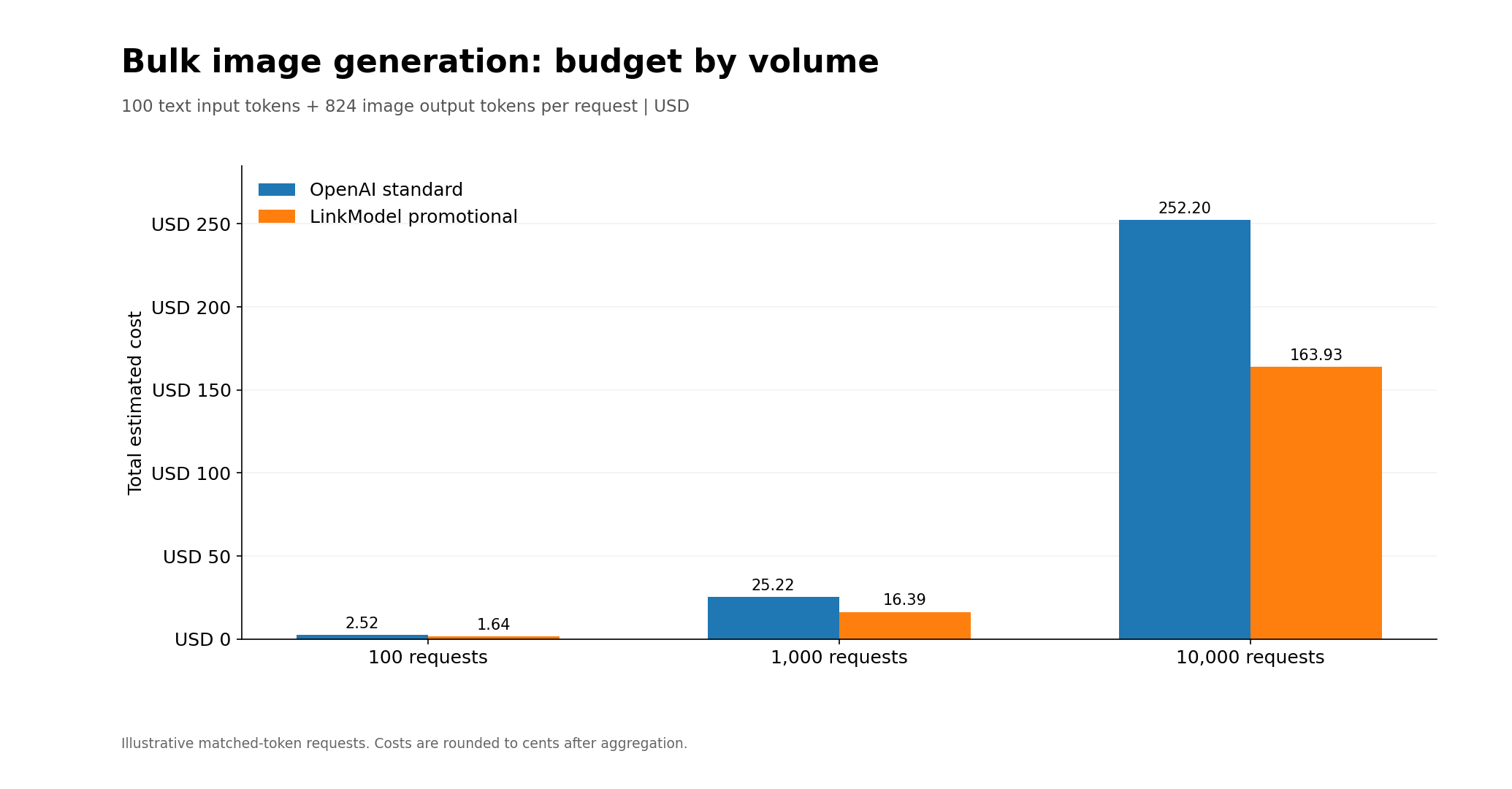
Bulk image-generation costs depend on the estimated number of requests and the cost per request.
The following calculations use the earlier baseline of 100 text input tokens and 824 image output tokens, with no reference-image inputs or additional editing steps.
Bulk Image-Generation Budget
| Generation Requests | OpenAI Official | LinkModel | Savings |
|---|---|---|---|
| 100 | $2.52 | $1.64 | $0.88 |
| 1,000 | $25.22 | $16.39 | $8.83 |
| 10,000 | $252.20 | $163.93 | $88.27 |
These estimates assume identical token usage across requests. Production workflows with varied prompts or editing requirements should sum their actual request costs.
How Many Images Can You Generate with a Fixed Budget?
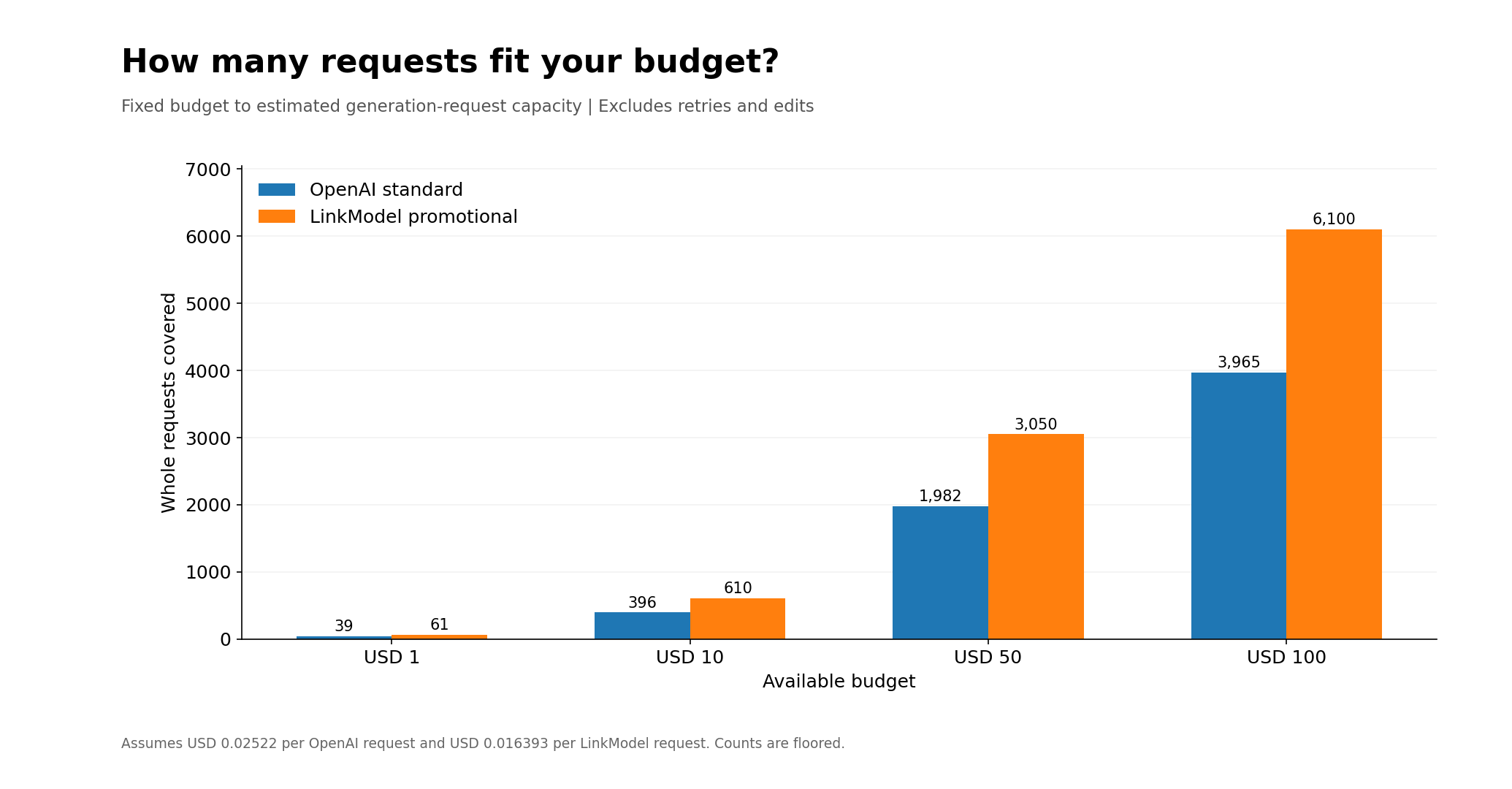
You can also calculate how many generation requests a fixed dollar amount can cover.
Maximum Requests = Floor(Available Budget ÷ Cost per Request)
Using the same token assumptions:
| Available Budget | OpenAI Requests | LinkModel Requests |
|---|---|---|
| $1 | 39 | 61 |
| $10 | 396 | 610 |
| $50 | 1,982 | 3,050 |
| $100 | 3,965 | 6,100 |
These counts represent affordable generation requests, not guaranteed accepted images.
At 65% of OpenAI's standard token rates, the same budget supports approximately 1.54 times as much equivalent billable token usage through LinkModel.
For applications that require multiple attempts per usable image, divide the affordable request count by the average attempts per accepted image to estimate deliverable capacity.
Cost per Generated Image vs Cost per Usable Image
For commercial creative workflows, the number of accepted images is often more important than the number of generations.
Product advertisements may require revisions because of inaccurate text, altered packaging, unsuitable layouts, or inconsistencies in product details.
Cost per Generated Image measures the average expense of one generation request.
Cost per Usable Image measures the total amount spent to obtain one image that satisfies the final requirements.
The formula is:
Cost per Usable Image = Total Billable Generation Spending ÷ Number of Accepted Images
For example, if 100 paid generation attempts produce 80 accepted images, the full cost of all 100 attempts must be divided by 80.
This metric helps creative teams compare image quality settings, prompt strategies, and editing workflows according to the actual cost of deliverable assets.
Why Your Actual Image Generation Bill May Be Higher
A production bill may exceed the initial estimate when a workflow consumes more output tokens, uses reference-image inputs, includes additional editing rounds, or calls other models.
The difference becomes easier to understand when you calculate the cost of every step rather than only the final image.
Example: Initial Generation Followed by Image Editing
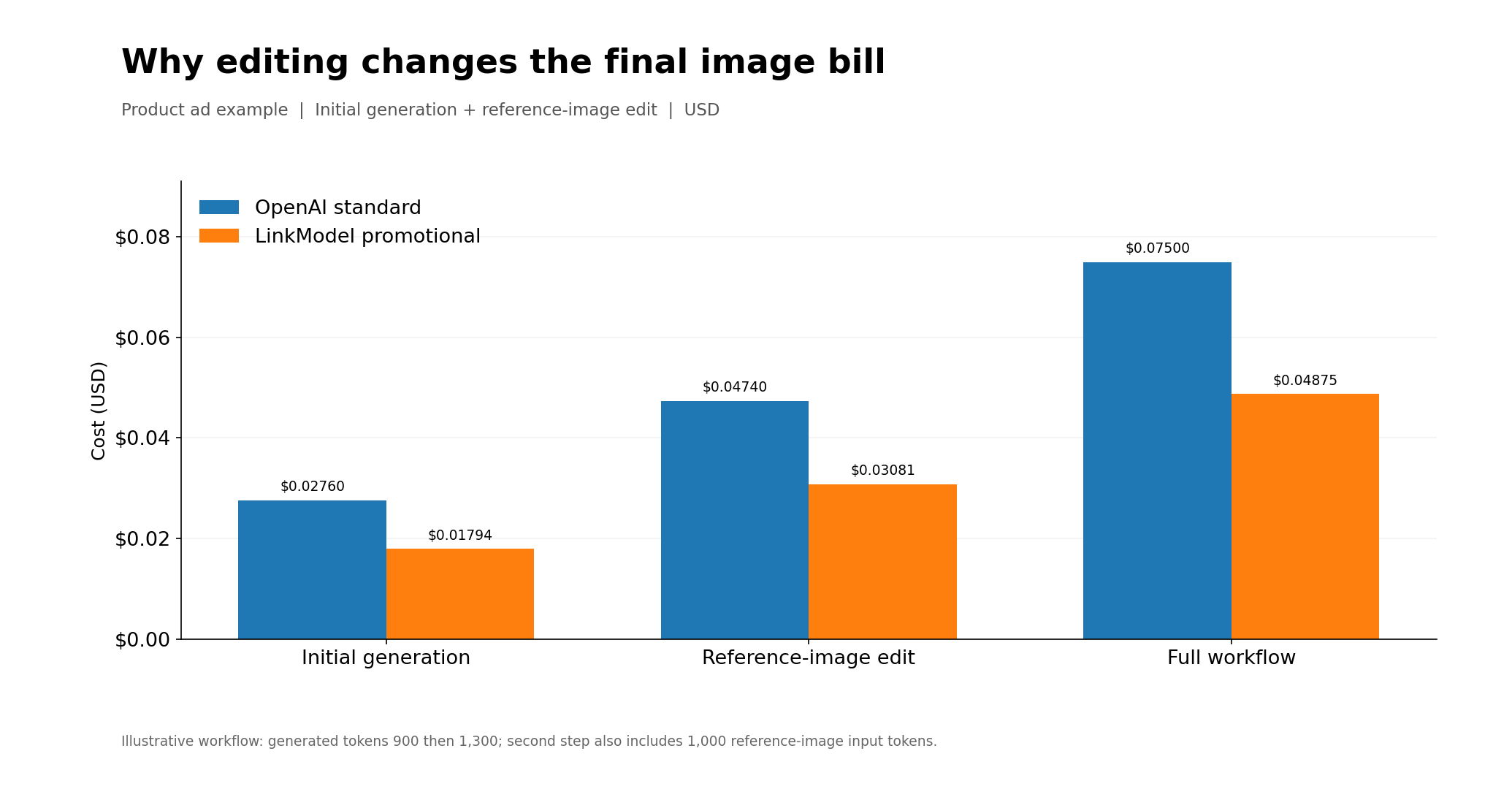
Consider an illustrative product-advertising workflow with two paid requests.
The first request generates a draft using 120 text input tokens and 900 image output tokens.
The second request edits the image using 80 text input tokens, 1,000 reference-image input tokens, and 1,300 image output tokens.
| Workflow Stage | OpenAI Official | LinkModel |
|---|---|---|
| Initial Generation | $0.02760 | $0.01794 |
| Reference-Image Edit | $0.04740 | $0.03081 |
| Total Cost | $0.07500 | $0.04875 |
This worked example uses specified token quantities to illustrate the cost components of a multi-step workflow.
If you counted only the final image output, you would miss the initial generation, reference-image processing, and additional text input charges.
Other workflows may include text-model calls for prompt development or SVG authoring. Each separately billed operation should be included in the total.
How to Calibrate Estimates Using Actual API Usage
A practical cost estimate becomes more accurate when it is updated with real request data.
Start with three representative tasks: a basic text-to-image generation, a detailed product advertisement, and a reference-image edit.
For each request, record the model, image dimensions, quality setting, input conditions, and whether the result was accepted.
Next, inspect the available usage information returned by the API and record the reported text, image input, and image output token counts.
Apply the relevant rates to calculate request costs. Reconcile cached-input charges with billing records where necessary, since cached image inputs are not always separately visible in API responses.
For multi-step workflows, calculate each paid request and add the costs together.
Finally, track the average cost per request, attempts per accepted image, and cost per usable image. Replace your initial estimates with these observed values as your sample grows.
How to Prevent Unexpected Spending
For an image-generation application, monthly cost depends on user activity as well as request complexity.
Suppose an app has 50 active users, each producing two usable images per day over a 30-day month.
That requires 3,000 usable images. At 1.5 attempts per accepted image, the app would make approximately 4,500 generation requests.
Using the basic request assumptions from the worksheet, the monthly estimates are $113.49 through OpenAI and $73.77 through LinkModel.
Applications can also set daily generation limits and internal monthly spending budgets, then update those limits as actual request data becomes available.
How to Reduce GPT Image 2.6 API Costs with LinkModel
Reducing image-generation spending involves two decisions: controlling unnecessary requests and choosing lower rates for the same billable token usage.
Start by selecting appropriate quality settings, improving prompt specificity, reducing avoidable regeneration, and monitoring the cost per usable image.
Then calculate the equivalent budget using LinkModel's promotional token rates.
Through November 30, 2026, LinkModel charges 65% of OpenAI's standard GPT Image 2.6 token rates across the corresponding text input, image input, cached input, and image output categories.
| OpenAI Standard Budget | LinkModel Promotional Budget | Savings |
|---|---|---|
| $10 | $6.50 | $3.50 |
| $50 | $32.50 | $17.50 |
| $100 | $65.00 | $35.00 |
| $500 | $325.00 | $175.00 |
For equivalent billable usage, a $100 standard-rate workload costs $65 through LinkModel, saving $35.
Beyond the price difference, LinkModel provides pay-as-you-go billing, a Playground for evaluating supported models, and unified access and billing across available text, image, and video models.
For developers planning to use GPT Image 2.6, the next step is to review the available models in LinkModel's model catalog and check the supported API options for the intended workflow.
You can begin with a small evaluation using the new-user Credits, then compare actual usage against the budget calculated above before expanding production.
This connects the cost estimate to a practical purchasing decision: know your expected spending, verify the model configuration, and evaluate the lower-cost option before scaling.
Frequently Asked Questions
How much does GPT Image 2.6 cost per image?
There is no universal fixed price. GPT Image 2.6 costs depend on text input, reference-image input, image output tokens, and request settings. For example, 100 text input tokens and 824 image output tokens cost $0.02522 at OpenAI's standard rates.
How much does it cost to generate 1,000 GPT Image 2.6 images?
Under the example assumptions of 100 text input tokens and 824 image output tokens per request, 1,000 generations cost $25.22 through OpenAI or $16.39 through LinkModel during its 35% promotion.
How many GPT Image 2.6 images can I generate for $1?
Using the same token assumptions, $1 supports approximately 39 OpenAI requests or 61 LinkModel requests. The number of usable images depends on whether those generations meet your requirements.
Is GPT Image 2.6 more expensive than GPT Image 2.5?
Both models have identical published standard token rates. However, a developer-reported comparison found substantially higher image output-token consumption for GPT Image 2.6 at Low and Medium quality. Measure usage for your own workload to estimate the actual difference.
Why is my GPT Image 2.6 API bill higher than estimated?
Your bill may increase when generation consumes more output tokens than expected, reference-image inputs are added, or multiple attempts are needed. Compare actual API usage and billed operations with the original assumptions, then recalculate the cost per usable image.
Conclusion
Estimating GPT Image 2.6 API costs requires accounting for text and image inputs, output tokens, quality, resolution, and the attempts needed to deliver acceptable visual assets. A practical budget worksheet, per-request formulas, fixed-budget calculations, and Cost per Usable Image help developers plan production spending beyond a simple advertised rate. Through November 30, 2026, LinkModel's 35% lower promotional GPT Image 2.6 token rates provide a way to reduce the cost of equivalent billable workloads, supported by pay-as-you-go access and unified model management.