
GPT Image 2.6 can help e-commerce teams create product photos, lifestyle scenes, advertising creatives, and social media visuals using text prompts and reference images. But creating attractive images is only half the challenge. Product colors, packaging, logos, and labels must still represent what customers will actually receive.
A single product launch may require a white-background listing photo, several lifestyle images, promotional banners, and multiple ad variations. If AI changes the product between generations, inexpensive images can quickly become expensive to correct. The practical goal is to create more usable marketing assets while protecting product accuracy and keeping production costs under control.
For teams exploring this workflow, LinkModel offers GPT Image 2.6 Flare and Sunburst at 35% below OpenAI's standard API token rates through November 30, 2026. With $0 minimum spend and $0 monthly platform fee, businesses can evaluate a small production workflow before scaling. New users automatically receive $1 in free Credits after registration, without adding a payment card or recharging; the credits never expire and can be used for any model currently available on LinkModel, while existing users cannot claim the signup reward again.
What Can GPT Image 2.6 Do for E-commerce?
GPT Image 2.6 is an image generation and editing model family released by OpenAI on November 4, 2026. It supports text-to-image creation, image-based editing, reference-guided compositions, and more specialized visual workflows.
For e-commerce businesses, its main value is the ability to extend existing product photography into multiple visual formats without physically staging every new scene.
GPT Image 2.6 Flare vs Sunburst
OpenAI offers two GPT Image 2.6 variants with different priorities.
| Feature | GPT Image 2.6 Flare | GPT Image 2.6 Sunburst |
|---|---|---|
| Primary focus | Fast creative iteration | Detailed visual work |
| Product photography role | Exploring backgrounds and concepts | Refining demanding compositions |
| Image generation | Supported | Supported |
| Image editing | Supported | Supported |
| Complexity control | Low, medium, high | Low, medium, high |
| Official image output rate | $30 / 1M tokens | $30 / 1M tokens |
| LinkModel image output rate | $19.50 / 1M tokens | $19.50 / 1M tokens |
Flare is a sensible starting point when an advertising team needs to explore different lighting, backgrounds, or creative concepts. Sunburst is worth evaluating when a composition involves more demanding details, precise layout instructions, or complex edits.
Both models share the same published standard token prices. The choice should therefore depend on the quality of the approved output and the amount of revision required, not an assumed difference in their per-token rates.
Image Generation, Editing, and Complexity Controls
Both models support transparent-background images, markup-guided editing, SVG generation, and animated GIF output through the Image API. For e-commerce teams, these capabilities enable clean product cutouts, targeted visual revisions, scalable promotional graphics, and animated marketing creatives.
The complexity setting provides three options: low, medium, and high. OpenAI documents high as the default when the parameter is omitted.
Lower complexity can suit focused adjustments, such as changing a backdrop. Higher complexity can help with detailed compositions or dense visual instructions, although it may introduce changes that were not requested. The setting does not have a separate complexity surcharge.
For a product photo, this means the simplest successful edit may be preferable to a more elaborate generation.
How to Create Product Photos With GPT Image 2.6
An effective AI product photography workflow begins with an accurate source image and an explicit definition of what the model may change.
The following five-step process can be adapted to packaged products, household goods, accessories, and other physical merchandise.
Step 1: Prepare an Accurate Product Reference
Start with a real photograph of the item being sold. Use a sharp, well-lit image with a clear product outline and readable packaging details.
For products with important visual differences, prepare additional references showing the front, side, label, and material texture.
A single front-facing photograph does not reliably establish what the back of a product looks like. Do not use AI-generated guesses about unseen features as factual product documentation.
Before editing, record the features that must remain accurate:
1. Product shape and proportions.
2. Color, material, and texture.
3. Logo and packaging text.
4. Buttons, ports, labels, and functional details.
5. The number and arrangement of items included in the product.
Step 2: Define What Can and Cannot Change
Separate the creative elements from the product's factual characteristics.
For example, an e-commerce brand selling bottled skincare may allow changes to the bathroom environment, lighting, surface, and decorative props. The bottle dimensions, cap, label, branding, and product color must remain unchanged.
This distinction should be stated explicitly in the prompt rather than assumed.
Step 3: Write a Product-Focused Prompt
A useful e-commerce prompt describes the desired scene while protecting the product reference.
Example: Skincare Lifestyle Photography
Using the uploaded product photograph as the reference, create a premium e-commerce lifestyle image of the same skincare bottle on a light stone bathroom counter. Use soft natural morning light, realistic reflections, and a clean neutral background. Preserve the bottle's exact shape, cap, label layout, logo, printed text, and product color. Do not add packaging details, alter the product proportions, or introduce additional products. Keep the bottle clearly visible as the main subject.
For a skincare product, the same reference image can serve as the foundation for several creative directions. Start with a clean catalog composition, introduce a realistic bathroom setting, and then adapt the background and lighting for a seasonal campaign.
Keep the original bottle geometry, packaging design, and product identity consistent throughout the creative brief. This creates a reusable visual production plan rather than a collection of unrelated prompts.
When a label must be reproduced with pixel-level accuracy, retain the authentic product image or label layer and composite it into the approved scene instead of relying exclusively on generative editing.
Step 4: Generate, Inspect, and Refine
Use Flare to explore several visual directions, or begin with Sunburst when the visual requirements justify more detailed editing.
Review each output against the original reference. Check the label, product edges, reflections, shadows, color, and proportions before refining the background.
Change one major variable at a time. For example, keep the product reference and composition fixed while testing different lighting conditions.
Repeatedly regenerating the entire image can introduce new product inconsistencies even when an earlier output was acceptable.
Step 5: Export for the Intended Channel
Different assets serve different purposes.
A product listing image emphasizes accurate product representation. A lifestyle image provides context. A social media creative may prioritize visual impact, while an advertising banner must also leave space for headlines and calls to action.
Use the required dimensions, aspect ratio, file format, and content specifications for the destination platform. Check the current platform requirements before publishing rather than assuming one export works everywhere.
Five E-commerce Photography and Marketing Use Cases
GPT Image 2.6 can support several stages of e-commerce visual production, from basic catalog preparation to campaign creative development.
Each use case has a different standard for acceptable changes.
White-Background Product Photos
A clean product image helps customers inspect the product without distracting scenery.
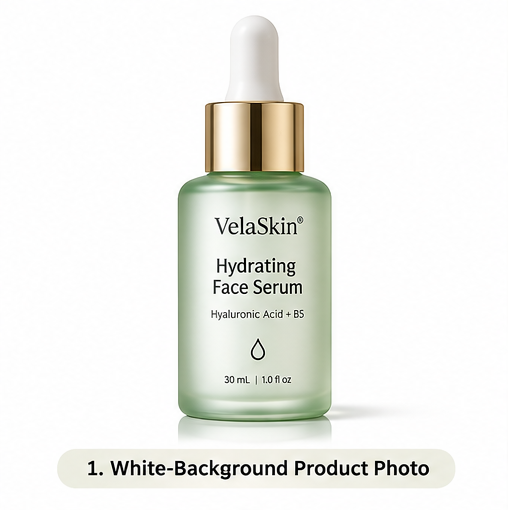
GPT Image 2.6 supports reference-guided editing and transparent-background output, which can help prepare isolated product visuals.
A practical prompt is:
Isolate the product from the uploaded reference image. Preserve its geometry, original colors, packaging text, and edge details. Remove the surrounding background and return a clean product cutout with natural-looking edges. Do not redesign the product or introduce additional objects.
For transparent output, use a supported transparent-background format such as PNG and verify that the file contains real transparency.
For a marketplace hero image, check its applicable main-image rules before adding props, effects, or artificial environments.
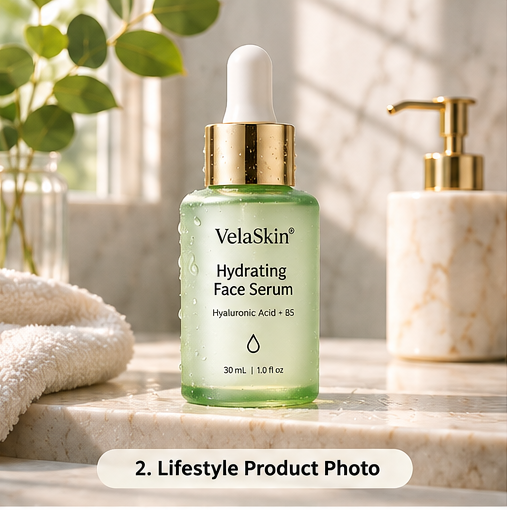
Lifestyle Product Photography
Lifestyle product photography places merchandise in a realistic context that helps shoppers understand its appearance, purpose, and relationship to surrounding objects.
For example, a skincare bottle can appear on a bathroom counter with soft morning light, while the same product can be presented in a warmer evening setting for a different campaign. The key is to vary the atmosphere without redesigning the product itself.
A kitchen accessory could be placed in a realistic cooking environment. A desk lamp could appear in a home office. A backpack could be shown in a travel setting.
These scenes can communicate use, placement, and scale, but the generated result still needs visual verification.
Our review of e-commerce discussions found that merchants often worry about subtle changes in product color, dimensions, and materials. For these products, realistic surroundings matter less than an accurate representation of the item itself.
Fashion and On-Model Visuals
Fashion brands can explore different photographic settings, styling concepts, and on-model compositions using garment references.
However, fabric texture, garment construction, and fit are especially sensitive to visual distortion.
Flat-lay images do not necessarily contain enough information to establish how a garment will fit a person. Generated on-model imagery should therefore be reviewed for sleeve length, seams, patterns, drape, and other construction details.
Use authentic photography when exact fit, color, or material representation is essential.
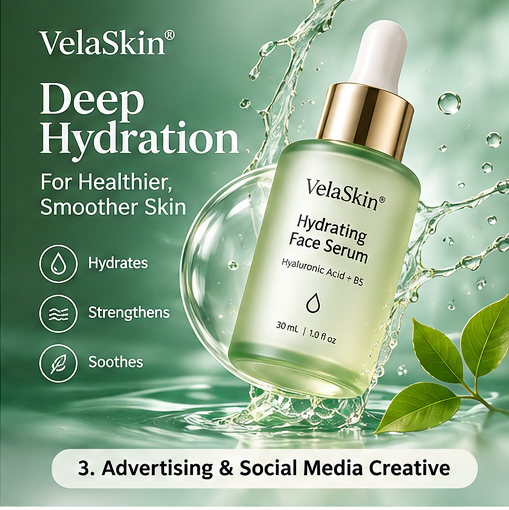
Advertising and Social Media Creatives
A single product reference can support multiple advertising concepts.
For example, a skincare campaign could explore a bright studio composition for a product launch, a warm bathroom scene for lifestyle content, and a seasonal background for promotional advertising.
The product remains constant while lighting, props, framing, and campaign atmosphere change.
This approach can support creative testing for Shopify storefronts, Instagram, Pinterest, and paid advertising.
However, better-looking creative does not automatically produce better sales. Evaluate click-through rate, add-to-cart rate, conversion rate, and revenue using actual campaign data.
Multi-SKU Catalog Photography
E-commerce businesses with dozens or hundreds of products need more than individual attractive images. They need a repeatable visual system.
Create a shared set of production rules covering backgrounds, camera angles, lighting, visual margins, product scale, and output formats.
For each SKU, preserve its real packaging, colors, quantity, and distinguishing features.
| Product category | Useful AI task | Main quality risk |
|---|---|---|
| Cosmetics | Lifestyle scenes and clean backgrounds | Label and packaging text |
| Fashion | Styled presentation and model concepts | Fabric, fit, and construction |
| Electronics | Desk setups and advertising visuals | Buttons, ports, and product geometry |
| Home goods | Interior scenes and seasonal variations | Scale and proportions |
| Packaged food | Promotional compositions | Ingredients, claims, and label accuracy |
The goal is a visually consistent catalog without making different products appear artificially identical.
How to Keep Product Images Accurate and Consistent
Product fidelity is one of the most important considerations when using generative AI for e-commerce.
A photograph should communicate what a buyer can reasonably expect from the actual item. If the image changes an important product detail, the result may be visually attractive but unsuitable for publication.
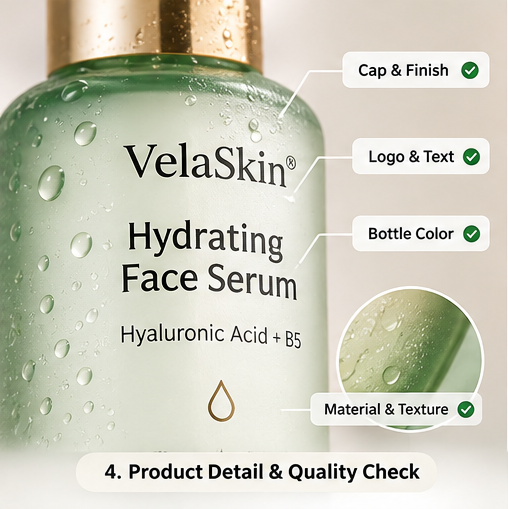
Product Fidelity: What Must Stay Accurate?
Different product elements carry different levels of risk.
| Risk level | Product elements | Recommended treatment |
|---|---|---|
| High | Logos, packaging text, ingredient labels, buttons, ports, unique product structures | Preserve authentic details; use manual compositing when exact accuracy is required |
| Medium | Color, texture, material, reflections, product proportions | Compare directly with verified reference photos |
| Lower | Backgrounds, decorative props, scene atmosphere | Allow creative changes while checking for misleading context |
A practical way to maintain product fidelity is to divide every image into three editing zones: protected product details, adjustable visual properties, and flexible scene elements.
Packaging text, logos, and distinctive structures belong in the protected zone. Lighting, shadows, and reflections can be adjusted after visual review, while backgrounds and decorative props provide creative flexibility.
This approach allows marketing teams to experiment with new scenes without losing control of the product's identity.
For a skincare bottle, the bathroom background can be synthetic while the label remains authentic. For a kitchen appliance, the surrounding countertop may change while the device's control panel should remain correct.
Common AI Product Photography Mistakes
Common failure patterns include unreadable label text, altered logos, inconsistent product colors, inaccurate reflections, and changes in proportions.
Our review of user discussions identified similar concerns about packaging accuracy, clothing texture, and repeated edits.
A useful editing strategy is to preserve the approved product layer and regenerate only the surrounding scene.
If the model modifies an essential feature, correct that specific element or return to the original reference instead of accepting the visually closest result.
Product Image Quality Checklist
Use this checklist before approving an AI-generated product image:
| Quality check | Approval question |
|---|---|
| Product identity | Is it clearly the same product and variant? |
| Logo and text | Are the brand marks and labels accurate and legible? |
| Geometry | Are the shape, parts, and proportions unchanged? |
| Color and material | Do they match the real product? |
| Scene realism | Are shadows, reflections, and placement believable? |
| Customer expectations | Could the image misrepresent what is included or how the product works? |
| Channel requirements | Does it satisfy the destination platform's image rules? |
Review important details at high magnification, especially for packaging, electronics, and clothing.
An image should only enter the publishing queue after it passes the relevant checks.
GPT Image 2.6 vs Traditional Product Photography
AI generation and traditional photography solve overlapping but different business problems.
Traditional photography captures the real product and is particularly valuable when packaging, materials, construction, or subtle physical details must be accurate.
AI generation offers more flexibility when a business needs to explore new backgrounds, creative concepts, seasonal campaigns, or multiple visual variations.
Cost, Accuracy, and Production Flexibility
| Dimension | Traditional photography | GPT Image 2.6 workflow |
|---|---|---|
| Product accuracy | Captures real physical details | Requires reference-based verification |
| New backgrounds | May require additional setup or shooting | Can be generated or edited |
| Creative variations | Additional production and editing | Prompt-driven exploration |
| Setup requirements | Camera, lighting, space, and sometimes models | Product references, prompts, and review |
| Main cost factors | Production crew, studio, shooting, retouching | API usage, editing, retries, and review |
| Best role | Authoritative product photography | Visual extensions and marketing experimentation |
The most practical approach is to use traditional photography as the source of product truth and AI generation as a creative extension.
Use real photographs for packaging details, precise materials, and important physical features. Use GPT Image 2.6 to explore lifestyle environments, campaign concepts, and visual variations.
This hybrid workflow keeps essential product information grounded in photography while expanding the range of marketing assets a team can produce.
What Our Research Found About E-commerce Results
One merchant discussion documented an A/B test involving five kitchen-accessory SKUs over 30 days.
The merchant reported approximately 14,000 visits per group, with AI lifestyle imagery associated with an 18.3% increase in add-to-cart rate, an approximately 11% increase in advertising click-through rate, and a 14.7% increase in revenue per session.
The workflow involved other AI photography and editing tools, while a price increase for one SKU affected the revenue comparison. These results provide an example of how a merchant evaluated lifestyle imagery, not a measured GPT Image 2.6 conversion result.
For businesses considering AI product photography, the transferable lesson is to measure sales-related outcomes instead of assuming visual improvements translate directly into revenue.
Start with a limited group of representative SKUs and compare approved AI-assisted visuals against existing product imagery.
Calculate the Cost per Approved Image
The production metric that matters is the cost of obtaining an approved, publishable asset—not simply the cost of one generation request.
Track the number of generated candidates, approved images, editing hours, and review effort for each batch. A lower token rate reduces API spending, while a higher approval rate and fewer revisions improve the economics of the complete workflow.
A useful calculation is:
Cost per Approved Asset = (Total Generation Cost + Editing Labor + Review Labor) / Number of Approved Assets
Consider an illustrative production batch:
| Production metric | Example |
|---|---|
| Generated image candidates | 100 |
| Approved images | 60 |
| API generation and editing charges | $12 |
| Human editing and quality review | $48 |
| Total production cost | $60 |
| Cost per approved image | $1.00 |
If only 30 images pass review with the same total spending, the cost per approved image doubles to $2.00.
This is why product accuracy matters economically: reducing failed images and unnecessary revisions can be as important as reducing the model's token rates.
Scaling E-commerce Visuals With the GPT Image 2.6 API
An API workflow becomes valuable when a team needs repeatable production across multiple products, campaigns, or channels.
Instead of writing unrelated prompts for every image, businesses can organize a pipeline around product references, brand constraints, generation templates, and quality checks.
Build a Repeatable Production Workflow
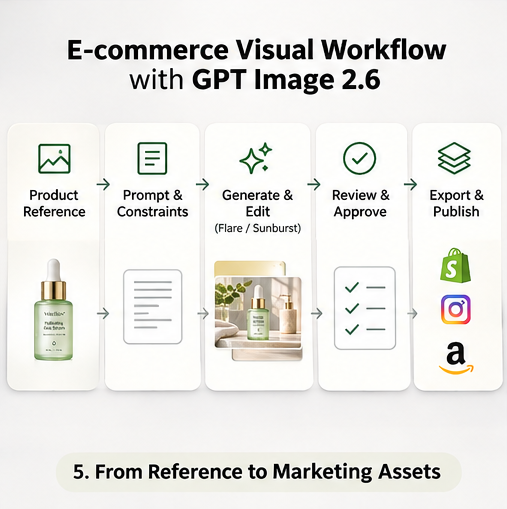
A practical e-commerce image production system can follow this sequence:
1. Product reference: Store verified images and approved product details for each SKU.
2. Creative requirements: Define the intended channel, image purpose, dimensions, and brand guidelines.
3. Model selection: Choose Flare for rapid creative exploration or Sunburst for demanding visual edits.
4. Generation and editing: Produce candidate images using supported model requests.
5. Quality review: Verify product details, visual consistency, and channel requirements.
6. Export and tracking: Save approved assets with the SKU, campaign, model, prompt version, and review status.
For a catalog containing 100 SKUs, the team can organize each product around a reference image, a fixed set of brand constraints, and three planned visual categories: catalog photography, lifestyle imagery, and promotional creatives.
This creates 300 planned asset slots before revisions.
Track each image by SKU, campaign, prompt version, and approval status, making it easier to identify missing assets, maintain consistency, and estimate production costs.
GPT Image 2.6 API Pricing: OpenAI vs LinkModel
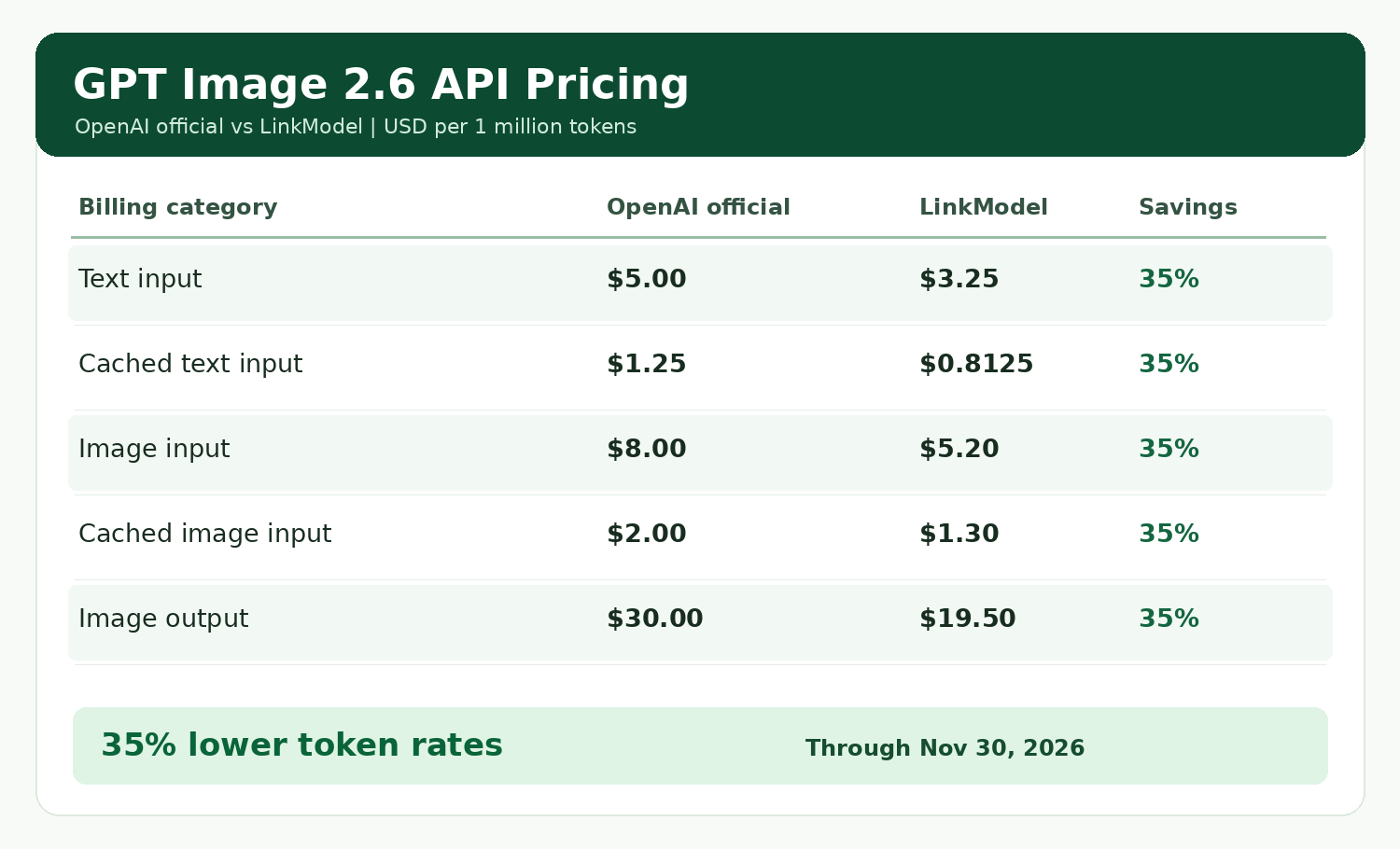
GPT Image 2.6 uses token-based pricing, with different rates for text input, image input, cached input, and image output.
Through November 30, 2026, LinkModel charges 65% of OpenAI's official standard token rates for GPT Image 2.6 Flare and Sunburst.
| Billing category | OpenAI official | LinkModel | Savings |
|---|---|---|---|
| Text input / 1M tokens | $5.00 | $3.25 | 35% |
| Cached text input / 1M tokens | $1.25 | $0.8125 | 35% |
| Image input / 1M tokens | $8.00 | $5.20 | 35% |
| Cached image input / 1M tokens | $2.00 | $1.30 | 35% |
| Image output / 1M tokens | $30.00 | $19.50 | 35% |
The most relevant cost categories for standard product image generation and editing are typically text input, image input, and image output.
For example, consider a production workload using 100,000 text input tokens, 200,000 image input tokens, and 1,000,000 image output tokens, without cached input.
| Cost component | OpenAI official | LinkModel |
|---|---|---|
| Text input | $0.50 | $0.325 |
| Image input | $1.60 | $1.04 |
| Image output | $30.00 | $19.50 |
| Total | $32.10 | $20.865 |
At these matching token volumes, the difference is $11.235, representing a 35% reduction in API charges.
For recurring e-commerce production, the absolute savings increase with consumption. The final cost per approved image also depends on how many candidates need revisions and how much human review is required.
When Should an E-commerce Team Use LinkModel?
LinkModel is worth considering for teams that want to evaluate GPT Image 2.6 through a unified model platform and control image-generation spending as production scales.
The 35% lower GPT Image 2.6 token rates provide a measurable advantage for matching API usage during the published offer period.
The platform also provides access to image, text, and video model categories through one account, supporting teams that work across different AI content-production tasks.
For teams starting with a small catalog, a sensible approach is to select several representative SKUs, prepare accurate reference photographs, establish quality criteria, and measure generation cost together with approval rates.
Explore GPT Image 2.6 through LinkModel: compare Flare and Sunburst, review the published pricing, and begin with a controlled product photography workflow before expanding to additional SKUs.
Frequently Asked Questions
Can GPT Image 2.6 create product photos for Shopify?
Yes. GPT Image 2.6 can generate and edit product imagery for use in Shopify product pages and marketing workflows. Merchants should review product accuracy, image quality, and applicable publishing requirements before using generated assets.
Can I create lifestyle product photos from one reference image?
Yes. A product reference image can guide scene creation and background editing. However, a single photograph may not contain enough information to reproduce unseen product details accurately. Use additional real references when those details matter.
Is GPT Image 2.6 Flare or Sunburst better for product photography?
Flare is designed for fast iteration, making it a useful starting point for exploring multiple creative concepts. Sunburst is designed for more detailed visual work and precise edits. Compare the resulting product accuracy and revision needs for your actual workflow.
How much does GPT Image 2.6 cost for e-commerce images?
GPT Image 2.6 uses token-based API pricing rather than a universal fixed price per image. OpenAI's official image output rate is $30 per million tokens, while LinkModel offers $19.50 per million through November 30, 2026. Total charges also depend on input tokens and actual output consumption.
Can I use GPT Image 2.6 images in commercial advertising?
AI-generated images can be considered for commercial marketing, subject to applicable service terms, platform rules, intellectual property rights, and advertising requirements. Before publishing, verify that the image accurately represents the product and does not introduce misleading features or claims.
Conclusion
GPT Image 2.6 can help e-commerce businesses extend accurate product photographs into lifestyle scenes, campaign variations, and other marketing visuals. The most effective approach is to combine real product references, carefully controlled editing, and consistent quality checks. For teams producing images at scale, LinkModel's 35% lower GPT Image 2.6 token rates can reduce the corresponding API charges, while product fidelity, review effort, and the number of approved assets ultimately determine the value of the workflow.