OpenAI's GPT Image 2.6 API offers two image models: Flare prioritizes fast generation and rapid iteration, while Sunburst focuses on detailed visuals, complex compositions, and consistent editing. Both models have identical official per-token rates, but that does not necessarily mean the same cost per finished image. For developers and creative teams, the more useful comparison includes image quality, generation speed, revision frequency, and the cost of obtaining a usable result.
Starting in December 2026, OpenAI will combine ChatGPT and Codex usage allowances for Plus, Pro, and Business subscribers. Eligible ChatGPT conversations and Codex coding tasks will draw from the same shared allowance, while unlimited Instant chats included in the plan will not consume that pool. The announcement has frustrated some paying users, prompting discussions about subscription value and whether to continue paying. For teams regularly producing AI-generated marketing images, product visuals, and creative assets, the change adds urgency to an existing question: how can AI spending remain predictable as workloads grow? ChatGPT subscription allowances and API billing are separate systems.
Through November 30, 2026, LinkModel offers GPT Image 2.6 Flare and Sunburst at 65% of OpenAI's official standard API rates, reducing applicable text input, cached text input, image input, cached image input, and image output charges by 35%. With $0 minimum spend, $0 monthly platform fee, and unified model management, developers can control spending based on actual usage. New users automatically receive $1 in free Credits upon signup, with no payment card or recharge required. These Credits never expire, apply to all models currently available on LinkModel, and cannot be claimed repeatedly by existing users.
GPT Image 2.6 Flare vs Sunburst: Key Differences
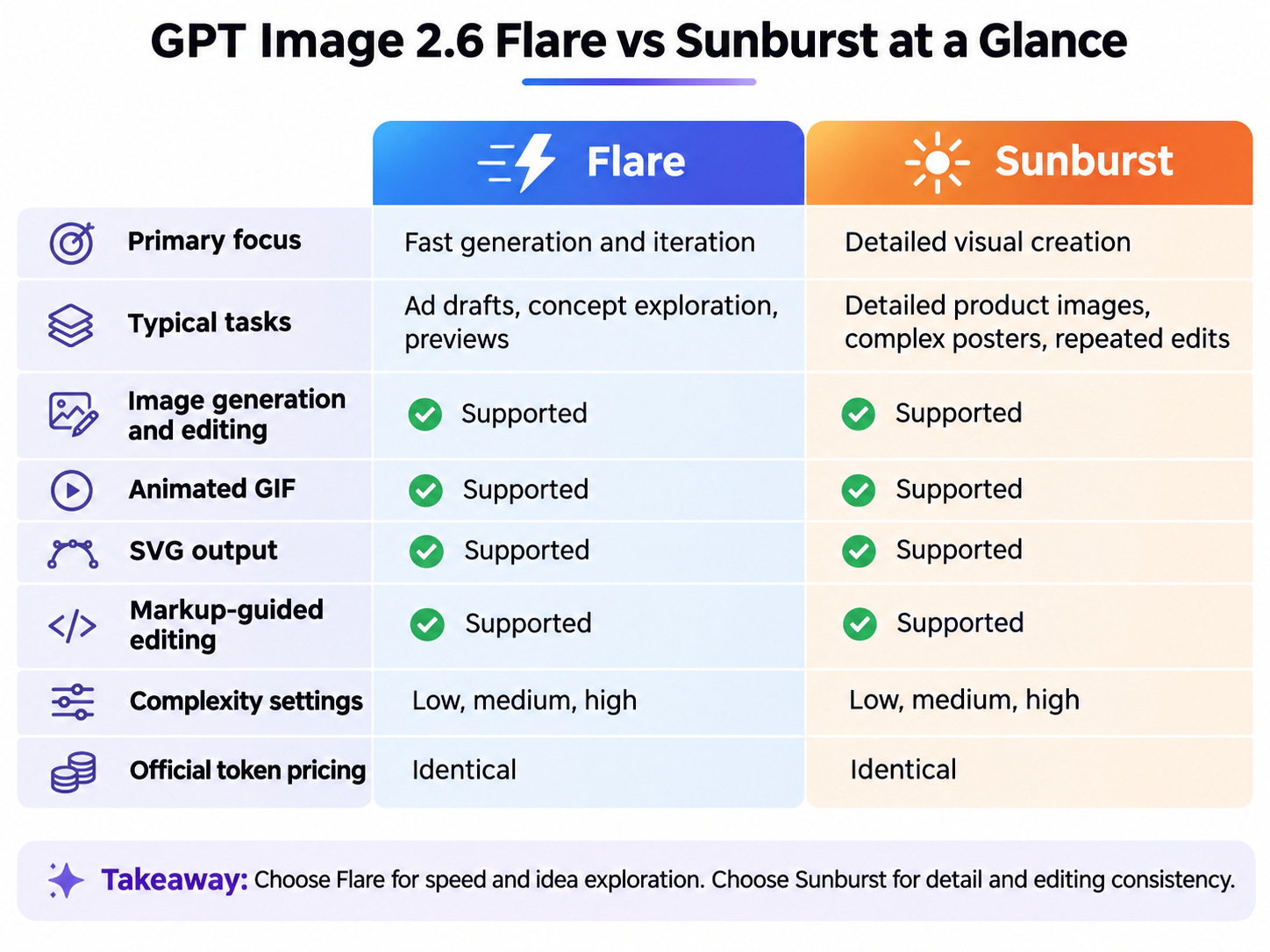
Released on November 4, 2026, GPT Image 2.6 introduces two models designed for different workloads. Flare emphasizes generation speed and creative iteration, while Sunburst focuses on detailed visual work and editing consistency.
| Feature | GPT Image 2.6 Flare | GPT Image 2.6 Sunburst |
|---|---|---|
| Model ID | gpt-image-2.6-flare | gpt-image-2.6-sunburst |
| Primary focus | Fast image generation and iteration | Detailed visual creation |
| Typical tasks | Ad drafts, concept exploration, previews | Detailed product images, complex posters, repeated edits |
| Image generation | Supported | Supported |
| Image editing | Supported | Supported |
| Animated GIF | Supported | Supported |
| SVG output | Supported | Supported |
| Markup-guided editing | Supported | Supported |
| Complexity settings | low, medium, high | low, medium, high |
| Official token pricing | Identical | Identical |
What Is GPT Image 2.6 Flare Best For?
Flare is best suited to workflows where developers need to generate multiple visual alternatives quickly and refine prompts through frequent iterations.
Consider a sports brand preparing a new running-shoe campaign. The creative team wants to explore several backgrounds, product angles, and color schemes before selecting a final design direction.
At this stage, generating alternatives efficiently matters more than perfecting every material detail.
Flare fits this process because its design prioritizes responsive generation. OpenAI also highlights improvements in poster layouts and professional product imagery.
Therefore, Flare should not be treated as a model for drafts only. When its outputs meet the project's requirements, it can also produce finished marketing assets.
What Is GPT Image 2.6 Sunburst Best For?
Sunburst is better positioned for tasks involving intricate details, complex compositions, and consistency across multiple editing rounds.
Imagine an ecommerce brand with an approved product photograph. The team needs to change the background, adjust lighting, and add promotional text while preserving the product's packaging, logo, colors, and material details.
The challenge goes beyond creating another attractive picture. The new image must maintain previously approved elements while incorporating the requested changes.
OpenAI emphasizes Sunburst's detailed visual generation and improved consistency across edits, particularly at medium and high quality settings.
For product imagery, repeated branded-image edits, and complex professional visuals, Sunburst is a sensible starting point.
Flare prioritizes rapid iteration, while Sunburst prioritizes visual detail and editing consistency. This distinction describes their intended strengths rather than a guaranteed winner for every task.
Image Quality, Speed and Editing: What Actually Matters?
Speed: How Fast Is GPT Image 2.6 Flare?
According to OpenAI's November 4 launch announcement, Images 2.6 generates images approximately 50% faster than before. With quality set to low, Flare can generate an image in as little as six seconds.
However, the fastest reported generation time is not a guaranteed response time for every request. Complex compositions, dense typography, and higher quality settings can increase processing time.
For commercial production, the more useful measure is Time to Usable Image: the total time required to obtain a deliverable result.
For example, Model A might generate individual drafts quickly but require five revisions. Model B might take longer per request but reach an acceptable result in one or two attempts.
In this situation, Model B could provide better overall workflow efficiency.
Developers producing large volumes of product images, posters, or website graphics should consider latency, retry frequency, accepted-output rates, and total generation costs together.
Product Images, Posters and Text Accuracy
Image quality should be assessed against the requirements of the final deliverable.
Product imagery: Inspect packaging geometry, logo placement, material textures, product colors, and label accuracy. Background changes and alternative viewing angles should preserve the product's defining features.
Marketing posters: Check headline spelling, pricing information, text placement, visual hierarchy, and call-to-action space. An attractive design may still be unusable if the product name or price is incorrect.
Website and UI graphics: Examine navigation elements, buttons, input fields, labels, and component alignment. A visually convincing mockup does not necessarily contain a complete or accurate interface structure.
Sunburst deserves priority when evaluating demanding detail-oriented tasks, while Flare offers a practical starting point for exploring multiple creative directions.
The actual quality difference depends on the workload. Official positioning alone does not establish a universal ranking.
Multi-Turn Editing and Reference Consistency
Repeated editing is an important consideration when choosing an image model for professional creative work.
Imagine a designer generating a coffee product photograph and then making three successive changes:
1. Replace the background with pale blue while preserving the product's position and proportions.
2. Adjust the lighting to soft daylight without changing the packaging color or logo.
3. Add promotional text on the right without covering the main subject.
Each edit must satisfy the new instruction while preserving elements that were already correct.
For work involving recurring characters, product details, or branded assets, Sunburst is worth evaluating first because consistency across editing rounds is central to its intended use.
What Can Go Wrong with GPT Image 2.6?
GPT Image 2.6 introduces improvements in generation and editing, but complex tasks may still produce problems with text, layout, or visual consistency.
| Common Problem | Typical Symptom | Practical Response |
|---|---|---|
| Text rendering | Misspelled or poorly positioned text | Specify exact copy and inspect critical text |
| Layout accuracy | Missing UI elements or misplaced objects | Describe spatial relationships explicitly |
| Editing consistency | Product details change during background edits | Supply reference images and preservation instructions |
| Complexity | Simple edits take longer than necessary | Try a lower complexity setting |
| GIF consistency | Characters or movements vary between frames | Specify motion, starting pose, ending pose, and loop behavior |
For small background or color changes, a lower complexity setting may be sufficient. More demanding tasks involving several subjects or dense typography may benefit from additional planning.
OpenAI also notes that complex image requests can take longer to process. The fastest advertised latency should not be treated as a universal performance guarantee.
GPT Image 2.6 API Pricing: OpenAI vs LinkModel
Official GPT Image 2.6 API Pricing
GPT Image 2.6 Flare and Sunburst share identical official standard token rates.
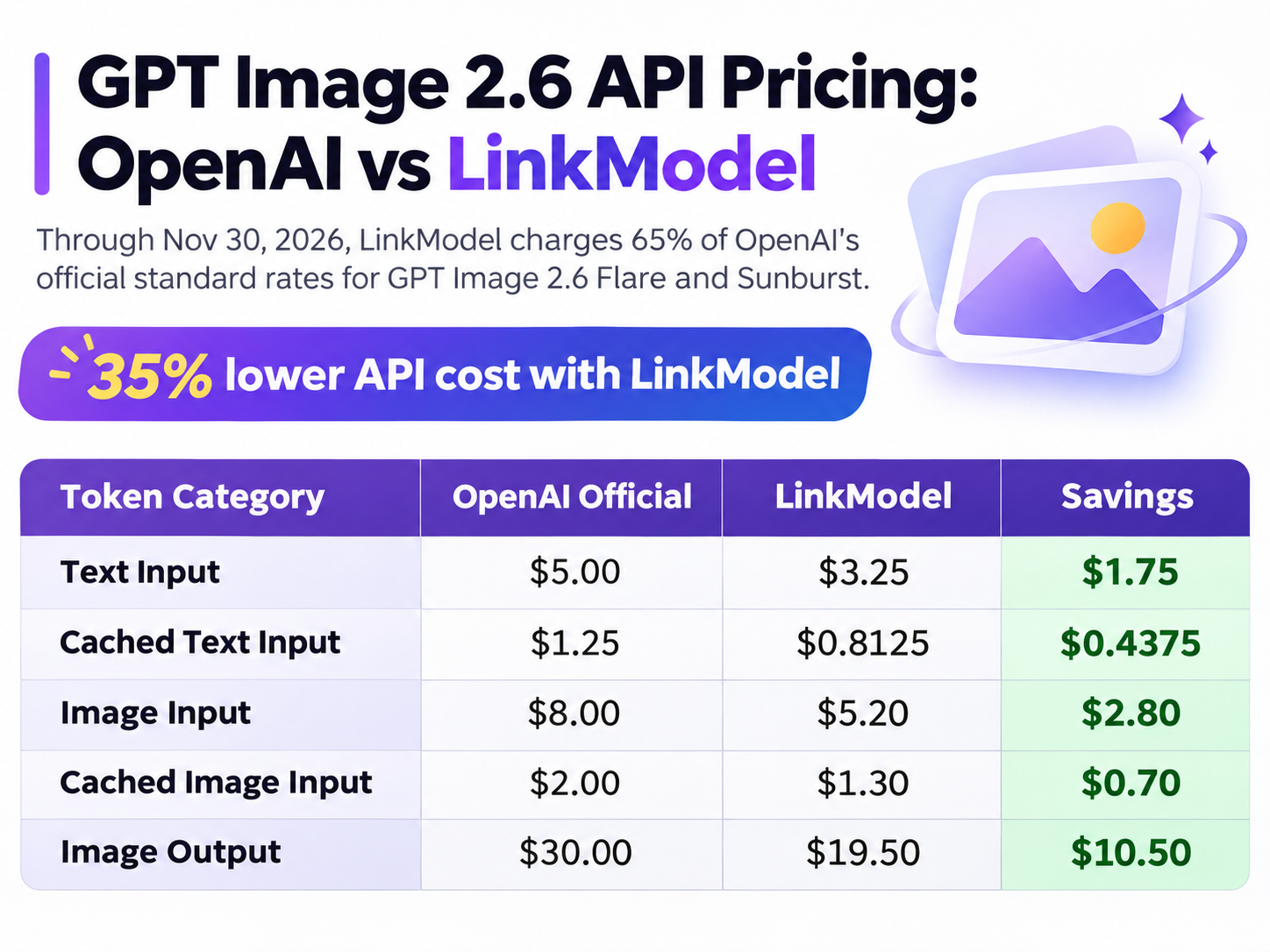
Through November 30, 2026, LinkModel charges 65% of OpenAI's official standard rates for the corresponding token categories.
All prices below are in USD per 1 million tokens.
| Token Category | OpenAI Official | LinkModel | Savings |
|---|---|---|---|
| Text Input | $5.00 | $3.25 | $1.75 |
| Cached Text Input | $1.25 | $0.8125 | $0.4375 |
| Image Input | $8.00 | $5.20 | $2.80 |
| Cached Image Input | $2.00 | $1.30 | $0.70 |
| Image Output | $30.00 | $19.50 | $10.50 |
For the same applicable token usage, LinkModel's rates are 35% lower across all five categories.
For example, 1 million image output tokens cost $30.00 at OpenAI's official standard rate but only $19.50 through LinkModel, saving $10.50.
For developers producing marketing materials, product images, and design assets regularly, the absolute savings grow with token usage.
How Much Does One GPT Image 2.6 Image Cost?
GPT Image 2.6 uses token-based billing rather than a universal fixed charge per generated image.
For standard raster image generation and editing, the primary cost components are text input, image input, and image output.
Total Cost = Text Input Cost + Image Input Cost + Image Output Cost
Eligible cached usage is billed at the applicable cached-input rates. Additional processing, such as SVG authoring, should be included when those features are used.
Consider a workload with the following token usage:
| Token Category | Usage |
|---|---|
| Text Input | 100,000 |
| Image Input | 200,000 |
| Image Output | 1,000,000 |
Using the published standard rates and LinkModel's offer:
| Cost Component | OpenAI Official | LinkModel |
|---|---|---|
| Text Input | $0.50 | $0.325 |
| Image Input | $1.60 | $1.04 |
| Image Output | $30.00 | $19.50 |
| Total | $32.10 | $20.865 |
For this workload, LinkModel saves $11.235, or 35%.
GPT Image 2.6 Cost for 100, 1,000 and 10,000 Images
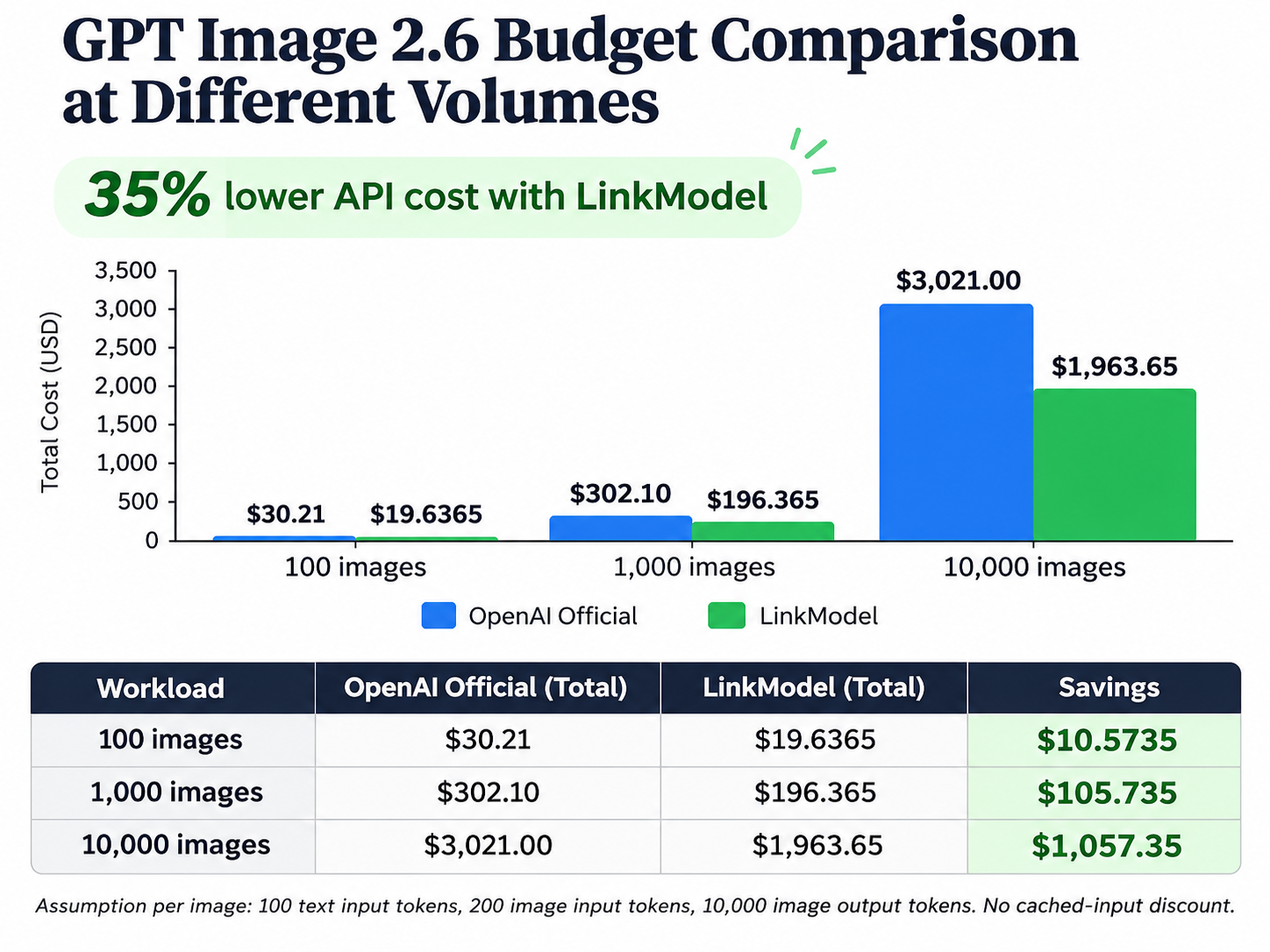
To compare API budgets at different production volumes, consider an illustrative workload with a fixed token allowance per generated image.
Assume each image consumes 100 text input tokens, 200 image input tokens, and 10,000 image output tokens, without cached-input discounts.
| Images Generated | OpenAI Official | LinkModel | Savings |
|---|---|---|---|
| 100 | $30.21 | $19.6365 | $10.5735 |
| 1,000 | $302.10 | $196.365 | $105.735 |
| 10,000 | $3,021.00 | $1,963.65 | $1,057.35 |
The same token allowance is applied to every image so the comparison isolates the pricing difference between OpenAI and LinkModel.
Actual output token consumption varies with image dimensions, quality settings, and task complexity. Developers can substitute their expected usage to build a budget that reflects their production needs.
Why Cost per Usable Image Matters
For creative teams, the number of images generated is often less important than the number of images that pass review.
A useful metric is Cost per Usable Image:
Cost per Usable Image = Total Generation and Retry Costs ÷ Number of Accepted Images
Suppose a team needs 100 approved product images.
Flare may be useful for exploring numerous concepts quickly, while Sunburst may be worth prioritizing for detailed work and repeated editing.
If one model requires more retries, faster individual requests may not translate into lower overall production costs.
The stronger model choice therefore depends on token expenses, generation time, revision count, and final output acceptance rates, rather than token rates alone.
GIF, SVG and Advanced Editing Features
Animated GIF Generation
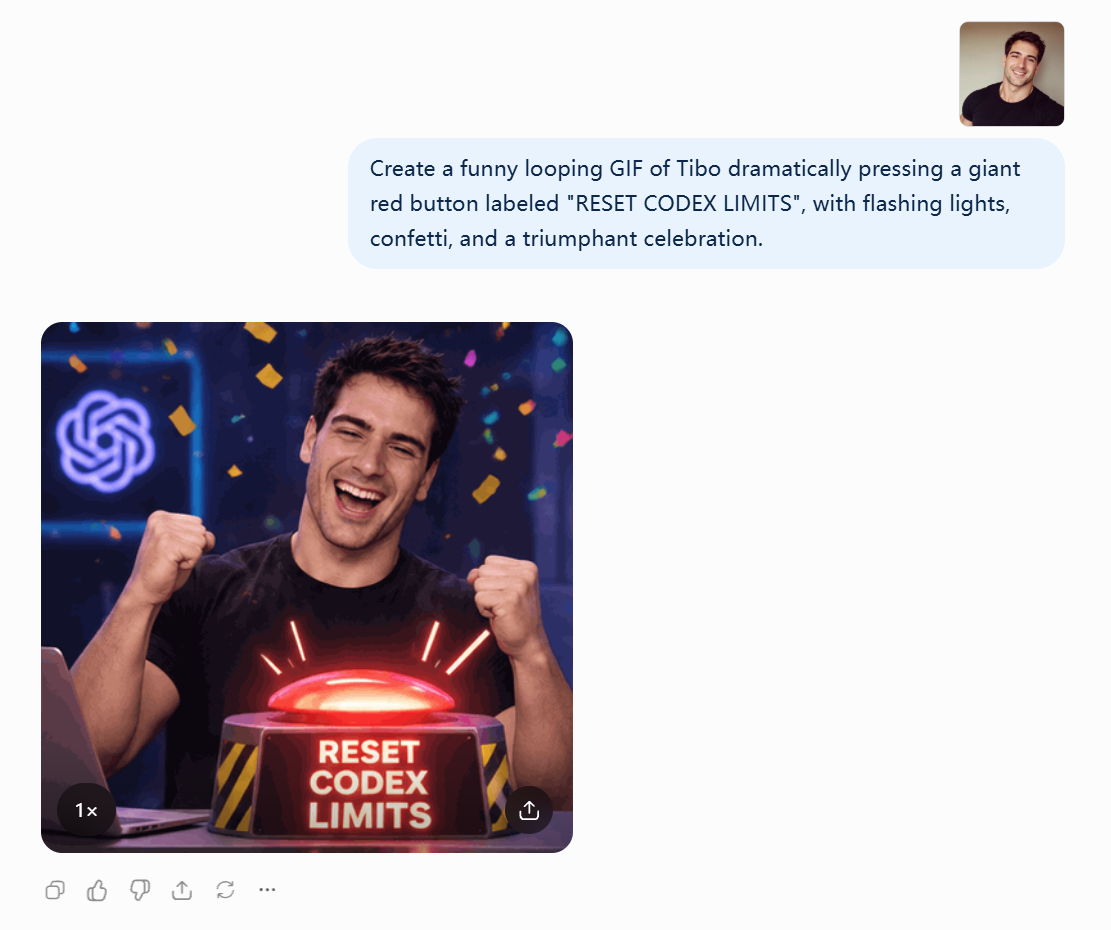
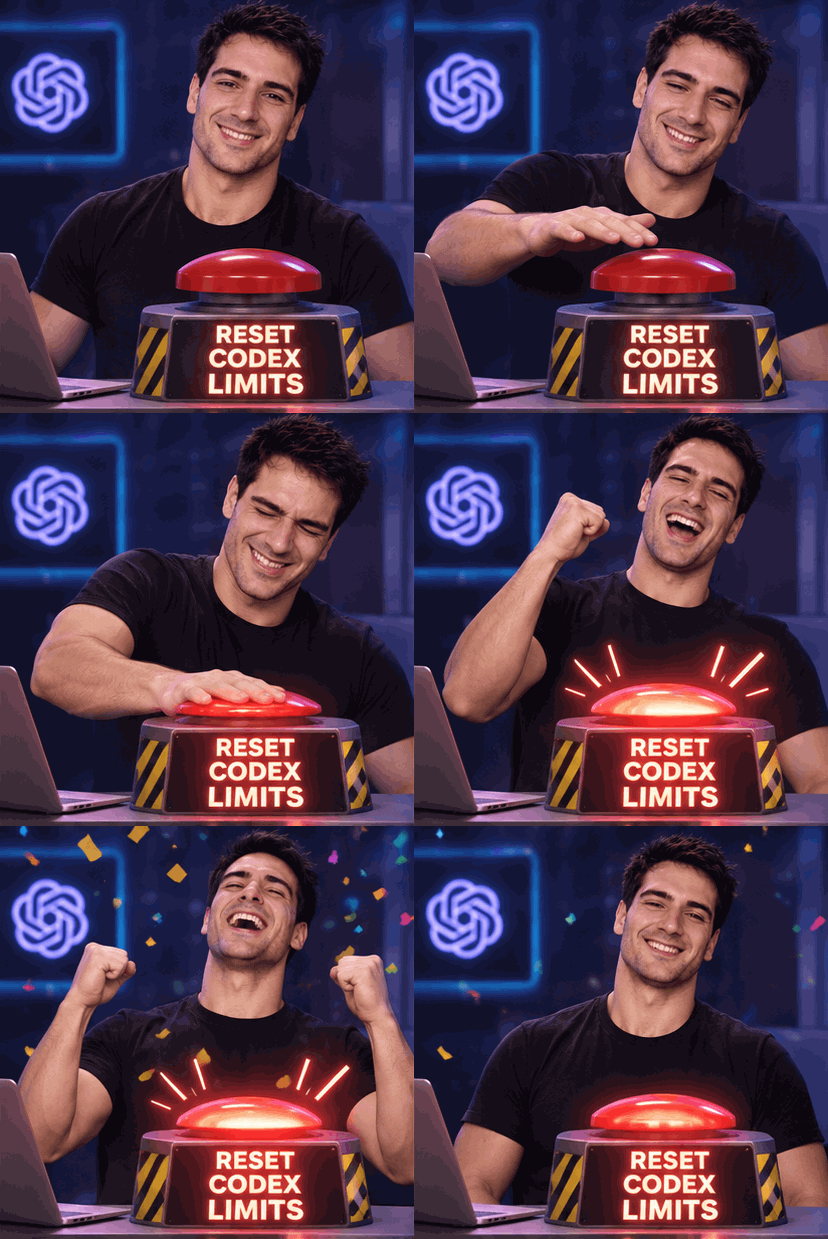
GPT Image 2.6 Flare and Sunburst support direct animated GIF generation through the Images Generations API.
The main parameters are:
| Parameter | Supported Values | Default |
|---|---|---|
| output_format | gif | Set for GIF output |
| frame_count | 2–64 frames | 9 |
| frame_duration_ms | 20–2000 ms | 200 ms |
For example, a brand could create a looping animation of its mascot waving by specifying the background, movement direction, starting pose, ending pose, and loop behavior.
Developers can adjust the frame count and playback speed to match the intended application.
GIF generation is useful for social media reactions, website elements, and simple branded animations, but it is not equivalent to a general-purpose video-generation model.
The Images Edits API does not directly support GIF output, so developers should distinguish between creating a new animation and editing an existing static image.
SVG Output for Editable Graphics
Both models support SVG generation through the Images Generations API.
SVG is useful for icons, simple logos, vector illustrations, and graphics that designers need to resize or modify.
Developers can set the output_format parameter to svg and the n parameter to 1.
SVG generation has additional billing considerations compared with ordinary raster output. OpenAI's documented workflow involves an image model generating a reference image and an SVG authoring model producing editable vector content. Developers should account for both components when estimating SVG production costs.
The resulting SVG can be opened in compatible vector design software to inspect paths, shapes, colors, and typography.
The Images Edits endpoint does not directly support SVG output, so vector generation and raster-image editing should be treated as separate workflows.
Complexity vs Quality: What's the Difference?
Complexity and quality are separate controls.
Quality determines image rendering quality, while complexity controls how much planning the model performs before rendering.
Both models support low, medium, and high complexity settings, with high as the default.
Low complexity may be appropriate for focused background or color changes. Medium or high complexity can be useful for complex posters, multiple subjects, and dense text layouts.
OpenAI states that changing complexity does not incur a separate fee, although higher complexity may increase processing time.
Both models also support markup-guided editing. Developers can use circles, arrows, or other visual annotations to identify the intended edit region and communicate changes more precisely.
How to Access and Use GPT Image 2.6 API
Where Can Developers Access the API?
Developers can access GPT Image 2.6 Flare and Sunburst through OpenAI's official Images API or the corresponding model services available on LinkModel.
The official model identifiers are:
Flare: gpt-image-2.6-flare
Sunburst: gpt-image-2.6-sunburst
OpenAI's developer platform provides model specifications, API key management, and image-generation interfaces.
LinkModel offers unified model discovery, API key management, Playground access, and centralized billing, making it useful for teams organizing multiple AI models through one platform.
How to Generate an Image with the Official API
The following steps describe the official Images Generations API workflow.
Step 1 — Create an API key.
Open the OpenAI developer platform, generate an API key, and store it securely in an environment variable.
Step 2 — Choose the image model.
Select gpt-image-2.6-flare for rapid creative iteration or gpt-image-2.6-sunburst for detail-oriented generation and editing.
Step 3 — Select the endpoint.
Use the official Images Generations API to create a new image.
Request method: POST
Endpoint: https://api.openai.com/v1/images/generations
For modifications to an existing image, use the Images Edits API instead.
Step 4 — Configure the request.
For a square product image, use the following settings:
Model: gpt-image-2.6-flare
Size: 1024 × 1024
Quality: medium
Complexity: low
Output Format: png
Number of Images: 1
Example Prompt:
A premium coffee product photo on a clean beige background. Soft natural lighting. Centered composition. No text.
Step 5 — Send the request.
Authenticate using the API key and submit the request fields as JSON to the Images Generations endpoint.
Step 6 — Save the generated result.
The API generally returns Base64-encoded image data in data[0].b64_json. Decode the data and save the image using the appropriate file format.
Step 7 — Review the output and usage.
Inspect text accuracy, composition, product details, and visual consistency.
Record token usage and repeated requests to estimate costs before scaling the workflow.
Common API Problems and How to Fix Them
| Problem | Possible Cause | Recommended Action |
|---|---|---|
| 401 Unauthorized | Invalid or missing API key | Check the Authorization header |
| 429 Rate Limit | Request volume exceeds account limits | Reduce request frequency and inspect usage limits |
| Incorrect image format | File extension does not match the output | Save the file using the correct format |
| GIF generation failure | Frame count, dimensions, or pixel budget exceeds limits | Reduce frame count or image dimensions |
| Unwanted image changes | Edit region or preservation instructions are unclear | Clarify the target and elements to preserve |
| Slow generation | Complex prompt or demanding quality settings | Simplify the task or adjust relevant settings |
API rate limits depend on the account and usage tier. Developers should plan request concurrency according to their actual limits.
Which Model Should You Choose?
Flare and Sunburst should be selected according to the requirements of the final image.
| Use Case | Recommended Starting Point | Main Reason |
|---|---|---|
| Rapid advertising concepts | Flare | Speed and concept variety |
| Social media image variations | Flare | Frequent iteration |
| Detailed ecommerce images | Sunburst | Product and material accuracy |
| Multi-round branded-image edits | Sunburst | Editing consistency |
| Complex marketing posters | Sunburst | Detailed compositions and typography |
| Animated GIF creation | Either | Compare actual animation quality |
| SVG icons and illustrations | Either | Evaluate the resulting vector quality |
A Two-Stage Image Production Strategy
For teams balancing creative speed and final visual quality, a two-stage workflow can be useful.
First, use Flare to explore multiple concepts and select promising compositions, colors, and visual directions.
Next, consider Sunburst for detailed refinement and repeated editing, while checking that approved products, characters, and brand elements remain consistent.
This workflow is particularly relevant to advertising campaigns, ecommerce imagery, website graphics, and brand content production.
What Our Research Suggests About Model Selection
Our review of OpenAI's documentation and available developer feedback indicates that the key distinction between Flare and Sunburst is their intended workload rather than their official token rates.
OpenAI emphasizes Flare's generation speed and Sunburst's detail-oriented design and editing consistency.
In one developer's 36-judgment UI-layout comparison, GPT Image 2.5 Flare was preferred 25 times, compared with 11 preferences for GPT Image 2.6 Flare. That case compares different Flare generations rather than the two GPT Image 2.6 models.
The finding illustrates why newer models do not necessarily outperform older versions on every practical task.
For Flare versus Sunburst, useful evaluation criteria include text accuracy, reference preservation, revision frequency, and the cost of obtaining an approved image.
Why LinkModel Fits a Multi-Model Workflow
Developers comparing image models also need to manage API costs, model access, and ongoing usage.
LinkModel provides unified model management and pay-as-you-go access, helping teams organize several AI models through one platform.
For GPT Image 2.6 Flare and Sunburst, the 35% lower applicable API rates through November 30, 2026 directly reduce spending for equivalent token consumption.
For teams producing product images, marketing graphics, and website visuals regularly, this creates a practical opportunity to manage production budgets more efficiently.
Frequently Asked Questions
1. What Is the Main Difference Between GPT Image 2.6 Flare and Sunburst?
Flare prioritizes fast generation and rapid iteration, while Sunburst focuses on detailed visual work and editing consistency. Both models support image generation, editing, animated GIFs, and SVG output.
2. Where Can I Access GPT Image 2.6 API?
Developers can access both models through OpenAI's official Images API or the corresponding GPT Image 2.6 model services available on LinkModel.
3. What Is the Cheapest GPT Image 2.6 API Provider?
LinkModel offers GPT Image 2.6 Flare and Sunburst at 35% below OpenAI's official standard API rates through November 30, 2026. Image output costs $19.50 per million tokens on LinkModel, compared with OpenAI's $30.00. The same 35% reduction applies to the corresponding text input, cached text input, image input, and cached image input rates.
4. How Much Does GPT Image 2.6 API Cost?
OpenAI's standard image output rate is $30 per million tokens, image input is $8 per million tokens, and text input is $5 per million tokens. During the offer period, LinkModel's corresponding rates are $19.50, $5.20, and $3.25. The final cost per generated image depends on token consumption, image quality, and dimensions.
5. Are There Cheaper Alternatives to the Official GPT Image 2.6 API?
Yes. LinkModel offers GPT Image 2.6 API access at 35% below OpenAI's official standard rates through November 30, 2026, alongside pay-as-you-go access, centralized billing, and unified model management.
Conclusion
GPT Image 2.6 Flare and Sunburst serve different creative priorities: Flare is better suited to rapid iteration and concept exploration, while Sunburst is more suitable for detailed visual production and consistent editing across multiple rounds. Both models share the same official token rates, but actual image-generation costs depend on usage, settings, and revision frequency. For developers who want flexible access to both models while controlling their budgets, LinkModel offers GPT Image 2.6 API pricing at 65% of OpenAI's official standard rates through November 30, 2026, providing direct savings on equivalent applicable token usage.