GPT Image 2.6 vs Nano Banana 2.1: which model is better for your images? GPT Image 2.6 stands out for precision-oriented editing and SVG/GIF workflows, while Nano Banana 2.1 offers 4K output and multi-reference image creation. For character consistency, both deserve evaluation across multiple editing rounds. The better choice depends on image quality, editing accuracy, speed, and actual cost.
Even a realistic image can contain incorrect text, altered product details, or inconsistent characters. A cheaper first generation may also become more expensive after repeated revisions. Real-world comparisons show why cost per usable image, not just the advertised token rate, is essential when choosing a model for commercial work.
LinkModel makes both models more affordable. Access GPT Image 2.6 at 35% below OpenAI's official API rates through November 30, 2026, or Nano Banana 2.1 at 25% below Google's official rates—with $0 minimum spend, $0 monthly platform fee, and unified billing. New users automatically receive $1 in free Credits upon signup, with no card binding or recharge required. The credits never expire, work across all currently available models, and are a one-time new-user benefit. Start comparing both models on LinkModel without a subscription.
GPT Image 2.6 vs Nano Banana 2.1: Quick Verdict
Choose GPT Image 2.6 when precision editing and specialized output formats matter most; start with Nano Banana 2.1 when high-resolution still images and multi-reference compositions are your priority. For recurring production, compare editing reliability, approval rates, and total image costs before committing to either model.
Both models can generate and edit compelling images, but GPT Image 2.6 offers specialized creative formats and editing controls, while Nano Banana 2.1 emphasizes high-resolution, reference-guided still-image workflows.
| Comparison | GPT Image 2.6 | Nano Banana 2.1 |
|---|---|---|
| Developer | OpenAI | |
| Model variants | Flare and Sunburst | Nano Banana 2.1 |
| Main focus | Detailed visual creation and controlled editing | Efficient generation and conversational editing |
| Reference-based editing | Supported | Supported |
| Multi-turn editing | Supported | Supported |
| Notable features | Complexity control, markup-guided edits, SVG and GIF | Multi-reference generation, 1K–4K output, search grounding |
| Official image output rate | $30 / 1M tokens | $30 / 1M tokens |
| LinkModel image output rate | $19.50 / 1M tokens | $22.50 / 1M tokens |
| LinkModel discount | 35% through November 30, 2026 | 25% |
GPT Image 2.6 Flare vs Sunburst
GPT Image 2.6 offers two variants with different creative priorities.
GPT Image 2.6 Flare is positioned for fast interactive generation and frequent revisions. It is a practical starting point when designers need to review multiple concepts or adjust images repeatedly.
GPT Image 2.6 Sunburst is positioned for detailed compositions and precision-oriented editing. It is worth considering when an image contains complex object relationships or visual elements that must remain unchanged.
Both variants support low, medium, and high complexity settings, along with SVG, GIF, and markup-guided editing workflows.
Sunburst's precision-oriented positioning does not mean it will outperform Flare or Nano Banana 2.1 in every editing task. Published comparisons demonstrate that different instructions can produce different winners.
What Makes Nano Banana 2.1 Different?
Nano Banana 2.1 focuses on efficient image generation, conversational editing, and high-resolution visual creation.
Its notable capabilities include 1K, 2K, and 4K image generation, multi-image references, character consistency features, text rendering, and search-grounded generation.
These features are especially relevant for product compositions involving several reference assets, high-resolution marketing graphics, and iterative still-image design.
For everyday image creation, both models are competitive. The more meaningful differences emerge when a project requires multiple references, consecutive edits, strict brand consistency, or specialized output formats.
Image Quality and Photorealism
Which Model Makes More Realistic Images?
Neither GPT Image 2.6 nor Nano Banana 2.1 has a consistent advantage across every photorealistic scenario. Available comparisons show that realism depends on lighting, skin detail, anatomy, object accuracy, and photographic style.
In a November 11 Reddit street-portrait comparison, the creator preferred GPT Image 2.6 for certain natural-looking details, while several commenters considered Nano Banana 2.1 or other competing models more convincing.
The disagreement highlights an important distinction: realistic facial texture does not necessarily mean the entire photograph is physically believable.
An image can have natural-looking skin while containing distorted hands, impossible shadows, incorrectly rendered objects, or inconsistent background geometry.
For portraits, product lifestyle images, and advertising photography, evaluate these five dimensions separately.
| Dimension | What to Examine | Common Problem |
|---|---|---|
| Skin and facial texture | Pores, asymmetry, natural facial features | Excessive smoothing or artificial detail |
| Lighting | Consistent direction, highlights, and shadows | Contradictory illumination |
| Human anatomy | Hands, fingers, posture, and proportions | Missing or distorted body parts |
| Background logic | Object placement, perspective, spatial relationships | Implausible or broken scene details |
| Photographic naturalness | Framing, exposure, and depth of field | A polished render rather than a natural photograph |
A commercial image should satisfy its intended requirements rather than simply receive the strongest aesthetic preference in a single comparison.
Prompt Accuracy Can Matter More Than Visual Appeal
Visual quality and instruction accuracy are separate performance dimensions.
In a published November 2026 comparison, one prompt requested a scene containing exactly one spoon.
Nano Banana 2.1 followed the quantity requirement, while the tested GPT Image 2.6 outputs introduced an additional spoon.
The result illustrates a practical problem: a model can create a convincing composition while adding elements that were never requested.
For e-commerce, even small changes can matter. An extra bottle handle, incorrect product attachment, missing label, or altered packaging component can make an attractive image unsuitable for publication.
The strongest result is not always the most visually impressive one. It is the image that satisfies the brief without introducing unwanted changes.
Character Consistency and Image Editing
Which Model Keeps the Same Character Across Different Styles?
Character consistency depends on preserving identifying details across transformations, not simply generating similar-looking faces.
In a November 9 Reddit comparison, one creator applied multiple visual transformations to the same fictional character, including illustrated artwork, watercolor, collectible figures, and product packaging.
The comparison examined facial features, hairstyle, clothing, freckles, and accessories.
In the creator's reported style-transfer comparison, GPT Image 2.6 preserved several distinctive character features more consistently, although results varied by style and the evidence does not establish an overall character-consistency ranking.
For recurring characters, advertisers should examine whether each output maintains the following:
| Character Feature | What Must Remain Consistent |
|---|---|
| Face | Recognizable facial shape and defining features |
| Hair | Color, style, fringe, and silhouette |
| Clothing | Garments, specified colors, and distinctive details |
| Accessories | Glasses, earrings, jewelry, and props |
| Proportions | Consistent relationships between face, body, and objects |
| Visual identity | A recognizable character across artistic styles |
The important question is whether a viewer can recognize the same character after the requested transformation.
Three-Round Editing Test: Why the Final Image Matters
Multi-round editing reveals problems that a single image comparison can miss.
In CreateVision's published three-round editing comparison, all configurations started from the same reference assets. Each model underwent three consecutive editing requests, repeated across three independent chains per subject.
The portrait task required the models to complete the following sequence.
| Editing Round | Requested Change | Details That Needed Protection |
|---|---|---|
| Round 1 | Replace the background with a bookstore | Face, hairstyle, glasses, earrings |
| Round 2 | Change the jacket to navy | Character identity and previous background |
| Round 3 | Turn the character's head approximately 30 degrees | Face, clothing, accessories, framing, and lighting |
The third step was particularly revealing.
All three models handled elements of the bookstore and clothing changes, but the head-turn instruction remained challenging.
Flare's final results stayed relatively close to the original forward-facing pose. Sunburst and Nano Banana 2.1 varied in the direction and extent of the requested rotation.
The findings demonstrate a distinction between identity preservation and editing completion.
A model may keep a character recognizable while failing to execute the requested change.
For production work, an approved result must meet both requirements: preserve the protected details and complete the new instruction.
Product Editing: Text Preservation and Unwanted Changes
The same comparison also evaluated a fictional skincare bottle through three consecutive edits.
The requests involved changing the background to sage green, introducing linen fabric, and adding a small orange blossom behind the bottle.
The bottle shape, cap, collar, camera position, and label text—NOMA / DAILY SERUM / 30 ml—needed to remain intact.
Across the reported final repeats, the three model configurations retained the main label text, although the treatment of the fabric and surrounding composition varied.
This matters for commercial product images because readable text does not guarantee complete product fidelity.
A bottle may retain its brand name while its cap, proportions, or surrounding accessories change.
For e-commerce, teams should verify both label accuracy and the physical appearance of the product.
What 48 Same-Photo Editing Tests Reveal
A separate YepShot comparison evaluated 48 matching image-editing tasks using GPT Image 2.6 Flare and Nano Banana 2.1.
Both models completed many requests, but several examples revealed meaningful differences in preservation and instruction completion.
| Editing Task | Reported Finding | Commercial Implication |
|---|---|---|
| Old photo restoration | GPT Image 2.6 changed the original crop and border | Restoration should preserve source framing |
| Removing clothing wrinkles | GPT Image 2.6 reduced wrinkles but flattened some fabric texture | Cleaner product images can lose material realism |
| Product flat-lay editing | GPT Image 2.6 handled an additional requested object | Object placement needs accuracy checks |
| Image branding | Some outputs introduced real brand names | Unrequested brand elements require review |
| Small-text translation | GPT Image 2.6 translated an additional small line | Text edits need complete coverage without layout drift |
The test demonstrates a critical tradeoff.
A model that performs more aggressive edits may complete a difficult instruction while also modifying protected elements. A conservative edit may preserve the scene but leave part of the requested transformation unfinished.
For commercial production, neither behavior guarantees an approved result.
A reliable editing workflow should check whether the requested change happened, whether approved details remained intact, whether text and branding stayed accurate, and whether the final composition satisfies the intended use.
Text Rendering, Prompt Accuracy, and Creative Features
Can Both Models Generate Accurate Text?
Both GPT Image 2.6 and Nano Banana 2.1 can generate readable text, but correct spelling does not guarantee correct layout or complete instruction compliance.
Marketing graphics often require exact wording, punctuation, line breaks, visual hierarchy, and object placement.
In published poster comparisons, models sometimes generated the requested words correctly while changing their line arrangement.
Other tests reported small punctuation changes or additional product components that were not part of the original brief.
For commercial materials, evaluate the following requirements separately.
| Requirement | Evaluation Question |
|---|---|
| Text accuracy | Are all words, numbers, and punctuation correct? |
| Layout accuracy | Are line breaks, spacing, and positions correct? |
| Object accuracy | Does the image contain exactly the requested elements? |
| Brand consistency | Are logos, labels, and colors preserved? |
| Instruction completion | Did the model perform every required change? |
This distinction is especially important for promotional posters, product packaging, price labels, menus, and educational infographics.
GPT Image 2.6: SVG, GIF, and Markup-Guided Editing
GPT Image 2.6 offers creative workflows beyond conventional still-image generation.
SVG output supports scalable graphic assets and vector-oriented design workflows. Its documented generation process involves dedicated authoring stages, and applicable token usage affects the cost.
Animated GIF output supports short frame-based animations for stickers, lightweight motion graphics, and simple social content.
Markup-guided editing allows visual annotations to help communicate the intended changes.
GPT Image 2.6 also provides complexity controls.
Lower complexity can be appropriate for focused modifications, while higher complexity can help with demanding compositions and complex visual relationships.
These capabilities make GPT Image 2.6 particularly relevant when a deliverable requires more than a standard static image.
Nano Banana 2.1: Multi-Reference Images and 4K Output
Nano Banana 2.1 supports conversational editing, multi-reference image workflows, and 1K, 2K, and 4K output resolutions.
Multiple references can help specify product appearance, scene composition, styling, and other visual constraints.
High-resolution output is useful for detailed still-image assets and large marketing placements.
Search-grounded image generation also offers an approach to producing visuals informed by external contextual information.
These capabilities expand workflow options rather than guaranteeing better results in every scenario.
If a project primarily requires high-resolution still images built from several references, Nano Banana 2.1 is a sensible starting point.
If SVG/GIF output or markup-guided editing is a core requirement, GPT Image 2.6 offers a more directly documented workflow.
Speed and Pricing: Official APIs vs LinkModel
GPT Image 2.6 vs Nano Banana 2.1 API Pricing
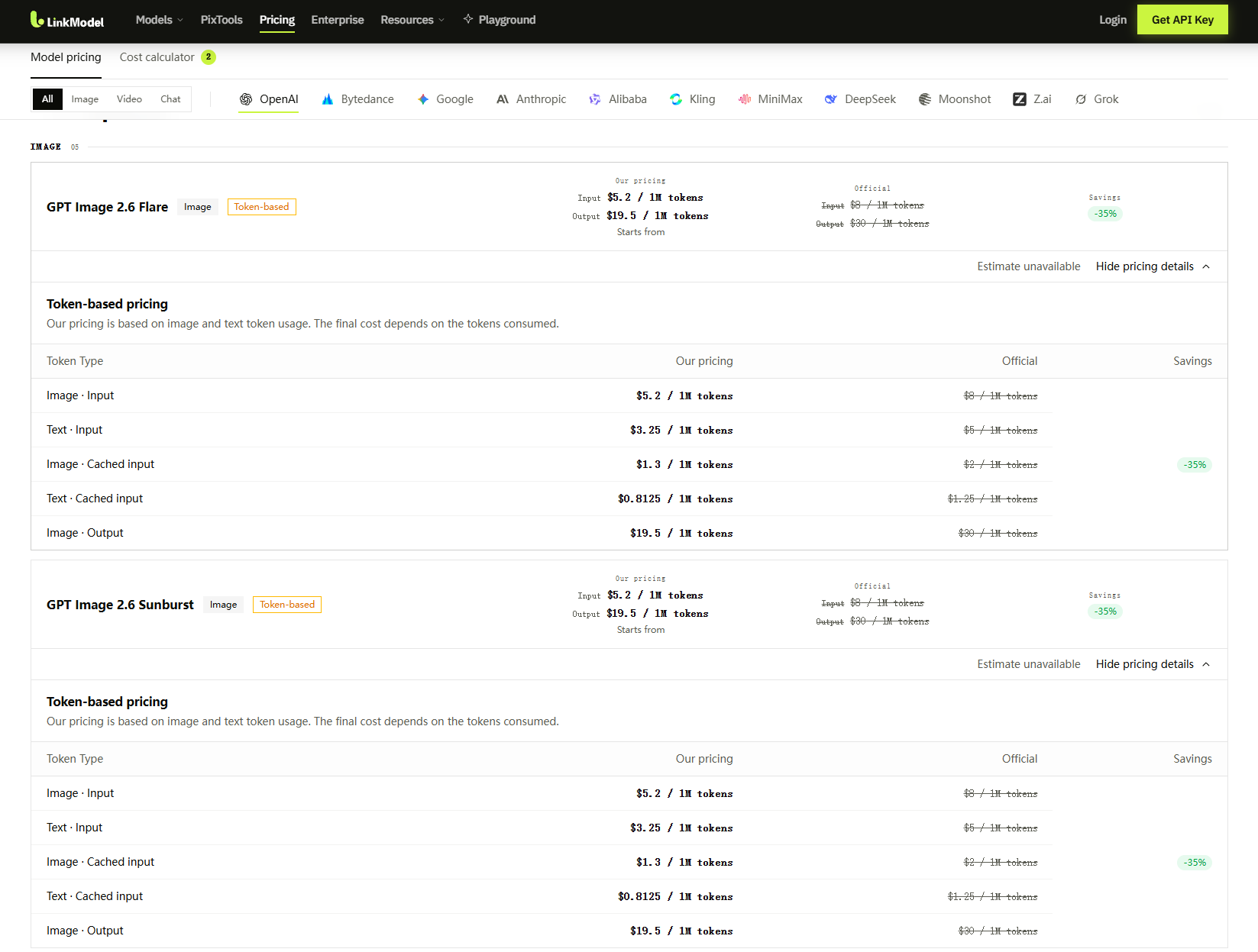
GPT Image 2.6 and Nano Banana 2.1 both have official image output rates of $30 per million tokens, although their input billing structures differ.
LinkModel offers lower published token rates for both models.
The following comparison uses USD per million tokens.
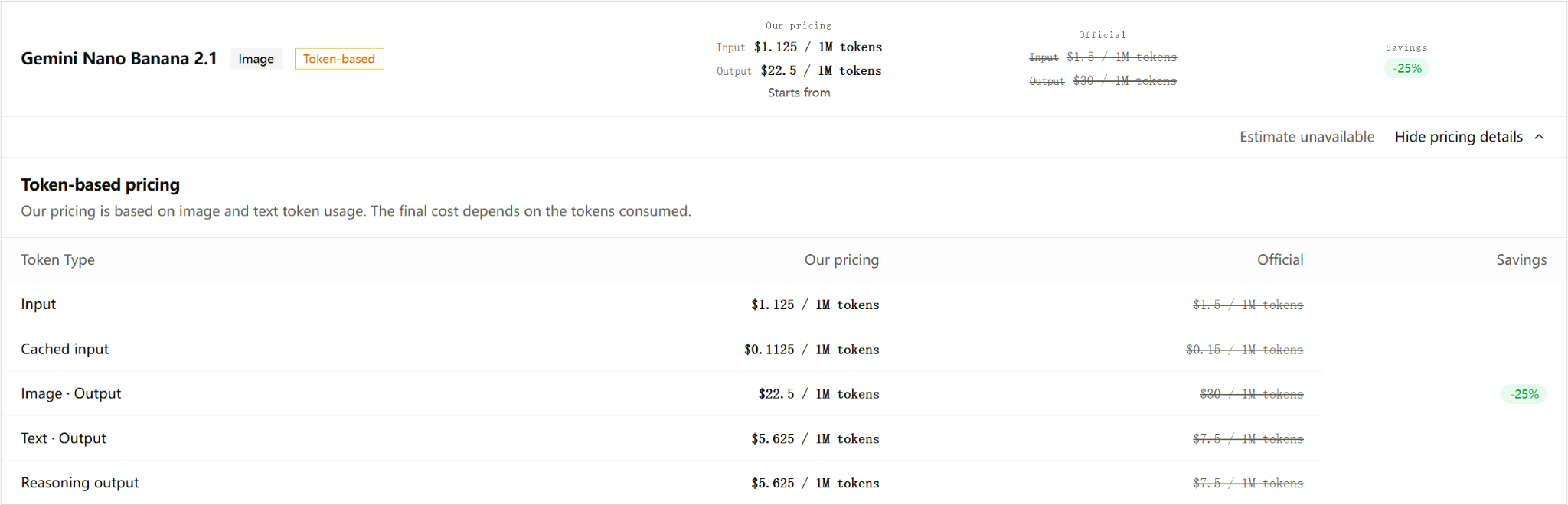
| Token Category | GPT Image 2.6 Official | GPT Image 2.6 LinkModel | Nano Banana 2.1 Official | Nano Banana 2.1 LinkModel |
|---|---|---|---|---|
| Image input | $8.00 | $5.20 | $1.50 | $1.125 |
| Text input | $5.00 | $3.25 | $1.50 | $1.125 |
| Cached image input | $2.00 | $1.30 | $0.15 | $0.1125 |
| Cached text input | $1.25 | $0.8125 | $0.15 | $0.1125 |
| Image output | $30.00 | $19.50 | $30.00 | $22.50 |
| Text / reasoning output | No separately listed text output rate | Not separately listed | $7.50 | $5.625 |
Google uses shared input rates for applicable text and image inputs. The separate rows above make the comparison with GPT Image 2.6's pricing structure easier to understand.
Nano Banana 2.1 text and reasoning output should be charged according to applicable token usage, without counting the same output twice.
For GPT Image 2.6, LinkModel's listed rates represent 35% savings compared with OpenAI's standard API pricing. The current promotional pricing runs through November 30, 2026, at 11:59 PM PST.
For Nano Banana 2.1, LinkModel's published rates are 25% lower than Google's corresponding standard rates.
The image output rate is $3 lower per million tokens for GPT Image 2.6 than for Nano Banana 2.1 on LinkModel, a difference of approximately 13.3% relative to Nano Banana 2.1's output-token rate.
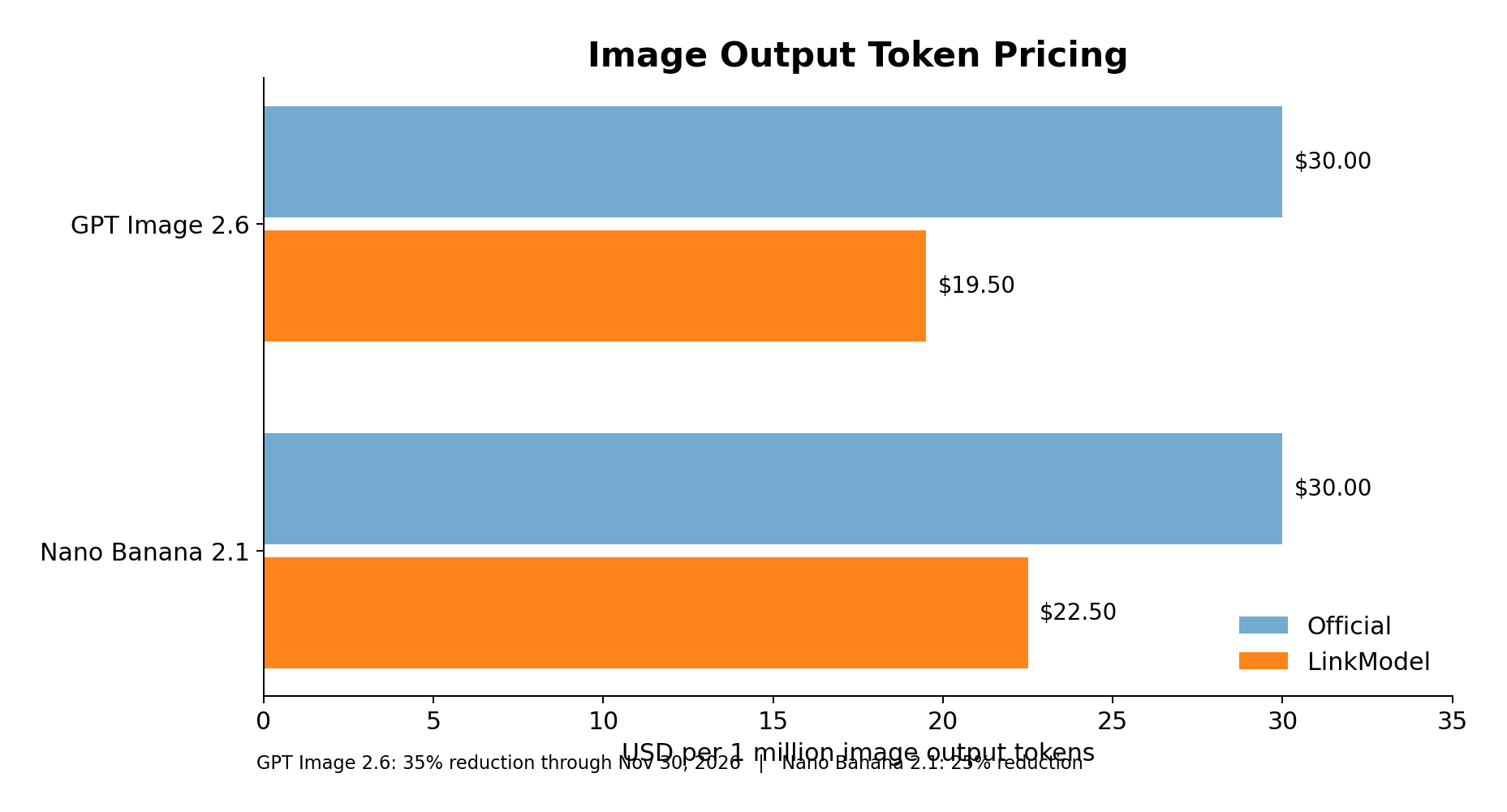
That is a unit-price comparison, not a guarantee that every GPT Image 2.6 image costs 13.3% less.
How Much Does a Nano Banana 2.1 Image Cost?
Google publishes output-token counts for Nano Banana 2.1 at three resolutions.
Using those counts and the corresponding image output rate produces the following comparison.
| Resolution | Output Tokens | Google Official | LinkModel |
|---|---|---|---|
| 1K | 1,120 | $0.0336 | $0.0252 |
| 2K | 1,680 | $0.0504 | $0.0378 |
| 4K | 3,780 | $0.1134 | $0.08505 |
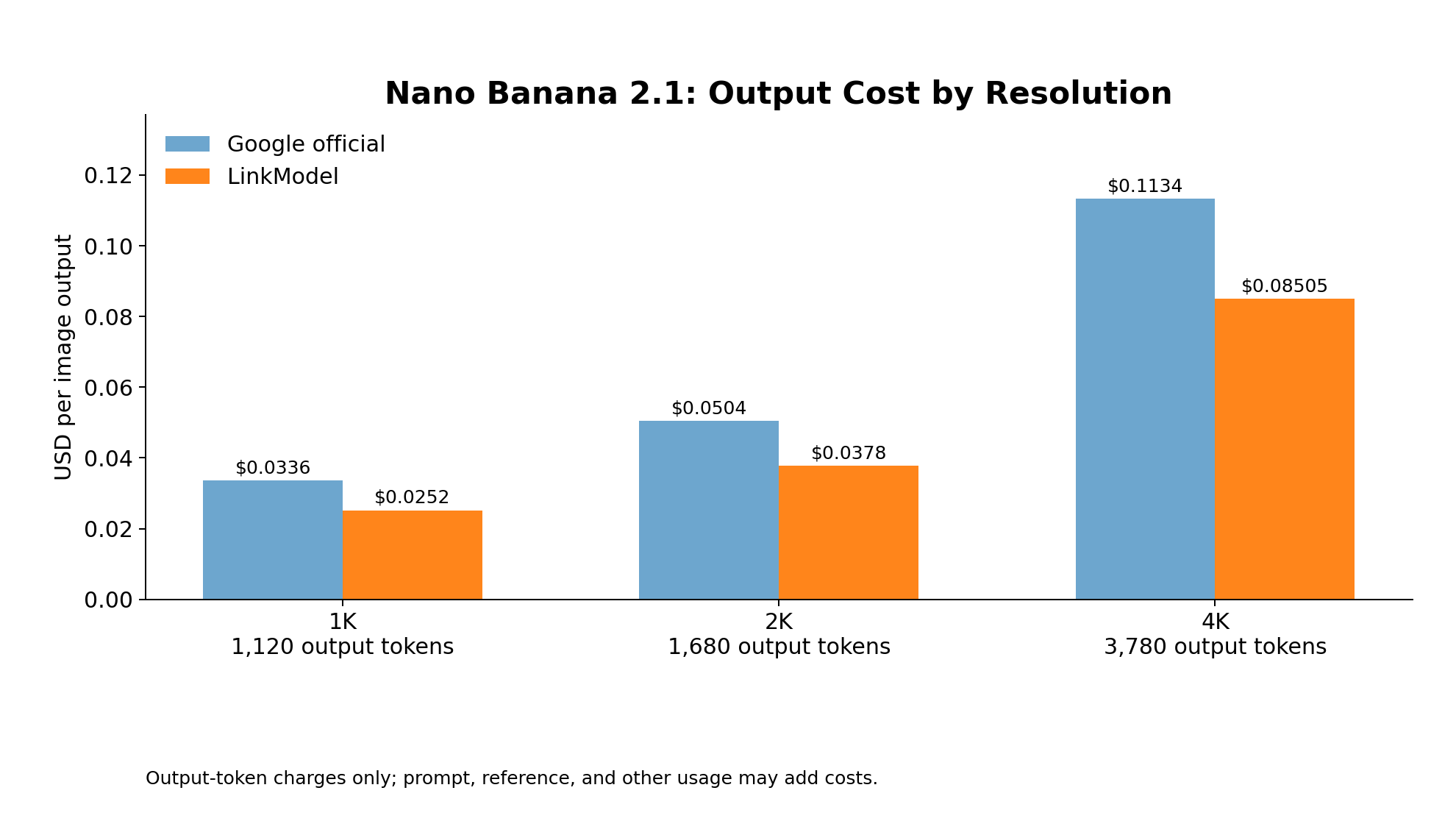
The 4K price is calculated using Google's published 3,780 output tokens. Google's pricing page displays the corresponding official cost as approximately $0.113 after rounding.
For a production workload of 1,000 images at 1K resolution, the image-output component is:
| Pricing Measure | Google Official | LinkModel |
|---|---|---|
| Image output cost per 1K image | $0.0336 | $0.0252 |
| Image output cost for 1,000 images | $33.60 | $25.20 |
| Total difference | — | $8.40 saved |
The total request cost also depends on prompt tokens, reference images, and other applicable usage.
This makes Nano Banana 2.1 relatively straightforward to budget at a specified resolution because Google publishes the corresponding image-output token counts.
Why GPT Image 2.6's Lower Output Rate Does Not Guarantee Cheaper Images
GPT Image 2.6 has a LinkModel image output rate of $19.50 per million tokens, compared with $22.50 for Nano Banana 2.1.
However, different models may use different output-token quantities for comparable image specifications.
GPT Image 2.6 also provides quality and complexity controls that can affect processing behavior, output characteristics, and latency.
For a meaningful price comparison, consider the requested image specifications, input tokens, output tokens, and additional editing requests.
A lower output-token rate is valuable, but total image cost depends on actual usage.
Cost per Usable Image: The Metric That Matters for Production
Cost per usable image = Total generation and editing charges ÷ Number of approved images
This calculation accounts for generation attempts and revisions that never become publishable assets.
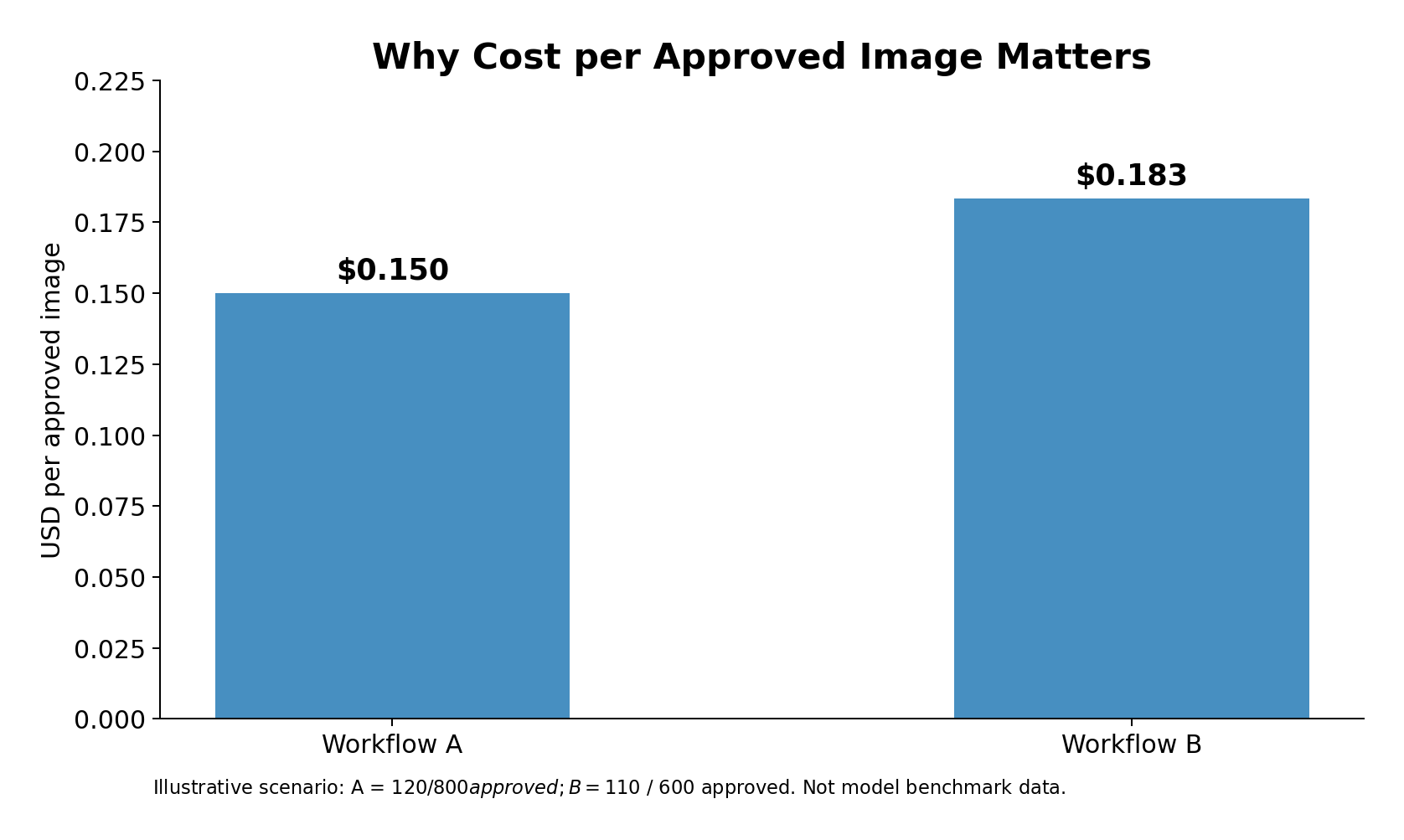
Consider two illustrative production workflows.
| Metric | Workflow A | Workflow B |
|---|---|---|
| Total generation and editing charges | $120 | $110 |
| Approved images | 800 | 600 |
| Approval rate, assuming 1,000 candidates | 80% | 60% |
| Cost per approved image | $0.150 | $0.183 |
Workflow B spends less overall but produces fewer usable images.
Workflow A achieves a lower cost per approved image, even though its total generation bill is higher.
The figures are illustrative workload assumptions rather than measured approval rates for GPT Image 2.6 or Nano Banana 2.1.
Now consider an e-commerce team that needs 100 approved product images.
The images must preserve packaging text, product dimensions, brand colors, and background requirements.
A model that produces visually attractive drafts but repeatedly changes product details may require additional generations and corrections.
A model with more reliable instruction completion could deliver a lower final cost even if its initial generation price were higher.
The more useful production metric is cost per approved image. A lower API token price helps, but reliable instruction completion and fewer required revisions can create greater value for a campaign.
Is GPT Image 2.6 Faster Than Nano Banana 2.1?
Speed depends on the model variant, task complexity, reference inputs, and whether a test measures one image or an entire editing chain.
CreateVision's November 6–7 comparison evaluated three consecutive edits across repeated editing chains.
The published values below represent median elapsed time for complete three-edit chains, including submission, transfers, queueing, network time, and polling—not a standardized single-image inference benchmark.
| Test Configuration | Portrait Editing Chain | Product Editing Chain |
|---|---|---|
| GPT Image 2.6 Flare Medium | 55.5 s | 49.8 s |
| GPT Image 2.6 Sunburst Medium | 95.8 s | 91.8 s |
| Nano Banana 2.1 | 85.5 s | 78.1 s |
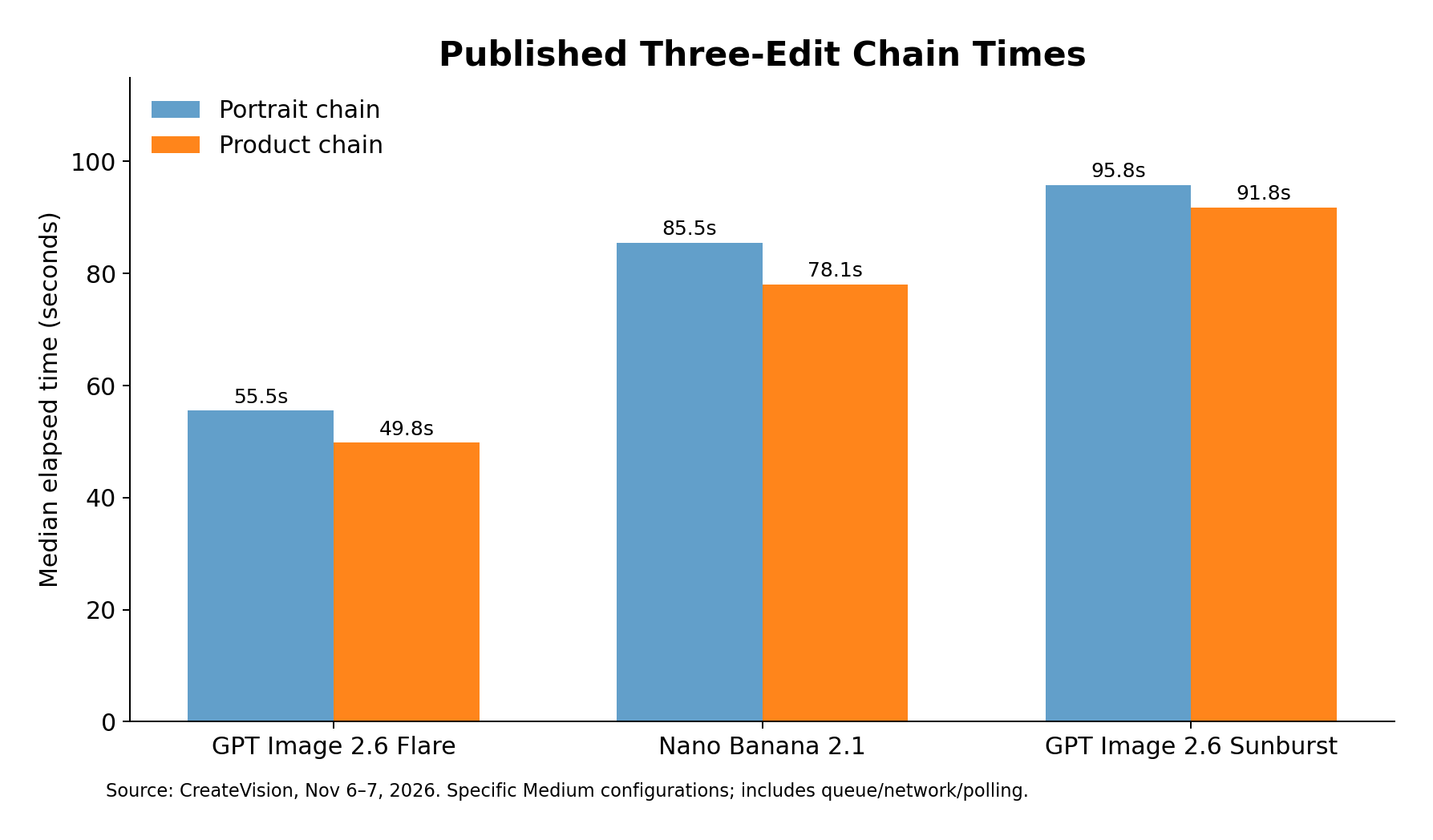
In these particular editing chains, Flare completed the sequence faster than Nano Banana 2.1 and Sunburst.
A separate Reddit street-portrait comparison reported a different result.
In that single-image task, Nano Banana 2.1 took 13 seconds, while GPT Image 2.6 took 57 seconds.
YepShot also reported approximately 20 seconds as the median for its GPT Image 2.6 Flare edits and 25 seconds for Nano Banana 2.1, although the two sets of requests were performed on different dates.
These comparisons measure different workloads.
A one-image generation result cannot directly replace a three-round editing-chain measurement.
For campaigns involving repeated revisions, the total time required to produce an approved image is more useful than first-preview latency alone.
Judge speed by the time needed to deliver an approved image, not only the time needed to return the first result.
Which Model Should You Choose for Real Projects?
The best starting model depends on the intended deliverable and the requirements that cannot be compromised.
The following recommendations combine documented functionality with specific observations from published comparisons.
| Project | Recommended Starting Point | Reason | What to Verify |
|---|---|---|---|
| Detailed local edits | GPT Image 2.6 Sunburst | Precision-oriented product positioning | Preservation of protected details |
| Fast concept revisions | GPT Image 2.6 Flare | Fast-iteration positioning and competitive editing-chain time | Completion of later edits |
| Multi-reference product scenes | Nano Banana 2.1 | Multi-reference generation | Product geometry and object counts |
| High-resolution still-image production | Nano Banana 2.1 | Documented 1K–4K output | Final resolution and visual quality |
| SVG graphics and short animated GIFs | GPT Image 2.6 | Specialized output workflows | File suitability and output requirements |
| Recurring characters | Compare both with the same references | Identity preservation and instruction completion can differ | Face, clothing, accessories, and pose |
| High-volume campaigns | Choose by cost per approved asset | Retries and editing affect final economics | Total cost, approval rate, and turnaround time |
For E-Commerce Product Photography
Start with Nano Banana 2.1 when the brief involves several reference assets or high-resolution static-image delivery.
Consider GPT Image 2.6 Sunburst when a project requires demanding changes to an established composition.
For either model, verify exact packaging text, product shape, colors, labels, and background consistency.
The 48-photo comparison demonstrates why these checks matter: an edit can improve one part of an image while changing another part that should remain untouched.
For e-commerce, product accuracy is a business requirement, not simply a visual preference.
For Posters, Advertising, and Social Media
GPT Image 2.6 Flare is worth considering for frequent concept iterations, while Sunburst offers a precision-oriented option for complex compositions.
If the final deliverable requires SVG or animated GIF output, GPT Image 2.6 has a documented functional advantage.
Nano Banana 2.1 is particularly relevant when the brief depends on multiple visual references or requires high-resolution still-image assets.
For posters and advertising, approval should cover exact copy, typography placement, object counts, brand identity, and visual hierarchy.
For Character-Based Content and Brand Campaigns
Neither model should be selected from a single impressive character sample.
Use consistent character references across a sequence of transformations and compare the ability to preserve facial identity, accessories, clothing, colors, and proportions.
The CreateVision portrait example illustrates why this matters.
Preserving a recognizable face did not guarantee successful completion of the requested head-turn edit.
For recurring campaigns, a reliable model must preserve approved details while accurately introducing new changes.
For Teams Managing Multiple Image Models
LinkModel provides a unified platform for accessing supported AI models and managing usage-based billing.
Rather than maintaining separate pricing workflows, teams can review both GPT Image 2.6 and Nano Banana 2.1 through one platform.
Compare GPT Image 2.6 and Nano Banana 2.1 on LinkModel to evaluate the right model for your workload—while benefiting from 35% lower GPT Image 2.6 rates through November 30, 2026, and 25% lower Nano Banana 2.1 rates.
For developers, designers, and production teams, the decision should combine model capabilities, actual token charges, and the number of approved results.
Lower API pricing is a compelling starting advantage. Reliable production determines the final value.
Frequently Asked Questions
Is GPT Image 2.6 Better Than Nano Banana 2.1?
GPT Image 2.6 is a strong starting choice for precision-oriented editing and SVG/GIF workflows, while Nano Banana 2.1 is compelling for multi-reference compositions and high-resolution still images. Published comparisons show different outcomes across editing tasks, so neither has a proven universal advantage.
Which Model Produces More Realistic Portraits?
Both models can generate realistic portraits. Available user comparisons show disagreements over skin texture, lighting, and photographic naturalness. For dependable results, review anatomy, facial detail, lighting consistency, background objects, and character identity.
Is GPT Image 2.6 Cheaper Than Nano Banana 2.1?
On LinkModel, GPT Image 2.6 has a listed image output rate of $19.50 per million tokens through November 30, 2026, compared with $22.50 per million tokens for Nano Banana 2.1. GPT Image 2.6 has the lower output-token rate, but actual per-image costs depend on model-specific token consumption and request settings.
Can GPT Image 2.6 Generate GIF and SVG Files?
Yes. OpenAI documents SVG and animated GIF workflows for GPT Image 2.6 Flare and Sunburst. SVG generation involves a dedicated authoring process, while GIF output uses animation-specific settings. These capabilities are relevant for scalable graphics and lightweight animated content.
Can I Access GPT Image 2.6 and Nano Banana 2.1 Through LinkModel?
Yes. LinkModel lists GPT Image 2.6 Flare, GPT Image 2.6 Sunburst, and Nano Banana 2.1 among its supported image models. It provides usage-based pricing, unified access to supported models, and consolidated billing with $0 monthly platform fee.
Conclusion
Choose GPT Image 2.6 for precision-focused editing, detailed visual control, and SVG/GIF workflows; choose Nano Banana 2.1 for high-resolution still images and multi-reference creative production. Published comparisons show that speed, character consistency, and instruction accuracy depend on the task. For commercial work, prioritize approved-image quality, editing stability, and total production cost rather than a single benchmark result. With 35% lower GPT Image 2.6 pricing through November 30, 2026, 25% lower Nano Banana 2.1 rates, and unified usage-based billing, LinkModel offers a cost-effective way to access both models and choose the right option for your workflow.