Seedream 5.5 is the better overall choice than Seedream 5.0 Pro for image generation and editing in 2026. It offers stronger multi-turn consistency, more realistic images, improved text rendering, and expanded transparency and layer capabilities. ByteDance's official evaluations show higher quality and usability across six professional scenarios. On LinkModel, Seedream 5.5 starts at $0.016 per output image, compared with $0.045 for Seedream 5.0 Pro at matching standard dimensions.
However, better image quality does not always mean a better production workflow. Repeated edits can alter product details, reference characters may lose consistency, and small text errors can make otherwise impressive images unusable. Our research into documented image-generation cases highlights why editing stability, information accuracy, and cost per usable image matter more than model version numbers alone.
LinkModel makes upgrading to Seedream 5.5 more affordable. At matching standard output sizes, its $0.016 rate is 64.4% lower than Seedream 5.0 Pro, with pay-as-you-go pricing and no mandatory monthly subscription. New users automatically receive $1 in free Credits, enough for up to 62 standard-tier, reference-free outputs with no separately billed layers. No credit card or upfront deposit is required, and the promotional Credits can be used across available models. Explore the Seedream 5.5 Playground to get started.
Seedream 5.5 vs Seedream 5.0 Pro: Quick Comparison
Seedream 5.5 wins overall in image realism, iterative editing, text accuracy, transparent asset generation, and comparable output pricing. Seedream 5.0 Pro remains a capable option for established precision-editing workflows, multilingual graphics, and reference-guided image generation.
Both models support text-to-image, image-to-image, multiple reference images, and layer decomposition. The most meaningful differences concern editing stability, transparent output flexibility, maximum layer counts, and production cost.
| Feature | Seedream 5.5 | Seedream 5.0 Pro |
|---|---|---|
| Release date | November 9, 2026 | July 8, 2026 |
| Photorealism | Improved lighting, materials, and textures | Strong realistic generation |
| Multi-turn editing | Improved preservation of unedited regions | Targeted editing and spatial controls |
| Official editing demonstration | 100 successive edits | No equivalent 100-round comparison established |
| Maximum reference images | 10 | 10 |
| Layer decomposition | 1 base image + up to 99 layers | 1 base image + up to 16 layers |
| Native RGBA text-to-image | Supported | Not supported |
| RGBA image-to-image | Up to 10 references; input alpha channel not required | One transparent PNG reference |
| Rich-text OCR | Supported | Not supported |
| Resolution presets | 1K, 1.5K, 2K | 1K, 1.5K, 2K |
| Text rendering | Improved dense and small-text accuracy | Multilingual text generation |
| LinkModel output at 1536 × 1536 | $0.016 | $0.045 |
| LinkModel output at 2048 × 2048 | $0.028 | $0.09 |
What Is the Biggest Upgrade in Seedream 5.5?
The biggest upgrade is greater control over images that require multiple revisions.
Seedream 5.0 Pro already handles many advanced design tasks. Its capabilities include localized editing, structured image generation, multilingual text, and reference-based creation.
Seedream 5.5 improves the reliability of those workflows by preserving unchanged image regions more effectively across successive edits.
It also expands transparent image generation, supports substantially more decomposed layers, and introduces rich-text OCR capabilities.
These improvements matter most when the output must be reused, revised, or integrated into a professional production pipeline.
What Do Official Benchmarks Show?
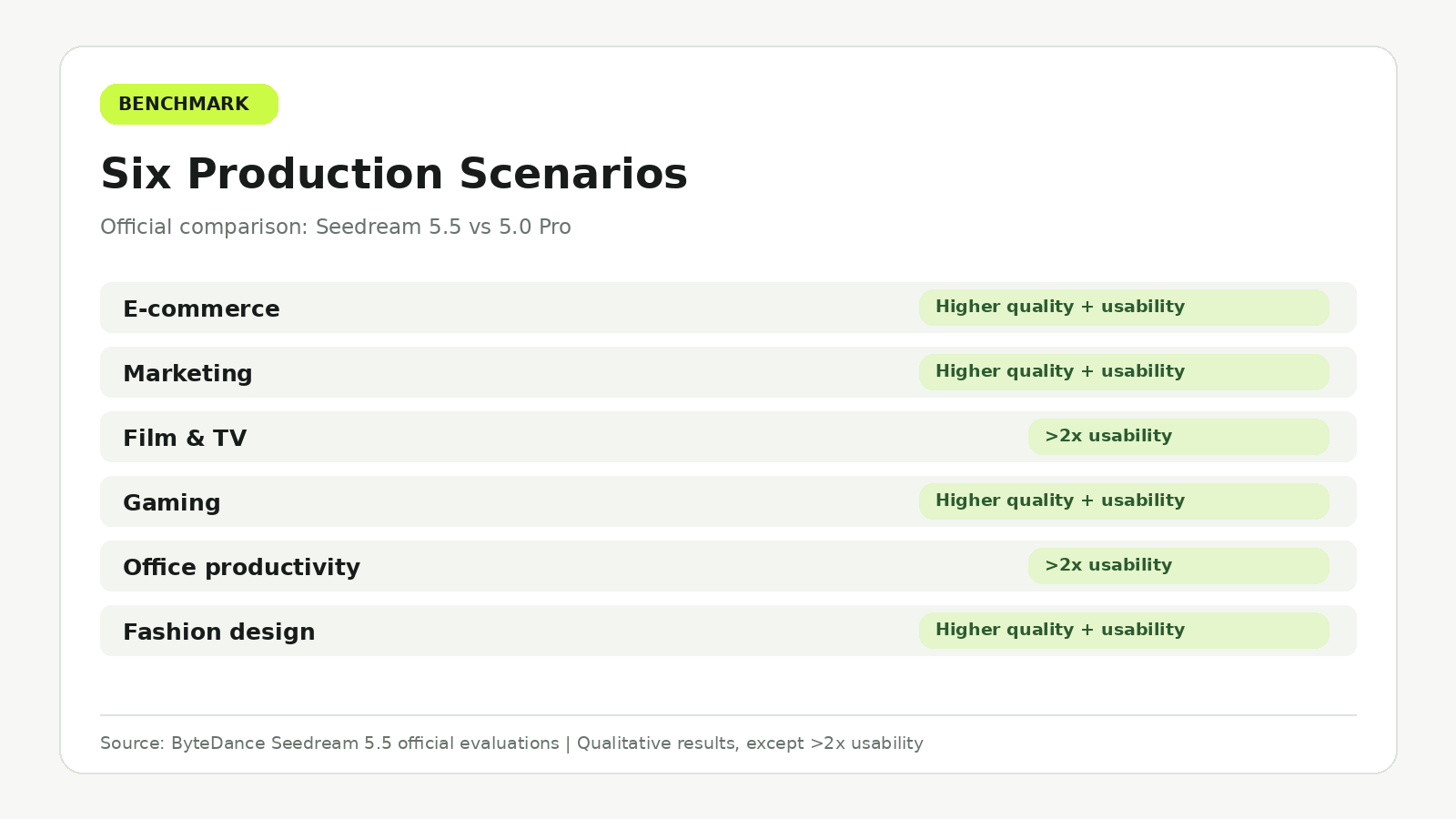
ByteDance evaluated Seedream 5.5 against Seedream 5.0 Pro across six professional production scenarios on MagicArena.
Experienced image-generation evaluators assessed both image quality and usability.
Seedream 5.5 achieved higher quality scores and usability rates in all six scenarios. In film and television and office productivity, the usability rates were more than twice those of Seedream 5.0 Pro.
Additional expert preference comparisons showed a +55.62% GSB result for image-to-image realism.
GSB uses Good, Same, and Bad judgments to measure relative preference between generated outputs. This number is a comparative evaluation score, not a 55.62% increase in resolution or a universal success-rate improvement.
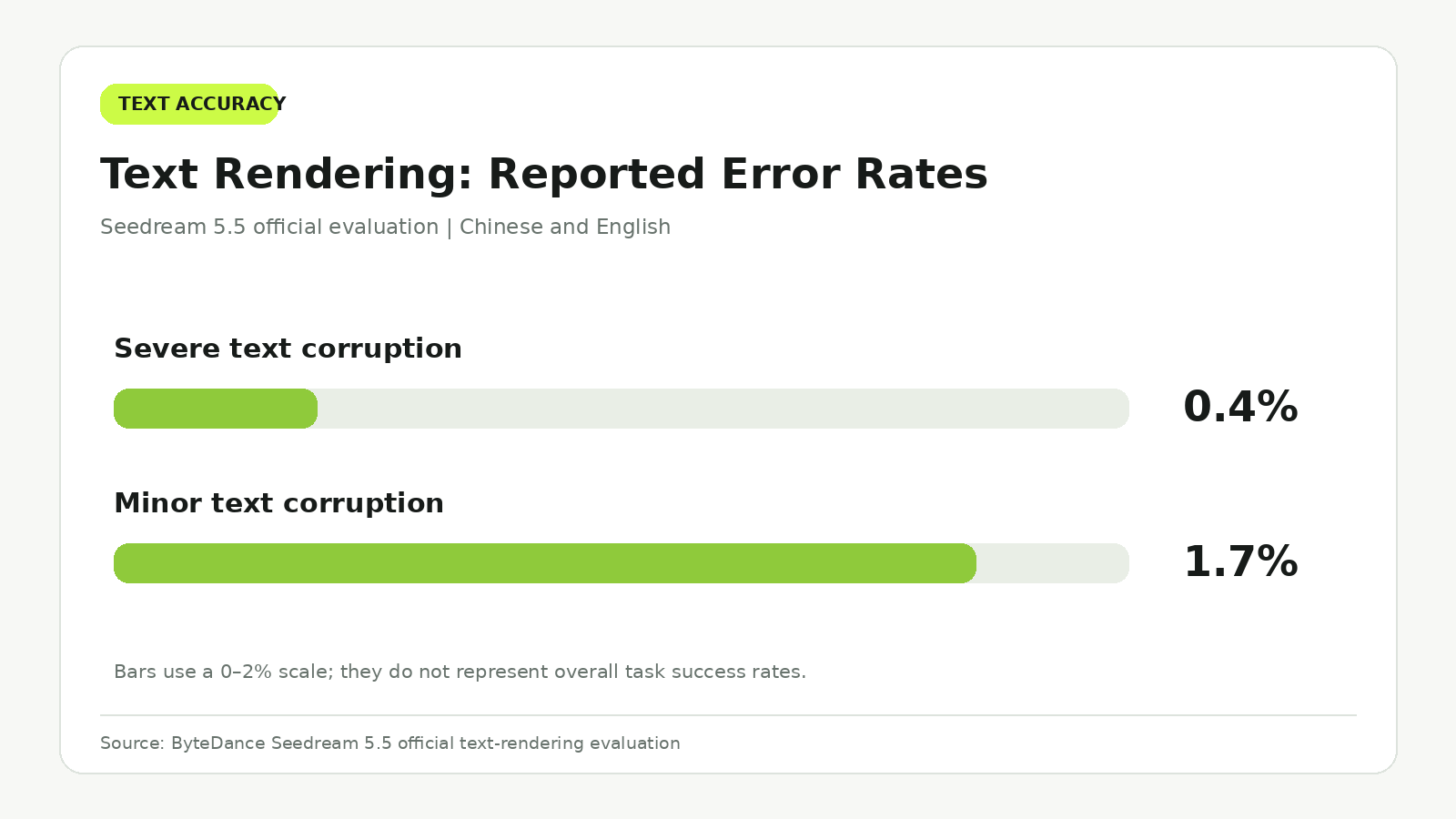
ByteDance also reported 0.4% severe text corruption and 1.7% minor text corruption in its text-rendering evaluation.
Together, these results support Seedream 5.5 as the stronger overall model, particularly for complex professional image creation.
Seedream 5.5 vs Seedream 5.0 Pro: Image Quality and Photorealism
Seedream 5.5 has the stronger official evidence for photorealistic image generation. Its improvements focus on natural lighting, realistic materials, skin texture, and reducing the artificial appearance of generated photographs.
For professional image production, realism is not just about making an image attractive. Product shapes, reflections, shadows, and surface details must work together convincingly.
Portrait Realism and Natural Lighting
ByteDance's official Seedream 5.5 examples demonstrate improvements in skin texture, hair detail, fabric, and lighting transitions.
The model reduces excessive gloss, overexposure, and unnatural material appearance.
These improvements are especially relevant to portraits and fashion photography.
A convincing portrait needs natural skin variation, realistic highlights, accurate shadows, and coherent relationships between the subject and environment.
Seedream 5.0 Pro was already capable of producing detailed photographic imagery. Documented evaluations include realistic skin textures, fabric weave, stitching, and automotive reflections.
Therefore, Seedream 5.5's advantage should be understood as an improvement over an already capable model rather than the introduction of photorealism itself.
Case Study: Product Photography and Background Replacement
Our review of documented production experiences identified a Seedream 5.0 Pro workflow involving product and marketing visuals.
The work included background replacement, local object editing, and creating multiple variations of the same product.
The reported experience emphasized two benefits:
- Localized editing reduced unnecessary regeneration.
- Product shape and proportions remained relatively stable across variations.
No standardized time savings or retry-rate measurements were provided.
Nevertheless, the case illustrates why controlled editing matters more than visual novelty in many commercial workflows.
Consider an e-commerce campaign requiring the same product to appear in five different environments.
The background, lighting, and surrounding objects may change, but the product's dimensions, packaging, logo, and material appearance should remain recognizable.
Seedream 5.5's stronger preservation of unchanged image regions addresses this production requirement.
For such tasks, the ability to modify an environment without unintentionally redesigning the product is a meaningful advantage.
Official Results Across Six Professional Scenarios
ByteDance's evaluation covered six production categories.
| Scenario | Official result for Seedream 5.5 | Production relevance |
|---|---|---|
| E-commerce | Higher quality and usability | Product listings and campaign images |
| Marketing | Higher quality and usability | Promotional visuals and advertising |
| Film and television | More than twice the usability rate | Storyboards and visual development |
| Gaming | Higher quality and usability | Character and environment concepts |
| Office productivity | More than twice the usability rate | Presentations and business graphics |
| Fashion design | Higher quality and usability | Apparel and editorial concepts |
The especially strong usability improvements in film and television and office productivity are relevant because these workflows require both visual appeal and dependable content structure.
However, the official usability results do not establish that every individual production task will require fewer generations or less editing time.
Seedream 5.5 is the stronger choice for new photorealistic and commercial image-generation projects, particularly when realistic details and revision stability are essential.
Seedream 5.5 vs Seedream 5.0 Pro: Multi-Turn Editing and Character Consistency
Multi-turn editing is one of Seedream 5.5's most important functional advantages.
In professional image creation, the first output is rarely the final version.
Designers frequently change clothing, backgrounds, props, lighting, materials, and text through several iterations.
Each modification introduces the risk of altering elements that should remain unchanged.
Seedream 5.5's Official 100-Round Editing Demonstration
ByteDance demonstrated Seedream 5.5 through 100 successive editing operations involving the same person.
Each output became the input for the following edit.
The demonstration included repeated changes to clothing, accessories, and tabletop objects while preserving important details of the underlying image.
Even small objects, including rings and eyeglass frames, were edited while maintaining coherent lighting, positioning, and contact with the subject.
The central achievement was not simply the number of edits.
It was the ability to preserve visual regions unrelated to the latest instruction.
This addresses a common production problem known as visual drift.
Visual drift can occur when repeated image edits gradually alter facial features, product packaging, colors, or background details.
Seedream 5.5's improved pixel-level preservation is designed to reduce these unintended changes.
Case Study: Six Reference Photos and Character Identity
Our research into character-generation experiences identified a specific Seedream 5.0 Pro case involving six portrait references captured from different angles.
The creator wanted to preserve a person's identity while generating different poses and actions.
Seedream 5.0 Pro demonstrated stronger understanding of complicated actions and poses than Seedream 4.5 in the reported experience.
However, the generated person showed weaker facial similarity to the supplied references than expected.
This case illustrates a crucial distinction:
Prompt adherence and identity preservation are different capabilities.
A model can follow complicated instructions while still changing recognizable facial features.
Likewise, supplying more reference images does not automatically guarantee identity consistency.
The original comparison involved Seedream 5.0 Pro and Seedream 4.5, not Seedream 5.5. It therefore establishes a useful evaluation problem rather than a measured identity-preservation result for the newer model.
Seedream 5.5's official multi-turn improvements make it a promising option for recurring characters, but identity accuracy remains a separate consideration.
How to Improve Multi-Turn Editing Consistency
A practical editing workflow should clearly identify what needs to change and what must remain unchanged.
For example, when replacing the background behind a product, the editing instructions should preserve:
- Product dimensions and overall shape.
- Logo position and packaging details.
- Material texture and characteristic colors.
- Lighting relationships that must remain consistent.
For character editing, the same principle applies to facial structure, hairstyle, clothing details, and distinguishing accessories.
BytePlus also recommends using the previous output as the next input and clearly specifying both the requested modification and preserved elements.
For stable multi-turn editing, its documentation recommends RGB inputs and opaque backgrounds where appropriate.
Seedream 5.5 is particularly attractive when many revisions must be made to the same underlying composition.
Which Model Is Better for Repeated Editing?
Seedream 5.5 is the stronger option for long revision sequences, character concepts, product campaigns, and complex visual storytelling.
Seedream 5.0 Pro remains suitable for localized edits that already produce reliable results.
For an established workflow involving only a few straightforward modifications, migration may not provide enough practical improvement to justify changing production settings and reviewing outputs again.
For new projects requiring extensive iterative editing, Seedream 5.5 offers the more compelling foundation.
Seedream 5.5 vs Seedream 5.0 Pro: Text Rendering and Complex Prompts
Seedream 5.5 improves text-rendering accuracy, but accurate typography does not automatically guarantee complete information.
This distinction matters for infographics, advertising posters, menus, packaging labels, and business presentations.
Our research into structured Seedream 5.0 Pro evaluations identified several useful examples of both successful information rendering and incomplete instruction execution.
Official Text Accuracy Results
ByteDance evaluated Seedream 5.5 on Chinese and English text rendering, including densely arranged small text.
| Text quality metric | Seedream 5.5 |
|---|---|
| Severe text corruption | 0.4% |
| Minor text corruption | 1.7% |
| Comparison with 5.0 Pro | Lower error rates in both categories |
These figures support the newer model's improved text quality under the official evaluation conditions.
However, text corruption and missing information are different problems.
A graphic may contain perfectly legible labels while omitting an important item from the original requirements.
Case Study: A 10-Node Timeline Infographic
One documented Seedream 5.0 Pro evaluation required a horizontal infographic containing 10 specified timeline entries.
The task supplied model names, dates, short descriptions, and layout instructions.
The reported output reproduced all ten entries without omissions or errors.
The model also organized the information into a coherent visual hierarchy.
This result demonstrates Seedream 5.0 Pro's ability to arrange fully specified content into a structured graphic.
The critical condition is that the information was supplied in advance.
The model did not need to independently research the timeline or decide which entries should be included.
For business graphics, this suggests that complete source information and explicit layout requirements can significantly improve output reliability.
Case Study: A 24-Animal Zoo Map
A more demanding structured task asked Seedream 5.0 Pro to design a fictional zoo map containing 24 specified animals.
Unlike the timeline task, the model needed to make additional decisions about habitat grouping, visitor routes, zone names, and spatial organization.
The published case reported the following results:
| Evaluation item | Result |
|---|---|
| Required animals | 24 |
| Missing animals | 5 |
| Omission share | 20.8% |
| Habitat or placement issues | 2 |
The reported issues included a hippopotamus assigned to an unsuitable themed habitat and a duplicated crocodile.
Despite these problems, the model produced a coherent overall map layout.
This reveals an important limitation of complex AI-generated infographics:
A visually convincing graphic can still omit required information.
The five missing animals represent an omission share within this single documented task, not Seedream 5.0 Pro's overall error rate.
ByteDance's official evaluations show improved text structure and usability for Seedream 5.5, but the specific zoo-map task does not establish a directly comparable result for the newer model.
For commercial infographics, content completeness must therefore be evaluated separately from image quality.
Case Study: Ten Menu Prices
Another documented Seedream 5.0 Pro test involved a fast-food menu with 10 specified items and prices.
The input provided the complete product names, prices, and visual requirements.
The reported result reproduced all ten prices correctly, without numerical errors.
This example shows that Seedream 5.0 Pro can render dense, structured commercial information accurately when the details are explicit.
The contrast with the zoo-map task is especially useful.
In the menu task, the model primarily needed to arrange supplied facts.
In the zoo-map task, it also needed to interpret relationships and make organizational decisions.
The more reasoning and information selection a task requires, the more important systematic content verification becomes.
Case Study: Chinese and Arabic Localization
The same structured evaluation examined multilingual promotional graphics.
Chinese localization produced a strong result, including translated text and design adjustments that retained the original visual style.
Arabic localization demonstrated appropriate right-to-left text handling but initially left some stylized elements untranslated.
The case illustrates a common localization challenge: satisfying several constraints simultaneously.
A model may translate the main text correctly while overlooking a decorative label, stylized logo, or smaller graphic element.
Seedream 5.5's improved text-rendering capabilities are valuable for multilingual design, although the existing localization examples do not measure its performance directly against 5.0 Pro.
Which Model Is Better for Infographics?
Seedream 5.5 is the stronger choice for new text-heavy and information-oriented graphics, based on its improved official text evaluations and professional usability results.
Seedream 5.0 Pro remains capable of generating structured graphics, particularly when all required information is supplied.
For both models, important prices, labels, dates, quantities, and required elements should be checked against the original brief.
Seedream 5.5 vs Seedream 5.0 Pro: RGBA Transparency and Layer Editing
Seedream 5.5 offers a clear functional upgrade in transparent image generation and layer decomposition.
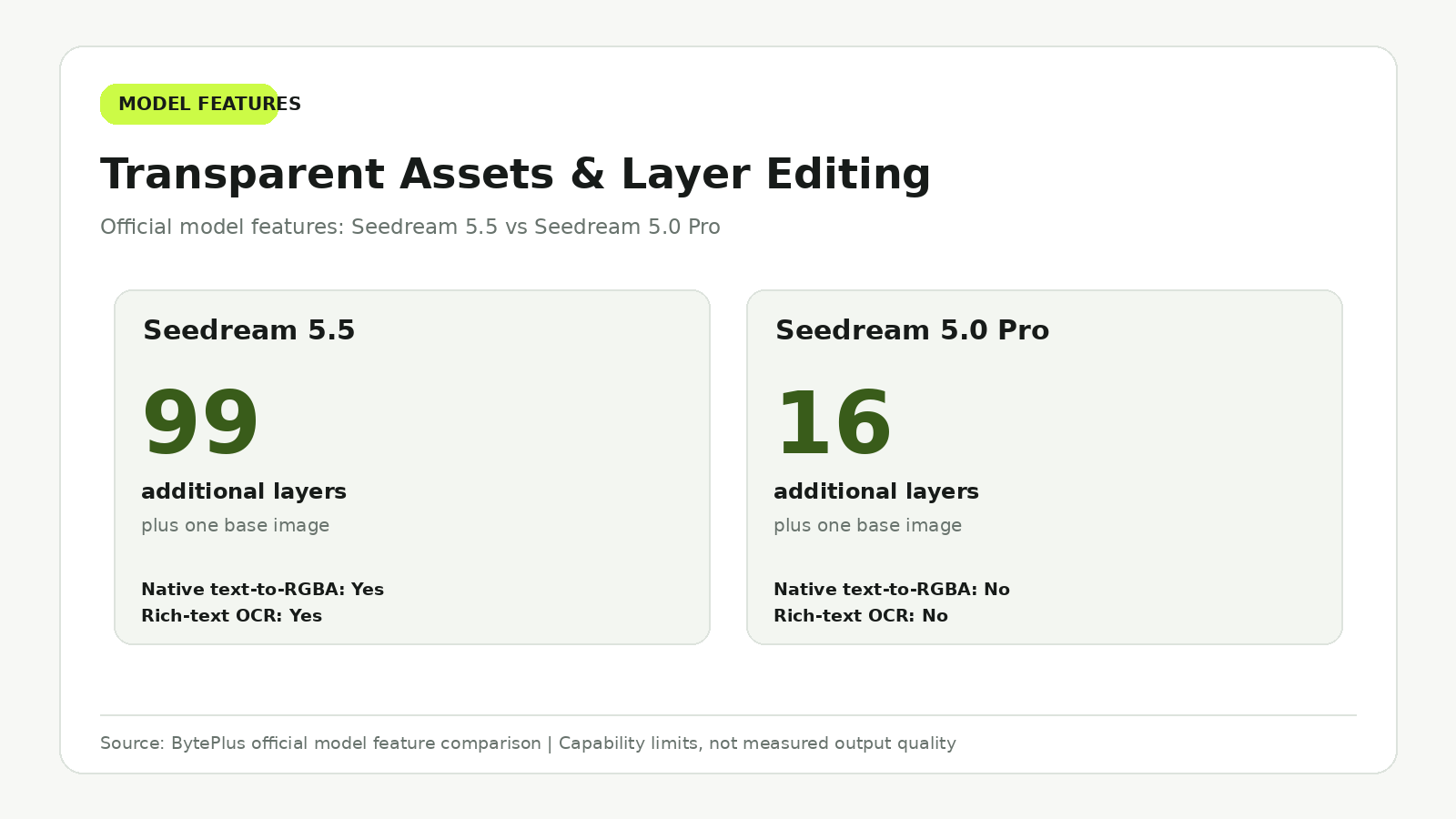
Both models support layer-related editing capabilities, but the newer version expands native transparency, increases layer capacity, and adds rich-text OCR.
These improvements matter for graphic designers, advertising teams, and developers building reusable visual assets.
Native RGBA: What Seedream 5.5 Adds
RGBA images include color channels and an alpha channel that controls transparency.
This allows a generated object to be placed over different backgrounds without appearing inside an opaque rectangular image.
Seedream 5.5 supports native RGBA generation directly from text descriptions.
It also supports transparent image-to-image generation with up to ten reference images without requiring the input images to contain an alpha channel.
Seedream 5.0 Pro supports a more limited transparent image-to-image workflow requiring one PNG reference image with an alpha channel.
This is a meaningful difference for workflows that begin with ordinary product photographs or existing illustrations.
Seedream 5.5 can make it easier to create reusable design assets without preparing transparent reference images first.
Layer Decomposition: 99 vs 16 Layers
The maximum number of decomposed layers is one of the clearest numerical differences between the two models.
| Capability | Seedream 5.5 | Seedream 5.0 Pro |
|---|---|---|
| Base image | 1 | 1 |
| Maximum additional layers | 99 | 16 |
| Total base and layer images at maximum | 100 | 17 |
| Layer decomposition | Supported | Supported |
| Rich-text OCR | Supported | Not supported |
Seedream 5.5 supports up to 99 additional layers, compared with 16 for Seedream 5.0 Pro.
This capacity is especially relevant to complex advertising visuals with separate backgrounds, products, typography, decorative objects, and other design elements.
The maximum layer count is a supported capacity, not a guarantee that every visual component will be separated perfectly.
Rich-Text OCR and Reusable Graphics
Seedream 5.5 also introduces rich-text OCR in its official feature set.
This can return recognized text content, positioning, and approximate styling information.
For graphic design workflows, such information can assist in reconstructing or modifying existing layouts.
Relevant applications include advertising posters, localized visual assets, social media graphics, and product promotional materials.
The value is not merely extracting text from an image.
It is enabling a workflow to treat text as an identifiable design component rather than only as rendered pixels.
Case Study: When Layer Separation Returns a Flat Image
Our review of documented Seedream 5.0 Pro access experiences identified a case where an attempted layer-separation operation returned an unchanged flattened image.
The task was performed through a third-party generation interface rather than a controlled comparison of the underlying model APIs.
The reported result therefore illustrates a potential integration limitation rather than establishing that Seedream 5.0 Pro lacks layer-decomposition capability.
Both models officially support layer decomposition.
For developers, the important practical distinction is whether the selected interface exposes the relevant operation and returns the expected format.
This is particularly relevant for specialized features such as transparency, layer extraction, and rich-text information.
Which Model Is Better for Design Assets?
Seedream 5.5 is the better choice when native RGBA, high layer counts, or rich-text extraction are important.
Seedream 5.0 Pro remains capable of interactive editing and layer separation, especially for simpler compositions requiring fewer layers.
If an existing workflow needs no more than 16 additional layers and already produces usable assets, the benefit of migrating may be limited.
For new transparency-first and complex design-asset workflows, Seedream 5.5 offers the greater flexibility.
Seedream 5.5 vs Seedream 5.0 Pro Pricing: Which Costs Less?
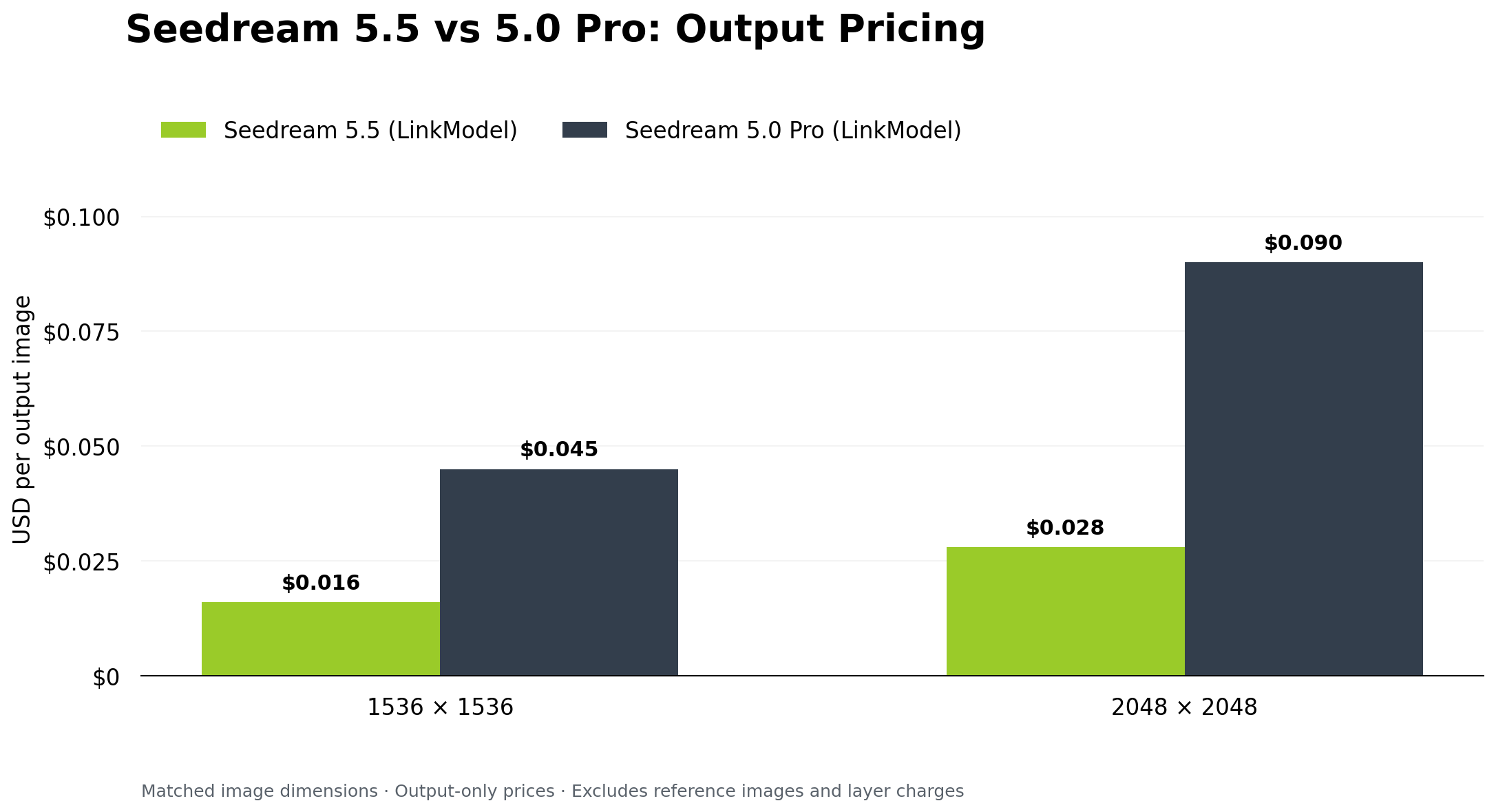
Seedream 5.5 costs less than Seedream 5.0 Pro for several comparable output specifications on LinkModel.
At 1536 × 1536, Seedream 5.5 costs $0.016 per output, compared with $0.045 for Seedream 5.0 Pro.
At 2048 × 2048, the respective output prices are $0.028 and $0.09.
These differences make Seedream 5.5 attractive for high-volume generation, but output pricing is only one component of a complete workflow budget.
LinkModel Pricing Comparison by Resolution
The following figures use LinkModel's published November 2026 rates.
| Matching output dimensions | Seedream 5.5 | Seedream 5.0 Pro | Savings with 5.5 |
|---|---|---|---|
| 1024 × 1024 | $0.016 | $0.045 | 64.4% |
| 1536 × 1536 | $0.016 | $0.045 | 64.4% |
| 2048 × 2048 | $0.028 | $0.09 | 68.9% |
These are output-only comparisons using matching dimensions.
Additional input images and decomposed layers are billed separately where applicable.
How Seedream Pricing Changes With Pixel Count
Seedream 5.5 uses output pixel tiers.
| Seedream 5.5 output specification | LinkModel rate |
|---|---|
| 921,600–2,601,123 pixels | $0.016/image |
| 2,601,124–2,610,000 pixels | $0.028/image |
| 2,610,001–4,624,220 pixels | $0.028/image |
Seedream 5.0 Pro uses a different tier structure.
| Seedream 5.0 Pro output specification | LinkModel rate |
|---|---|
| Up to 1536 × 1536 pixel area | $0.045/image |
| Above 1536 × 1536 and up to 2048 × 2048 pixel area | $0.09/image |
Because the tier boundaries differ, minimum advertised prices should not be compared without checking the requested output dimensions.
For example, a 2048 × 2048 image falls into a higher priced tier for both models.
Cost Example: 100 Generated Images
Consider a project requiring 100 text-to-image outputs at 1536 × 1536.
| Cost item | Seedream 5.5 | Seedream 5.0 Pro |
|---|---|---|
| Cost per output | $0.016 | $0.045 |
| Total outputs | 100 | 100 |
| Total output cost | $1.60 | $4.50 |
Seedream 5.5 reduces the output cost by $2.90 for every 100 images at this specification.
At 2048 × 2048, the corresponding costs are $2.80 and $9.00.
These calculations illustrate the advantage for repeated image generation, product variations, and promotional asset production.
Cost Example: Multiple Reference Images
Reference-based generation requires additional attention to input-image pricing.
Seedream 5.5 lists $0.0064 per input image.
Seedream 5.0 Pro lists $0.003 per additional input image after the first.
For a 1536 × 1536 output using three references:
| Billable item | Seedream 5.5 | Seedream 5.0 Pro |
|---|---|---|
| Output image | $0.016 | $0.045 |
| Reference inputs | 3 × $0.0064 | 2 × $0.003 |
| Total | $0.0352 | $0.051 |
Under these conditions, Seedream 5.5 remains cheaper.
However, it has a higher listed per-reference input charge than Seedream 5.0 Pro's additional-reference charge.
The number of reference images therefore affects the final price comparison.
Layer Decomposition Pricing
Layer decomposition has its own cost structure.
On LinkModel, each returned image, including the background or base layer, is billed separately. The published pricing details use the base image's pixel tier to determine the rate applied to returned layers.
For example, suppose a decomposition produces one background and four additional layers.
The operation returns five billable images.
| Applicable layer rate | Returned images | Layer-output subtotal |
|---|---|---|
| $0.016/image | 5 | $0.08 |
| $0.028/image | 5 | $0.14 |
Input-image charges, if applicable, are additional.
This distinction matters because a model capable of producing many layers can also generate a substantially larger number of billable outputs.
The maximum supported layer count should never be confused with the price of a single ordinary output image.
Which Cost Applies to Your Workflow?
The most useful pricing comparison depends on what the application actually does.
| Workflow | Main billable components | What to compare |
|---|---|---|
| Text-to-image | Output image | Matching resolution and output rate |
| Single-reference editing | Input + output | Reference fee and output fee |
| Multi-reference generation | Multiple inputs + output | Number of reference images |
| Repeated image editing | Inputs and outputs across turns | Total billable work across all edits |
| Layer decomposition | Input, base image, returned layers | Base-image tier and layer count |
| Large-scale marketing production | All billable operations | Total cost per accepted final asset |
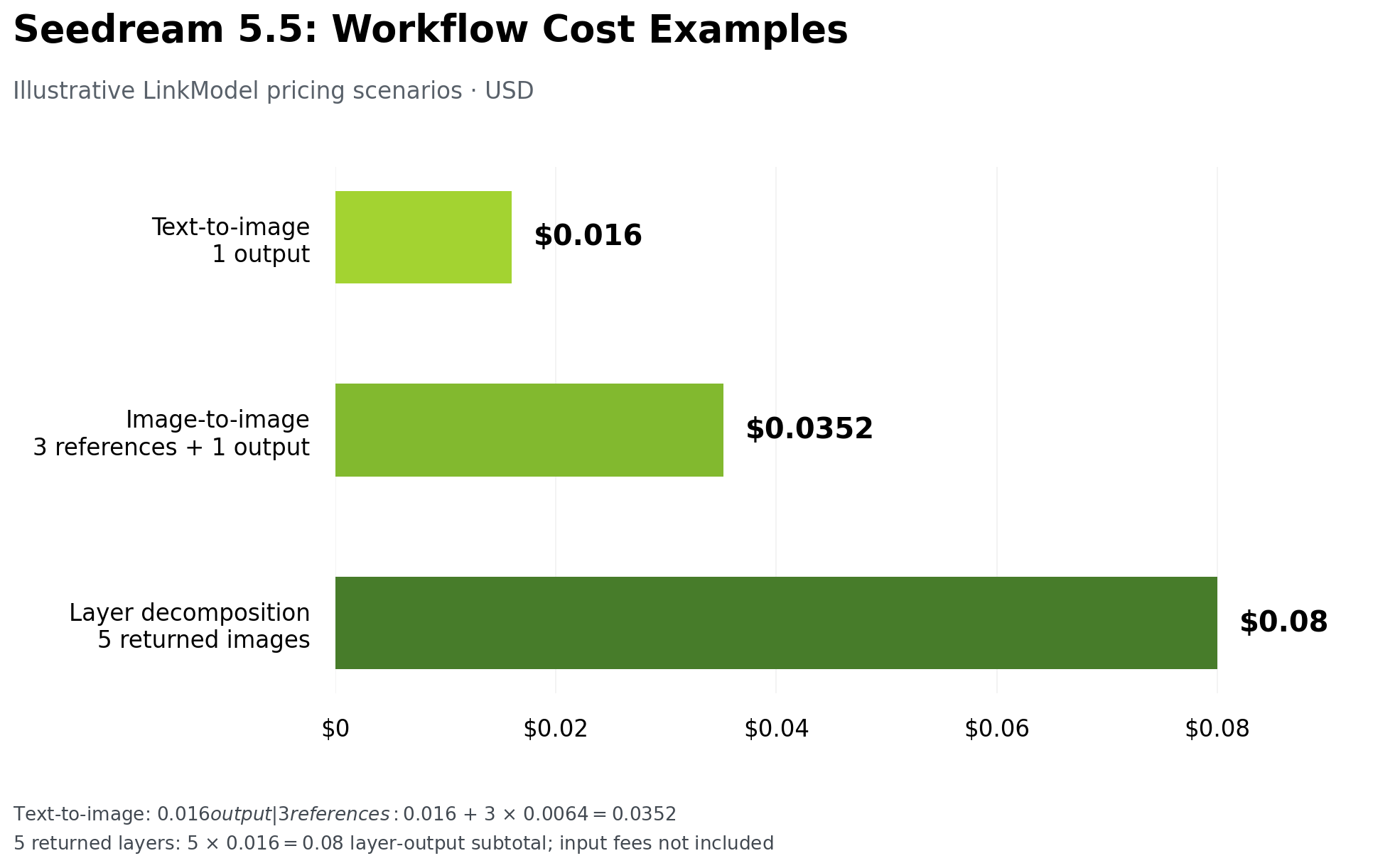
For a simple text-to-image application, the output-price difference may be sufficient to choose Seedream 5.5.
For a workflow involving many references or layers, the full operation cost is more important.
For repeated editing, output quality also affects how often another revision is needed.
Why Cost per Usable Image Matters
A lower generation price does not automatically guarantee a lower final production cost.
A practical measure is:
Cost per usable image = Total billable image expenses ÷ Number of accepted final images
Consider a hypothetical project requiring 100 approved images.
If one workflow produces 125 billable outputs while another needs 160, their actual production costs will differ even when nominal output prices are identical.
Editing stability, text accuracy, and reference consistency can influence how much reworking is required.
The available public evidence does not establish a universal retry-rate difference between Seedream 5.5 and Seedream 5.0 Pro.
Nevertheless, Seedream 5.5's lower listed output charges and stronger official editing results make it a compelling option for production workflows.
Start With Seedream 5.5 on LinkModel
LinkModel offers Seedream 5.5 from $0.016 per standard-tier output, with pay-as-you-go billing and no mandatory monthly subscription.
New users automatically receive $1 in free Credits without a credit card or upfront deposit.
At $0.016 per output, that starting balance can cover up to 62 standard-tier, reference-free images without additional layer charges.
The promotional Credits do not expire and can be used across available models.
For readers comparing the two Seedream versions, the Seedream 5.5 model page provides a direct starting point, while LinkModel Pricing provides the current model rates.
Seedream 5.5 vs Seedream 5.0 Pro: Best Real-World Use Cases
Choosing the better model depends on the production requirement.
Our research indicates that Seedream 5.5 is especially attractive for long editing sequences, text-heavy graphics, transparent assets, and high-volume image generation.
Seedream 5.0 Pro remains relevant for stable, established workflows that do not need the newer capabilities.
| Production task | Recommended model | Main reason |
|---|---|---|
| E-commerce campaign variations | Seedream 5.5 | Stronger editing consistency |
| Photorealistic marketing visuals | Seedream 5.5 | Improved realism |
| Long character-editing sequences | Seedream 5.5 | Better preservation across turns |
| Dense multilingual graphics | Seedream 5.5 | Improved text accuracy |
| Complex layered compositions | Seedream 5.5 | Up to 99 additional layers |
| Transparent asset generation | Seedream 5.5 | Native RGBA flexibility |
| Existing localized editing workflow | Either | Depends on established results |
| Established projects using up to 16 layers | Either | Migration may offer limited benefit |
| High-volume standard image generation | Seedream 5.5 | Lower comparable output prices |
Best for E-Commerce and Marketing
Seedream 5.5 is preferable when products must remain visually consistent across multiple backgrounds, lighting setups, or promotional variations.
Its lower output charges also improve the economics of generating large numbers of creative alternatives.
Best for Character Design and Visual Storytelling
Seedream 5.5 is particularly attractive for characters and environments that require repeated revisions.
However, character identity should still be evaluated independently from pose accuracy and general prompt adherence.
Best for Infographics and Design Assets
Seedream 5.5 is the stronger choice for dense text, transparent materials, high layer counts, and reusable design components.
Seedream 5.0 Pro remains a practical option for simpler, well-established graphic workflows.
Seedream 5.5 vs Seedream 5.0 Pro: Which Should You Choose?
Choose Seedream 5.5 for most new image-generation projects. Its official improvements in realism, iterative editing, small-text rendering, and asset-generation flexibility make it the stronger overall model.
Its lower listed output charges on LinkModel further strengthen the case for new projects.
However, switching is not automatically necessary for every existing Seedream 5.0 Pro application.
When Seedream 5.5 Is the Better Choice
Seedream 5.5 is particularly valuable when your project requires:
- Many successive image edits.
- Consistent product or character details across variations.
- Native transparent text-to-image outputs.
- Complex compositions with more than 16 additional layers.
- Rich-text extraction from visual assets.
- Lower output costs for new high-volume workflows.
These requirements align closely with the model's documented improvements.
When Seedream 5.0 Pro Is Still Worth Keeping
Seedream 5.0 Pro remains a reasonable choice when an existing workflow already produces reliable, accepted results.
Both models support up to ten reference images, precision-oriented editing, and layer decomposition.
Seedream 5.0 Pro can also separate a base image and up to 16 additional layers.
If your project does not require native text-to-RGBA generation, expanded layer capacity, or extensive multi-turn editing, the benefits of switching may be limited.
Migration may require updating integration settings, checking output consistency, and reviewing existing design processes.
For established production environments, those considerations matter alongside generation prices.
The strongest reason to upgrade is a clear improvement in the tasks your workflow actually performs, not simply the existence of a newer model.
Seedream 5.5 vs Seedream 5.0 Pro API: Features and Access
Both models support API-based image generation and editing.
For developers, the main considerations are model capabilities, required inputs, output formats, and the functions exposed by the selected provider.
Seedream 5.5 Technical Specifications
| Specification | Seedream 5.5 |
|---|---|
| LinkModel API Model ID | seedream-5.5 |
| Input | Text and reference images |
| Main generation modes | Text-to-image and image-to-image |
| Official resolution presets | 1K, 1.5K, 2K |
| Maximum reference images | 10 |
| Native RGBA | Supported |
| Layer decomposition | Up to 99 layers plus one base image |
| Rich-text OCR | Supported in the official feature set |
Seedream 5.5 is available through LinkModel under the API model ID seedream-5.5. Developers should use this identifier when submitting image-generation requests through LinkModel's API.
The official feature set supports advanced image editing and asset-generation workflows, although specific operations should be selected according to the functions exposed by the relevant API interface.
Why API Implementation Matters
Our review of user questions identified several recurring concerns about image-model integrations.
These include differences in pricing, advanced editing access, returned output formats, and content restrictions.
The documented Seedream 5.0 Pro layer-separation case illustrates why an interface may not expose every capability of its underlying model.
Similarly, reports of different content-restriction behavior across providers do not establish that one platform universally changes the model's restrictions.
For developers, the practical question is whether the selected integration supports the desired task and returns the required output structure.
How to Access Seedream 5.5 Through LinkModel
The Seedream 5.5 model page on LinkModel provides dedicated Playground and API entry points.
Users can explore text-to-image or image-to-image generation and review available resolution options and model information.
For developers building applications, LinkModel provides usage-based model access through its unified platform, alongside other supported image, video, and language models.
To get started, open the Seedream 5.5 model page, select the API tab, and use seedream-5.5 as the model ID. LinkModel provides usage-based access starting at $0.016 per standard-tier output image, with no mandatory monthly subscription. Developers can follow the documented task-submission and status-polling workflow to retrieve generated images.
Frequently Asked Questions
Is Seedream 5.5 better than Seedream 5.0 Pro?
Yes, Seedream 5.5 is the stronger overall model according to ByteDance's official comparative evaluations. It offers improved image realism, more stable iterative editing, better small-text rendering, and expanded native RGBA and layer features. Seedream 5.0 Pro remains capable for established precision-editing workflows.
Is Seedream 5.5 cheaper than Seedream 5.0 Pro?
Yes, for several matching output specifications on LinkModel. At 1536 × 1536, Seedream 5.5 costs $0.016 per output compared with $0.045 for Seedream 5.0 Pro, a reduction of approximately 64.4%. At 2048 × 2048, the respective prices are $0.028 and $0.09. Input images and returned layers can add charges.
Can Seedream 5.5 preserve characters and backgrounds better?
Seedream 5.5 improves preservation of unedited image regions and includes an official demonstration of 100 successive edits. This makes it particularly attractive for repeated product, background, and character modifications. Character identity preservation remains a separate quality consideration and should be assessed for the specific task.
Does Seedream 5.5 support transparent images and layers?
Yes. Seedream 5.5 supports native RGBA generation and up to 99 additional decomposed layers plus one base image. Seedream 5.0 Pro supports up to 16 additional layers and a more limited transparent image-to-image workflow. Seedream 5.5 also includes rich-text OCR in its official capabilities.
Is Seedream 5.5 more restricted than Seedream 5.0 Pro?
There is insufficient consistent comparative evidence to establish that Seedream 5.5 is universally more restrictive. Reported behavior differs across tasks and provider interfaces. Developers should review the functionality and applicable content requirements of their selected service.
Conclusion
Seedream 5.5 is the better overall choice than Seedream 5.0 Pro in 2026, particularly for repeated image editing, photorealistic generation, dense text layouts, and reusable transparent assets. Its stronger official evaluation results, 100-round editing demonstration, expanded RGBA support, and ability to decompose images into up to 99 additional layers make it a meaningful upgrade for professional visual workflows. Seedream 5.0 Pro remains suitable for established projects that already produce reliable results and do not require these additional capabilities. For new projects, Seedream 5.5 combines stronger functionality with a substantial output-price advantage: on LinkModel, matching standard images start at $0.016 instead of $0.045. This makes the newer model a compelling option for creators and developers who want better editing control, more flexible image production, and lower generation costs.