GPT Image 2.6 API pricing starts at $30 per million image output tokens on OpenAI, with identical published rates for Sunburst and Flare. Through November 30, 2026, LinkModel charges 65% of OpenAI's standard rates, bringing image output pricing to $19.50 per million tokens and saving $10.50 per million. But how much does one image actually cost? That depends on quality, dimensions, reference images, and billable token usage.
OpenAI's plan to merge ChatGPT and Codex usage allowances for Plus, Pro, and Business subscribers in December 2026 has added to concerns about the cost of using AI. The move has drawn criticism from users who worry that sharing usage limits across two services could reduce the value of their subscriptions, with some even considering cancellation. For developers and content teams producing images at scale, the debate raises a broader question: How can they keep AI production costs predictable without paying more than necessary? Although subscription limits and API billing are separate, both make the economics of regular AI usage increasingly important.
For developers seeking greater control over their GPT Image 2.6 API spending, LinkModel offers a concrete alternative to OpenAI's standard API rates: 35% lower promotional token pricing through November 30, 2026. It also provides pay-as-you-go access, $0 minimum spend, $0 monthly platform fee, unified billing, and a Playground for supported models.
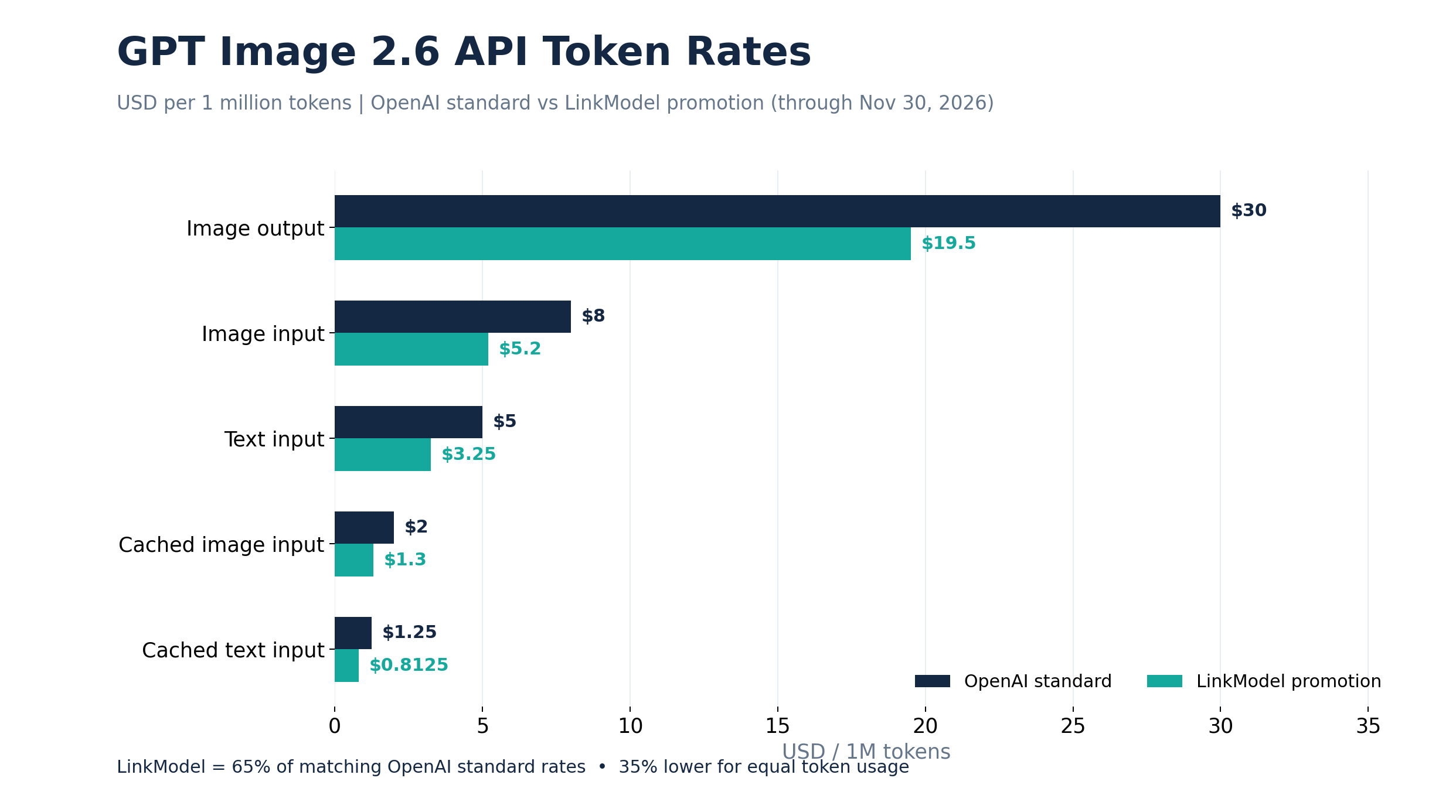
GPT Image 2.6 API Pricing: OpenAI vs LinkModel
GPT Image 2.6 offers two API models: Sunburst for detailed visual creation and consistent editing, and Flare for fast generation and interactive iteration. Both variants share the same published OpenAI token rates.
Official GPT Image 2.6 Token Pricing
| Billing category / 1M tokens | OpenAI | LinkModel promotion | Savings |
|---|---|---|---|
| Text Input | $5.00 | $3.25 | $1.75 |
| Cached Text Input | $1.25 | $0.8125 | $0.4375 |
| Image Input | $8.00 | $5.20 | $2.80 |
| Cached Image Input | $2.00 | $1.30 | $0.70 |
| Image Output | $30.00 | $19.50 | $10.50 |
LinkModel's promotional rates are calculated at 65% of the corresponding OpenAI standard rates through November 30, 2026.
For image-generation-heavy workloads, the clearest comparison is image output pricing.
At identical usage, one million image output tokens cost $30 through OpenAI versus $19.50 through LinkModel. At ten million tokens, those charges become $300 and $195, producing $105 in savings.
What Are You Actually Paying For?
GPT Image 2.6 pricing includes three main types of usage.
Text input: Processing written instructions, including the subject, style, composition, colors, and editing requirements.
Image input: Processing uploaded photographs, reference images, and images supplied for editing.
Image output: Generating the resulting image content.
Eligible cached inputs are charged at their corresponding cached rates.
Consequently, a text-to-image request and a multi-round product photo editing workflow may have different bills even when they use the same model.
Importantly, $30 per million image output tokens does not mean $30 per image. The individual image cost depends on the number of billable tokens used.
How Much Does GPT Image 2.6 Cost Per Image?
GPT Image 2.6 has no universal fixed per-image price across every quality level and resolution. A useful estimate starts with image output costs, then adds applicable text input, image input, and other billable components.
Estimate Image Cost by Quality and Size
OpenAI provides a GPT Image 2.6 image output cost calculator in its official Image Generation Guide.
To estimate a particular output:
1. Open the OpenAI Image Generation Guide and locate Calculating costs under Cost and latency.
2. Select GPT Image 2.6 (Sunburst and Flare).
3. Choose a quality level: low, medium, high, xhigh, or max.
4. Enter the desired dimensions, such as 1024 pixels wide by 1024 pixels high.
5. Review the estimated image output tokens and OpenAI output cost.
Suppose the calculator estimates $0.12 in image output charges. Under LinkModel's promotional rate, the same output token quantity costs:
LinkModel output cost = $0.12 × 0.65 = $0.078.
The difference is $0.042 for the output component.
The calculator estimates image output rather than necessarily including every input charge. Actual token usage may also differ from the estimate.
GPT Image 2.6 Cost Formula
For requests without cached inputs:
Total cost = (Text input tokens × text input rate + Image input tokens × image input rate + Image output tokens × output rate) / 1,000,000
Consider a text-to-image request using 100 text input tokens and 2,000 image output tokens.
| Cost component | OpenAI | LinkModel |
|---|---|---|
| Text Input | $0.000500 | $0.000325 |
| Image Output | $0.060000 | $0.039000 |
| Total | $0.060500 | $0.039325 |
For the same token usage, LinkModel's promotional rates reduce the cost of this request by 35%.
The 2,000 image output tokens are an illustrative calculation input, not a guaranteed token count for a particular image dimension.
Bulk Image Generation: 100, 500, and 1,000 Requests
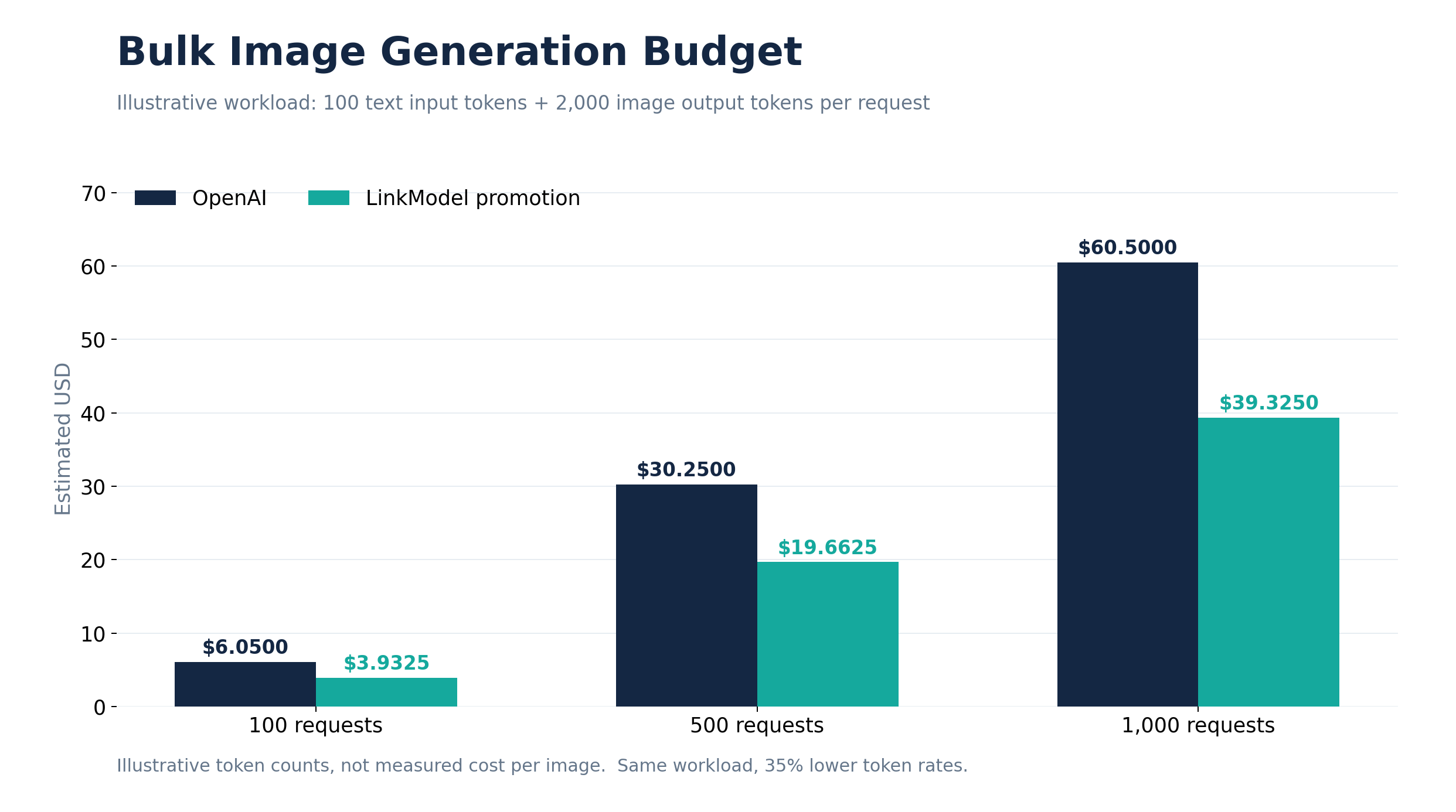
Assume every request has the same token consumption as the example above, without additional charges.
| Generation requests | OpenAI | LinkModel | Savings |
|---|---|---|---|
| 100 | $6.0500 | $3.9325 | $2.1175 |
| 500 | $30.2500 | $19.6625 | $10.5875 |
| 1,000 | $60.5000 | $39.3250 | $21.1750 |
For e-commerce imagery, blog illustrations, social media graphics, and advertising assets, the total budget depends on more than the planned number of finished images.
A project requiring 500 approved images may need more than 500 generation requests if some outputs need revisions or regeneration.
Budgeting should therefore account for both request volume and final usable assets.
GPT Image 2.6 Sunburst vs Flare: Which Should You Choose?
Flare is the natural starting point for evaluating rapid creative iteration, while Sunburst is worth prioritizing for detailed visual work and consistent multi-round editing. Their token rates are identical, but total task costs can differ with token consumption and editing requirements.
OpenAI reports that Images 2.6 generates images approximately 50% faster than before. At low quality, Flare can produce an image in as little as six seconds. These are published performance figures, not guaranteed response times for every API request.
Flare: Fast Generation and Professional Layouts
Flare is designed for quickly generating drafts, adjusting layouts, and exploring multiple visual directions.
Consider a marketing team planning 20 poster concepts for a new product.
During early exploration, the team needs to compare backgrounds, product placement, color schemes, and headline layouts rather than render every draft at maximum detail.
Flare is worth evaluating first for this stage. OpenAI also highlights improvements in posters, product imagery, and professional layouts.
For social graphics, advertising concepts, and commercial design drafts, response speed and layout quality are useful selection criteria.
Sunburst: Detailed Creation and Editing Consistency
Sunburst focuses on detailed image generation and editing workflows where preserving visual consistency matters.
For example, a brand team might create a character and then change its clothing, props, and background across several images.
If each edit unexpectedly changes facial features, proportions, or essential brand details, additional revisions may be required.
OpenAI emphasizes Sunburst's editing consistency at medium and high quality settings. This makes it a strong candidate to evaluate for recurring brand characters, complex product imagery, and detailed iterative edits.
Sunburst vs Flare Comparison
| Factor | Flare | Sunburst |
|---|---|---|
| Primary positioning | Fast iteration | Detailed creation and editing |
| Early advertising drafts | Prioritize evaluation | Supported |
| Complex visual details | Evaluate by task | Core positioning |
| Multi-round editing | Supported | Stronger focus on consistency |
| Official token rates | Identical | Identical |
| LinkModel promotion | 35% lower | 35% lower |
| Actual image cost | Depends on usage | Depends on usage |
The right decision is not simply which model responds faster. It also depends on output quality, revision frequency, and total spending required to produce acceptable results.
GIF, SVG, and Image Editing: What Do the New Features Cost?
GPT Image 2.6 supports animated GIFs, SVG output, and markup-guided editing. These capabilities extend what developers can create, but their request formats, constraints, and cost components differ.
Animated GIF Generation and Pricing
GPT Image 2.6 can create animated GIFs through the Images API. Developers select GIF as the output format and control the animation's frame count and duration.
| Setting | Supported values |
|---|---|
| Output format | GIF |
| Frame count | 2–64 |
| Frame duration | 20–2000 milliseconds |
| Default frame count | 9 |
| Default frame duration | 200 milliseconds |
For example, a nine-frame animation at 200 milliseconds per frame lasts 1.8 seconds.
Possible applications include animated brand mascots, social media stickers, product illustrations, and storyboards.
OpenAI's launch materials include a six-frame cartoon office worker animation. The character reacts sadly to a declining chart and celebrates a rising one, illustrating how a sequence of frames can communicate motion and emotion.
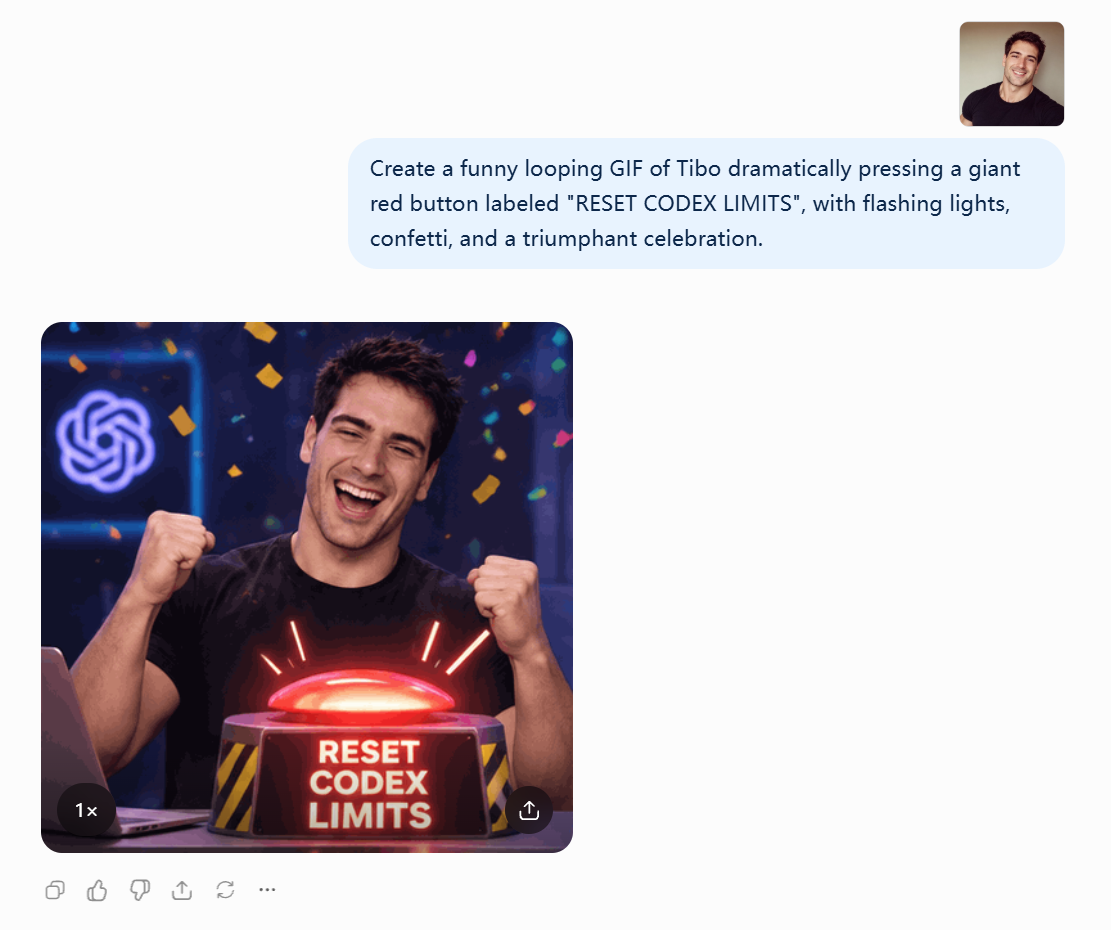
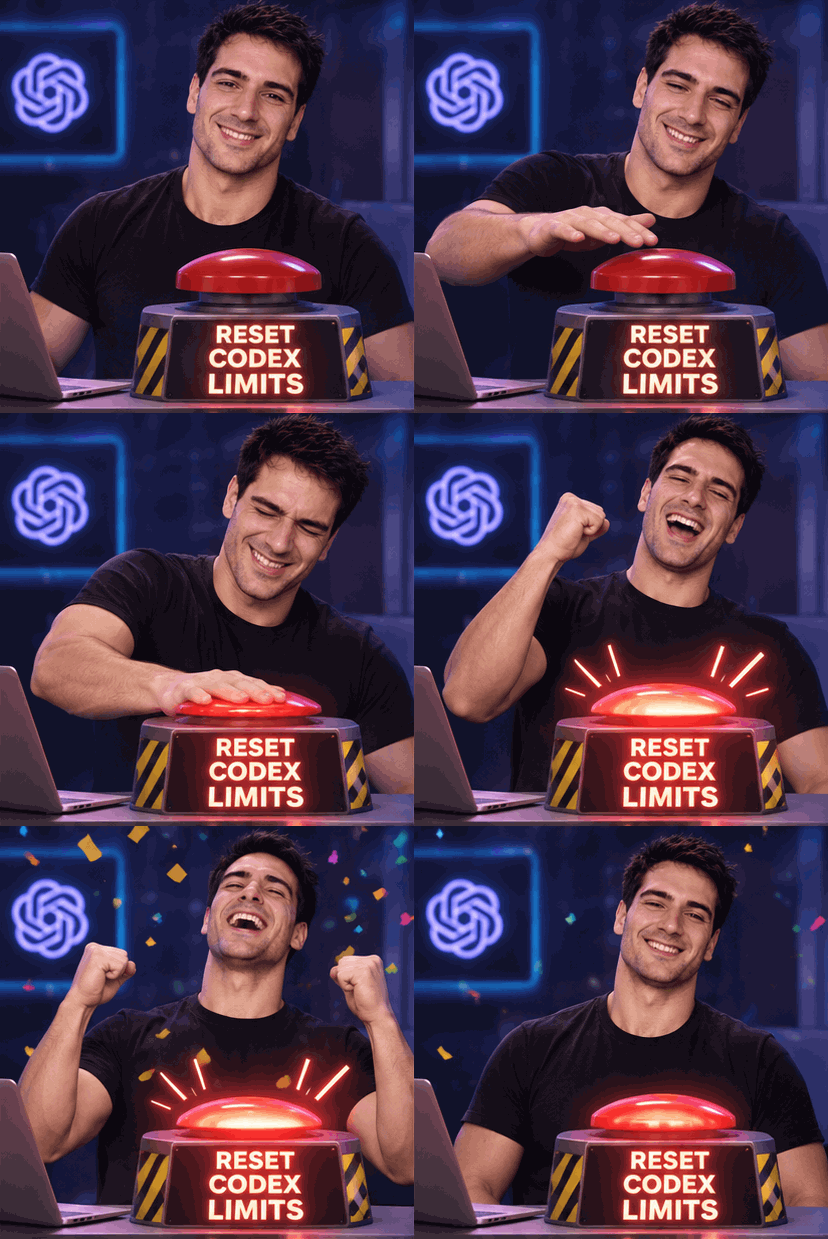
GIF generation does not have one fixed price that applies to every animation.
The request is billed according to its applicable token usage. Frame count, frame dimensions, and the number of animations must also stay within API size and pixel-budget limits.
Suppose a GIF request produces 10,000 billable image output tokens:
| Image output charge | OpenAI | LinkModel |
|---|---|---|
| 10,000 tokens | $0.30 | $0.195 |
At the same token usage, LinkModel saves $0.105 on the output component.
This is a calculation for a specified token quantity, not a claim that every nine-frame GIF uses 10,000 tokens.
GIF output is available through image generation rather than the image edit endpoint. It also does not support streaming or partial-image previews.
SVG Output and Its Cost Structure
GPT Image 2.6 supports SVG generation for icons, logo concepts, decorative graphics, and scalable design assets.
SVG represents graphics through vector structures, allowing compatible applications to edit paths, shapes, and colors.
OpenAI documents a two-stage process: an image model generates a reference image, then an authoring model produces the final SVG content.
Therefore, SVG costs include the reference image model's charges and the authoring model's token usage.
The SVG workflow also has important limitations: one SVG per request, no streaming or partial-image previews, and no direct SVG output from the image edit endpoint.
When evaluating whether SVG generation is economical, designers should consider both billing stages and whether the resulting vector file meets their editing requirements.
Markup-Guided Image Editing
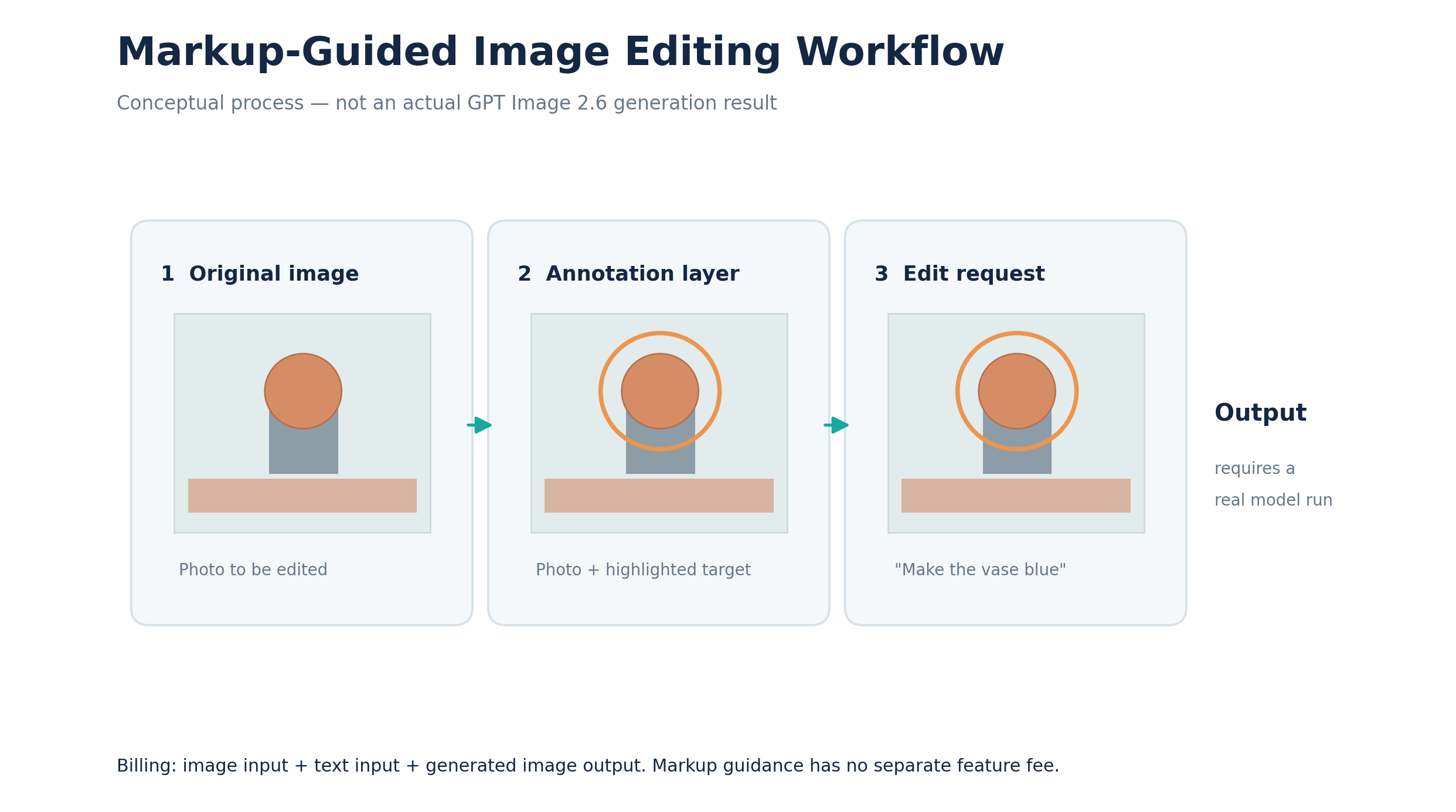
Markup-guided editing lets developers indicate exactly which part of an image they want changed.
For example, a designer can circle a vase in a kitchen photograph and request a blue replacement while preserving the surrounding room and lighting.
The workflow uses the original image, a transparent PNG annotation layer, and a written instruction.
It is useful for product photography, interior visualization, advertising revisions, and collaborative visual feedback.
Markup-guided editing has no separate feature charge. Applicable text input, image input, and image output tokens are billed at their corresponding rates.
How to Reduce GPT Image 2.6 API Costs
Reducing production spending requires more than choosing a lower token rate. Developers should also limit unnecessary regeneration, manage preview costs, and improve the proportion of usable outputs.
Quality, Complexity, and Caching
GPT Image 2.6 offers low, medium, high, xhigh, and max quality options.
These primarily affect rendering quality, and the official calculator helps estimate the related image output usage.
Separately, Sunburst and Flare support low, medium, and high complexity settings, with high as the default.
Complexity controls how much planning the model performs before rendering, rather than serving as another name for image quality.
A simple localized edit may suit lower complexity, while a dense layout with multiple objects and detailed typography may benefit from higher complexity.
OpenAI states that adjusting complexity has no separate feature fee, although it may affect latency and results.
Both models also publish cached text and image input rates. Actual cache eligibility depends on the relevant API path and conditions; uploading the same image repeatedly does not automatically qualify every request for cached pricing.
Streaming Preview Costs
For interfaces displaying intermediate previews during generation, the Images API supports partial images.
OpenAI specifies 100 additional image output tokens for each returned partial image.
| One partial preview | OpenAI | LinkModel |
|---|---|---|
| Additional output tokens | 100 | 100 |
| Additional cost | $0.003 | $0.00195 |
If two partial previews are returned, the corresponding additional output charges are $0.006 and $0.0039.
This may be a small amount per request, but preview-heavy applications should include it in their total budget.
Cost per Accepted Image
For production teams, the final cost includes all relevant paid requests required to obtain acceptable assets.
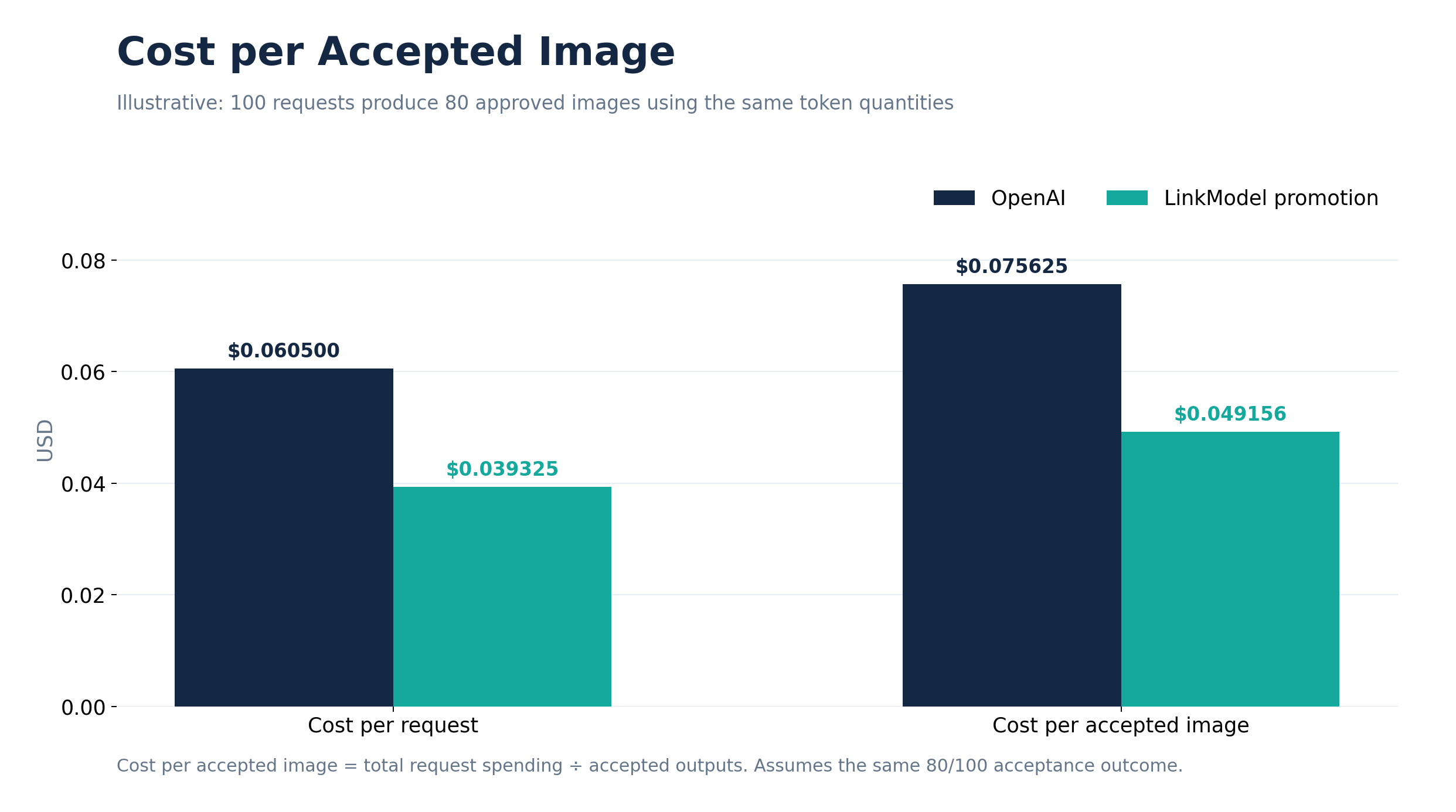
Cost per accepted image = Total relevant request spending / Number of accepted final images
Using the earlier request prices of $0.0605 on OpenAI and $0.039325 on LinkModel, suppose 100 requests produce 80 accepted images.
| Metric | OpenAI | LinkModel |
|---|---|---|
| Generation requests | 100 | 100 |
| Accepted images | 80 | 80 |
| Total request spending | $6.0500 | $3.9325 |
| Cost per accepted image | $0.075625 | $0.04915625 |
Cost per accepted image is often more useful than the initial request price because it reflects the goal of delivering usable creative work.
Developers can track revision rounds, acceptance rates, and token consumption for each model to decide which workflow fits their budget.
Why Consider LinkModel for GPT Image 2.6?
LinkModel combines competitive promotional token rates with pay-as-you-go access, unified billing, and support for managing multiple AI models. Developers can compare OpenAI's direct API route with LinkModel's lower promotional rates and check the LinkModel model catalog for current model access.
35% Lower Token Costs for Matched Usage
Through November 30, 2026, LinkModel charges 65% of the corresponding OpenAI standard rates for GPT Image 2.6.
For matched image output token usage, the price drops from $30 to $19.50 per million tokens.
This lets bulk image producers translate the rate difference directly into their token-based budgets without changing the underlying calculation method.
Pay-as-You-Go and Unified Model Management
LinkModel provides $0 minimum spend and $0 monthly platform fee, without requiring a recurring platform subscription.
Developers can manage supported text, image, and video models through one platform and use consolidated billing to organize spending across AI workloads.
Its Playground also offers an entry point for evaluating supported models.
For teams working across image, text, and other AI content tasks, this approach can simplify model and budget management.
A Practical Budgeting Workflow
Suppose a team plans to create 500 marketing images.
First, determine the desired image quality and dimensions, then use the official calculator to estimate image output costs per request.
Next, apply LinkModel's promotional rates to equivalent token usage and add expected reference-image input and editing charges.
Finally, divide the project's budget by the expected number of approved images to estimate the cost per usable deliverable.
This makes API pricing a practical production decision rather than simply a comparison of advertised rates.
Frequently Asked Questions
How much does GPT Image 2.6 API cost?
OpenAI lists identical rates for Sunburst and Flare: $5 per million text input tokens, $8 per million image input tokens, and $30 per million image output tokens. During LinkModel's promotion, the corresponding prices are 65% of these standard rates, including $19.50 per million image output tokens.
Where can I access GPT Image 2.6 API?
Developers can access GPT Image 2.6 through OpenAI's API and compare access through LinkModel's model catalog. OpenAI publishes the Sunburst and Flare model IDs; check the current LinkModel catalog for available models and their supported API options.
Is Sunburst more expensive than Flare?
Their published token rates are identical, but token consumption and editing requirements can differ. Flare focuses on fast iteration, while Sunburst emphasizes detailed creation and editing consistency.
How much does GPT Image 2.6 GIF generation cost?
GIFs are billed according to the request's actual token usage rather than one fixed per-GIF fee. For example, 10,000 image output tokens cost $0.30 on OpenAI or $0.195 at LinkModel's promotional rate, before any additional input charges.
Is LinkModel cheaper than OpenAI for GPT Image 2.6?
Yes. Through November 30, 2026, LinkModel's promotional rates are 35% lower than OpenAI's published standard token rates. For example, image output costs $19.50 instead of $30 per million tokens at matched usage. This comparison covers these two pricing routes; it does not establish the lowest price across all providers.
Research methodology (reviewed November 5, 2026): Official token rates and model features are based on OpenAI's published model documentation and image generation guide. LinkModel figures apply the confirmed promotional multiplier of 0.65 to the corresponding OpenAI rates. Per-image, GIF, bulk-request, and acceptance-rate examples are calculations using stated token assumptions, not measured API bills.
Conclusion
GPT Image 2.6 Sunburst and Flare share identical official token rates, but actual image costs depend on quality, dimensions, reference images, editing rounds, and output token usage. For developers creating static images, animated GIFs, SVG assets, or repeatedly edited commercial visuals, using the official calculator and tracking cost per accepted image offers a more useful budgeting approach than looking only at the cost of a single request. Through November 30, 2026, LinkModel provides 35% lower promotional token rates, combining the price advantage with pay-as-you-go access and unified model management to help teams plan image production more predictably.