Is Seedream 5.5 free? You can try Seedream 5.5 through official ByteDance platforms such as Dreamina, Doubao, and Volcano Engine, or use LinkModel's $1 signup Credits for eligible Seedream 5.5 generation without paying upfront. However, unlimited free generation is not guaranteed: official access depends on platform-specific benefits, while LinkModel's free experience is limited by its signup credit balance. Dreamina also offers a separate 30-day unlimited-generation promotion that requires an eligible paid subscription.
The real question is how many usable images you can create before paying. Free access, signup Credits, and subscription-based unlimited generation are different benefits. For example, $1 in LinkModel signup Credits can cover up to 62 standard-tier Seedream 5.5 output images at $0.016 each, provided no separately billed inputs or additional output layers are involved. If you need repeated edits, transparent product assets, or text-heavy marketing images, understanding the actual generation cost matters just as much as image quality.
For creators looking to try Seedream 5.5 without paying upfront, LinkModel offers Seedream 5.5 image generation starting at $0.016 per output image, 20% below the listed official $0.020 rate for the same pixel tier. New users automatically receive $1 in free Credits, enough for up to 62 standard-tier images or approximately 44 single-reference edits under the listed rates. There is no credit card requirement, minimum deposit, or monthly platform fee. With a unified Playground and pay-as-you-go pricing, LinkModel provides a practical way to explore Seedream 5.5 before spending your own money.
Is Seedream 5.5 Free? Official Access and Free-Use Conditions
Seedream 5.5 can be explored through ByteDance's official platforms, but there is no publicly confirmed universal daily free-generation allowance for every user. Access to the model and the ability to generate images without paying are two different things.
Released on November 9, 2026, Seedream 5.5 introduces more stable multi-turn editing, native RGBA transparency, more realistic materials and lighting, and improved text rendering.
For anyone searching for Seedream 5.5 free, the first step is to identify which official platform provides the model and whether the account has a benefit that covers the requested generation.
Where Can You Actually Try Seedream 5.5?
ByteDance provides official Seedream 5.5 access through its supported products and developer services. LinkModel offers an additional third-party route, with pay-as-you-go Seedream 5.5 generation and $1 in automatic signup Credits for new users.
| Platform | Access route | What to check | Best suited for |
|---|---|---|---|
| Dreamina | Web AI Image and Canvas | Model availability, credits, membership benefits | Consumer image creation |
| Doubao | App and web image generation | Whether Seedream 5.5 appears in the model selector | Everyday AI image generation |
| Doubao Work | Skills and supported workflows | Model availability and access conditions | Workflow-based creation |
| Volcano Engine | Visual model experience center | Model access, API settings, and billing | Developers and businesses |
| LinkModel | Third-party Playground and API / $1 signup Credits; from $0.016 per standard-tier output | Current model listings and displayed prices | Exploring supported AI models with flexible billing |
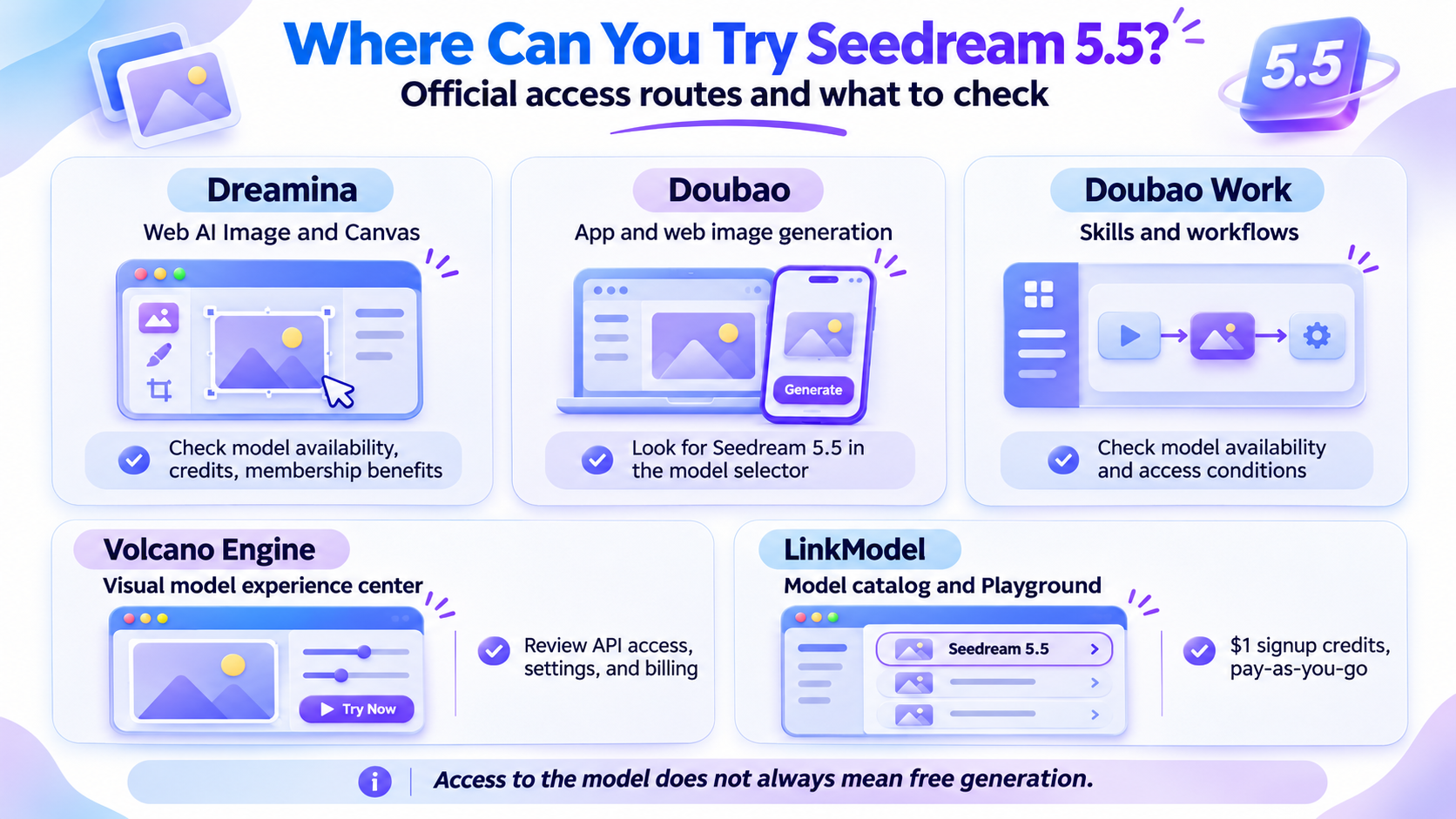
Important: an official model entry point does not automatically guarantee free generations. A platform may allow you to open the model interface while requiring credits or a paid benefit to submit an image-generation request.
Dreamina's consumer membership benefits also operate separately from developer API packages. A free account, promotional generation credits, and a paid subscription with unlimited-generation benefits should not be treated as interchangeable.
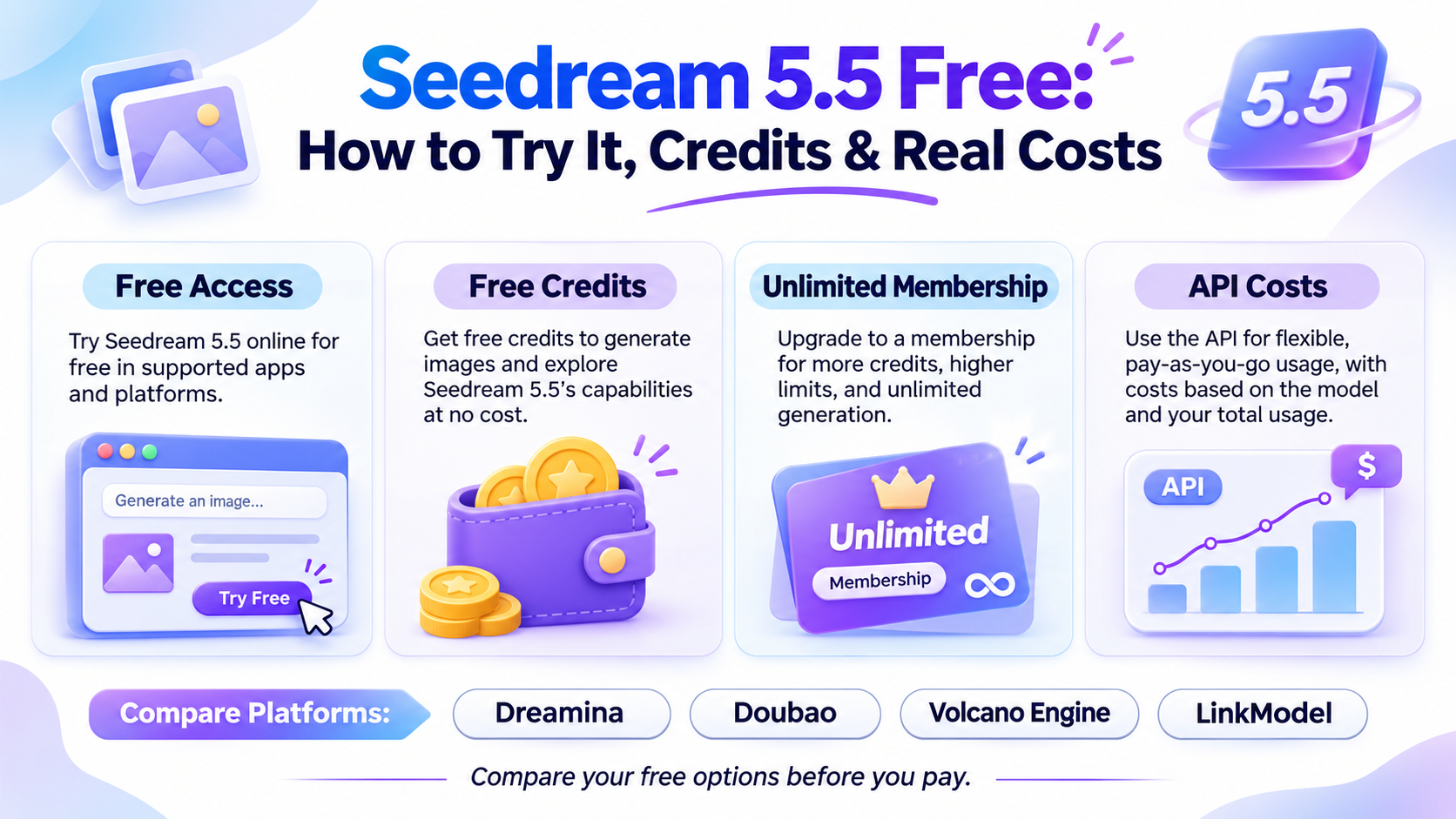
Free Account vs. Free Credits vs. Unlimited Generation
The difference between these access types determines whether you actually need to pay. A third-party signup credit is another practical route: eligible new LinkModel users receive $1 in Credits that can be used for Seedream 5.5 generation at the platform's published rates. This provides a limited free starting balance rather than permanently free generation or an unlimited membership.
| Access type | What it provides | Does it guarantee free Seedream 5.5 images? |
|---|---|---|
| Free account | Access to a platform interface | No |
| Eligible free credits | A balance that can cover supported generation requests | Only within the available allowance |
| Unlimited membership benefit | Covered generations without individual credit deductions | Requires an eligible paid subscription |
| Developer API | Automated generation through supported endpoints | Depends on API pricing and account benefits |
For example, you may register for a creative platform without entering payment information but still discover that generating with Seedream 5.5 requires credits.
A qualifying Dreamina membership is different: it can provide 30 days of covered unlimited generation, even though the membership itself has a purchase price.
The practical test is whether the selected model and generation settings are covered by your account's available benefits.
How to Try Seedream 5.5 for Free: Official and Third-Party Options
To check whether you can generate Seedream 5.5 images without paying, sign in to an official platform, select the exact model, and inspect the generation cost before submitting your request. If eligible free benefits cover the request, you can proceed without an additional purchase.
Try Seedream 5.5 Through Dreamina
Dreamina is a useful starting point for consumers who want to explore Seedream 5.5.
Follow these steps:
- Open Dreamina and sign in.
- Enter the AI Image workspace.
- Open the model selector.
- Select Seedream 5.5 if it is available to your account.
- Choose the image dimensions and other supported settings.
- Check the displayed credit requirement or membership benefit.
- Generate an image if your account has an eligible free allowance.
For your first image generation, choose a scene with several materials and lighting conditions. This makes it easier to assess the model's visual quality in a single image.
Example prompt: Realistic café photography
A candid editorial photograph inside a small European café on a rainy evening. Warm pendant lights illuminate wooden tables, ceramic cups, and clear drinking glasses. Cool blue light enters through rain-covered windows. Natural materials, realistic reflections, subtle film grain, believable perspective, documentary photography, horizontal composition.
ByteDance's official gallery includes a related bistro scene featuring glasses, breadcrumbs, worn furniture, and warm evening lighting.
This type of prompt is useful for examining material detail, reflections, natural lighting, and photographic atmosphere.
Explore Seedream 5.5 Through Doubao
ByteDance also lists Doubao App and web as official Seedream 5.5 access channels.
The model selector and available features may vary by account and platform version.
To check access:
- Open Doubao.
- Enter the image-generation interface.
- Look for Seedream 5.5 in the available model options.
- Review the generation settings and any displayed credit requirement.
- Submit a request only after confirming the applicable cost.
If the model is not listed, do not assume that another image-generation model in the same interface uses Seedream 5.5.
Example prompt: Interior image editing
Replace the wooden chair beside the desk with a forest-green velvet armchair. Preserve the bookshelf, window, wall texture, floor, existing shadows, camera angle, and overall room layout. Change no other objects.
This prompt has one clear objective and specifies what should remain unchanged.
It is useful for evaluating whether an image-editing model can make a targeted change without unnecessarily altering the rest of the composition.
Explore Seedream 5.5 Through Volcano Engine
Volcano Engine provides a developer-oriented route for exploring supported Seedream models.
Open the official visual model experience center, locate Seedream 5.5, and inspect the available generation settings.
Before submitting requests, check:
- The exact model identifier.
- Supported output resolutions.
- Available image-generation and editing functions.
- The displayed API pricing and account requirements.
Consumer account credits and developer API billing should be evaluated separately.
For developers planning automated image production, the API route is more relevant than a consumer membership because it provides an integration path for applications and production workflows.
How to Try Seedream 5.5 With LinkModel's $1 Free Credits
LinkModel provides a way for new users to try Seedream 5.5 using $1 in signup Credits instead of paying upfront. Unlike subscription-based unlimited-generation offers, LinkModel uses a pay-as-you-go pricing model.
At the currently displayed rates, Seedream 5.5 costs:
| Usage | LinkModel Price | Listed Official Price | Savings |
|---|---|---|---|
| Input image | $0.0064 | $0.008 | 20% |
| Standard output image | $0.016 | $0.020 | 20% |
| Higher-pixel output image | $0.028 | $0.035 | 20% |
With $1 in free Credits, a new user can theoretically generate up to 62 standard-tier images without reference inputs, 35 higher-pixel outputs, or 44 standard-tier edits using one separately billed input image per request.
Actual usage depends on output dimensions, input images, and the number of returned layers.
To get started:
- Create a LinkModel account and receive the automatic $1 signup Credits.
- Open the Playground and select Seedream 5.5.
- Review the displayed image-generation settings and pricing.
- Submit an initial generation request using the available Credits.
- Continue experimenting within the remaining balance.
The $1 signup benefit provides free initial usage, not permanently free API access. After the Credits have been consumed, additional generations use the platform's normal pay-as-you-go pricing.
A Practical First-Generation Strategy
Our review of Seedream 5.5's official demonstrations suggests that a targeted editing task is a useful way to evaluate the model.
Start with an image whose composition already meets most of your requirements. Then change one feature at a time.
For example, begin with a perfume bottle on a stone countertop.
First, evaluate the bottle's shape and lighting. Next, request a different label design. Then refine the background without changing the product's proportions.
Example editing prompt
Replace only the perfume bottle's paper label with an elegant cream label featuring understated dark-green typography. Keep the bottle shape, cap, reflections, stone countertop, lighting, and camera position unchanged.
This approach focuses each generation on one decision.
It is especially useful for evaluating a model designed to support repeated image editing rather than one-shot generation alone.
Seedream 5.5 Free Credits: Daily Limits and Actual Value
ByteDance's public Seedream 5.5 model page does not specify a universal daily free-credit allocation or refresh schedule. The actual number of free generations depends on the selected platform and the benefits available to your account.
The value of free credits depends on whether they cover the exact model and generation settings you want.
How Many Seedream 5.5 Images Can Free Credits Cover?
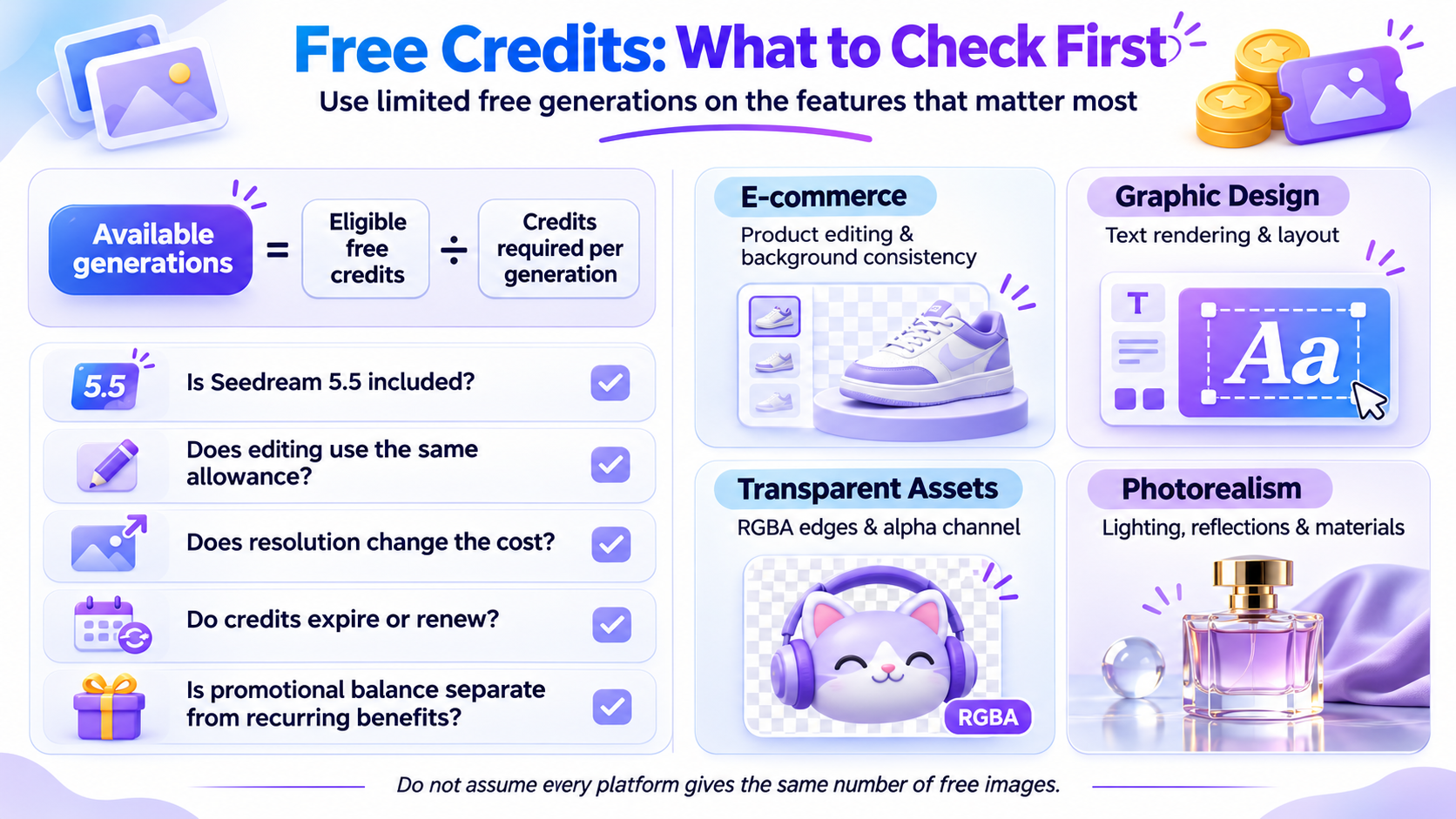
Where a platform charges credits per generation, the calculation is:
Available generations = Eligible free credits ÷ Credits required per generation
The important variable is the actual credit cost displayed by the platform.
What Can $1 in LinkModel Credits Generate?
At LinkModel's currently displayed Seedream 5.5 rates, $1 in signup Credits can cover a meaningful number of initial generations without requiring a payment card or an upfront deposit.
| Generation scenario | Cost per request | Maximum with $1 |
|---|---|---|
| Standard-tier output, no input image | $0.0160 | 62 images |
| Higher-pixel output, no input image | $0.0280 | 35 images |
| Standard-tier edit with one billed input | $0.0224 | 44 edits |
| Higher-pixel edit with one billed input | $0.0344 | 29 edits |
These calculations assume one output per request and no additional billable images or layers. Standard-tier outputs cover 921,600–2,601,123 pixels, while the higher-pixel tier covers 2,601,124–4,624,220 pixels.
The $1 signup benefit is enough for up to 62 standard-tier images under these conditions, not 62 images regardless of settings.
For example, a platform may offer a promotional balance that covers standard image generation but applies different charges to higher-resolution output or other generation modes.
A useful way to evaluate the benefit is to check:
- Whether Seedream 5.5 is included.
- Whether image editing consumes the same allowance.
- Whether output resolution changes the credit requirement.
- Whether the credits expire or renew.
- Whether a promotional balance is separate from recurring account benefits.
Do not assume that a large account balance translates into the same number of Seedream 5.5 images across all platforms.
Do Seedream 5.5 Free Credits Reset Every Day?
A universal daily refresh schedule has not been established across official Seedream 5.5 access channels.
Check three details in your account:
- Your current available balance.
- The renewal or expiration conditions.
- Whether the credits apply to Seedream 5.5 specifically.
One-time promotional credits and recurring daily allowances are different.
If the platform does not display a recurring benefit, do not plan future generations around an assumed daily reset.
Which Features Should You Prioritize With Limited Credits?
If you only have a small amount of free usage, test the features that matter most to your project first.
| Your project | What to test first | Why it matters |
|---|---|---|
| E-commerce | Product editing and background consistency | Determines whether revisions preserve the product |
| Graphic design | Text rendering and layout | Determines how much manual correction is needed |
| Transparent assets | RGBA edges and alpha channel | Determines whether outputs can enter a design workflow |
| Photorealism | Lighting, reflections, and materials | Determines whether images are suitable for commercial use |
| Creative editing | Multi-turn consistency | Determines whether previous work can be preserved |
For an online store, a realistic product image with a transparent background may be more valuable than several unrelated artistic experiments.
For a marketing team, text accuracy and consistent layouts may be the most important factors.
Use limited free generations to evaluate the capabilities that directly affect your final production cost.
Dreamina Seedream 5.5 Unlimited: Free Trial or Paid Offer?
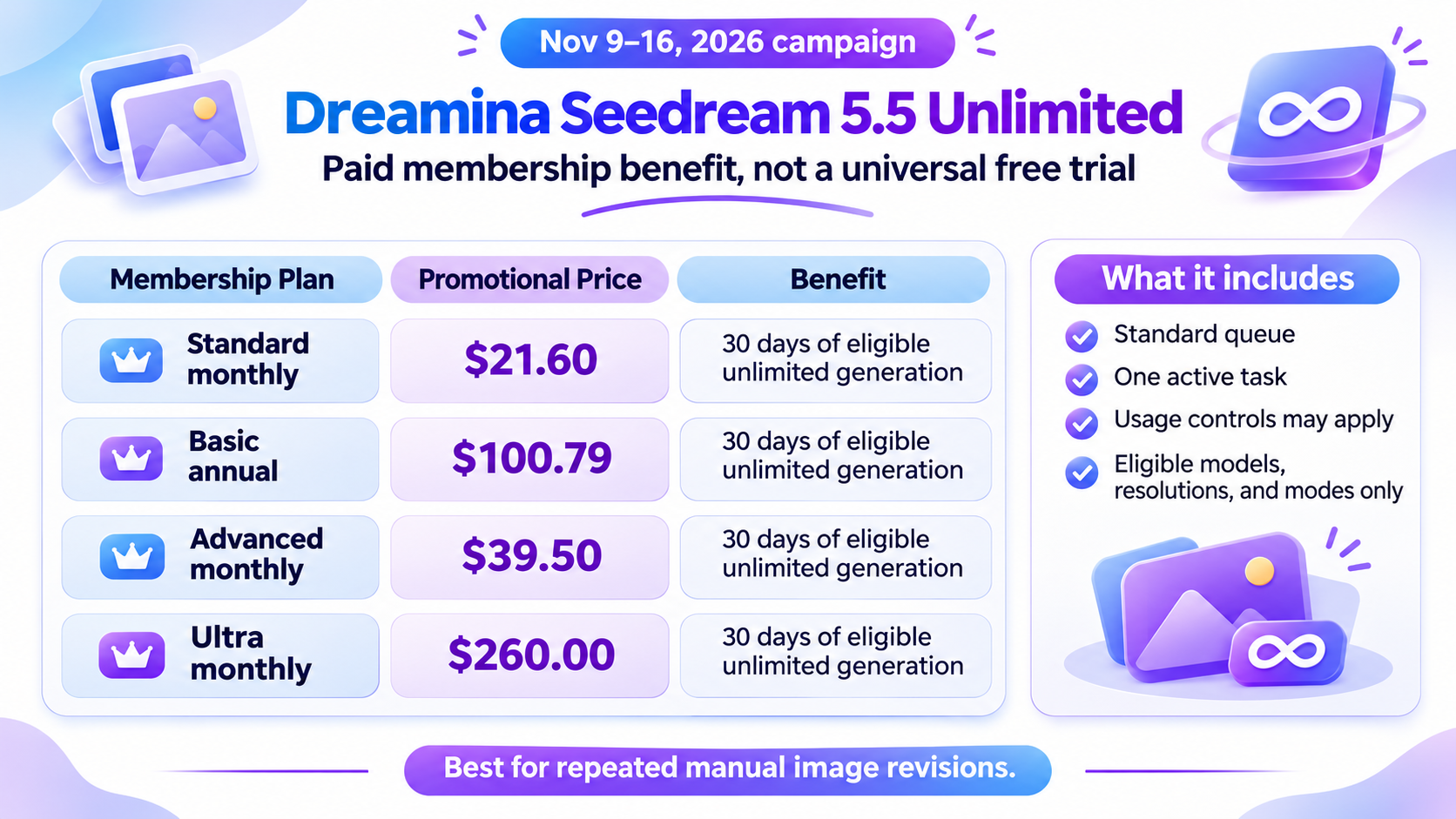
Dreamina's Seedream 5.5 unlimited-generation promotion is a paid-membership benefit, not a universal free trial. During the November 9–16, 2026 campaign, eligible subscriptions provide 30 days of unlimited Seedream 5.5 generation under the promotion's conditions.
Dreamina Seedream 5.5 Promotional Prices
Dreamina lists several eligible promotional subscription options.
| Membership | Promotional price | Original price | Seedream 5.5 benefit |
|---|---|---|---|
| Standard monthly | $21.60 | $36.00 | 30 days of eligible unlimited generation |
| Basic annual | $100.79 | $167.99 | 30 days of eligible unlimited generation |
| Advanced monthly | $39.50 | $79.00 | 30 days of eligible unlimited generation |
| Ultra monthly | $260.00 | $520.00 | 30 days of eligible unlimited generation |
Other annual and higher-tier options are also listed in the campaign.
These are subscription prices, not standalone Seedream 5.5 generation prices. Annual prices represent the listed annual charge rather than monthly installments.
Check the final checkout price and included benefits shown to your account before purchasing.
Who Is Eligible for Dreamina's Unlimited Offer?
The campaign runs from November 9 through November 16, 2026.
The official campaign lists participating markets including the United States, Canada, the United Kingdom, Japan, South Korea, France, Germany, Italy, Spain, Mexico, Brazil, and Australia.
However, availability depends on the account, region, subscription type, and offer displayed on the membership page.
The campaign includes important eligibility conditions:
- Qualifying subscriptions: Eligible new subscriptions and upgrades during the campaign.
- Subscription type: Eligible auto-renewing monthly, quarterly, or annual plans.
- Excluded plans: Basic monthly and certain non-renewing subscription products.
- Platform: Supported Dreamina Web AI Image and Canvas workflows.
- Excluded access routes: App, MCP, CLI, external software, scripts, plugins, and Agent image generation.
- Benefit duration: 30 days for eligible Seedream 5.5 generation.
- Membership status: The qualifying subscription and its applicable renewal arrangement must remain active.
The offer is therefore more specific than a simple free-generation promotion.
For example, someone who wants to use Seedream 5.5 through an external API should not assume that purchasing a Dreamina membership provides the same API access.
What Does Unlimited Generation Actually Include?
Dreamina's unlimited-generation benefit removes individual credit deductions for covered requests during the eligible period.
However, unlimited generation does not mean unrestricted usage in every situation.
Standard processing queue: Covered tasks use the applicable standard processing route.
One active task: The unlimited-generation channel supports one active task at a time.
Usage controls: Frequency and daily usage restrictions may still apply.
Supported settings: Only eligible models, resolutions, and generation modes receive the unlimited benefit.
Priority processing: Higher-priority or separate credit-based generation routes may have different conditions.
These details matter when comparing a consumer membership with a developer API workflow.
A designer working on one image at a time may benefit from the subscription.
A developer generating images programmatically should instead evaluate API pricing, request requirements, and production volume.
Is Dreamina Unlimited Better Than Free Credits?
The better option depends on how frequently you create images.
| Creative situation | Main consideration | Practical choice |
|---|---|---|
| One or two experimental images | Avoiding upfront cost | Check eligible free credits |
| Repeated manual image revisions | Number of creative iterations | Compare the eligible unlimited membership |
| Automated image production | Integration and request volume | Developer API |
| Several different AI models | Flexible spending across models | Pay-as-you-go platform |
For beginners, the most practical starting point is to compare official free-generation benefits with LinkModel's $1 signup Credits. Dreamina's paid unlimited-generation promotion may suit frequent manual creation, while LinkModel's credit-based access is more suitable for smaller experiments and users who prefer pay-as-you-go pricing.
A subscription becomes worthwhile when its covered generation volume and workflow conditions justify the purchase.
What Should You Test First With Seedream 5.5? Official Cases and Performance Data
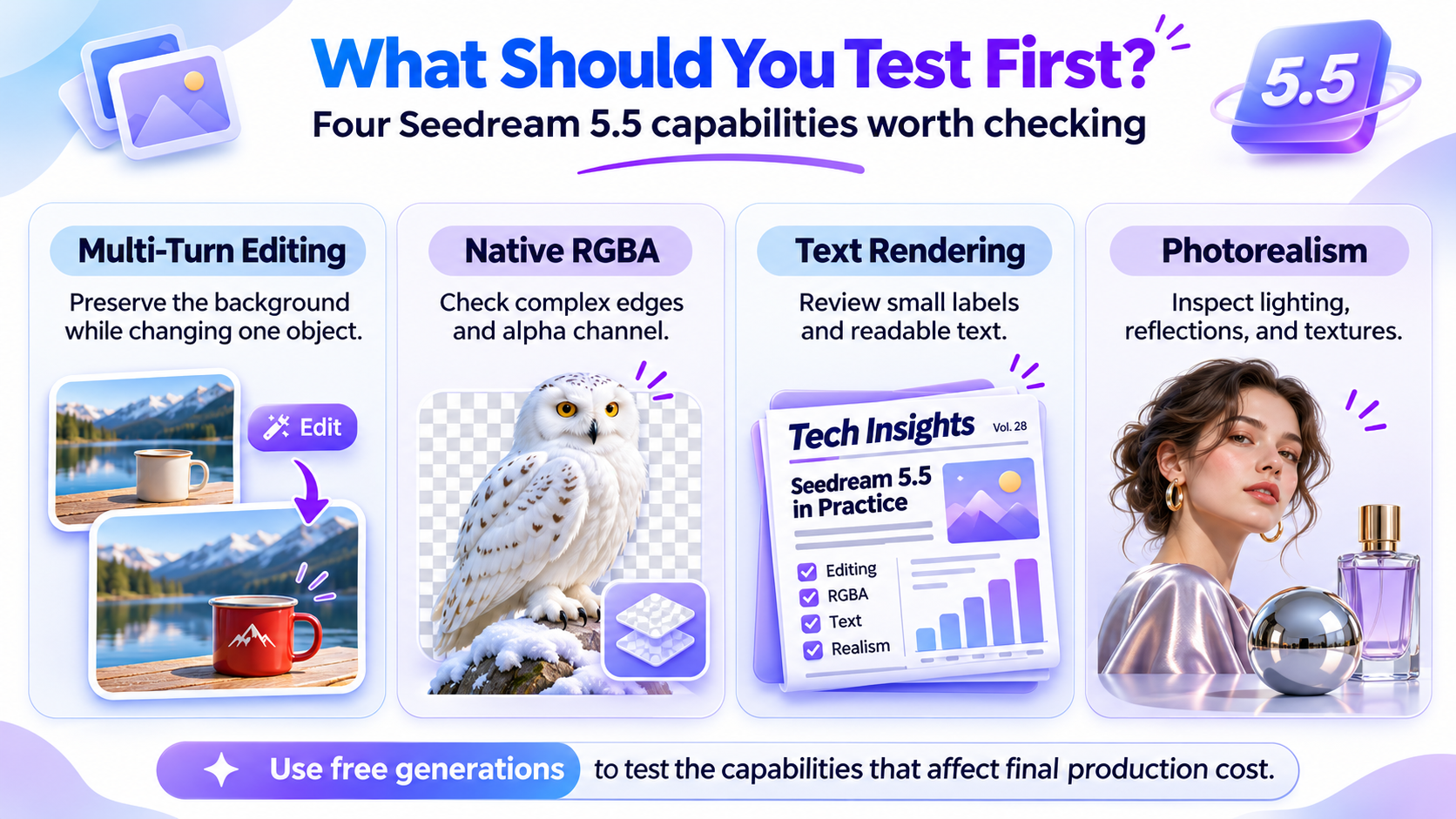
Seedream 5.5's strongest improvements involve image-editing consistency, reusable visual assets, realistic materials, and clearer text.
These capabilities matter when a creator needs an image that can be refined and used in an actual production workflow.
Our research into ByteDance's official demonstrations identifies several useful tasks for evaluating the model before committing to larger generation volumes.
Multi-Turn Editing: The Official 100-Round Demonstration
ByteDance's official 100-round editing demonstration shows how Seedream 5.5 can apply successive modifications to the same image while preserving regions that are not being edited.
The official examples include changes to hairstyles, clothing, eyewear, furniture, lighting, accessories, and tabletop objects.
Case study: Furniture and interior changes
One demonstration progressively changes a room by modifying furniture, decorative objects, and lighting.
As objects move, the image needs to maintain coherent perspective and adjust visible shadows.
For an interior designer, this creates a useful workflow: start with one room, compare different furniture arrangements, and refine the preferred composition without recreating the entire scene each time.
Case study: Watch-face information editing
Another official example demonstrates changes to a digital watch interface.
The image updates information such as time, activity data, and charts while maintaining the overall appearance of the watch face.
This is particularly relevant to product mockups, interface concepts, and marketing visuals.
What should you test with limited credits?
Start with a simple edit that changes one object while preserving the background.
Then inspect whether the model alters unrelated objects, colors, shadows, or text.
The most useful result is not merely a visually attractive edit, but one that preserves the parts of the original image you intended to keep.
Native RGBA: Transparent Assets for Reuse
Seedream 5.5 supports native RGBA image generation, including fully and partially transparent regions.
This means visual elements can be generated as reusable assets rather than flattened images that require separate background removal.
Case study: Snowy owl feathers
ByteDance's official demonstration shows a snowy owl with detailed feathers, including small gaps, fine wingtip structures, and clearly rendered claw boundaries.
These details are challenging when an object needs to be separated from its original background.
Native transparency helps preserve complex edges and textures.
Case study: Flamingo extraction
Another official example extracts a flamingo from its original image as an independent RGBA layer.
This is useful for designers who want to place the same object into multiple compositions.
Other official examples include transparent cartoon stickers, independent characters, and textured typography.
Example prompt: Transparent product photography
A premium amber-glass perfume bottle with a brushed gold cap, realistic reflections, precise glass edges, and elegant packaging details. Isolated on a fully transparent background, no surrounding scene, clean professional product photography.
The final file should retain its alpha channel when actual transparency is required.
What should you test with limited credits?
Prioritize a subject with complex edges, such as feathers, hair, glass, or transparent packaging.
Check whether the output preserves the alpha channel and whether the subject can be reused in another design.
Text Rendering: Posters, Newspapers, and Infographics
Seedream 5.5 also improves the generation of complex text and densely arranged small characters.
ByteDance reports the following results in its Chinese and English text-rendering evaluation:
| Text-rendering measure | Official result |
|---|---|
| Severe text corruption rate | 0.4% |
| Minor text corruption rate | 1.7% |
Case study: Butterfly infographic
The official butterfly infographic combines anatomical illustrations with compact Chinese annotations.
The image needs to coordinate text placement, visual hierarchy, and detailed illustration.
This is relevant to educational graphics, product information images, and social media explainers.
Case study: Shakespeare-themed newspaper
Another example presents a newspaper-style composition containing English passages, typography, and illustrations.
This type of design requires the model to manage several text regions without losing the visual structure of the page.
Example prompt: Educational infographic
Create a clean infographic titled "FROM SEED TO SALAD." Show five sequential stages of plant growth from seed to harvest. Include readable English labels, accurate botanical illustrations, consistent spacing, a cream background, and a professional editorial layout.
Important text, numbers, and brand names should still be reviewed in the final image before publication.
What should you test with limited credits?
Choose a short headline, several labels, and a simple infographic layout.
Inspect spelling, character structure, text alignment, and the readability of smaller labels.
Photorealism and Professional Image Quality
Seedream 5.5 is designed to improve lighting, material textures, skin detail, and reflective surfaces.
ByteDance's official gallery contains several examples that illustrate these capabilities.
Case study: Family portrait
One image shows a father holding a sleeping baby on a sofa.
Soft window lighting, fabric textures, skin detail, and natural shadows create a candid domestic atmosphere.
The image is useful for evaluating how different materials interact under the same lighting conditions.
Case study: Rainy street photography
The official gallery includes a street scene after rain, showing wet paving stones and fragmented reflections from nearby buildings.
The image relies on realistic puddles, surface textures, light, and perspective.
Case study: European bistro
A separate gallery image shows two older diners inside a warmly lit restaurant.
Glasses, cutlery, breadcrumbs, worn furniture, and mixed lighting contribute to a candid photographic style.
For marketers, these examples demonstrate that photorealism depends on the relationship between materials, lighting, and composition rather than sharpness alone.
What should you test with limited credits?
Choose a scene containing at least three different materials, such as glass, fabric, and wood.
Check whether reflections, shadows, and textures remain visually consistent.
What the Official Performance Data Shows
ByteDance evaluated Seedream 5.5 across six professional production categories:
- E-commerce
- Marketing
- Film and television
- Gaming
- Office productivity
- Fashion design
The evaluations were conducted using the MagicArena platform, with experienced image-generation evaluators assessing image quality and usability.
Compared with Seedream 5.0 Pro, Seedream 5.5 improved both measures across all six categories.
In film and television and office productivity, reported usability rates were more than twice those of the previous model.
Separate expert evaluations compared generated image pairs using GSB (Good, Same, Bad) preferences.
In the image-to-image realism assessment, Seedream 5.5 achieved a +55.62% GSB result against the previous version.
GSB measures comparative image preferences, not generation success rates.
| Official evidence | Reported result | Practical relevance |
|---|---|---|
| Multi-turn editing | Up to 100 rounds | Repeated image refinement |
| Native transparency | RGBA output | Reusable standalone assets |
| Image-to-image realism | +55.62% GSB | Preference for realistic edited images |
| Severe text corruption | 0.4% | Text-heavy layouts |
| Minor text corruption | 1.7% | Small labels and annotations |
| Film and television usability | More than 2× previous version | Production imagery |
| Office productivity usability | More than 2× previous version | Presentations and visual communication |
ByteDance also reports strong text-structure results compared with GPT Image 2.5 Sunburst and Nano Banana 2.1.
The most important conclusion is that Seedream 5.5 is designed for production usability, not just attractive first-generation images.
For users evaluating the model through limited free access, multi-turn stability, transparent exports, and readable text are valuable capabilities to prioritize.
Seedream 5.5 API Pricing: Free Access, Real Costs, and LinkModel
Seedream 5.5 API access should be evaluated separately from consumer free credits. BytePlus publishes introductory paid image-generation packages, while Dreamina's unlimited-generation benefits belong to its consumer membership system. LinkModel provides a third option: usage-based Seedream 5.5 pricing with a 20% reduction against the listed official per-image rates and $1 in signup Credits for new users.
For developers, the most useful comparison includes upfront payment, output resolution, separately billed input images, package validity, and actual generation volume. A prepaid package and a pay-as-you-go API should not be compared solely by their advertised average image prices.
Official BytePlus Seedream 5.5 API Packages
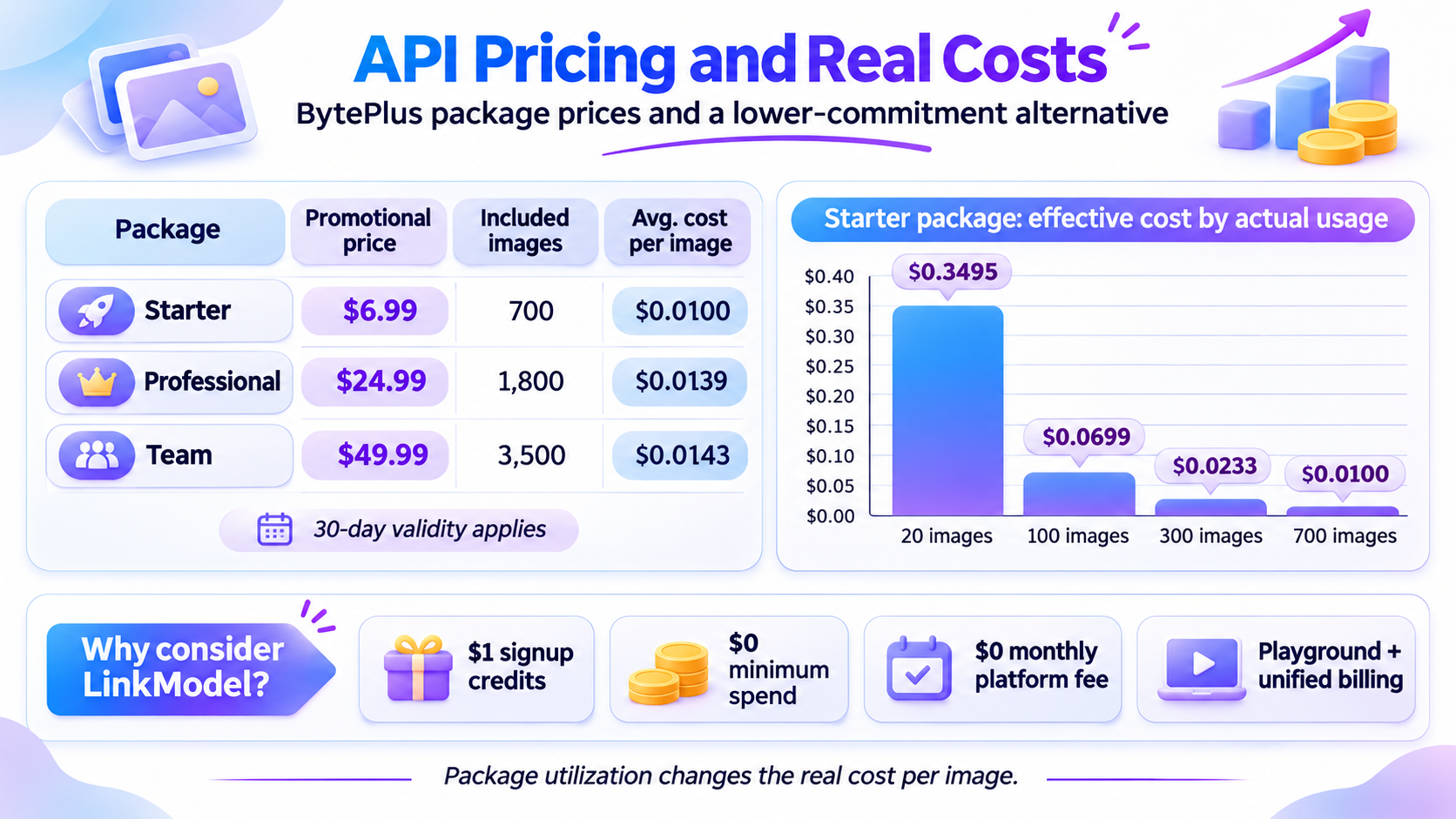
BytePlus publishes three introductory image-generation packages for Seedream 5.5.
| Package | Original price | Promotional price | Included images | Average cost per image |
|---|---|---|---|---|
| Starter | $13.99 | $6.99 | 700 | $0.0100 |
| Professional | $35.99 | $24.99 | 1,800 | $0.0139 |
| Team | $69.99 | $49.99 | 3,500 | $0.0143 |
These are introductory offers for eligible first purchases.
Each package is valid for 30 days, and unused image allowances cannot be extended after expiration.
The average price per image assumes the full package allowance is used.
For developers, it is also important to verify the exact model identifier and supported API functions before integration. A package name and a model-family name should not automatically be treated as interchangeable.
LinkModel vs. Official Seedream 5.5 Image Rates
LinkModel's published Seedream 5.5 rates are 20% below the corresponding listed official rates for the supported pixel tiers shown below.
| Billable item | LinkModel | Listed official rate | Savings |
|---|---|---|---|
| Input image | $0.0064 | $0.0080 | 20% |
| Output: 921,600–2,601,123 pixels | $0.0160 | $0.0200 | 20% |
| Output: 2,601,124–4,624,220 pixels | $0.0280 | $0.0350 | 20% |
Each separately billed input contributes to the request cost. When layer decomposition returns multiple output images, including the background layer, each delivered output is charged according to its pixel tier.
This price comparison uses published per-image rates rather than the effective unit prices derived from BytePlus's introductory image packages.
What Does Seedream 5.5 Actually Cost at Different Usage Levels?
A package's advertised average cost is not necessarily the amount you effectively spend per image when you use only a small portion of the allowance.
Consider the BytePlus Starter package.
The actual purchase requires $6.99, which includes 700 images.
| Images generated | Cash paid for Starter package | Effective cost per generated image |
|---|---|---|
| 20 | $6.99 | $0.3495 |
| 100 | $6.99 | $0.0699 |
| 300 | $6.99 | $0.0233 |
| 700 | $6.99 | $0.0100 |
The calculation is:
Effective cost per generated image = Package purchase price ÷ Images actually generated
For example, if you purchase the Starter package and generate 100 images, your actual payment is still $6.99. The effective cost per generated image is $0.0699.
If you use all 700 images, the effective cost falls to approximately $0.01.
The difference is package utilization. A low advertised unit price is most attractive when your actual usage is high enough to consume most of the included allowance before it expires.
This matters for small projects.
If you only need 20 images, paying $6.99 upfront may be less attractive than a genuinely usage-based alternative, even when the package's full-utilization price looks inexpensive.
Why Consider LinkModel for AI Image Generation?
For creators and developers exploring Seedream 5.5 and other image models, LinkModel combines lower published Seedream 5.5 per-image rates with flexible pay-as-you-go access, making it possible to evaluate the model without purchasing a fixed image package.
Its main advantages are 20% lower listed Seedream 5.5 image rates, automatic $1 signup Credits, no minimum deposit, no monthly platform fee, and unified access to supported AI models.
Pay-as-you-go pricing: Pay according to supported model usage, with $0 minimum spend and $0 monthly platform fee.
Automatic $1 signup Credits: New users receive $1 in free Credits without adding a payment card or making a recharge. The Credits do not expire and apply to all models currently available on LinkModel.
Unified Playground: Explore available models and test prompts in a visual interface.
Unified billing: Manage usage across supported models through one platform rather than treating every model as a separate subscription.
Developer integration: Use supported models through LinkModel's unified, OpenAI-compatible API environment.
These advantages are particularly useful when a project involves several image styles or combines image generation with other AI workflows.
For example, a marketing team may need realistic product photographs, illustrated campaign graphics, and visual assets for different channels.
Instead of committing to several separate platform subscriptions, a pay-as-you-go model can make it easier to control fixed costs while exploring available tools.
For Seedream 5.5 specifically, check the current LinkModel model catalog for the exact listing, price, and available functions before choosing an integration.
How to Start With LinkModel's $1 Free Credits
Getting started with LinkModel's Seedream 5.5 access requires no upfront recharge for eligible new users. The $1 signup Credits can cover initial usage, while subsequent requests follow the model's published per-image pricing. Before generating, check the selected output dimensions and whether input images or additional layers will incur separate charges.
- Create a LinkModel account and receive the automatic $1 signup Credits.
- Open the Seedream 5.5 model page, where Playground and API access are available.
- Choose the Playground to explore image generation without writing code, or select the API tab for developer integration.
- Use the correct API model ID,
seedream-5.5, when configuring an API request. - Review the applicable image charges, including output resolution, reference images, and any additional layers.
- Generate your first image using the available signup Credits, then continue according to your remaining balance.
The signup benefit is particularly useful for users who want to explore supported models before committing to a larger usage budget.
You do not need to purchase a fixed monthly platform subscription or meet a minimum recharge amount to begin.
Which Seedream 5.5 Access Option Should You Choose?
The best option depends on your generation volume and the type of workflow you need.
| Your priority | Recommended starting point | Why |
|---|---|---|
| Try Seedream 5.5 without paying | Official account with eligible free credits | No additional payment for covered generations |
| Create many manual variations | Qualifying Dreamina membership | Covered generation without individual credit deductions |
| Build an application using Seedream 5.5 | BytePlus API | Published developer packages |
| Generate small volumes across different models | LinkModel | Flexible pay-as-you-go usage |
| Explore multiple AI image models | LinkModel Playground | Centralized model discovery and testing |
If your priority is trying Seedream 5.5 without paying upfront, compare official free-generation eligibility with LinkModel's $1 signup Credits. For larger workloads, compare BytePlus's package prices against LinkModel's usage-based rates and account for the cost of input images, output resolution, and additional layers. If you prefer to avoid fixed platform fees while exploring Seedream 5.5 alongside other supported models, LinkModel offers a flexible pay-as-you-go option.
Frequently Asked Questions
Is Seedream 5.5 completely free without a subscription?
Not for every user. Seedream 5.5 is available through official ByteDance platforms, but a universal free-generation allowance has not been publicly specified. Check whether your account has eligible credits before generating.
How many free Seedream 5.5 credits do I get daily?
ByteDance's public model page does not specify a universal daily allowance or refresh schedule. The available balance and renewal rules depend on the platform and account benefits.
Is Dreamina Seedream 5.5 unlimited really free?
No. Dreamina's November 9–16, 2026 promotion provides 30 days of eligible unlimited generation through qualifying paid memberships. Supported settings, regions, subscription conditions, and usage restrictions apply.
How many Seedream 5.5 images can I generate with $1 in free Credits?
With LinkModel's $1 signup Credits, eligible new users can generate up to 62 standard-tier Seedream 5.5 output images at $0.016 each, assuming one output per request and no separately billed inputs or additional layers. Higher-pixel images and editing requests cost more. The signup benefit provides limited free initial usage rather than permanently free generation.
Can free users generate transparent PNGs or edit images with Seedream 5.5?
Seedream 5.5 supports native RGBA output and multi-turn editing, but individual accounts may have different feature and credit entitlements. Check the generation mode and export settings available on your chosen platform.
Conclusion
Seedream 5.5 can be explored without an upfront payment through eligible official benefits or LinkModel's $1 signup Credits, although neither route guarantees permanently unlimited free generation. The model's multi-turn editing, native RGBA output, photorealism, and text-rendering capabilities make it worth evaluating with a small initial workload. For users who prefer pay-as-you-go access, LinkModel lists Seedream 5.5 standard-tier outputs at $0.016 per image, 20% below the corresponding listed official rate, allowing eligible new users to generate up to 62 standard-tier images with their $1 Credits under the stated billing conditions. Compare official free benefits, Dreamina memberships, BytePlus packages, and LinkModel's usage-based pricing according to your generation volume and workflow requirements.