GPT Image 2.6 API is not completely free, but eligible users can generate images without paying additional API fees by using free API credits. ChatGPT Free offers limited image creation, while qualifying ChatGPT Pro and Business subscribers can claim API credits that cover image generation. However, ChatGPT image allowances and API credits are not the same thing, and a ChatGPT Plus subscription does not automatically include free API usage.
Released on November 4, 2026, GPT Image 2.6 introduces Flare and Sunburst, two image generation and editing models with different performance priorities. Both use token-based billing rather than a fixed price per image. That distinction matters because image size, quality settings, reference images, and output token consumption can significantly affect your final bill. A lower quality setting does not necessarily guarantee the lowest overall cost, especially when comparing GPT Image 2.6 with 2.5.
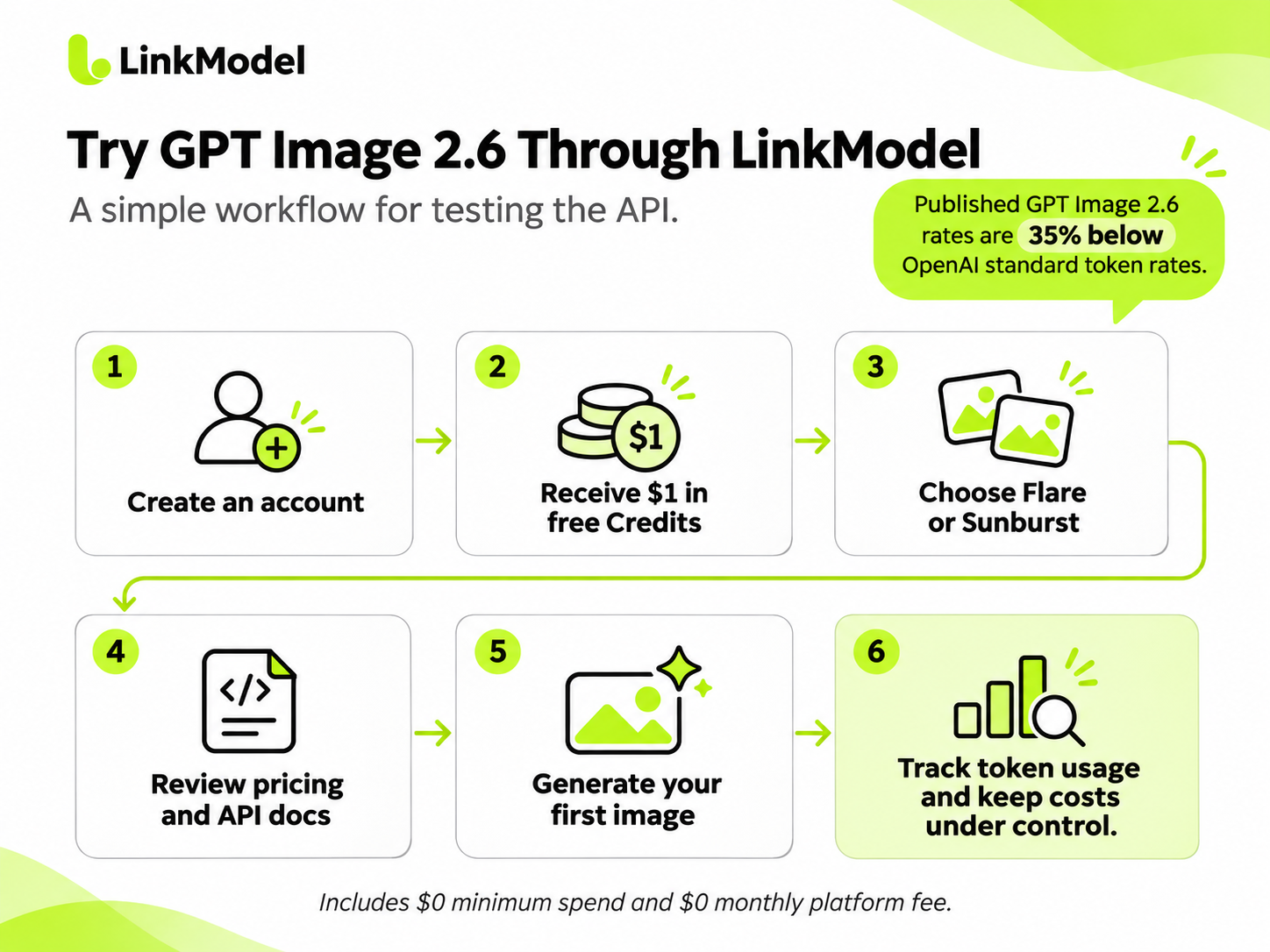
For developers who want to test GPT Image 2.6 without committing to a large budget, LinkModel offers both models at 35% below OpenAI's standard token rates, with $0 minimum spend and $0 monthly platform fee. New users automatically receive $1 in free Credits after registration, without adding a payment card or making a deposit. The credits never expire, apply to all models currently available on LinkModel, and cannot be claimed repeatedly by existing users. This gives developers a practical starting balance and a lower-cost route for continued API usage.
Is GPT Image 2.6 API Free?
GPT Image 2.6 is a paid API, but you can use it without an additional API payment if your account has eligible free credits. There is no unlimited free API available to everyone.
The most important distinction is whether you want to generate images inside ChatGPT or integrate image generation into your own application.
| Access method | Free image generation available? | API access | Main limitation |
|---|---|---|---|
| ChatGPT Free | Yes, limited | Not included | In-app image generation limits |
| ChatGPT Plus | Included with subscription limits | Separately billed | No Pro/Business API credit benefit |
| Eligible ChatGPT Pro | Yes, with claimed API credits | Yes | Activation and eligibility requirements |
| Eligible ChatGPT Business | Yes, with claimed API credits | Yes | Seat-based allowance and workspace cap |
| Regular OpenAI API | If an eligible credit balance exists | Yes | Token-based billing |
| New LinkModel account | $1 signup credit balance | Yes, for supported models | Limited initial credit balance |
The simplest answer: If you only need to create images, start with ChatGPT Free. If you need automated image generation through code, check your available API credits or use a provider with an introductory credit offer.
OpenAI provides two GPT Image 2.6 API model IDs:
- gpt-image-2.6-flare — optimized for fast image iteration.
- gpt-image-2.6-sunburst — designed for detailed compositions and editing.
Both support image generation, image editing, and additional output capabilities, including SVG and animated GIF generation.
Official documentation: GPT Image 2.6 Flare and GPT Image 2.6 Sunburst.
How to Use GPT Image 2.6 Without Paying Extra
There are three practical ways to begin using GPT Image 2.6 without making an additional API payment: ChatGPT Free, qualifying OpenAI API credits, and third-party introductory credits.
Each option solves a different problem.
Use GPT Image 2.6 in ChatGPT Free
ChatGPT Free is the easiest way to try GPT Image 2.6 without writing code. It offers image generation through the ChatGPT interface, although usage is limited.
To start:
1. Open ChatGPT and sign in with a free account.
2. Start a conversation or select the available image creation option.
3. Enter an image prompt describing the subject, composition, lighting, style, and required text.
4. Generate your image and review the result.
5. Refine the prompt or edit the image while your available allowance permits.
For example, you can use this prompt:
Create a professional 16:9 product photograph of a white ceramic coffee mug on a light wooden desk. Use soft morning sunlight, realistic shadows, a minimal background, and empty space on the right for marketing text.
ChatGPT Free is useful for occasional image creation, marketing concepts, and visual experimentation.
However, it does not provide a free API key or transfer its in-app image allowance to the OpenAI API Platform.
Free image generation limits may also vary by account and current service conditions. Check the allowance shown in ChatGPT rather than relying on a fixed image count from an older guide.
Use OpenAI API Credits for Image Generation
If you already have promotional credits in your OpenAI API organization, you may be able to generate GPT Image 2.6 images without purchasing additional API credits.
Before starting, check:
- Whether your API organization has an active promotional credit grant.
- Whether your account has access to GPT Image 2.6.
- How much credit remains and when it expires.
- Which API organization and project will send your requests.
Eligible API credits can cover Images API usage, including GPT Image 2.6 requests.
The important distinction is that the grant must actually be issued to the API organization. Having an eligible ChatGPT subscription alone does not mean the API balance has already been credited.
Try GPT Image 2.6 Through a Third-Party Provider
For developers who do not qualify for OpenAI's subscription-linked API credits, third-party providers can offer another way to start with a small balance.
For example, LinkModel provides a $1 new-user credit reward that can be applied to supported image models.
This option is particularly useful if you want to:
- Test image generation with a limited initial budget.
- Explore an API before paying for ongoing usage.
- Compare image quality and token consumption.
- Continue with pay-as-you-go billing rather than a fixed platform subscription.
Unlike ChatGPT Free, this route is intended for API-based workflows.
How to Get Free API Credits for GPT Image 2.6
OpenAI introduced a subscription-linked API credit benefit on October 28, 2026, for eligible ChatGPT Pro and Business customers.
These credits can cover Images API usage, making this one of the most relevant options for developers who already have a qualifying subscription.
Which ChatGPT Plans Include API Credits?
The credit allowance depends on the subscription tier and, for Business, the number and type of paid seats.
| Eligible subscription | Full-period API credit allowance |
|---|---|
| ChatGPT Pro $100 tier | $100/month |
| ChatGPT Pro $200 tier | $200/month |
| ChatGPT Pro $500 tier | $500/month |
| Business Standard | $20 per paid seat/month |
| Business Premium | $100 per paid seat/month |
For monthly Business workspaces, the total grant is capped at $500 per billing period.
For example, a Business workspace with five Standard seats and three Premium seats has a full-period allowance of:
- Five Standard seats: 5 × $20 = $100.
- Three Premium seats: 3 × $100 = $300.
- Total monthly API credits: $400.
There are several eligibility requirements.
Your paid subscription must have been active for at least seven days before claiming. The person activating the benefit must also have the required ownership permissions for the subscription or workspace and the receiving API organization.
The linked ChatGPT and API accounts must use the same email address.
ChatGPT Plus does not qualify for this particular API credit benefit.
The first grant may be prorated according to the time remaining in the current billing cycle. Monthly unused credits expire at the end of that cycle rather than rolling over.
For annually prepaid Business workspaces, the full-year allowance can be granted upfront, subject to a $6,000 annual cap and the applicable billing-cycle expiration.
Official source: OpenAI API Credits Benefit for Eligible ChatGPT Subscriptions.
How to Claim Your Free OpenAI API Credits
There are two official activation routes: through ChatGPT or directly through the API Platform.
Method 1: Claim through ChatGPT
1. Sign in to the account that owns your eligible Pro subscription, or select your eligible Business workspace as an owner.
2. For Pro, open Settings → Billing. For Business, open the workspace billing settings or Admin Console.
3. Find the API credits benefit option.
4. Start the claim process and select the API organization that should receive the credits.
5. Review the grant amount and confirm activation.
6. Open the API Platform billing page to verify the issued credits.
Method 2: Claim through the OpenAI API Platform
1. Sign in to OpenAI API Platform using the email associated with your eligible ChatGPT subscription.
2. Select the API organization that you own.
3. Open Billing → API credits benefit.
4. Select the qualifying Pro subscription or Business workspace.
5. Review the offer and confirm the linked organization.
6. Open Billing → Credit grants to check the actual grant amount and expiration date.
You do not need to add an API payment method merely to use an active qualifying promotional grant.
However, receiving free credits does not remove model access requirements, project limits, or API rate limits.
Why Your Free API Credits May Not Be Working
If you have claimed credits but still see API usage costs, the problem may involve the linked organization, credit status, or billing display.
| Problem | What to check | Recommended action |
|---|---|---|
| API credits benefit is missing | Subscription eligibility, seven-day requirement, account email | Confirm eligibility and check the correct billing page |
| Credits were claimed but are not visible | Linked API organization and grant status | Open Credit grants in the receiving organization |
| API usage shows charges | Usage reporting versus actual credit deduction | Compare the usage dashboard with the promotional balance |
| Requests fail despite remaining credits | Organization, project, model access, and rate limits | Inspect the exact API error and account limits |
| Credits disappeared | Billing-cycle expiration and remaining balance | Check grant expiry and subscription status |
API returns credit_balance_exhausted | Remaining promotional and purchased credits | Add paid credits if you want to continue |
OpenAI states that applicable promotional credits are used before purchased API credits.
If your promotional balance is exhausted and no other API credits are available, requests can fail with HTTP 429 and error code credit_balance_exhausted.
This is different from a rate-limit error caused by sending too many requests.
Knowing the distinction helps you avoid purchasing additional credits when the actual issue is a request limit or account configuration.
GPT Image 2.6 API Pricing and Real Image Costs
GPT Image 2.6 Flare and Sunburst share the same official token rates, but the final cost per image depends on actual token consumption.
Both text inputs and image inputs may contribute to a request's cost, while generated image output tokens represent the principal output charge.
For developers planning repeated image generation, understanding this billing structure is more useful than comparing a single advertised image price.
OpenAI vs LinkModel GPT Image 2.6 Pricing
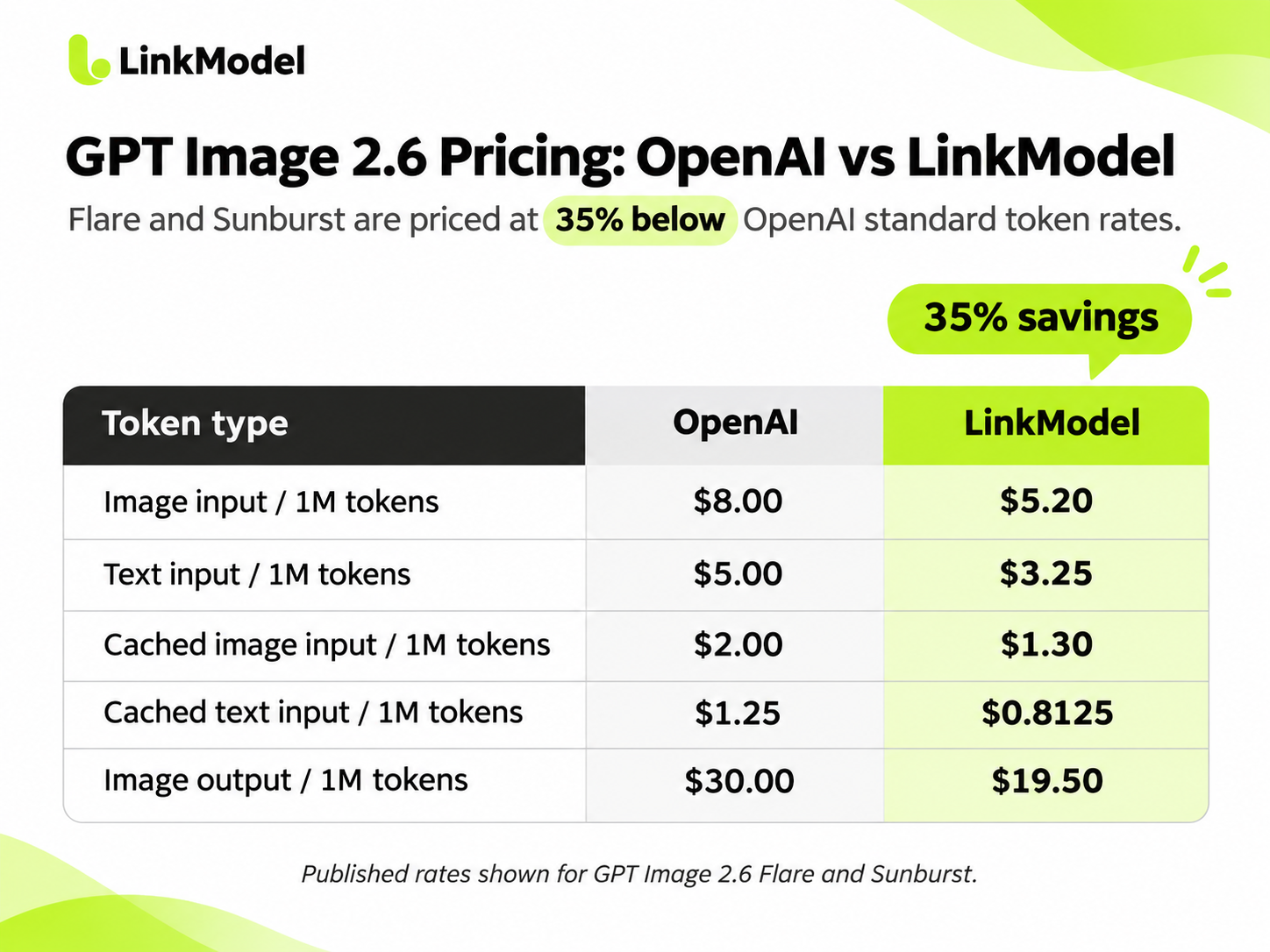
LinkModel lists both GPT Image 2.6 models at 35% below OpenAI's standard token rates.
| Token type | OpenAI official | LinkModel | Savings |
|---|---|---|---|
| Image input / 1M tokens | $8.00 | $5.20 | 35% |
| Text input / 1M tokens | $5.00 | $3.25 | 35% |
| Cached image input / 1M tokens | $2.00 | $1.30 | 35% |
| Cached text input / 1M tokens | $1.25 | $0.8125 | 35% |
| Image output / 1M tokens | $30.00 | $19.50 | 35% |
These rates apply to both GPT Image 2.6 Flare and Sunburst in the published pricing comparison.
For every one million image output tokens:
- OpenAI charges $30.00.
- LinkModel charges $19.50.
- Difference: $10.50 saved.
The matching 35% reduction also applies to the listed text inputs, image inputs, and cached-input rates.
This matters for applications that use reference images, image editing, or more complicated multimodal requests.
Cached-input pricing applies only when the request is eligible for caching. For example, OpenAI documents specific caching behavior for image generation through the Responses API; it should not be assumed that every direct image request automatically receives cached rates.
How Much Does One GPT Image 2.6 Image Cost?
A model's per-million-token price does not immediately tell you what one generated image will cost.
To make the calculation practical, consider a published GPT Image 2.6 API test from November 5, 2026.
In that test, the author used a 1024 × 1024 image size, the same prompt, and five quality levels. The reported image output token counts were almost identical for Flare and Sunburst.
Source: GPT Image 2.6 API and Pricing: Cost per Image.
Using those reported token counts and the corresponding output-token rates:
| Quality | Image output tokens | OpenAI output cost | LinkModel output cost |
|---|---|---|---|
| Low | 824 | $0.02472 | $0.01607 |
| Medium | 1,449 | $0.04347 | $0.02826 |
| High | 1,756 | $0.05268 | $0.03424 |
| Xhigh | 3,122 | $0.09366 | $0.06088 |
| Max | 7,024 | $0.21072 | $0.13697 |
The figures above show image output charges. A complete request also includes applicable input tokens.
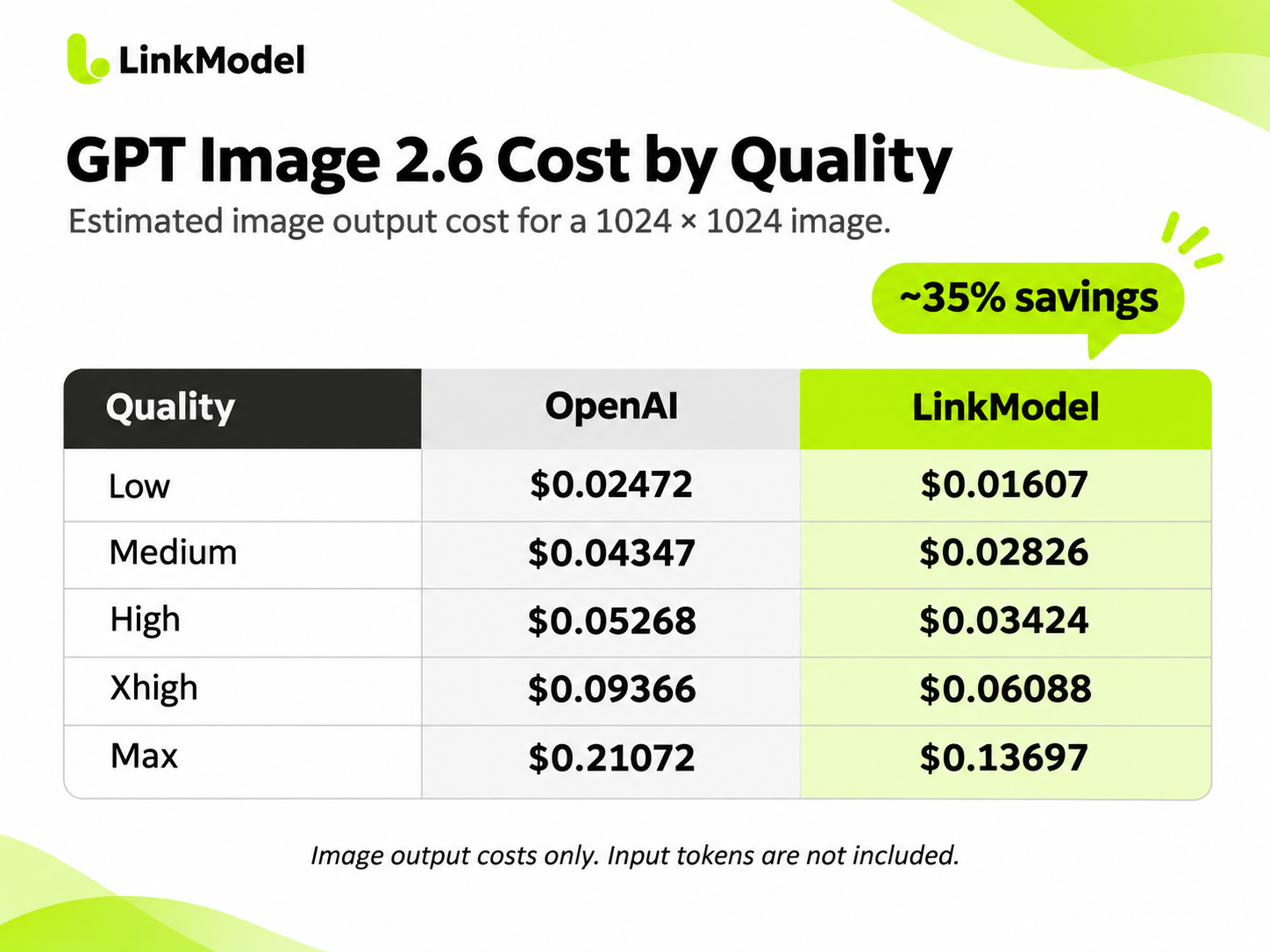
At High quality, an image consuming 1,756 output tokens costs approximately $0.05268 in image output through OpenAI or $0.03424 through LinkModel.
Now consider a workflow generating 1,000 images with the same output-token consumption.
| Workload | OpenAI | LinkModel |
|---|---|---|
| 1,000 images × 1,756 output tokens | $52.68 | $34.24 |
| Image output cost difference | $18.44 saved |
This shows how a relatively small per-image rate difference becomes more significant as image production scales.
How Many GPT Image 2.6 Images Can You Generate With $1?
For a developer searching for a free GPT Image 2.6 API, this may be the most useful budget question.
How far can a $1 credit balance actually go?
To answer it, consider a text-to-image example with these assumptions:
- Image size: 1024 × 1024.
- Text input: 100 tokens per request.
- No reference images.
- No cached input.
- One generated image per request.
- Image output tokens based on the published quality-level measurements.
- LinkModel text input pricing: $3.25 / 1M tokens.
- LinkModel image output pricing: $19.50 / 1M tokens.
Under these conditions, 100 text input tokens cost:
100 × $3.25 / 1,000,000 = $0.000325
The total estimated request cost is:
(Text input tokens × text input rate + image output tokens × image output rate) ÷ 1,000,000
Applying this formula:
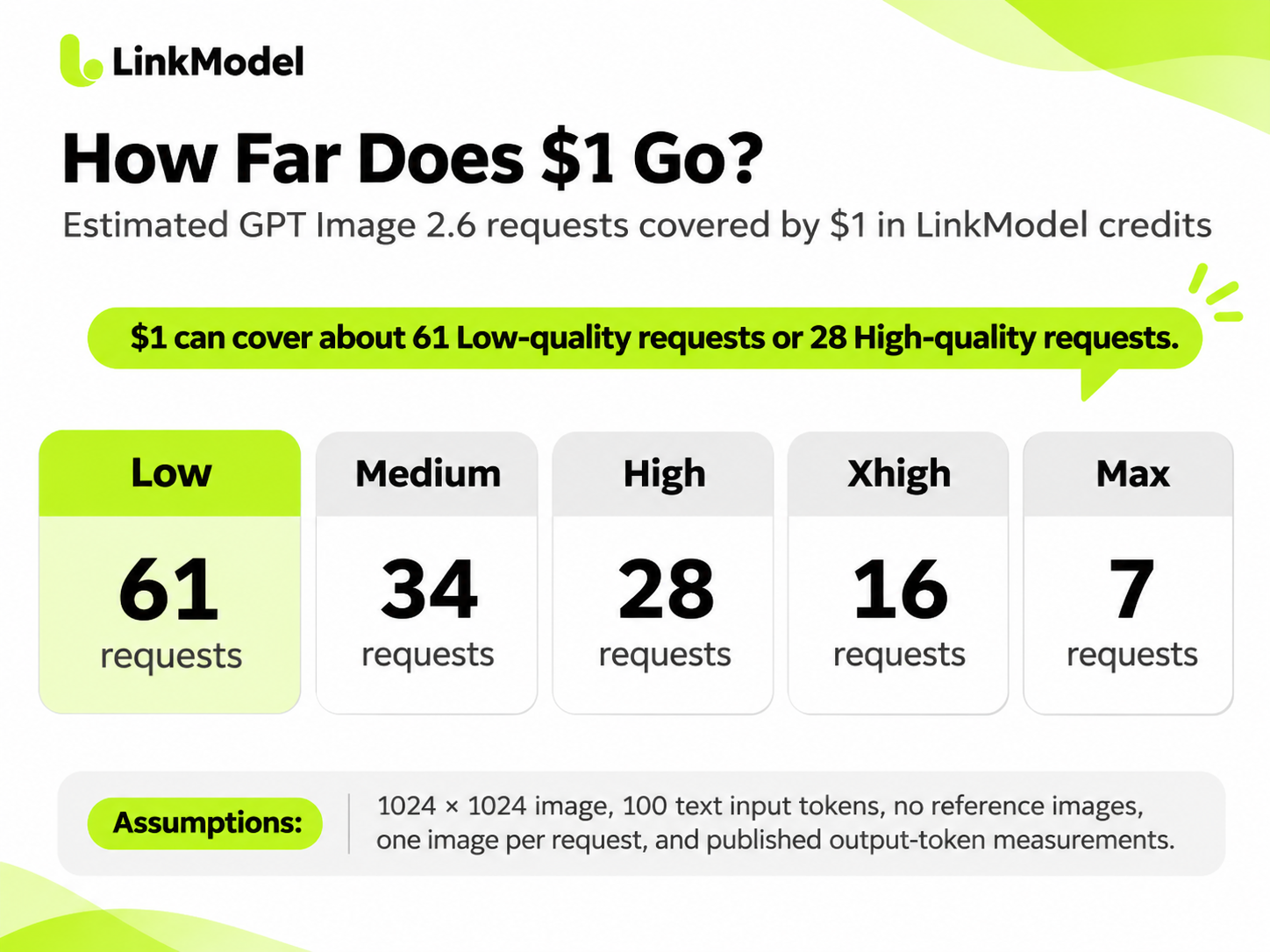
| Quality | Estimated cost per request | Requests covered by $1 |
|---|---|---|
| Low | $0.01639 | 61 |
| Medium | $0.02858 | 34 |
| High | $0.03457 | 28 |
| Xhigh | $0.06120 | 16 |
| Max | $0.13729 | 7 |
These figures are calculated using the stated request assumptions and published output-token measurements.
For example, at Low quality:
100 × $3.25 / 1,000,000 + 824 × $19.50 / 1,000,000 = $0.016393
Therefore:
$1 ÷ $0.016393 ≈ 61 complete requests
A $1 balance can theoretically cover approximately 61 Low-quality requests or 28 High-quality requests under these assumptions.
The actual number changes with token consumption, prompt length, references, image dimensions, and the quality level selected.
This provides a more useful way to plan an initial API test than treating $1 as an undefined promotional balance.
Why GPT Image 2.6 Can Cost More Than GPT Image 2.5
An important finding from developer discussions is that the same token price does not necessarily mean the same cost per image.
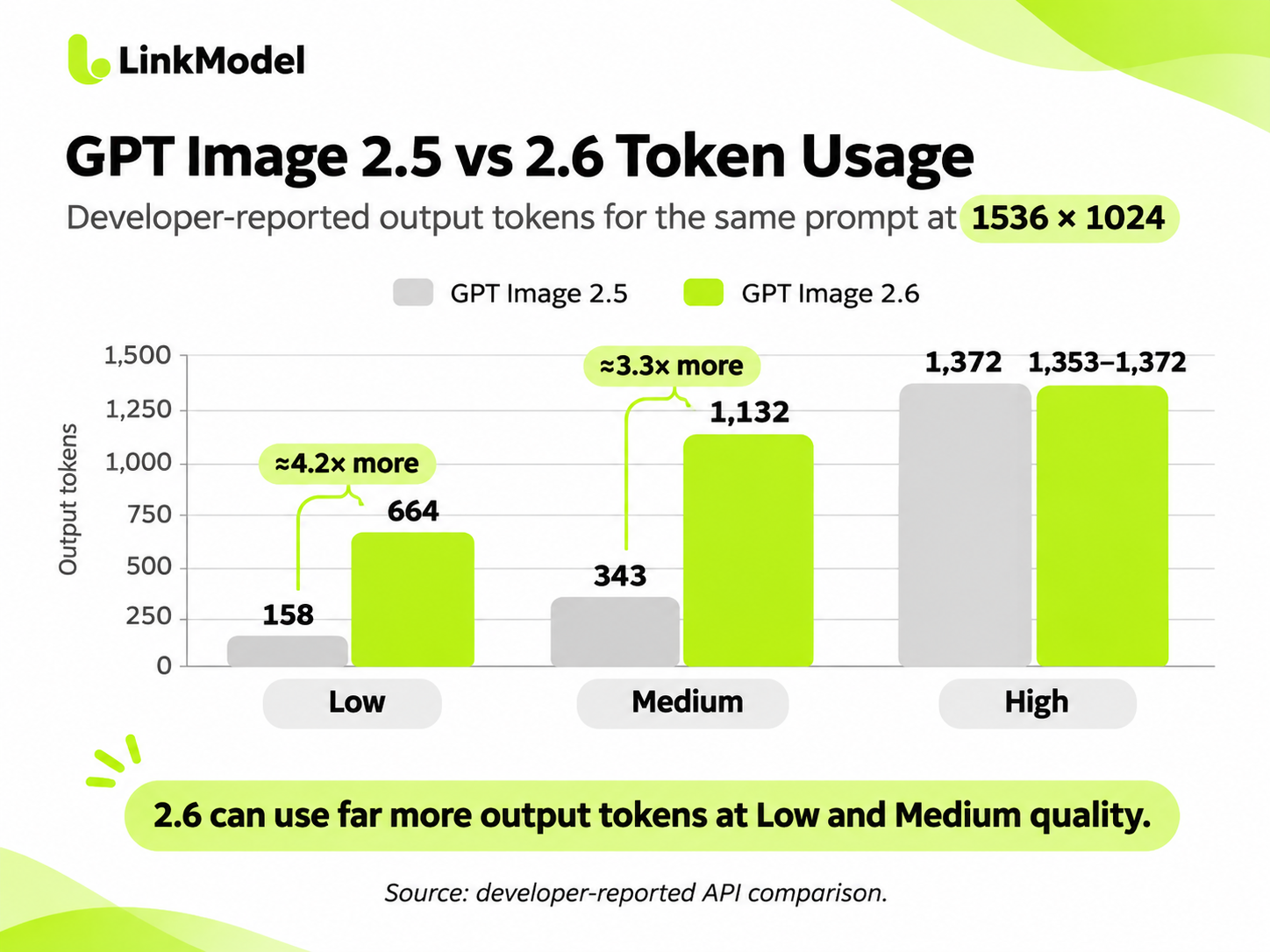
In a publicly shared API comparison, a developer measured GPT Image 2.5 and GPT Image 2.6 using the same prompt and a 1536 × 1024 output size.
The reported results were:
| Quality | GPT Image 2.5 tokens | GPT Image 2.6 tokens |
|---|---|---|
| Low | 158 | 664 |
| Medium | 343 | 1,132 |
| High | 1,372 | 1,353–1,372 |
Source: Developer API token comparison on Reddit.
At Low quality, GPT Image 2.6 consumed approximately 4.2 times as many output tokens in this test.
At Medium quality, the reported increase was approximately 3.3 times.
High-quality token consumption was much closer between versions.
The developer also reported that some lower-quality GPT Image 2.6 Flare outputs followed layout instructions less effectively in their image-drafting tasks, which could increase the need for revisions.
A separate November 5 test found a similar pattern at 1024 × 1024:
- GPT Image 2.5 Low: 196 output tokens.
- GPT Image 2.6 Low: 824 output tokens.
- GPT Image 2.5 Medium: 439 output tokens.
- GPT Image 2.6 Medium: 1,449 output tokens.
For image-generation pipelines that produce large numbers of drafts, lower token consumption and fewer revisions can matter more than the advertised quality setting alone.
The practical decision is not simply whether GPT Image 2.6 is newer. It is whether the newer model produces enough usable images to justify its actual token consumption for your workload.
GPT Image 2.6 Flare vs Sunburst: Which Should You Choose?
Choose GPT Image 2.6 Flare when fast iteration matters most, and Sunburst when detailed compositions or precision edits are your priority.
Both models support image generation and editing, and their published token prices are the same.
The difference lies primarily in their intended workflow.
| Feature | GPT Image 2.6 Flare | GPT Image 2.6 Sunburst |
|---|---|---|
| Primary focus | Fast iteration | Detailed visual work |
| Image generation | Supported | Supported |
| Image editing | Supported | Supported |
| SVG output | Supported | Supported |
| Animated GIF output | Supported | Supported |
| Quality options | Low through Max, Auto | Low through Max, Auto |
| Complexity options | Low, Medium, High | Low, Medium, High |
| OpenAI token pricing | Same | Same |
| LinkModel token pricing | Same | Same |
Choose Flare for Fast Visual Iteration
Flare is designed for applications that benefit from faster image generation and repeated visual exploration.
Useful scenarios include:
- Creating multiple early-stage marketing concepts.
- Exploring product photography compositions.
- Producing visual drafts for landing pages.
- Testing different backgrounds or design treatments.
- Generating images where rapid iteration is more important than complex detail.
In the November 5 pipeline test, Flare completed a Low-quality image in approximately six seconds, compared with about 17 seconds for Sunburst under the test's conditions.
At High quality, the same source reported approximately ten seconds for Flare and 50 seconds for Sunburst.
These timings illustrate why Flare may be suitable for interactive creative workflows.
However, faster generation does not automatically mean lower token charges or fewer revisions.
Choose Sunburst for Detailed Image Generation and Editing
Sunburst focuses on complex compositions and precise visual work.
It is especially relevant for:
- Detailed illustrations with multiple visual elements.
- Marketing images containing dense text.
- Product visuals requiring precise object placement.
- Editing existing images while preserving important details.
- Complex layouts where relationships between objects must remain consistent.
For example, a product marketing image containing several labels, materials, and layout requirements may benefit from Sunburst's emphasis on detailed rendering.
If the first output already satisfies the requirements, the additional processing time can be worthwhile.
Understand Quality and Complexity Before Choosing
GPT Image 2.6 introduces a useful distinction between quality and complexity.
| Parameter | What it controls | Available values |
|---|---|---|
quality | Rendering quality and visual detail | auto, low, medium, high, xhigh, max |
complexity | Planning before image rendering | low, medium, high |
Higher quality settings generally increase image output token consumption.
Higher complexity can help with intricate layouts or dense text, but it can also increase latency and may introduce unwanted changes.
Complexity has no separate surcharge, although request behavior and token usage still determine the applicable cost.
OpenAI documents high as the default complexity setting when none is specified.
For predictable testing, specify your model, quality, complexity, and image dimensions rather than changing several parameters at once.
Official reference: OpenAI Image Generation Guide.
How to Try GPT Image 2.6 Through LinkModel
For developers who need an API rather than in-app ChatGPT image generation, LinkModel offers a low-commitment entry point with a new-user credit reward and lower published token prices.
The most relevant advantages are straightforward: a $1 starting balance, 35% lower GPT Image 2.6 rates, usage-based billing, and access to supported models through a unified platform.
Start With Your LinkModel Credits
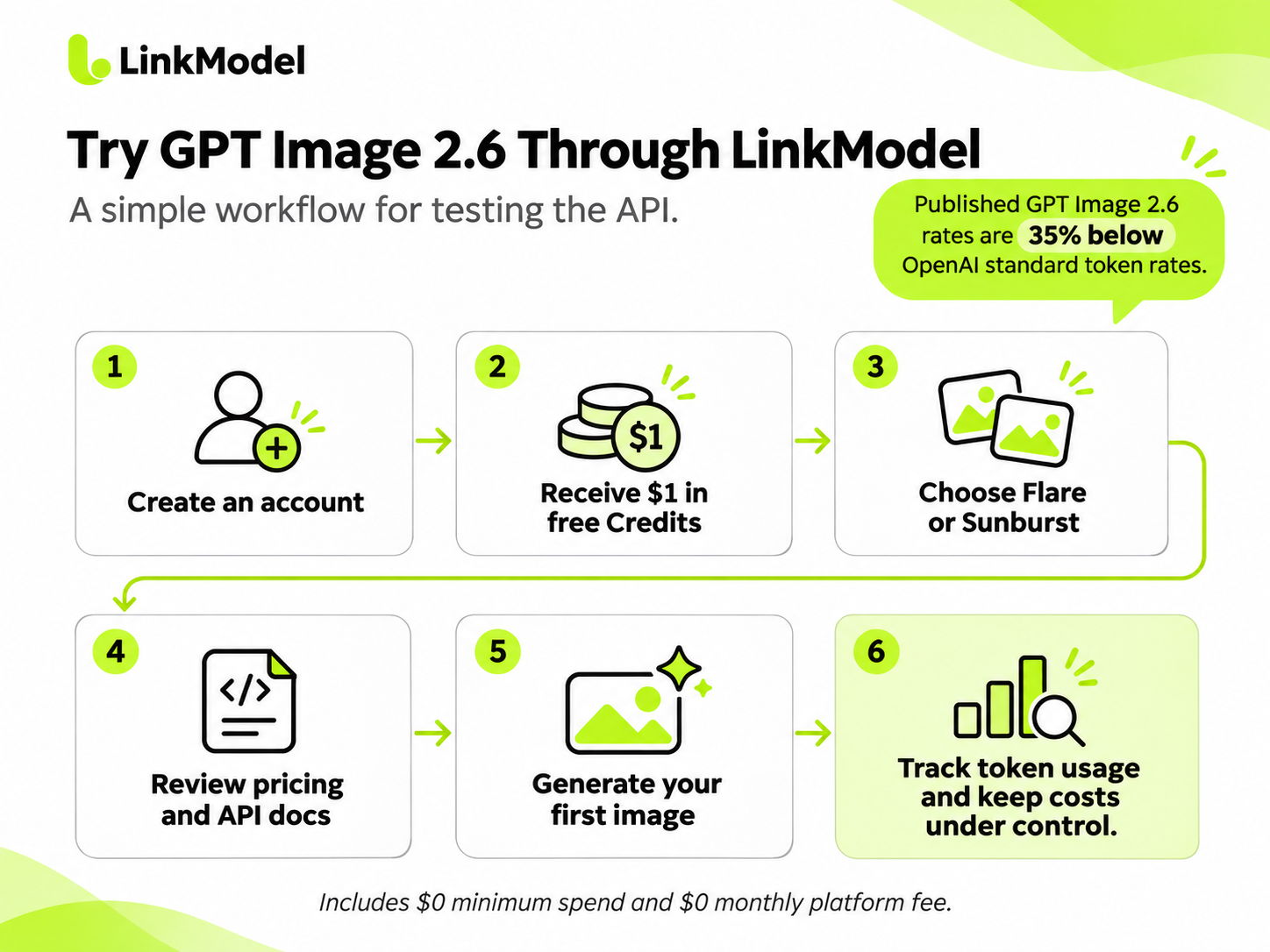
A practical starting workflow is:
1. Open LinkModel and create an account.
2. Sign in and open your dashboard.
3. Check the credit balance available to your new account.
4. Open the model catalog and select GPT Image 2.6 Flare or Sunburst.
5. Review the model's pricing and API documentation.
6. Follow the supported API or Playground workflow for image generation.
7. Review token usage and account balance after generating images.
The model pages are available here:
- GPT Image 2.6 Flare on LinkModel
- GPT Image 2.6 Sunburst on LinkModel
For an initial experiment, use a short text prompt and a single generated image before increasing image quality or adding reference images.
This makes it easier to understand the request's cost and decide whether the model meets your needs.
Why LinkModel Makes Sense After Free Credits
Free credits help you begin testing, but ongoing costs matter more when image generation becomes part of a product or business workflow.
At the published GPT Image 2.6 rates:
- Image output: $19.50 / 1M tokens instead of $30.
- Image input: $5.20 / 1M tokens instead of $8.
- Text input: $3.25 / 1M tokens instead of $5.
For a workload consuming ten million image output tokens, the difference is particularly clear.
| Usage scenario | OpenAI | LinkModel |
|---|---|---|
| 10M image output tokens | $300 | $195 |
| Savings | $105 |
At 100 million image output tokens, the corresponding rates yield a $1,050 difference in image output charges.
The absolute savings increase as usage grows.
LinkModel also supports multiple model categories through a shared platform, which can be useful when an application expands from image generation to text or video workflows.
Instead of purchasing a separate monthly platform subscription, developers can use the available credit balance and continue through pay-as-you-go billing.
How to Avoid Unexpected GPT Image 2.6 API Costs
Controlling image-generation costs requires more than selecting a low token rate.
A more effective approach is to measure each stage of the workflow.
Set explicit generation parameters. Use a consistent model, image size, and quality level when comparing requests.
Check actual token usage. The final bill depends on tokens consumed, not just the published price per million tokens.
Account for reference images. Image editing can introduce additional image input tokens. In one published editing test, a reference image consumed 1,523 input image tokens, adding approximately $0.01218 at OpenAI's standard rate or $0.00792 at LinkModel's listed rate.
Track revisions and retries. A Low-quality output may appear inexpensive, but repeated edits can increase the effective cost of obtaining an acceptable image.
Measure cost per usable image. If 100 generation requests produce only 60 acceptable results, your effective cost per usable image is higher than the initial per-request price.
For example, if 100 requests each cost $0.03 and only 60 images are accepted, then:
100 × $0.03 ÷ 60 = $0.05 per usable image
That distinction becomes increasingly important when building production image-generation systems.
For developers evaluating GPT Image 2.6, the most reliable cost strategy is to begin with a small test budget, inspect actual token usage, and scale the configuration that delivers acceptable results at the lowest effective cost.
Frequently Asked Questions
Is GPT Image 2.6 API completely free?
No. GPT Image 2.6 API uses paid token-based billing, but eligible promotional credits can cover usage. ChatGPT Free separately provides limited in-app image generation without giving users a free API key.
Does ChatGPT Plus include free GPT Image 2.6 API credits?
No. ChatGPT Plus does not qualify for the subscription-linked API credit benefit available to eligible Pro and Business customers. ChatGPT subscription usage and OpenAI API billing are separate.
Can OpenAI Pro API credits pay for GPT Image 2.6 generation?
Yes. Eligible Pro and Business API credit grants can cover qualifying Images API requests when activated and issued to the linked API organization. The available amount depends on subscription eligibility, grant status, and the remaining balance.
How many GPT Image 2.6 images can I generate with $1?
The number depends on image quality, input tokens, image dimensions, and actual output-token consumption. Under the example assumptions in this guide, $1 can cover approximately 61 Low-quality or 28 High-quality 1024 × 1024 requests through LinkModel.
What happens when my free GPT Image 2.6 API credits run out?
When eligible free credits are exhausted, remaining paid API credits can cover additional requests. If no usable balance remains, the API may return a balance-related error. LinkModel users can choose whether to add funds and continue with pay-as-you-go billing at the published GPT Image 2.6 rates.
Conclusion
GPT Image 2.6 does not provide unlimited free API access, but qualifying OpenAI API credits and third-party signup credits can help developers start without an additional API purchase. The key is to distinguish ChatGPT Free from API access, verify which credits you can actually use, and calculate costs using real token consumption rather than advertised quality settings alone. For developers moving beyond a trial, LinkModel offers $1 in new-user credits, 35% lower GPT Image 2.6 token rates, and flexible pay-as-you-go billing, providing a practical way to test Flare or Sunburst and manage ongoing image-generation costs.