
The Kling 4.0 API is not yet publicly available as of October 19, 2026. The model itself has launched, introducing up to 30-second generation, 10 keyframes, and 15 combined reference assets. Developer API access is a separate upcoming release, and LinkModel currently lists its integration as Coming Soon.
For teams building video products or producing advertising content, the opportunity is more control over subjects, movement, and story progression. The planning challenge is knowing which specifications belong to the full model, how Flash differs, and which capabilities remain upcoming—before committing a campaign or development schedule.
At LinkModel, we are preparing to bring Kling 4.0 into our unified API platform. Our existing platform offers pay-as-you-go billing with no minimum spend or monthly platform fee, helping teams use supported image, video, and language models through one integration. Kling 4.0 pricing and any model-specific launch offers remain unannounced.
Last updated: October 19, 2026. This preview draws on Kling’s release information, model introduction manual, and Kuaishou’s launch announcement. It does not report an independent API benchmark or hands-on generation test.

Is the Kling 4.0 API Available?
No public Kling 4.0 API is available at the time of this update. Kuaishou confirms that the model launched on October 15, 2026, while its launch announcement describes enterprise and developer API access as coming soon. The model release and API release are separate milestones.
For LinkModel users, the integration remains Coming Soon. A launch date, callable model identifier, and production request specification are not confirmed in this preview.
| Release milestone | Current position |
|---|---|
| Kling 4.0 model | Released |
| Public developer API | Not yet open at this update |
| Kling 4.0 on LinkModel | Coming Soon |
| LinkModel launch price | Not announced |
| 1080p and 4K 10-bit HDR | Described as upcoming |
| Extension toward 2 minutes | Described as upcoming |
This article focuses on what the published capabilities mean for your workflow and what you can prepare before access opens.
Kling 4.0 Features and Specifications
Kling 4.0 combines text, image, keyframe, and reference-driven video creation. The supplied Kling 4.0 model introduction manual lists the following capabilities.
| Capability | Published specification |
|---|---|
| Generation modes | Text-to-video, image-to-video, first and last frames, multi-keyframes, and Omni Reference |
| Single-generation duration | 3–30 seconds |
| Keyframes | Up to 10 images |
| Prompt length | Up to 8,000 tokens |
| Aspect ratios | 21:9, 16:9, 1:1, 9:16, and automatic selection |
| Audio output | Two-channel stereo |
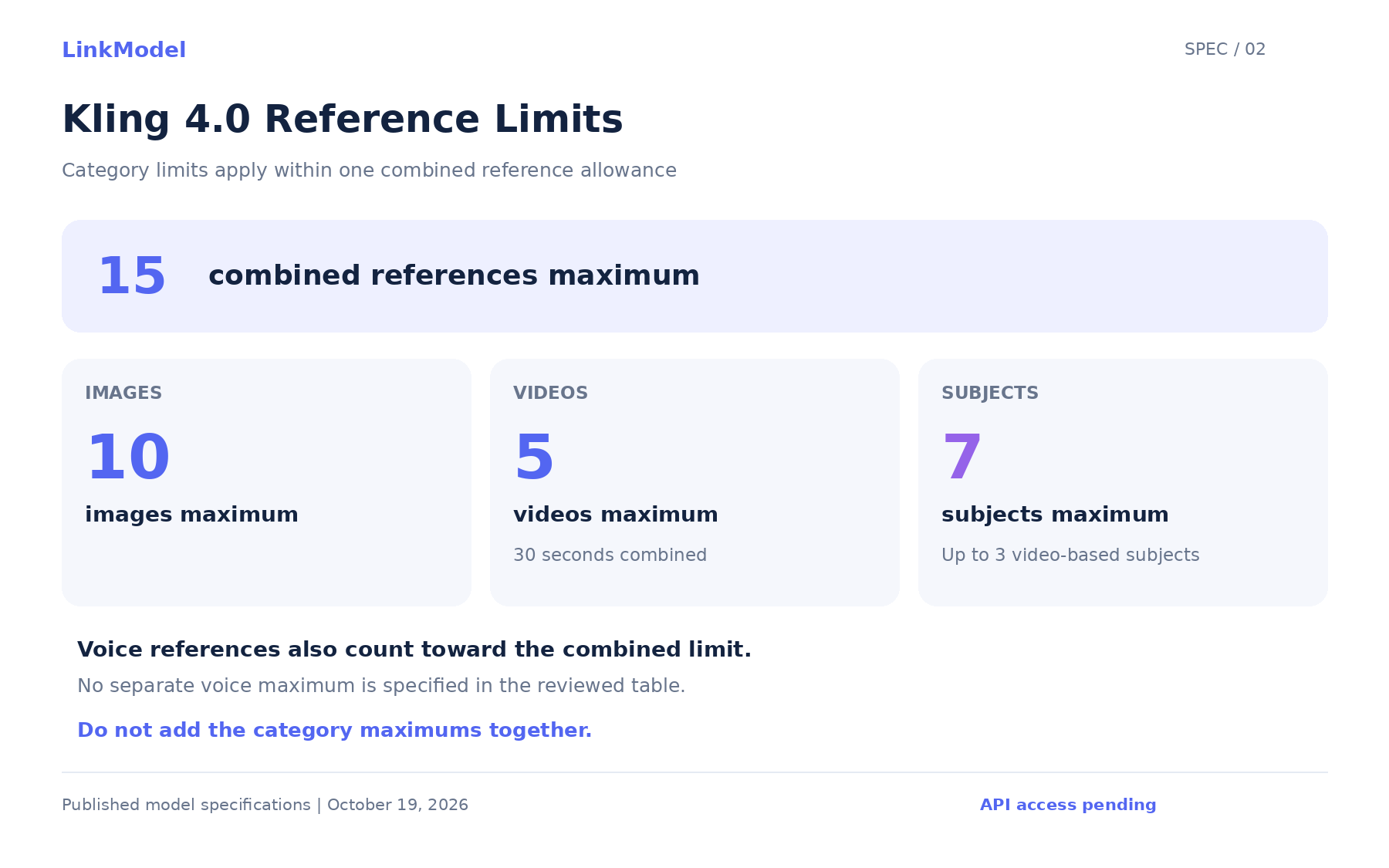
| Image references | Up to 10 |
| Video references | Up to 5, totaling no more than 30 seconds |
| Subject references | Up to 7, including up to 3 video-based subjects |
| Combined references | Up to 15 across images, videos, voices, and subjects |
| Audio reference | Voice reference |
| High-resolution HDR | 10-bit HDR at 1080p and 4K, coming soon |
| Video extension | Multiple extensions reaching up to 2 minutes, coming soon |
These are published model specifications, rather than a confirmed LinkModel API parameter list. The released integration will determine which options are exposed and how they are configured.
The Kling model introduction manual also describes targeted video editing and reference inputs for appearance, performance, camera movement, and pacing. Its numerical limits are useful planning boundaries; its qualitative claims about better realism or consistency are developer claims, not independent test results.
How the Reference Limits Work
The 15-reference total applies alongside the limits for each reference category. It is not an allowance to combine every category’s maximum.
For example, supplying the maximum number of images does not leave room for the maximum number of every other reference type. Video inputs also have a combined duration limit, and video-based subjects have their own count restriction.
A practical preparation method is to give each asset one clear role: product appearance, character identity, environment, movement, camera behavior, or voice. Select references for the information they contribute, rather than trying to fill every available slot.
What These Features Mean for Video Workflows
The most useful way to evaluate Kling 4.0 is to connect each control to a production requirement. The workflows below are proposed applications of the published capabilities, not measured customer outcomes.
Product Advertising: Preserve the Product, Direct the Reveal
A product advertisement often needs recognizable packaging, a deliberate reveal, and a usable ending. Reference images can communicate appearance, while keyframes can specify important compositions.
An evaluation brief might define:
- Opening: the product appears within the intended environment.
- Reveal: camera movement exposes the product without changing its packaging.
- Ending: the product remains clearly visible in the required composition.
The review should cover both the planned visual moments and the movement between them. A result can resemble the supplied frames while introducing an unwanted cut or changing a label midway through the shot.
For commercial work, product identity and readable branding are acceptance criteria—not details to overlook because the overall video looks attractive.
Narrative Content: Plan the Story Beats
The longer generation window gives creators more room to describe an action and its consequences. Multi-keyframes offer a way to communicate important changes in character state, scene composition, or narrative direction.
Before generating, decide whether the sequence should be one continuous take or several shots. Then describe what changes between the visual moments: who moves, what the camera follows, and how the scene should end.
A longer duration does not establish better continuity. Evaluate whether the result maintains character identity, spatial relationships, and the intended sequence of events.
Reference-Driven Recreation: Separate Appearance From Movement
The manual describes video references for character performance, action, camera movement, and narrative pacing. Image references can provide subjects, layouts, styles, and compositions.
That distinction is useful when a team wants to preserve its own product or character while exploring a particular movement or shot structure.
| Reference role | What it communicates |
|---|---|
| Product image | Packaging, proportions, and appearance |
| Character reference | Identity and visual characteristics |
| Environment image | Setting and composition |
| Motion video | Action and performance |
| Camera reference | Framing, movement, and pacing |
| Voice reference | Intended voice characteristics |
Explain what each reference should influence. Conflicting inputs make it harder to determine why an output departed from the brief.
Video Editing: Define the Change and the Invariants
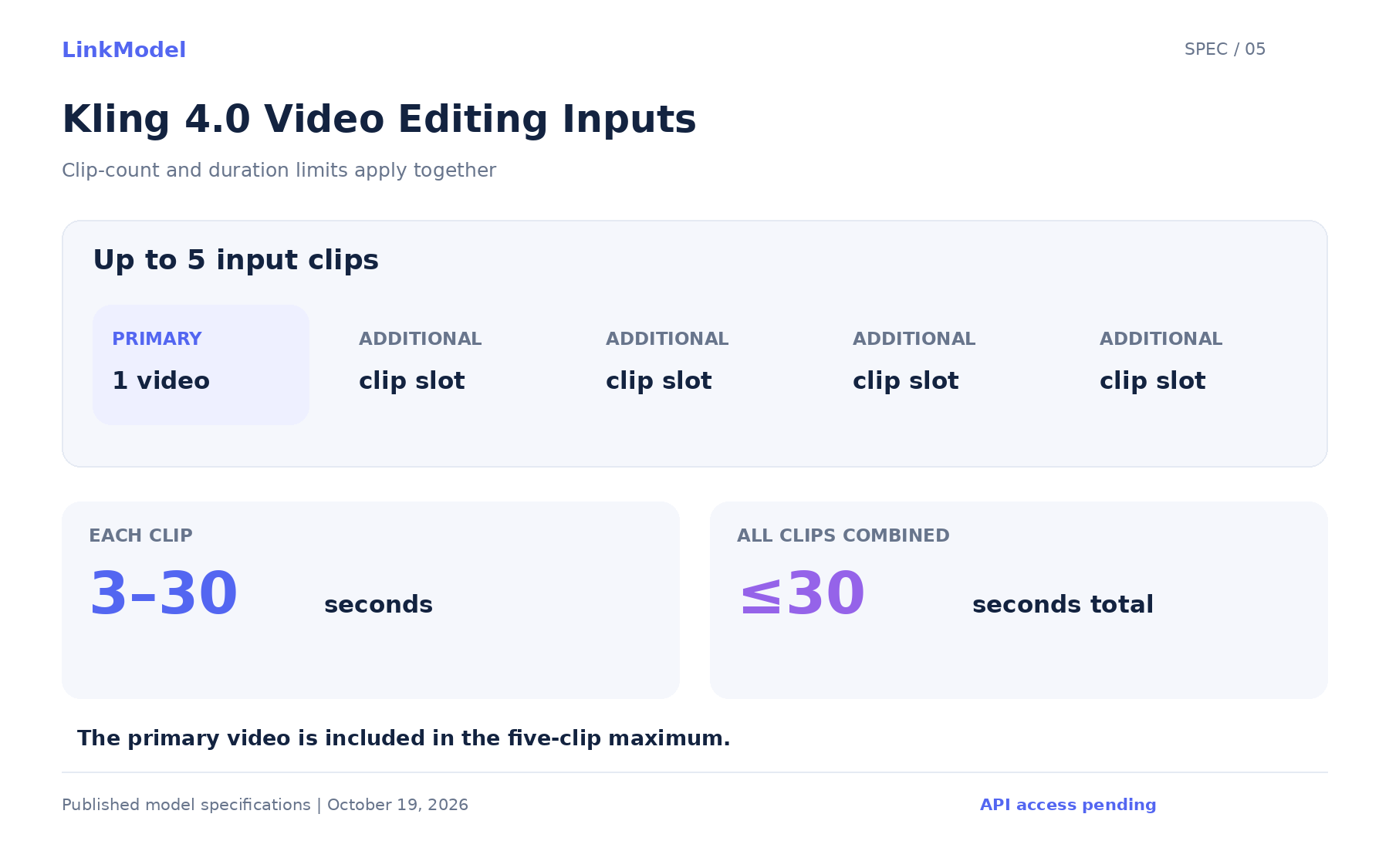
The manual describes editing with up to 5 input clips, including 1 primary video. Each clip must be 3–30 seconds, and their combined duration must be no more than 30 seconds.
Its listed editing scope includes changing subjects, backgrounds, style, weather, color, material, framing, and viewpoint.
A useful first evaluation asks for one specific revision and states what must remain stable. For example, changing a background should be reviewed alongside subject appearance, action, and camera continuity.
An edit succeeds when it makes the requested change while preserving the required parts of the original scene.
Kling 4.0 vs Kling 4.0 Flash
Kling 4.0 Flash is a separate variant with a narrower published output specification. Its documented limits should not be used to describe the full model, or vice versa.
| Specification | Kling 4.0 | Kling 4.0 Flash |
|---|---|---|
| Text-to-video | Listed | Listed |
| Image-to-video | Listed | Listed |
| Omni Reference | Listed | Listed |
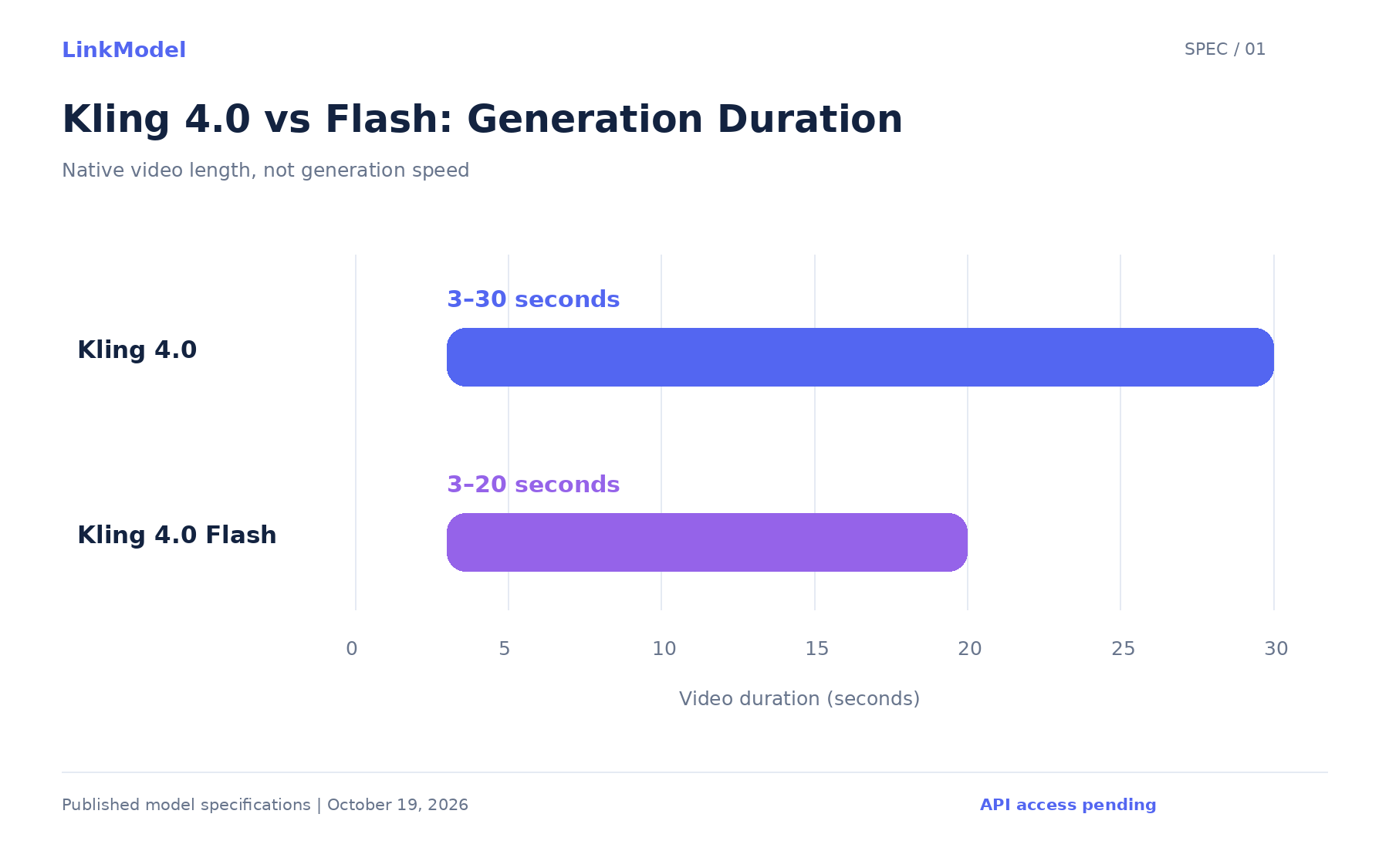
| Generation duration | 3–30 seconds | 3–20 seconds |
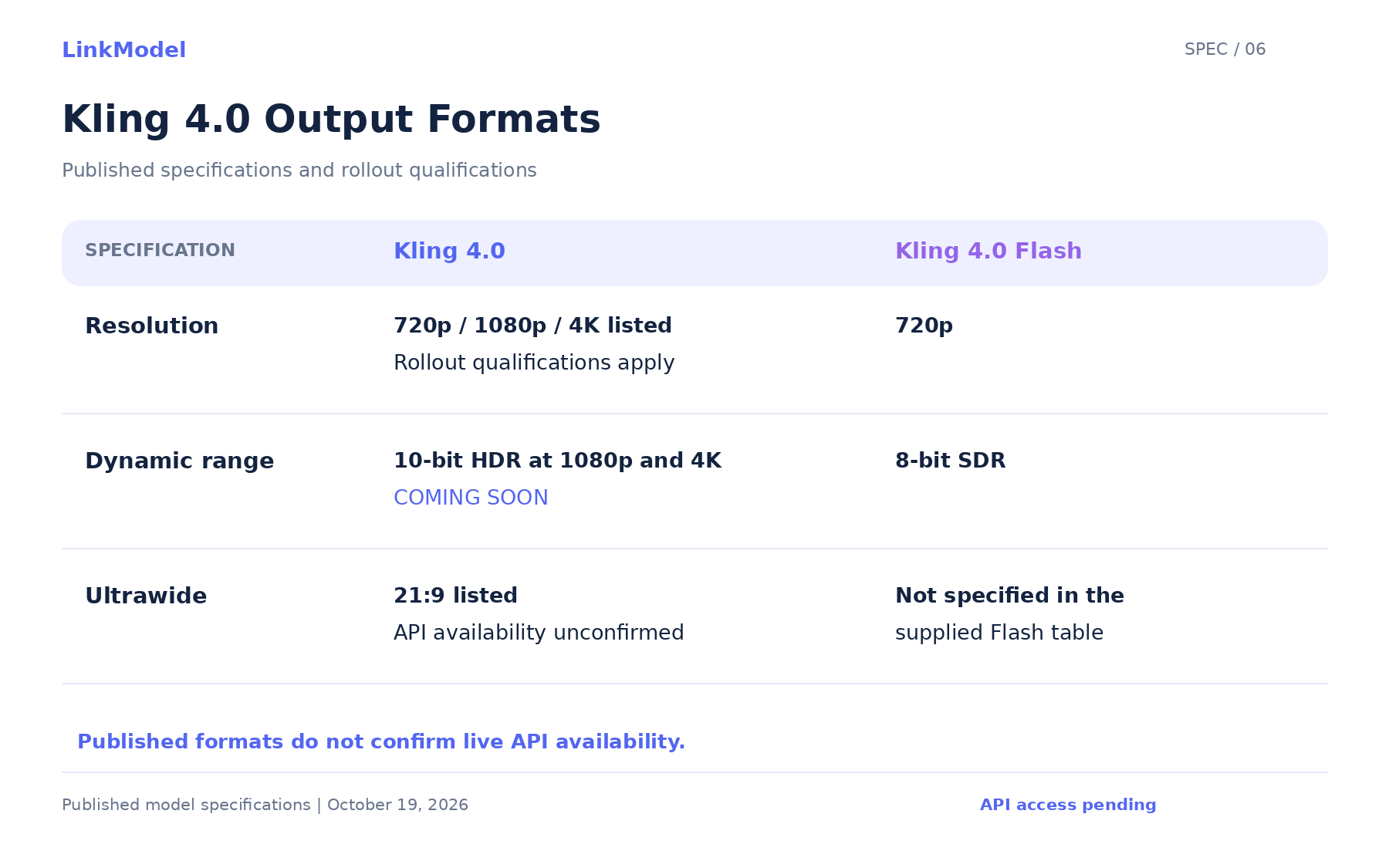
| Resolution | 720p, 1080p, and 4K listed, with rollout qualifications | 720p |
| Dynamic range | 10-bit HDR at 1080p and 4K marked upcoming | 8-bit SDR |
| Multi-keyframes | Up to 10 listed | Not specified in the supplied Flash table |
Kling positions Flash for frequent creation and faster generation. However, the reviewed materials do not provide matched generation-time measurements, verified API rates, or an independent quality comparison.
The defensible distinction is therefore the published specification. There is no supported percentage saving or “times faster” figure to attach to Flash here.
For planning purposes, identify the output your project requires first. Then evaluate the appropriate variant when its access and configuration are available.
4K, HDR, and Video Extension: What Is Coming Later?
The model manual marks 10-bit HDR output at 1080p and 4K, plus video extension toward 2 minutes, as upcoming capabilities. These should not be presented as live API options.
The materials list 21:9 ultrawide framing, although rollout wording differs between the feature information and launch announcement. Its availability through a future API must be confirmed separately.
Resolution, Framing, and HDR Are Different Properties
| Property | What it describes | What to inspect |
|---|---|---|
| Resolution | Output pixel dimensions | The downloaded file |
| Aspect ratio | Width relative to height | The generation setting and delivered framing |
| Native generation | How the output resolution was produced | Whether enlargement was part of the workflow |
| Bit depth and HDR | Color representation and dynamic-range format | File metadata and playback behavior |
A 21:9 video is not automatically 4K, and a 4K file is not automatically HDR. Teams with strict delivery requirements should validate the actual output and preserve its required properties through editing and export.
Extension Is Different From Single-Pass Generation
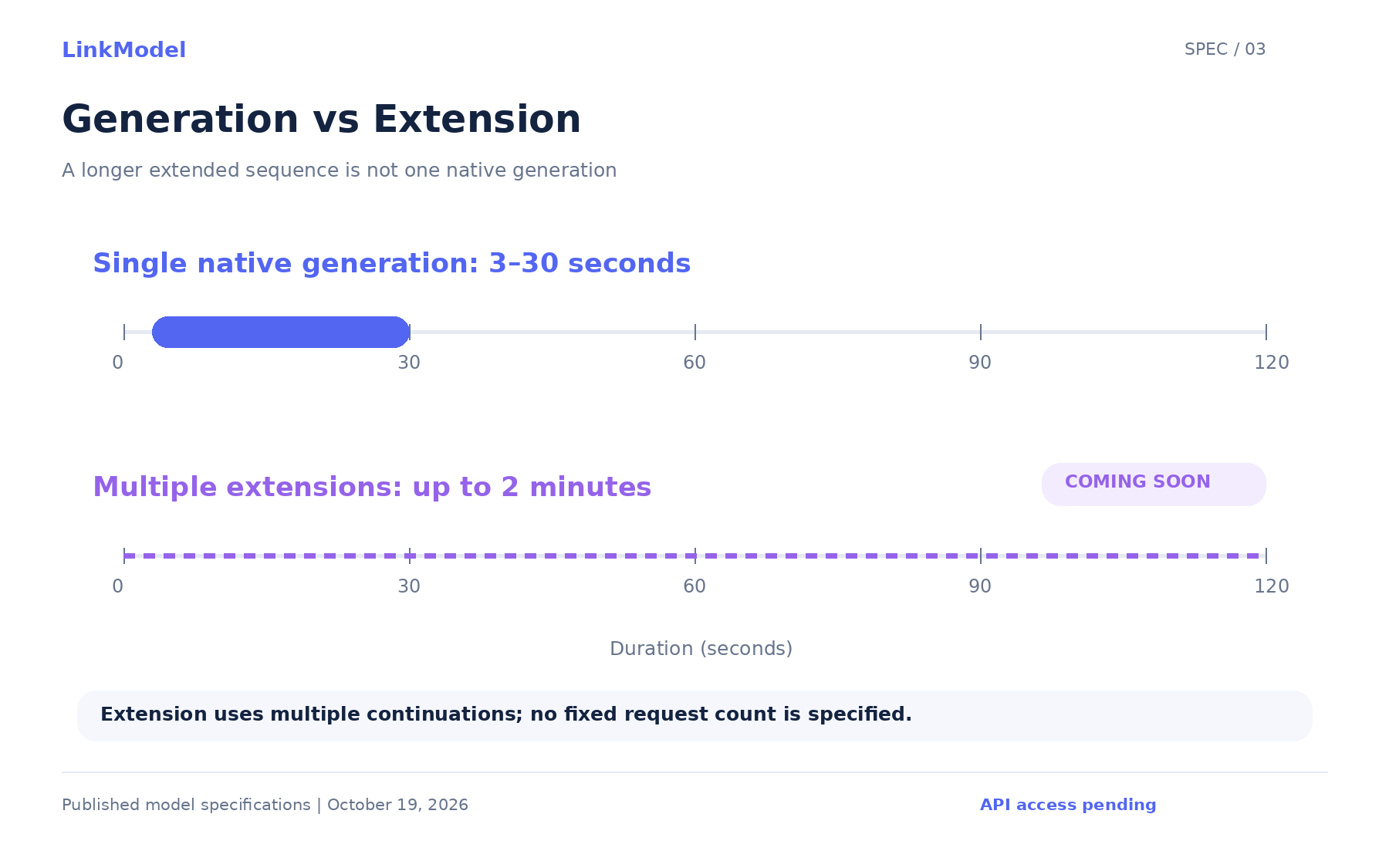
The published native generation range is 3–30 seconds. The separate extension capability is described as allowing multiple continuations toward 2 minutes.
That distinction affects both creative planning and evaluation. An extended sequence needs continuity checks across continuation points; it should not be described as a single native 2-minute generation.
Audio, Voice References, and On-Screen Text
The model manual lists stereo output, voice references, multilingual speech, and generated on-screen text. Its language examples include Chinese, English, Japanese, Korean, Spanish, Portuguese, German, French, and Hindi, alongside several dialects and accents.
For localized content, assess speech, synchronization, and visible text separately.
Speech: Check the wording, pronunciation, language, and intended delivery.
Synchronization: Review whether dialogue aligns with the visible performance throughout the clip.
On-screen text: Inspect names, packaging labels, and required words during movement—not only in a still frame.
The voice-reference specification should not be expanded into an unsupported claim about arbitrary music or soundtrack control. Likewise, published language support does not establish equal accuracy across languages.
For final advertising assets, review all generated brand names, prices, and required copy before use.
Common Kling 4.0 Specification Misunderstandings
| Misunderstanding | Correct interpretation |
|---|---|
| The model has launched, so the API is open | Product release and API availability are separate |
| Every reference category can be used at its maximum together | Individual limits apply within the combined reference limit |
| Five video references can each be 30 seconds | Reference videos have a combined duration ceiling |
| Flash includes every full-model capability | Use the specification published for each variant |
| Two-minute extension means two-minute native generation | Extension is a separate continuation workflow |
| Voice reference means unrestricted soundtrack control | The manual specifically describes voice reference |
| Every announced format will be available on API launch day | Provider configurations and rollout timing require confirmation |
These distinctions are more useful for planning than an unqualified list of maximum specifications.
Kling 4.0 API Pricing and LinkModel Availability
Kling 4.0 API pricing has not been announced in the materials reviewed for this update. LinkModel’s model-specific rates and any launch offers remain unconfirmed.
We are therefore not publishing a per-second estimate, applying an earlier Kling model’s price, or assigning a platform-wide discount to this upcoming integration.
LinkModel currently lists Kling 4.0 as Coming Soon. In the meantime, teams can explore supported models through the existing platform and prepare assets for a focused evaluation when access opens.
What to Prepare Before API Access Opens
Prepare a production brief, a purposeful reference set, and clear acceptance criteria. Those inputs will make your first evaluation more informative than an open-ended request for a cinematic video.
Define One Repeatable Brief
Choose a concrete task: a product reveal, a character action, a reference-driven recreation, or a localized promotional clip.
Specify the subject, action, camera behavior, sound requirements, and intended ending. Separate essential requirements from optional stylistic preferences.
Prepare References and Visual Moments
Organize each reference by its intended role. For a keyframe-based brief, prepare the visual moments that matter and describe how the action should progress between them.
Remove contradictory references before testing. A clear brief makes it easier to distinguish an instruction problem from a generation limitation.
Establish a Review Record
For each future evaluation, keep the inputs, configuration, original output, and review notes together. Record actual generation time and charges when those measurements become available.
| Review area | Acceptance question |
|---|---|
| Subject identity | Does the required product or character remain recognizable? |
| Action | Does the intended event happen in the correct order? |
| Camera | Does movement and shot continuity follow the brief? |
| Audio | Is speech intelligible and appropriately synchronized? |
| Text | Are required words accurate and stable? |
| Ending | Is the final composition usable? |
| Delivery | Does the actual file meet the required format? |
A completed generation and an approved production asset are different outcomes. Keeping that distinction visible will support more meaningful quality and cost comparisons after launch.
Frequently Asked Questions
Is the Kling 4.0 API Open Yet?
Not as of October 19, 2026. The model has launched, while public API access remains upcoming at this update. LinkModel’s integration is also marked Coming Soon.
How Much Will the Kling 4.0 API Cost?
A verified launch price has not been announced in the reviewed materials. LinkModel’s Kling 4.0 rates and any model-specific discounts remain unconfirmed.
What Is the Difference Between Kling 4.0 and Flash?
The full model lists 3–30-second generation and expanded controls. Flash lists 3–20 seconds at 720p with 8-bit SDR. The supplied specifications do not establish a measured speed, quality, or price advantage.
Will 4K and HDR Be Available When the API Opens?
That has not been established. The model manual describes 1080p and 4K 10-bit HDR as coming soon; API launch and format rollout should be treated separately.
Can Kling 4.0 Generate a 2-Minute Video in One Pass?
The published specification describes up to 30 seconds in a single generation. The upcoming extension workflow is described separately as reaching up to 2 minutes through multiple continuations.
Conclusion
Kling 4.0’s most useful announced advances are longer generation and more ways to direct subjects, movement, and visual progression. For developers and creative teams, the immediate opportunity is to prepare a focused brief and reference assets while keeping API access, high-resolution rollout, and pricing separate from the model launch. At LinkModel, we are preparing to bring Kling 4.0 into our unified API platform; explore the platform’s supported models today and use the published specifications to plan a disciplined evaluation when the integration opens.