Seedream 5.5 is worth using for photorealistic images, multi-round editing, accurate text, and transparent PNG assets. Our review of published tests found strong results in product consistency, bilingual text rendering, and reusable character designs. However, missed editing instructions, visual drift, and inconsistent exports remain important limitations for commercial work.
The real challenge is turning a good-looking image into a production-ready asset without expensive rework. In one eight-round product-editing test, Seedream 5.5 completed seven requested changes while preserving the product's label identity. Another workflow produced 16 character stickers for approximately $0.20 but revealed cross-batch color inconsistencies. These findings show why editing reliability and cost per usable image matter more than first-generation quality alone.
For creators and developers who want Seedream 5.5 at a lower per-image cost, LinkModel offers API access under the model ID seedream-5.5, with standard-tier outputs starting at just $0.016 per image—approximately 47% less than fal's matching $0.030 rate. With no mandatory monthly subscription, pay-as-you-go billing, and a $1 free credit for new users, LinkModel provides an affordable way to explore Seedream 5.5's capabilities before scaling production workflows. The Credits never expire, apply to every model currently available on LinkModel, and are available once per new user. Start creating with Seedream 5.5 on LinkModel at a lower per-image price.
Seedream 5.5 Review Verdict: Is It Worth Using?
Our verdict: Seedream 5.5 is particularly well suited to iterative product imagery, character assets, and text-heavy graphics. Its main advantage is preserving useful visual elements through successive revisions, although exact brand details and layout constraints still require attention.
Released by ByteDance on November 9, 2026, Seedream 5.5 focuses on multi-round editing consistency, natural lighting, complex text rendering, native RGBA transparency, and layer decomposition.
ByteDance has demonstrated an editing sequence extending to 100 rounds. Independent shorter tests help establish where the model's capabilities are most useful in practical production.
Which Tasks Are Worth Using Seedream 5.5 For?
| Your main task | Recommendation | Why |
|---|---|---|
| Repeated product-image revisions | Strong choice | Published editing tests show good product and brand preservation |
| Transparent stickers and reusable assets | Strong choice | Native RGBA and practical multi-image production workflows |
| Text-heavy posters and menus | Promising with review | Good text reproduction, but layout and illustration errors remain |
| Consistent characters across images | Promising with references | Recognizable characters can survive repeated edits |
| Exact technical infographics | Additional review needed | Text can be right while diagrams are wrong |
| Strict spatial composition | Compare alternatives | GPT Image 2.6 followed some spatial instructions more literally |
| Completely unattended commercial delivery | Not established | Exact branding and output requirements still need validation |
For commercial designers, the distinction is between generating a convincing image and generating an asset that passes every requirement in a brief.
A missed decorative effect may be acceptable. An altered logo or incorrect product label may not be.
Seedream 5.5 Performance at a Glance
Our research brings together task-specific results from product-editing comparisons, text-generation evaluations, transparency tests, and creator workflows. These findings reveal where Seedream 5.5 performs consistently and where particular production requirements remain difficult.
| Evaluation | Reported result | Key lesson |
|---|---|---|
| Eight-round product editing | 7 of 8 changes completed | Brand label identity remained stable |
| Five-round product editing | 5 requested changes appeared | Some label lettering changed unexpectedly |
| Four-round character editing | 4 of 4 changes completed | Character survived despite early drift |
| Bilingual café menu | 8 dishes, prices, and hours correct | Strong text reproduction |
| Six-step infographic | Correct captions, 2 incorrect illustrations | Visual meaning needs separate review |
| Transparent PNG workflows | 4/4 success in one test; 1/2 in another | Exported alpha channels must be checked |
| Pet sticker production | 16 correct captions; about $0.20 total | Efficient generation with minor style drift |
| Photorealism experiments | 4 scene pairs | Camera-specific prompting improved perceived realism |
How We Evaluated the Evidence
Our research combines ByteDance's official model information, published same-prompt comparisons, documented creator workflows, and publicly listed image prices.
For editing, we distinguish requested changes completed, preservation of protected details, and visual consistency across rounds. For typography, we examine spelling separately from layout and the meaning of accompanying illustrations. For transparency, the key requirement is a genuine alpha channel, not simply a white-looking background.
Individual test results remain tied to their reported model settings and workflows. Cost calculations use the specified rates and assumptions, while creator-reported spending and generation times are treated as observations from those workflows.
This approach makes it possible to compare practical strengths without reducing different image tasks to a misleading universal score.
Seedream 5.5 Pros and Cons
| Pros | Cons |
|---|---|
| Promising multi-round editing consistency | Some requested changes may be missed |
| Better preservation of products and characters in selected tests | Small protected details can still change |
| Natural lighting and realistic materials | Images may still look overly polished |
| Accurate text in several public evaluations | Layout and illustrations can be incorrect |
| Native transparent and partially transparent output | Some integrations deliver opaque exports |
| Layer decomposition for reusable elements | More complex asset and billing management |
| Competitive standard-tier generation costs | References and extra attempts add costs |
Seedream 5.5 is most valuable when the initial image is only the beginning of the workflow. It is less distinctive for tasks that require no subsequent modification.
Seedream 5.5 Image Quality Review: Photorealism, Lighting, and Composition
Can Seedream 5.5 Generate Realistic Photos?
Yes. Seedream 5.5 can produce convincing photographic scenes, particularly when lighting, materials, skin texture, and camera behavior are specified clearly.
A published same-prompt comparison used an elderly fisherman repairing a fishing net, with instructions for documentary realism, soft overcast lighting, and an unretouched appearance.
Seedream 5.5 produced relatively flat natural light and muted colors, closer to the requested atmosphere. Seedream 5.0 Pro introduced stronger sunrise-style backlighting, producing a more dramatic but less instruction-faithful image.
The result illustrates why realism and visual attractiveness should be evaluated separately.
For editorial photography, lifestyle campaigns, and product advertising, accurate lighting can be more useful than dramatic lighting when a visual needs to follow a precise brief.
| Quality dimension | What to evaluate |
|---|---|
| Lighting | Direction, softness, exposure, and shadows |
| Materials | Reflections, surface texture, and roughness |
| Human appearance | Skin detail and natural proportions |
| Camera behavior | Perspective, focal length, and depth |
| Scene coherence | Object relationships and environmental consistency |
A glossy product image can look impressive while still having incorrect labeling or unrealistic material behavior. Photorealism should therefore be assessed alongside prompt adherence.
Why Can Seedream 5.5 Images Look Too Polished?
Our review of a four-scene photography experiment found that adding realistic optical characteristics can improve perceived photographic authenticity.
The creator generated eight images, comparing conventional polished prompts with more camera-specific versions. The reported image cost was approximately $0.016 each, with generation times of 20–50 seconds.
| Prompt adjustment | Intended result |
|---|---|
| Film grain and slight soft focus | Reduce excessively smooth surfaces |
| Mild barrel distortion | Simulate lens characteristics |
| Subtle chromatic aberration | Add plausible optical imperfections |
| Natural highlight bloom | Soften the appearance of intense light |
| Candid framing | Avoid overly staged compositions |
For example, a generic prompt might request:
A photorealistic family photograph on a beach, flawless skin, perfect lighting, ultra-sharp detail, and cinematic composition.
A more controlled version would be:
A candid beach photograph in soft late-afternoon light, with natural skin texture, subtle film grain, slight lens softness, realistic shadows, gentle highlight bloom, and spontaneous documentary-style framing.
The second prompt gives the model concrete photographic constraints instead of relying on quality adjectives.
For a campaign containing multiple related images, these camera characteristics can also serve as a reusable visual direction.
Seedream 5.5 Prompt Following and Spatial Depth
A separate creator comparison examined Seedream 5.5, GPT Image 2.6, and Nano Banana 2.1 using a rainy Paris flower-shop scene.
The test explored three different spatial changes: an ultra-wide-angle view, strong foreground occlusion, and a low camera angle with converging architectural lines.
| Model | Observed strength | Tradeoff |
|---|---|---|
| Seedream 5.5 | Dramatic low-angle perspective | Some outputs became darker |
| GPT Image 2.6 | More literal adherence to spatial instructions | Sometimes less visually dramatic |
| Nano Banana 2.1 | Strong response to ultra-wide-angle wording | Scene-dependent results |
Strong visual impact is not always the same as precise prompt following.
For low-angle scenes, Seedream 5.5 prompts benefit from explicit camera position, foreground and background relationships, and exposure requirements.
For example:
A rainy Paris flower shop photographed from a low camera position with a 14 mm wide-angle lens. Wet flowers fill the foreground, the storefront occupies the middle ground, distant buildings appear smaller, architectural lines converge naturally, and reflections remain visible on the pavement. Maintain realistic daylight and balanced exposure.
This gives the model measurable compositional requirements instead of requesting dramatic perspective alone.
Seedream 5.5 Editing Review: Multi-Round Consistency, Text, and Transparency
How Reliable Is Seedream 5.5 Multi-Round Editing?
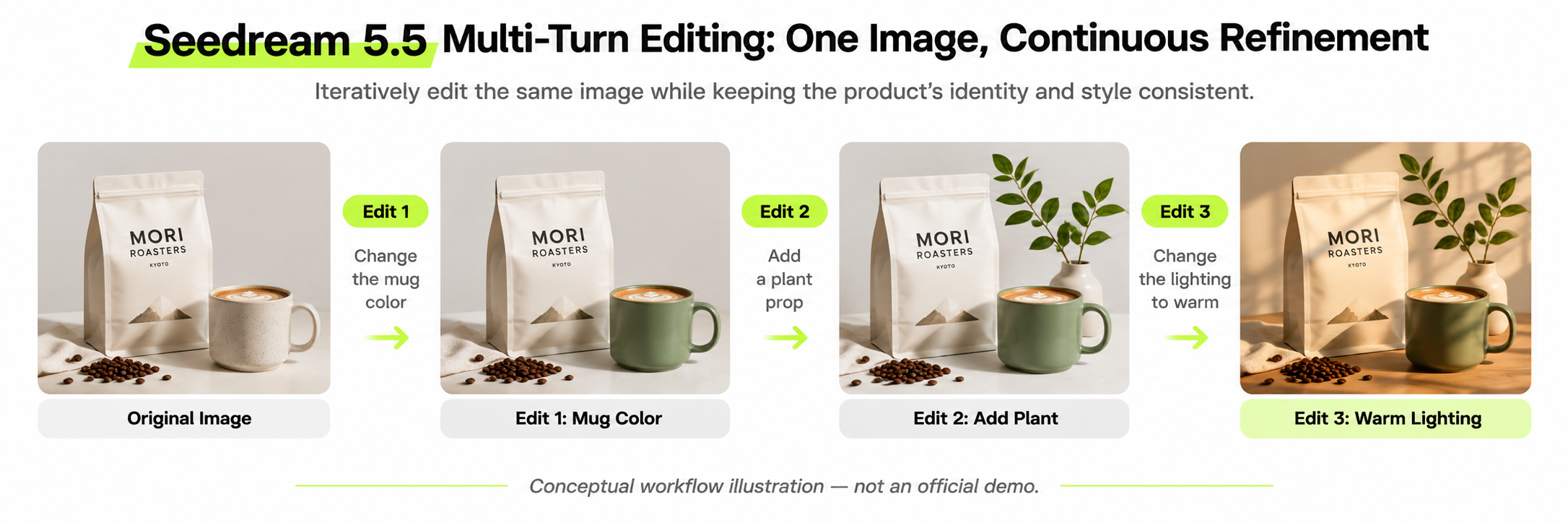
Multi-round editing is Seedream 5.5's most important production-oriented capability, but successful editing involves more than applying each requested change.
ByteDance's official demonstration extends to 100 consecutive edits, showing how image elements can be revised while maintaining a coherent composition.
In real commercial work, three outcomes matter:
- Edit completion: The requested element changes.
- Protected-detail preservation: Unrelated elements remain acceptable.
- Cumulative consistency: Earlier approved changes survive later revisions.
The difference is particularly important for branded product images. A successful background replacement is of limited value if a product's logo or packaging text changes unexpectedly.
Case Study: Eight Rounds of Coffee Product Editing
A published 28-request comparison tested Seedream 5.5 and Seedream 5.0 Pro using matching prompts at 2K resolution.
For the editing sequence, the tester used the previous image as the reference for the next round, requesting one change at a time while instructing the model to preserve everything else.
The original scene featured a white pour-over coffee dripper, a branded MORI ROASTERS mug, coffee beans, linen fabric, and morning window light.
| Round | Requested modification |
|---|---|
| 1 | Change the mug to terracotta glaze |
| 2 | Replace the table with walnut |
| 3 | Add eucalyptus |
| 4 | Change the label to MORI ROASTERS · KYOTO |
| 5 | Replace the jar with a copper kettle |
| 6 | Add steam above the dripper |
| 7 | Change the lighting to a warm evening atmosphere |
| 8 | Translate the label into Japanese |
Seedream 5.5 completed seven of eight requested changes, missing the steam instruction in round six.
Its most important success was preserving the mug's label structure during two text changes. The overall product composition also remained recognizable throughout the sequence.
Seedream 5.0 Pro completed all eight modifications but redesigned the original two-line label during round four.
This distinction matters for commercial images: completing every requested operation does not necessarily mean producing the more usable branded asset.
A missing decorative effect may be easier to correct than an altered brand identity.
For product editing, review the requested modification and protected brand elements independently after every round.
Case Study: Five Consecutive Bottle Edits
Another published test examined a matte cobalt-blue insulated bottle with a black cap, a white NORTH label, and a 500 ml marking.
The original composition also included an orange sphere and cream linen fabric, making it easier to detect unintended changes to surrounding objects.
Five successive editing requests were completed, and the overall bottle composition remained coherent.
However, a recoloring operation also changed some label lettering.
The case demonstrates that recognizable product identity and exact typography are separate quality requirements.
For commercial packaging, the review process should cover the complete scene, the product's defining shape and materials, and exact brand information.
Keeping approved intermediate images is useful when later edits damage previously correct text or visual details.
Seedream 5.5 Text Rendering: Menus, Posters, and Infographics
Seedream 5.5 shows encouraging text accuracy, although visual layout and semantic accuracy remain distinct concerns.
ByteDance reports a 0.4% severe text corruption rate and a 1.7% minor text corruption rate in its published Chinese and English evaluations.
Practical examples illustrate how results can vary by task.
| Published task | Seedream 5.5 result | Practical finding |
|---|---|---|
| Bilingual café menu | 8 dish names, prices, and hours correctly reproduced | Strong text accuracy |
| English poster examples | Requested prices and dates preserved | Exact layout requirements not always followed |
| Chalkboard text comparison | Requested words reproduced correctly | Short text can perform well |
| Six-step coffee infographic | Captions correct; 2 illustrations inaccurate | Visual explanations require separate review |
In the bilingual menu comparison, Seedream 5.0 Pro also reproduced the text correctly, so the result does not establish that Seedream 5.5 is always more accurate.
The infographic result is especially relevant to commercial designers. Correct captions are insufficient when the accompanying images communicate the wrong procedure.
For posters, packaging, menus, and educational graphics, review spelling, numbers, hierarchy, layout, illustration meaning, and brand consistency separately.
Seedream 5.5 Transparent PNG and Layer Decomposition
Seedream 5.5 supports native RGBA output, allowing images to contain fully and partially transparent regions.
This is useful for stickers, logos, interface assets, product cutouts, and compositing.
Published transparency tests show why the exported file matters more than the preview.
| Published test | Observed outcome | Lesson |
|---|---|---|
| Four prompt-based transparency requests | 4/4 produced alpha channels | Native transparency works in supported setups |
| Ceramic bird and translucent ribbon | 1/2 produced the intended transparency | Translucent materials remain challenging |
| Transparent sticker request | White background without alpha | Some interfaces may return an opaque image |
The four-success test also revealed an important material limitation: a glass perfume bottle's surroundings were transparent, but the glass itself appeared opaque in the alpha channel.
For professional use, inspect transparent PNGs against both dark and light backgrounds, paying attention to hair, fur, glass, soft shadows, and translucent edges.
Seedream 5.5 also supports layer decomposition. Official documentation describes a base image and up to 99 layers, enabling individual elements to be separated for downstream design tasks.
Layered workflows are especially relevant when a design must remain editable after generation. The actual export options should be checked in the interface used for production.
Seedream 5.5 Real-World Use Cases and Production Workflows
Case Study: Creating 16 Transparent Corgi Stickers for About $0.20
Our review of creator-shared workflows identified a practical 16-sticker production example using Seedream 5.5.
The workflow started with an AI-generated, phone-style corgi reference image, not an uploaded photograph of a real pet.
The creator then used Seedream 5.5 editing to turn the image into a cartoon sticker character while preserving recognizable markings, ears, and a red collar.
That character reference became the foundation for four generation batches, each containing a 2×2 grid of stickers with different expressions and captions.
The four sheets were subsequently divided into 16 individual transparent PNG files.
| Production metric | Creator-reported result |
|---|---|
| Finished sticker files | 16 |
| Sticker-sheet generations | 4 |
| Correct captions on first attempt | 16/16 |
| Initial reference and character creation | $0.06 |
| Four sticker sheets | $0.14 |
| Total generation spending | $0.20 |
| Reported workflow duration | About 5 minutes |
| Main inconsistency | Lighter caption color in the final batch |
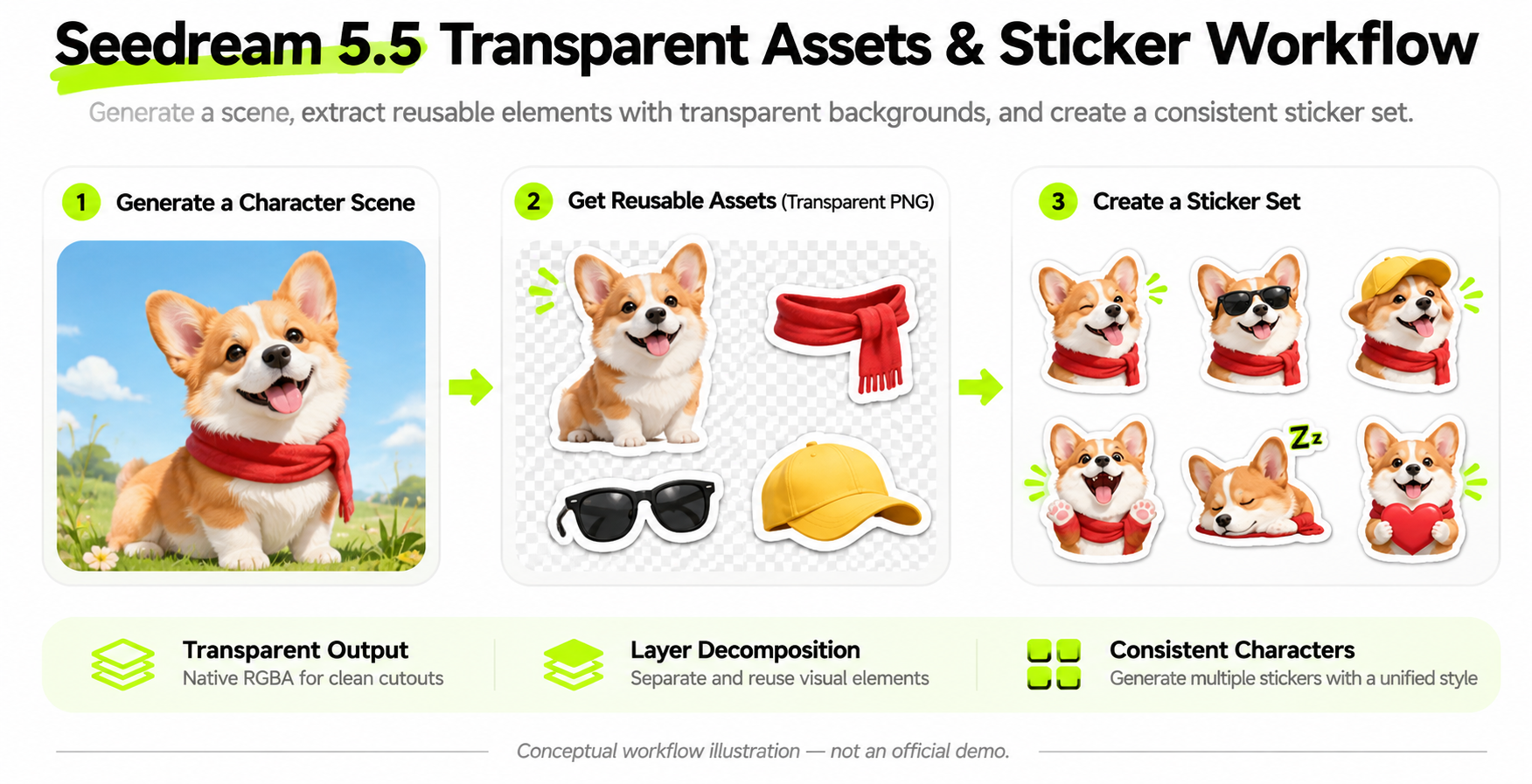
The example demonstrates two distinct advantages.
First, a stable character reference can support many expressions without recreating the character for every image.
Second, generating multiple stickers on each sheet changes the economics of asset production.
The remaining issue was not spelling or character recognition. It was typography consistency: the last sheet contained lighter captions than earlier sheets.
The production lesson is to preserve both a character reference and a design-style reference. Defining caption color, outline thickness, placement, and typography can make multi-batch output more consistent.
Case Study: Four-Round Fox Character Editing
A separate character-editing workflow involved four consecutive changes to a fox sticker.
Each round used the preceding output as its reference. All four requested edits appeared, with reported generation times of approximately 30 seconds per edit.
The character's face, fur, and tail remained recognizable, but the first change also altered the hood and coat shape and shifted the character within the frame.
Later rounds showed less noticeable drift.
This case highlights the importance of protecting secondary character attributes, not just overall identity.
A useful editing instruction would be:
Change the fox's expression from surprised to happy. Preserve the face shape, fur markings, red scarf, clothing silhouette, outline thickness, original colors, transparent background, and centered composition.
For character-driven campaigns, those constraints can become a reusable editing standard.
Production Readiness: Which Workflows Benefit Most?
The reviewed cases support different decisions for different commercial tasks.
| Workflow | Strongest benefit | Main quality check |
|---|---|---|
| E-commerce product images | Repeated visual revisions | Exact labels and logos |
| Marketing posters | Short-text reproduction | Typography and layout |
| Character sticker packs | Reusable references and transparency | Cross-batch visual consistency |
| Lifestyle photography | Natural lighting and textures | Camera realism and exposure |
| Technical infographics | Text rendering | Whether illustrations match captions |
| Transparent design assets | Native RGBA | Alpha-channel integrity |
| Layered graphics | Reusable components | Layer completeness and editability |
The clearest production opportunity is repeatable asset creation. Across the reviewed sticker, product, and photography workflows, the greatest practical value comes from preserving reusable visual elements while making targeted changes.
Character consistency, typography, accurate edits, and export quality should therefore be evaluated separately before an asset is accepted.
Seedream 5.5 vs Seedream 5.0 Pro, GPT Image 2.6, and Nano Banana 2.1
Seedream 5.5 vs Seedream 5.0 Pro
Seedream 5.5 focuses more strongly on editing stability, realistic lighting, and transparent asset production than its predecessor.
The published same-prompt comparison provides task-specific evidence rather than a single overall quality score.
| Test dimension | Seedream 5.5 | Seedream 5.0 Pro |
|---|---|---|
| Eight-round product edit | 7 changes; label structure preserved | 8 changes; label redesigned |
| Bilingual menu | All tested wording correct | All tested wording correct |
| Six-step infographic | Accurate captions, 2 problematic visuals | More faithful flat-card layout |
| Documentary portrait | Followed overcast-lighting brief | Introduced dramatic backlighting |
| Prompt-based transparency | 4/4 alpha-channel successes in one test | Not supported in that test setup |
A separate two-edit comparison reported average protected-region grayscale differences of approximately 0.7 out of 255 for Seedream 5.5, compared with 2.1–2.3 for Seedream 5.0 Pro.
In that same test, 0.0% of protected-area pixels exceeded the visible-change threshold for Seedream 5.5, versus 2.0% for Seedream 5.0 Pro. The average differences were still measurable, so this represents lower visible drift under the reported conditions rather than perfectly unchanged pixels.
Choose Seedream 5.5 when multi-round preservation and transparent assets matter most. Seedream 5.0 Pro remains worth evaluating when a specific illustration layout or established production style better suits the task.
Seedream 5.5 vs GPT Image 2.6
A creator's same-scene spatial comparison provides a useful perspective on Seedream 5.5 and GPT Image 2.6.
In the rainy flower-shop task, Seedream 5.5 produced particularly dramatic low-angle views, while GPT Image 2.6 followed the tested spatial directions more literally.
| Metric in the reported test | Seedream 5.5 | GPT Image 2.6 |
|---|---|---|
| Low-angle effect | More dramatic | More literal |
| Spatial prompt adherence | Strong visual impact | Closer to the tested instructions |
| Generation time | 27 seconds | 37–75 seconds |
| Generation price | $0.016 | $0.033, high-quality setting |
These figures describe one creator's configurations and do not establish universal latency or pricing rankings.
For iterative branding and transparent assets, Seedream 5.5 deserves attention. For tightly specified spatial composition, GPT Image 2.6 is a relevant alternative.
Seedream 5.5 vs Nano Banana 2.1
In the same perspective comparison, Nano Banana 2.1 responded especially strongly to ultra-wide-angle prompts.
The creator reported 28–47 seconds per generation and $0.040 per image for the tested configuration.
A separate chalkboard-text comparison found that both Seedream 5.5 and Nano Banana 2.1 reproduced the requested wording correctly.
These observations show why model comparisons should follow the required task: similar outcomes can come from different models, while cost, visual interpretation, and editing requirements may differ.
Which Image Model Should You Choose?
| Requirement | Model to evaluate first | Reason |
|---|---|---|
| Repeated product editing | Seedream 5.5 | Strong protected-detail preservation in selected tests |
| Transparent stickers and assets | Seedream 5.5 | Native RGBA and real creator workflow evidence |
| Text-heavy design variations | Seedream 5.5 | Promising text and editing capabilities |
| Strict spatial instructions | GPT Image 2.6 | More literal results in the reviewed perspective scene |
| Dramatic wide-angle photography | Nano Banana 2.1 | Strong ultra-wide-angle response in the reviewed test |
| Existing Seedream 5.0 Pro design workflows | Seedream 5.0 Pro | May better preserve particular established layouts |
For a broader GPT Image 2.6 vs Nano Banana 2.1 comparison, the best choice is the model that satisfies the highest-priority requirements of the intended asset, not necessarily the one that produces the most striking first image.
Seedream 5.5 Pricing Review: Cost, Speed, and Value for Money
How Much Does Seedream 5.5 Cost on LinkModel?
Seedream 5.5 output images start at $0.016 on LinkModel. Model pricing depends on actual output pixel counts, with reference-image inputs and layers billed separately according to the applicable usage.
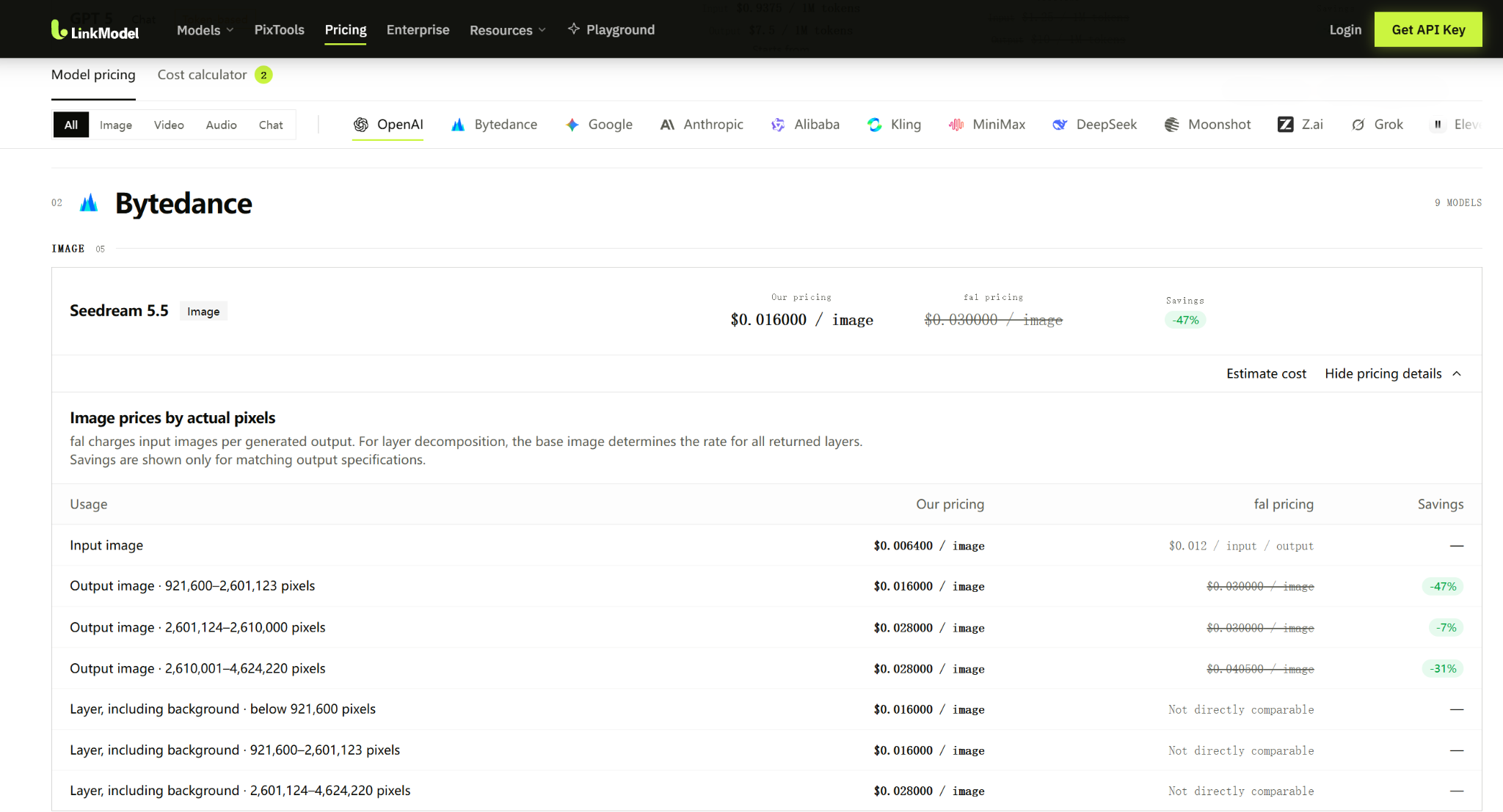
| Usage | LinkModel price | fal price |
|---|---|---|
| Input reference image | $0.0064 | $0.012 per input per output |
| Output: 921,600–2,601,123 pixels | $0.016 | $0.030 |
| Output: 2,601,124–2,610,000 pixels | $0.028 | $0.030 |
| Output: 2,610,001–4,624,220 pixels | $0.028 | $0.04050 |
| Layer including background, below 921,600 pixels | $0.016 | Not directly comparable |
| Layer including background, 921,600–2,601,123 pixels | $0.016 | Not directly comparable |
| Layer including background, 2,601,124–4,624,220 pixels | $0.028 | Not directly comparable |
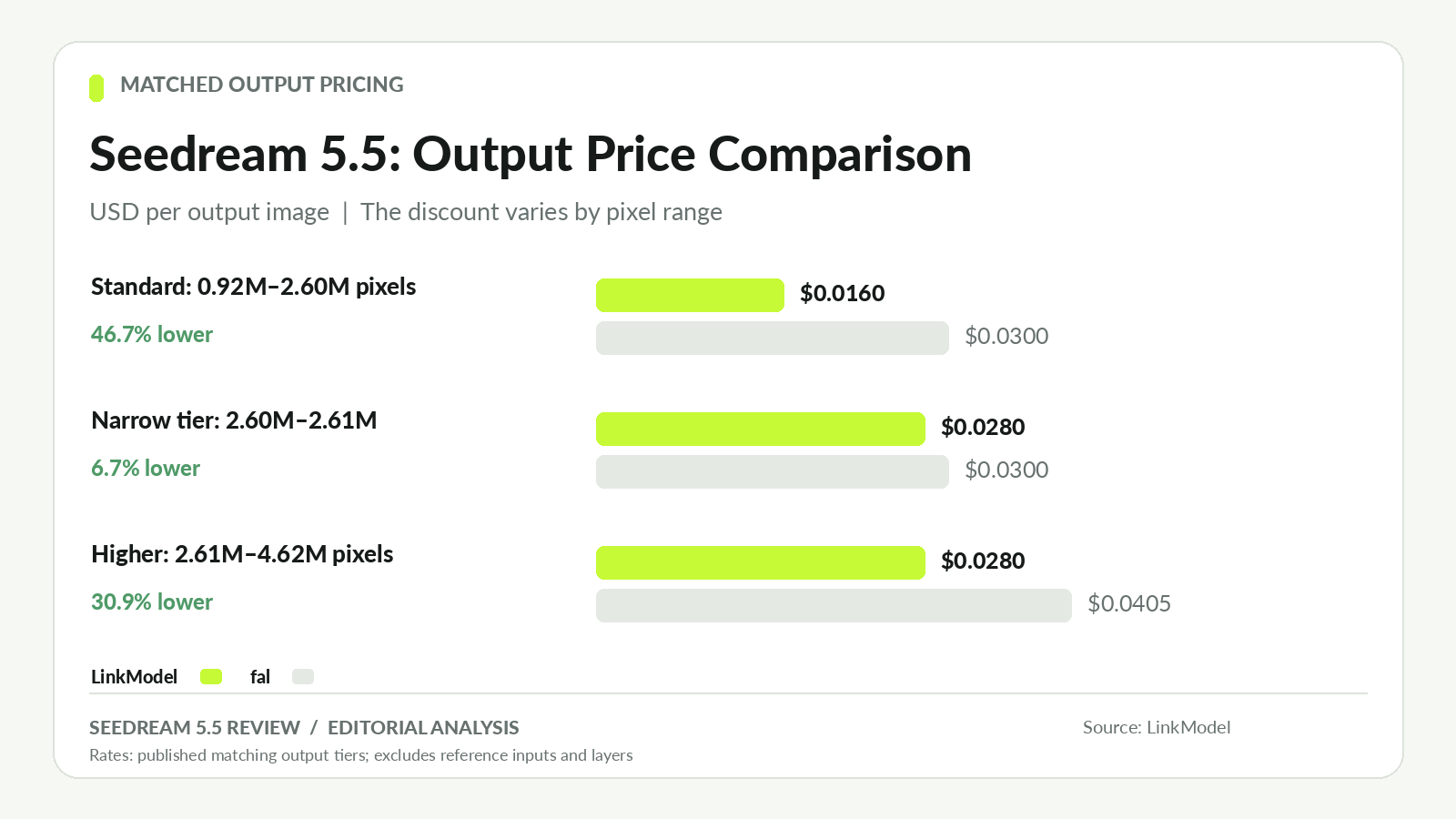
At matching standard-tier output specifications, LinkModel's $0.016 price is 46.7% lower than fal's $0.030.
For outputs between 2,610,001 and 4,624,220 pixels, the difference is approximately 30.9%, while the narrow intermediate pixel band has a smaller difference of approximately 6.7%.
The advertised percentage advantage therefore depends on the actual output specifications.
For layer decomposition, the pricing of all returned layers is determined by the base image tier. Layer requirements should be included when planning a more complex workflow.
How Much Does It Cost to Generate 100 Images?
For 100 matching standard-tier output images:
| Scenario | Calculation | Output cost |
|---|---|---|
| LinkModel | 100 × $0.016 | $1.60 |
| fal | 100 × $0.030 | $3.00 |
| Difference | $3.00 − $1.60 | $1.40 |
LinkModel reduces this matched output budget by approximately 46.7%.
If a LinkModel workflow also uses one separately billed reference image per generation, 100 reference-image charges add:
100 × $0.0064 = $0.64
The combined input and output charges are therefore $2.24 for that specified scenario.
For multi-reference editing or layer decomposition, the total depends on how many inputs and outputs are billed.
This makes it important to compare a complete workflow rather than only its cheapest advertised generation rate.
Cost per Usable Image: What Does Production Really Cost?
Cost per usable image = Total generation spending ÷ Number of accepted final images
This measure captures the impact of repeated attempts and quality requirements.
At $0.016 per standard-tier output attempt, illustrative acceptance rates produce the following values:
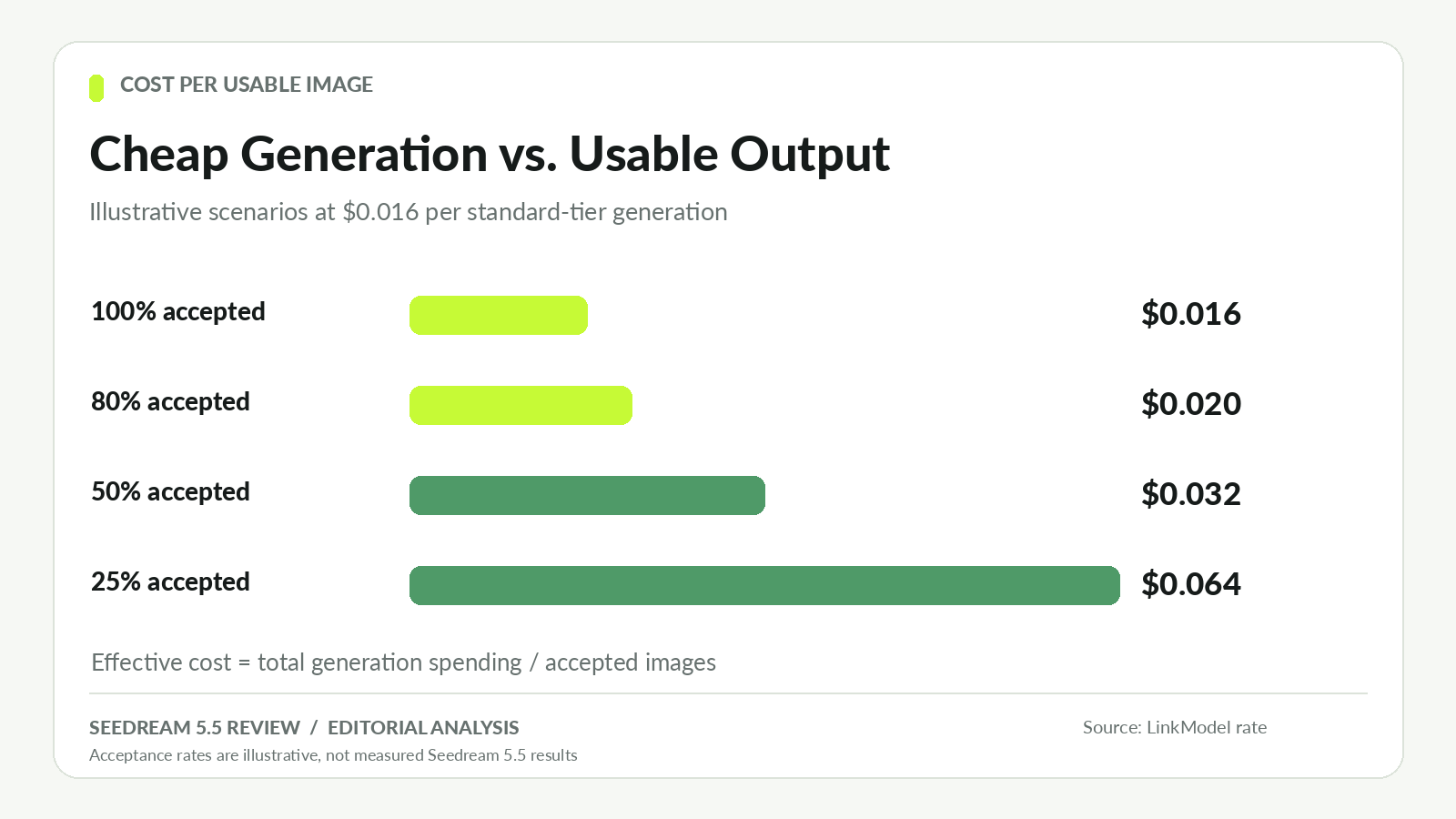
| Assumed acceptance rate | Effective output cost per accepted image |
|---|---|
| 100% | $0.016 |
| 80% | $0.020 |
| 50% | $0.032 |
| 25% | $0.064 |
These are mathematical scenarios, not measured Seedream 5.5 acceptance rates.
For example, 200 standard-tier outputs cost $3.20. If only 100 satisfy the creative brief, the effective output charge becomes $0.032 per accepted image.
The real sticker workflow offers a second, more concrete way to evaluate unit economics.
What Did the 16-Sticker Workflow Cost per Asset?
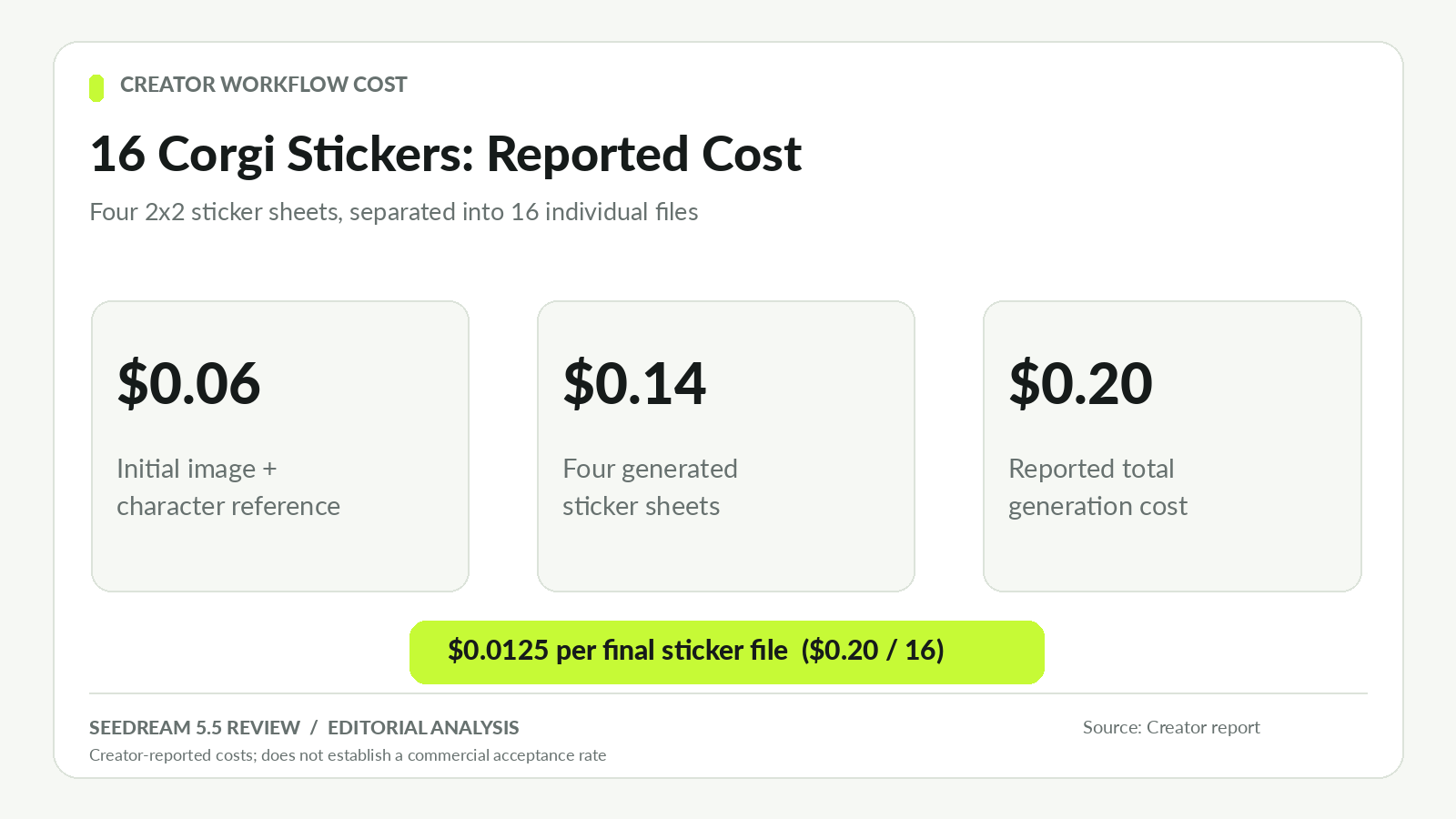
The creator-reported sticker workflow cost approximately $0.20 and yielded 16 individual sticker files.
That produces an average generation cost of:
$0.20 ÷ 16 = $0.0125 per sticker
| Cost component | Reported amount |
|---|---|
| Initial image and character reference | $0.06 |
| Four generated sticker sheets | $0.14 |
| Total reported generation cost | $0.20 |
| Final individual sticker files | 16 |
| Average generation cost per sticker | $0.0125 |
This unit cost is below the $0.016 standard single-output price because each generated sheet contained four final stickers. It is the creator's reported workflow average, not LinkModel's rate for a standalone output image.
All 16 short captions were reported correct on the first try, although the final batch had a noticeable color inconsistency. The number of files produced should not be confused with a verified commercial acceptance rate.
The example highlights how generating multiple usable components in one output can change the cost structure of a design workflow.
Is Seedream 5.5 Fast Enough for Production?
Published tests report different generation times depending on the task, platform, and settings.
| Workflow | Reported time |
|---|---|
| Four-scene photorealism experiment | 20–50 seconds per image |
| Four-round character editing | About 30 seconds per edit |
| Three-model perspective test: Seedream 5.5 | 27 seconds |
| Three-model perspective test: GPT Image 2.6 | 37–75 seconds |
| Three-model perspective test: Nano Banana 2.1 | 28–47 seconds |
| Separate 2K text-to-image comparison | 19–55 seconds for Seedream 5.5 |
| Separate 2K reference-editing comparison | 26–127 seconds per edit, 69 seconds average |
For interactive design, the delay between revisions affects creative iteration.
For larger projects, total throughput, accepted output rate, and the number of required edits matter more than the time of one isolated generation.
A useful budget should account for both generation charges and the work required to review or correct outputs.
How to Start Using Seedream 5.5 on LinkModel
For creators and developers ready to try Seedream 5.5, LinkModel's Seedream 5.5 model page provides direct access to the Playground and API documentation. The model is available through LinkModel using the API model ID seedream-5.5.
To get started:
- Open the Seedream 5.5 model page. Choose the Playground for visual experimentation or the API tab for application integration.
- Get your LinkModel API key. Use Bearer token authentication when submitting API requests.
- Select the correct model ID. Set the model parameter to
seedream-5.5. - Submit an image-generation task. Follow the documented image-generation endpoint and request format, then poll the task status and retrieve the result.
- Evaluate output quality and total cost. Check text accuracy, preserved details, image resolution, and any applicable reference-image charges before scaling your workflow.
For transparent images, also confirm the alpha channel in the downloaded file. For successive edits, compare each new output against the approved reference.
LinkModel's $0.016 standard-tier price makes repeated image creation more economical than fal's matching $0.030 rate, while pay-as-you-go billing lets creators scale usage according to the number of outputs they actually need.
For commercial projects, the strongest reason to pay is not simply generating more images. It is obtaining more approved assets at a predictable cost.
Frequently Asked Questions
Is Seedream 5.5 actually good for photorealistic images?
Yes. Published examples show convincing lighting, materials, and natural photographic textures. In one same-prompt comparison, Seedream 5.5 followed an overcast documentary-lighting instruction more closely than Seedream 5.0 Pro. Camera-aware prompts can help reduce an overly polished appearance.
Is Seedream 5.5 better than GPT Image 2.6 and Nano Banana 2.1?
It depends on the task. Seedream 5.5 is particularly promising for repeated editing and transparent assets. In one creator comparison, GPT Image 2.6 followed spatial instructions more literally, while Nano Banana 2.1 responded strongly to ultra-wide-angle prompts. Compare models according to the intended visual requirements.
Can Seedream 5.5 generate transparent PNGs and maintain character consistency?
Yes, with appropriate output settings and quality checks. Seedream 5.5 supports native RGBA and reference-guided editing. A creator-produced pack of 16 transparent corgi stickers preserved the character and correctly spelled all captions, although caption colors varied across batches. Other transparency tests also found occasional opaque exports.
How accurate is Seedream 5.5 at rendering text?
Text accuracy is a notable strength. ByteDance reports severe and minor text corruption rates of 0.4% and 1.7% in its evaluations. A published bilingual menu test reproduced eight dishes, prices, and hours correctly. Exact layouts, graphics, and brand details still need review.
How much does Seedream 5.5 cost, and is it worth using commercially?
LinkModel offers standard-tier Seedream 5.5 outputs from $0.016 per image, approximately 47% below fal's matching $0.030 rate. Higher-pixel outputs cost $0.028, and reference-image inputs cost $0.0064 each. Seedream 5.5 is most attractive for product variations, transparent assets, and repeated editing, where output quality and the number of accepted final images determine overall value.
What is the Seedream 5.5 API model ID on LinkModel?
The correct API model ID for Seedream 5.5 on LinkModel is seedream-5.5. Developers can select this model through the LinkModel Seedream 5.5 API page, authenticate using an API key, and follow the documented task-submission and status-polling workflow to generate images. Standard-tier output pricing starts at $0.016 per image.
Conclusion
Seedream 5.5 is worth using for commercial image workflows that depend on consistent editing, natural-looking visuals, accurate text, and reusable transparent assets. Published product-editing tests show meaningful improvements over Seedream 5.0 Pro in preserving visual identity, while creator workflows involving character stickers and photographic images demonstrate practical asset-production potential. Its limitations remain most visible in missed instructions, typography changes, and cross-batch inconsistencies, making quality checks important for professional work. For creators prioritizing repeated product revisions and transparent design assets, Seedream 5.5 is a strong candidate; GPT Image 2.6 and Nano Banana 2.1 remain relevant alternatives for particular composition tasks. With LinkModel offering standard-tier outputs from $0.016 per image, creators can combine the model's editing capabilities with competitive generation costs and evaluate value through the number of usable final assets produced.