DeepSeek V4.1 Flash API gives developers access to DeepSeek-V4.1-Flash-1017 for coding, reasoning, vision, and AI agents. To get started, obtain an API key, configure the provider's Base URL, and select the correct model ID: deepseek-flash for the official API or DeepSeek-V4.1-Flash-1017 on LinkModel. With a 1M-token context window, thinking modes, and tool calling, the model supports everything from text generation to complex coding workflows.
But fast generation and low token prices do not always mean lower task costs. Our review of developer evaluations found that API configurations produced task pass rates ranging from 52.0% to 82.7% in a 98-task test of the earlier V4.1 Flash release. Differences in prompts, output processing, and provider integration affected the results. Choosing the correct API configuration, controlling reasoning tokens, and validating output can be just as important as model speed.
LinkModel makes DeepSeek V4.1 Flash 1017 more affordable during official peak hours, at $0.24/M input tokens and $0.96/M output tokens—20% below DeepSeek's official peak rates. Get one API key for multiple supported models, unified billing, $0 minimum spend, and $0 monthly platform fee. Better yet, new users automatically receive $1 in free Credits upon registration, with no credit card or recharge required. These one-time signup Credits never expire and work across all currently available LinkModel models, so you can explore DeepSeek and other AI models before spending your own money.
What Is DeepSeek V4.1 Flash API 1017?
DeepSeek-V4.1-Flash-1017 is an updated multimodal reasoning model designed for coding, document analysis, visual understanding, and agent-driven workflows. It builds on the earlier V4.1 Flash release with improved software engineering performance and more efficient task execution.
The 1017 update preserves the official API calling method and pricing. Developers using the official deepseek-flash model identifier can access the updated release without switching to a new version-specific ID.
Its combination of long-context processing, reasoning modes, and function calling makes it suitable for applications that need to do more than generate a single text response.
DeepSeek V4.1 Flash 1017 Specifications and Features
| Feature | DeepSeek V4.1 Flash 1017 |
|---|---|
| Official model ID | deepseek-flash |
| LinkModel model ID | DeepSeek-V4.1-Flash-1017 |
| Context window | 1M tokens |
| Maximum official API output | Up to 384K tokens |
| Input modalities | Text and images |
| Thinking mode | Supported |
| Non-thinking mode | Supported |
| Reasoning effort | Low, high, and max |
| JSON output | Supported |
| Tool calls | Supported |
| Responses API | Supported |
| OpenAI-compatible API | Supported |
| Anthropic-compatible API | Supported |
A 1M-token context window can accommodate extensive documentation, repository context, or lengthy conversations.
However, context capacity is not the same as guaranteed instruction retention. Applications working with long histories should still maintain explicit task requirements, use focused context, and verify important outputs.
The official maximum-output specification also should not be confused with the practical output limits configured by individual applications or API clients.
DeepSeek V4.1 Flash vs 1017: Benchmark Improvements
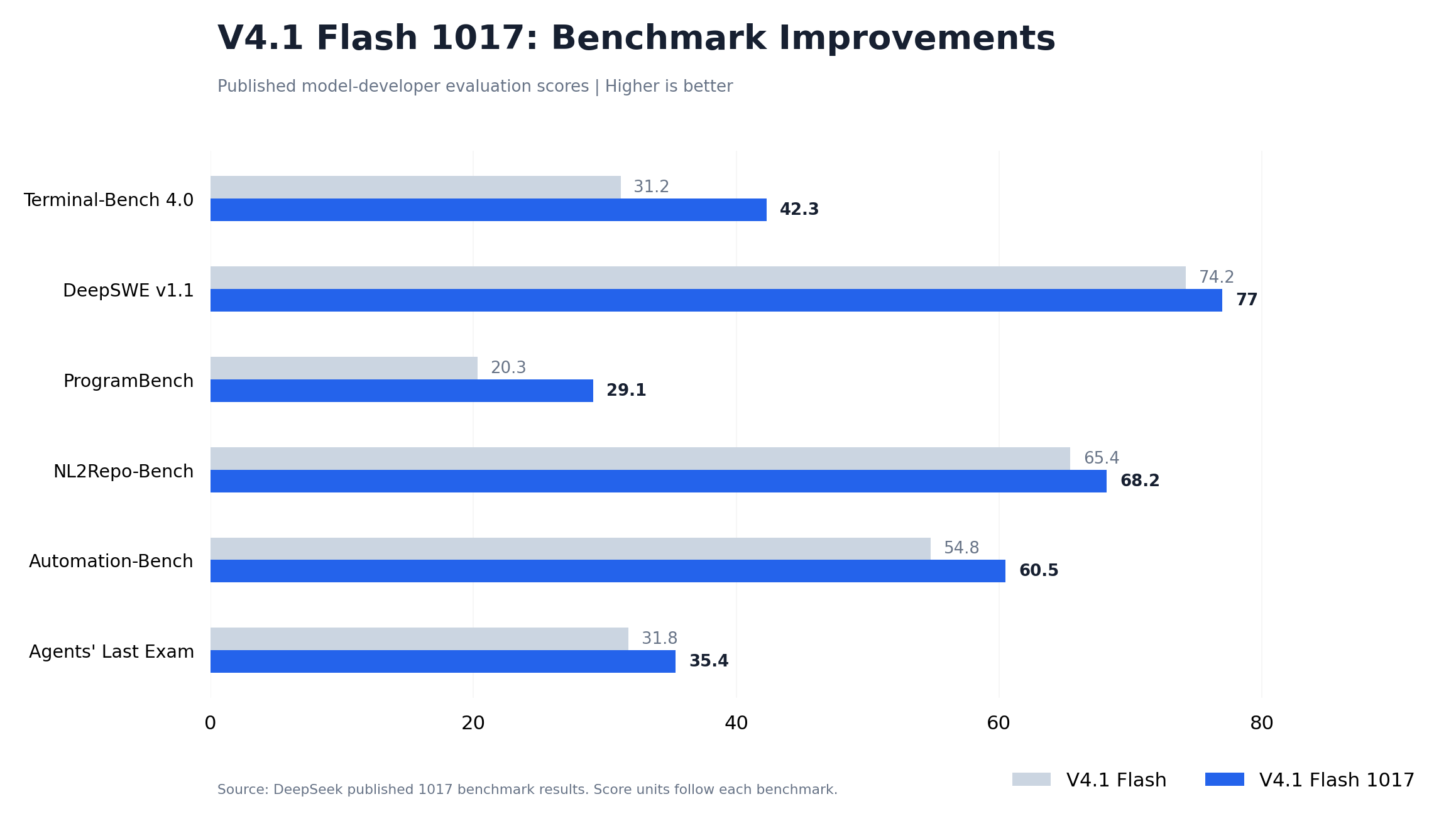
DeepSeek's published evaluations show improvements across coding, software engineering, and agent-oriented benchmarks.
| Benchmark | V4.1 Flash | V4.1 Flash 1017 | Improvement |
|---|---|---|---|
| Terminal-Bench 4.0 | 31.2 | 42.3 | +11.1 points |
| DeepSWE v1.1 | 74.2 | 77.0 | +2.8 points |
| ProgramBench | 20.3 | 29.1 | +8.8 points |
| NL2Repo-Bench | 65.4 | 68.2 | +2.8 points |
| Automation-Bench | 54.8 | 60.5 | +5.7 points |
| Agents' Last Exam | 31.8 | 35.4 | +3.6 points |
The largest absolute score improvement in this comparison is on Terminal-Bench 4.0, where the score rose from 31.2 to 42.3.
ProgramBench also improved by 8.8 points, while Automation-Bench increased by 5.7 points.
These results are particularly relevant to developers choosing models for coding agents, where completion quality matters more than a single short-answer response.
The benchmark results support evaluating the 1017 release for more demanding software tasks, but the final application outcome still depends on prompts, tools, execution conditions, and verification.
Real Development Examples From the 1017 Release
The official 1017 launch includes demonstrations involving project creation and interactive development.
These examples include a 3D model of the Forbidden City, a browser-based racing game, a recreation of Portal 2 using the Godot engine, and a 3D scene exploring the evolution of human civilization.
These demonstrations illustrate the kinds of extended development tasks the model is intended to support.
They are more informative than a simple code-completion example because the model must work toward a coherent project rather than generate a small isolated function.
For developers, the relevant evaluation questions are whether the generated project runs, how much correction it requires, and how reliably the agent follows specifications.
A practical deployment should combine the model's generation capabilities with tests, project constraints, and clear acceptance criteria.
How to Access and Set Up DeepSeek V4.1 Flash API
To access DeepSeek V4.1 Flash API, create an API key, select your provider, configure the correct endpoint, and use the provider's published model ID.
The most important distinction is that a model's version name and its API identifier are not necessarily identical.
For DeepSeek V4.1 Flash 1017, the official provider and LinkModel expose different identifiers.
Step 1: Choose the Correct DeepSeek API Provider and Model ID
| Configuration | DeepSeek Official API | LinkModel |
|---|---|---|
| Model version | V4.1 Flash 1017 | V4.1 Flash 1017 |
| API model ID | deepseek-flash | DeepSeek-V4.1-Flash-1017 |
| OpenAI-format Base URL | https://api.deepseek.com | https://api.linkmodel.ai/v1 |
| Chat Completions | /chat/completions | /chat/completions |
| Authentication | DeepSeek API key | LinkModel API key |
| Billing | Official DeepSeek rates | LinkModel rates |
| Multi-provider model access | Direct DeepSeek service | Multiple supported model providers |
DeepSeek's official API uses deepseek-flash to access the current 1017 version.
The official service also accepts some older Flash identifiers for compatibility, but developers building new integrations should use the documented current identifier.
LinkModel provides a dedicated DeepSeek-V4.1-Flash-1017 model route. Its documentation lists both Chat Completions and Messages endpoints for the model.
The LinkModel model identifier is separate from the older deepseek-v4-flash listing.
When switching providers, update the model ID, API key, and endpoint together rather than assuming the same configuration values work everywhere.
Step 2: Get Your DeepSeek V4.1 Flash API Key
For direct access, sign in to the official DeepSeek developer platform, open the API key management page, and create a new credential.
For LinkModel, register or sign in, open the Dashboard, and generate a key for the unified API gateway.
Keep the API key in an environment variable or another secure credential store.
Avoid adding credentials directly to public repositories, client-side applications, screenshots, or shared configuration files.
A provider-specific key authenticates requests to that provider. A DeepSeek API key should not be substituted for a LinkModel API key, or vice versa.
Step 3: Configure Your First API Request
The official DeepSeek service supports OpenAI-compatible Chat Completions requests.
A basic request requires the following configuration:
| Setting | Official DeepSeek example |
|---|---|
| Base URL | https://api.deepseek.com |
| Request endpoint | /chat/completions |
| Authentication | Bearer authentication using your API key |
| Model | deepseek-flash |
| Messages | Role-based conversation messages |
| Streaming | Disabled for the initial check |
For LinkModel, use the Base URL https://api.linkmodel.ai/v1 and model ID DeepSeek-V4.1-Flash-1017.
Start with a short text prompt, such as asking the model to explain the difference between an API key and a model ID.
A successful initial request should return generated content and the relevant response metadata.
Before proceeding, check whether the request completed successfully, whether the model returned the expected content, whether token usage was reported, and whether the requested model identifier was accepted.
This initial test helps separate connection problems from more complicated tool-calling or reasoning behavior.
Step 4: Understand DeepSeek API Responses and Usage
A Chat Completions response typically contains the generated message inside a choices structure and usage information describing token consumption.
The key measurements include input tokens, output tokens, and any available cached-input or reasoning-token details.
These fields are important because the visible answer may represent only part of the model's generated output.
For example, an application might receive a concise final response after the model has consumed additional reasoning tokens.
For cost tracking, record the complete billable output quantity instead of estimating usage from the visible answer length.
For agent workflows, also record the number of model requests and total task duration.
A single user instruction may produce several underlying model calls, particularly when tools, tests, or iterative corrections are involved.
Step 5: Configure Thinking, Vision, JSON, and Tool Calling
Once the basic request works, advanced features can be enabled individually.
Thinking mode provides reasoning capabilities for more complex tasks. DeepSeek supports different reasoning-effort settings, allowing developers to balance the reasoning budget against task requirements.
Vision input enables applications to analyze screenshots, documents, charts, and other images.
JSON output supports workflows requiring structured responses, such as data extraction or automated classification. Applications should validate the returned structure before using it.
Tool calling allows the model to request operations such as searching, reading files, or executing predefined functions. The application remains responsible for authorizing and executing each operation.
Testing these features separately makes it easier to identify compatibility or configuration problems.
For example, a provider may successfully process ordinary text while a more complex request fails because an advanced parameter or tool format requires a different configuration.
DeepSeek V4.1 Flash API Pricing and Real Task Costs
DeepSeek V4.1 Flash API pricing depends on uncached input, cached input, and total output tokens, including reasoning output.
The model's relatively low published token prices make it attractive for repeated inference workloads, but meaningful cost comparisons should consider the actual usage pattern.
Developers should evaluate both the cost of individual requests and the total cost of successfully completed tasks.
DeepSeek Official API vs LinkModel Pricing
| Token type | LinkModel | Official peak | Official off-peak |
|---|---|---|---|
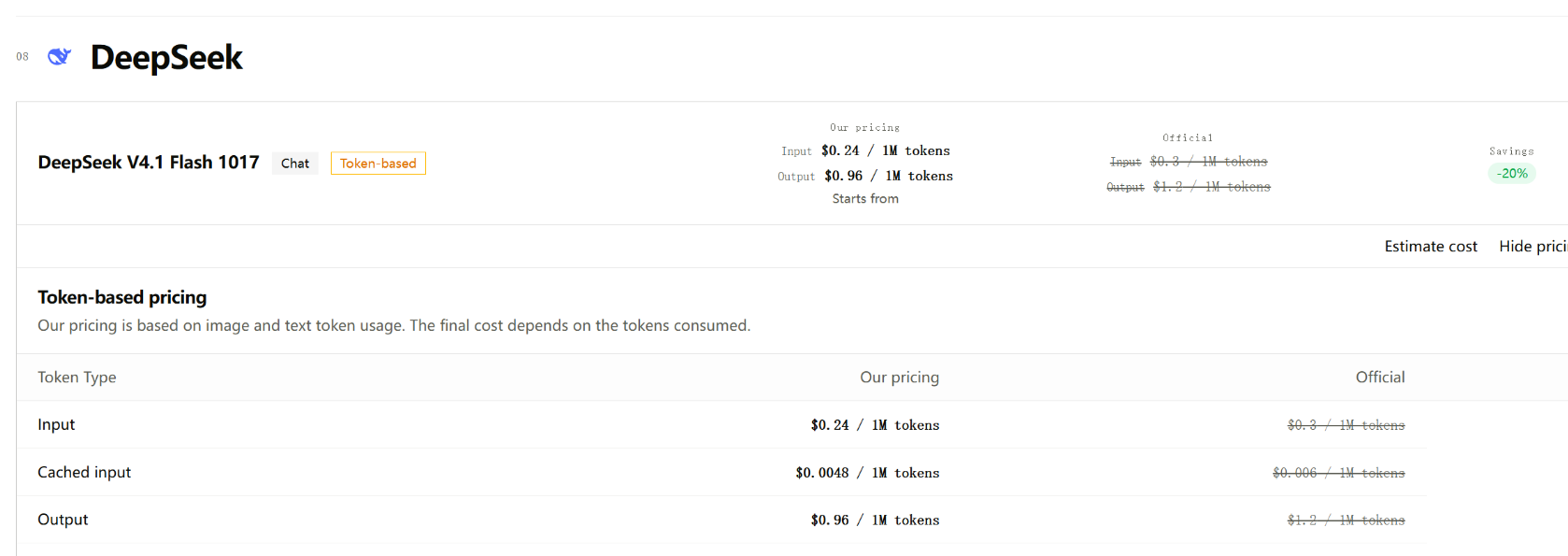
| Input / 1M tokens | $0.24 | $0.30 | $0.15 |
| Cached input / 1M tokens | $0.0048 | $0.006 | $0.003 |
| Output / 1M tokens | $0.96 | $1.20 | $0.60 |
| Reasoning output / 1M tokens | $0.96 | $1.20 | $0.60 |
All prices are in USD.
LinkModel's published prices are 20% lower than DeepSeek's official peak rates for the matching token categories.
DeepSeek's direct API also offers lower off-peak rates.
Official peak windows are Monday through Friday, 01:00–04:00 and 06:00–10:00 UTC, excluding Chinese public holidays. Other periods use the published off-peak prices.
For workloads that must run during official peak hours, LinkModel offers a lower listed token price.
For flexible workloads that can be scheduled during off-peak periods, DeepSeek's direct API offers lower token rates.
LinkModel also provides unified billing and access to multiple supported model providers through one API platform, which can simplify multi-model application development.
How to Calculate DeepSeek V4.1 Flash API Costs
The basic calculation is:
Request cost = Uncached input cost + Cached input cost + Total output cost
Each category is calculated using its token count and corresponding per-million-token price.
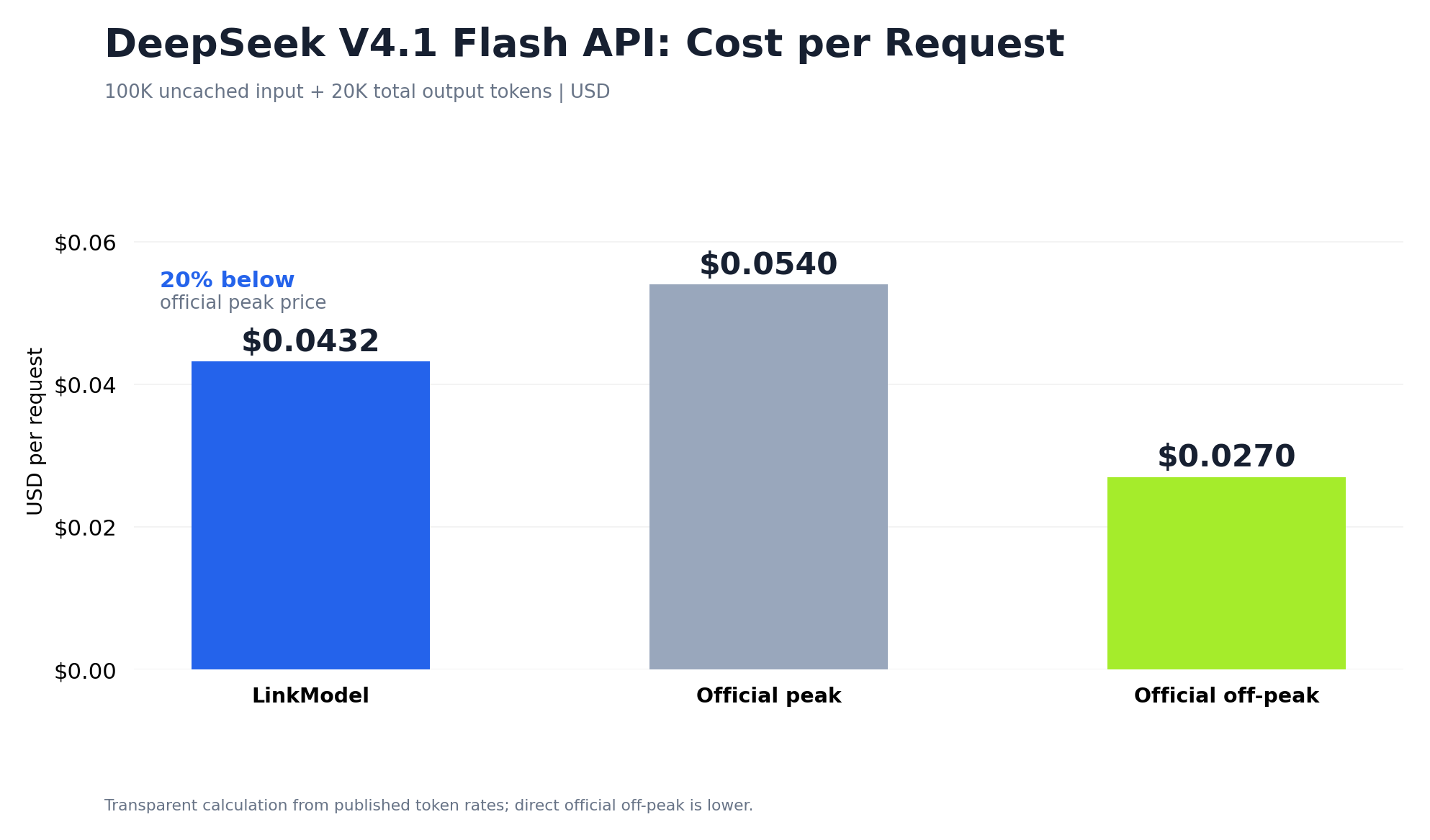
Consider a request containing 100,000 uncached input tokens and 20,000 total output tokens.
| Pricing option | Input cost | Output cost | Total |
|---|---|---|---|
| LinkModel | $0.024 | $0.0192 | $0.0432 |
| Official peak | $0.030 | $0.0240 | $0.0540 |
| Official off-peak | $0.015 | $0.0120 | $0.0270 |
At these usage quantities, LinkModel saves $0.0108 per request compared with the official peak rate.
Across 10,000 identical requests, the corresponding total is $432 through LinkModel versus $540 at the official peak price.
That represents $108 in model-token savings against the same peak-price baseline.
The calculation illustrates why small per-request price differences can become more meaningful as request volume increases.
How Reasoning Tokens Affect DeepSeek API Pricing
Reasoning output contributes to total billable output.
Suppose a request generates 5,000 visible response tokens and 15,000 reasoning tokens.
If those components together represent the billable output, the output quantity is 20,000 tokens.
At LinkModel's listed output price of $0.96 per million tokens, the output charge would be $0.0192.
Reasoning tokens should not be counted again after they have already been included in the total output-token figure.
The practical cost of reasoning depends on the selected effort level, prompt difficulty, and number of model calls required.
Simple extraction or classification tasks may not need extensive reasoning.
Complex code debugging, mathematical analysis, or multi-step planning may benefit from a larger reasoning budget.
The relevant optimization target is not necessarily the smallest output, but the lowest cost that consistently produces an acceptable result.
How Prompt Caching Reduces Long-Context Costs
Caching can substantially reduce input costs when requests reuse qualifying context.
Consider a request containing 200,000 input tokens, with 150,000 eligible for cached-input pricing.
At LinkModel rates:
| Input type | Tokens | Cost |
|---|---|---|
| Uncached input | 50,000 | $0.012 |
| Cached input | 150,000 | $0.00072 |
| Total input | 200,000 | $0.01272 |
Without caching, billing all 200,000 input tokens at the standard input rate would cost $0.048.
For this example, caching reduces input-token charges by 73.5%.
This matters for applications that repeatedly provide the same documentation, system instructions, or repository context.
To benefit from caching, developers should monitor actual cache-hit quantities and avoid unnecessary changes to stable repeated input where the provider's caching implementation makes that relevant.
DeepSeek Search & Fetch API Costs for Agent Workflows
Search and Fetch are dedicated APIs for retrieving search results and webpage content.
They are billed separately from ordinary model-token usage.
DeepSeek's published prices are:
| API | Billing unit | Price |
|---|---|---|
| Search | 1,000 successful requests | $0.75 |
| Fetch | 1,000 successful requests | $0.75 |
A successful Search request is billed when it returns a non-empty result set, while a successful Fetch request is billed when it retrieves page content under the documented conditions.
Our review of an agent-retrieval workload identified 353 searches and 196 Fetch operations, totaling 549 requests.
At the published rate, the corresponding dedicated API request charges would be:
| Operation | Requests | Calculated request charges |
|---|---|---|
| Search | 353 | $0.26475 |
| Fetch | 196 | $0.14700 |
| Total | 549 | $0.41175 |
This calculation demonstrates the request-level cost of using dedicated retrieval APIs.
The original workflow also evaluated a model-driven search approach, but its reported costs did not cover an identical set of processing operations. Therefore, the most useful comparison is the difference in retrieval architecture rather than an unsupported end-to-end savings percentage.
The lesson for agent developers is straightforward: use dedicated retrieval tools for search and page fetching when they fit the task, and reserve language-model reasoning for interpreting the retrieved information.
These Search and Fetch prices apply to DeepSeek's published dedicated APIs; they should not automatically be treated as LinkModel tool prices.
Why Cost per Successful Task Matters More Than Token Price
A coding agent may generate a response, receive a failed test result, request additional context, and produce another revision.
Each step can contribute to the final cost.
A more useful workload formula is:
Cost per successful task = Total relevant workload cost / Number of successfully completed tasks
For example, consider two configurations:
| Metric | Configuration A | Configuration B |
|---|---|---|
| Total model cost | $10 | $8 |
| Successfully completed tasks | 100 | 50 |
| Cost per successful task | $0.10 | $0.16 |
Configuration B has the lower total bill, but Configuration A is more economical per completed task.
This distinction is particularly important for coding agents, structured-data pipelines, and other applications where a valid API response does not necessarily mean the user's task has been completed successfully.
How to Use DeepSeek V4.1 Flash API With OpenCode and Coding Agents
DeepSeek V4.1 Flash API can support OpenCode and other compatible coding-agent environments through its reasoning, long-context, and tool-calling capabilities.
The model can help inspect files, suggest code changes, analyze errors, and respond to tool results.
However, the quality of an agent workflow also depends on its execution environment, task definition, and validation process.
Configure DeepSeek V4.1 Flash in OpenCode
For direct DeepSeek access, OpenCode provides a supported provider-connection workflow.
- Install or update OpenCode.
- Launch the application and open the provider connection interface using /connect.
- Select the DeepSeek provider.
- Enter the corresponding DeepSeek API key.
- Open the model selector using /models.
- Choose the available Flash model.
- Start with a small coding task and inspect the result.
For LinkModel or another custom compatible provider, configure the API gateway and model using the supported custom-provider settings of your OpenCode version.
The required LinkModel values are its API key, the Base URL https://api.linkmodel.ai/v1, and model ID DeepSeek-V4.1-Flash-1017.
Before using advanced agent capabilities, confirm that the client supports the required message format, tools, and reasoning parameters through the selected provider.
A small initial task makes configuration problems easier to identify than a large repository-wide change.
A Practical Workflow for Coding Agents
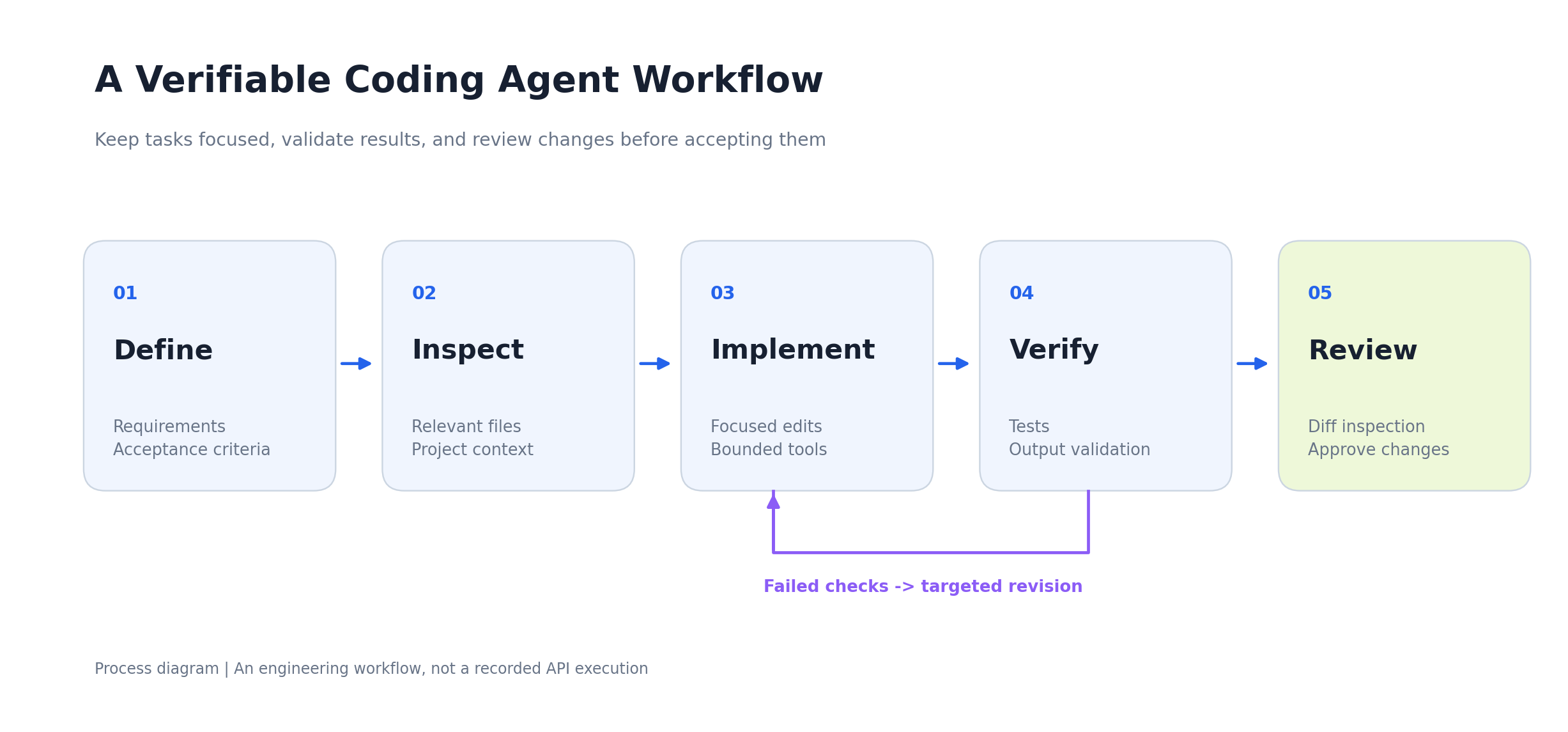
Our research into developer workflows points to five useful stages for coding-agent tasks.
Define the task: Specify the desired behavior, relevant files, constraints, and acceptance criteria.
Inspect the code: Allow the agent to examine the relevant project context before proposing changes.
Implement focused changes: Keep modifications limited to the task's intended scope.
Verify the result: Run tests, inspect generated output, and compare behavior with the original requirements.
Review the final differences: Check modified files and approve only changes that satisfy the acceptance criteria.
For example, a request to fix an authentication problem should describe the expected behavior, affected component, error conditions, and tests that must pass.
This is more actionable than an unrestricted instruction to improve the entire application.
A clear acceptance test also creates a measurable definition of completion.
Managing Long Context and Repository Changes
DeepSeek V4.1 Flash 1017 offers a large context window, but effective repository-level work still requires context management.
A large codebase can contain extensive unrelated material. Including all available information does not necessarily help the model identify the specific files and requirements relevant to the task.
For larger projects, maintain concise requirements, provide focused file context, and preserve important acceptance criteria outside long conversational histories.
When working across multiple files, use version control to inspect the differences before accepting generated changes.
Automated tests and static analysis can reveal regressions that are difficult to identify from a natural-language explanation alone.
The goal is not to maximize the amount of context supplied, but to provide enough relevant context for the agent to make verifiable progress.
Improve Reasoning, JSON Output, and Tool Reliability
Coding agents often need machine-readable results and correctly executed tool operations.
For JSON output, validate the result against the application's expected schema.
A response can contain logically useful information while still failing because of missing fields, incorrect types, or unexpected formatting.
For tool calling, restrict the available operations to those required by the task.
The application should validate proposed tool arguments and protect sensitive credentials or unrelated files.
For reasoning, select the level of effort according to the problem.
A simple file lookup may not need extensive reasoning, while a complex debugging task may require multiple analysis and verification steps.
Across these workflows, successful task completion and validated output are more useful metrics than raw generation speed.
DeepSeek V4.1 Flash API Performance: What Our Research Found
DeepSeek V4.1 Flash API performance depends on the complete integration, including model configuration, prompts, output processing, tool execution, and task validation.
Our review of developer evaluations identified a particularly useful 98-task experiment involving the earlier V4.1 Flash release.
Although the experiment predates the 1017 update, it demonstrates how different API and output configurations can affect application-level results.
Case Study: 98 Tasks Across Three API Configurations
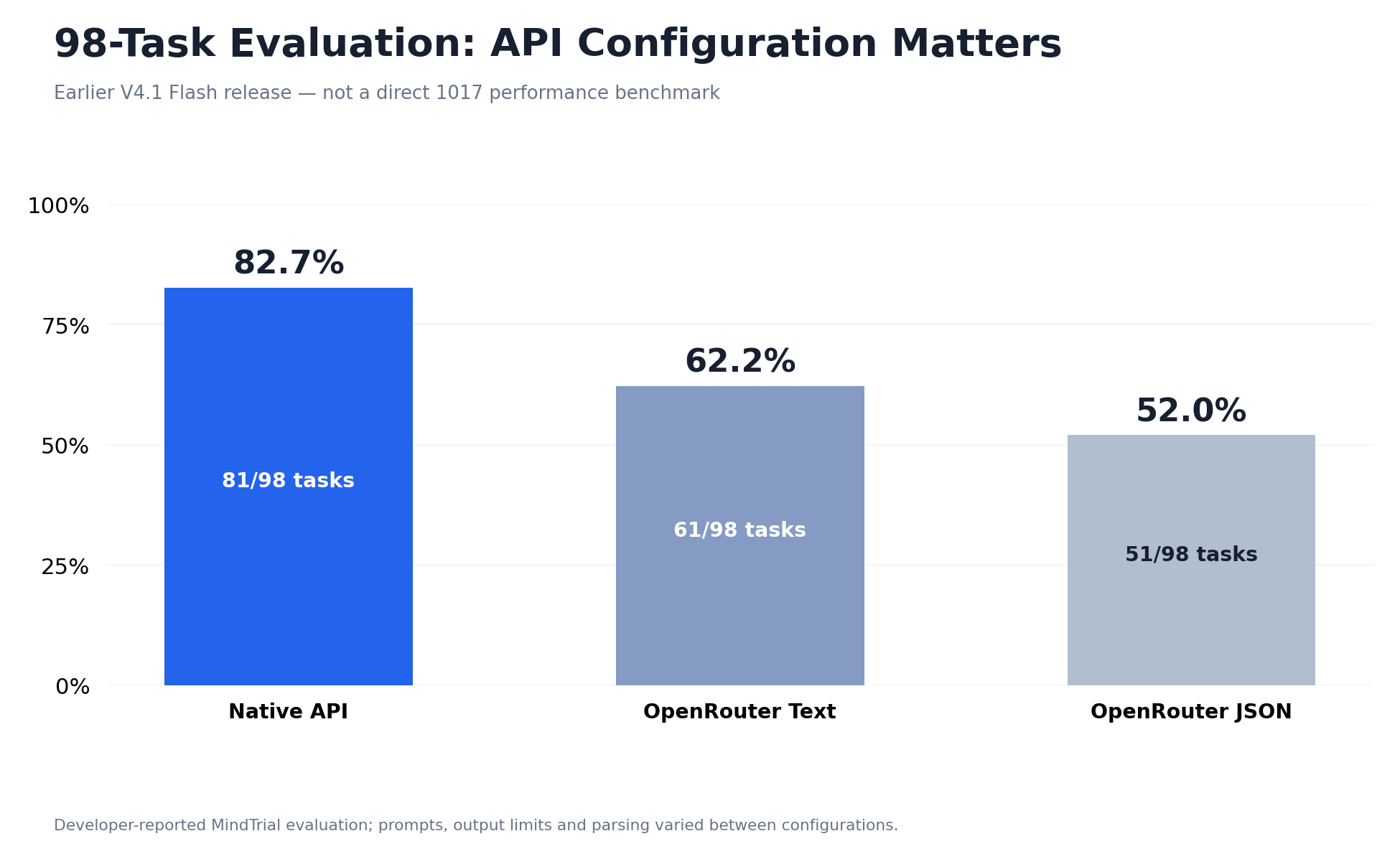
The MindTrial evaluation examined 98 tasks under three configurations.
| API configuration | Tasks passed | Pass rate |
|---|---|---|
| Native API | 81 / 98 | 82.7% |
| OpenRouter Text | 61 / 98 | 62.2% |
| OpenRouter JSON | 51 / 98 | 52.0% |
The difference between the highest and lowest reported pass rates was approximately 30.6 percentage points.
The evaluation also reported substantial differences in cumulative model-request time.
| Configuration | Cumulative model-request time |
|---|---|
| Native API | 4h 17m |
| OpenRouter Text | 7h 24m |
The native configuration recorded approximately 42% less cumulative model-request time than the tested text configuration, excluding local tool execution.
Importantly, the tested configurations also differed in prompting, output limits, and parsing behavior.
The results therefore demonstrate the importance of the complete API integration configuration, rather than proving that one provider's infrastructure alone caused the difference.
For developers migrating between API providers, this suggests that model version, prompts, response formats, output budgets, and task evaluators should be held consistent wherever possible.
What the JSON Results Reveal About Output Validation
The same experiment reported 61 completed tasks for the text configuration and 51 for the JSON configuration.
This difference highlights how response formatting can affect automated workflows.
A model response may contain a useful answer but fail an evaluation if the parser cannot extract the required structure.
In production systems, a structured response should pass several checks before being accepted.
It should be valid JSON, contain all required fields, use appropriate data types, and satisfy the task's logical constraints.
When validation fails, provide precise feedback about the problem rather than repeatedly asking the model to regenerate the entire answer without guidance.
This approach is relevant to data extraction, automated evaluation, function calling, and agent-to-agent communication.
Output-format reliability is part of task reliability, not merely a presentation preference.
Official 1017 Results vs Earlier Integration Research
The two evidence sets answer different questions.
The official 1017 benchmarks evaluate improvements in the updated model's capabilities.
The earlier 98-task experiment explores the impact of complete API configurations on real task outcomes.
| Evidence | Main question answered |
|---|---|
| Official 1017 benchmarks | How did the model improve compared with the earlier release? |
| 98-task configuration evaluation | How can integration choices affect task success? |
| Published token pricing | What does model usage cost under specified billing conditions? |
| Search & Fetch calculations | What are the request-level costs of dedicated retrieval operations? |
Together, these findings suggest that model selection and integration engineering should be treated as complementary decisions.
A stronger model is valuable, but applications still need correct routing, reliable parsing, effective tool orchestration, and measurable acceptance criteria.
Measuring Real API Performance
Our research suggests tracking five metrics in repeated API workloads.
| Metric | Definition | Why it matters |
|---|---|---|
| Task success rate | Accepted tasks divided by attempted tasks | Measures usable outcomes |
| Total task duration | Time from task start to verified completion | Captures processing and execution overhead |
| Retry count | Additional requests after failures | Reveals reliability costs |
| Total token usage | Billable input, cache, and output across requests | Measures model consumption |
| Cost per successful task | Total cost divided by accepted tasks | Connects spending with productive results |
These metrics are especially useful for AI agents and software engineering workflows.
A service can provide fast individual responses while requiring additional steps before a task passes verification.
Conversely, a configuration that spends more time reasoning may still be economical if it reduces subsequent corrections.
The most useful performance comparison is therefore one that measures accepted results, elapsed time, and total cost under comparable task conditions.
DeepSeek V4.1 Flash API Errors: 429, 503, and Troubleshooting
Most DeepSeek V4.1 Flash API errors can be diagnosed by checking authentication, model identifiers, request format, rate limits, and provider availability.
When an integration stops working, start with the actual HTTP response rather than immediately changing models or rewriting prompts.
Different errors require different responses, and unnecessary retries can complicate troubleshooting.
Common DeepSeek V4.1 Flash API Error Codes
| HTTP error | What to investigate | Recommended action |
|---|---|---|
| 400 Bad Request | Invalid model ID, unsupported field, malformed request | Check the request schema and provider documentation |
| 401 Unauthorized | Missing or invalid API key | Verify authentication |
| 403 Forbidden | Account or permission restriction | Check access permissions |
| 429 Too Many Requests | Rate, concurrency, or usage limit | Reduce traffic and inspect retry guidance |
| 500 Internal Server Error | Server-side failure | Review the response and provider status |
| 503 Service Unavailable | Temporary service or upstream issue | Check availability and retry safely |
An HTTP error code is a starting point rather than a complete diagnosis.
The response body and provider documentation can provide more specific details about what failed.
A short text request is often useful for isolating basic endpoint and authentication issues.
How to Fix DeepSeek API 429 Errors
HTTP 429 errors generally indicate a rate-related or resource-related restriction.
First, determine whether the limit concerns requests per second, simultaneous requests, token throughput, or account-specific usage.
Reduce concurrency and inspect any retry interval provided in the response.
For retryable requests, use bounded exponential backoff with jitter instead of submitting repeated requests in rapid succession.
Set a maximum number of attempts and record the failure details.
For DeepSeek's dedicated Search and Fetch APIs, the official account-level limits are 100 Search requests per second and 25 Fetch requests per second, with additional per-domain limits for Fetch.
These limits are separate from model inference limits, so applications should not assume every 429 error is caused by the same resource constraint.
How to Fix DeepSeek API 503 Errors
HTTP 503 errors commonly indicate that a service is temporarily unavailable.
Start by checking whether the failure affects all requests or only a particular request type.
If a small text request succeeds while a larger multimodal request fails, inspect the request payload, supported features, image quantity, and relevant provider limits.
For tool-based workflows, also determine whether the failure occurred during model inference or an external tool operation.
When retrying operations that modify files or interact with external services, check whether the previous operation completed before attempting it again.
A reliable troubleshooting process avoids duplicating operations simply because a response was interrupted.
Why the Same Model Can Behave Differently Across API Providers
Different providers may use different request adapters, routing systems, response parsers, and configuration defaults.
The earlier 98-task evaluation demonstrates why these differences matter.
A configuration that uses the same model family may still produce different completion results if the prompting, output limits, or response processing changes.
This is particularly important for coding agents and structured-output systems.
When comparing providers, evaluate the complete integration under the same workload wherever possible.
Check whether required reasoning parameters, image formats, tool calls, and response structures are supported.
Also consider the pricing schedule, billing model, and operational requirements of the application.
DeepSeek Official API vs LinkModel: Which Should You Choose?
Direct DeepSeek API access is a straightforward choice for developers focused on DeepSeek models and the provider's official features.
Its off-peak pricing can also be attractive for workloads that can be scheduled around lower-rate periods.
LinkModel offers a stronger value proposition for developers who need unified multi-model access and lower published DeepSeek prices during official peak hours.
For DeepSeek V4.1 Flash 1017, LinkModel lists:
| Token category | LinkModel rate |
|---|---|
| Input / 1M | $0.24 |
| Cached input / 1M | $0.0048 |
| Output / 1M | $0.96 |
These rates are 20% below the official peak-price baseline.
LinkModel also provides an OpenAI-compatible API gateway, unified billing, and access to multiple supported model providers through one account.
This can simplify workflows that compare models or switch between different AI services.
For a production integration, select the provider using the correct model route, required capabilities, expected usage schedule, and cost per completed task.
A Practical DeepSeek API Troubleshooting Checklist
When a request fails, follow a consistent order.
- Check the provider and model ID. Use deepseek-flash for the official API or DeepSeek-V4.1-Flash-1017 for the dedicated LinkModel model.
- Verify the API key. Confirm that the credential belongs to the selected provider.
- Test a short text request. Separate basic connection problems from complex workload issues.
- Review the request parameters. Check supported reasoning settings, output limits, message formats, image inputs, and tools.
- Identify the HTTP error. Distinguish authentication, formatting, rate limits, and service availability.
- Retry only when appropriate. Use bounded retries and avoid repeating operations that may already have completed.
- Measure the complete outcome. Record elapsed time, token usage, retry count, and final task success.
A disciplined troubleshooting process can reduce unnecessary configuration changes and help developers identify the actual cause of an integration problem.
Frequently Asked Questions
How Do I Get a DeepSeek V4.1 Flash API Key and Use the 1017 Model?
Create an API key through the official DeepSeek developer platform or LinkModel Dashboard. The official API uses deepseek-flash with the Base URL https://api.deepseek.com. LinkModel provides the dedicated model ID DeepSeek-V4.1-Flash-1017 through https://api.linkmodel.ai/v1. Configure the credentials and endpoint for the provider you select.
Is DeepSeek V4.1 Flash API Free, and How Much Does It Cost?
DeepSeek V4.1 Flash API is billed by token usage. LinkModel lists $0.24/M input, $0.0048/M cached input, and $0.96/M output, including reasoning output. These prices are 20% below DeepSeek's official peak rates. Eligible new LinkModel users automatically receive $1 in free Credits upon registration, providing a starting balance for supported models without requiring a payment card or recharge.
How Do I Fix DeepSeek V4.1 Flash API 429 and 503 Errors?
For 429 errors, inspect rate limits, concurrency, and account usage, then reduce request volume or apply bounded retries. For 503 errors, inspect provider availability and the characteristics of the failed request. Test a smaller request to identify whether the problem affects basic access or a particular feature. Avoid repeatedly submitting operations without checking their completion status.
Can I Use DeepSeek V4.1 Flash API With OpenCode or Other AI Agents?
Yes. DeepSeek supports compatible coding-agent integrations, including OpenCode. Configure the correct API key, endpoint, and model identifier for the selected provider. For custom integrations, verify the client supports the required tool calls and message formats. Use explicit task requirements, automated tests, and code reviews to improve agent reliability.
How Can I Reduce DeepSeek V4.1 Flash API Costs and Improve Task Performance?
Use appropriate reasoning effort, monitor cache-hit input, reduce unnecessary repeated context, and validate outputs before expensive follow-up operations. Dedicated Search and Fetch APIs can also reduce the need to use model generation for straightforward retrieval tasks. Measure task success rate, retries, total token consumption, and cost per accepted result rather than relying only on token prices or generation speed.
Conclusion
DeepSeek V4.1 Flash 1017 provides a capable and competitively priced API for coding, reasoning, visual understanding, and AI agent development, with a 1M-token context window and measurable improvements over the earlier Flash release. Successful deployment depends on more than model benchmarks: our research into API configurations demonstrates how prompts and response processing can affect task completion, while published pricing and retrieval costs show why caching, reasoning budgets, and tool selection matter for overall spending. Developers should use the correct provider-specific model ID, validate structured outputs, manage retries carefully, and evaluate cost per successful task. For applications that need DeepSeek alongside other AI models, LinkModel offers unified API access, centralized billing, and DeepSeek V4.1 Flash 1017 rates 20% below the official peak-price baseline, making it a practical option for building and scaling multi-model workflows.