The Seedream 5.5 API gives developers access to ByteDance's image generation and editing model, supporting up to 10 reference images, multi-turn editing, native transparent PNGs, and layer decomposition. It is designed for product photography, advertising, character design, and creative workflows that require repeated image revisions.
But choosing an API involves more than comparing generation quality. Reference images, output resolution, and successive edits all affect Seedream 5.5 API costs, while providers can differ in API configuration and available features. A low advertised image price is less useful if the integration cannot support your actual workflow.
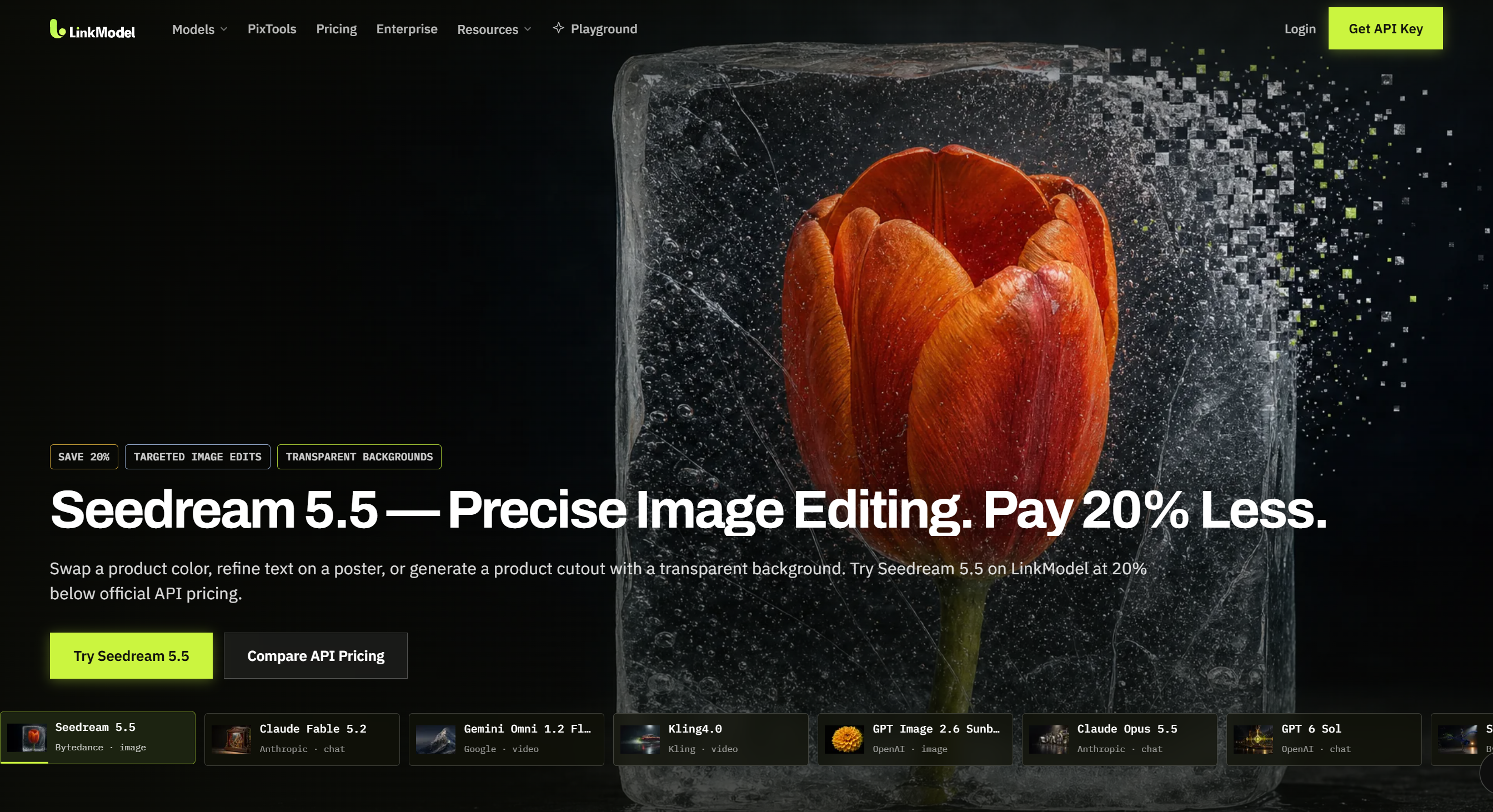
LinkModel now offers Seedream 5.5 API access starting at just $0.016/image—up to 47% less than fal for matching common output specifications. With $0 minimum spend, $0 monthly platform fee, and one API key for supported AI models, you can start without a subscription. New users automatically receive $1 in free Credits, with no credit card or recharge required. This one-time signup benefit does not expire and applies to all currently available models, making it easier to try Seedream 5.5 before increasing your usage.
What Is Seedream 5.5 API? Features, Benchmarks, and Improvements
Seedream 5.5 API provides programmatic access to ByteDance Seed's image generation and editing model, announced on November 9, 2026. It supports text-to-image generation, reference-guided editing, multiple visual inputs, transparent images, and layered outputs.
The model's most important improvement is greater control over how images change through successive revisions.
Instead of regenerating an entire composition whenever a small detail needs modification, developers can build workflows around targeted editing instructions and previous outputs.
Seedream 5.5 API Features and Technical Specifications
| Capability | Official Seedream 5.5 specification |
|---|---|
| Text-to-image | Supported |
| Image-to-image editing | Supported |
| Reference images | Up to 10 |
| Generation resolution presets | 1K, 1.5K, 2K |
| Standard output formats | PNG and JPEG |
| Native transparent images | RGBA with alpha channel |
| Multi-turn editing | Supported |
| Layer decomposition | One base image plus up to 99 layers |
| Layer-decomposition output count | 2–100 images |
| Rich-text OCR | Available for supported text layers |
| Background options | Auto, transparent, opaque |
Three capabilities make Seedream 5.5 particularly relevant to professional workflows.
Multi-turn editing allows an image to be revised while improving preservation of untouched regions. This matters when the subject, layout, and visual identity should remain stable throughout a series of changes.
Native RGBA generation creates transparent or partially transparent assets that can be placed over different backgrounds, reducing the need for a separate background-removal step in suitable workflows.
Layer decomposition separates an existing image into a background and independently usable visual layers, making it easier to rearrange an advertisement or reuse elements in another composition.
The official model supports up to 10 reference images for generation and editing. Layer decomposition is a separate operation that accepts one source image.
Seedream 5.5 vs Seedream 5.0 Pro
Seedream 5.5 expands several editing capabilities available in the previous version.
| Feature | Seedream 5.0 Pro | Seedream 5.5 |
|---|---|---|
| Text-to-image | Supported | Supported |
| Multiple reference images | Up to 10 | Up to 10 |
| Multi-turn editing | Supported | Improved preservation |
| Native text-to-RGBA | Not supported | Supported |
| Layer decomposition | Up to 16 layers plus base | Up to 99 layers plus base |
| Transparent image editing | More restrictive input requirements | Expanded reference support |
| Rich-text OCR in layer outputs | Not supported | Supported |
For one-off image generation, the practical difference may be less noticeable than for repeated editing.
For a marketing workflow that requires product revisions, isolated design assets, or separately editable image elements, the newer model introduces more meaningful capabilities.
ByteDance's professional evaluations also reported improvements across six categories: e-commerce, marketing, film and television, gaming, office productivity, and fashion design.
Film and television and office productivity showed more than twice the previous version's usability rate in those evaluations.
Additional published metrics include:
| Official evaluation | Seedream 5.5 result |
|---|---|
| Severe text corruption rate | 0.4% |
| Minor text corruption rate | 1.7% |
| Image-to-image realism GSB comparison | +55.62% |
The GSB metric reflects expert comparative preferences for image realism, rather than API request completion rates.
These results are relevant to applications that need coherent image edits, realistic materials, or text-heavy visual content.
Where Can You Access Seedream 5.5 API?
Seedream 5.5 API is available through ByteDance's developer ecosystem and third-party API platforms, including LinkModel.
Our review of user questions identified three recurring concerns: finding affordable API access, preserving visual consistency during repeated edits, and incorporating Seedream into existing creative tools.
The provider you choose determines the authentication method, accepted model ID, request structure, and billing system.
LinkModel Seedream 5.5 API Access and Model ID
LinkModel's Seedream 5.5 API is available under the model ID seedream-5.5. This is the identifier developers should use when submitting image-generation requests through LinkModel's API.
Its dedicated model page provides Text to Image, Image to Image, Playground, and API entry points, alongside published pricing starting at $0.016 per image.
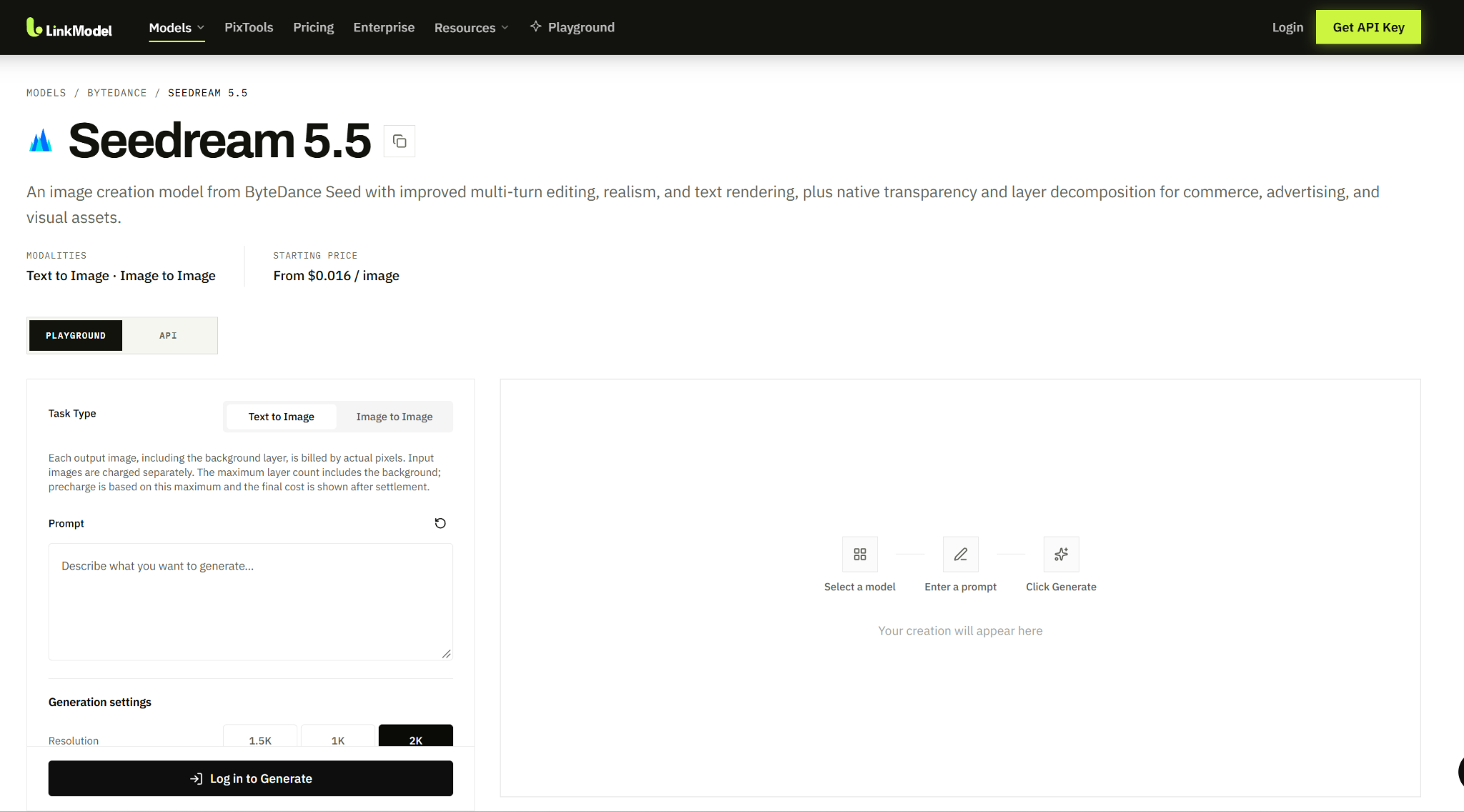
Developers can begin by exploring the model in the Playground and then configure their applications using the API documentation available through LinkModel.
For integration, use these details:
| Item | LinkModel information |
|---|---|
| Model | Seedream 5.5 |
| Model ID | seedream-5.5 |
| API status | Available |
| Generation options | Text to Image, Image to Image |
| Starting output price | $0.016/image |
| Development entry points | Playground and API |
| Billing | Pay-as-you-go |
LinkModel also provides a unified environment for supported image, video, and language models.
That can simplify account management and integration for applications combining visual generation with other AI capabilities.
For example, an e-commerce application may use language models to prepare product descriptions, Seedream to create marketing visuals, and another supported model to generate promotional video content.
Using one API platform can reduce the need to manage separate credentials and billing arrangements for each service.
Official API vs Third-Party API Access
BytePlus ModelArk provides the official model documentation and reference configuration.
Third-party platforms, including LinkModel, can expose the model through their own authentication systems, endpoints, and pricing.
The underlying model's documented capabilities should not be confused with an assumption that every platform uses identical request fields.
| What you need | What to verify |
|---|---|
| Simple image generation | Text-to-image support and output settings |
| Image editing | Image-to-image input and reference-image format |
| Multiple references | Maximum accepted images and input billing |
| Transparent assets | PNG output and transparency controls |
| Layer decomposition | Task support, output count, and image retrieval |
| Application integration | Model ID, endpoint, authentication, response format |
This comparison helps prevent a common integration mistake: copying request parameters from one provider into another provider's API without checking compatibility.
Can Seedream 5.5 Work With ComfyUI?
Seedream 5.5 can be used in ComfyUI through a compatible hosted API integration, including custom nodes or workflows that communicate with a remote service.
This is different from running the model weights locally.
Our review of developer questions found interest in custom ComfyUI nodes and direct API integrations, including a reported workflow built around a hosted Seedream service and custom software.
A ComfyUI integration generally needs to accept an input image, submit prompts and parameters, retrieve the generated output, and pass the result to another node.
For example, a developer might use ComfyUI to prepare a product reference, send it to a hosted Seedream API for editing, and return the result for compositing.
The key requirement is that the node or integration uses the request format supported by its selected provider.
A node developed for another platform may require adaptation before it can use LinkModel credentials and API endpoints.
Seedream 5.5 API Pricing: Output, Reference Images, and Editing Costs
LinkModel's Seedream 5.5 API starts at $0.016 per output image, compared with the matching official standard rate of $0.020.
The higher output tier costs $0.028 through LinkModel, while reference images are priced at $0.0064 each.
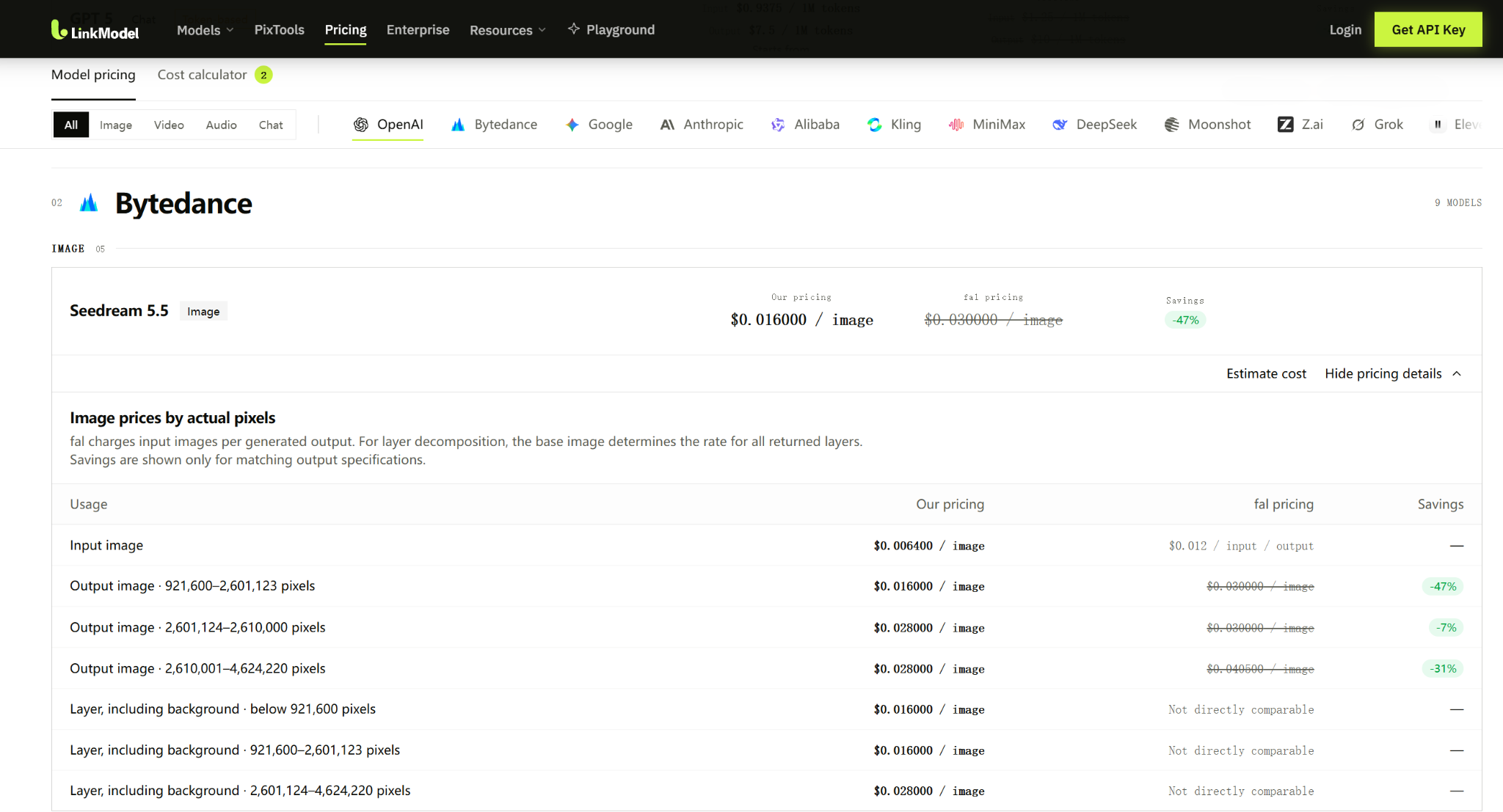
For API users, the important distinction is between the cost of one output and the total cost of completing a workflow.
LinkModel vs Official and fal API Pricing
| Billable item | Official standard | LinkModel | fal |
|---|---|---|---|
| Output: 921,600–2,601,123 pixels | $0.020 | $0.016 | $0.030 |
| Output: 2,601,124–2,610,000 pixels | $0.035 | $0.028 | $0.030 |
| Output: 2,610,001–4,624,220 pixels | $0.035 | $0.028 | $0.0405 |
| Input reference image | $0.008 | $0.0064 | $0.012 |
For matching standard outputs, LinkModel is 20% below the official per-image rate.
Against fal, its lower output tier is approximately 46.7% cheaper, while the highest listed pixel band saves approximately 30.9%. The narrow middle band has a smaller 6.7% difference.
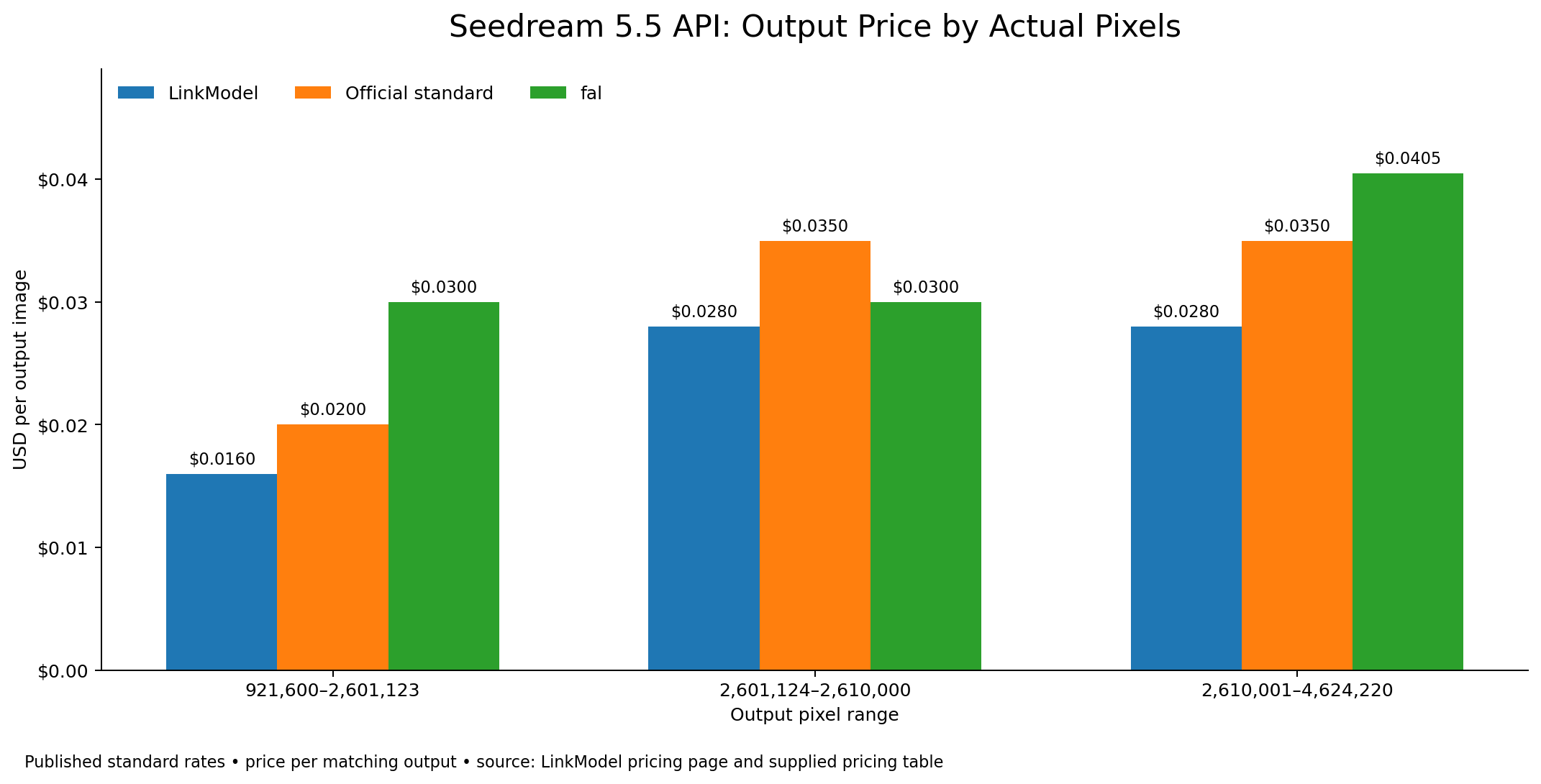
fal charges reference-image inputs per generated output for its editing service, so tasks producing multiple images require attention to that billing structure.
For a simple API budget, the calculation is:
Total image cost = Output charges + Applicable reference-image charges
The actual pixel count is important. A 1536 × 1536 image contains 2,359,296 pixels and falls within LinkModel's $0.016 tier, while 2048 × 2048 contains 4,194,304 pixels and falls within its $0.028 tier.
A full comparison of official introductory packages, purchase arrangements, and provider-specific pricing belongs in a separate detailed pricing analysis. For an API integration, the priority is matching the rate to the actual task.
Cost Scenario: 20 Sequential Image Edits
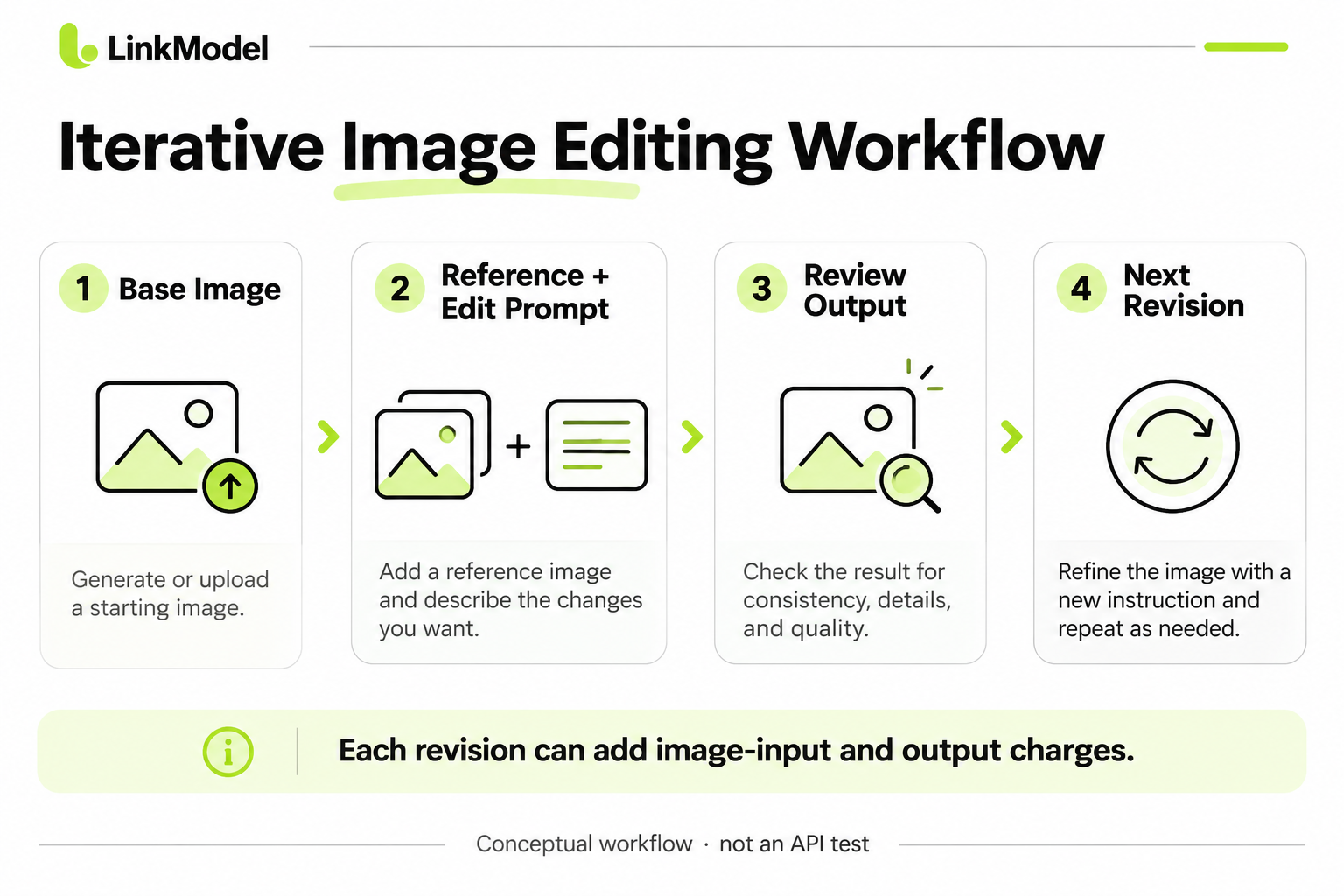
Consider an application that generates one lower-tier image and then performs 20 edits, using the previous image as one reference for each revision.
| Operation | Cost |
|---|---|
| Initial image generation | $0.016 |
| 20 edited outputs | $0.320 |
| 20 reference-image inputs | $0.128 |
| Total | $0.464 |
At the corresponding official standard rates, the same operation count costs $0.580, making LinkModel 20% less expensive for this matching scenario.
This is why the advertised single-image price does not fully describe a multi-turn workflow.
For a project that needs continuous revisions, budget for the initial generation and every subsequent input and output.
Cost Scenario: 1,000 E-Commerce Images
For 1,000 standard-tier text-to-image outputs without reference inputs:
| Provider | Total output cost |
|---|---|
| Official standard | $20 |
| LinkModel | $16 |
| fal | $30 |
This creates a $4 difference against the official standard rate and a $14 difference against fal.
For teams generating recurring product images, the absolute difference increases with volume.
If those images also require reference-guided editing, add the necessary reference inputs and edited outputs to the budget.
How Layer Decomposition Is Billed
Layer decomposition returns a background image and multiple independent layers.
LinkModel charges for each returned image, including the background. Its published layer pricing uses the base image's pixel tier to determine the rate applied to returned layers.
A decomposition with one input and four lower-tier returned images has an estimated cost of:
$0.0064 input + 4 × $0.016 output = $0.0704
If ten images are returned under the same assumptions:
$0.0064 + 10 × $0.016 = $0.1664
The Playground's layer controls also distinguish the selected maximum output count from the actual number of returned images.
For developers building design tools, the important budgeting question is not simply how much one layer costs. It is how many images the decomposition produces and which pixel tier applies.
How to Use Seedream 5.5 API Through LinkModel
To use Seedream 5.5 through LinkModel, obtain an API key, select the model ID seedream-5.5, and submit an image-generation request through LinkModel's API. Follow the documented task workflow to retrieve the result.
Start with an ordinary text-to-image request before adding references, transparency, or layer decomposition.
Step 1: Configure Your LinkModel API Access
Open LinkModel's Seedream 5.5 model page, then select the API entry point.
Create or access your API key and use the authentication method and request endpoint shown in the current LinkModel documentation.
Set the model identifier to seedream-5.5, as shown in LinkModel's Quick Start documentation.
The essential components are:
| Request component | Purpose |
|---|---|
| API key | Authenticate your request |
| API endpoint | Submit the request to LinkModel |
| Model ID | Select Seedream 5.5 |
| Prompt | Describe the image or edit |
| Image inputs | Supply references when needed |
| Output size | Select the required resolution |
| Format and advanced options | Control image output when supported |
| Response handling | Retrieve the generated image or task result |
LinkModel provides OpenAI-compatible infrastructure, but image-generation requests must follow the appropriate model and task schema.
Do not substitute another provider's image-generation endpoint or assume that chat-completion parameters automatically work for this model.
Step 2: Choose the Correct Input and Output Settings
The official Seedream 5.5 specification supports 1K, 1.5K, and 2K generation presets.
For ordinary image generation, it also permits custom dimensions within the documented pixel and aspect-ratio ranges.
Use either a resolution preset or explicit dimensions, not both in the same request.
The following official model constraints are useful when preparing image inputs:
| Setting | Official model requirement |
|---|---|
| Image input methods | Accessible image URL or Base64-encoded image |
| Common image inputs | PNG, JPEG, WebP, and other documented formats |
| Maximum reference images for generation | 10 |
| Maximum input-file size | 30 MB per image |
| Layer-decomposition input count | One image |
| Layer-decomposition input formats | PNG or JPEG |
| Layer-decomposition output size | Supported presets: auto, 1K, 1.5K, 2K |
Image generation and layer decomposition have different parameter constraints, so they should be configured as separate task types.
The official API also provides response-format options such as image URLs and Base64 data.
For URL-based output, the official BytePlus documentation specifies a 24-hour validity period, making prompt retrieval and image saving important parts of an application workflow.
Use the corresponding LinkModel API response specification when implementing these features on LinkModel.
Step 3: Generate Your First Image
Begin with a product image that can later be used for reference-guided editing.
Example prompt:
Create a premium studio product photograph of a white ceramic coffee cup on a warm beige background. Use soft directional lighting from the left, realistic ceramic texture, natural shadows, and a clean commercial composition. Center the cup with generous negative space for advertising copy. No text or logos.
Select an appropriate output resolution and submit the request through the supported image-generation interface.
For this example, a lower-tier output is sufficient for understanding the basic composition and preparing a reference for the next edit.
Inspect the image for subject shape, lighting, background consistency, and material details.
The resulting image can become the approved starting point for a sequence of revisions.
Step 4: Use Reference Images for Controlled Editing
Move to image-to-image editing and supply the previously generated image as a reference.
The editing prompt should describe both the requested change and the details that must remain unchanged.
Example prompt:
Change the ceramic cup from white to deep forest green. Preserve its exact shape, handle, camera angle, beige background, surface texture, shadows, lighting direction, and all surrounding objects.
For the next edit, the instruction could add a folded linen napkin while preserving the product.
A subsequent edit could change the background color while keeping the subject's placement and proportions intact.
This staged process gives the model a clearer target than requesting many unrelated changes at once.
BytePlus recommends opaque RGB images and appropriate opaque background settings for consistent successive edits.
For multi-reference generation, assign a purpose to every input image, such as subject, scene, or lighting reference.
Step 5: Generate Transparent Assets and Layered Outputs
For transparent assets, configure the task for transparency and PNG output.
The official Seedream 5.5 API uses the background and output_format parameters for this purpose.
| Official parameter | Relevant setting |
|---|---|
| background | transparent |
| output_format | png |
| watermark | false, when an output without the official watermark is required |
Transparent background and JPEG output are incompatible in the official API.
The official watermark setting defaults to true. When using the official interface, review this option before producing final design assets.
These are official model parameter names; when configuring LinkModel, follow the parameter names and options provided by its actual API interface.
Layer decomposition is different from ordinary transparent generation.
It takes one source image and returns a base image plus individual layers. The official model supports up to 99 layers beyond the base.
The background option is not used for this decomposition task because its layer outputs are generated as transparent PNG images automatically.
This difference matters when building workflows that produce editable visual components rather than one flattened image.
Step 6: Retrieve and Validate the Result
After submitting a request, use the response or task-retrieval method documented by the selected API service.
Inspect the following output properties:
| Task | What to verify |
|---|---|
| Text-to-image | Output dimensions, format, composition |
| Reference editing | Subject consistency and preserved regions |
| Multi-reference composition | Correct use of each input |
| Transparent assets | Alpha channel and clean object edges |
| Layer decomposition | Base image, layer count, individual layer content |
| Text-heavy graphics | Exact labels, spelling, numbers, and layout |
For production design, a completed response is only the first part of the task.
The returned asset must also meet the application's visual and format requirements.
For example, an RGBA image should be checked on both light and dark backgrounds, while a layered design should be inspected to confirm that the expected objects were separated correctly.
Seedream 5.5 API Image Editing: Official Examples and Real Workflows
Seedream 5.5's editing features are most useful when an image must remain consistent through several production stages.
ByteDance's official demonstrations illustrate how the model handles repeated edits, spatial relationships, native transparency, layer decomposition, and dense text.
Each example addresses a different development problem.
Case Study: 100 Rounds of Portrait Editing
ByteDance demonstrated a portrait undergoing 100 successive edits, including changes to clothing, eyewear, accessories, and small visual details.
The challenge in this type of task is maintaining consistency across the editing history.
When an image is revised repeatedly, unrelated regions can gradually drift in color, texture, shape, or composition.
The official demonstration illustrates the model's ability to make localized changes while preserving much of the remaining scene.
For a character customization or iterative advertising application, a useful workflow is to save approved versions and make each subsequent request target one specific group of changes.
This also makes it easier to compare revisions and identify when a previously approved detail changes.
Case Study: Interior Design With Spatial Consistency
Another official demonstration begins with an older study and progressively modifies furniture, decoration, lighting, and other scene elements.
The task requires more than inserting new objects.
Moving furniture affects occlusion, shadows, and the perspective of surrounding objects. A convincing result must maintain plausible relationships between the floor, walls, furniture, and light sources.
The demonstration shows how iterative editing can support room redesign while retaining the overall spatial structure.
For developers, this suggests building interior-design applications around smaller, approved modifications instead of relying on one instruction to transform every part of a scene simultaneously.
Case Study: Native Transparent PNG Assets
ByteDance's transparent-asset demonstration includes a snowy owl with extended wings and detailed feather edges.
Fine edges are a useful test for transparency because unwanted background pixels and poorly preserved translucent areas become visible when the asset is placed over another background.
The model's native RGBA output is relevant to stickers, characters, product cutouts, and decorative elements intended for reuse.
For a design application, the practical requirement is to preserve the alpha channel and inspect the asset in different compositions.
A transparent image is not simply a picture with a white background. Its pixel data must actually represent the transparent areas.
Case Study: Layer Decomposition for Marketing Graphics
A finished advertisement may combine a product, background, price label, typography, and decorative objects in one flattened image.
Seedream 5.5's layer-decomposition capability allows such compositions to be separated into independently usable image elements.
The official API can return one base image and up to 99 layers, with rich-text OCR information for supported regular text layers.
This can help a designer move objects, reuse decorative elements, or rearrange parts of a composition without regenerating the complete artwork.
The returned assets are image layers and associated information, not automatically an editable vector design file.
Developers should inspect the layer count, output formats, and text information before importing the assets into another design workflow.
The number of returned images also determines the corresponding output charges.
Case Study: Dense Text and Multilingual Visuals
ByteDance's official text-rendering examples include a newspaper-style Shakespeare layout and a butterfly infographic with compact Chinese labels.
These tasks combine typography, detailed illustrations, and structured layout.
They are relevant to educational graphics, advertising, packaging, and presentation assets.
The official evaluation reports 0.4% severe text corruption and 1.7% minor text corruption under its tested conditions.
For production use, text-heavy images should be reviewed for exact product names, prices, measurements, and other content that must be reproduced correctly.
Improved rendering makes these workflows more practical, but visually attractive text is not a substitute for checking whether the information itself is accurate.
What Our Research Revealed About Developer Priorities
Our review of user questions highlighted three closely related needs:
Affordable access, because ongoing editing can require many more billable images than a single generation.
Workflow compatibility, because developers want to connect image models to existing tools rather than rebuild an entire production system around each service.
Consistent results, because repeated changes can reduce the value of an otherwise successful initial image.
These concerns translate into practical API decisions.
| Workload | Most important capability | Primary cost or integration question |
|---|---|---|
| Product images | Consistent subject and usable resolution | Price per completed asset |
| Character design | Multi-turn consistency | Reference count and editing rounds |
| Advertising graphics | Transparent reusable elements | PNG and alpha support |
| Layered design | Independent image layers | Total returned image count |
| ComfyUI automation | API compatibility | Request and result handling |
The strongest Seedream 5.5 application is not necessarily the one producing the most images. It is the one that uses the model's editing capabilities to produce assets that meet the next stage of the workflow.
Seedream 5.5 API Troubleshooting and Provider Selection
Common Seedream 5.5 integration issues involve model configuration, input formats, transparency settings, output dimensions, and editing consistency.
Start troubleshooting with the request configuration rather than assuming that every unexpected image is a problem with the model.
Common Seedream 5.5 API Problems
| Problem | What to check | Practical action |
|---|---|---|
| Model not recognized | Model ID and API endpoint | Use the LinkModel model ID for LinkModel requests |
| Authentication problem | API key and required authentication format | Follow LinkModel's API instructions |
| Reference rejected | Image format, size, and access method | Check the documented image-input limits |
| Unexpected output size | Resolution preset or explicit dimensions | Use one supported sizing method |
| Transparent output missing | Format and background settings | Check PNG and transparency support |
| Layer-decomposition issue | Input count, output count, and task parameters | Use the dedicated decomposition configuration |
| Edited subject changes unexpectedly | Edit instruction and reference continuity | Identify the elements to preserve |
| Unwanted watermark | Supported watermark controls | Review output settings before generation |
| Budget differs from estimate | Input count, output pixels, and returned layers | Recalculate the actual operation |
A useful distinction is that ordinary generation and layer decomposition do not have identical input and output requirements.
For example, the official model accepts up to 10 references for image generation but only one source image for layer decomposition.
Similarly, the background parameter belongs to ordinary image generation and must not be carried blindly into the official layer-decomposition request.
These distinctions can prevent avoidable configuration errors.
Why Do API Providers Behave Differently?
Our review of user questions found differing experiences with provider availability, hosted workflows, and content moderation.
Possible causes include different model versions, input preparation, parameter support, provider policies, or request configurations.
When comparing results, use the same model version and as closely matched inputs and settings as the providers permit.
A custom ComfyUI node or a direct API program still depends on the underlying service's requirements.
For applications involving content categories that may be restricted, review the provider's permitted-use documentation before designing the workflow.
When Should You Choose LinkModel?
LinkModel is a strong option for developers who want an available Seedream 5.5 API, clear per-image pricing, and unified access to other supported AI models.
At $0.016 per standard-tier output, its published rate is 20% below the corresponding official standard rate.
The model has a dedicated Playground and API entry point, and its pay-as-you-go structure suits teams that want to start with modest usage before expanding.
For recurring image generation, the lower matching output rates become a measurable budget advantage.
For reference editing and layer decomposition, calculate the complete operation cost before scaling the application.
Frequently Asked Questions
Is Seedream 5.5 API free, and where can I get cheaper access?
Seedream 5.5 API is generally usage-based. LinkModel starts at $0.016/image, approximately 46.7% below fal's matching common lower-pixel output rate and 20% below the matching official standard rate. New LinkModel users can use their signup Credits to begin exploring supported models. The number of images covered depends on the selected task, output size, and reference-image charges.
How do I access Seedream 5.5 API on LinkModel?
Open the Seedream 5.5 model page on LinkModel, obtain an API key, and use seedream-5.5 as the model ID. Submit your request through LinkModel's image-generation endpoint, then poll the task status and retrieve the generated image. You can also explore the model in the Playground before integrating the API.
Can I run Seedream 5.5 locally or connect it to ComfyUI?
Seedream 5.5 can be connected to ComfyUI using a compatible hosted API workflow or custom integration. This is different from local model execution. Publicly downloadable weights for self-hosting have not been established as available, so a hosted API remains the practical choice for developers.
Why do Seedream 5.5 API providers have different restrictions?
Providers may differ in model availability, accepted parameters, input handling, task support, and content policies. If results differ, compare the exact model version, input images, prompts, output settings, and provider requirements before drawing conclusions about reliability.
Does Seedream 5.5 support transparent PNGs, multiple references, and layer decomposition?
Yes. The official model supports native RGBA output, up to 10 reference images for generation, and up to 99 layers plus a base image. Transparent output requires appropriate PNG settings, while layer decomposition uses a separate one-image input workflow. Configure each capability according to the API service's supported parameters.
Conclusion
The Seedream 5.5 API is particularly useful for developers building image-generation and editing workflows that require consistent revisions, transparent assets, multiple references, and layered outputs. ByteDance's official demonstrations and evaluations show improvements in multi-turn editing, visual realism, and text rendering, while the actual API cost depends on output resolution, reference inputs, and the number of returned images. With Seedream 5.5 API access already available under model ID seedream-5.5, pricing starting at $0.016/image, and unified access to supported AI models, LinkModel offers a cost-effective way to integrate image generation and editing into production workflows without a mandatory monthly subscription.