The best Halloween AI image prompts for 2026 help you create realistic Halloween selfies, witch and vampire portraits, spooky Y2K photos, pumpkin-head costumes, and party posters. Explore 25 ready-to-copy prompts with practical tips to keep your face recognizable, customize costumes, and create Halloween images without complicated prompt writing.
But AI-generated Halloween photos don't always turn out as expected. Faces change, costumes look unnatural, horror scenes aren't scary enough, and repeated attempts increase costs. The key is choosing the right prompt, using reference images when needed, and refining specific details instead of starting over. With the right AI image prompting techniques, you can spend less time correcting mistakes and more time creating images you'll actually want to share.
With LinkModel, you can try Nano Banana 2.1 at 25% below Google's listed Standard API token rates, with pay-as-you-go pricing, no minimum spend, and no monthly platform fee. New users receive $1 in credits upon registration, so you can try the model before deciding whether to top up. Plus, our Halloween API Treat gives both new and existing users 50% extra credits on eligible top-ups, with multiple top-ups allowed and a $100 cumulative bonus cap. Bonus credits arrive within 24 hours of an eligible top-up. Claim the offer before November 8, 2026, at 11:59 PM PST.
25 Halloween AI Image Prompts: Find the Right Style
The best Halloween AI image prompt depends on your goal. For a personalized selfie, choose a costume transformation and preserve your recognizable face. For a horror-themed image, focus on camera framing and atmosphere. For a commercial poster, prioritize layout, text placement, and a clear visual subject.
Use this quick guide to choose a prompt before generating.
| What You Want to Create | Recommended Prompt | Best Starting Approach |
|---|---|---|
| A Halloween selfie that still looks like you | 1 or 6 | Upload a clear reference photo |
| A trendy pumpkin-head portrait | 5 | Text-to-image or reference-based costume edit |
| A romantic Halloween couple photo | 4 | Assign each person's identity and costume |
| A retro horror-style portrait | 9 | Specify decade, camera style, and lighting |
| A Halloween portrait of your pet | 13 or 16 | Use an authorized pet photo |
| A printable party invitation | 18 | Reserve space for accurate text |
| A cute digital Halloween sticker | 21 | Request an isolated character and check transparency |
| A detailed Halloween fantasy scene | 17 or 25 | Establish the main composition before editing |
How to Write a Better Halloween AI Prompt
A reliable starting formula is:
Subject + Costume + Setting + Composition + Lighting + Mood + Visual Style + Output Requirements
For example, "a witch in a forest" is open to many interpretations. This gives the model a more specific target:
Create a photorealistic portrait of an elegant witch wearing a black velvet dress and silver jewelry in a misty autumn forest. Use soft blue moonlight, warm orange lantern highlights, realistic skin texture, and cinematic depth of field. Frame the subject from the waist up in a vertical 4:5 composition.
For a selfie transformation, also state what must remain unchanged:
Use the uploaded photo as the identity reference. Preserve the subject's recognizable facial features and proportions as closely as possible. Change only the clothing, background, and lighting described in the prompt.
The prompts below follow these principles and can be adapted to different supported image generators.
Halloween AI Selfie and Portrait Prompts
These Halloween AI selfie prompts are designed for realistic costume photos and personalized portraits. The most important distinction is whether you're generating a fictional person or editing a real photograph.
For a photo of yourself, upload a reference image. A text-only prompt can create a convincing Halloween character, but it cannot reliably reproduce your identity without visual information.
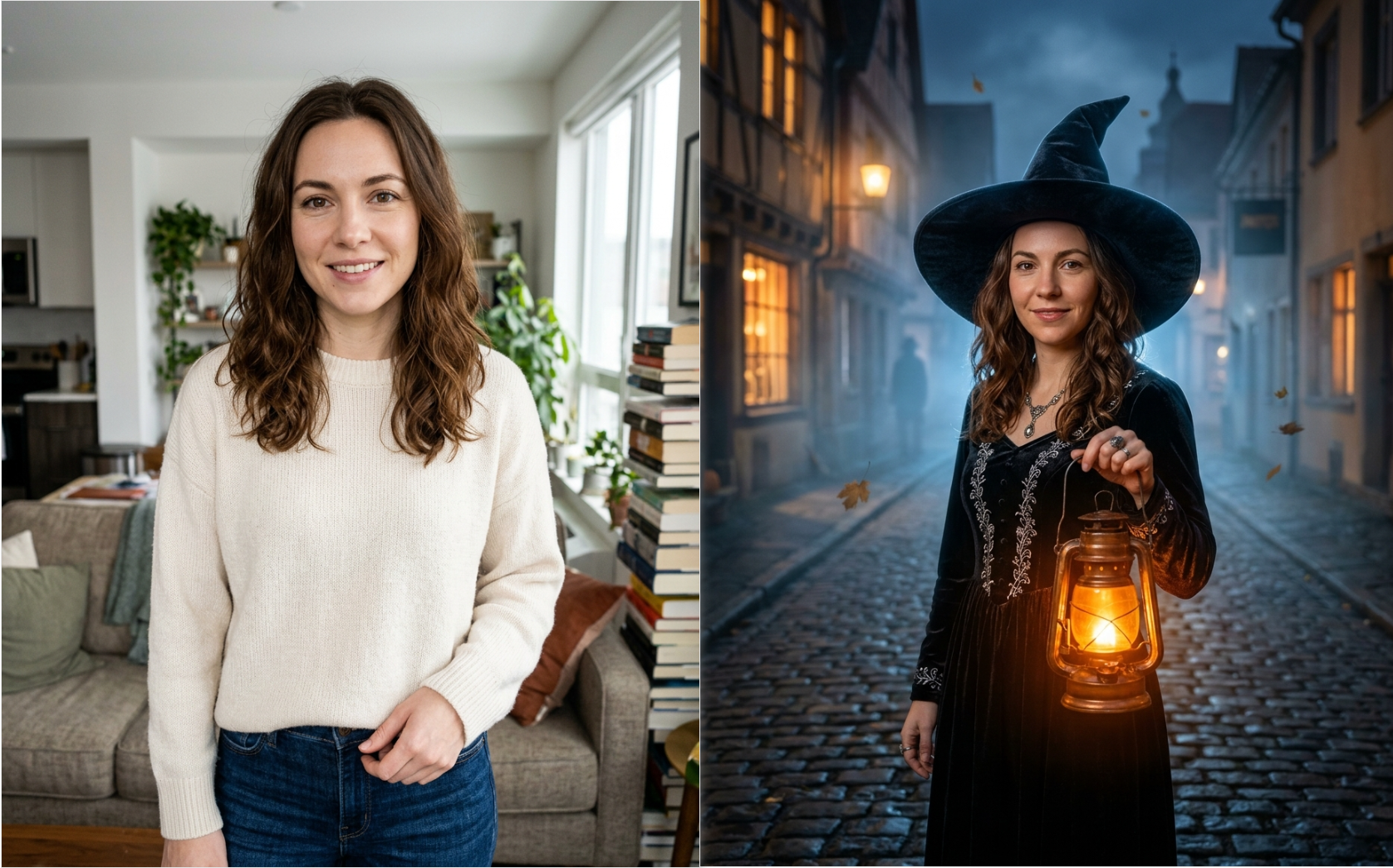
1. Elegant Witch Halloween Selfie
Best for: Halloween profile pictures, Instagram portraits, and realistic costume transformations.
Copy-and-paste prompt:
Create a photorealistic cinematic Halloween portrait of an elegant witch standing on a cobblestone street in an old European village at midnight. She wears a black velvet dress with delicate silver embroidery, a wide-brimmed pointed hat, and antique jewelry. Her hair moves naturally in the autumn breeze as she holds a glowing amber lantern. Floating orange leaves, soft blue fog, and warmly illuminated Victorian windows fill the background. Use warm lantern light on her face and cool moonlight around her silhouette. Natural skin texture, realistic hands, detailed fabric, professional fantasy photography, 85mm portrait lens, shallow depth of field, vertical 4:5 composition. If a reference photo is provided, preserve the person's recognizable facial features and proportions as closely as possible.
Make it yours: Change the dress color or hairstyle without replacing the entire setting.
Common issue: An oversized hat may hide the face. Ask for the hat brim to sit above the eyebrows and keep both eyes visible.
2. Gothic Vampire Makeover
Best for: Dramatic Halloween selfies and gothic fashion photography.
Copy-and-paste prompt:
Create a photorealistic portrait of an elegant vampire standing in a candlelit Victorian ballroom. The character wears a deep burgundy velvet outfit, a tailored black coat, an embroidered waistcoat, and a subtle antique pendant. Tall windows reveal a full moon, while dark red curtains and ornate furniture establish a gothic atmosphere. The subject looks directly at the camera with a confident, mysterious expression. Use natural facial proportions, restrained pale makeup, realistic clothing textures, warm candlelight, and deep midnight-blue shadows. Professional editorial fashion photography, medium portrait framing, vertical 4:5 composition. Avoid exaggerated fangs, graphic violence, and distorted anatomy.
Make it yours: Upload the same selfie used for Prompt 1 to explore a second costume while keeping a consistent identity reference.
Common issue: Excessive vampire makeup can change facial appearance. Specify subtle makeup when resemblance matters.
3. Mysterious Masked Halloween Portrait
Best for: Suspense photography and original horror-inspired portraits.
Copy-and-paste prompt:
Create a cinematic Halloween photograph of an adult standing in a dim suburban hallway at night. The subject wears a vintage black outfit and holds an original handcrafted white theatrical mask beside their face. A partially open door reveals a dark corridor illuminated by faint blue light. Warm amber light from a nearby lamp softly illuminates the subject. The atmosphere feels suspenseful and mysterious without graphic violence. Realistic skin texture, natural hands, carefully controlled shadows, subtle 35mm film grain, authentic interior details, medium portrait framing, vertical 4:5 aspect ratio. Use an original mask design rather than a recognizable movie character.
Make it yours: Add a vintage telephone or old television for a nostalgic horror mood.
Common issue: If the mask covers the face, request that it be held at chest height instead.
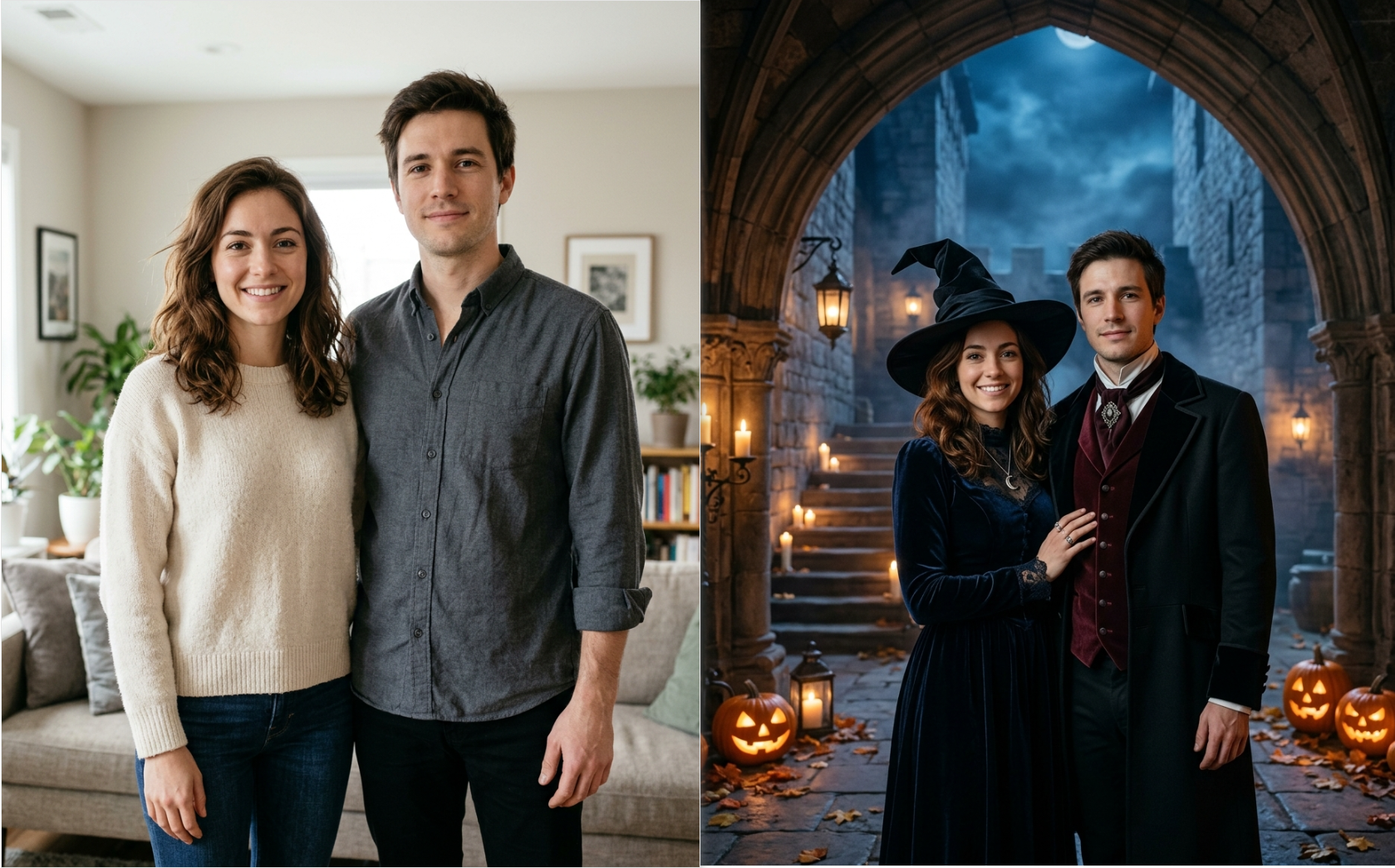
4. Witch and Vampire Couple Photo
Best for: Halloween couple pictures, greeting cards, and romantic social posts.
Copy-and-paste prompt:
Create a romantic cinematic Halloween portrait of exactly two adults standing together beneath the gothic archway of an ancient castle. Person A stands on the left wearing a midnight-blue witch costume with a velvet cloak and silver jewelry. Person B stands on the right wearing a burgundy vampire outfit with a tailored black coat. They exchange a subtle affectionate glance. Glowing pumpkins illuminate the stone staircase while a full moon shines through drifting autumn mist. Preserve two distinct faces, realistic body proportions, natural hands, and accurate costume assignments. Luxury editorial photography, warm candlelight contrasted with cool moonlight, vertical 4:5 composition.
Make it yours: Upload reference images for both people and define which person appears on each side.
Common issue: If the costumes are swapped, specify each person's position and clothing again in a targeted edit.
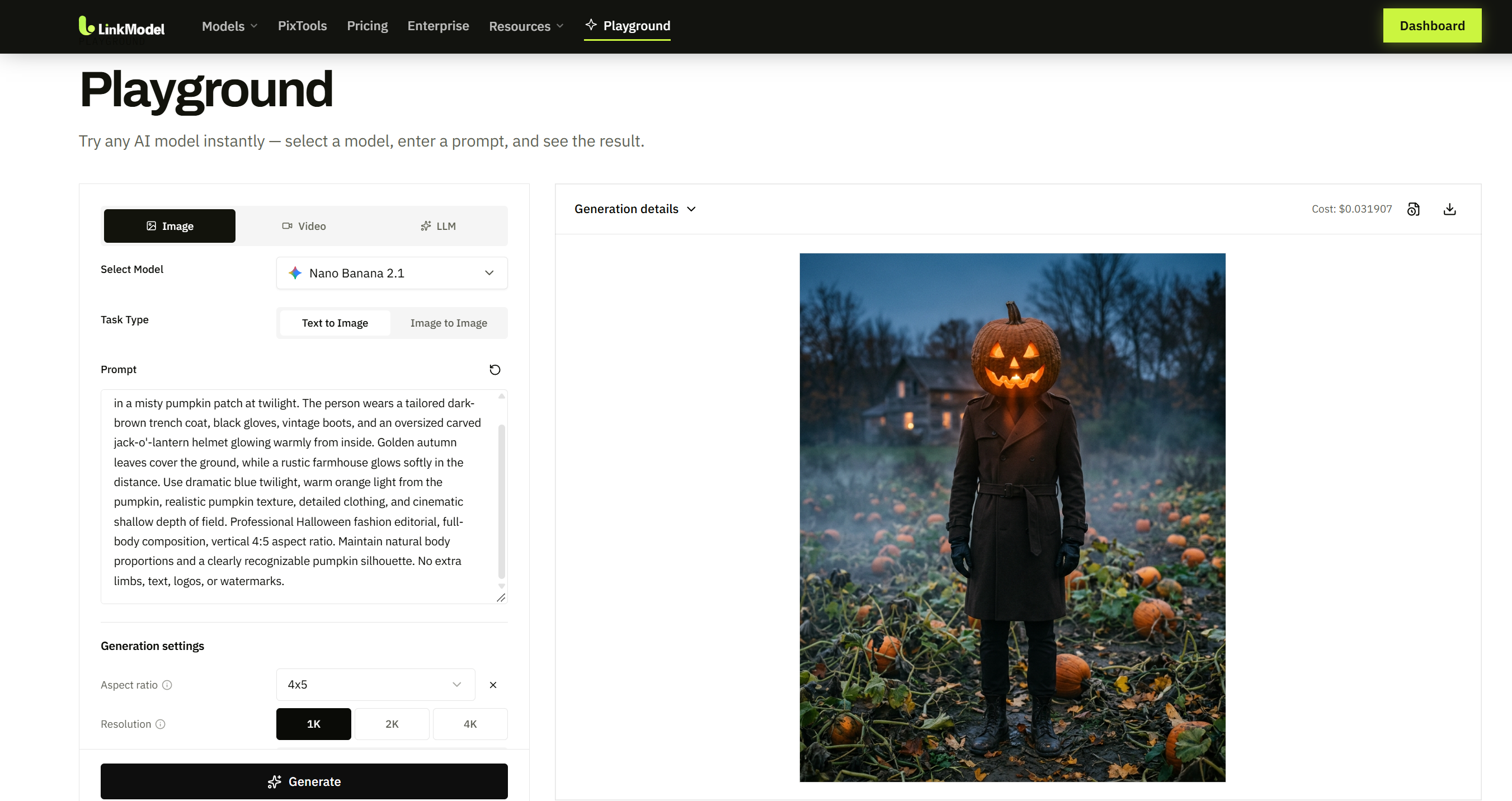
5. Pumpkin Head Halloween Photoshoot
Best for: Trend-inspired Halloween selfies, surreal fashion portraits, and social media photos.
Copy-and-paste prompt:
Create a photorealistic Halloween fashion portrait of an adult standing in a misty pumpkin patch at twilight. The person wears a tailored dark-brown trench coat, black gloves, vintage boots, and an oversized carved jack-o'-lantern helmet glowing warmly from inside. Golden autumn leaves cover the ground, while a rustic farmhouse glows softly in the distance. Use dramatic blue twilight, orange light from the pumpkin, realistic pumpkin texture, detailed clothing, and cinematic shallow depth of field. Professional Halloween fashion editorial, full-body composition, vertical 4:5 aspect ratio. Maintain natural body proportions and a clearly recognizable pumpkin silhouette.
Make it yours: Replace the trench coat with a vintage suit or oversized knitted sweater.
Common issue: A pumpkin helmet hides facial identity. For a recognizable selfie, change the instruction to "holding a carved pumpkin mask beside the face."
6. Vintage Halloween Photo Using Your Own Face
Best for: Personalized Halloween portraits that preserve recognizable facial features.
Copy-and-paste prompt:
Use the uploaded portrait as the primary identity reference. Transform the scene into an elegant vintage Halloween photoshoot inside a candlelit Victorian mansion. Change the clothing to a black gothic outfit with delicate embroidered details. Add antique furniture, dark floral wallpaper, and subtle autumn decorations. Preserve the person's recognizable facial features, facial proportions, hairstyle, natural skin texture, and original number of people as closely as possible. Maintain a similar camera angle and framing. Use realistic candlelight, subtle photographic grain, and a mysterious but sophisticated atmosphere. Photorealistic portrait, vertical 4:5 composition. Do not introduce extra people or unrelated facial changes.
Make it yours: Replace the gothic costume with a witch, vampire, or Victorian aristocrat outfit.
Common issue: If the result changes your expression, use the original reference again and explicitly request the original expression.
Vintage and Cinematic Halloween AI Image Prompts
Vintage Halloween images become more convincing when you specify a recognizable period and a coherent photographic style.
The difference between a generic retro filter and a well-directed vintage scene is often found in the small details: furniture, camera framing, fashion, color treatment, and lighting.
7. Antique 1920s Halloween Portrait
Best for: Historical horror aesthetics and antique-style photography.
Copy-and-paste prompt:
Create a fictional 1920s-inspired Halloween studio portrait of an elegantly dressed adult seated beside an antique wooden table. A faint translucent ghostly silhouette appears behind a lace curtain. The subject wears period-inspired formal clothing, neat vintage hair styling, and understated accessories. Include a painted studio backdrop, antique furniture, and soft frontal lighting. The photograph resembles an early twentieth-century black-and-white studio portrait with restrained contrast, fine silver-gelatin-style grain, subtle edge softness, and realistic proportions. Mysterious, elegant, non-violent atmosphere, vertical 3:4 composition.
Make it yours: Move the scene to a 1940s interior and use film-noir lighting.
Visual detail to check: Clothing and props should support the selected historical period.
8. Haunted Victorian Mansion
Best for: Halloween wallpapers, gothic settings, and cinematic backgrounds.
Copy-and-paste prompt:
Generate a photorealistic wide-angle image of an abandoned Victorian mansion standing on a mist-covered hill at midnight. The building features pointed roofs, intricate wooden ornaments, cracked stone steps, and several glowing amber windows. Twisted leafless trees surround the house while an iron gate stands partially open. A full moon shines through storm clouds, casting pale blue light across wet cobblestones. Scattered glowing jack-o'-lanterns create warm highlights along the path. Realistic architecture, atmospheric perspective, detailed surfaces, sophisticated horror-film color grading, horizontal 16:9 composition. No people or readable text.
Make it yours: Add one mysterious illuminated attic window to create a stronger focal point.
Visual detail to check: Keep the moonlight, windows, and pumpkins consistent with the nighttime atmosphere.
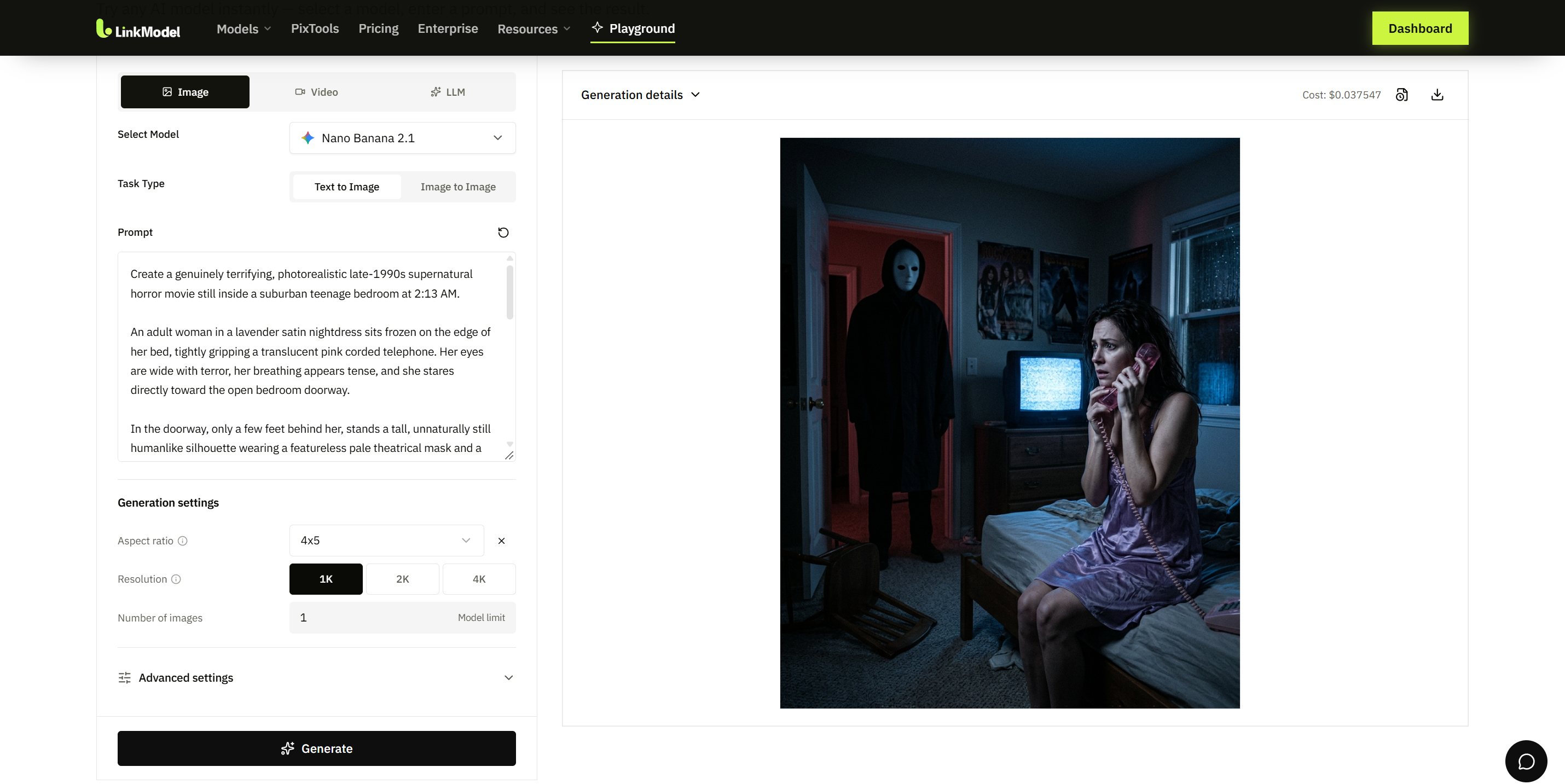
9. Y2K Halloween Horror Bedroom
Best for: Nostalgic horror selfies and early-2000s-inspired photography.
Copy-and-paste prompt:
Create a photorealistic Halloween scene inside an early-2000s suburban bedroom. An adult wearing a lavender satin top sits on a bed holding a translucent pink corded telephone. The room includes colorful wall posters, a bulky CRT television, a small CD collection, and decorative string lights. Outside a rain-covered window, an indistinct shadowy figure stands beneath a streetlamp. The subject glances toward the window with a tense expression. Dreamy pink interior lighting contrasts with unsettling blue exterior shadows. Authentic Y2K details, subtle analog film grain, realistic skin texture, cinematic medium-wide composition, vertical 4:5 aspect ratio. Original characters only.
Make it yours: Replace the bedroom with a retro video rental store.
Visual detail to check: Keep one primary suspense element instead of filling the background with several competing figures.
10. Moonlit Haunted Graveyard
Best for: Gothic wallpapers and supernatural environmental artwork.
Copy-and-paste prompt:
Create an atmospheric nighttime photograph of an old cemetery surrounded by crooked trees. Weathered gravestones rise from the ground as low blue mist drifts between them. A narrow cobblestone path leads toward a distant gothic chapel with one glowing window. Bare branches frame a full moon, and tiny floating particles catch the moonlight. Use realistic stone textures, natural atmospheric perspective, cool desaturated blue tones, restrained amber highlights, and a peaceful yet eerie mood. Cinematic wide-angle composition, horizontal 16:9 aspect ratio. No people, violence, or readable inscriptions.
Make it yours: Add a single antique lantern beside the pathway.
Visual detail to check: The path should clearly guide the viewer toward the chapel.
11. Dark Forest Fashion Editorial
Best for: Gothic costume photography and dark fantasy portraits.
Copy-and-paste prompt:
Generate a professional Halloween fashion portrait of an adult model standing in a misty autumn forest after sunset. The model wears a dramatic black feathered cloak over a tailored gothic outfit. Twisted branches form a natural arch overhead while crimson leaves cover the forest floor. A narrow shaft of moonlight illuminates the face as surrounding trees fade into deep blue shadows. The pose is calm and confident. Natural anatomy, detailed fabric, atmospheric fog, realistic skin texture, carefully controlled editorial lighting, 85mm portrait photography, vertical 4:5 composition.
Make it yours: Change the feathered cloak to emerald velvet.
Visual detail to check: Ensure the face remains visible against the dark clothing and background.
12. Classic Black-and-White Horror Poster
Best for: Vintage Halloween decorations and original cinematic artwork.
Copy-and-paste prompt:
Design an original monochrome gothic horror poster inspired by mid-twentieth-century theatrical illustration. A mysterious cloaked figure stands at the bottom of an enormous staircase leading into a decaying castle. Moonlight casts long angular shadows across cracked stone walls. Flying bats, twisted trees, and storm clouds frame the composition. Use dramatic high-contrast monochrome tones, vintage poster grain, hand-painted textures, strong perspective, and generous negative space at the top for a future title. Vertical 2:3 composition. No recognizable existing movie characters or logos.
Make it yours: Add one muted crimson accent for a more dramatic visual hierarchy.
Visual detail to check: Keep the upper area uncluttered if you plan to add a title later.
Cute Halloween AI Image Prompts for Pets and Families
Cute Halloween AI images are especially useful for greeting cards, social media posts, family portraits, and pet photos.
Unlike cinematic horror, these prompts prioritize friendly expressions, cozy lighting, warm autumn colors, and clear character silhouettes.
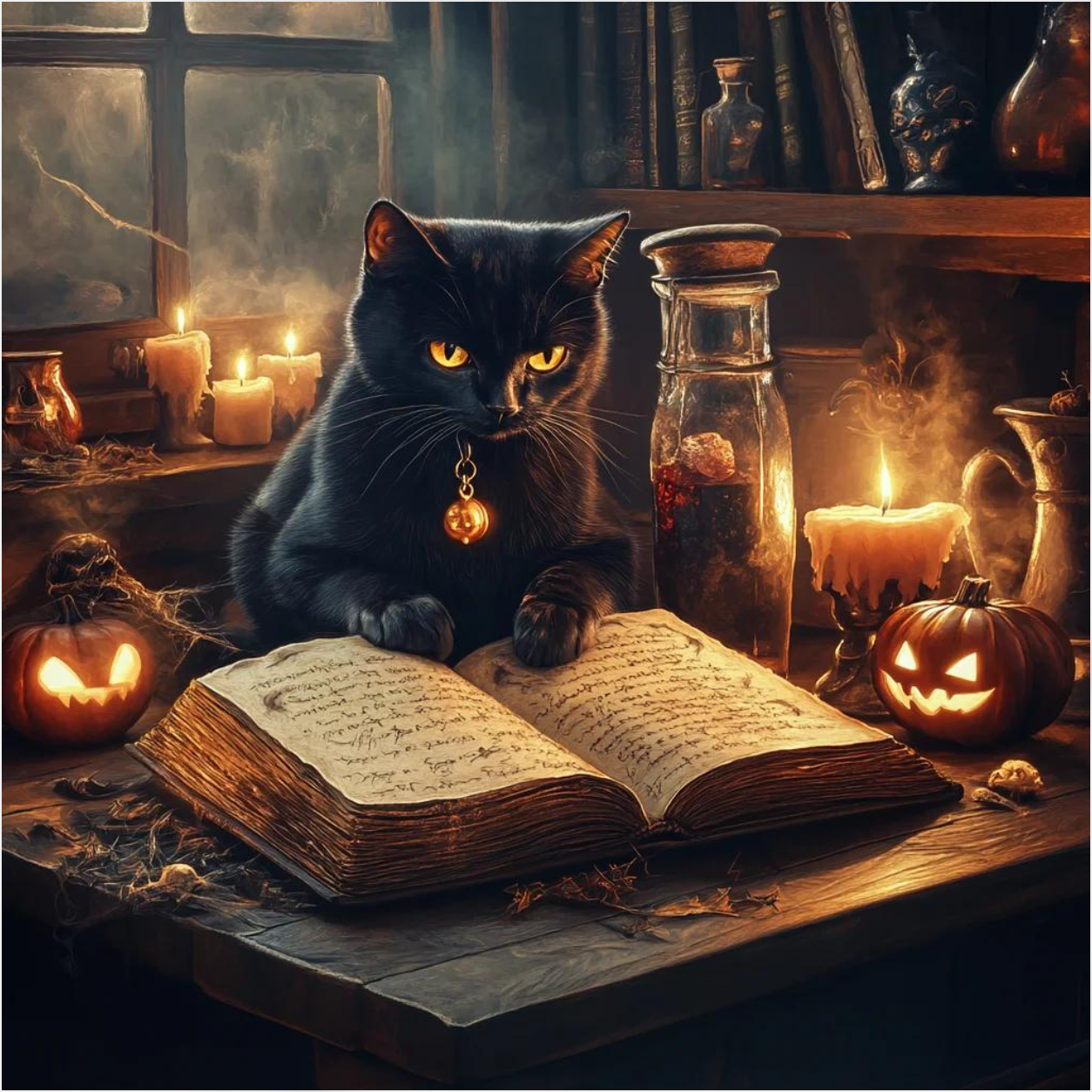
13. Black Cat Wizard
Best for: Halloween cat pictures and magical pet portraits.
Copy-and-paste prompt:
Create an adorable photorealistic portrait of a fluffy black cat sitting on an antique wooden desk inside a magical library. The cat wears a miniature purple wizard hat decorated with gold stars. A glowing spellbook rests nearby, surrounded by tiny pumpkins, colorful potion bottles, and floating golden sparkles. Warm candlelight reflects softly in the cat's eyes. Natural feline anatomy, highly detailed fur, realistic whiskers, whimsical fantasy atmosphere, shallow depth of field, centered composition, square 1:1 aspect ratio. No text or watermark.
Make it yours: Specify your cat's actual coat markings and eye color.
Visual detail to check: The hat should fit naturally without distorting the cat's head.
14. Friendly Ghost in an Autumn Garden
Best for: Halloween greeting cards and cheerful illustrations.
Copy-and-paste prompt:
Create a charming storybook illustration of a small friendly ghost floating above a garden filled with golden autumn leaves. The ghost has a rounded white body, cheerful black eyes, and a tiny orange bow tie. Glowing pumpkins, colorful mushrooms, and delicate fairy lights decorate the path. A cozy cottage with illuminated windows stands beneath a star-filled twilight sky. Use warm orange, cream, pastel violet, and soft midnight-blue colors, gentle painterly textures, and balanced whimsical composition. Square 1:1 format. Family-friendly mood, no text.
Make it yours: Add another ghost carrying a tiny lantern.
Visual detail to check: The character should remain easy to recognize at thumbnail size.
15. Pumpkin Patch Family Halloween Photo
Best for: Family Halloween cards and personalized seasonal portraits.
Copy-and-paste prompt:
Create a warm photorealistic Halloween family portrait in a pumpkin patch during golden hour. Exactly four family members wear coordinated costumes: a friendly wizard, a forest fairy, a little pumpkin, and a storybook explorer. They stand close together among pumpkins and golden leaves, smiling naturally at the camera. Hay bales, rustic fences, and distant autumn trees create a cozy background. Soft sunlight, natural facial expressions, realistic clothing, accurate hands, professional family photography, horizontal 3:2 composition. Exactly four people, no additional figures.
Make it yours: Adjust the number of family members and assign a costume to each.
Visual detail to check: Inspect each person's face and costume separately, especially when using multiple reference photos.
16. Halloween Puppy in a Wizard Costume
Best for: Dog Halloween photos and personalized pet cards.
Copy-and-paste prompt:
Generate a photorealistic portrait of a happy golden retriever puppy sitting on a soft autumn blanket beside three carved pumpkins. The puppy wears a lightweight purple wizard cape and a small soft costume hat. Warm fairy lights illuminate the pumpkins, with golden leaves and a cozy wooden porch in the background. The puppy looks toward the camera with a natural joyful expression. Detailed golden fur, correct canine anatomy, gentle lighting, shallow depth of field, charming seasonal photography, vertical 4:5 aspect ratio. No extra limbs, distorted paws, or text.
Make it yours: Upload your own dog's photo and preserve its actual appearance.
Visual detail to check: Avoid costume elements that visually merge with ears or paws.
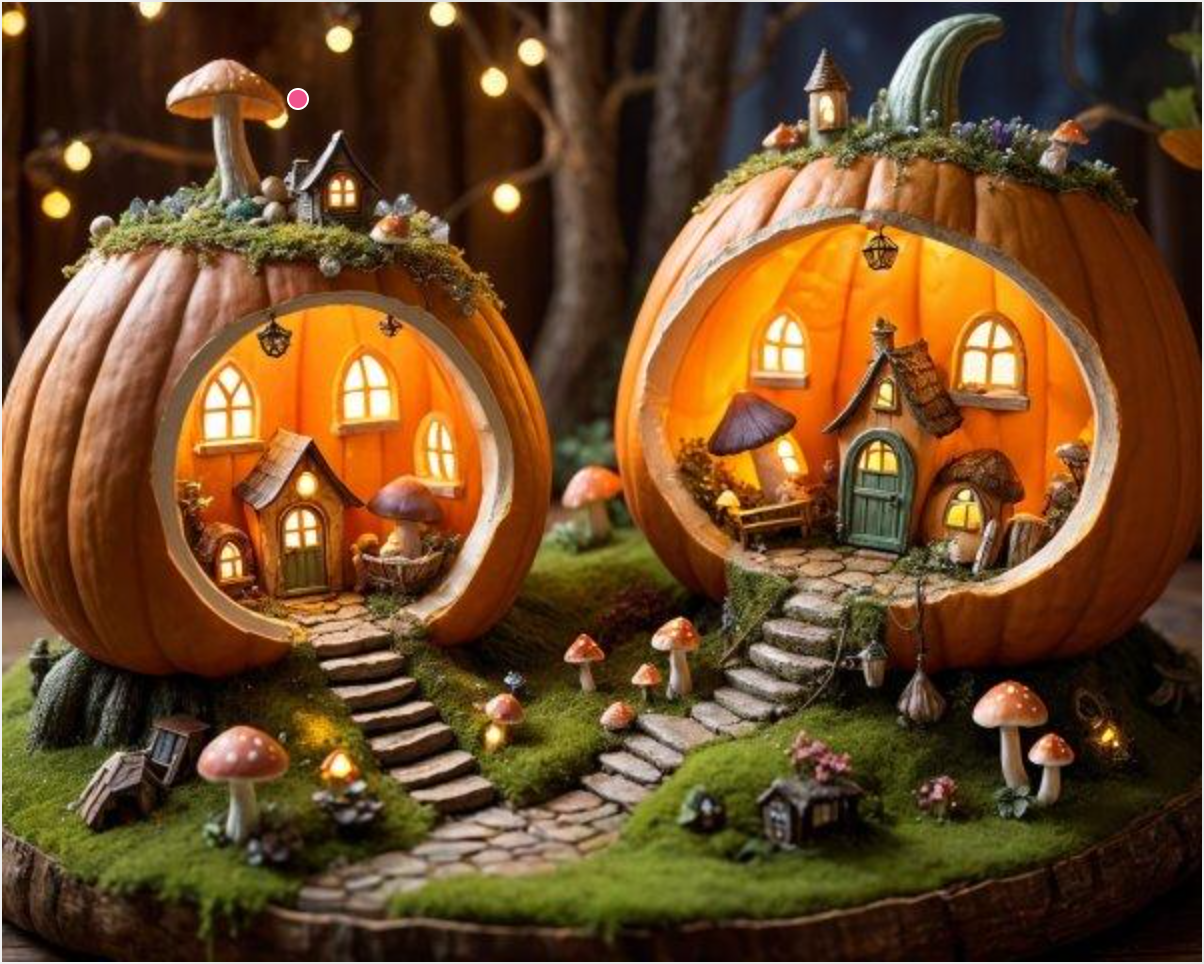
17. Miniature Halloween Village
Best for: Whimsical Halloween artwork and imaginative wallpapers.
Copy-and-paste prompt:
Create an intricate miniature Halloween village built inside a giant hollowed-out pumpkin. Tiny wooden houses with glowing windows line winding cobblestone streets. Friendly little ghosts float above rooftops while miniature witches carry lanterns among colorful market stalls. Small autumn trees, decorative pumpkins, warm string lights, and a miniature stone bridge complete the scene. Charming handcrafted diorama aesthetic, realistic miniature materials, tilt-shift-style depth of field, detailed lighting, orange and purple color palette, horizontal 3:2 composition. No readable text.
Make it yours: Place the village inside a vintage glass lantern.
Visual detail to check: Choose a clear main structure so the miniature environment does not become visually overcrowded.
Halloween AI Poster and Business Image Prompts
Halloween AI image prompts can also help creators design invitations, retail displays, restaurant concepts, party backdrops, and digital stickers.
For commercial assets, a successful result must do more than look attractive. It should meet specific layout, text, branding, and export requirements.
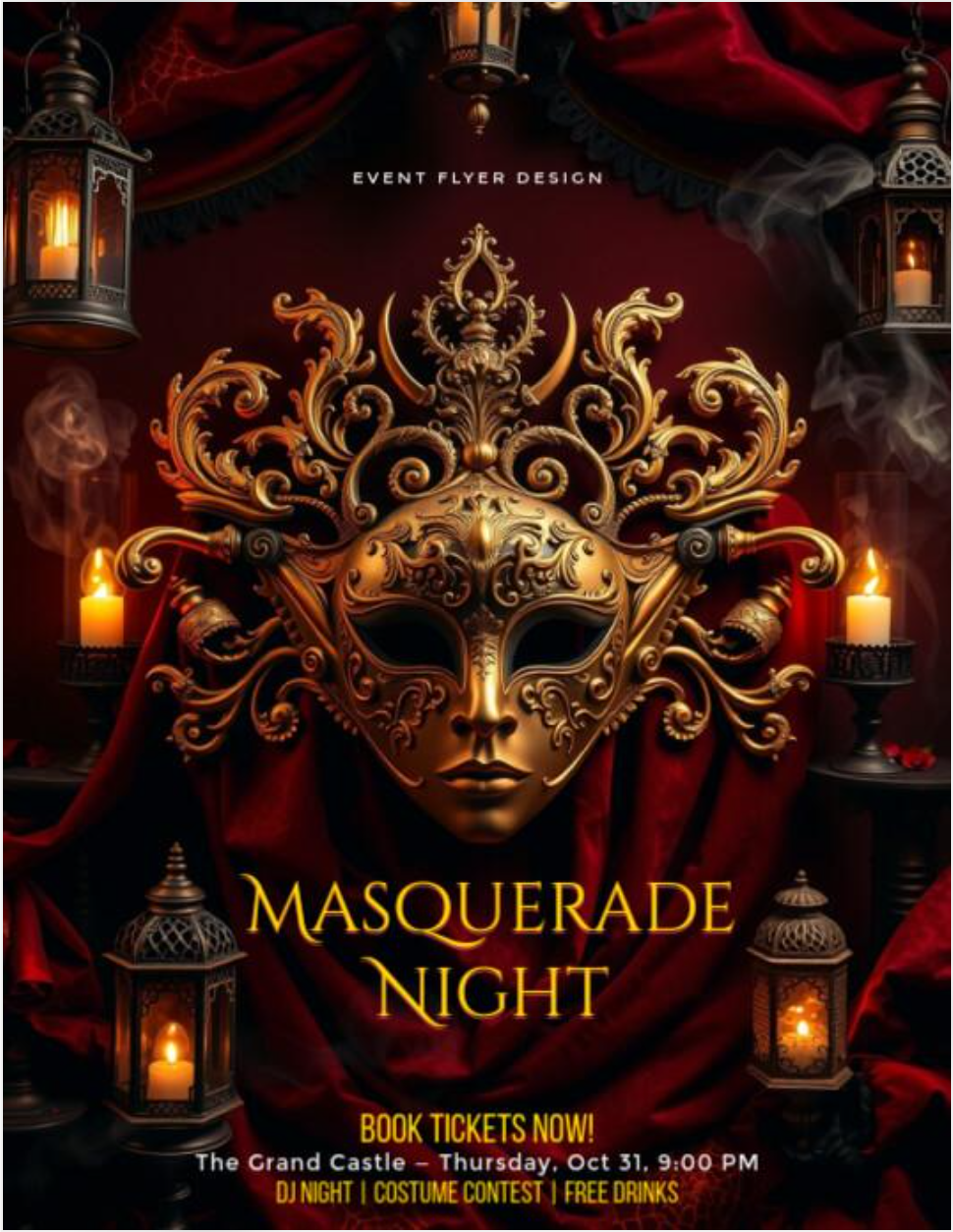
18. Halloween Party Invitation Poster
Best for: Party flyers, social media invitations, and promotional artwork.
Copy-and-paste prompt:
Design a premium vertical Halloween party invitation poster with an elegant midnight masquerade theme. Feature a black masquerade mask with intricate gold details, glowing candles, autumn leaves, and a mysterious gothic ballroom. Use deep black, amber orange, antique gold, and burgundy colors. Reserve the upper third for a large event title and the lower third for the date, venue, and RSVP details. Maintain strong visual hierarchy, generous spacing, balanced contrast, and professional promotional design. Vertical 2:3 composition. Do not invent event information or add unrelated logos.
Make it yours: Replace the masquerade theme with a haunted carnival.
Practical production note: For an important event, add the final date, venue, and contact details after checking the generated composition.
19. Halloween Storefront Decoration
Best for: Retail businesses and seasonal storefront concepts.
Copy-and-paste prompt:
Use the uploaded storefront photograph as the architectural reference. Create a realistic Halloween decoration concept while preserving the original building structure, windows, entrance, storefront sign, and perspective. Add glowing jack-o'-lanterns, warm orange string lights, autumn leaves, and decorative spiderwebs around appropriate exterior areas. Match the decorations to the existing lighting. Keep doorways, pathways, and existing signage visible and unobstructed. Professional architectural visualization, realistic materials, polished seasonal atmosphere, original image aspect ratio.
Make it yours: Use your store's brand colors rather than traditional Halloween orange.
Practical production note: Compare the output with the reference photograph to check that essential storefront elements remain unchanged.
20. Gothic Halloween Dinner Party
Best for: Restaurant promotions and Halloween event inspiration.
Copy-and-paste prompt:
Create a photorealistic luxury Halloween dinner table inside an elegant gothic dining room. A long wooden table is decorated with black taper candles, antique silver cutlery, burgundy flowers, miniature pumpkins, and vintage crystal glasses. Tall arched windows reveal a moonlit garden. Warm candlelight softly illuminates the table while cool blue shadows add depth. Rich velvet textures, realistic reflections, sophisticated interior styling, professional hospitality photography, balanced wide-angle composition, horizontal 16:9 aspect ratio. No people, logos, or readable text.
Make it yours: Replace burgundy and orange with emerald green and antique gold.
Practical production note: Leave enough clear tabletop space if you plan to add food, products, or promotional elements.
21. Cute Ghost Halloween Sticker
Best for: Digital stickers, merchandise concepts, and messaging graphics.
Copy-and-paste prompt:
Create a single adorable Halloween ghost sticker with a rounded white body, expressive black eyes, a cheerful smile, and a small orange pumpkin hat. The ghost floats gently while holding a miniature candy bucket. Use clean illustration edges, bright balanced colors, a modern cartoon style, and a bold white sticker outline. Center the full character with generous space on every side. Isolated single-object composition, square 1:1 aspect ratio. Request a transparent background where supported. No text or additional characters.
Make it yours: Replace the pumpkin hat with tiny bat wings.
Practical production note: Verify actual transparency in the exported file. A white background is not equivalent to a transparent PNG.

22. Halloween Photo Booth Backdrop
Best for: Parties, brand activations, and seasonal events.
Copy-and-paste prompt:
Design a photorealistic Halloween photo booth backdrop featuring a symmetrical gothic arch decorated with glowing pumpkins, dark purple flowers, stylized bats, and warm fairy lights. Keep the central standing area relatively clear for two or three people. Create visual depth using layered decorations, soft atmospheric lighting, and subtle autumn foliage. Use an elegant black, orange, and purple palette. Professional event-installation concept, wide-angle framing, horizontal 16:9 composition. No people, brand logos, or readable text.
Make it yours: Add a reserved blank area for the event or company name.
Practical production note: Leave important decorative elements outside the area where guests will stand.
Creative Fantasy Halloween AI Image Prompts
A memorable Halloween image does not always need to imitate an existing horror scene. A distinctive idea can emerge by combining a familiar Halloween symbol with an unexpected function or setting.
These three prompts are useful for original artwork, storytelling, and visually imaginative social posts.
23. The Midnight Pumpkin Train
Best for: Halloween fantasy illustrations and original seasonal artwork.
Copy-and-paste prompt:
Create a cinematic fantasy illustration of a miniature midnight train traveling through an enchanted autumn forest. The locomotive is shaped like a glowing carved pumpkin, with warm golden light shining through its windows. Tiny pumpkin carriages follow winding silver tracks suspended above a misty valley. Friendly ghost passengers look through the windows while glowing fireflies illuminate the trees. A large luminous moon hangs overhead. Intricate miniature construction, imaginative worldbuilding, cinematic perspective, magical realism, warm orange and cool blue contrast, horizontal 16:9 composition. No text or logos.
Make it yours: Turn the train into a floating pumpkin-powered ship.
Visual detail to check: The locomotive should remain the dominant visual subject.
24. The Witch's Floating Tea Room
Best for: Whimsical fantasy artwork and original Halloween illustrations.
Copy-and-paste prompt:
Create a detailed fantasy illustration of a tiny floating tea room suspended above an autumn village at midnight. The tea room rests on a giant enchanted teacup surrounded by delicate wooden balconies, glowing lanterns, and miniature pumpkins. A friendly witch prepares tea beside a round window while little black cats sit on velvet cushions. Orange leaves drift through the moonlit air, and warm golden light spills onto the surrounding clouds. Intricate architecture, cozy magical atmosphere, handcrafted details, cinematic depth, warm amber and midnight-blue color palette, vertical 4:5 composition. No text or logos.
Make it yours: Add floating teacups or a tiny magical greenhouse.
Visual detail to check: Keep the main teacup structure and the witch clearly identifiable.
25. The Halloween Library of Lost Spells
Best for: Fantasy book art, Halloween illustrations, and detailed wallpapers.
Copy-and-paste prompt:
Generate a detailed fantasy image of an ancient magical library hidden inside a giant hollow tree on Halloween night. Hundreds of miniature books float between spiral wooden staircases while glowing pumpkins illuminate suspended platforms. A small cloaked librarian stands on a narrow bridge reaching toward a floating spellbook. Through tall arched windows, orange leaves swirl beneath a full moon. Elaborate wood textures, warm golden interior lighting, cool blue moonlight, intricate fantasy architecture, cinematic depth, mysterious yet welcoming atmosphere, vertical 3:4 composition. No recognizable franchise elements or text.
Make it yours: Replace floating spellbooks with glowing paper birds.
Visual detail to check: Maintain a clear separation between foreground architecture and floating objects.
How to Make Halloween AI Photos Using Your Own Picture
To create Halloween AI photos using your own picture, upload a clear reference photo, choose a costume prompt, specify what must stay recognizable, and refine the generated result. This approach is more suitable for personalized selfies than relying on a text-only description.
Nano Banana 2.1 is one model you can use for this workflow because it supports image generation, reference-image inputs, and conversational editing.
Step 1: Choose a Clear Reference Photo
For the first attempt, choose a well-lit portrait with an unobstructed face and a simple background.
A single-person portrait is a practical starting point when you're learning how reference-based editing works.
For couples or families, provide authorized reference photographs and describe each person's role in the scene.
Step 2: Open Nano Banana 2.1 on LinkModel
Visit LinkModel and open the model selection or Playground interface.
Choose Nano Banana 2.1, then enter your selected Halloween prompt and attach a reference photo where supported.
For a beginner, Prompt 1, 2, or 6 offers a straightforward starting point.
Step 3: Tell the Model What to Preserve
For a personalized Halloween selfie, add this instruction to the selected prompt:
Use the uploaded photo as the primary identity reference. Preserve my recognizable facial features, facial proportions, hairstyle, and natural skin texture as closely as possible. Change only the Halloween costume, background, and lighting requested in the prompt. Keep the original number of people and maintain realistic anatomy.
This is more specific than simply writing "keep the same face."
For a couple photo, specify each person's position and costume separately to reduce identity or clothing confusion.
Step 4: Choose an Aspect Ratio
Choose the format that matches where you want to use the image.
| Final Use | Suggested Ratio | Suggested Starting Resolution |
|---|---|---|
| Profile photo | 1:1 | 1K |
| Instagram portrait | 4:5 | 1K |
| Vertical story | 9:16 | 1K or 2K |
| Landscape wallpaper | 16:9 | 2K |
| Detailed poster | 2:3 | 2K or 4K |
Nano Banana 2.1 supports 1K, 2K, and 4K image outputs. Higher resolution can be useful for detailed artwork, but it does not eliminate problems with anatomy, text, or identity.
Step 5: Review and Refine the Image
Check whether the result meets your original requirements.
For a selfie, review the face, expression, hairstyle, costume, and framing.
For a poster, inspect spelling and layout.
If only the lighting is wrong, use a targeted edit:
Keep the existing subject, face, costume, pose, and background composition. Change only the lighting to soft blue moonlight with warm orange lantern highlights.
Save a satisfactory version before making further changes, so you have a clear reference if an edit affects something you wanted to preserve.
How to Keep Your Face in Halloween AI Images
The most effective way to guide facial consistency is to use a reference photo and separate the details you want preserved from the elements you want changed. A prompt alone cannot guarantee an identical face, but clear editing boundaries make your intended result easier to communicate.
This is particularly useful when creating multiple Halloween costumes from one selfie.
One Selfie, Three Different Halloween Looks
A practical workflow is to use the same reference portrait to produce three distinct styles:
| Halloween Look | Change | Preserve |
|---|---|---|
| Witch portrait | Dress, hat, lantern, village | Identity, facial proportions, hairstyle |
| Vampire portrait | Gothic outfit, makeup, ballroom | Identity, facial proportions, hairstyle |
| Vintage horror portrait | Retro costume, bedroom, lighting | Identity, facial proportions, hairstyle |
Start from the original reference image for each version.
This keeps the identity reference consistent and makes it easier to compare the changes between costumes.
For example, use this instruction when moving from the witch portrait to the vampire portrait:
Use the same original identity reference. Create a sophisticated vampire Halloween portrait while preserving the person's recognizable facial features and natural proportions as closely as possible. Change the clothing to a burgundy gothic outfit and the setting to a candlelit Victorian ballroom.
How to Avoid Mixing Faces in Couple Photos
When editing a couple photo, define each person explicitly.
Person A stands on the left wearing a witch costume. Person B stands on the right wearing a vampire costume. Preserve each reference identity separately. Keep exactly two people in the image, with natural facial anatomy and accurate costume assignments.
Review the generated faces individually.
If one face changes substantially, return to the original references and request a more limited edit rather than continuing to modify a heavily altered image.
What If the Face Still Looks Different?
Try reducing the number of simultaneous changes.
Instead of changing the face, pose, clothing, background, lighting, and camera angle all at once, preserve the original pose and framing while changing only the costume and environment.
If the result is still unsatisfactory, restart from the original photograph.
The goal is to maintain a recognizable subject across styles rather than assuming every new image will reproduce the source photograph perfectly.
How to Fix Halloween AI Image Prompts That Don't Work
If your Halloween AI prompt produces the wrong result, identify the specific problem and revise only the relevant instructions. Longer prompts are not automatically better; a precise correction often provides a clearer editing target.
Common problems include altered faces, extra characters, incorrect clothing, unexpected objects, unrealistic lighting, and misspelled poster text.
Common Halloween AI Image Problems and Fixes
| Problem | What to Change | Example Correction |
|---|---|---|
| Face looks unfamiliar | Reinforce identity reference | Preserve recognizable facial features and original proportions |
| Extra people appear | Specify exact count | Show exactly two adults, one left and one right |
| Wrong Halloween costume | Define clothing more precisely | Use a burgundy velvet vampire coat, not a generic cape |
| Lighting is too bright | Specify light sources | Use dim moonlight and soft candle illumination |
| Scene looks cartoonish | Clarify photographic style | Photorealistic editorial photography with natural textures |
| Extra moon or decorations | Remove specific objects | Remove the additional moon on the left |
| Poster text is wrong | Simplify or separate typography | Leave clean title space for final lettering |
| Sticker lacks transparency | Check export capability | Request an alpha-supported export and verify the file |
| Prompt is rejected | Adjust the creative request | Use original, non-graphic suspense imagery |
Example: Correcting an Extra Object
Suppose you create a miniature Halloween village with one full moon, but the generated scene contains two.
Rather than replacing the entire prompt, try:
Remove the smaller additional moon on the left. Keep the main moon above the central building and preserve the remaining village, characters, and lighting.
This approach is also useful when correcting additional people or misplaced decorations.
Example: Correcting a Halloween Poster
A party poster may look polished but include incorrect lettering.
If the exact event information matters, use the generated image as a background and add the final text separately.
For a poster that needs more room for the title, try:
Preserve the central Halloween illustration and color palette. Clear the upper third of the poster to create a high-contrast area for the title. Keep the remaining artwork unchanged.
Nano Banana 2.1 supports enhanced text rendering, but spelling, dates, and other important details still need to be checked before publication.
When Should You Generate Again?
Generate a new image when the overall composition is unsuitable or the result has too many interconnected errors.
Use targeted edits when the scene is mostly correct and only a specific detail needs revision.
For projects with multiple assets, record the original prompt and final accepted version so you can reuse successful instructions.
Nano Banana 2.1 Pricing for Halloween AI Images
Nano Banana 2.1 image-output tokens cost $22.50 per million on LinkModel, compared with Google's $30 per million Standard API rate—a 25% reduction.
For Halloween creators, this price difference is relevant when generating multiple portraits, editing costumes, or preparing a set of seasonal marketing assets.
LinkModel vs. Google Standard Pricing
| Token Type | Google Standard | LinkModel | LinkModel Savings |
|---|---|---|---|
| Input | $1.50/M | $1.125/M | 25% |
| Cached input | $0.15/M | $0.1125/M | 25% |
| Image output | $30.00/M | $22.50/M | 25% |
| Text output | $7.50/M | $5.625/M | 25% |
| Reasoning output | $7.50/M | $5.625/M | 25% |
M means one million tokens. Total request charges depend on the actual token usage and applicable processing components.
This comparison uses the same token categories and Google's published Standard API rates rather than assuming that every image has one universal fixed price.
Why Image Quality Matters to Your Budget
A lower token price reduces the cost of the corresponding usage, but the number of attempts also matters.
Consider a Halloween campaign that needs 100 approved images:
| Approval Rate | Approximate Generations Required |
|---|---|
| 100% | 100 |
| 80% | 125 |
| 50% | 200 |
For example, an 80% approval rate means producing approximately 125 candidates to obtain 100 approved images. A 50% rate would require around 200.
Cost per accepted image = Total generation and editing cost ÷ Number of accepted images
For personalized portraits, acceptance criteria could include facial resemblance, costume accuracy, and natural anatomy. For event posters, they could include correct text, composition, and brand compatibility.
A prompt that consistently produces usable results can therefore be valuable even beyond its nominal per-image price.
Halloween API Treat: Get 50% Extra Credits on LinkModel
LinkModel's Halloween API Treat gives both new and existing users 50% extra API credits on eligible top-ups, up to $100 in cumulative bonus credits per account. Multiple top-ups are allowed, and bonus credits are automatically credited within 24 hours after each eligible top-up.
The campaign runs through November 8, 2026, at 11:59 PM PST.
How Much Extra Credit Can You Get?
| Eligible Total Top-Up | Bonus Credits | Total Credits Added |
|---|---|---|
| $20 | $10 | $30 |
| $50 | $25 | $75 |
| $100 | $50 | $150 |
| $150 | $75 | $225 |
| $200 | $100 | $300 |
| $300 | $100 | $400 |
You can make multiple eligible top-ups during the campaign, but the combined promotional bonus cannot exceed $100 per account. Bonus credits are credited within 24 hours after each eligible top-up, rather than immediately.
For example, topping up $100 twice can earn $50 in bonus credits on each qualifying transaction, reaching the cumulative $100 cap.
Why the Halloween Offer Is Useful for Image Creators
If you're creating several Halloween portraits, comparing different costumes, or preparing seasonal campaign images, extra API credits give you more budget for generation and revision.
On LinkModel, you can also use supported AI models under one account, without a minimum spend or monthly platform fee.
Explore Nano Banana 2.1 and the Halloween API Treat on LinkModel
The campaign ends November 8, 2026, at 11:59 PM PST. Bonus credits are credited within 24 hours of an eligible top-up, with a cumulative bonus cap of $100 per account.
Is Nano Banana 2.1 Good for Halloween AI Image Prompts?
Nano Banana 2.1 is a practical model to consider for Halloween images because it supports original image generation, reference-image editing, multi-turn revisions, and 1K–4K outputs.
Google also documents multi-image fusion with up to 14 reference images, with capabilities designed for character consistency across up to four characters and object fidelity across up to ten objects.
These functions are relevant to several Halloween workflows.
| Halloween Task | Useful Capability |
|---|---|
| Create a witch or vampire portrait | Text-to-image generation |
| Transform a selfie into a Halloween costume | Reference-image editing |
| Create multiple looks for the same person | Multi-turn editing and identity instructions |
| Design a Halloween party poster | Image generation and enhanced text rendering |
| Produce detailed Halloween artwork | 2K and 4K resolution options |
| Create couple or group portraits | Multiple-reference composition |
When selecting an image model, evaluate the actual task rather than assuming one model is best for every creative need.
For a Halloween selfie, prioritize recognizable facial features. For a poster, prioritize readable text and layout. For an elaborate fantasy scene, prioritize composition and detail.
Why Use LinkModel for Halloween Image Generation?
LinkModel provides access to supported AI models through a unified platform, letting creators and developers manage model selection and billing in one place.
For Nano Banana 2.1, the main advantages include:
- 25% lower listed Standard API token rates for the corresponding pricing categories.
- One API key for supported models across providers.
- Pay-as-you-go billing, with no minimum spend or monthly platform fee.
- Playground access for trying prompts and reviewing outputs before integration.
- Unified billing, making it easier to manage usage across supported models.
The right starting point is straightforward: choose a Halloween prompt from this guide, try it with Nano Banana 2.1, inspect the result, and refine what needs changing.
For developers creating multiple seasonal assets, the same prompt structure can become a reusable template for repeated generation and editing.
FAQ
What are the best Halloween AI image prompts for 2026?
The best Halloween AI image prompts describe a specific subject, costume, environment, lighting, composition, and visual style. Useful ideas include witch selfies, vampire portraits, pumpkin-head photos, Y2K horror scenes, haunted houses, pet costumes, and Halloween party posters. Choose a prompt based on your intended result and customize the details before generating.
How do I make Halloween AI photos with my own face?
Upload a clear reference photo to an image model that supports editing, then describe the costume and background you want. Ask the model to preserve your recognizable facial features, proportions, hairstyle, and natural skin texture as closely as possible. Check the generated photo and make targeted revisions if the face or framing changes.
Why does my Halloween AI prompt change my face or add extra people?
These problems can occur when identity requirements, character counts, or scene composition are unclear. Use a reference image for personal portraits, specify the exact number of people, assign each person's costume and position, and preserve the original camera framing where practical. If a result is largely correct, revise the specific issue rather than replacing the complete scene.
Can AI create Halloween party posters with accurate text?
Yes. Models with text-rendering capabilities, including Nano Banana 2.1, can create Halloween poster concepts containing titles and other lettering. However, important text should be checked for accuracy. For commercial event materials, generating the artwork with reserved text space and adding the final event details separately can provide more reliable control.
How much does it cost to generate Halloween AI images?
The cost depends on the model, resolution, input content, and actual token usage. On LinkModel, Nano Banana 2.1 image-output tokens are listed at $22.50 per million, compared with $30 per million on Google's Standard API tier, a 25% reduction. Text, input, reasoning, and repeated generations can contribute to the final total. LinkModel's Halloween 2026 promotion also offers 50% extra credits on eligible top-ups, capped at $100 cumulatively.
Conclusion
The best Halloween AI image prompts make it easier to turn a creative idea into a specific, usable result—whether that's a personalized witch selfie, a cinematic horror photo, a pumpkin-head portrait, a cute pet costume, or a Halloween party poster. Start with one of the 25 copy-and-paste prompts above, use reference images when facial identity matters, and refine individual details rather than repeatedly starting from scratch. With LinkModel, you can explore Nano Banana 2.1 and other supported models through a unified API, with Nano Banana 2.1 token rates 25% below Google's listed Standard pricing and flexible pay-as-you-go billing. During the Halloween API Treat promotion, eligible top-ups also receive 50% extra credits, capped at $100 in cumulative bonuses, through November 8, 2026, at 11:59 PM PST. Choose your favorite prompt and start creating your next Halloween image.