GPT Image 2.5 leads the verified image preference rankings, while Nano Banana 2.1 has lower official input rates and clearer resolution-based output costs. A five-task comparison favors Flare for photography, editing, and character preservation, but Nano Banana 2.1 for product composition. Better value depends on your brief and cost per accepted image.
Changed packaging, missing copy space, or a drifting character identity can turn an attractive image into another failed attempt. Retries and manual corrections can erase a low generation price, so reducing AI API costs requires more than comparing a model’s best-looking output.
LinkModel brings these models into one platform, with GPT Image 2.5 pricing listed from $0.00441 per image, depending on configuration. With pay-as-you-go pricing, no minimum spend, and no monthly platform fee, you can start with a small budget and scale the workflow that produces usable results.
Nano Banana 2.1 vs GPT Image 2.5: The Main Differences
This comparison covers Nano Banana 2.1, GPT Image 2.5 Flare, and GPT Image 2.5 Sunburst. Flare and Sunburst must remain separate when discussing quality, editing, performance, and cost.
Our research combines official documentation, original leaderboard snapshots, and published same-task examples. Our review of user questions informs the acceptance criteria and FAQ. The image cases are third-party experiments; LinkModel’s contribution here is source verification and workflow analysis.
Nano Banana 2.1: References, Resolution, and Search Grounding
According to Google’s model documentation, Nano Banana 2.1 supports 1K, 2K, and 4K output, up to 14 reference images, Google Web and Image Search grounding, and configurable thinking levels.
These features make it relevant to reference-heavy compositions and grounded visual content. They establish supported functionality rather than a guaranteed advantage in output quality.
For a product scene, one reference might define geometry while another defines lighting. Specify those roles clearly. Otherwise, the model must infer which details to preserve, and the reviewer has no consistent standard for accepting the result.
GPT Image 2.5 Flare vs Sunburst
In OpenAI’s Sunburst documentation, editing precision is the recommended selection criterion. The Flare documentation positions Flare for everyday generation where speed matters.
Both share published token rates. Equal rates do not establish equal token consumption, latency, or cost per image.
The Flare vs Sunburst distinction also matters for evidence. The five-task study below tested Flare. Sunburst’s leaderboard scores are a separate result and cannot be presented as measured performance on those five tasks.
Nano Banana 2.1 vs GPT Image 2.5 Benchmarks: Which Leads on Quality?
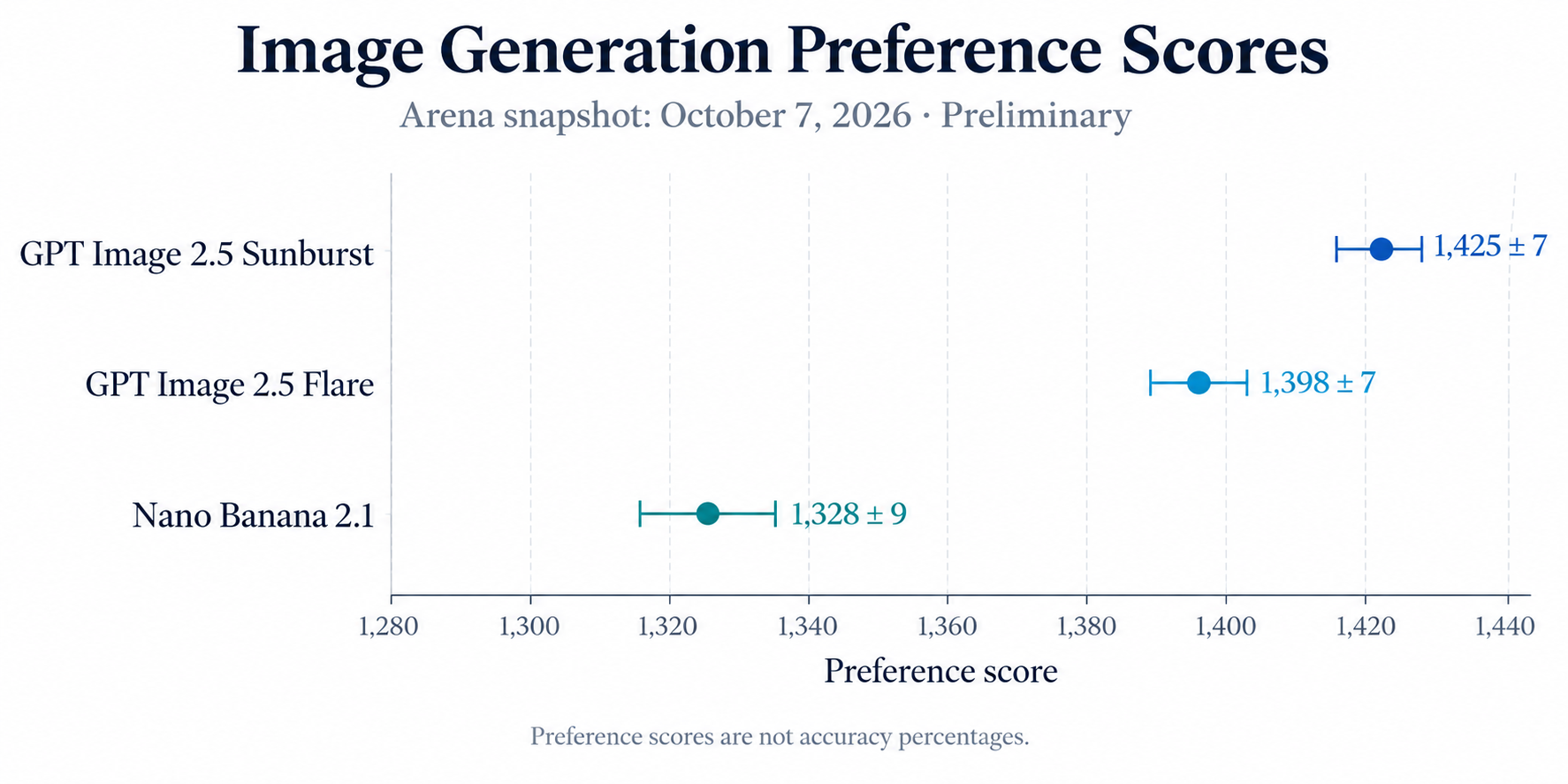
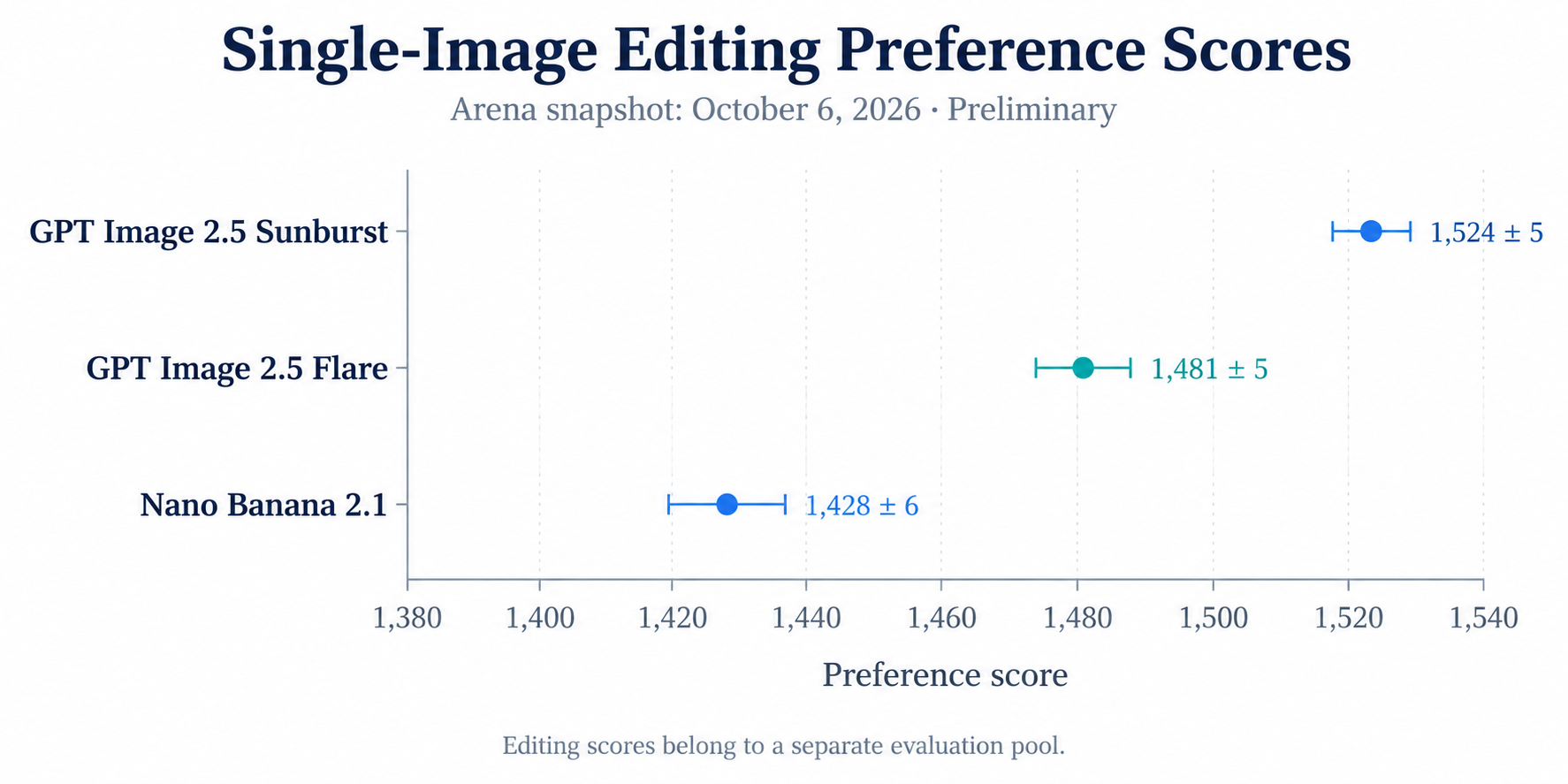
GPT Image 2.5 leads the reviewed Arena preference snapshots for generation and single-image editing. These rankings provide broader evidence than a few examples, but they do not predict your product’s acceptance rate.
Text-to-Image Generation Scores
The October 7, 2026 snapshot on Arena’s generation leaderboard reported:
- Sunburst: 1,425 ± 7, with 17,752 listed votes.
- Flare: 1,398 ± 7, with 16,889 listed votes.
- Nano Banana 2.1: 1,328 ± 9, with 5,310 listed votes.
All three entries were preliminary.
These results justify including both GPT Image 2.5 variants in a quality shortlist. They do not establish which model will follow a particular layout, preserve a product label, or produce an acceptable image within a fixed budget.
Single-Image Editing Scores
The separately dated October 6 snapshot on Arena’s editing leaderboard reported:
- Sunburst: 1,524 ± 5, with 59,825 listed votes.
- Flare: 1,481 ± 5, with 57,408 listed votes.
- Nano Banana 2.1: 1,428 ± 6, with 12,985 listed votes.
These entries were also preliminary.
Preference scores are not accuracy percentages. A score gap cannot be converted into a percentage improvement in image quality. Generation and editing scores also belong to different evaluation pools.
The useful next step is to test the shortlisted models against your hardest requirements, rather than treating the leaderboard as a purchasing decision by itself.
Nano Banana 2.1 vs GPT Image 2.5 Image Quality: Five Task Examples
The original Fuser comparison tested five tasks on October 6, 2026, using identical prompts and one generation per model without retries. It reported three Flare wins, one Nano Banana 2.1 win, and one tie.
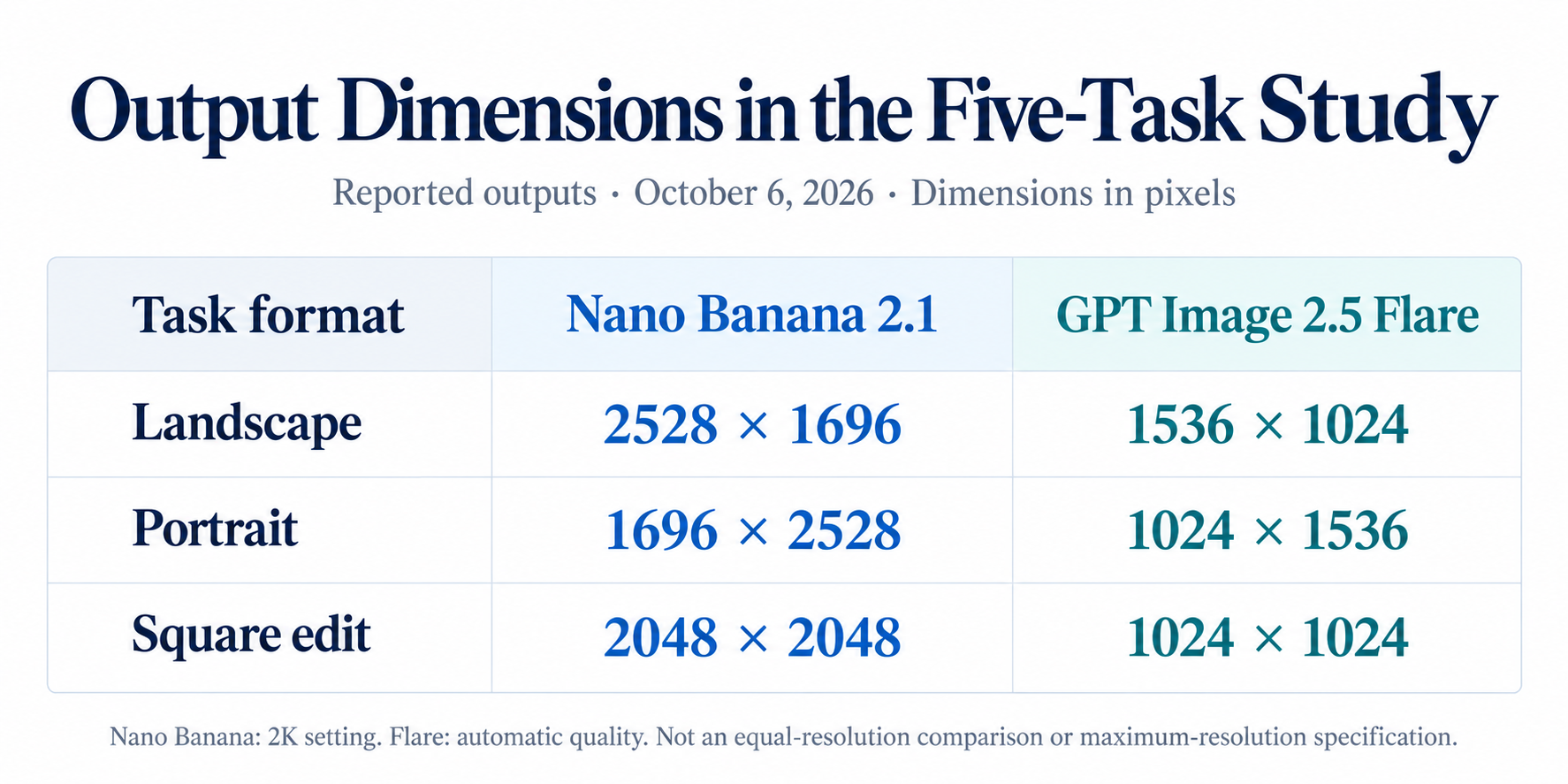
Nano Banana used 2K output; Flare used automatic quality and smaller dimensions:
- Landscape: 2528 × 1696 versus 1536 × 1024.
- Portrait: 1696 × 2528 versus 1024 × 1536.
- Square edit: 2048 × 2048 versus 1024 × 1024.
The editing inputs came from a third model. Neither competitor was editing its own generated source.
This was a small workflow comparison, not an equal-resolution, equal-budget benchmark. Its value lies in the specific successes and failures.
Photorealism: A Fisherman at Dawn
Fuser’s brief requested an elderly fisherman repairing an orange net, with sharp hands, mist, dawn light, and background blur. Flare better matched the lighting and blur; Nano Banana produced a wider scene.
The practical distinction is between photographic direction and scene coverage. More visible scenery can be useful for cropping, but it does not compensate for missing the requested depth of field.
Review lighting, subject separation, anatomy, texture, and composition independently. Inspect both the full frame and the final crop.
A photographic result should satisfy the requested visual direction, rather than simply contain convincing detail.
Typography: The NIGHT TIDE Poster
Fuser reported correct wording from both models. Nano Banana retained the middle dot; Flare substituted a bullet and produced flatter artwork.
For approved copy, readability and exact compliance are separate standards. A punctuation substitution may be acceptable for a concept but fail a finished brand asset.
Check spelling, punctuation, hierarchy, spacing, and presentation. A photograph of a poster can suit a mockup, while a production layout may require flat artwork.
Also inspect at the final display size. Enlarging an image can hide the practical problem of small text becoming unreadable in the delivered asset.
Product Photography: A Ceramic Coffee Dripper
Fuser’s product brief specified a separate oak board, directional light and shadow, and copy space. Nano Banana followed those constraints more closely; Flare used a tabletop.
This case demonstrates why prompt compliance deserves its own score. An attractive product rendering may still require regeneration if its layout cannot accommodate the campaign.
Turn important instructions into visible acceptance conditions:
- The product sits on the required surface.
- Light and shadow follow the specified direction.
- The designated area remains available for copy.
- Unrequested props are absent.
Commercial usefulness depends on the complete layout, not only the object’s appearance.
Background Replacement: The LUMA 02 Bottle
Fuser’s edit required a new outdoor setting while preserving the bottle. Nano Banana altered the cap collar; Flare retained its structure but added droplets.
That difference matters because editing has two obligations: complete the requested change and protect the original product.
Compare silhouette, closure, label, material, and surface finish against the source. Review added effects too. They may introduce a product condition or visual claim the original brief never approved.
A convincing background does not make an inaccurate product acceptable.
Character Consistency: A Rainy Cycling Scene
Fuser reported better retention of curls, freckles, and glasses in Flare’s transformed character image.
Identity should be evaluated through specific features rather than general resemblance. Hair texture, facial marks, eyewear, and proportions can all matter.
For recurring characters, repeat the comparison across poses, angles, and environments. Record which features drift and whether corrections create new problems.
One successful scene change does not establish consistency across an entire campaign.
Nano Banana 2.1 vs GPT Image 2.5 Editing: What Must Stay Unchanged?
Successful editing requires both accurate changes and reliable preservation. Overall visual appeal can conceal failures that make an output commercially unusable.
Divide the brief into required changes, protected attributes, and optional details. In a background replacement, lighting may change, the label must remain faithful, and background foliage may vary within approved limits.
This produces actionable rejection reasons. “Closure geometry changed” is more useful than “the image feels wrong.”
Reference Capacity vs Preservation Quality
Google documents up to 14 references. OpenAI’s editing API reference permits up to 16 input images for GPT Image models.
Those are input capacities, not consistency scores.
Additional views can clarify geometry or identity, but conflicting references can introduce ambiguity. In Nano Banana prompting, identify which image controls the product, pose, clothing, lighting, or style.
For multi-character scenes, review every person separately. A recognizable main subject does not establish that the supporting characters remain consistent.
Masks vs Exact Source Preservation
The OpenAI editing reference documents a mask input, providing a regional editing control.
A mask still requires output verification. Inspect protected labels, closures, logos, and fine edges rather than assuming they survived unchanged.
When exact source pixels are essential, compositing the original product over a generated background may be more controllable. That adds a production step, but it can fit strict catalog or packaging requirements.
Choose the workflow according to the required preservation standard.
Multi-Turn Editing: Review the Whole Revision Chain
The five-task study does not measure repeated revisions. It cannot establish how either model performs after several edits.
For a revision-heavy workflow, compare each result against both the previous image and the approved source. Check whether labels, identity features, materials, or sharpness drift as changes accumulate.
Use separate acceptance checks for the newest change and previously approved details. A successful revision should not reopen a problem already resolved.
Multi-turn reliability needs its own test, rather than being inferred from a single edit.
Nano Banana 2.1 vs GPT Image 2.5 Pricing: What Does an Image Really Cost?
Nano Banana has lower official Standard input rates, while both families charge $30 per million image output tokens. Complete request costs still depend on consumption and configuration.
Our review of Google’s pricing documentation found Standard input at $1.50 per million tokens and text or thinking output at $7.50 per million tokens.
The OpenAI model pages list Standard text input at $5 and image input at $8 per million tokens.
These are direct-provider rates. They should not be confused with LinkModel listings or reseller prices.
Nano Banana 2.1 Output Costs at 1K, 2K, and 4K
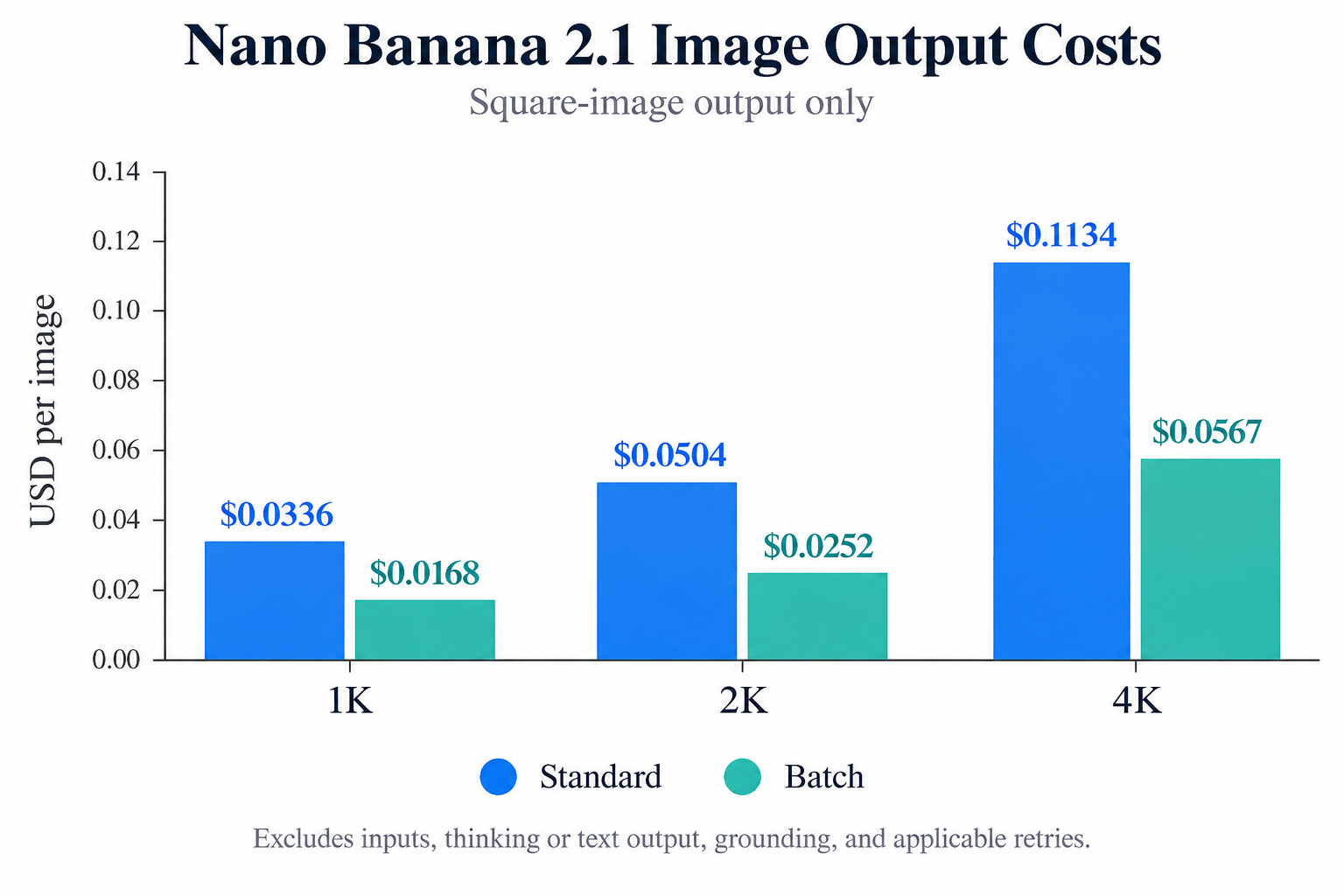
Google publishes square-image output token counts supporting these calculations:
- 1K: 1,120 tokens; $0.0336 Standard or $0.0168 Batch.
- 2K: 1,680 tokens; $0.0504 Standard or $0.0252 Batch.
- 4K: 3,780 tokens; $0.1134 Standard or $0.0567 Batch.
The 4K Standard calculation preserves precision; Google displays a rounded $0.113 equivalent.
For 10,000 generated images, Standard image output alone would cost $336 at 1K, $504 at 2K, or $1,134 at 4K. Batch output would cost $168, $252, or $567 respectively.
Inputs, thinking or text output, grounding, and applicable retries remain additional costs.
GPT Image 2.5: Calculate from the Actual Request
According to OpenAI’s billing guide, consumption can differ by model and quality setting. Responses workflows also incur mainline model usage.
At Standard rates:
Image output cost = output tokens × $30 ÷ 1,000,000
For illustration, 2,000 output tokens cost $0.06 and 4,000 cost $0.12. These are calculations, not measured costs for a particular configuration.
Add input charges and applicable workflow usage. Cached image-generation input discounts have endpoint-specific conditions.
For a reproducible budget, retain:
- Exact model and quality setting.
- Output dimensions and image count.
- Reference inputs.
- Reported token usage.
- Complete billed amount.
- Acceptance or rejection reason.
No measured complete-request bills are available in this review. The figures above should not be presented as full production costs.
Cost per Accepted Image: Account for Retries
Use:
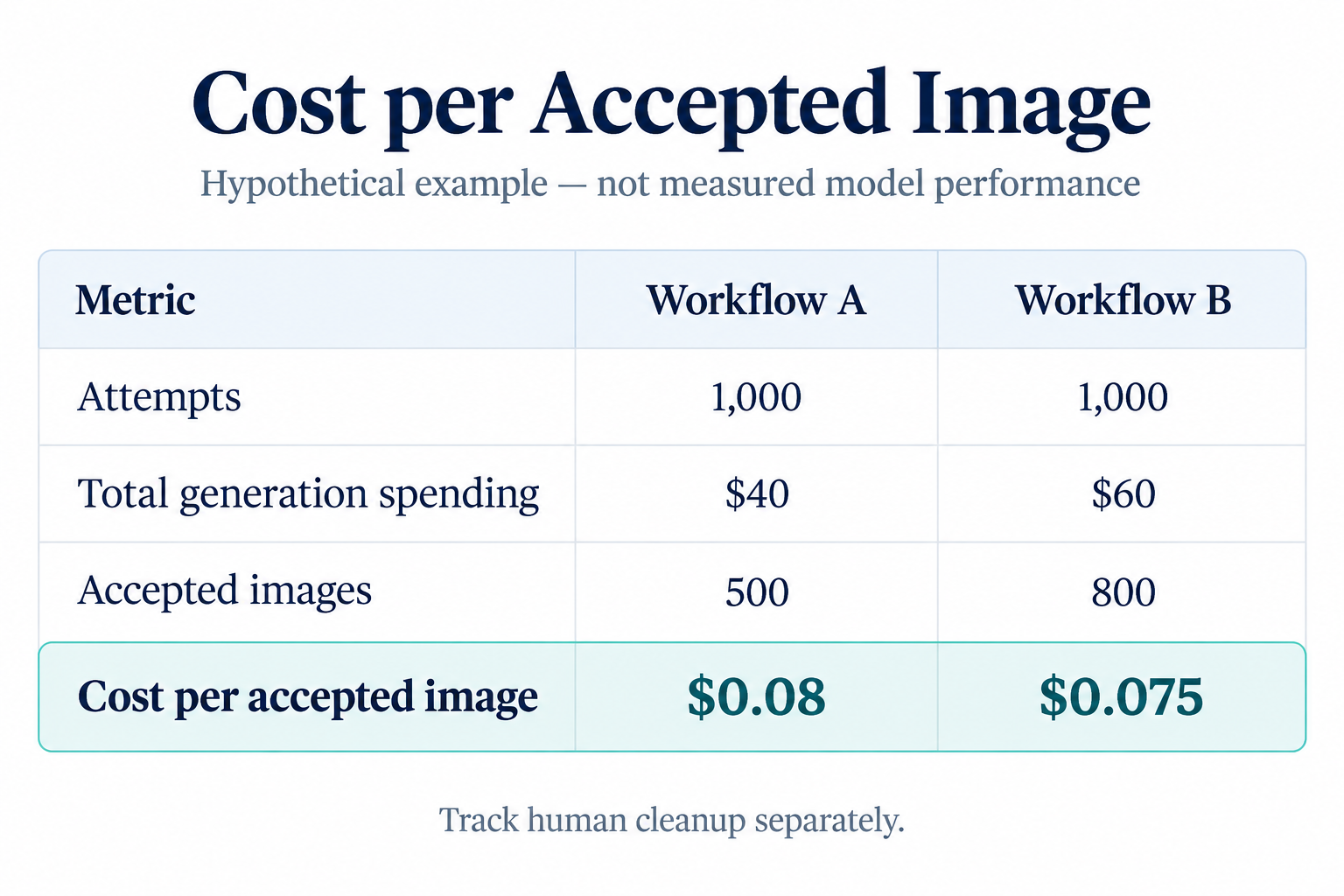
Cost per accepted image = total generation spending ÷ accepted outputs
Consider two hypothetical batches of 1,000 attempts. Workflow A spends $40 and produces 500 accepted images, costing $0.08 per accepted image. Workflow B spends $60 and produces 800 accepted images, costing $0.075.
Workflow B costs more per attempt but less per usable result. These examples explain the calculation; they do not describe measured model performance.
Track selection and retouching time separately. Frequent label repair or compositing can outweigh a small API saving.
LinkModel Pricing: Starting Rates Need Context
LinkModel’s listed $0.00441 GPT Image 2.5 starting price is not a fixed charge for every size, quality, or input configuration.
Check the applicable request price before comparing it with official token billing. The review did not verify the exact configuration or input-charge conditions behind that minimum.
When comparing low-cost image APIs, the useful commercial advantage is the ability to begin with a small pay-as-you-go workload. Evaluate actual spending and accepted outputs before scaling.
Compare equivalent jobs, not unlike pricing units.
Nano Banana 2.1 vs GPT Image 2.5 Performance: Speed, Failures, and Delivery
The reviewed evidence does not establish a matched latency winner across Nano Banana, Flare, and Sunburst. Historical aggregator figures were not reproducible as a comparable final-image dataset.
Measure completed delivery. An initial response or partial preview is a different event from receiving the finished asset.
Reliability also needs clear definitions. Uptime, valid-image return rate, and commercial acceptance rate measure different things.
Measure Final-Image Latency and Acceptance Together
When measuring AI API latency, record median and P95 completion times, valid-image return rate, and acceptance rate under consistent settings.
For example, a model may return images quickly but frequently miss a mandatory label or layout requirement. Those outputs increase time spent regenerating and selecting.
Time to an accepted image is more useful than the fastest individual response.
Keep technical failures separate from quality rejections. A request returning no valid image and a completed image failing the brief require different corrective actions.
Interactive Editing vs Batch Production
An interactive editor prioritizes short waits and clear progress. An overnight catalog job may prioritize total spending and deadline completion.
Evaluate those workloads separately. A simple generation request does not predict a reference-heavy editing job.
Log settings, duration, charges, errors, and acceptance reasons. This helps distinguish temporary service problems from a model consistently struggling with a task.
Nano Banana 2.1 vs GPT Image 2.5 API: Which Is Easier to Integrate?
The easier integration is the one that exposes your required controls and makes failures and charges understandable. Model availability alone does not establish a production-ready workflow.
Reference handling, formats, transparency, dimensions, and grounding all affect implementation effort.
Formats, Transparency, and Dimensions
OpenAI’s generation API reference documents PNG, JPEG, and WebP output, transparent backgrounds, and one to ten images per request.
Transparency can remove an additional cutout-processing stage. Explicit formats simplify downstream handling.
The reference permits custom dimensions within constraints, marks resolutions above 2560 × 1440 experimental, and lists a maximum supported resolution of 3840 × 2160.
Google’s square 4K output is 4096 × 4096. The “4K” label does not identify the same deliverable across providers.
Grounding and Reference Workflows
Nano Banana’s documented search grounding is relevant when visuals depend on retrieved information.
Retrieval and accurate rendering remain separate requirements. For an infographic, verify facts, dates, quantities, and generated wording before publication.
Grounding also belongs in the request budget through its separate charging conditions.
For reference workflows, define a source of truth for each attribute. That makes both prompting and acceptance review more precise.
Using LinkModel for Model Evaluation
When assessing a LinkModel endpoint, test an entire representative job.
A background-editing workflow should verify source-image handling, editing controls, output format, usage reporting, and failed-request behavior. Confirm how retries affect billing.
A shared API can reduce integration work, but required model-specific features still need checking on the endpoint your application uses.
Keep settings attached to evaluation results so model switching remains interpretable.
Nano Banana 2.1 vs GPT Image 2.5: Which Should You Choose?
Start with your hardest acceptance requirement, then compare cost at that standard.
For photographic scenes and recurring characters, include Flare and Sunburst because of the preference evidence, then test them against Nano Banana on your actual briefs.
For product layouts, include Nano Banana because the published composition example shows the importance of spatial compliance.
For grounded visuals, evaluate Nano Banana’s search capabilities. For transparent assets, evaluate GPT Image 2.5’s documented export controls.
For product edits, inspect protected details in every shortlisted model’s output.
Run a Repeatable Selection Trial
Use representative tasks: a hero image, a product composition, a background replacement, a text-heavy design, and a reference-character scene.
Keep source assets and semantic instructions consistent. Use comparable delivery dimensions, disclose quality settings, and generate multiple results per task.
An initial ten generations per task can reveal recurring failures, although it remains exploratory. Review without model labels where practical and define rejection criteria before inspecting results.
Maintain two outcomes: best quality within a fixed budget and lowest cost at a fixed acceptance standard. Those questions can produce different choices.
Nano Banana 2.1 vs GPT Image 2.5: Conclusion
GPT Image 2.5 has the stronger verified preference-ranking evidence, while Nano Banana 2.1 offers lower official input rates, documented resolution-based output costs, and useful grounding and reference controls. The task examples show that photography, composition, editing preservation, and identity need separate evaluation. Our recommendation at LinkModel is to test representative briefs and choose using cost per accepted image, delivery time, and preservation quality, rather than a model’s best-looking example or lowest advertised price.
Frequently Asked Questions
Is Nano Banana 2.1 Better Than GPT Image 2.5?
Neither is better for every task. GPT Image 2.5 leads the reviewed preference snapshots, while Nano Banana better followed one product composition brief. Test the exact variant against your requirements.
Which Model Is Cheaper After Retries?
Nano Banana has lower official Standard input rates, but consumption and acceptance rate determine the result. Divide total spending by accepted images, then track human cleanup separately.
Which Model Better Preserves Products and Characters?
Flare better preserved the tested cap structure and character features in the small published study. That does not establish universal preservation. Compare multiple outputs with the approved source.
Should I Choose Flare or Sunburst?
OpenAI positions Flare for everyday generation and Sunburst for editing precision. Sunburst leads the reviewed preference snapshots, but actual cost, acceptance, and completion time still need testing.
Is Nano Banana 2.1 Faster Than GPT Image 2.5?
This review does not establish a matched speed winner. Measure final-image latency and retries under equivalent delivery requirements. Time to an accepted image is the more useful production metric.