A useful 1980s AI photo prompt for ChatGPT identifies the facial features to preserve, the year and location, and the kind of photograph to create. Upload a clear reference image, use the template below, and inspect the result before requesting another edit.
The frustrating part is getting an image that looks nostalgic but no longer resembles the person—or a scene filled with strange objects, heavy grain, and orange skin. Separate instructions for the subject, setting, and photographic treatment give you a clearer way to diagnose and correct the result.
For recurring creative work, LinkModel offers multiple models with pay-as-you-go pricing, no minimum spend, and no monthly platform fee. GPT Image 2.5 Flare is available at 25% below OpenAI’s corresponding standard API token rates. Start with the tutorial below; the business workflow later explains when separate API access becomes useful.

Copy This 1980s AI Photo Prompt for ChatGPT
Replace the bracketed details before sending. This is a starting template, not a guarantee of facial accuracy or historically perfect results.
Prompt:
Edit the uploaded reference photograph into a believable portrait taken in 1985 in [city, country]. Keep the subject recognizable. Preserve their apparent age, skin tone, expression, facial proportions, and distinctive visible features. Retain the pose and camera angle where possible. Change the hairstyle, clothing, accessories, and setting to suit the requested scene. Place the subject in [a modest family living room / a college courtyard / a neighborhood street]. Use clothing and everyday objects appropriate to the year and location. Keep uncertain background details simple. Use lighting that fits the setting: modest on-camera flash for an indoor snapshot, available daylight for an outdoor portrait, or soft controlled lighting for a studio photograph. Add subtle film-like texture without obscuring the face. Exclude contemporary devices, modern branding, exaggerated beauty retouching, heavy scratches, and strong orange or sepia effects.
If you only want the photographic treatment, remove the instructions about changing the clothing and surroundings. For more ways to separate the subject, composition, and constraints, see our GPT Image prompting guide.
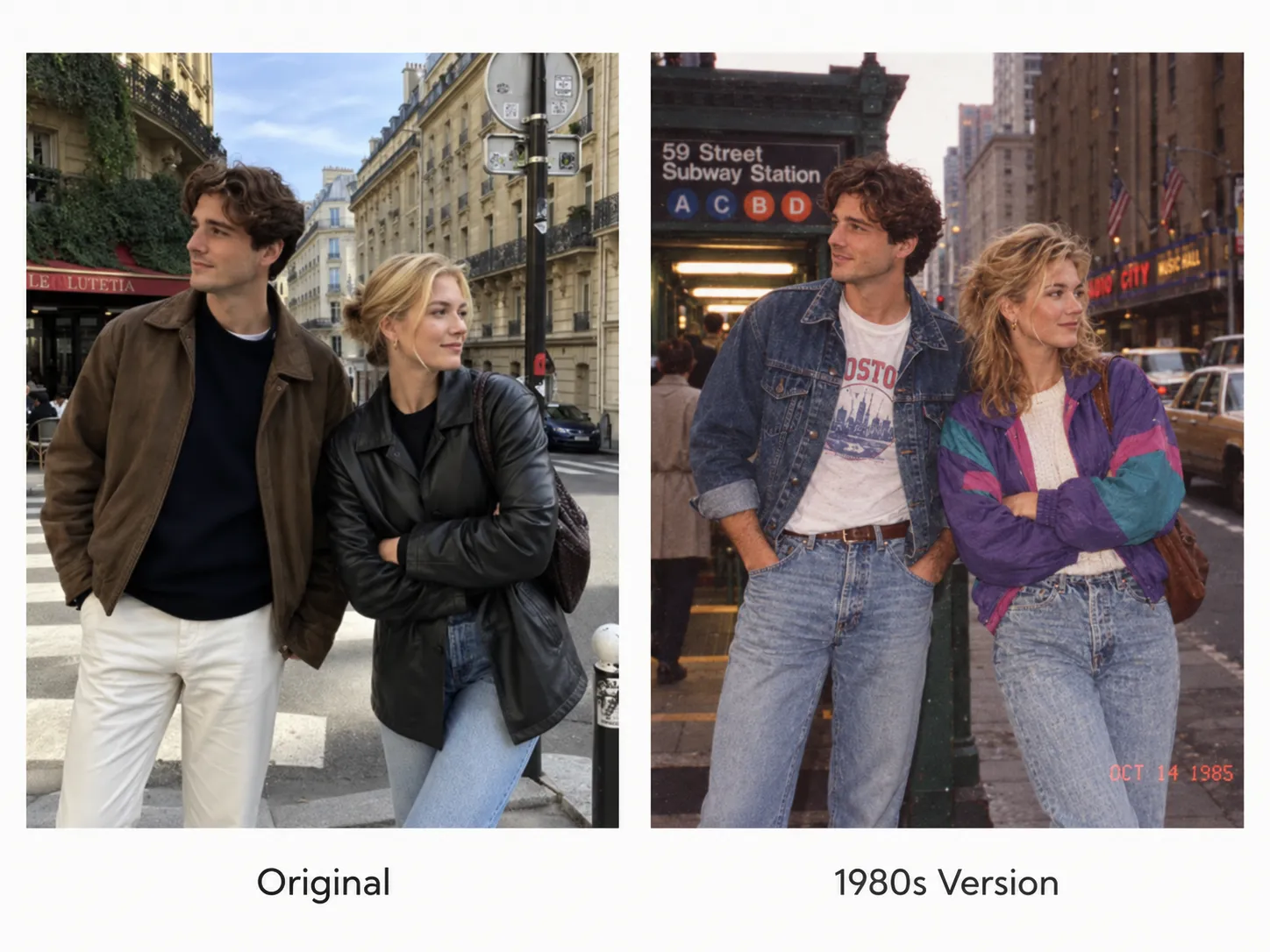
How to Make an 80s Photo in ChatGPT
1. Choose Your Reference
Use an image where the face and the features you want retained are easy to inspect. Choose a photograph you are entitled to upload, or begin with an AI-generated fictional adult character.
If you provide several images, explain their roles:
Image one defines the person’s appearance. Image two is only a reference for clothing and background. Do not combine the two faces.
2. Upload the Image and Describe the Scene
Open a ChatGPT conversation with image creation available, attach the reference, and send your edited prompt.
Include the year, place, occasion, and framing. If the response only describes a picture, clarify that you want an image transformation using the uploaded reference.
3. Inspect the Person First
Compare the eyes, nose, mouth, jawline, expression, and apparent age with the original. Then inspect the hands, clothing, and background.
For a group portrait, check every person separately. A convincing central face does not establish that everyone has been retained correctly.
4. Request One Specific Correction
Continue in the same conversation and identify the visible problem:
Use the original reference to restore the subject’s mouth shape. Retain the current clothing, background, and framing as closely as possible.
Save a preferred version before attempting another major change. Additional edits can introduce new differences.
How to Reduce Face Drift
Separate what should remain consistent from what may change. Asking for an unchanged face while also requesting a slimmer jaw, larger eyes, or a much younger appearance creates competing goals.
| Keep consistent | Allow to change |
|---|---|
| Recognizable facial proportions | Hairstyle |
| Apparent age and skin tone | Clothing |
| Expression, when important | Accessories |
| Distinctive visible characteristics | Setting and lighting |
If the likeness deteriorates, return to the original reference instead of relying only on the latest generated image.
When evaluating tools for portrait transformation, inspect the same features under comparable conditions. Visual appeal and faithful transformation are separate questions.
Choose a Specific Year, Place, and Occasion
Use a scene description that gives you something concrete to evaluate.
| Broad request | More specific creative brief |
|---|---|
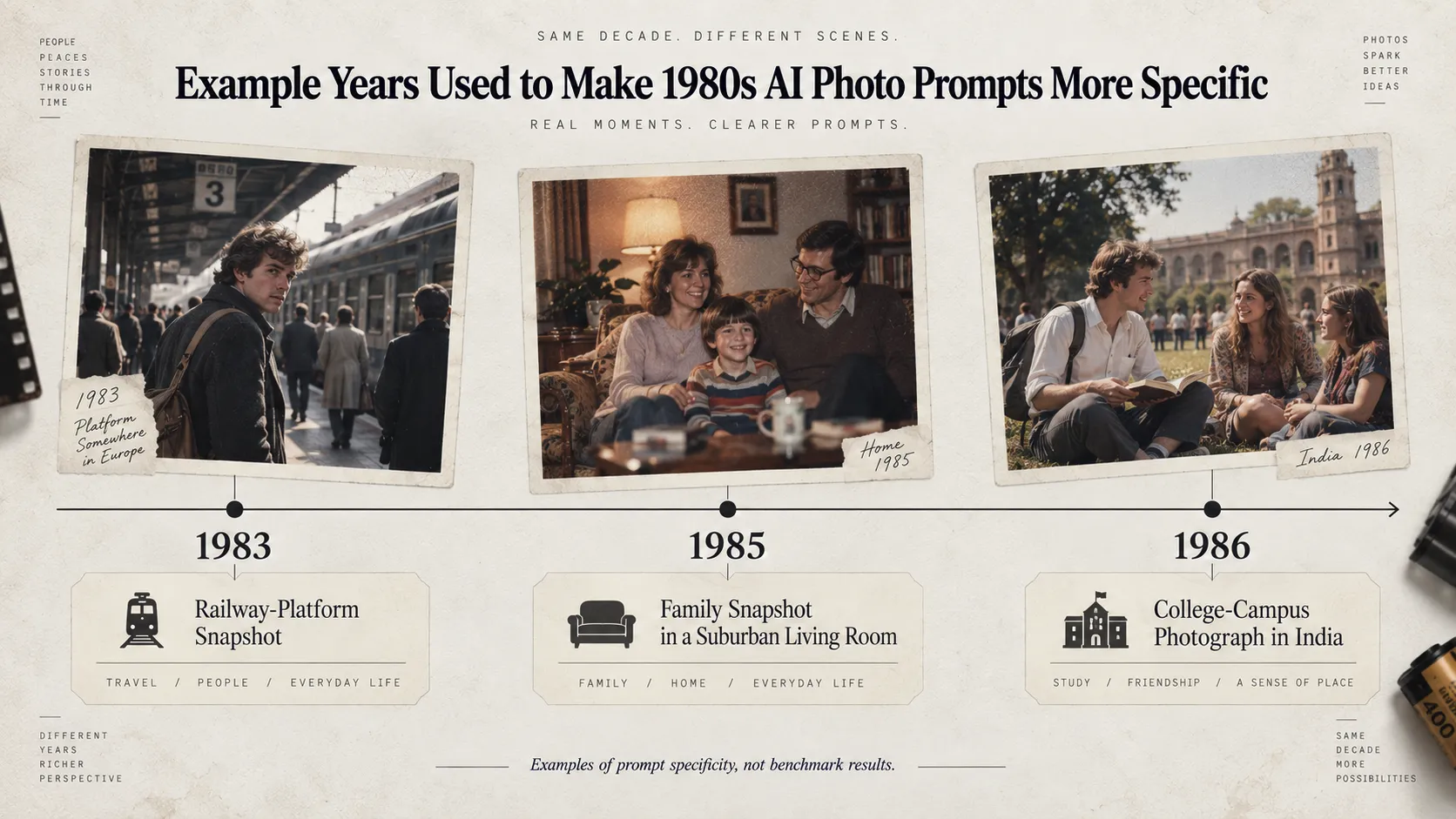
| An 80s family photo | A family portrait inside a modest home in 1985 in [location] |
| A vintage college portrait | An outdoor college photograph in Kerala in 1986 |
| An old railway photograph | A portrait on a railway platform in 1983 in [location] |
These years are examples for defining a brief, not measured performance settings.
Make the Scene and Photographic Treatment Agree
A believable creative brief connects the person, location, objects, and lighting. Adding more grain will not correct an unsuitable vehicle, malformed telephone, or inconsistent background.
Keep the scene manageable. A simple room or courtyard gives you fewer details to verify than a crowded street filled with signs and vehicles.
Match the Lighting to the Situation
Indoor party snapshots, studio portraits, and outdoor campus photographs need different lighting descriptions.
Choose the situation first:
- Indoor snapshot: modest direct flash and ordinary background shadows.
- Outdoor portrait: daylight appropriate to the location and time.
- Studio portrait: controlled light, a deliberate pose, and a simple backdrop.
Decide Whether the Print Has Aged
A clean period-inspired photograph and a scan of an aged album print are different creative goals.
Ask for either:
Clean period-inspired color, subtle photographic texture, and no visible print damage.
Or:
A gently aged album print with modest fading and slight paper texture, while retaining readable facial detail.
Camera names and exposure settings communicate visual intent; they do not establish that the generated image reproduces a physical camera or film stock.
Our guide to prompting other image models provides additional patterns to adapt when changing tools.
1980s Photo Prompts for Different Scenes
Choose a scene before adding stylistic detail. These scene-specific prompting patterns are creative templates, not independently tested performance results.
1980s Family Photo Prompt
Prompt:
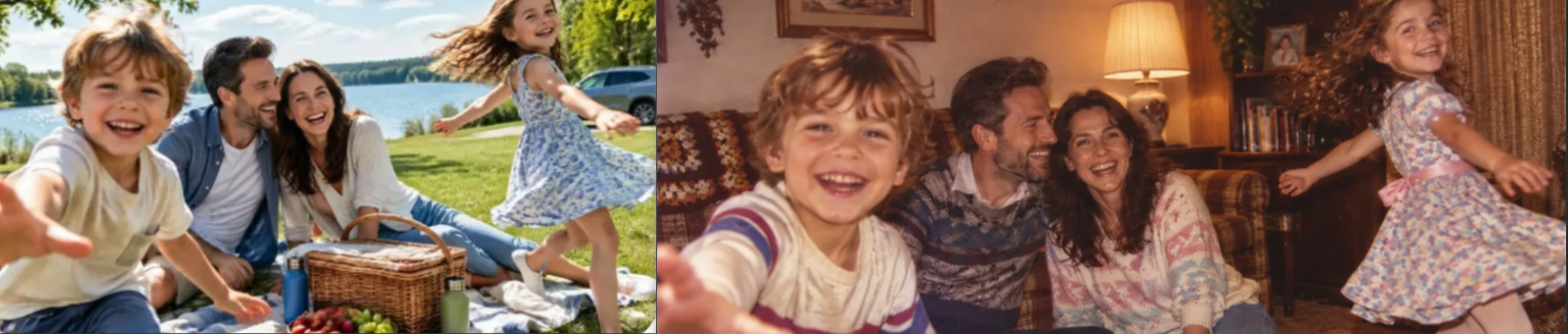
Create a casual family-album portrait set in 1985 in [location], using the uploaded photograph as the reference for everyone’s appearance. Retain each person’s recognizable features, apparent age, and expression. Place the group in a modest home with appropriate everyday clothing, furnishings, and household objects. Use relaxed posing and simple indoor flash. Keep skin detail readable, grain subtle, and colors natural. Avoid contemporary electronics, matching costume-like outfits, excessive yellowing, and changes to the number of people.
Check faces at the edges, overlapping arms, hands around shoulders, and objects being held. The following image illustrates the family-album style.
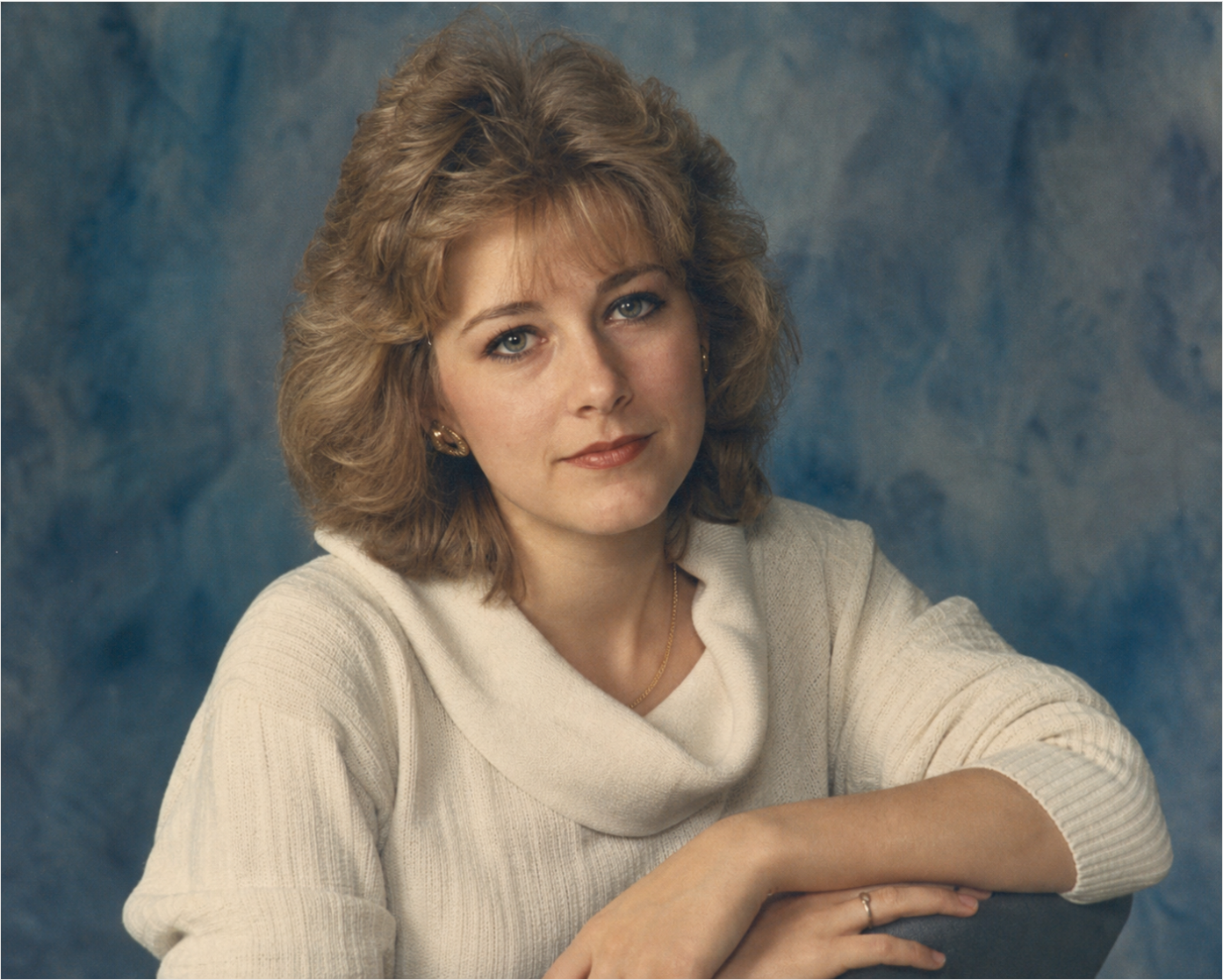
1980s Studio Portrait Prompt
Prompt:
Create a waist-up portrait inspired by a local photography studio in [location] in 1984. Use the uploaded photograph as the subject reference. Preserve the person’s recognizable facial proportions, apparent age, skin tone, and expression. Use [clothing preference], restrained period hairstyling, a simple painted backdrop, and soft studio lighting. Keep the eyes clear and retain natural skin detail. Avoid glamour retouching, excessive blur, elaborate costumes, and changes to facial structure.
A simple backdrop gives you fewer environmental details to inspect. For production work involving subject preservation and local edits, compare tools using the same reference and acceptance criteria.
The following image illustrates a restrained studio-portrait direction.
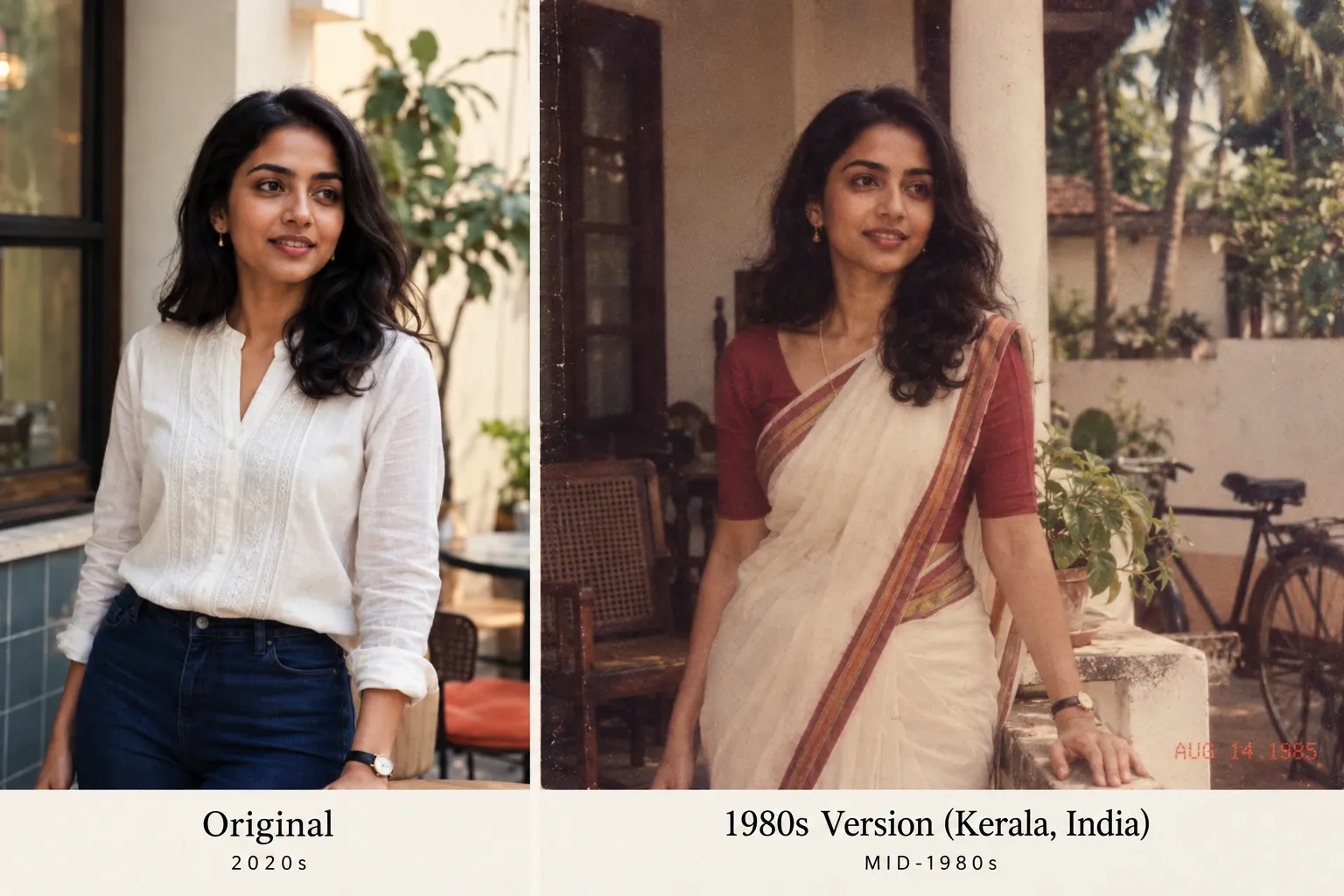
1980s Indian and Kerala Photo Prompt
Prompt:
Recreate the uploaded portrait as a photograph taken in Kerala, India, in 1986 during [a family visit / a college day / a studio session]. Preserve the subject’s recognizable facial features, apparent age, skin tone, and expression. Use [specific clothing preference] with understated jewelry and a setting appropriate to the occasion. Choose [available daylight / soft studio lighting / modest indoor flash]. Keep the photographic texture subtle and the background locally plausible. Avoid generic Western retro props, exaggerated cultural symbols, contemporary logos, and heavy sepia.
Use a relevant period reference when available, and explain which details it should influence. If historical accuracy matters, verify the important clothing, architecture, and objects against documented references.
The following image illustrates a regional portrait direction, rather than evidence of historical accuracy.
Short Prompt or Detailed Prompt?
Start with the instructions needed to define the task. Add detail when it addresses a visible problem.
Short prompt:
Turn the uploaded portrait into a casual photograph taken in 1985 in [location]. Retain the person’s recognizable face and apparent age. Use appropriate clothing, a simple setting, natural skin detail, and restrained film-like texture. Exclude modern devices and heavy vintage filters.
A longer prompt is useful when its extra detail clarifies the person, scene, or allowed changes. Repeated adjectives do not necessarily make the instruction more precise.
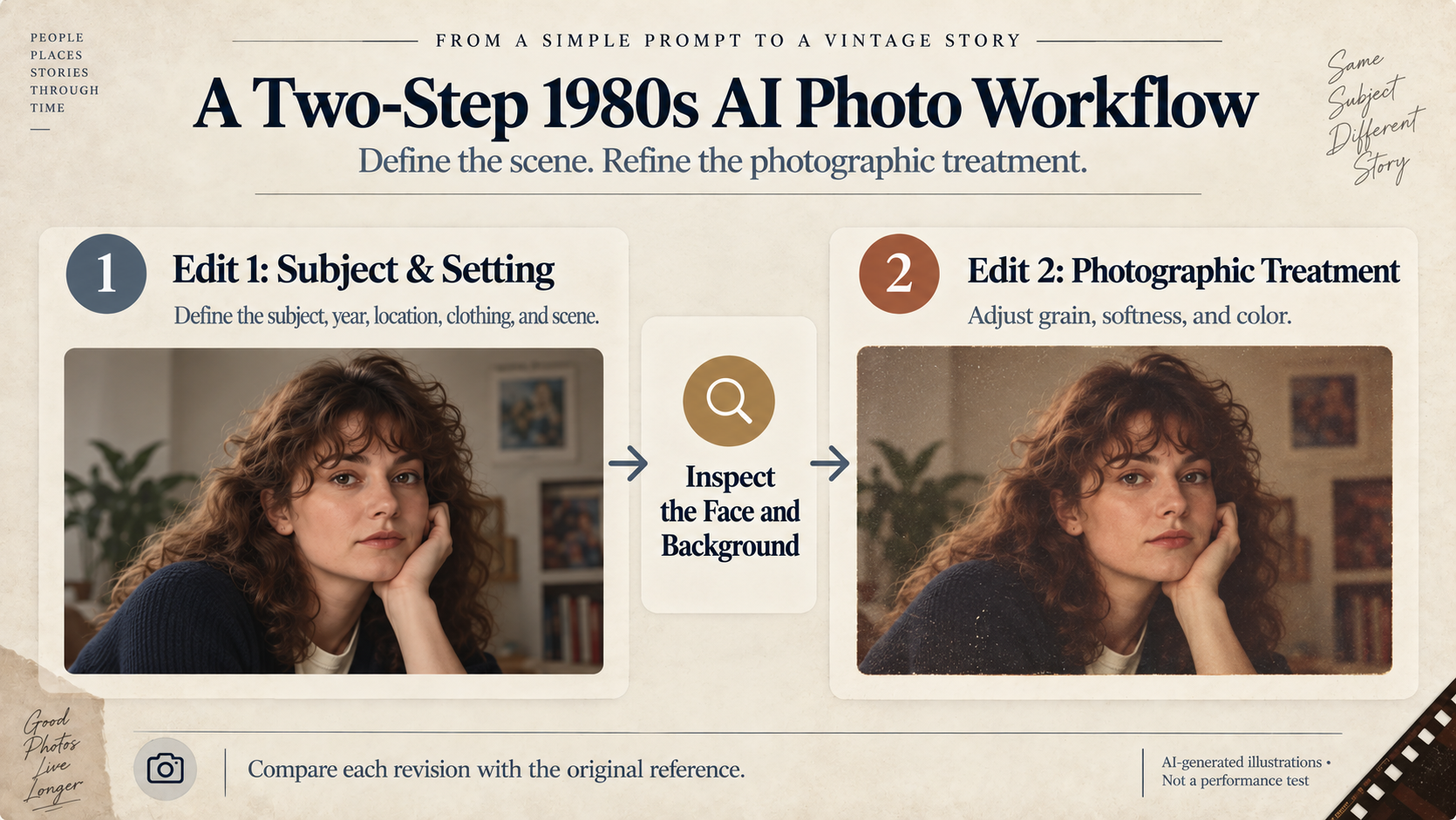
Try a Two-Step Edit When Too Much Changes
Separate the scene transformation from the photographic treatment when you need to inspect them independently.
Step 1: Establish the Subject and Setting
Prompt:
Use the original upload as the subject reference. Create a portrait set in 1985 in [location], wearing [clothing], in [setting]. Retain the person’s facial proportions, expression, and apparent age. Keep the photographic treatment simple so I can inspect the subject and scene first.
Correct major facial or background problems before continuing.
Step 2: Adjust the Photographic Treatment
Prompt:
Retain the latest composition and use the original upload to maintain the person’s appearance. Add subtle photographic grain and gentle softness. Keep the eyes and facial outline readable. Avoid heavy yellowing, scratches, and strong color casts.
Compare the versions and keep the one that best meets your brief. A second edit is useful only if it improves the result.
Use the two-step approach to separate scene changes from photographic treatment, inspecting the result after each edit.
Why Your 1980s AI Photo Looks Fake—and What to Change
Inspect the person, objects, and scene before strengthening the vintage effect. A stronger filter can make an existing error harder to see without correcting it.
Our review of a public discussion about 1980s image realism found criticism of excessive grain, unusual props, and inconsistent scene details.
| Visible problem | Try this correction |
|---|---|
| The face looks different | “Use the original reference to restore the eye, nose, mouth, and jaw proportions. Retain the current styling where possible.” |
| Skin looks airbrushed | “Reduce beauty smoothing and restore natural skin texture without changing apparent age.” |
| Grain obscures the subject | “Reduce grain around the face and retain clear eyes and facial outlines.” |
| The image is too orange | “Reduce the orange cast and yellowing. Use natural skin tones and restrained color.” |
| The background looks modern | “Remove contemporary devices and branding. Simplify the scene to suit [year and location].” |
| A hand or object is malformed | “Correct the affected hand and its contact with [object], keeping the rest as close as possible.” |
| Revisions change unrelated details | Return to a saved version and request a smaller edit |
Save an acceptable version before trying another major change. If repeated edits weaken the likeness, return to the original reference and simplify the task.
From a Personal Portrait to a Repeatable Business Workflow
An individual may need one portrait. A content team needs instructions that different people can repeat, review, and budget.
Document the Creative Brief
Record the reference image, year, location, clothing, framing, and allowed changes. Keep the core brief stable while comparing alternatives.
For creative exploration without a real person, use a clearly fictional AI-generated adult character. This can help evaluate style and character continuity, but it does not establish real-person facial preservation.
Agree on Approval Criteria
| Review area | Approval question |
|---|---|
| Subject continuity | Does the output retain the reference character or authorized person closely enough for the brief? |
| Scene | Are important objects, clothing, and surroundings appropriate? |
| Structure | Are hands, anatomy, and object interactions usable? |
| Consistency | Do the images belong to the same visual direction? |
| Presentation | Is the image accurately described as AI-generated content? |
Keep the prompt and settings alongside accepted outputs. Separate actual results from illustrative examples.
Compare Models Before Integration
Use the same reference and creative brief when evaluating candidates. Record the model, output settings, requests made, accepted results, and total usage cost.
LinkModel’s Playground supports visual testing and comparison. Supported OpenAI-compatible endpoints can also help teams reuse existing integrations, although model-specific parameters and editing capabilities still need checking.
For broader evaluation criteria, see our image-generation API guide.
Understand the API Price
The following published rates apply to GPT Image 2.5 Flare, in USD per million tokens. The comparison uses OpenAI standard processing.
| Token category | OpenAI standard API | LinkModel |
|---|---|---|
| Text input | $5.00 | $3.75 |
| Cached text input | $1.25 | $0.9375 |
| Image input | $8.00 | $6.00 |
| Cached image input | $2.00 | $1.50 |
| Image output | $30.00 | $22.50 |
LinkModel’s listed rates are 25% lower for these corresponding categories. This concerns API token rates, not ChatGPT subscription pricing or a guaranteed cost per finished portrait.
The total depends on actual usage and the requests needed. Consult the current LinkModel image pricing documentation and OpenAI model pricing when budgeting.
Rates checked October 23, 2026.
Privacy Before Uploading a Photograph
Check the service’s current privacy settings and obtain permission before uploading another identifiable person’s image.
OpenAI’s Temporary Chat guidance states that a conversation is not used to improve its models while it remains temporary. A copy may be retained for up to 30 days for safety purposes. Saving it as a regular chat changes the applicable settings and retention rules.
Review a separate provider’s policy if you switch services. ChatGPT’s settings do not establish another platform’s data practices.
Label public illustrations accurately. A fictional character demonstration should not be presented as a test of real-person identity preservation.
Frequently Asked Questions
What Is a Good 1980s AI Photo Prompt for ChatGPT?
A useful starting prompt identifies the reference subject, features to retain, year, location, scene, and photographic treatment. Use the structured prompting template near the beginning of this guide, then correct specific problems after inspecting the output.
Can ChatGPT Keep My Face Exactly the Same?
Exact preservation should not be assumed. Compare the output with the original and request targeted corrections when facial proportions, expression, or apparent age changes. Evaluate subject-preservation capabilities against your own acceptance criteria.
Why Does My 80s Photo Still Look Artificial?
Check the face, objects, and scene before adding stronger grain. Excessive smoothing, heavy color casts, malformed details, and inconsistent surroundings can undermine the result even when the clothing looks retro. Adjust your image-prompting instructions to address the visible problem.
Can I Try This Without Uploading a Real Person?
Yes. Start with an AI-generated fictional adult character and use that image as the reference. This is useful for creative exploration, but it does not establish how well a model preserves a real person’s identity.
Do I Need an API for This Workflow?
No. Conversational image editing can be enough for a personal project. Consider an API when generation needs to fit an application, a repeatable team process, or ongoing production.
Create Your First Version, Then Refine It
Choose one scene, use a clear reference, and inspect the person before adjusting the photographic texture. Save a version you like, identify the next visible problem, and request a focused correction.
For teams, turn an accepted creative brief into a documented template with consistent review criteria and recorded usage. This makes the process easier to evaluate as the number of images grows.
Editorial note: This guide provides creative templates and workflow recommendations informed by published documentation and public discussion.
