To write Kling 4.0 Halloween prompts, define the spooky subject, one clear action, the camera movement, and the ending. Assign references to characters, costumes, or settings, and use keyframes to plan important reveals. For edits, specify which Halloween elements should change and what must remain consistent.
A haunted setting alone does not create a coherent video. A ghost can appear before its reveal, a costume can change between shots, and fog can hide the product you meant to advertise. The 10 prompts below organize Halloween ideas into usable briefs, with preparation steps and checks for each result, applying the scene-direction principles covered in our Kling prompting guide.
For your Halloween campaign, LinkModel brings supported text, image, and video models into one platform, with discounted pricing on selected models, $0 minimum spend, and $0 monthly platform fee. Compare supported models in the Playground before choosing where to spend your production budget, and check current model pricing to plan your costs.

How to Write Kling 4.0 Halloween Prompts
Build the scene around a visible event: a pumpkin lights up, a door opens, a ghost appears, or a character discovers something unexpected. Then explain how the camera follows that event.
Use this structure:
Subject: The character, creature, or product. Setting: The Halloween location, lighting, and atmosphere. Action: What happens, in chronological order. Camera: Framing, movement, and whether the sequence contains cuts. Ending: The final reveal, reaction, or product composition. Audio: Dialogue, ambience, music, and sound effects. References: What each supplied asset should control.
For example, “a spooky pumpkin video” leaves most of the scene undecided. A clearer brief is:
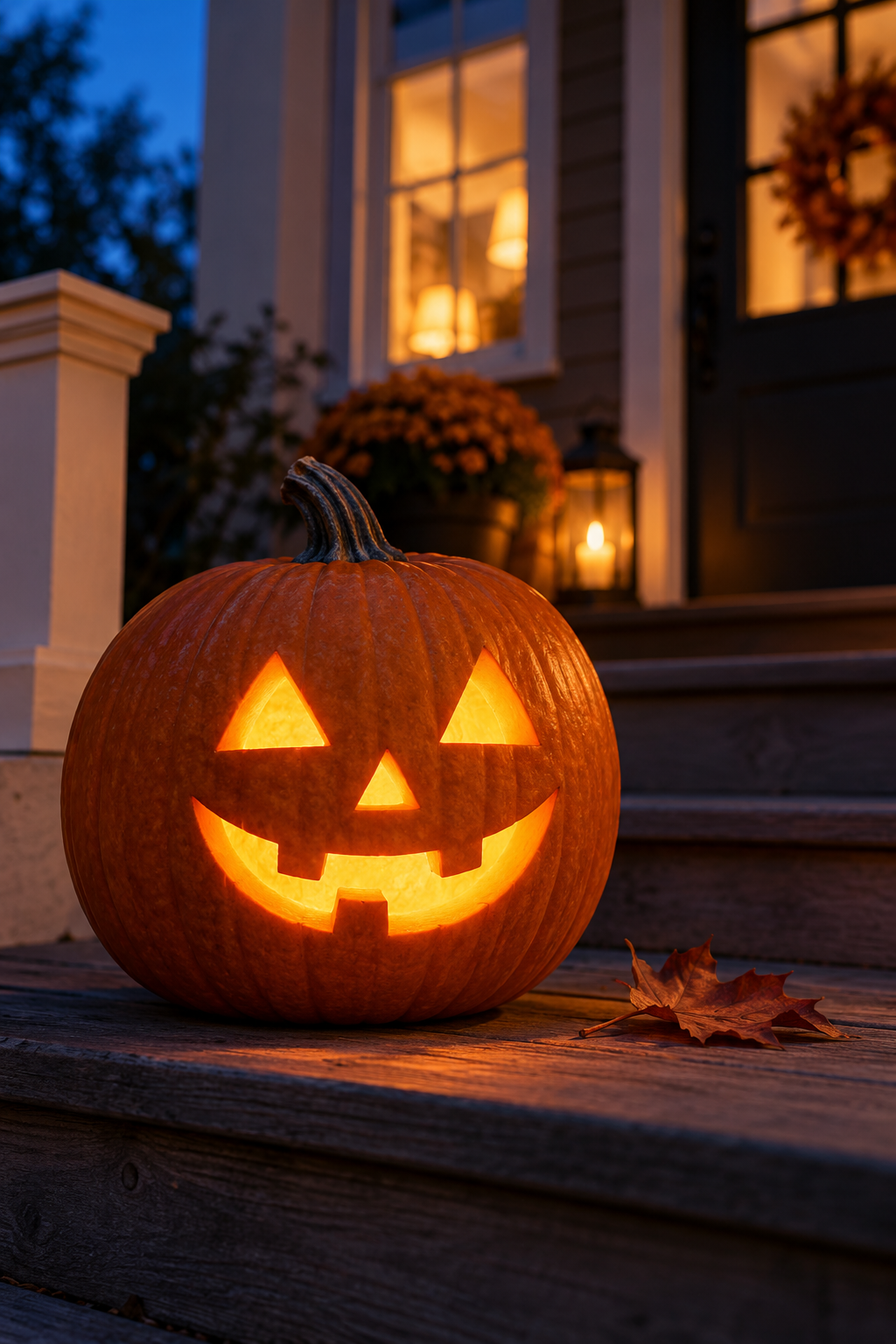
A carved pumpkin sits on a wooden porch at dusk. Its candle gradually brightens as a curled leaf slides across the step. Slowly move the camera toward the pumpkin, ending on its illuminated face. Audio: a light breeze, dry leaves, and a faint candle crackle.
Choose the intended tone before adding details: playful, eerie, elegant, or frightening. A family-friendly candy advertisement needs different expressions, sounds, and pacing from a haunted-house teaser.
Choose Your Halloween Video Task
| Your goal | Start with | Main decision |
|---|---|---|
| Create an atmospheric Halloween clip | Example 1 | How the scene develops without cuts |
| Animate a witch portrait | Example 2 | Which small movements bring the image to life |
| Combine a character, costume, and location | Example 3 | What each reference controls |
| Reuse cinematic camera movement | Example 4 | Which movement to borrow |
| Reveal a friendly ghost | Example 5 | When and where the reveal happens |
| Advertise Halloween treats | Example 6 | Product visibility and shot order |
| Open a mysterious box | Example 7 | Movement between keyframes |
| Remove a distracting object | Example 8 | Edit scope and reconstruction |
| Restyle a Halloween character | Example 9 | Which surfaces change |
| Create a short Halloween exchange | Example 10 | Speaker assignment and timing |
Set the Output Format Before Generating
Choose the available duration, aspect ratio, resolution, and model mode in the interface. Use the prompt to direct the action within those settings.
For vertical social content, keep the main subject and essential reveal inside the central composition. For a landscape website banner, leave intentional space for text added during editing.
Prompt timestamps describe the intended schedule; they do not guarantee frame-exact execution. Check the exported sequence before publishing a timed reveal or advertisement.
10 Kling 4.0 Halloween Prompts to Adapt
Replace the scene details and asset identifiers with your own inputs. Each prompt includes a preparation step and a focused review task.
1. Glowing Pumpkin Porch: An Atmospheric Halloween Prompt
Prepare: A porch reference if a specific setting matters. Suggested format: vertical for social media.
Prompt:
Create an eight-second continuous shot of a carved pumpkin on the wooden steps of a quiet house at dusk. A small candle inside the pumpkin gradually brightens, illuminating its friendly carved face. One curled autumn leaf slides across the step in a light breeze. Warm light spills from the house windows behind it. Slowly move the camera closer at pumpkin height. Keep the pumpkin stationary and its face fully visible. Finish on the glowing face, with the porch softly blurred behind it. Audio: a light breeze, dry leaves, and faint candle crackle. No dialogue or subtitles.
Check: The carved face, lighting continuity, leaf movement, and whether the camera approaches without rotating the pumpkin.
Focused revision: If the background becomes distracting, simplify the decorations rather than adding more atmospheric objects.
2. Witch Portrait: A Halloween Image-to-Video Prompt
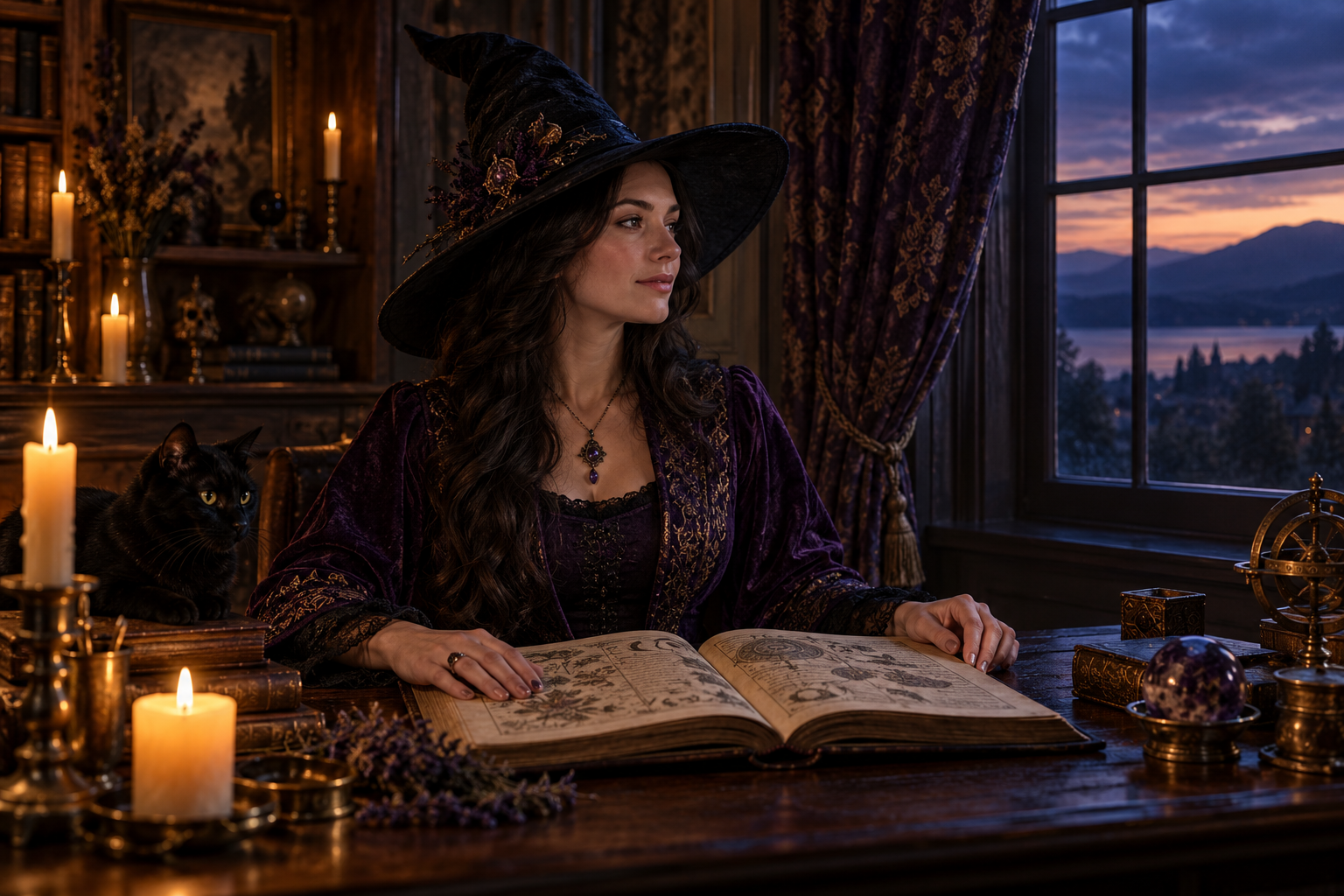
Prepare: A portrait showing an adult witch, an open spellbook, and the intended costume.
Prompt:
Animate the supplied portrait as a quiet six-second moment. The adult witch remains seated beside a candlelit window, holding an open spellbook. She lowers her gaze toward the page, traces one line with her fingertip, and looks toward the window as a soft green reflection crosses her face. Preserve her face, hat, hairstyle, clothing, and room layout. Keep the camera at the original viewing angle. The candle flame flickers gently. Audio: a soft page rustle, quiet room ambience, and a distant owl. No background music or subtitles.
Check: Face and costume consistency, fingertip contact, and the direction of the green light.
Focused revision: If the hand movement introduces distracting changes, simplify the action to a gaze shift and a small head turn.
3. Halloween Costume Reveal: A Multi-Reference Prompt
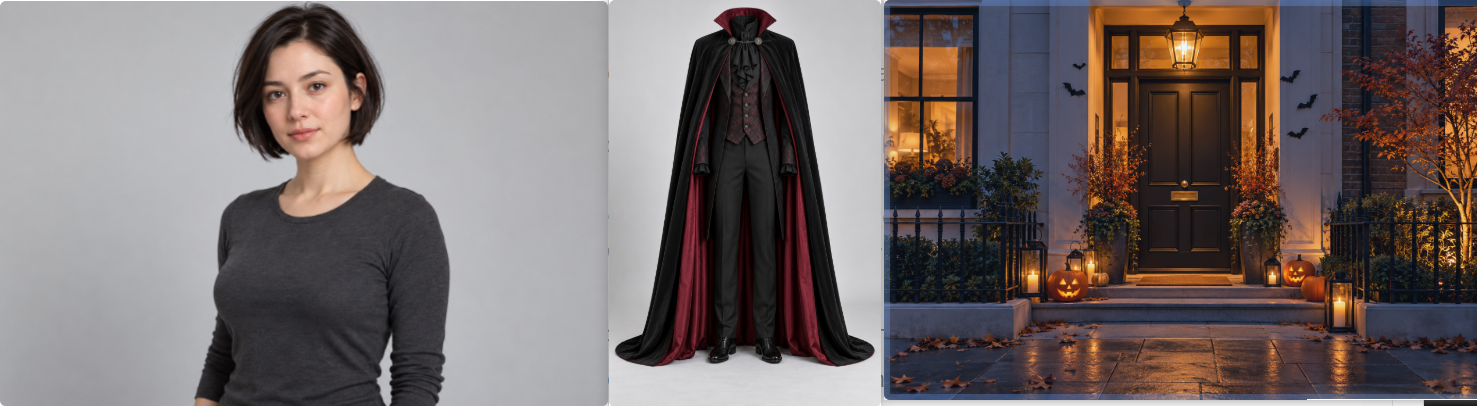
Prepare: Separate images for an adult character, a costume, and a decorated entrance.
Prompt:
@Image1 defines the character’s face and hairstyle. @Image2 defines the vampire costume, including its cape, collar, fabric, and fastenings. @Image3 defines the decorated townhouse entrance and its lighting. Create a ten-second Halloween costume reveal. The character approaches the entrance from the pavement, stops beneath the porch light, and turns toward the camera. The character lifts one edge of the cape, gives a playful smile, then lowers it. Keep the face visible throughout the gesture. Begin with a medium full-body view and move slightly closer as the character stops. End with the costume clearly visible against the doorway. Audio: footsteps, a light fabric rustle, and distant party ambience.
Check: The costume after the turn, cape movement, facial appearance, and the relationship between the character and doorway.
Focused revision: If the costume reference changes the face, state the appearance responsibilities of the character and costume images separately.
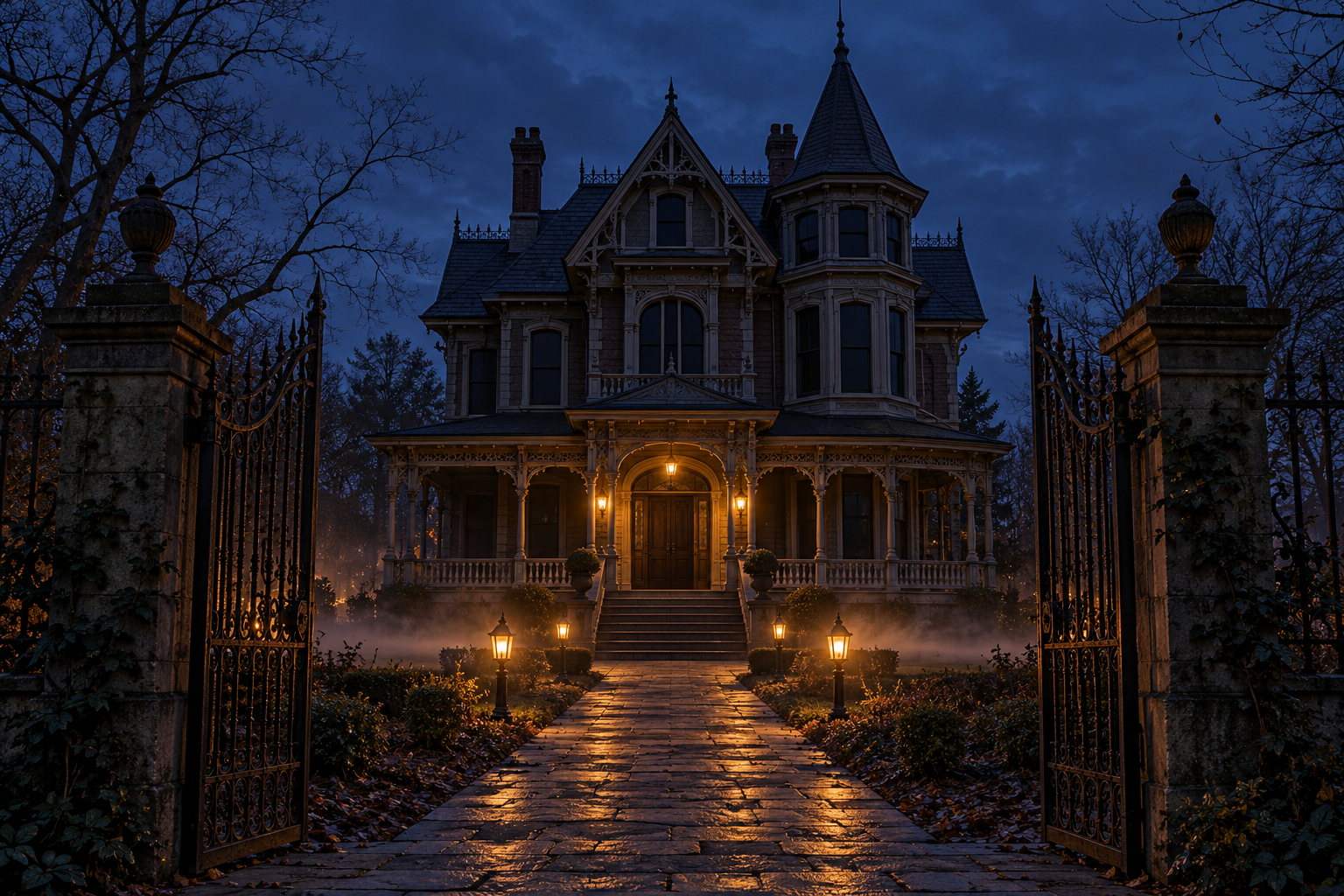
4. Haunted-House Approach: A Camera Reference Prompt
Prepare: A haunted-house image and a video demonstrating the intended camera movement.
Prompt:
Use @Image1 for the house, garden path, gate, and surrounding trees. Use @Video1 only for its slow forward camera movement and gradual slowing. Create a continuous approach toward the house along the garden path. The gate is already open. Thin ground fog drifts below the path lights, leaving the route visible. The camera moves forward at walking speed and slows before reaching the porch. A warm light appears in one upstairs window near the end. Preserve the house architecture and path layout. Finish with the front door centered. Audio: wind in the trees, a faint gate creak, and distant floorboard sounds. No dialogue or subtitles.
Check: The camera route, architecture, fog height, and timing of the upstairs light.
Focused revision: If the reference video’s location carries over, restrict its role to camera movement and identify the house image as the setting source.
5. Friendly Ghost Reveal: A Continuous-Shot Halloween Prompt
Prepare: A hallway reference if consistent geography is important.
Prompt:
Create a ten-second continuous shot inside a warmly lit hallway decorated for a family Halloween party. Begin facing a closed cupboard door. A small paper bat hanging from the handle sways gently. The cupboard opens slowly, revealing a friendly rounded ghost holding a bowl of wrapped sweets. The ghost leans forward slightly and gives a small wave. Keep its expression cheerful and the bowl steady. The camera remains at a fixed eye-level position. Finish with the ghost fully visible in the doorway. Audio: a gentle hinge creak, a soft magical chime, and distant party conversation. No subtitles.
Check: Whether the ghost stays hidden before the door opens, door movement, bowl continuity, and the final reveal.
Focused revision: If the ghost appears early, define its opening position inside the cupboard and describe the door as the visual obstruction.
6. Halloween Treat Advertisement: A Multi-Shot Product Prompt
Prepare: A clear reference image of the treat box and its contents.

Prompt:
Use @Image1 as the appearance reference for the Halloween treat box. Preserve the box shape, orange-and-black packaging, and the designs of the pumpkin-shaped biscuits. Create a fifteen-second advertisement with three shots. 0–3 seconds: Wide view of the closed treat box on a dark wooden table. Small pumpkins sit in the background, leaving the product unobstructed. 3–11 seconds: Cut to a close three-quarter view. Adult hands open the lid, pause to reveal the biscuits, then lift one pumpkin-shaped biscuit by its edges. 11–15 seconds: Cut to a clean product composition showing the open box and one biscuit on a small plate. Hold the composition with empty space above for text added during editing. Lighting: soft warm side light, clear packaging detail, and gentle background shadows. Audio: paper movement, a light lid sound, and quiet room ambience. No subtitles.
Check: Packaging, biscuit designs, hand contact, reveal timing, and whether the closing shot shows the product clearly.
Focused revision: If the reveal feels rushed, remove the biscuit pickup and let the open-box presentation occupy the middle shot.
7. Mysterious Halloween Box: A Keyframe Transition Prompt
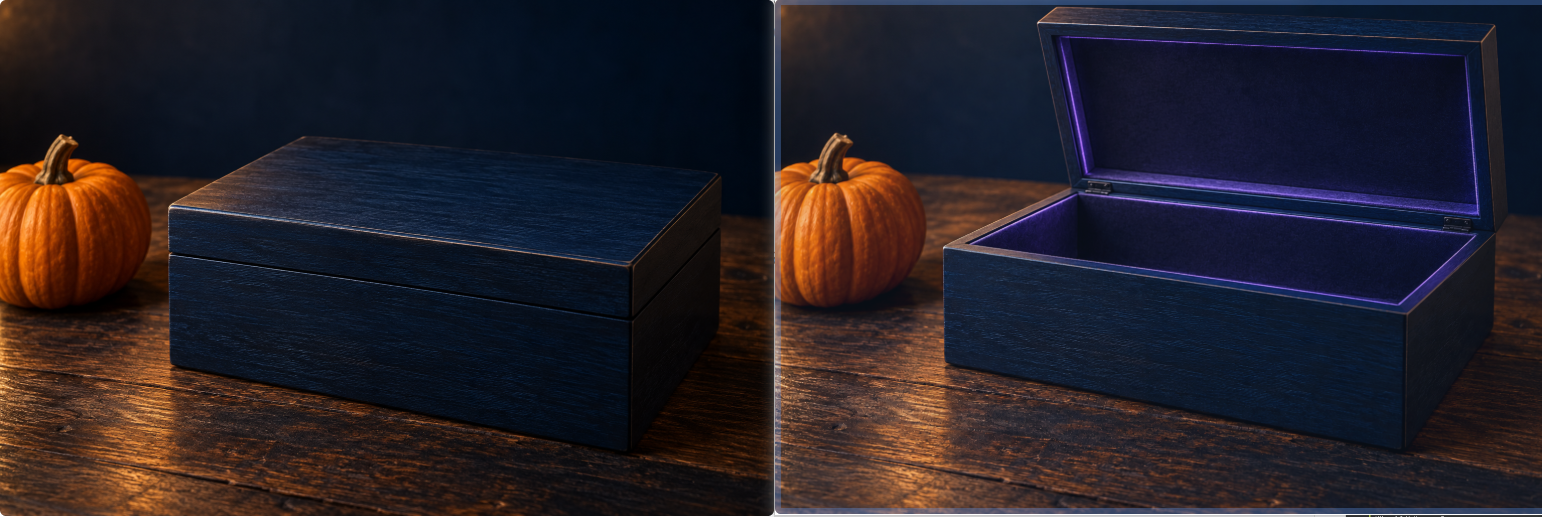
Prepare: Compatible images of the same closed and open box, placed in the workflow’s designated frame inputs.
Prompt:
Begin with the supplied image of the closed midnight-blue box and finish with the supplied image of the same box open. Create an eight-second close-up. The box rests on a wooden table beside a small pumpkin. A gloved adult hand enters from the right, grips the lid, and opens it gradually. Soft violet light becomes visible inside as the lid rises. The hand releases the lid and withdraws. Keep the box, pumpkin, table, camera angle, and lighting direction consistent. Finish with the open box still and the violet interior light gently illuminating its edges. Audio: a soft hinge creak and a restrained magical shimmer. No dialogue or subtitles.
Check: Hinge movement, hand contact, light appearing at the correct stage, and final-frame compatibility.
Focused revision: If the box changes shape, inspect the source images before expanding the prompt.
For intermediate keyframes, keep each state physically connected:
| Visual state | Image requirement | Connecting action |
|---|---|---|
| Opening | Closed box in the intended position | Hand approaches and grips the lid |
| Intermediate | Partly open lid with compatible hand placement | Lid rises and interior light becomes visible |
| Ending | Open box in the same composition | Hand releases and withdraws |
The images should agree on the box design, hinge, surroundings, and viewpoint.
8. Halloween Scene Cleanup: An Object-Removal Prompt
Prepare: Existing footage containing a clearly identifiable distraction.
Prompt:
Edit @Video1 by removing the bright plastic storage bin beside the decorated porch throughout the clip. Reconstruct the porch boards and wall where the bin and its shadow appeared, matching their texture, perspective, and illumination. Preserve the pumpkins, hanging paper bats, doorway, people, camera movement, lighting, and clip duration. Keep the original audio where the editing workflow supports it.
Check: Residual shadows, reconstructed surfaces, decoration boundaries, and frames where someone passes in front of the edited area.
Focused revision: If the bin disappears but its shadow remains, include the shadow explicitly in the removal instruction.
9. Knitted Pumpkin Character: A Local Material-Change Prompt
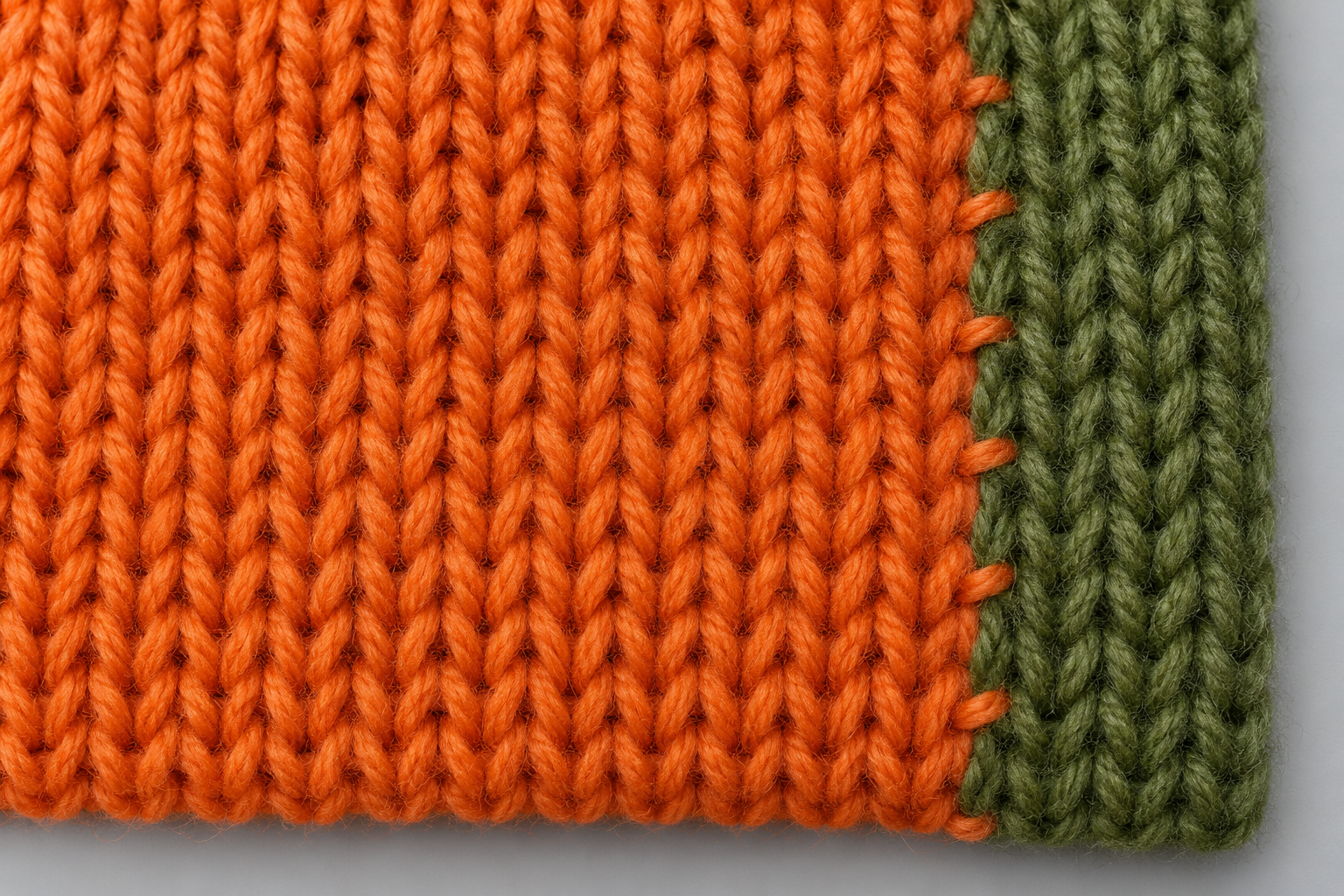
Prepare: Source footage of a pumpkin character and an image showing the desired knitted texture.
Prompt:
Edit @Video1 so only the pumpkin character’s outer surface becomes knitted wool, using @Image1 for yarn texture and stitched seams. Preserve the character’s orange color, green stem, face, silhouette, walking route, and limb movement. Keep the porch, wooden floor, decorations, lighting direction, and camera movement consistent with the source footage. Apply the knitted material to the pumpkin character alone. Keep surrounding materials realistic.
Check: The face, stem, texture during movement, floor contact, and unintended changes to the background.
Focused revision: If nearby decorations also become knitted, explicitly identify them as preserved background objects.
Check the audio separately and restore the original track during editing if needed.
10. Halloween Party Dialogue: A Two-Speaker Prompt
Prepare: Character references if specific appearances matter. Keep both speakers visible.
Prompt:
Create a ten-second medium two-shot of two adult friends beside a Halloween party table. The woman on the left, wearing a witch costume, places a bowl of sweets on the table and says, “I brought the treats.” The man on the right, wearing a simple vampire cape, looks at the bowl, smiles, and replies, “Good. The ghosts got here first.” The woman speaks first. The man begins after she finishes. Their gestures remain small and conversational. Keep the costumes, table decorations, and character positions consistent. Audio: clear English dialogue, a soft bowl contact sound, and subdued party ambience. No background music or subtitles.
Check: Complete wording, speaker assignment, turn order, mouth movement, and costume continuity.
Focused revision: Shorten the exchange if the dialogue and gestures compete for time.
How to Control Halloween References and Keyframes
Use references to define appearance and atmosphere; use keyframes to establish visual milestones. The written prompt should explain how the sequence moves between those milestones.
Assign One Clear Responsibility to Each Reference
The official Kling 4.0 user guide recommends defining the role of each uploaded asset.
For a Halloween sequence, separate those roles explicitly:
| Reference | Intended responsibility | What to inspect |
|---|---|---|
| Character image | Face and hairstyle | Identity during turns and reactions |
| Costume image | Clothing and accessories | Hat, cape, fastenings, and fabric |
| Location image | Scene layout | Doorways, furniture, paths, and decorations |
| Motion video | Action or camera movement | Direction, pacing, and route |
| Material image | Surface treatment | Yarn, clay, paper, or fabric texture |
A witch-costume image may contain a different face. A haunted-house image may include a creature you do not want. Specify the contribution instead of asking the model to borrow the entire image.
Keep Reference Inputs Within the Shared Limits
The official guide lists 15 combined reference assets, with category limits including 10 images, 5 videos totaling no more than 30 seconds, and 7 elements.
Reference videos, editing clips, and video elements share the video allowance. These category limits cannot all be added together as independent budgets.
Use the assets needed to establish the scene. Additional Halloween decorations do not automatically require additional references.
Choose Keyframes for the Reveal That Matters
The official keyframe guide lists up to 10 keyframe images within a 3–30-second generation.
A simple ghost reveal might only require an opening and ending state. A longer sequence may need an intermediate state to establish the partly opened door or the character’s reaction.
Check the selected Kling 4.0 creation interface before combining inputs. The user guide distinguishes the separate Keyframes entry point from Omni Reference and states that those entry points cannot be combined within one task.
Make Halloween Atmosphere Support the Main Action
Lighting, fog, decorations, and sound should help the viewer understand the scene. If they obscure the subject or distract from the reveal, simplify them.
Describe Light Sources Instead of “Spooky Lighting”
Replace a broad instruction with visible lighting relationships:
Warm candlelight illuminates the pumpkin from inside. Cool dusk light falls across the porch. The carved face remains readable as the camera approaches.
For a costume reveal:
A warm porch light illuminates the character’s face and collar. The background remains darker, with small amber lights around the doorway.
These instructions identify what the lighting should reveal.
Keep Fog Away from Essential Details
Fog can establish atmosphere, but its location matters.
For a product video:
Thin fog drifts behind the treat box at table height. The packaging, lid, and biscuits remain clearly visible.
For a haunted-house approach:
Ground fog moves below the path lights, leaving the walking route readable.
Name the area that must remain visible, especially faces, hands, product labels, and the reveal itself.
Give Sound a Specific Role
Use sound to reinforce an event: a hinge creak as the door moves, a small chime when the ghost appears, or paper rustling as a treat box opens.
Avoid overloading a short clip with dialogue, narration, music, and multiple competing effects.
For the dialogue example, clear speaker turns matter more than a dense soundtrack. For the quiet pumpkin scene, environmental sound may be enough.
What Our Research Adds to Halloween Prompt Planning
Published cases help identify what to direct and inspect, even when the creative theme changes. Our research points to useful lessons about scene geography, reference scope, and small editing remnants.
Apply Continuous-Shot Planning to a Haunted-House Approach
A published street-scene brief in the official user guide organizes movement around the subject’s route, temporary obstructions, and an ending.
The same planning principle applies to a haunted-house camera move: establish the path, explain what blocks the view, and describe the scene when that obstruction clears.
If a branch passes in front of the camera, the house should reappear in a coherent position. Describe the route through the setting, rather than adding unrelated camera angles.
Use Clear Edit Boundaries for Costume and Material Changes
Our review of a published editing walkthrough identified an author-reported example where a dog’s collar remained after replacement with a fox.
For Halloween editing, the corresponding inspection targets are costume accessories, old clothing edges, hats, and shadows.
If replacing a jacket with a vampire cape, specify the intended collar and fastening. Then inspect the neckline, shoulders, and areas revealed when the character turns.
Coordinate Seasonal Scenery and Lighting
The same walkthrough reported a seasonal edit whose lighting did not fully match the request.
For a Halloween transformation, changing decorations and changing the time of day are separate requirements:
Add pumpkins and paper bats to the porch. Change the scene to blue-hour dusk with warm doorway light. Preserve the house layout, character movement, and camera route.
Review the illumination on people and objects alongside the added decorations. These cases identify useful checks; they do not establish a general success or failure rate.
Troubleshoot Kling 4.0 Halloween Prompts
Identify the visible mismatch before rewriting the whole scene. Keep instructions that worked and revise the part connected to the problem.
| Problem | Possible ambiguity | Focused revision |
|---|---|---|
| Ghost appears before the reveal | Opening position is undefined | Place it behind the closed door until the opening action |
| Costume changes between shots | References disagree about clothing | Assign one costume source and name defining details |
| Pumpkin rotates unexpectedly | Object and camera motion are mixed | Keep the pumpkin fixed and move the camera |
| Fog hides the product | Atmosphere has no spatial boundary | Place fog behind the product and preserve visibility |
| Haunted-house shot contains cuts | Camera instructions conflict | Choose one continuous route |
| Box changes shape between keyframes | Input images are incompatible | Align design, hinge, position, and viewpoint |
| Background changes during a costume edit | Preservation scope is unclear | Name architecture, decorations, and lighting to retain |
| Original accessories remain | Replacement description is incomplete | Specify the intended hat, collar, fastening, and silhouette |
| Dialogue switches speakers | Lines lack explicit ownership | Assign each line and speaking order |
Check the Reveal Across the Full Clip
For a reveal, inspect three stages:
- Before: Is the hidden subject actually concealed?
- During: Does the opening or appearance follow the requested action?
- After: Does the final composition show the subject clearly?
For an advertisement, also check product accuracy and space for the final message.
Keep Reusable Halloween Briefs Organized
Save the prompt, reference map, settings, and review notes together.
Record specific observations such as “the cape collar changes after the turn” or “fog covers the box during the closing hold.” These notes give the next revision a concrete target.
Frequently Asked Questions
What Should a Kling 4.0 Halloween Prompt Include?
Include the Halloween subject, setting, action, camera movement, and ending. Add reference roles and audio where needed. Choose a clear tone, such as playful or eerie, and define when any reveal should happen.
How Do I Create a Halloween Video from an Image?
Start with an image containing the character, costume, or setting you want. Describe a small sequence of movements while identifying the appearance and composition to preserve. For an image-to-video portrait, begin with a gaze shift, expression change, or simple gesture.
How Do I Keep a Halloween Costume Consistent?
Use a clear costume reference and identify its defining details, including the hat, collar, cape, fastenings, and fabric. Check that other references and keyframes do not contradict it. Review the costume during turns and across cuts.
How Do I Stop a Ghost or Surprise Appearing Too Early?
Define the opening state and the object concealing the subject. Describe the action that reveals it, then specify the closing composition. Where supported, compatible keyframes can establish the required visual states.
Can I Add Halloween Decorations Without Changing the Whole Video?
Write an editing brief that identifies the decorations and where they belong. Specify the people, actions, architecture, camera movement, and lighting to preserve. Check the full clip for unwanted changes, shadows, and occlusion problems.
Conclusion: Give Your Halloween Idea a Clear Sequence
The most useful Kling 4.0 Halloween prompts turn a seasonal idea into visible actions, coherent camera movement, and a deliberate ending. Start with the closest example, assign references clearly, and keep costumes, keyframes, lighting, and sound consistent with the scene. Review the full clip for reveal timing, product visibility, accessories, and edit boundaries, then revise the instruction connected to the mismatch. For your wider creative workflow, explore available models through LinkModel with flexible, usage-based spending.