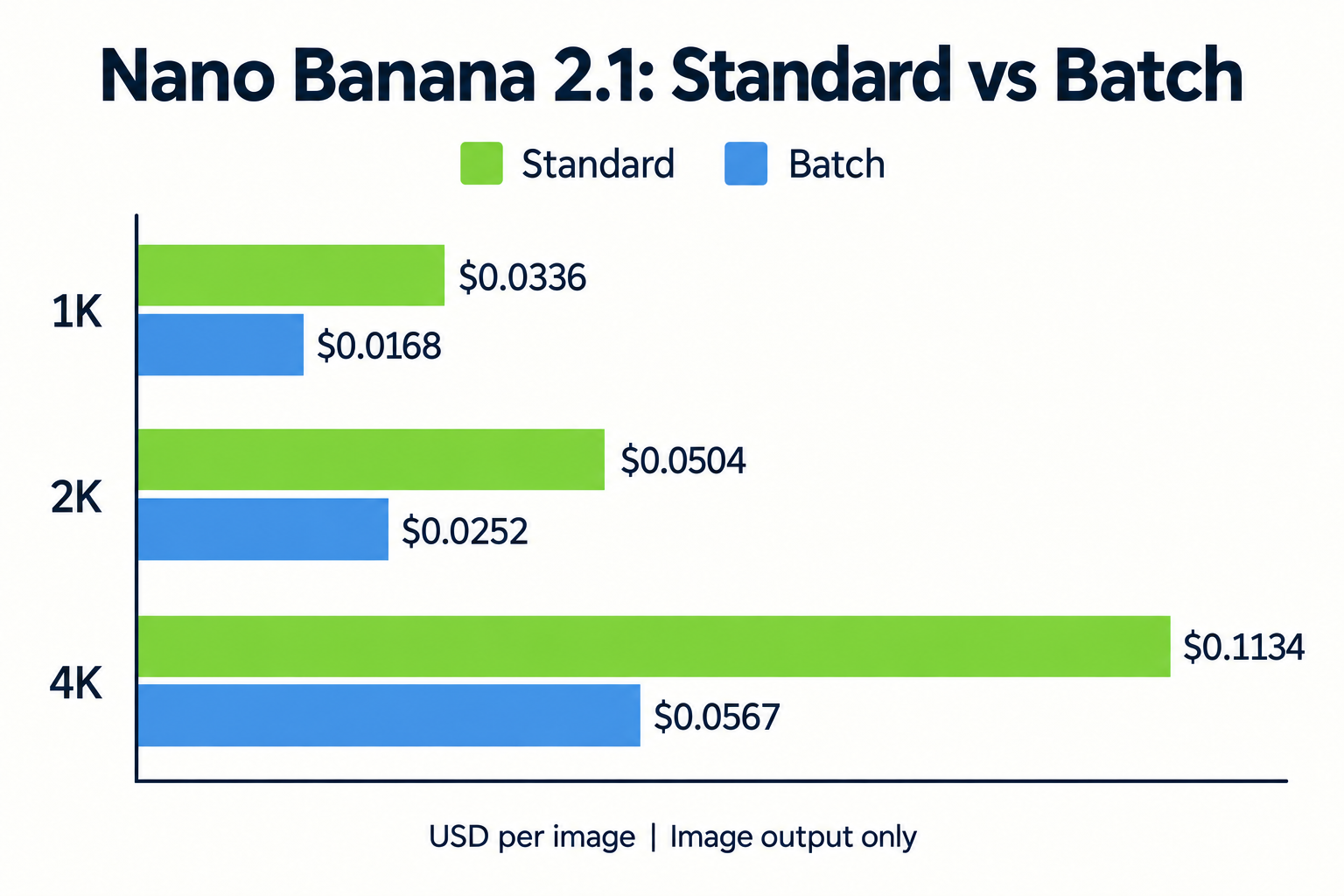
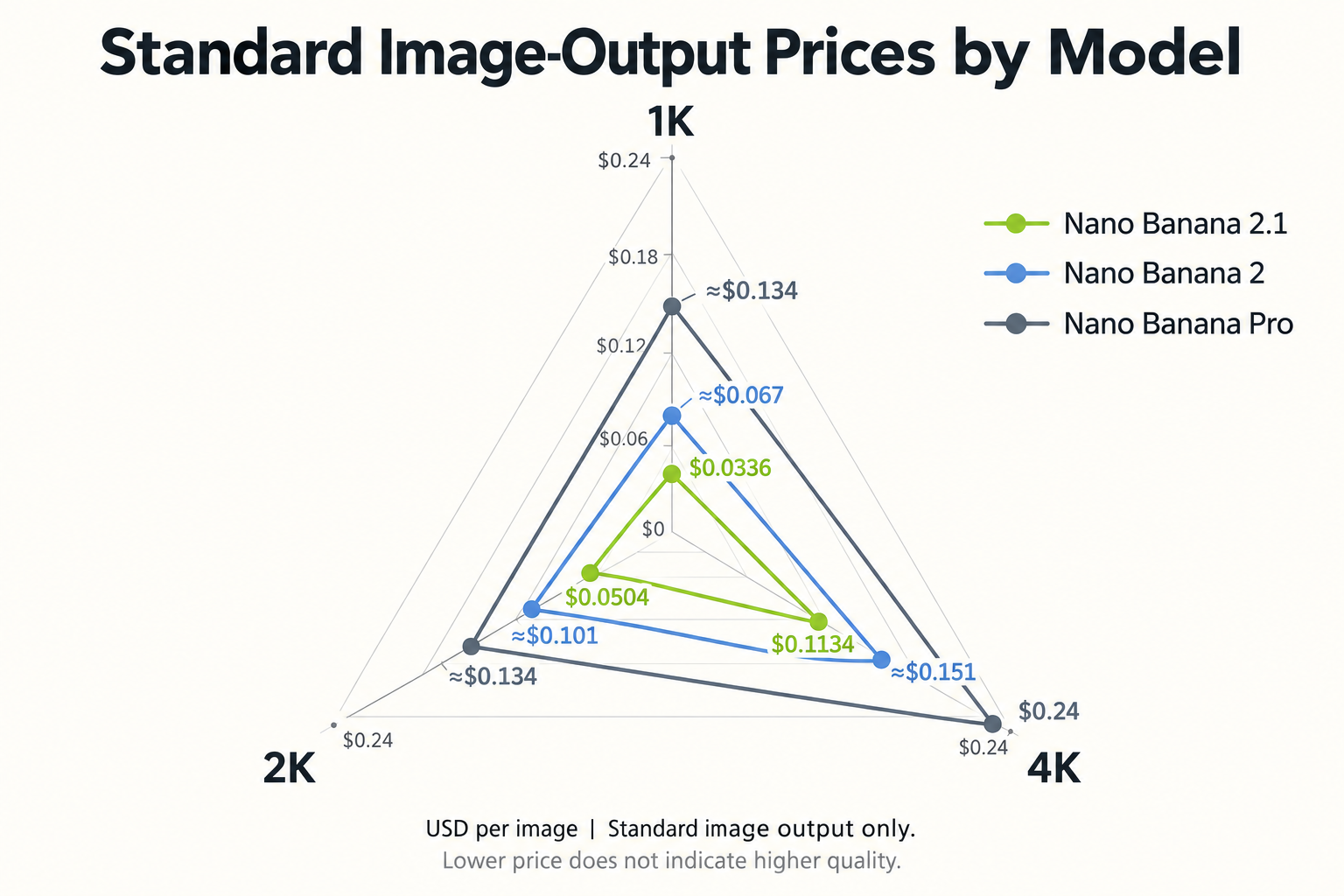
Nano Banana 2.1 API image output costs $0.0336 at 1K, $0.0504 at 2K, and $0.1134 at 4K through Google’s standard Gemini Developer API. Batch image-output rates are 50% lower. Input, text and thinking output, and applicable search charges are additional.
The price of one generation does not tell you what a finished asset will cost. Repeated edits, incorrect text, and unwanted changes can raise the cost per approved image, particularly when a brief requires exact packaging, typography, or subject consistency.
Keep spending flexible with LinkModel’s pay-as-you-go pricing, no minimum spend, and no monthly platform fee. Check available models and prices in the model directory, then compare outputs in the Playground before choosing the option that fits your requirements and budget.
Nano Banana 2.1 API Pricing: Official Costs at 1K, 2K and 4K
The rates below cover image output only, in USD. Google’s model identifier is gemini-nano-banana-2.1; the default resolution is 1K.
Standard and Batch Pricing per Image
| Resolution | Standard | Batch |
|---|---|---|
| 1K | $0.0336 | $0.0168 |
| 2K | $0.0504 | $0.0252 |
| 4K | $0.1134 | $0.0567 |
Image-Output Budget for 1,000 Images
| Resolution | Standard | Batch |
|---|---|---|
| 1K | $33.60 | $16.80 |
| 2K | $50.40 | $25.20 |
| 4K | $113.40 | $56.70 |
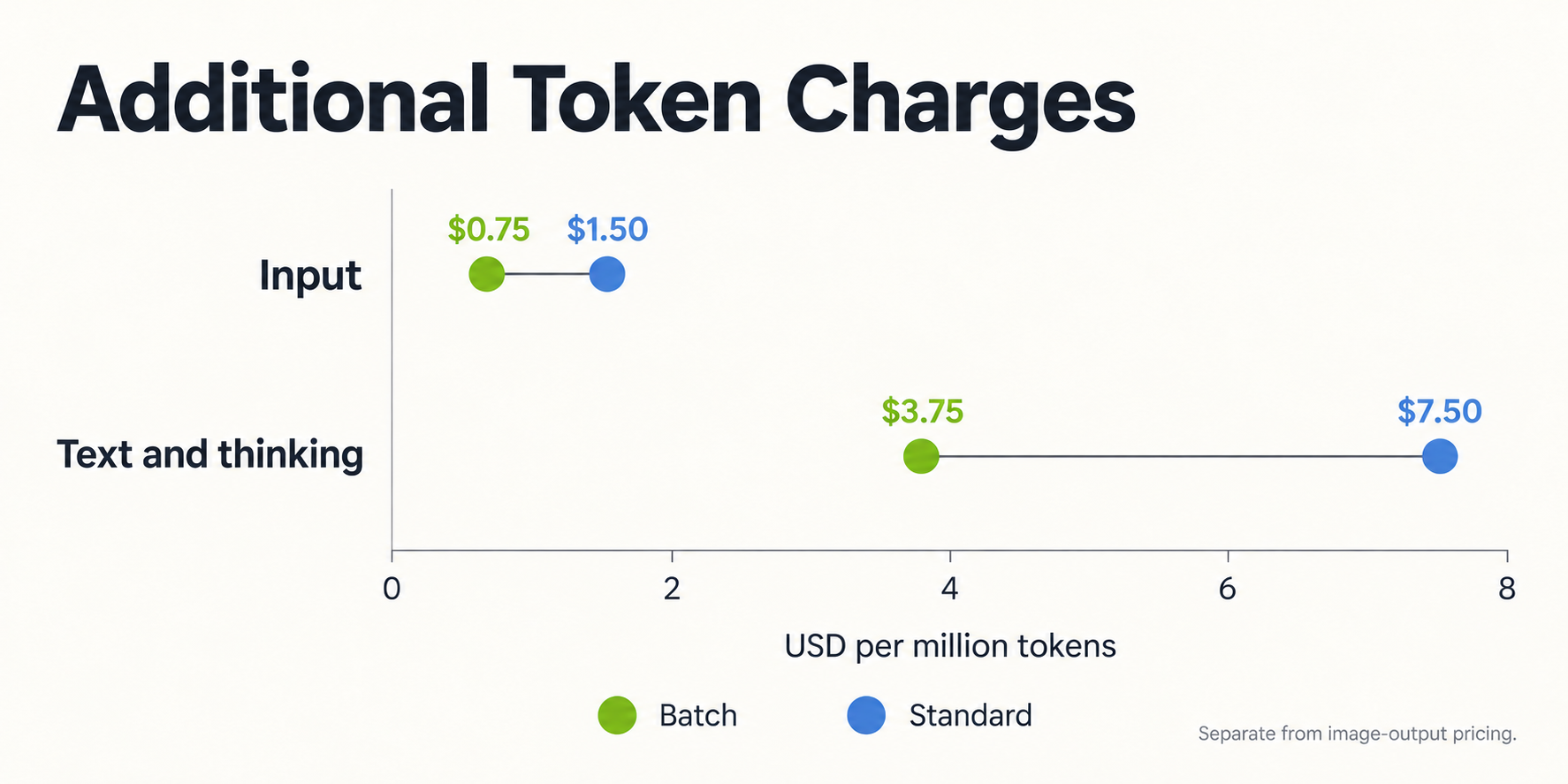
Additional API Charges
| Per million tokens | Standard | Batch |
|---|---|---|
| Input | $1.50 | $0.75 |
| Text and thinking | $7.50 | $3.75 |
Standard search grounding includes 5,000 monthly queries shared across Gemini 3.x models, then costs $14/1,000 queries. One request can trigger multiple queries.
Why Some Guides Quote a Different 4K Price
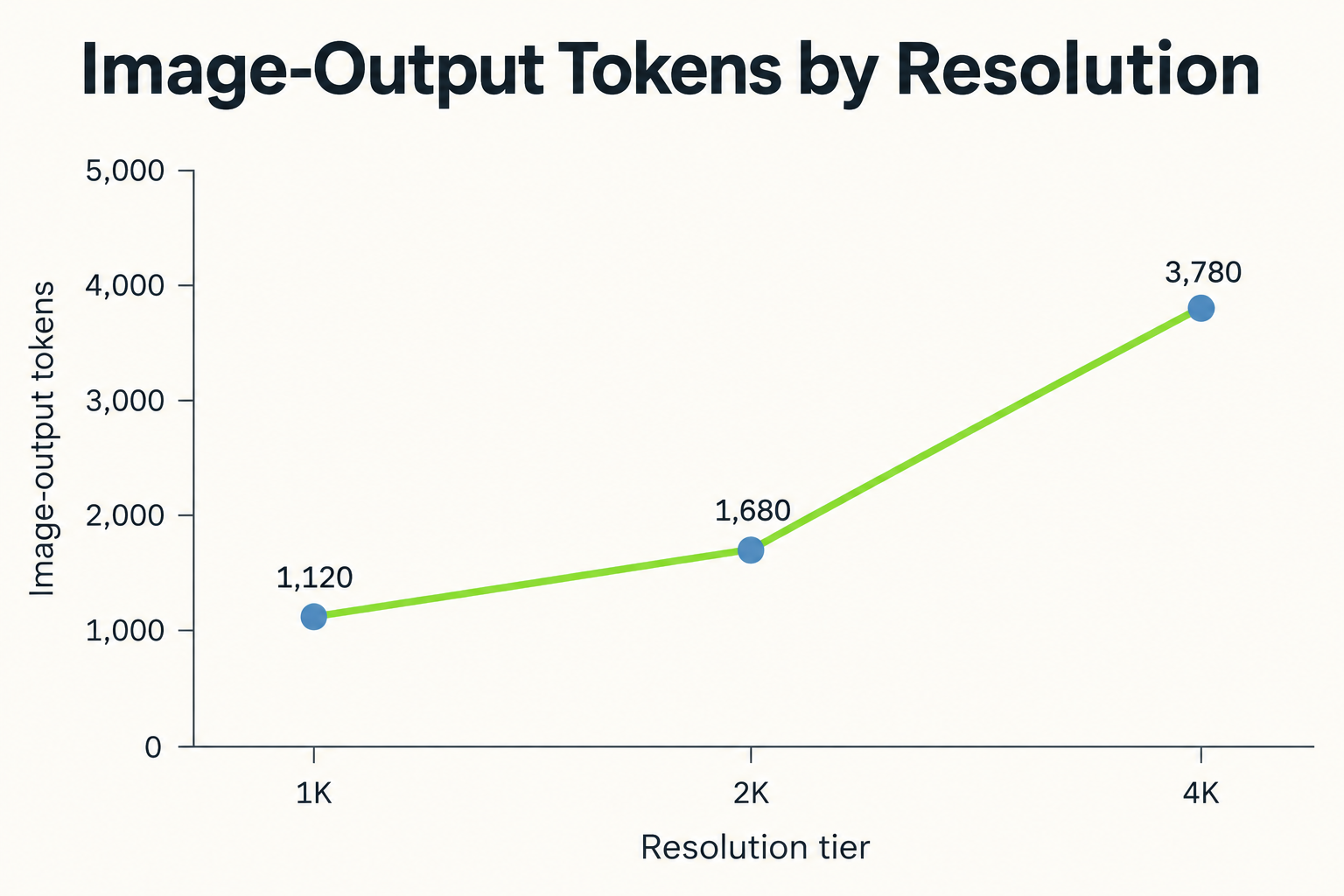
Current official token counts are 1,120 at 1K, 1,680 at 2K, and 3,780 at 4K.
Image-output cost = tokens × rate ÷ 1,000,000.
Google rounds Standard 4K to $0.113. This article uses the calculated $0.1134 rather than the $0.0756 quoted in some guides.
Nano Banana 2.1 vs Nano Banana 2 and Pro: API Price Comparison
The comparison below uses Standard image-output rates.
| Resolution | Nano Banana 2 | Nano Banana Pro |
|---|---|---|
| 1K | ≈$0.067 | ≈$0.134 |
| 2K | ≈$0.101 | ≈$0.134 |
| 4K | ≈$0.151 | $0.24 |
Lower image-output prices do not guarantee proportionally lower complete-request costs.
Choose Around the Requirement That Determines Approval
For packaging, the decisive requirement may be preserving the product’s shape and label. For portraits, it may be keeping a particular face recognizable. For diagrams, it may be accurate text and relationships.
An attractive image can fail any of these requirements. Compare candidates against the same brief and references, and record the reason each rejected output was unsuitable.
This gives model selection a practical basis beyond appearance or a benchmark ranking.
Nano Banana 2.1 API Costs: How Thinking and References Affect the Budget
The image-output rate is a starting point. A complete request can involve reference material, text output, thinking, and search activity.
Thinking Settings and Production Requirements
Google supports minimal, medium, and high thinking levels, with medium as the default.
Evaluate these settings on the requirements that are hardest to satisfy: a diagram with fixed relationships, a banner with reserved space, or a composition containing several specified objects.
Avoid assuming that a higher setting guarantees a better result. Judge whether it improves the delivered asset enough to justify its resource use and processing time.
Reference Images and Editing Sessions
References help define what the model should preserve or incorporate. They also make the request more complex to budget than a standalone text prompt.
For a product edit, identify the authoritative reference and the details that must remain fixed. Additional images should have a clear purpose, such as providing another view of the object.
Track the session rather than only its final output. Several revisions can contribute to producing one approved asset.
Nano Banana 2.1 Standard vs Batch API: Which Workflow Fits?
Standard suits interactive revisions; Batch suits work that can be submitted and reviewed later. Google’s Batch API processes requests asynchronously, with a target turnaround of 24 hours. Actual processing time varies.
Standard for Decisions Between Edits
A designer may replace a background, inspect the packaging, and then request a lighting change. Each decision depends on the previous result.
Measure time to approval, including generation, inspection, and correction. A fast first response is useful, but it does not describe the entire editing experience.
For customer-facing tools, make it clear how someone can revise an unsuitable result and return to an earlier approved version.
Batch for Scheduled Asset Queues
Batch fits work that can be specified in advance, such as catalog backgrounds or candidate campaign visuals.
Reserve a correction window after the queue completes. Generated assets may still contain inaccurate text, inconsistent products, or framing that does not suit the placement.
Plan around when the team needs approved assets, rather than when it needs generation to finish.
Nano Banana 2.1 Resolution Guide: Choosing 1K, 2K or 4K
Choose resolution around the final display size, detail requirements, and intended crops.
1K for Composition and Smaller Placements
An early draft should settle the subject, framing, and visual hierarchy.
For a banner, check whether the product is positioned correctly and leaves enough room for the headline. More detail will not repair a composition that misses the brief.
Google’s model card identifies blurry small text at 1K as a known limitation. Inspect dense text at full size before approving it.
2K for Closer Detail Review
Product images require inspection of labels, edges, reflections, and distinguishing features. Promotional graphics require inspection of wording and spacing.
For a menu, compare every item and price against approved copy. For packaging, compare visible features against the reference.
Visual appeal and information accuracy require separate checks.
4K for Larger Delivery Formats and Cropping
Consider 4K when the placement requires more detail or cropping flexibility.
Inspect the actual delivery formats. A convincing full frame may lose its focal point in a vertical crop or reveal defects when displayed larger.
Review the final generation again even if an earlier draft passed. Approval belongs to the image being delivered.
Nano Banana 2.1 Research Findings: Where Revisions Become Necessary
Our review focuses on three recurring production questions: accurate information, preservation during edits, and adherence to explicit instructions.
Official evaluations provide comparative evidence. Reported workflow examples identify problems worth checking. Neither establishes a guaranteed outcome for every request.
Menus and Infographics: Separate Layout from Factual Accuracy
Google’s infographic design scores are 1,048 ±17 for Nano Banana 2.1 with thinking, 1,001 ±17 without thinking, and 961 ±12 for Nano Banana 2 with thinking.
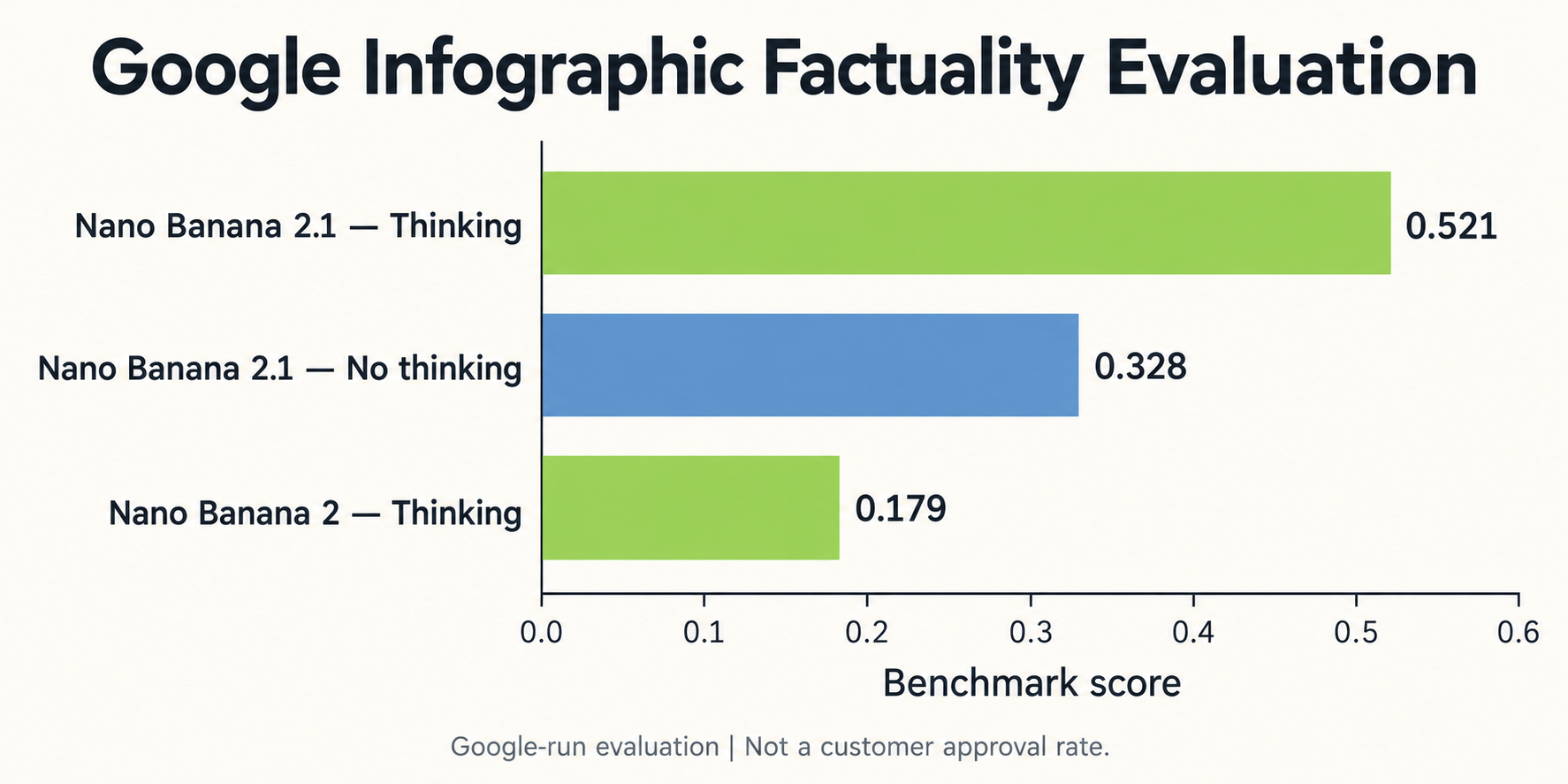
The corresponding infographic factuality scores are 0.521, 0.328, and 0.179.
These are Google-run evaluations. Design scores are comparative ratings; factuality scores are not customer approval rates.
A menu review should verify names, prices, and grouping. A water-cycle diagram review should verify labels, arrow directions, and scientific relationships.
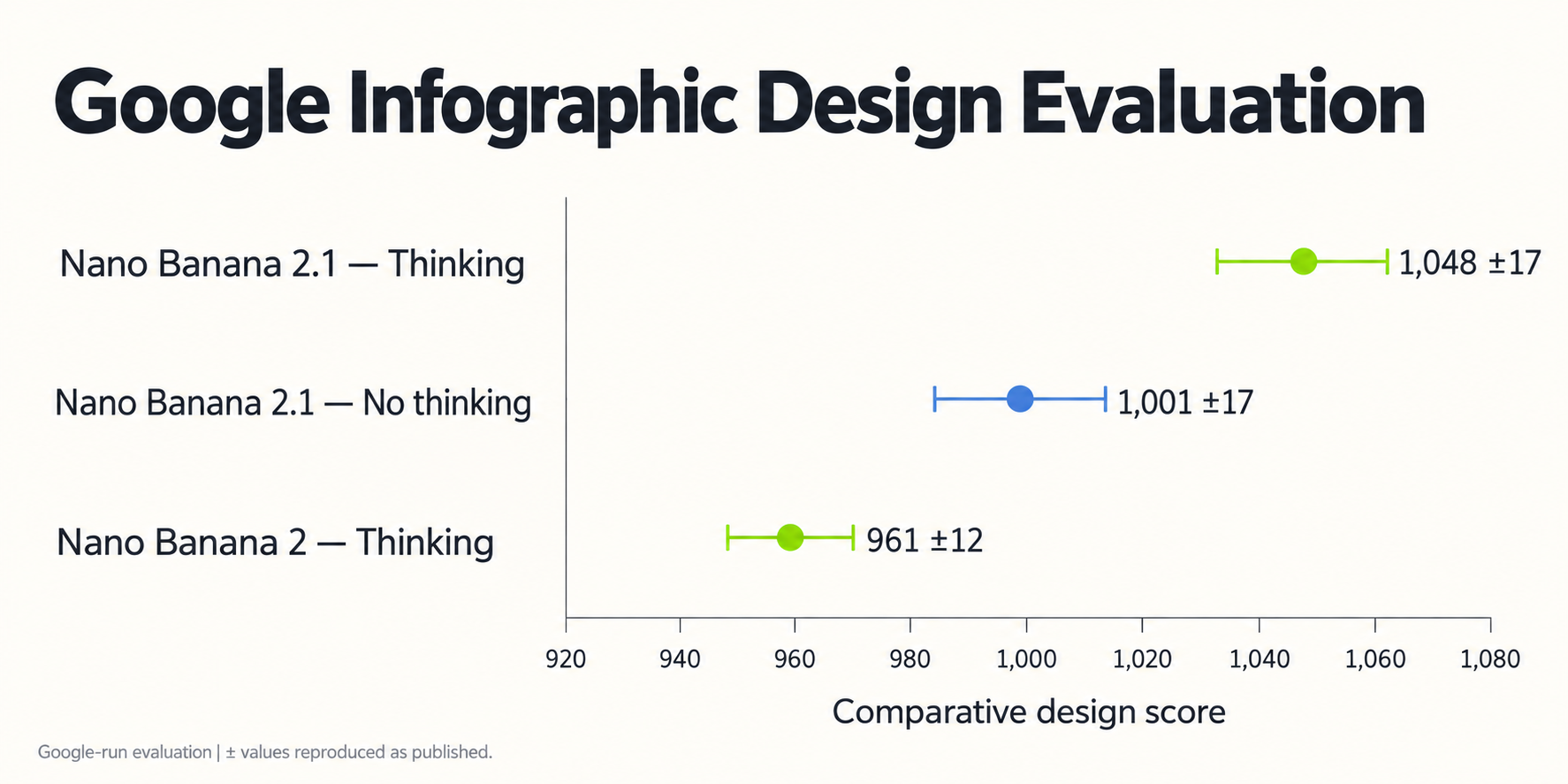
The important distinction is that a well-designed infographic can still contain incorrect information.
Consecutive Edits: Watch for Changes Outside the Requested Region
Our review identified a reported sequence in which the first edit changed the crop and a second altered the apparent sharpness of a character’s skin.
This illustrates a preservation risk, not an established failure rate. Compression was also discussed as a possible contributing factor.
Define the unchanged elements before requesting an edit:
- Background replacement: preserve subject position and framing.
- Clothing changes: preserve face and skin texture.
- Packaging edits: preserve package shape and lighting.
- Diagram updates: preserve other labels and arrows.
If a revision introduces new problems, return to the approved reference rather than continuing indefinitely from an altered intermediate output.
Prompt Adherence: Turn the Brief into Acceptance Criteria
Our review of user questions found conflicting upgrade experiences. Some described improvements; others raised concerns about ignored constraints and unwanted additions.
For a banner, four acceptance criteria might be: preserve the product, position it on the right, leave the left side empty, and add no extra objects.
Review each requirement independently. This turns a vague rejection into a specific issue that can guide the next request.
Google acknowledges partial instruction following and occasional spatial confusion. Explicit criteria make these limitations easier to detect.
Nano Banana 2.1 Budget Calculator: Cost per Approved Image
Effective API cost per approved image = total API spend ÷ approved images.
For planning, approval rate can also show how the same generation budget produces different amounts of usable work.
How Approval Rate Changes the Budget
| Assumed approval rate | Generation-spend multiplier |
|---|---|
| 100% | 1.00× |
| 80% | 1.25× |
| 50% | 2.00× |
Hypothetical scenarios, not measured model performance.
An 80% approval rate means roughly 125 generations are needed for 100 approved outputs. At 50%, the same target requires roughly 200.
Use this relationship to explore your budget’s sensitivity to rejection. It is a planning estimate, not a guarantee of the number of attempts a specific project will need.
Worked Production Budget Example
Suppose a project spends $12 in API charges and produces 80 approved images. Its effective API cost is $0.15 per approved image.
If the same spend produces 40 approved images, the figure becomes $0.30.
Record rejection reasons alongside spending. Incorrect text, changed packaging, and unsuitable framing require different corrective actions.
Keep API Spend Separate from Human Production Cost
Review and repair consume time as well as API resources.
Track those costs separately so the team can distinguish expensive generation from expensive correction. For exact typography, generating the visual foundation and placing approved text in a design tool may provide a more predictable workflow.
After repeated unsuccessful revisions, inspect the brief and references before submitting another request.
Nano Banana 2.1 API Providers: Compare Price, Terms and Availability
A useful provider comparison identifies the exact service being purchased and the conditions attached to its quote.
Verify the Complete Offer
Check the underlying model, resolution, included charges, revision billing, credit expiry, and treatment of failed requests.
Confirm whether the advertised rate applies to the settings your project requires. Do not assume that a flat per-image price includes every optional feature.
Availability also matters: verify the specific model in the current catalog before planning an integration.
Evaluate Available Options with LinkModel
LinkModel offers pay-as-you-go pricing without a minimum spend or monthly platform fee. Its unified API supports multiple models, and its Playground lets you compare outputs before committing to an integration.
Start in the LinkModel model directory to check available options and current prices. Evaluate the configuration that matches your task, then choose according to approved output quality and the complete billing terms.
This keeps the spending decision flexible while reducing the integration work involved in using multiple models.
Sources and Calculation Method
Pricing was checked on October 9, 2026. Image-output budgets use Google’s published token counts and rates. Evaluation results are attributed to Google’s model card. Approval-rate scenarios and production-budget examples are illustrative calculations.
- Google Gemini Developer API pricing
- Google Nano Banana 2.1 model documentation
- Google DeepMind Nano Banana 2.1 model card
- Google Batch API documentation
- Repeated-edit discussion reviewed
- Prompt-adherence discussion reviewed
- LinkModel platform and billing information
Conclusion: Plan Nano Banana 2.1 API Costs Around Approved Images
Nano Banana 2.1 budgeting starts with the published image-output rates and becomes more useful when it accounts for complete requests, revisions, and approval effort. Match resolution to the final placement, consider Batch for scheduled work, and use clear acceptance criteria to identify costly rejection patterns. Compare cost per approved image alongside the listed price, then verify provider availability and billing terms. LinkModel’s flexible purchasing model and unified API offer a practical way to evaluate available options without a minimum spending commitment.
Frequently Asked Questions
Does the per-image price include every revision?
The listed rate covers image output. An editing session can involve additional requests and other billing components. Check the provider’s terms before assuming revisions are bundled.
Is there a free Nano Banana 2.1 API tier?
Google lists the model’s API free tier as unavailable. Consumer-app access and provider trial offers are separate arrangements. Check current eligibility and terms before planning around a promotional allowance.
Why can an edit change something outside the requested area?
Image editing can introduce unintended changes to framing, texture, or subject details. Compare the output with the approved reference, including regions you did not ask to modify. A successful requested change does not establish that everything else remained intact.
Is Nano Banana 2.1 always better than Nano Banana 2?
Google’s evaluations show improvements on several measured capabilities, but results depend on the task and configuration. Judge whether the image meets your requirements rather than treating an overall benchmark as a guarantee.
Can Nano Banana 2.1 reliably generate menus and infographics?
It can generate these formats, but approval still requires information checks. Verify menu wording and prices against source copy, and review diagram labels and relationships independently of the layout. Higher resolution does not establish factual accuracy.