Cyber Monday AI API deals in 2026 offer up to 55% savings on eight ready-to-use models through LinkModel, including GPT-6.2, Seedream 5.5, and Seedance 2.5 Flash. The promotion covers coding, AI agents, image editing, and video generation from November 23 through December 2, 2026, at 11:59 PM PST.
The biggest discount doesn't always mean the lowest project cost. Coding agents consume tokens across repeated calls, image editing adds revision costs, and video bills grow with generated seconds. Comparing real workload costs, model IDs, and billing rates helps you choose a deal that actually saves money.
LinkModel makes Cyber Monday savings easier to use: get 25% off GPT-6.2 Sol and Astra, 47% savings on Seedream 5.5 vs. fal, and up to 55% savings on Seedance 2.5 Flash vs. fal, with one API key for text, image, and video models. Pay as you go with $0 minimum spend and $0 monthly platform fee. New users automatically receive $1 in free Credits—no card or recharge required, once per new user, and valid across all currently available models.
Best Cyber Monday AI API Deals 2026: Eight Models and Prices
LinkModel's 2026 Cyber Monday promotion covers eight available AI models, with discounts ranging from 15% to 55% against their respective comparison prices.
Cyber Monday falls on November 30, but the promotion continues until December 2 at 11:59 PM PST. New and existing users can access the discounted rates automatically, including when using their existing account balance.
Complete Cyber Monday AI API Price Comparison
| AI Model | Cyber Monday Savings | LinkModel Promotional Price | API Model ID | Best For |
|---|---|---|---|---|
| Seedance 2.5 Flash | 55% vs. fal | From $0.060527/s, 480p | seedance-2-5-flash | Video ads, product clips |
| Seedream 5.5 | 47% vs. fal | From $0.016/image, eligible output specification | seedream-5.5 | Ecommerce images, editing |
| GPT-6.2 Sol | 25% vs. official | $1.50/M input; $7.50/M output | gpt-6.2-sol | Daily coding, assistants |
| GPT-6.2 Astra | 25% vs. official | $6/M input; $30/M output | gpt-6.2-astra | Advanced reasoning, complex coding |
| GPT Image 2.6 Flare | 35% on eligible output fees | 65% of corresponding official output charges | gpt-image-2.6-flare | Fast image generation |
| GPT Image 2.6 Sunburst | 35% on eligible output fees | 65% of corresponding official output charges | gpt-image-2.6-sunburst | Detailed design, precision editing |
| DeepSeek V4.1 Flash 1017 | 32% vs. official | 68% of corresponding official charges | DeepSeek-V4.1-Flash-1017 | Affordable coding agents |
| Kling 4.0 | 15% vs. official | $0.19975/s, 1080p reference | Kling4.0 | Cinematic ads, commercial video |
Prices are in USD. The displayed discounts use the specified official or fal comparison baseline and eligible generation configuration.
GPT-6.2 Sol and Astra rates apply to short-context requests. If prompt input, including cached tokens, exceeds 272K tokens, the entire request uses the higher-priced context tier.
For GPT Image 2.6 Flare and Sunburst, the 35% discount applies to eligible output charges rather than every possible component of an image request.
Do Cyber Monday API Deals Require a Coupon?
No coupon code is required.
LinkModel automatically applies the eligible promotional model prices during the campaign. Existing users can use their current Credits, while new users can register and begin with their signup reward.
You do not need to purchase a monthly LinkModel subscription or make a new deposit to qualify for the discounted model rates.
For developers looking to compare the offers immediately, Explore Models & Pricing to find the model that fits your workload.
Which Cyber Monday AI API Deal Should You Choose?
The best Cyber Monday API deal depends on the type of work, the number of requests, and the output quality your project requires.
Our research suggests three useful buying priorities: select a model that matches the task, compare the applicable billing units, and estimate the number of calls or generations required to produce a usable result.
Coding and AI Agents: Sol, Astra, or DeepSeek?
For everyday coding, AI assistants, and routine automation, GPT-6.2 Sol is a cost-conscious starting point at $1.50 per million input tokens and $7.50 per million output tokens.
An application that explains code, answers development questions, or generates small functions may make frequent calls throughout the day. At this scale, the price difference between models can significantly affect the monthly budget.
GPT-6.2 Astra is worth evaluating for complex coding and advanced reasoning tasks. Its promotional rates are $6/M input and $30/M output, four times Sol's rates for the same short-context token quantities.
That distinction matters when deciding which model should handle each part of a development workflow.
For example, a team could evaluate Sol for routine code explanations and reserve Astra for complex architecture reviews or demanding reasoning tasks. The more expensive model becomes worthwhile when its contribution to task completion justifies the additional cost.
DeepSeek V4.1 Flash 1017 is another option for budget-sensitive coding and agent workloads, with eligible charges at 68% of the corresponding official reference price.
For an agent that makes many sequential requests, compare not only token rates but also how many requests and retries the task requires. These factors are especially important when evaluating AI agent operating costs.
Ecommerce Images: Seedream, Flare, or Sunburst?
Seedream 5.5 is a strong price-first option for ecommerce image workflows, starting at $0.016 per eligible image.
Consider an online seller preparing three visual variations for each of 50 products: a clean catalog image, a lifestyle image, and an advertising variation.
That requires at least 150 outputs. At the eligible starting rate, the generation budget is $2.40, before any additional editing rounds or differently priced operations.
For repeated product-background editing, catalog preparation, and large image batches, Seedream's low starting price is particularly attractive. Developers planning an automated workflow can explore the Seedream 5.5 API.
GPT Image 2.6 Flare is a candidate for fast visual generation and editing, while GPT Image 2.6 Sunburst is suited to workflows requiring detailed composition and precision-oriented editing.
Both offer 35% savings on eligible output fees during the promotion.
For image-heavy projects, compare the required editing controls and the number of generated variations, not just the lowest initial output price. A broader AI image API comparison can also help ecommerce teams evaluate workflow requirements.
AI Video Ads: Seedance 2.5 Flash or Kling 4.0?
Seedance 2.5 Flash starts at $0.060527 per second at 480p, making it a practical option for testing short-form advertisements and product clips.
A 10-second generation costs approximately $0.61 at the starting rate. That provides an accessible way to experiment with multiple creative directions before expanding a campaign.
Kling 4.0 costs $0.19975 per second at the stated 1080p reference configuration, or approximately $2.00 for 10 seconds.
Kling is worth considering for cinematic video work and commercial projects that call for more sophisticated visual direction.
These are different model configurations and resolutions, so the prices are not a direct quality-adjusted ranking.
For social media concepts that require frequent variations, begin by evaluating Seedance. For projects with more demanding commercial visuals, assess Kling against the intended creative requirements. Developers comparing broader options can also review AI video APIs for advertising.
How Much Can You Actually Save? Four AI API Cost Examples
The most useful way to measure a Cyber Monday API discount is cost per completed task or approved creative asset.
A model with a low input rate can still become expensive when an agent makes repeated requests. Similarly, video costs can double when a campaign needs multiple generations of each clip.
The following examples combine the campaign's confirmed rates with developer workflow observations and transparent cost calculations.
Example 1: GPT-6.2 Sol vs. Astra for a Coding Assistant
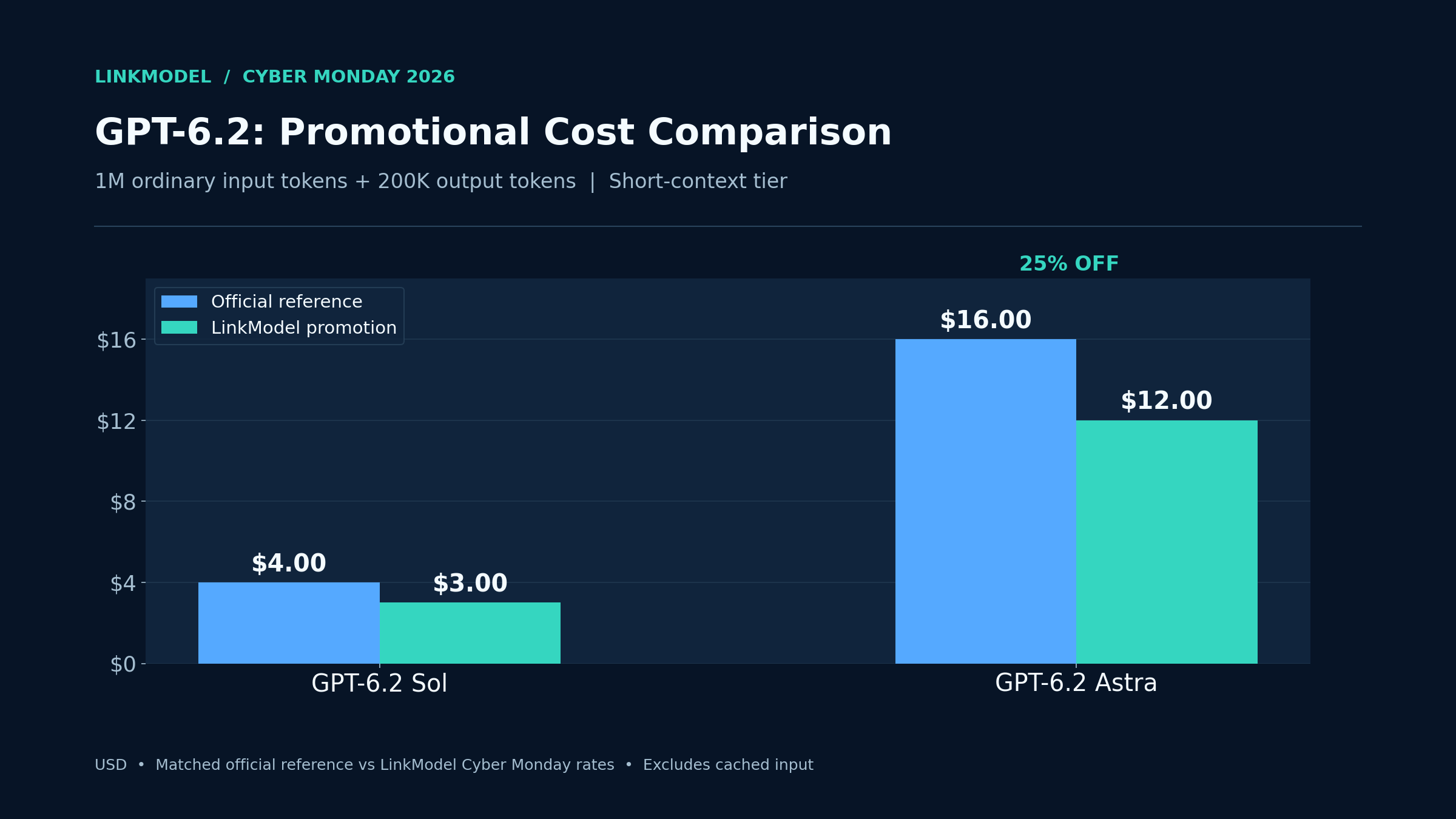
Assume a coding assistant processes 1 million ordinary input tokens and 200,000 output tokens across requests that individually remain in the short-context tier.
The cost formula is:
Input tokens ÷ 1,000,000 × input rate + output tokens ÷ 1,000,000 × output rate
| Model | Official Reference Cost | LinkModel Cost | Savings |
|---|---|---|---|
| GPT-6.2 Sol | $4.00 | $3.00 | $1.00 / 25% |
| GPT-6.2 Astra | $16.00 | $12.00 | $4.00 / 25% |
At the same token volume, Astra costs four times as much as Sol, even though both receive a 25% discount.
For developers, this creates an important purchasing decision.
If routine requests can be completed satisfactorily with Sol, using Astra everywhere increases costs without necessarily providing proportionate value.
However, Astra may be justified for tasks requiring greater reasoning capability.
The best model allocation depends on which tasks benefit from the higher-cost option.
Example 2: Why Simple AI Questions Can Become Expensive
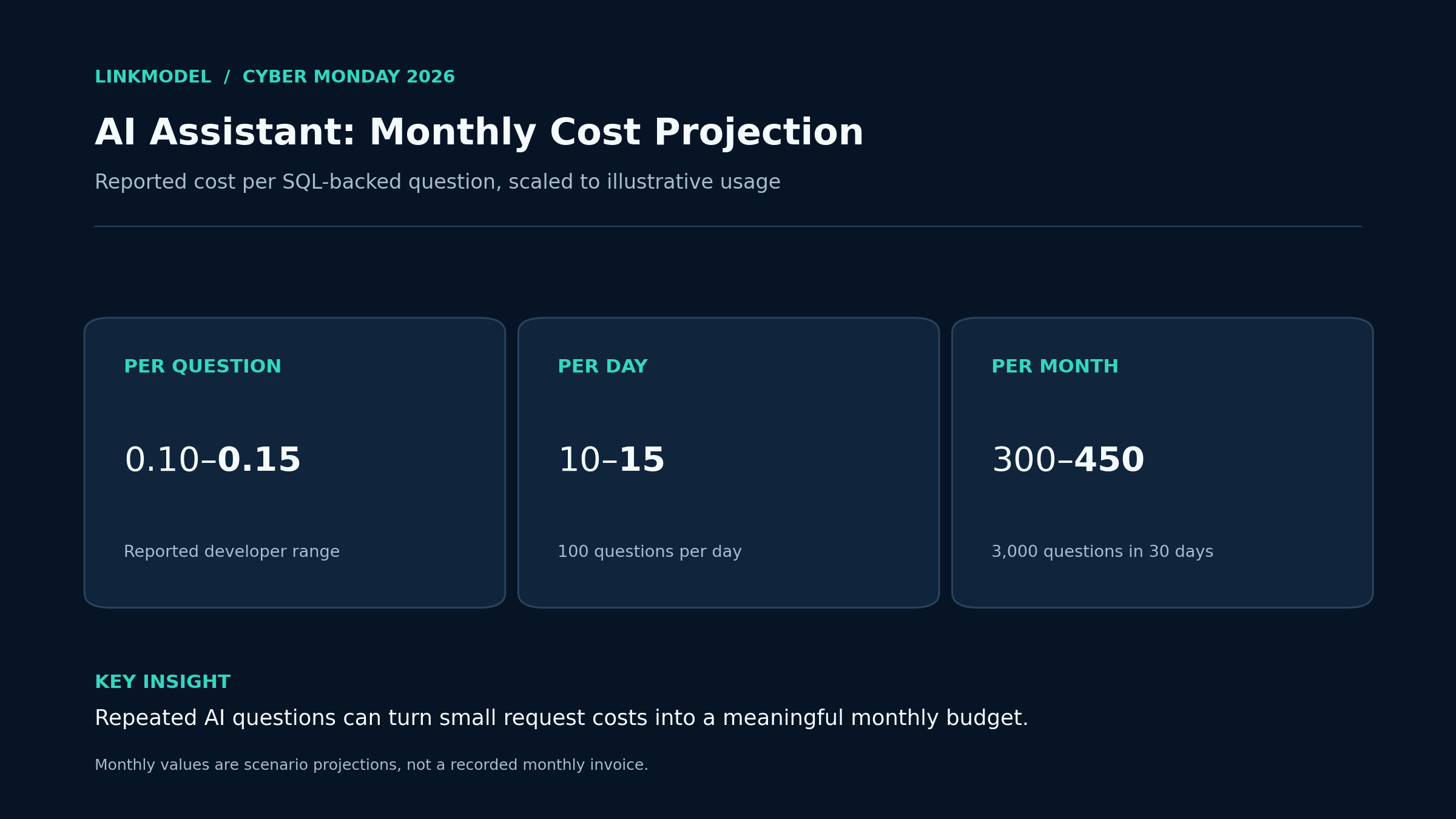
Our review of developer cost discussions identified an SQL-connected AI assistant whose reported usage cost was approximately $0.10–$0.15 per user question.
Although the visible user question might be simple, the application needed to interpret the request, retrieve database information, process the results, and generate an answer.
Those operations can involve multiple model calls and repeated context.
At that reported per-question cost, an application handling 100 questions per day would have the following projected budget:
| Workload | Projected Cost |
|---|---|
| One completed question | $0.10–$0.15 |
| 100 questions per day | $10–$15 |
| 3,000 questions per month | $300–$450 |
The monthly range assumes 30 days of usage at the same per-question cost.
For a SaaS product, the lesson is that a cheap model alone does not guarantee an inexpensive AI feature.
Request count, context length, output size, and repeated operations all contribute to the final budget.
Before choosing a Cyber Monday API offer, estimate how many model calls are needed to complete one typical user request. This is especially important when designing AI APIs for SaaS applications.
Example 3: Prompt Caching and Agent Cost Control
Our research into developer pricing questions found that cached input can be a major factor in the cost of long-context and agent workflows.
One developer described a scenario in which fully cached requests could cost approximately 10% of their ordinary cost. Discussions about automatic provider selection also showed why developers increasingly compare cache pricing rather than ordinary input rates alone.
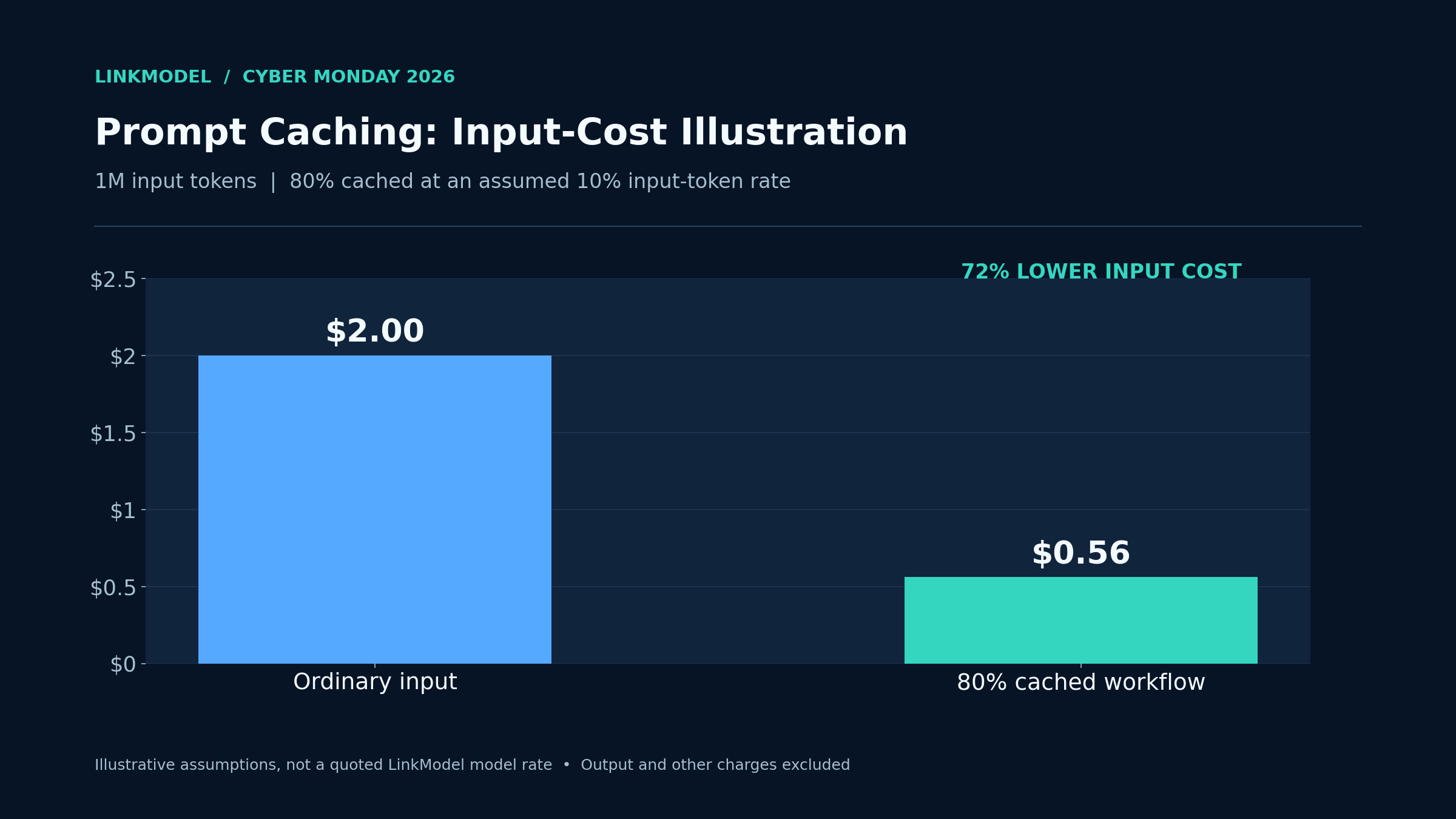
Consider an illustrative workload with 1 million input tokens, of which 80% are eligible for cached-input pricing.
Assume ordinary input costs $2 per million tokens and cached input costs $0.20 per million.
| Input Category | Tokens | Rate per 1M | Cost |
|---|---|---|---|
| Ordinary input | 200,000 | $2.00 | $0.40 |
| Cached input | 800,000 | $0.20 | $0.16 |
| Total | 1,000,000 | Mixed | $0.56 |
At the ordinary rate, the same total input volume would cost $2.00.
With these assumed cache rates and eligibility, the input charge falls to $0.56, a 72% reduction.
This illustrates how caching can matter more than a small difference in standard input pricing.
For coding agents and repeated-context applications, evaluate ordinary input, cached input, applicable cache-write charges, output tokens, and total request volume together.
Example 4: Ecommerce Images and Video Ads at Scale
Creative workloads make per-output pricing particularly easy to calculate.
Seedream 5.5: Product-image generation
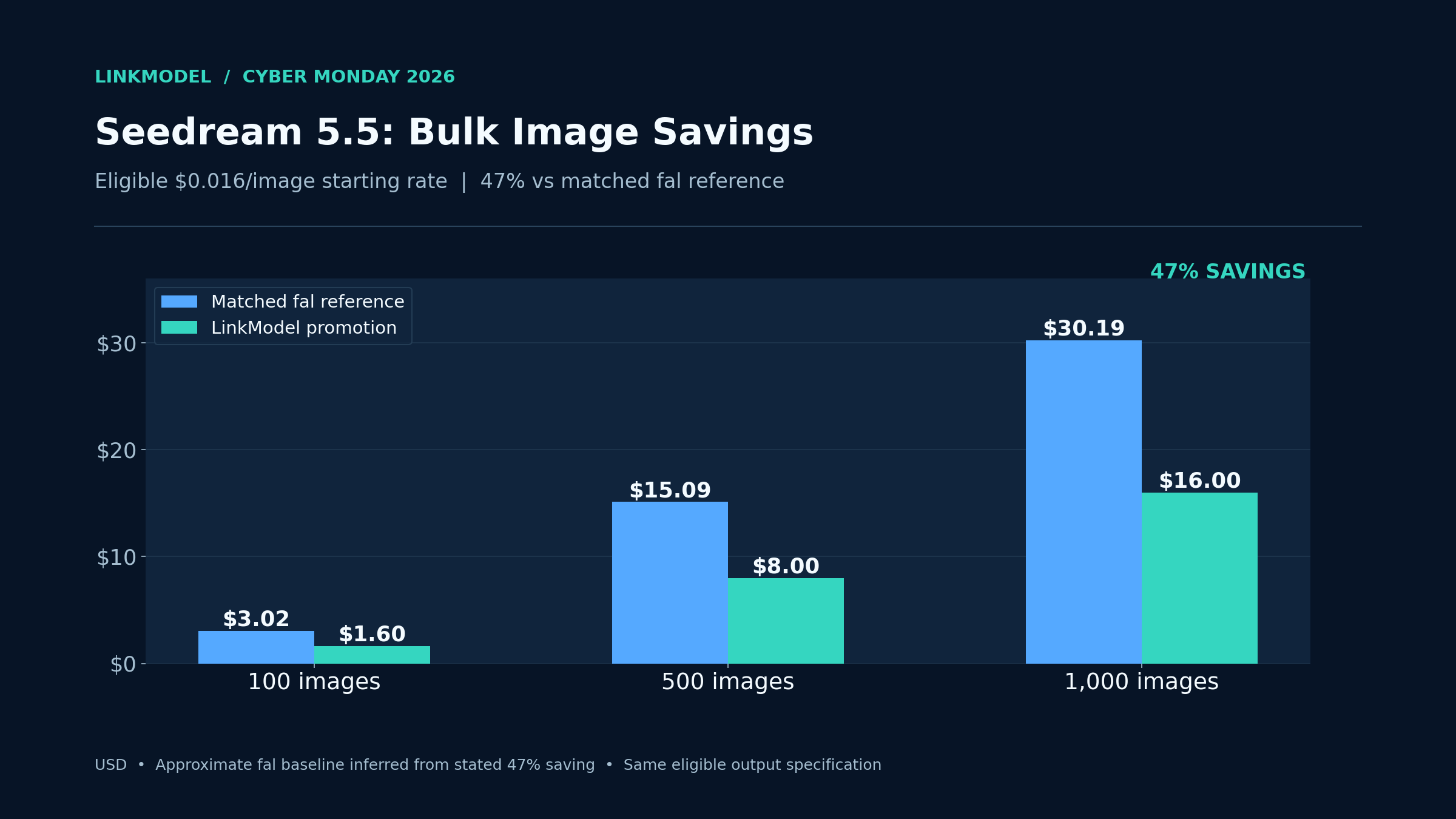
At the eligible starting rate of $0.016 per image, the cost scales as follows:
| Eligible Image Outputs | LinkModel Cost | Approx. Matched fal Reference | Approx. Savings |
|---|---|---|---|
| 100 | $1.60 | $3.02 | $1.42 |
| 500 | $8.00 | $15.09 | $7.09 |
| 1,000 | $16.00 | $30.19 | $14.19 |
These values use the stated 47% fal comparison and the same eligible output specification.
For an ecommerce seller producing 1,000 images, the approximate saving is $14.19 at those rates.
The actual production budget also depends on how many outputs are generated before a final image is approved.
Seedance 2.5 Flash: Short video advertisements
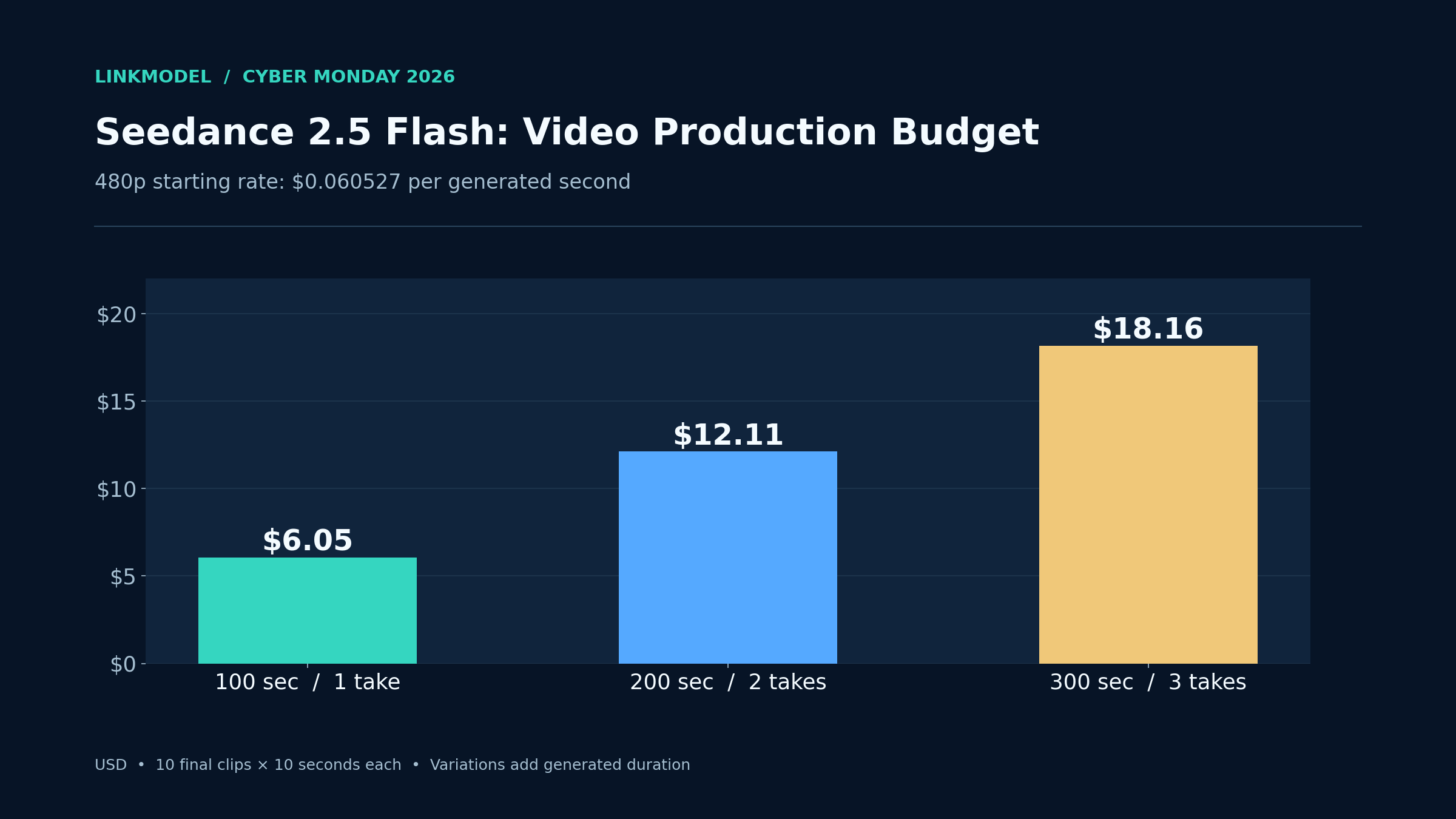
Suppose a campaign requires 10 final clips, each 10 seconds long, at the eligible 480p starting rate.
If each clip is generated only once, the total output is 100 seconds.
At $0.060527 per second, that costs $6.05.
If the team produces two or three variations of each clip, total generated duration increases accordingly.
| Video Production | Total Generated Duration | LinkModel Cost |
|---|---|---|
| 10 clips, one generation each | 100 seconds | $6.05 |
| 10 clips, two generations each | 200 seconds | $12.11 |
| 10 clips, three generations each | 300 seconds | $18.16 |
The most useful comparison is cost per completed task, approved image, or usable video clip.
Other Cyber Monday AI Deals Worth Comparing in 2026
Cyber Monday AI promotions include API usage discounts, developer tools, and creative software subscriptions.
However, these offers should not be treated as interchangeable.
API discounts reduce the cost of eligible model usage, while software subscription discounts usually apply to a particular plan with its own included features and usage conditions.
Several relevant platforms are worth comparing.
| Platform | Offer Category | Best Fit |
|---|---|---|
| PoYo | Selected image and video API promotions | Developers comparing AI media generation costs |
| ElevenLabs | Selected voice and audio subscription promotions | Audio creators and voice-production teams |
| Adobe Firefly | Creative software and image-generation plans | Designers and marketing teams |
| InVideo | Video creation subscription plans | Social media creators and marketing teams |
For developers building applications, the central purchasing questions are different from those of someone buying a creative software subscription.
Can the API access the required model? Does the provider support the intended request format? How are outputs billed? Can multiple model types be managed under one account?
LinkModel combines text, image, and video model access under a unified API key and billing system, making it particularly relevant to developers who use several AI model families.
The platform's $0 monthly platform fee also allows users to pay according to model usage instead of adding a separate recurring LinkModel platform subscription.
For high-volume applications, the most valuable comparison is the total cost of the actual workflow rather than the largest percentage shown in a promotional banner.
How to Claim Cyber Monday AI API Deals and Start Using LinkModel
LinkModel's Cyber Monday discounts are automatically applied to eligible calls. You can choose a model, check your balance, obtain an API key, and begin using the supported API without entering a promotional code.
The setup path depends on whether you are calling a language model, generating an image, or creating a video.
Step 1: Check Your Balance and Top Up
First, create a LinkModel account or sign in.
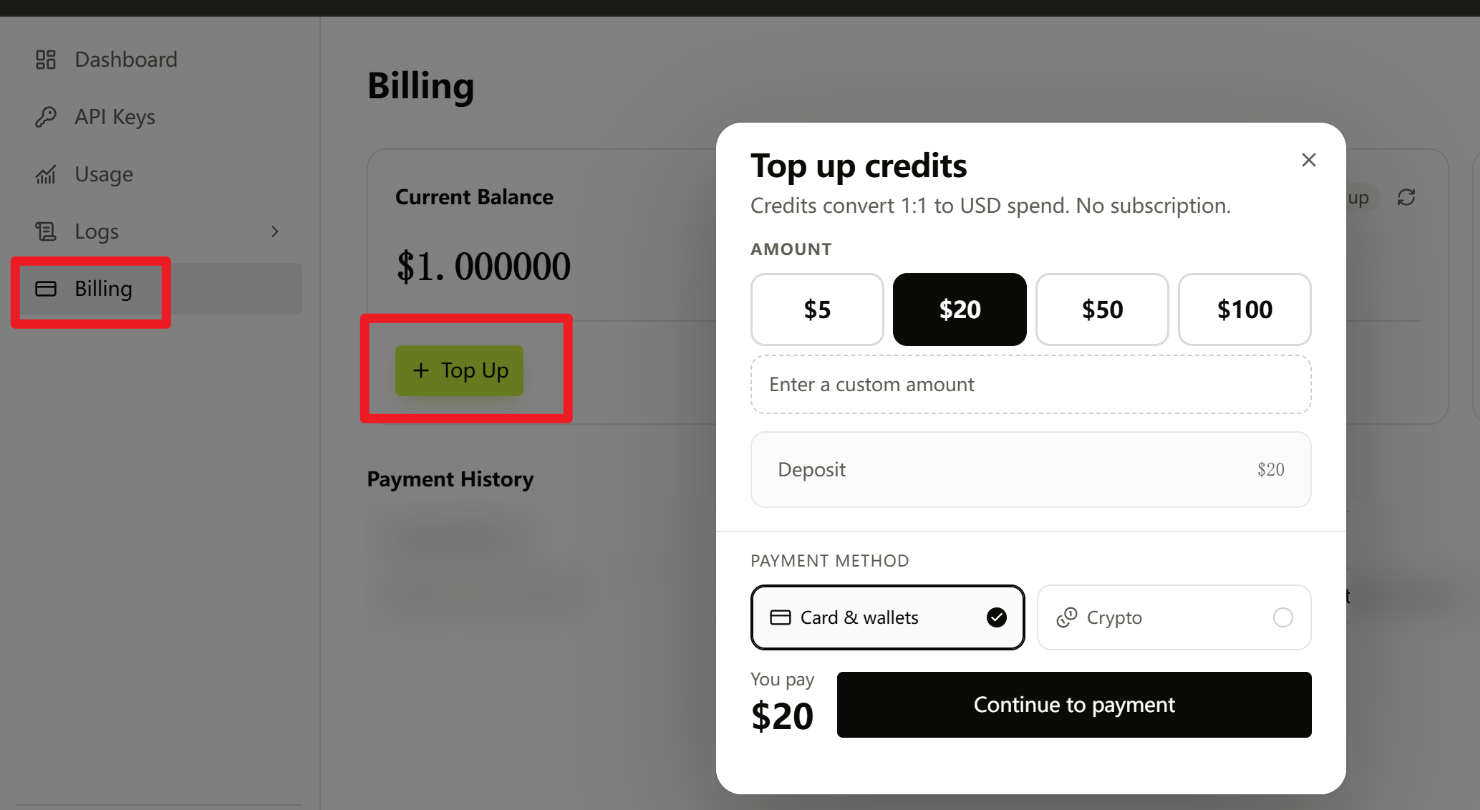
Open the LinkModel Billing page to access your account's balance and billing information.
From the Billing page, you can review your available Credits and click Top Up when you want to add funds.
The process is straightforward:
- Sign in and open Billing.
- Check your available balance.
- If additional funds are needed, click Top Up.
- Complete the payment process and return to Billing to review your balance.
Existing users do not need to make a new deposit to use the Cyber Monday promotional rates.
For a first project, estimate a small number of requests or generations before deciding how much to add.
Step 2: Get Your API Key and Call a Language Model
Open the LinkModel Developer Resources to access API documentation, authentication guidance, and supported model references.
Create or retrieve your LinkModel API key and keep it private. If you are setting up API authentication for the first time, the API key setup guide provides additional context.
For OpenAI-compatible chat integrations, use the following settings:
| API Setting | Value |
|---|---|
| API Base URL | https://api.linkmodel.ai/v1 |
| Chat Endpoint | https://api.linkmodel.ai/v1/chat/completions |
| HTTP Method | POST |
| Authentication | Authorization: Bearer YOUR_API_KEY |
| Content Type | application/json |
Choose the exact model identifier from the eight-model promotional price table.
A typical request includes the model field and a messages array containing the conversation.
For example, a coding assistant can submit the following user instruction:
"Review this Python function for possible logic errors, explain the most important issue, and suggest a corrected implementation."
The API response includes the assistant's generated content and usage information for monitoring token consumption.
For an existing OpenAI-compatible application, the LinkModel base URL, API key, and model identifier are the key integration settings to review. Developers can also consult the OpenAI-compatible LangChain integration guide for a related application workflow.
Step 3: Call Image or Video Generation APIs
Image and video generation use dedicated endpoints rather than a standard chat request.
GPT Image 2.6 Flare and Sunburst
The documented image-generation workflow uses:
POST https://api.linkmodel.ai/v1/images/generations
After creating a generation task, use the corresponding image task-query endpoint to retrieve the completed result.
Seedream 5.5
The documented Seedream image-generation workflow uses:
POST https://api.linkmodel.ai/api/v1/image-generation
Submit the generation task with the correct model identifier and supported parameters, then follow the task-query process to retrieve the output.
The endpoint is different from the GPT Image 2.6 path, so use the model-specific request instructions.
A useful starting product-image prompt is:
"Create a premium ecommerce product photo of a white ceramic coffee mug on a warm beige background. Use soft studio lighting, natural shadows, realistic materials, and a clean composition suitable for an online store."
Seedance 2.5 Flash and Kling 4.0
The documented unified video-generation endpoint is:
POST https://api.linkmodel.ai/v1/videos/generations
After the task is created, use the following endpoint pattern to check its status and retrieve the result:
GET https://api.linkmodel.ai/v1/videos/generations/{task_id}
A suitable starting video prompt is:
"Create a 10-second product advertisement featuring a white ceramic coffee mug on a wooden table. Begin with a smooth camera push-in, use warm morning sunlight, and finish with a clean product close-up."
For video generation, configure the supported duration, resolution, and other available model parameters.
A generation request initially creates a task; the completed video is retrieved through the task workflow.
For all media models, consult the model-specific API reference for the supported request fields before submitting advanced configurations.
Step 4: Try the Playground Before Integrating
Developers who prefer to evaluate a model through a browser can start with the LinkModel Playground.
Select a supported model, enter a prompt, and inspect the returned result.
For coding, use a representative development question or code-review task.
For product images, begin with a single catalog-style prompt and adjust it according to the desired composition.
For video, test a short creative concept before preparing a larger batch.
Once you have a suitable model and prompt, use the developer documentation to move the same workflow into your application.
This provides a practical way to understand model outputs and likely usage before increasing your budget.
Step 5: Join Discord for $2 in Credits and API Support
Join the LinkModel Discord. Claim $2 in AI credits. Get API examples, tutorials, and help getting started.
The LinkModel community offers a place to explore model announcements, prompt tutorials, API examples, and setup support.
Starting November 23, both new and existing Discord members can participate in a limited credit activity.
To claim:
- Join the Discord community.
- Open the pinned claim form and privately submit your LinkModel account email.
- After verification, eligible Credits are issued within 24–48 hours.
The offer is limited to the first 30 valid claimants, with $2 in Credits each.
Each real participant and LinkModel account can claim once. No recharge is required.
The activity ends on December 2, 2026, at 11:59 PM PST.
The community also provides ongoing access to model updates, practical examples, and assistance with API integration questions.
Step 6: Enter the Black Friday Build Fund Giveaway
LinkModel's Black Friday Build Fund gives developers and creators another opportunity to explore AI projects during the promotional period.
10 winners receive $5 in Credits each, for a total of $50.
To participate:
- Follow the official LinkModel X account.
- Join LinkModel Discord and share which model you want to use and what project you plan to build in the event channel.
- Submit your X username and Discord user ID through the activity's registration form.
Entries close on December 2, 2026.
Winners will be announced on December 3, with Credits issued within 48 hours after verification.
Only one entry is allowed per person. No recharge is required, and reposting is optional.
The model discounts, community tutorials, and giveaway make the promotion useful for developers who want both lower model costs and help getting started.
How to Choose a Reliable Cyber Monday AI API Deal
A worthwhile AI API deal should make its model selection, billing structure, and promotion period clear.
Our review of developer purchasing questions highlights three factors that deserve attention before choosing a discounted API provider.
Verify the Model Version and Billing Configuration
The same model name can appear across multiple providers, but the available configurations and billing structures may differ.
Check the exact model identifier, supported capabilities, context tier, resolution, and request format.
For instance, a 480p video-generation price should not be compared directly with a 1080p price as if both were identical outputs.
For GPT-6.2, short-context and higher-context tiers can have different rates. Developers working with especially large inputs can use a context-window comparison to understand why context requirements matter.
For GPT Image 2.6, the eligible output-fee discount is distinct from the pricing of the entire request.
A reliable comparison matches both the model and the billable specification.
Compare the Total Cost of a Completed Task
A reliable API deal should remain cost-effective across the entire workflow. Before choosing a provider, compare the applicable billing structure, model configuration, and expected number of requests.
Use the workload calculations above to estimate costs for your own project. For longer-running applications, compare the cost per completed task rather than relying only on the advertised input-token price.
Confirm the Cyber Monday Deadline and Plan Ahead
LinkModel's eligible promotional prices run through December 2, 2026, at 11:59 PM PST.
From December 3, standard platform prices apply.
If you are building an application intended to operate beyond the sale, compare the promotional cost with your ongoing operating budget.
The promotional period is a useful opportunity to evaluate model selection, estimate production volume, and determine the expected cost of a typical completed task.
Developers who understand those numbers can make a more informed decision about which models to use and how much to spend.
Frequently Asked Questions
Are discounted AI APIs the same as official models?
Model names alone do not establish that every provider uses identical configurations. Compare the exact model ID, version, supported features, context tier, and generation settings. LinkModel's eight promotional models are available through its platform, with their Model IDs listed in the pricing table.
How do caching and retries affect AI API costs?
Caching may reduce the cost of eligible repeated input, while additional requests and output tokens increase usage. For agents, calculate total ordinary input, cached input, applicable cache-write charges, output, and repeated calls rather than relying only on the standard input-token price.
Can I use my existing Credits, and where can I top up?
Yes. Existing balances can be used for eligible Cyber Monday model calls. Sign in and open the LinkModel Billing page to check your balance. Select Top Up when you need to add funds. Eligible promotional prices are applied automatically.
Why can pay-as-you-go AI APIs cost more than an AI subscription?
API charges depend on actual usage, while subscription plans offer different access arrangements and usage conditions. Applications making many model calls or producing large outputs may accumulate substantial API charges. Compare your expected workload, model rates, and access requirements before choosing.
When do Cyber Monday AI API deals end in 2026?
Cyber Monday is November 30, 2026. LinkModel's promotional prices for the eight selected models run from November 23 through December 2, 2026, at 11:59 PM PST. Standard platform pricing resumes on December 3.
Conclusion
The best Cyber Monday AI API deals in 2026 are those that reduce the cost of completing real AI workloads. LinkModel's eight available promotional models cover coding, advanced reasoning, AI agents, ecommerce image editing, and video production, with savings of up to 55% against the stated comparison baseline. Developers can compare exact prices and Model IDs, estimate token and generation costs, and start using supported models through the Playground or documented APIs. LinkModel also provides one API key, unified billing, and a $0 monthly platform fee, plus a straightforward way to check balances and top up. Explore the discounted models and choose the best fit for your project before the promotion ends on December 2 at 11:59 PM PST.