Seedance 2.5 Flash API pricing on LinkModel starts at $0.060527/s for 480p and $0.13608/s for 720p. A 10-second video costs approximately $0.6053 or $1.3608, respectively, for generation without reference-video input. Both rates are 55% lower than the fal comparison baseline displayed on LinkModel, making Flash an attractive option for lower-cost AI video creation. For a broader model-level comparison, see our Seedance 2.5 API pricing analysis.
But the lowest per-second rate does not always produce the lowest finished-video cost. Resolution, reference footage, repeated generations, and complex movements can change the production budget. Our research found Flash completing some video tasks more than 3× faster than standard Seedance 2.5, while difficult physical actions sometimes favored the standard model. Understanding these tradeoffs helps you spend less on unnecessary generations and more on usable results, especially when refining scenes with a Seedance 2.5 prompting guide.
LinkModel offers Seedance 2.5 Flash at 55% below its displayed fal comparison rates, alongside a Playground, $0 minimum spend, and $0 monthly platform fee. New users automatically receive $1 in free Credits upon registration, with no credit card or recharge required. This one-time offer is available to new users only, never expires, and applies to all models currently available on LinkModel. At the listed 480p output rate, that starting credit can cover approximately three 5-second generations, giving you a practical way to evaluate the model before increasing your budget.
Seedance 2.5 Flash API Pricing: LinkModel Rates and Official Costs
Seedance 2.5 Flash costs $0.060527/s at 480p and $0.13608/s at 720p on LinkModel. Its pricing depends on output resolution, generation duration, and whether video references are included.
For most developers and creators, the first decision is straightforward: choose 480p for lower-cost exploration or 720p for sharper output, then estimate the total duration you plan to generate.
LinkModel vs fal: Seedance 2.5 Flash Pricing at 480p and 720p
LinkModel displays the following comparison for Seedance 2.5 Flash video generation:
| Output resolution | LinkModel price | fal comparison baseline | LinkModel savings |
|---|---|---|---|
| 480p | $0.060527/s | $0.134505/s | 55% |
| 720p | $0.13608/s | $0.3024/s | 55% |
The fal figures are the comparison baseline shown on LinkModel's model pricing page for matching video specifications.
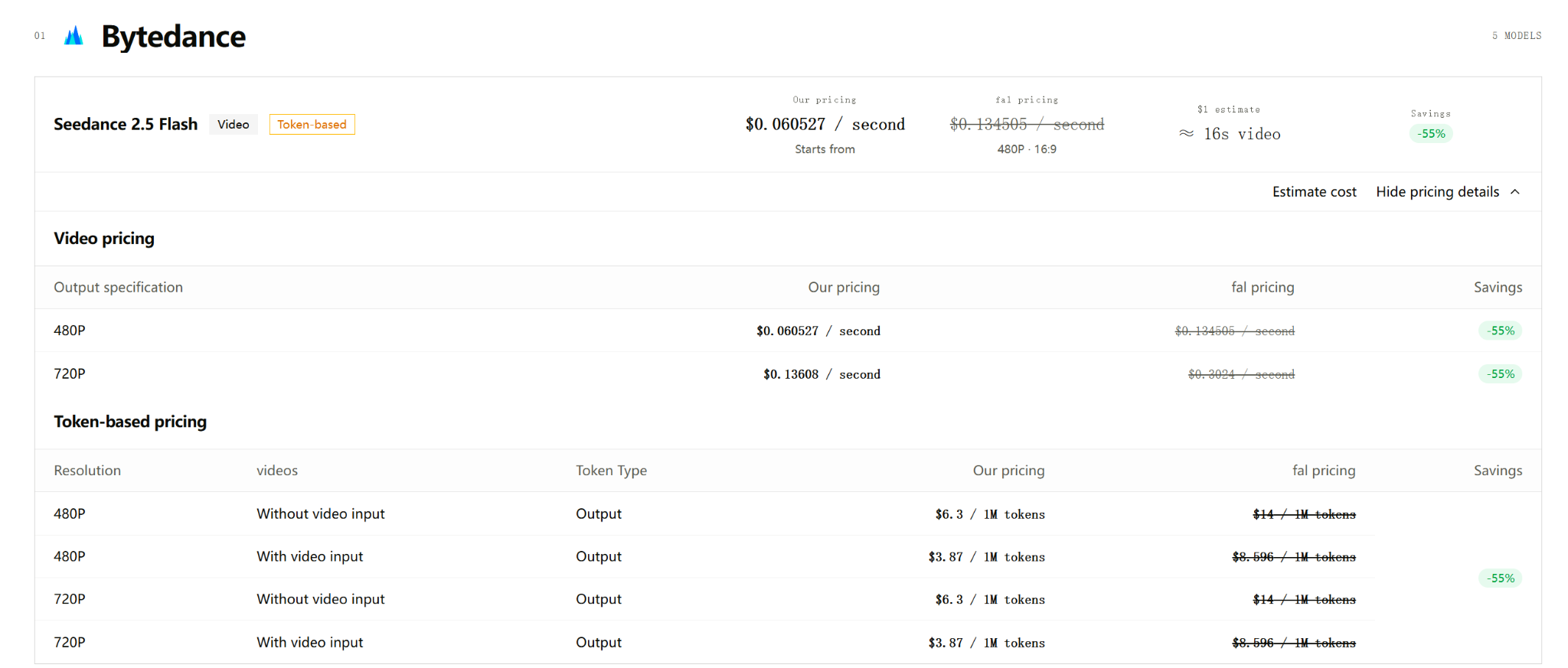
At these rates, LinkModel saves approximately $0.074 per generated second at 480p and $0.1663 per second at 720p against that displayed baseline.
For a 10-second 720p video, the difference is especially clear:
| Pricing comparison | 10-second 720p cost |
|---|---|
| LinkModel | $1.3608 |
| fal baseline displayed on LinkModel | $3.0240 |
| Estimated savings | $1.6632 |
For creators producing frequent short-form videos or developers running repeated generation jobs, that difference can quickly become significant.
The right resolution depends on what the video needs to accomplish. A 480p clip can be sufficient to explore scene ideas and camera movement, while 720p offers more visual detail for selected outputs.
LinkModel Token Pricing vs BytePlus Official Rates
Seedance 2.5 Flash also supports token-based billing.
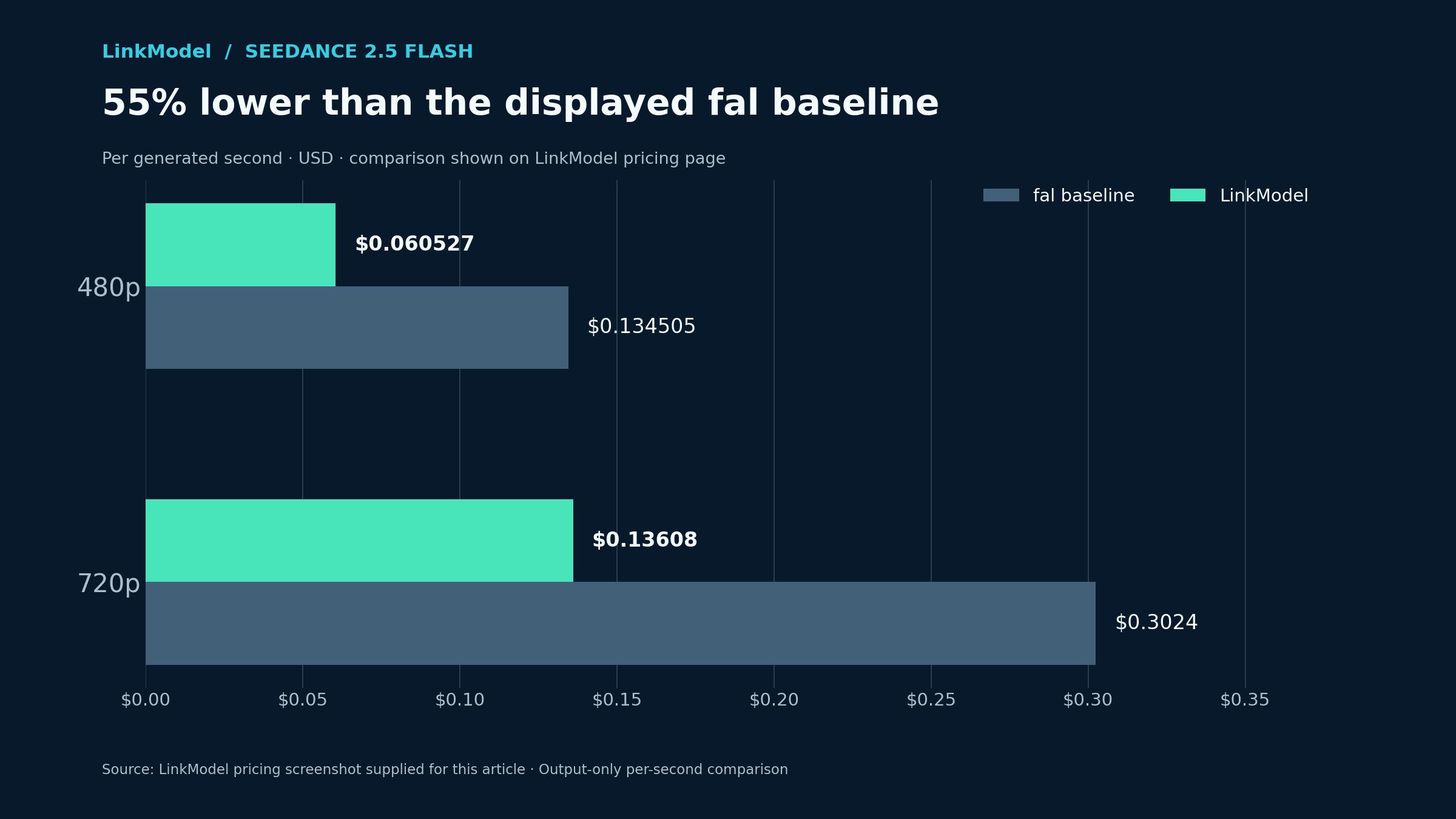
LinkModel's published token pricing is:
| Input configuration | LinkModel output-token price | BytePlus reference price | Savings |
|---|---|---|---|
| Without video input | $6.30/M tokens | $7.00/M tokens | 10% |
| With video input | $3.87/M tokens | $4.30/M tokens | 10% |
These prices apply to the supported 480p and 720p token configurations.
The two comparisons represent different savings:
LinkModel vs fal: 55% lower against LinkModel's displayed fal pricing baseline.
LinkModel vs BytePlus: 10% lower than the listed official reference token rates.
The official BytePlus rates also help explain the price difference between Flash and standard Seedance 2.5:
| Model | Without video input | With video input |
|---|---|---|
| Seedance 2.5 Flash | $7.00/M | $4.30/M |
| Standard Seedance 2.5 | $10.70/M | $6.40/M |
At equivalent token consumption, Flash's no-video-input rate is approximately 34.6% lower than the standard model's rate.
For tasks with video input, the difference is approximately 32.8%.
That makes Flash attractive both as a lower-priced model tier and through LinkModel's additional pricing advantage.
What Does Seedance 2.5 Flash Support?
Seedance 2.5 Flash offers a substantial set of video-generation capabilities despite its lower price.
| Capability | Seedance 2.5 Flash |
|---|---|
| Output resolution | 480p and 720p |
| Video duration | 4–30 seconds |
| Native audio generation | Supported |
| Text-to-video | Supported |
| Image-to-video | Supported |
| First-frame and last-frame guidance | Supported |
| Reference images | Up to 10 |
| Reference videos | Up to 5 |
| Reference audio clips | Up to 5 |
| Video editing and extension | Supported |
| Native 1080p output | Not supported |
| Official Draft mode | Not supported |
Reference-media combinations must follow the selected API's request-field constraints. For example, LinkModel's documented reference image, video, and audio arrays are separate from its first-frame and last-frame inputs.
These capabilities make Flash useful for product demonstrations, dialogue-based scenes, social media content, and multimodal reference workflows. For broader creative applications, AI video generation with synchronized audio explores how sound and visuals work together.
Its most important tradeoff is resolution. Flash stops at 720p, while standard Seedance 2.5 provides higher-resolution options and a dedicated Draft workflow.
Seedance 2.5 Flash API Cost Calculator: 5 to 30 Seconds
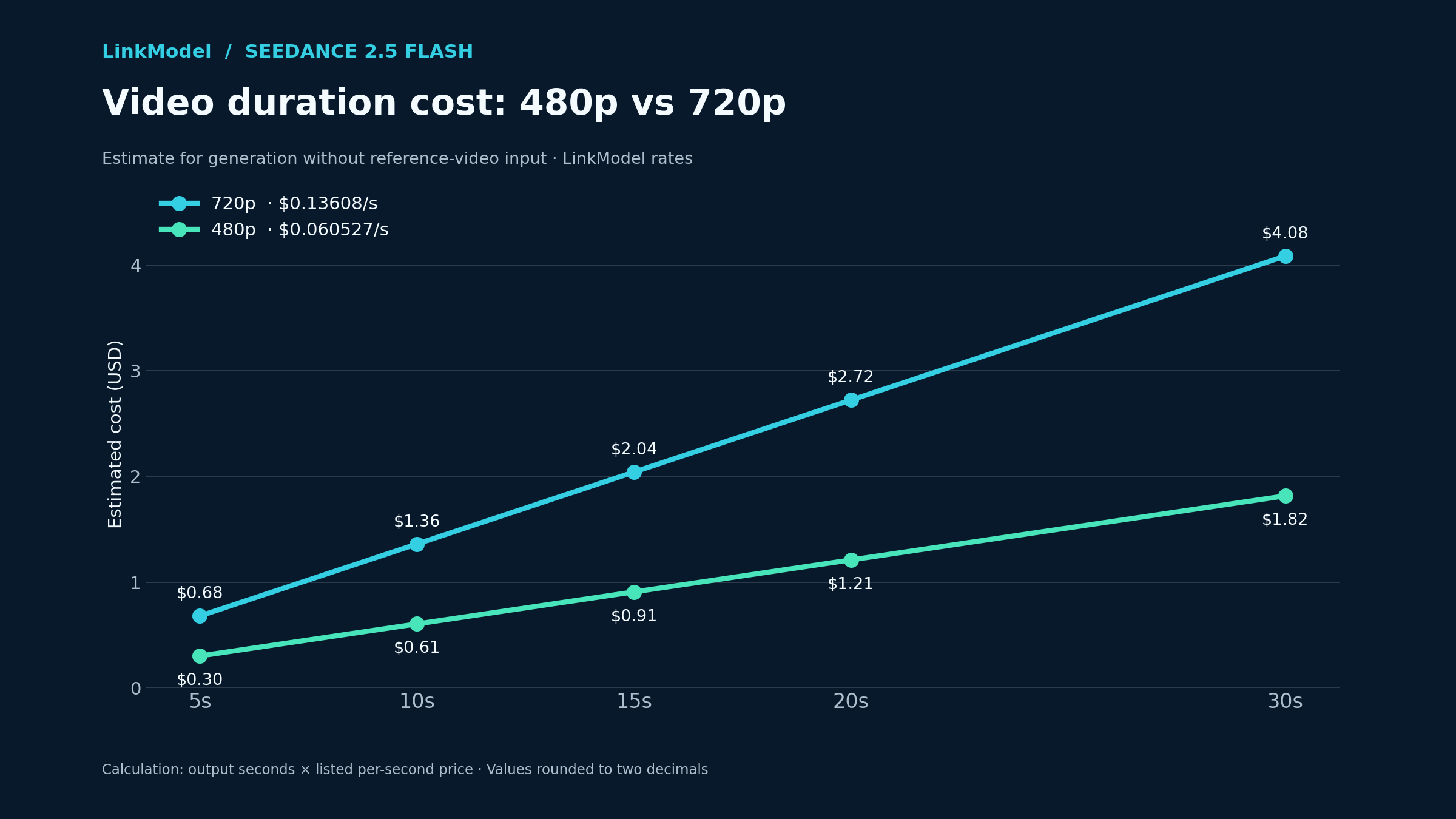
For generation without reference-video input, the estimated cost is:
Video cost = output duration × price per second
Using LinkModel's published per-second rates:
| Video duration | 480p cost | 720p cost |
|---|---|---|
| 5 seconds | $0.3026 | $0.6804 |
| 10 seconds | $0.6053 | $1.3608 |
| 15 seconds | $0.9079 | $2.0412 |
| 20 seconds | $1.2105 | $2.7216 |
| 30 seconds | $1.8158 | $4.0824 |
A 30-second 720p Flash video costs approximately $4.0824 on LinkModel at the listed output rate.
For a single generation, that amount is easy to estimate. The more important question for production teams is how many video variations they expect to create.
Quick Buying Guide: Which Resolution Fits Your Budget?
| Your goal | Suggested configuration | Estimated LinkModel cost |
|---|---|---|
| Test one short creative idea | 5s, 480p | $0.3026 |
| Evaluate a sharper short clip | 5s, 720p | $0.6804 |
| Create a 10-second social video | 10s, 720p | $1.3608 |
| Generate a 30-second sequence | 30s, 720p | $4.0824 |
| Compare five short concepts | Five 5s clips, 480p | $1.5132 |
For first-time users, a five-second 480p generation offers a low-cost way to explore the model's response to a prompt.
Move to 720p when the selected concept needs more detail or is closer to its final delivery format.
Case Study: Fifteen E-commerce Video Variations
Consider an e-commerce team producing three ten-second video concepts for each of five products.
This creates 15 clips and 150 seconds of total video output.
| Production strategy | Total output | Estimated cost |
|---|---|---|
| All concepts at 480p | 150 seconds | $9.0791 |
| All concepts at 720p | 150 seconds | $20.4120 |
| Difference | — | $11.3330 |
Starting with 480p reduces the initial concept-generation budget by approximately 55.5% compared with generating every version at 720p.
That difference can be used to explore additional opening shots, alternative camera movements, product presentation styles, or creative directions.
The team can then select the concepts worth reproducing at the desired final resolution.
For projects that involve many variations, separating creative exploration from final output is often more useful than treating every generation as a finished video. This approach is also relevant to AI video APIs for advertising, where multiple concepts and revisions are common.
Case Study: Why Two 30-Second Projects Can Have Different Costs
A 30-second output does not always represent the full amount of generation work required.
Our review of video-production experiences found two projects using standard Seedance 2.5 with final clips of approximately 30 seconds but total spending of around $23 and $13.
The difference came from how many creative and final generations were produced.
For Flash planning, the same relationship can be illustrated using LinkModel's 720p rate:
| Number of 30-second generations | Total estimated cost |
|---|---|
| 1 | $4.0824 |
| 2 | $8.1648 |
| 3 | $12.2472 |
| 5 | $20.4120 |
The production lesson is clear: budget for the number of candidate generations, not only the duration of the final published video.
That matters most when the creative brief contains difficult motions, multiple shots, or detailed product requirements.
How Seedance 2.5 Flash API Billing Works
Seedance 2.5 Flash pricing can be expressed as a per-second estimate or as video-token consumption. Video-input workflows account for additional footage, while ordinary output-only estimates are based on generated duration.
Understanding the billing structure makes it easier to plan video-generation, editing, and extension work.
How Video-Token Billing Is Calculated
LinkModel's published video-token estimate uses the input and output video durations, output dimensions, and frame rate.
Estimated video tokens = (input-video duration + output duration) × output width × output height × 24 ÷ 1,024
The applicable price per million tokens then determines the estimated token charge.
At the same resolution and frame rate, longer video duration increases token usage. Higher output dimensions also increase the number of video tokens.
This explains why the published 720p per-second rate is higher than the 480p rate.
For API users planning multiple video tasks, token pricing is especially relevant when requests include reference footage or video editing.
Reference-Video Pricing: A Practical Cost Example
Reference-video tasks can be priced differently from ordinary generation.
For example, Kie.ai lists the following Seedance 2.5 Flash rates:
| Resolution | Without video input | With video input |
|---|---|---|
| 480p | $0.0925/s | $0.0575/s |
| 720p | $0.2050/s | $0.1275/s |
Under its published reference-video formula, the billable duration includes input footage and generated output.
For a 10-second 720p generation without video reference:
10 × $0.2050 = $2.05
For an eight-second reference video and a ten-second output:
(8 + 10) × $0.1275 = $2.295
For two reference videos lasting six and eight seconds, followed by a ten-second output:
(6 + 8 + 10) × $0.1275 = $3.06
These examples show why the number and duration of reference assets matter when budgeting video-generation workflows.
Case Study: Editing a Video With Reference Footage
Our analysis of published Seedance 2.5 Flash results identified an editing task that used approximately eight seconds of source footage and generated a 7.7-second output.
The reported charge was $1.536 under the tested video-input rate.
The example is useful for workflows involving targeted edits, extending existing footage, or creating variations from source clips.
For a production sequence that involves generation, editing, and extension, the budget should reflect the operations being performed at each stage. A broader image-to-video API workflow can also help explain how visual references fit into the production process.
LinkModel Seedance 2.5 Flash API: Model ID and Request Flow
LinkModel documents the Seedance 2.5 Flash model ID as seedance-2-5-flash.
Its video-generation endpoint is:
https://api.linkmodel.ai/v1/videos/generations
The API uses an asynchronous workflow with three stages:
- Submit the task. Send a POST request with the model ID, prompt, and selected video settings. The response provides a task ID.
- Check the task status. Send a GET request using the returned task ID to retrieve the current generation state.
- Read the completed result. When generation succeeds, the response includes the output video URL.
For a broader walkthrough, see how to use the Seedance 2.5 API.
The published request defaults are:
| Setting | Default | Supported options |
|---|---|---|
| model | Set explicitly | seedance-2-5-flash |
| duration | 5 seconds | 4–30 seconds; -1 for applicable modes |
| resolution | 720P | 480P, 720P |
| extends.audio | true | true, false |
The documentation also supports up to ten images, five videos, or five audio clips as reference materials, subject to request combination rules.
Because the task runs asynchronously, the initial API response provides a task identifier rather than the finished video. LinkModel's documentation recommends polling for completion and notes that generation commonly takes two minutes or longer.
For a Pricing-focused workflow, the most important preparation is to choose the exact resolution, duration, and reference configuration before submitting a larger generation batch.
Seedance 2.5 Flash API Pricing Across Providers
Among the published output-only quotations reviewed here, LinkModel has the lowest listed Seedance 2.5 Flash price at both 480p and 720p.
Comparing identical resolutions and output durations gives a clearer buying decision than comparing unrelated credits, subscriptions, or token packages.
Seedance 2.5 Flash Provider Price Comparison
| Provider or price reference | 480p per second | 720p per second |
|---|---|---|
| LinkModel | $0.060527 | $0.13608 |
| APIMart, as reported by Yir | $0.0631 | $0.1419 |
| Revana | $0.0850 | $0.1850 |
| Kie.ai | $0.0925 | $0.2050 |
| fal baseline displayed on LinkModel | $0.134505 | $0.3024 |
The fal row uses the comparison baseline displayed on LinkModel's pricing page, while the broader fal.ai pricing analysis provides context for fal's different pricing models.
Under that displayed comparison, LinkModel costs 55% less at both resolutions.
LinkModel is also approximately 34.6% less expensive than Kie.ai at 480p and 33.6% less expensive at 720p, using the rates listed above.
Against the APIMart quotation reported by Yir, LinkModel's rate is approximately 4.1% lower at each resolution.
How Much Does the Price Difference Matter at Scale?
The following table compares estimated costs for 720p output.
| Provider or baseline | 100 output seconds | 1,000 output seconds |
|---|---|---|
| LinkModel | $13.608 | $136.080 |
| APIMart, reported by Yir | $14.190 | $141.900 |
| Revana | $18.500 | $185.000 |
| Kie.ai | $20.500 | $205.000 |
| fal baseline displayed on LinkModel | $30.240 | $302.400 |
For 1,000 seconds of 720p video, LinkModel's rate is $166.32 lower than its displayed fal baseline.
The difference relative to Kie.ai is approximately $68.92, while the gap relative to the listed APIMart rate is approximately $5.82.
The absolute savings grow as the output workload increases.
For creators experimenting with a few videos, low initial spending may be the priority. For teams producing hundreds of clips, even a smaller difference in unit price can become meaningful.
Which Seedance 2.5 Flash API Provider Should You Choose?
For the standard output-only 480p and 720p workloads compared above, LinkModel offers a particularly competitive published rate.
Its 55% advantage against the displayed fal baseline, combined with the Playground and $0 monthly platform fee, makes it a practical starting choice for cost-conscious video generation.
For projects using video references or editing, compare the relevant input configuration and token rates before deciding how much to allocate.
The strongest provider choice is one that supports the specific task and makes its expected cost clear.
Seedance 2.5 Flash vs Standard: Real Production Findings
Our research of published video-generation comparisons found that Seedance 2.5 Flash can substantially reduce generation cost and completion time, but output quality depends on the scene and required action.
The most useful observations come from matched-prompt examples involving dialogue, product advertisements, physical motion, continuous shots, and reference-guided generation.
Case Study: Dialogue, Lip Sync, and a Bicycle Repair Scene
A 10-second, 720p comparison used the same prompt and random seed for Flash and standard Seedance 2.5.
The scene showed a bicycle repair technician handling a wheel, looking toward the camera, and delivering a short spoken line.
| Measurement | Flash | Standard |
|---|---|---|
| Generation charge | $1.598 | $2.443 |
| Completion time | 88.5 seconds | 166.3 seconds |
| Video length | 10 seconds | 10 seconds |
| Resolution | 720p | 720p |
Flash was approximately 34.6% cheaper in the recorded comparison and completed considerably faster.
Both versions generated dialogue, environmental sound, and lip movement that followed the spoken line.
The Flash output also produced a more accurate speech-recognition transcription of the requested dialogue.
However, both versions placed the bicycle wheel incorrectly on its stand.
This reveals an important distinction: convincing dialogue and sound do not guarantee accurate physical interactions.
For dialogue-based commercial videos, evaluate the spoken line, timing, environmental audio, and object placement rather than judging only visual quality.
Case Study: Three-Shot Coffee Advertisement
Another matched-prompt comparison generated a 10-second cold-brew coffee advertisement.
The creative brief specified three shots: four seconds of coffee pouring over ice, three seconds of mint being added and the glass moving, followed by a three-second café-wide shot.
| Measurement | Flash | Standard |
|---|---|---|
| Generation charge | $1.598 | $2.443 |
| Completion time | 76.2 seconds | 175.3 seconds |
| First transition | 3.75s | 3.79s |
| Second transition | 7.21s | 7.71s |
Flash followed the intended shot lengths more closely and completed the requested glass movement.
The standard model produced a visually stronger closing wide shot but did not fully complete the same glass-moving action.
For advertisers, this is an important tradeoff.
The more expensive video is not automatically the more useful video. A less expensive generation may better satisfy shot timing or essential product movement, even when another output has stronger overall visual appeal.
The best choice depends on which details the creative brief requires.
Case Study: Complex Physical Action
Our research also reviewed three tasks: a flying-disc catch, a baker speaking to the camera, and a bicycle courier in a continuous shot.
The reported 720p completion times were:
| Scene | Flash | Standard | Standard/Flash time ratio |
|---|---|---|---|
| Flying-disc catch | 100s | 230s | 2.30× |
| Speaking baker | 110s | 363s | 3.30× |
| Bicycle courier | 144s | 443s | 3.08× |
Flash completed all three reported tasks faster.
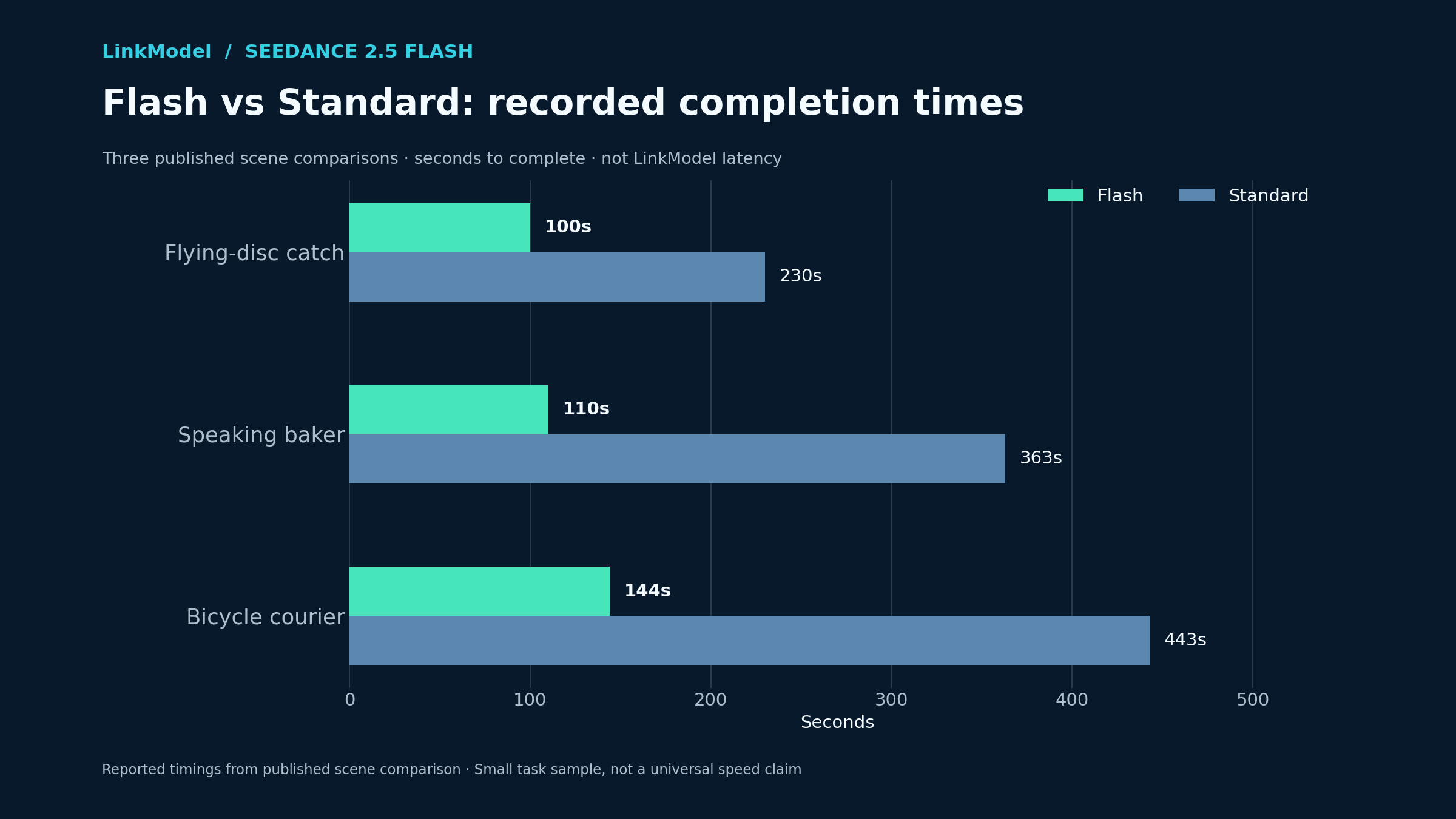
However, in the flying-disc scene, Flash twice failed to show the complete flight-and-catch action, while the standard model completed it in both attempts.
This is a useful reminder for video creators working with product interactions, sports, physical contact, or carefully timed movements.
A scene can appear convincing without completing the action specified in the prompt.
For action-heavy clips, successful execution of the required event matters more than generation speed alone.
Case Study: A 30-Second Continuous Camera Shot
In the bicycle courier example, Flash completed the 30-second sequence in approximately 144 seconds, while standard Seedance 2.5 took about 443 seconds.
The Flash output also preserved some clothing and prop details more consistently throughout the shot.
Long continuous clips are particularly demanding because the model must maintain subject appearance, object placement, and environmental continuity during camera movement.
For a creator working on 720p short narratives, the combination of lower cost and faster generation is attractive.
The key quality checks are whether the subject remains consistent, objects maintain their identity, and the camera movement follows the intended sequence.
Case Study: 480p vs 720p With the Same Prompt
Our review found another important observation from a same-prompt, same-seed Flash comparison.
A bicycle repair scene generated at 480p did not reproduce the identical person or composition when regenerated at 720p.
The published test recorded approximately $0.711 for the 480p version and $1.598 for the 720p version.
The key prompt elements were preserved, including the repair-shop setting and spoken dialogue, but the visual composition changed.
This matters when using 480p as a low-cost creative preview.
A 480p generation can confirm whether the prompt produces the intended scene structure and sound, but a separate 720p generation may produce a different visual take.
For character or product consistency, use appropriate reference guidance when moving toward a final output.
Case Study: First-Frame-Guided Video Generation
Another published Flash test used a reference image of a seaplane on a lake and generated an eight-second video.
The intended action was a continuous sequence: the propeller starts, the plane taxis away from the dock, and it lifts off toward the mountains.
The reported generation cost was $1.277, with a completion time of 72.2 seconds.
The output preserved the dock and mountain scene while showing the plane moving across the water and taking off. It also included engine and environmental audio.
This example demonstrates why image-to-video generation can be useful for product or scene continuity: the starting image provides a stronger visual reference than text alone.
For commercial content, a clearly prepared first frame can help establish product appearance, opening composition, or scene identity before motion is generated.
What Our Research Means for Choosing Flash or Standard
The observed results support a task-based decision rather than a universal quality ranking.
| Production requirement | Recommended starting point |
|---|---|
| Low-cost 480p and 720p concepts | Flash |
| Repeated social-media variations | Flash |
| Product advertisements with defined shots | Flash, with action checks |
| Short dialogue and native audio | Flash, with speech review |
| Native 1080p delivery | Standard |
| Dedicated Draft workflow | Standard |
| More reference assets than Flash supports | Standard, using a compatible mode |
| Complex physical interactions | Compare both models on the essential action |
| Long continuous 720p shots | Flash is worth evaluating |
For many short-form production tasks, Flash is a strong value choice.
However, when a critical action fails or higher-resolution delivery is required, the standard model may justify its additional cost.
For additional comparisons of video generation quality and production control, our Kling 4.0 vs Seedance 2.5 analysis explores how different models approach video creation.
How to Reduce Seedance 2.5 Flash API Costs per Usable Video
The most effective way to control Seedance 2.5 Flash spending is to measure the cost of approved video output, not just the cost of individual generations.
A lower per-second rate creates more room for experimentation, but the complete production budget also depends on how many generations meet the creative brief.
Use 480p for Exploration and 720p for Selected Outputs
Consider a workflow with five five-second concept drafts followed by one ten-second final video.
| Workflow | Draft spending | Final spending | Total |
|---|---|---|---|
| Five 480p drafts + one 720p final | $1.5132 | $1.3608 | $2.8740 |
| Five 720p drafts + one 720p final | $3.4020 | $1.3608 | $4.7628 |
The mixed-resolution workflow saves approximately $1.8888, or 39.7%.
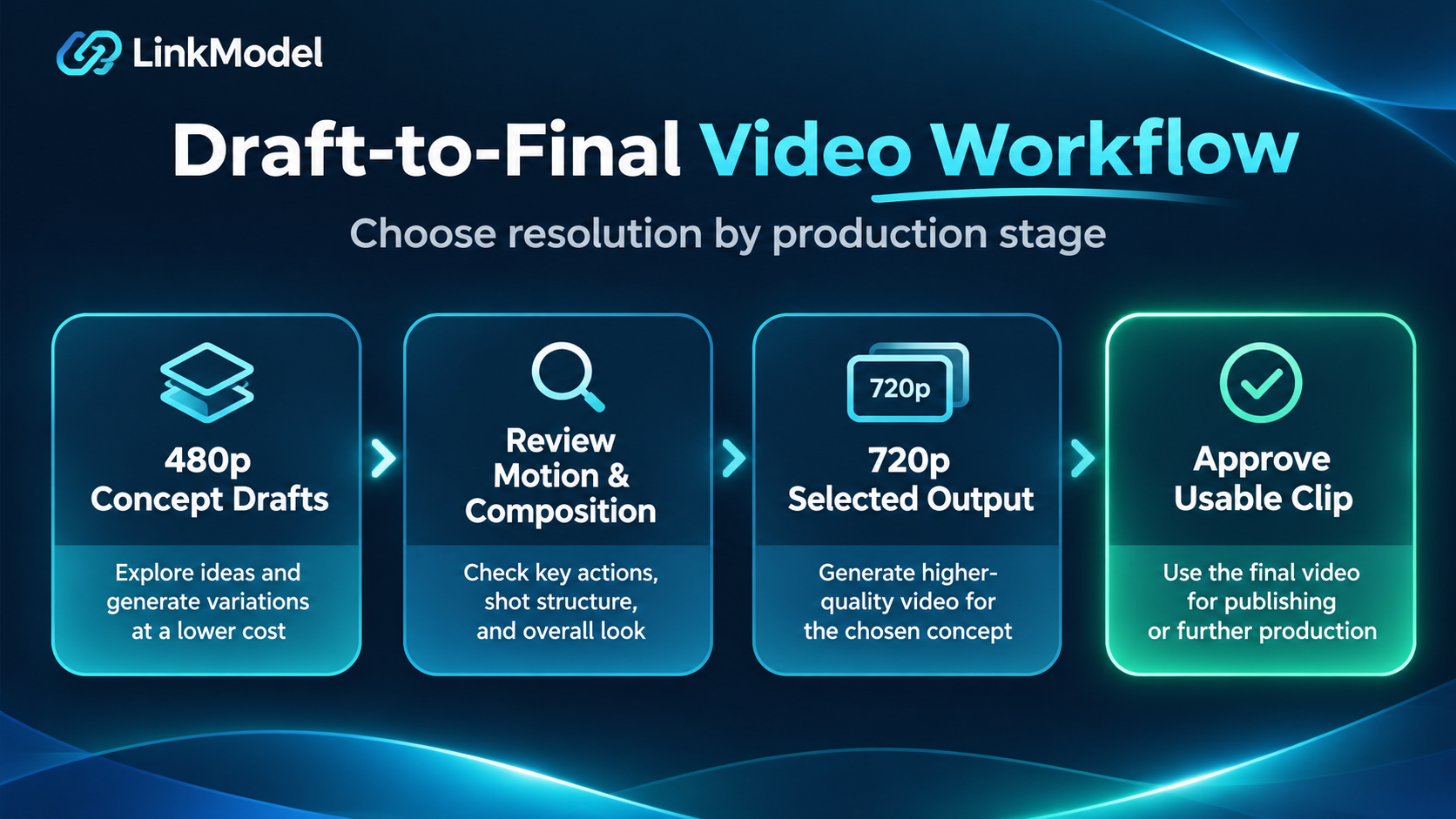
This approach is useful when the first task is selecting a concept rather than delivering a completed production asset.
Early drafts can help identify a suitable subject, action, shot structure, and general creative direction.
The final 720p generation should then be evaluated against the project's actual quality requirements.
Calculate Cost per Usable Video
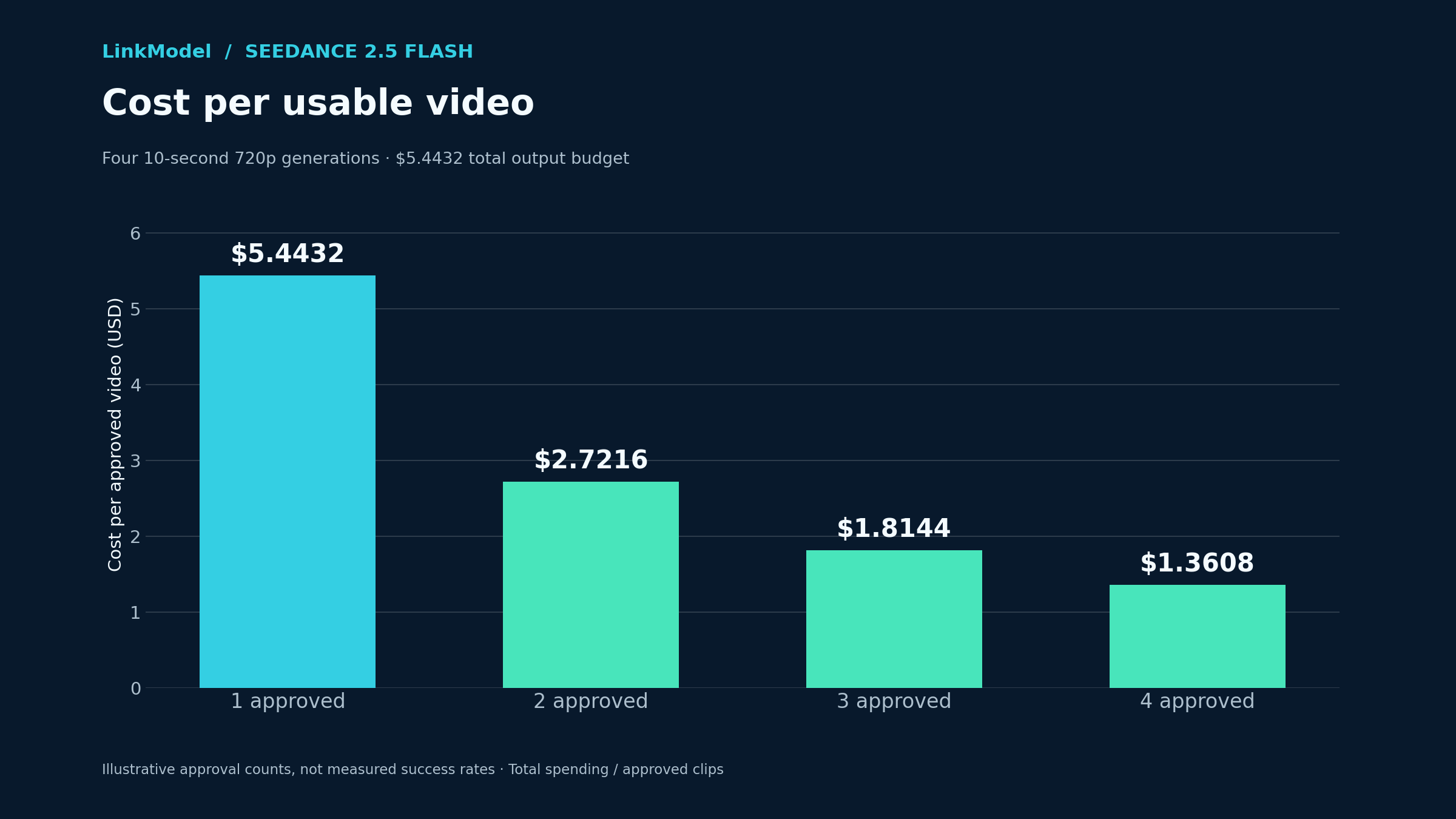
A practical production metric is:
Cost per usable video = total generation spending ÷ number of approved videos
For example, four ten-second 720p generations on LinkModel have an estimated total cost of:
4 × $1.3608 = $5.4432
The effective cost depends on how many videos meet your acceptance criteria.
| Approved videos | Total spending | Cost per usable video |
|---|---|---|
| 1 | $5.4432 | $5.4432 |
| 2 | $5.4432 | $2.7216 |
| 3 | $5.4432 | $1.8144 |
| 4 | $5.4432 | $1.3608 |
This framework reveals the difference between buying inexpensive generations and producing inexpensive finished content.
For simple scenes, Flash's lower unit price can provide excellent value.
For demanding physical actions or precise visual requirements, a model that produces more acceptable results may sometimes offer better overall economics even at a higher unit price.
Reduce Unnecessary Generations With Clear Acceptance Criteria
Our research highlights several useful checks for different kinds of video.
For product advertisements, check product identity, required actions, shot transitions, and the final composition.
For dialogue scenes, evaluate the spoken words, lip synchronization, environmental audio, and accompanying object interactions.
For complex physical actions, verify that the essential event actually occurs, including object contact and the correct sequence of movements.
For continuous shots, inspect subject consistency, clothing, props, background details, and camera motion throughout the clip.
These checks make it easier to choose which outputs deserve further development.
They also help prevent a lower-priced but unsuitable video from being mistaken for a successful result.
Start Small With LinkModel, Then Scale Your Video Budget
LinkModel combines published Seedance 2.5 Flash prices with a Playground, unified access to available AI models, $0 minimum spend, and $0 monthly platform fee.
For a first-time user, the automatic $1 in free Credits can cover approximately 16.5 seconds of 480p output at the listed output-only rate.
That is enough for three five-second 480p generations, or a five-second 720p generation with some credit remaining.
A practical starting workflow is to generate a short 480p scene, review the required action and composition, then evaluate a selected concept at 720p.
When planning larger batches, use the published rates to decide how many concepts to explore and what proportion of the project requires final-resolution generation.
The goal is to spend less on unselected concepts and more on video outputs that actually meet your requirements. For broader cost optimization strategies, see how to reduce AI API costs.
Frequently Asked Questions
How much does Seedance 2.5 Flash API cost per second?
On LinkModel, Seedance 2.5 Flash costs $0.060527/s for 480p and $0.13608/s for 720p. These are 55% lower than the fal comparison baseline displayed on LinkModel for the matching resolutions.
How much does a 30-second Seedance 2.5 Flash video cost?
At LinkModel's listed output-only rates, a 30-second video costs approximately $1.8158 at 480p or $4.0824 at 720p, assuming generation without reference-video input.
Is Seedance 2.5 Flash cheaper and faster than standard Seedance 2.5?
BytePlus's no-video-input token rate for Flash is approximately 34.6% lower than the corresponding standard-model rate. Our research of published generation comparisons also found Flash completing some tasks more than 3× faster, although difficult physical actions can favor the standard model.
Can Seedance 2.5 Flash generate 1080p videos?
No. Seedance 2.5 Flash supports native output at 480p and 720p. For higher-resolution delivery, choose a compatible standard Seedance 2.5 configuration.
How can I reduce Seedance 2.5 Flash API costs and avoid unnecessary generations?
Use 480p for suitable concept exploration, reserve 720p for selected outputs, and establish clear acceptance criteria for motion, composition, audio, and continuity. Track cost per usable video to understand how much you spend on completed, approved content rather than individual attempts.
Conclusion
Seedance 2.5 Flash API pricing makes lower-cost video creation more accessible for developers, advertisers, and short-form content creators, particularly when projects involve multiple concepts and repeated generations. LinkModel's published rates start at $0.060527/s for 480p and $0.13608/s for 720p, representing 55% savings against the fal comparison baseline displayed on its pricing page. Our research shows that Flash can deliver meaningful cost and speed advantages, while output resolution, action accuracy, reference footage, and production requirements determine the value of the finished result. By combining low-cost creative exploration, targeted 720p generation, and a clear measure of usable video costs, creators can allocate their budgets more effectively. With competitive pricing, a Playground, and pay-as-you-go access, LinkModel provides an attractive starting point for turning those savings into practical video-production workflows.