Grok Imagine Image 2.0 API costs $0.04–$0.08 per generated image through xAI, while LinkModel offers 30% lower generation rates at $0.028–$0.056 per image. The model supports text-to-image generation, natural-language editing, up to five reference images, and Low, Medium, and Auto quality settings. Developers can use it for product photography, advertising assets, creative automation, and image editing.
The lowest advertised price is not always the lowest production cost. Image quality, editing consistency, reference-image fees, retries, and provider compatibility all affect whether an API is worth using. An inexpensive image that changes a product label or a person's appearance may require another generation, increasing the cost of an acceptable result.
LinkModel** makes Grok Imagine Image 2.0 generation 30% less expensive than xAI's published rates**, bringing 1K Low images down to $0.028 and 2K Medium images to $0.056. At 10,000 images, that saves $120–$240 in base generation costs at matching settings. For developers evaluating a production integration, the key is to combine that pricing advantage with a successful API test, predictable billing, and image quality that meets the intended use case.
What Is Grok Imagine Image 2.0 API?
Grok Imagine Image 2.0 is xAI's image-generation and editing model, released in August 2026. It accepts text instructions and supports image-based editing, allowing developers to generate new visuals or modify existing assets.
The official xAI model identifier is grok-imagine-image-2.0.
Its capabilities are particularly relevant to applications that generate large numbers of creative assets, such as e-commerce product imagery, advertising concepts, editorial illustrations, and content production systems.
Grok Imagine Image 2.0 API Specifications
| Feature | Details |
|---|---|
| Developer | xAI |
| Model ID | grok-imagine-image-2.0 |
| Image generation | Supported |
| Image editing | Supported |
| Reference images | Up to 5 |
| Quality settings | Low, Medium, Auto |
| Published pricing resolutions | 1K, 1.5K, 2K |
| xAI output pricing | $0.040–$0.080/image |
| LinkModel output pricing | $0.028–$0.056/image |
| xAI input-image charge | $0.010/image |
| xAI published rate limit | 6 requests/second |
| xAI Batch API | Supported |
The resolution tiers in a pricing table should not be confused with the exact parameter values accepted by every endpoint or provider. Always use the documented request schema for the API route you select.
What Can Developers Build With It?
Product imagery. Generate lifestyle scenes, backgrounds, and advertising concepts for online stores.
Image editing. Modify an existing image using natural-language instructions while attempting to preserve important visual elements.
Reference-based creative workflows. Combine visual references for products, environments, and stylistic direction.
Content automation. Generate image variations for blogs, marketing campaigns, and social media.
The model is suitable for experimentation and production evaluation, but output quality must be checked against each application's requirements.
For example, a visually attractive product image is not commercially acceptable if it changes the packaging or invents a label.
Grok Imagine Image 2.0 API vs Grok App
The Grok consumer application and xAI's developer API serve different purposes.
The app provides an interactive creative interface. The API allows developers to automate requests, select documented settings, integrate image generation into applications, and track usage programmatically.
Do not assume that every feature or quality mode visible in the consumer app maps directly to an API parameter.
For development decisions, use the official API documentation and test the specific endpoint your application will call.
Grok Imagine Image 2.0 API Pricing: xAI vs LinkModel
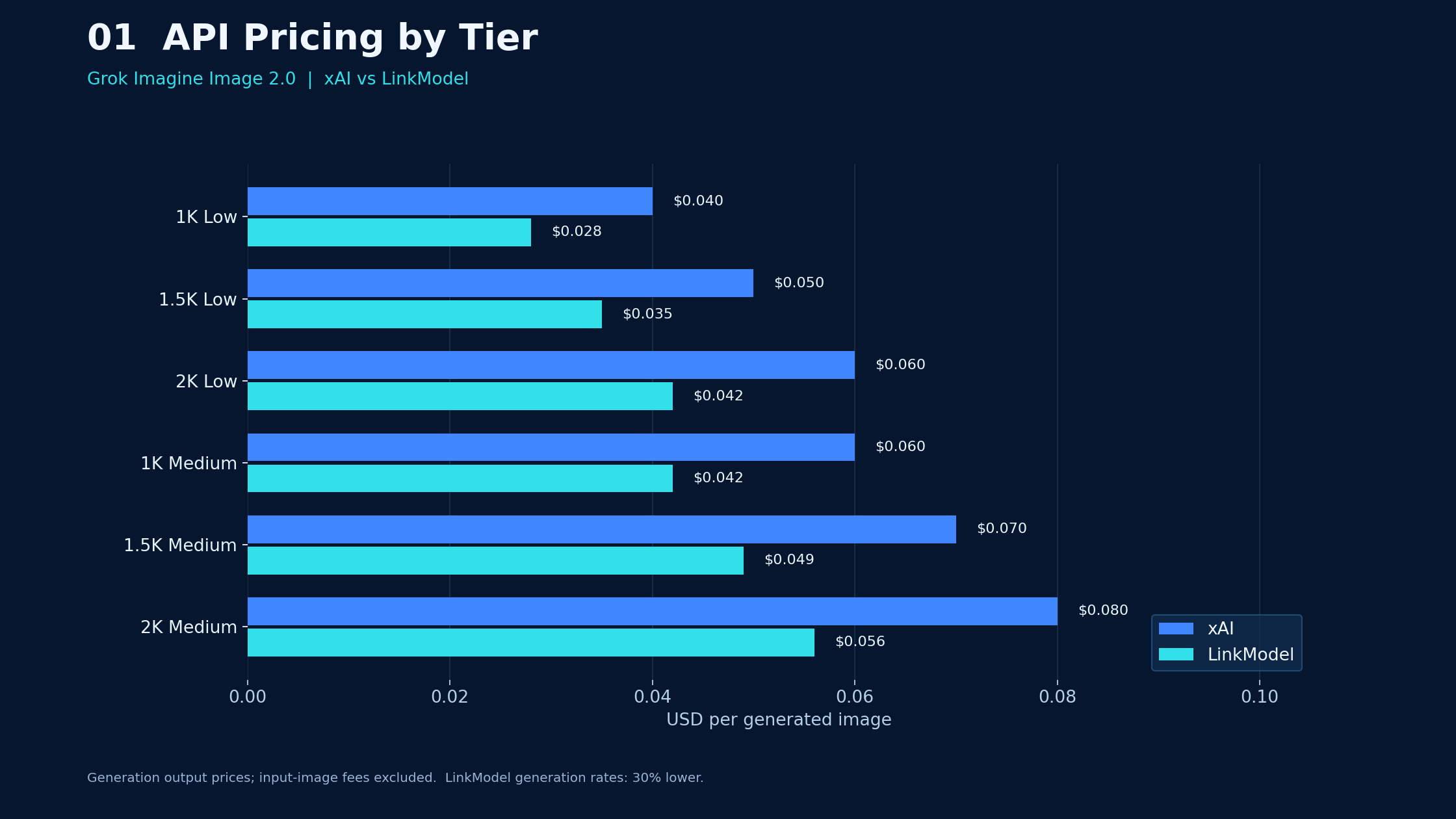
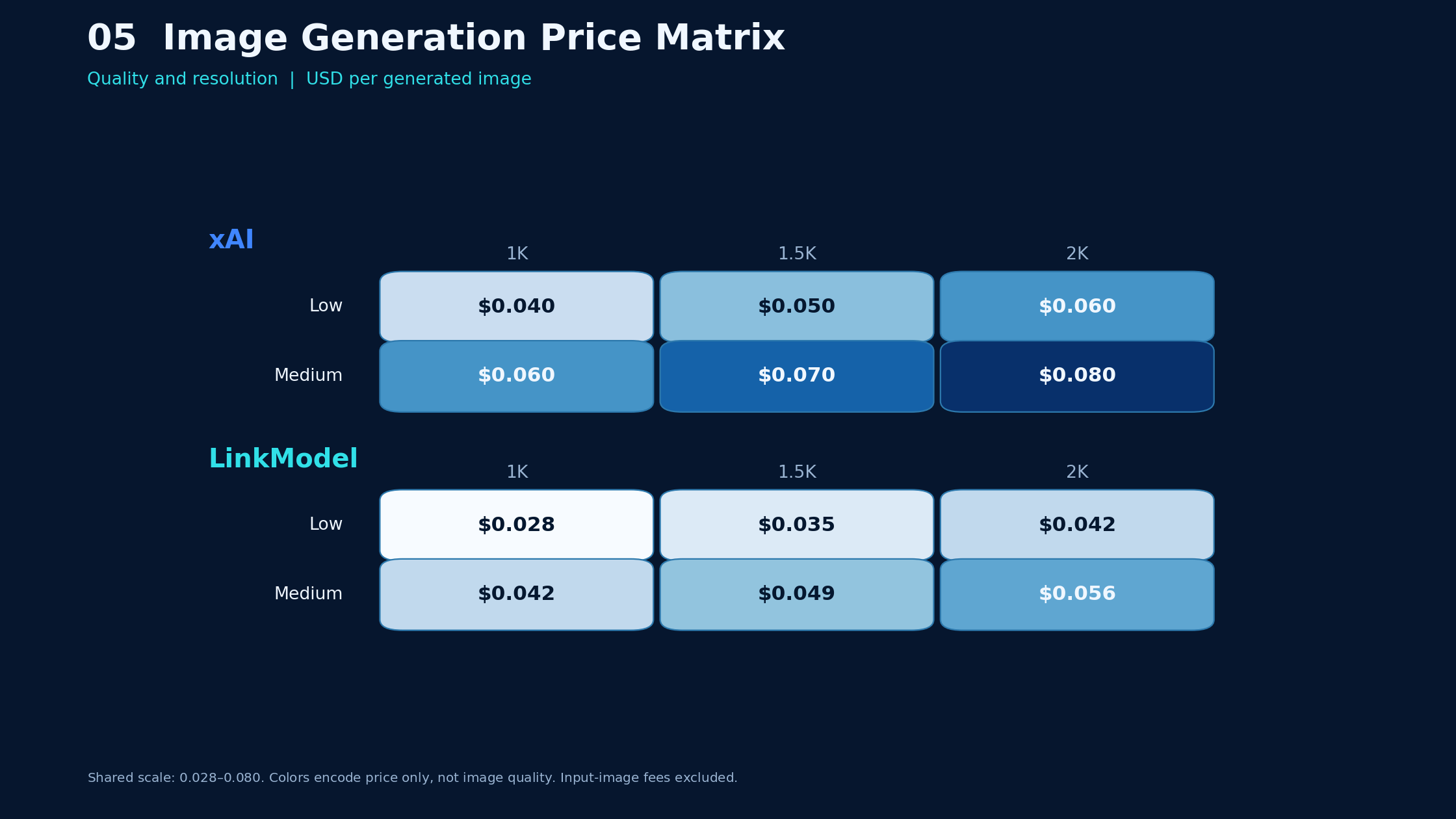
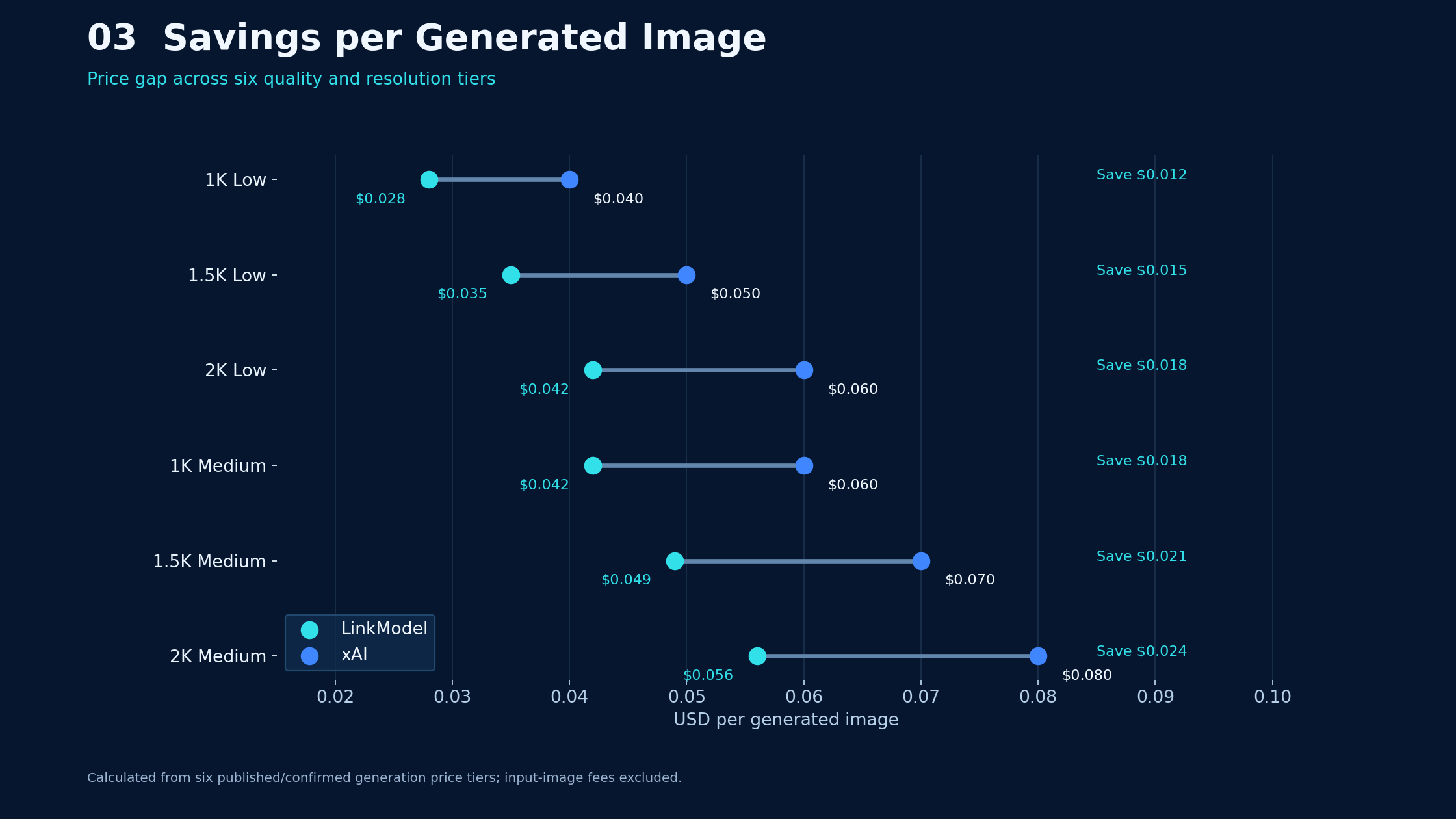
LinkModel's 30% generation discount reduces Grok Imagine Image 2.0 output prices from xAI's $0.040–$0.080 range to $0.028–$0.056 per image.
The following comparison uses xAI's published rates and the corresponding LinkModel discounted generation prices.
Grok Imagine Image 2.0 API Price Comparison
| Resolution | Quality | xAI per image | LinkModel per image | Savings |
|---|---|---|---|---|
| 1K | Low | $0.040 | $0.028 | 30% |
| 1.5K | Low | $0.050 | $0.035 | 30% |
| 2K | Low | $0.060 | $0.042 | 30% |
| 1K | Medium | $0.060 | $0.042 | 30% |
| 1.5K | Medium | $0.070 | $0.049 | 30% |
| 2K | Medium | $0.080 | $0.056 | 30% |
Pricing reviewed: October 16, 2026.
These are generation-output rates. Input-image charges, additional outputs, and other applicable provider fees must be considered separately.
How Much Does It Cost to Generate 1,000 or 10,000 Images?
| Quality configuration | Volume | xAI cost | LinkModel cost | Savings |
|---|---|---|---|---|
| 1K Low | 1,000 | $40 | $28 | $12 |
| 1K Medium | 1,000 | $60 | $42 | $18 |
| 2K Medium | 1,000 | $80 | $56 | $24 |
| 1K Low | 10,000 | $400 | $280 | $120 |
| 1K Medium | 10,000 | $600 | $420 | $180 |
| 2K Medium | 10,000 | $800 | $560 | $240 |
These calculations assume the specified number of billable generated images, with no input-image charges.
For a service producing 10,000 images monthly at 2K Medium, the difference is $240 per month, or $2,880 over 12 months if volume and rates remain unchanged.
That makes LinkModel's lower output pricing particularly relevant to image-heavy applications.
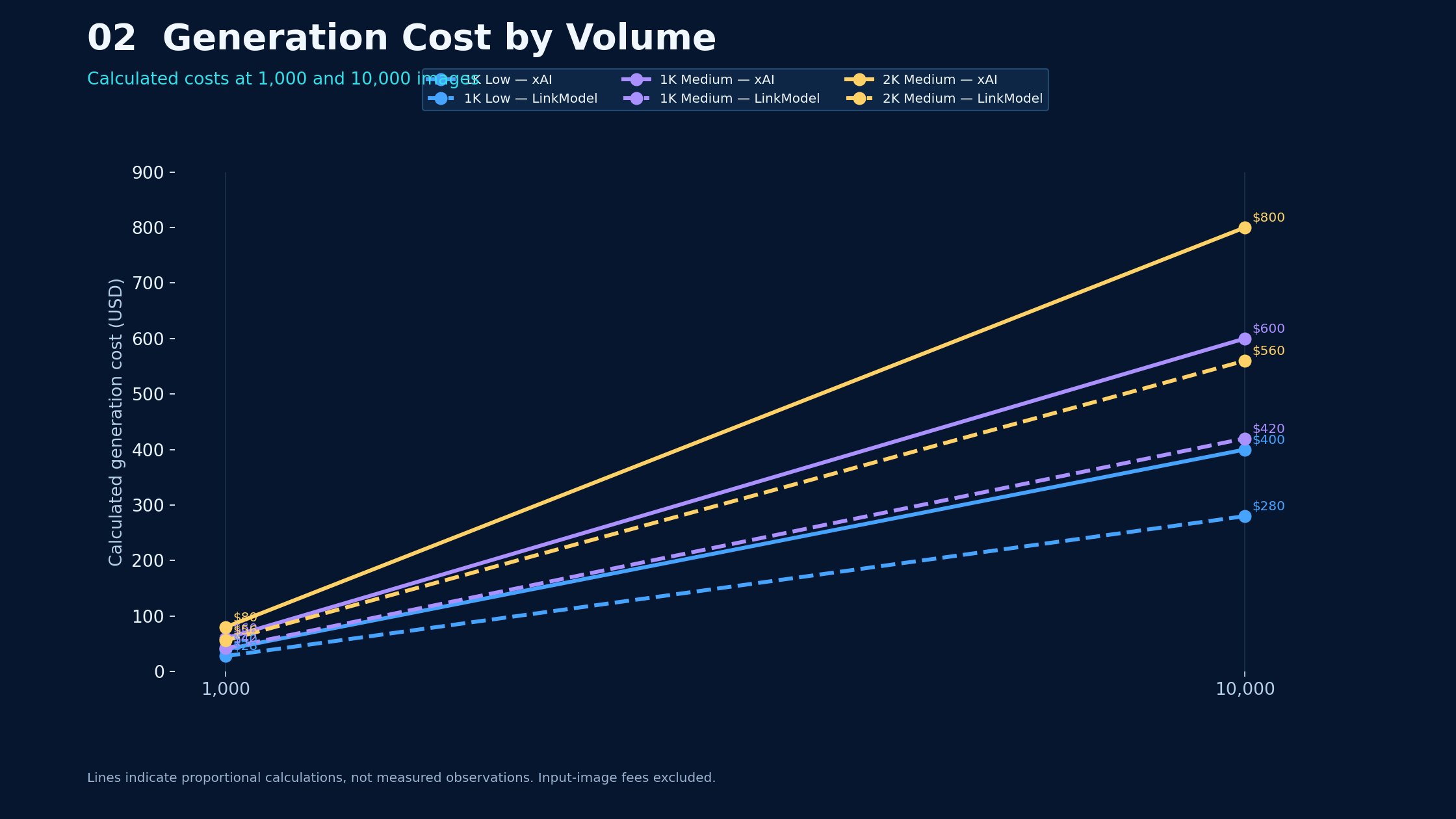
Image Editing Costs: Do Reference Images Cost Extra?
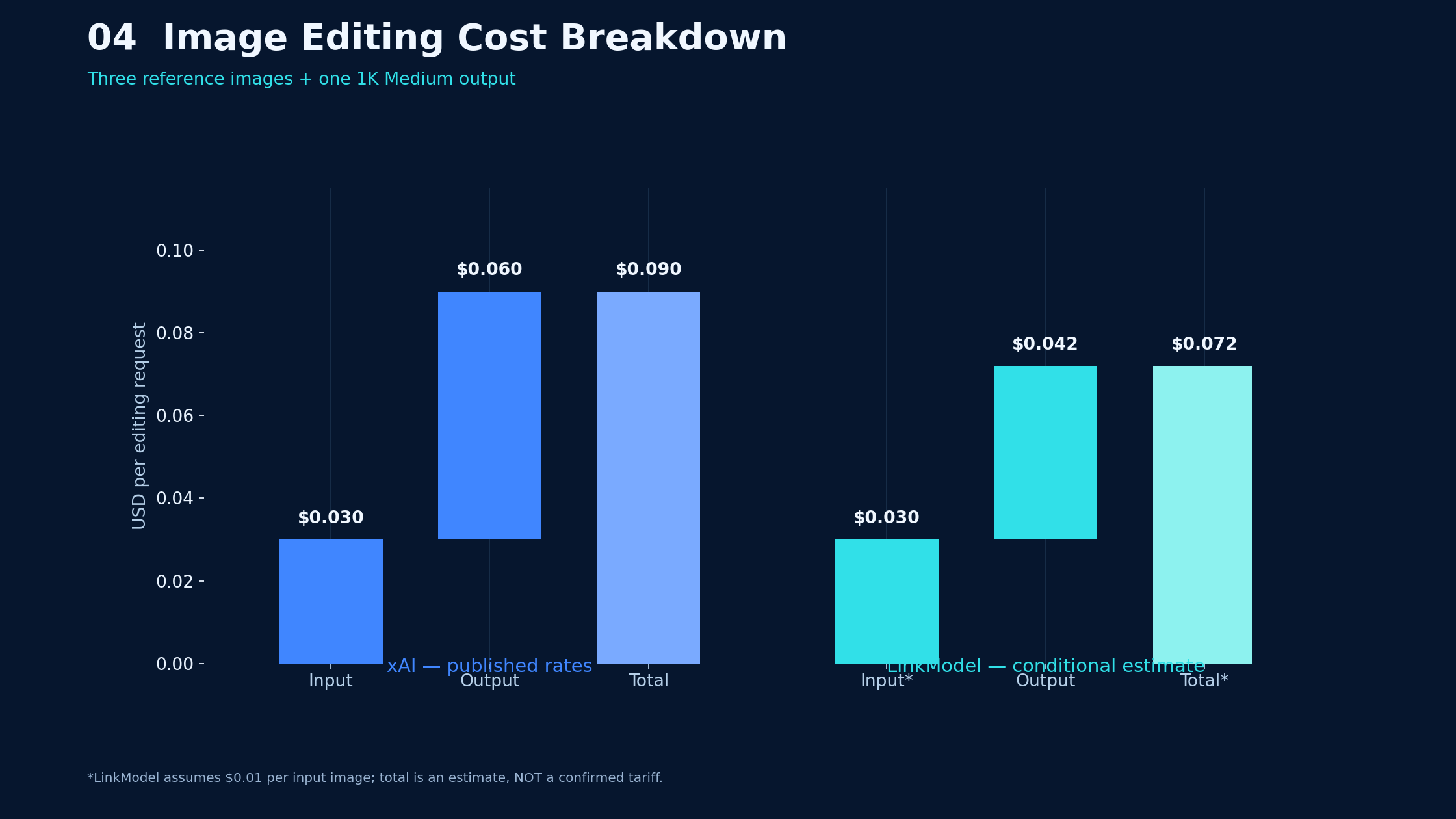
Yes. xAI's published Image 2.0 pricing includes $0.01 per input image, in addition to the output-generation charge.
An editing request using three reference images and generating one 1K Medium output costs:
- Input images: 3 × $0.01 = $0.03.
- xAI output: $0.06.
- Total xAI cost: $0.09.
With LinkModel's $0.042 generation price, the corresponding estimated total would be $0.072 if the same $0.01 per-input-image charge applies.
That LinkModel editing total is an illustrative calculation, not a confirmed all-inclusive editing tariff.
A 30% discount on generated outputs should not be interpreted as a 30% discount on every billable component.
Low vs Medium: Which Quality Tier Is Better Value?
At 1K resolution, Low costs $0.028 through LinkModel and Medium costs $0.042.
That is a difference of $0.014 per generated image.
Low is a sensible starting point for drafts, exploration, and large-volume workflows.
Medium is worth evaluating when the output requires finer details or more precise editing.
The correct choice depends on how many images pass your acceptance criteria.
For example, generating 1,000 images at 1K Low through LinkModel costs $28. If only 700 are acceptable, the effective generation cost is $0.04 per accepted image.
That is a calculated example, not a measured model acceptance rate.
The most useful metric is cost per accepted image, not simply cost per request.
How to Access Grok Imagine Image 2.0 API
Developers can use xAI's official API or a supported third-party provider.
The official xAI model ID is grok-imagine-image-2.0.
Step 1: Create an Account and Obtain an API Key
For direct access, use the xAI developer console and create an API key.
For a multi-model integration, LinkModel provides a unified API platform for supported models.
Keep your API key in a secure server-side environment variable or secret manager. Do not expose it in public repositories or browser-side application code.
Step 2: Select the Correct Endpoint
xAI documents the following API routes:
| Operation | Official xAI route |
|---|---|
| Generate images | POST /v1/images/generations |
| Edit images | POST /v1/images/edits |
| Retrieve a deferred result | GET /v1/images/{request_id} |
The official xAI API base URL is https://api.x.ai.
When using LinkModel, use its documented base URL, authentication method, and supported model identifier. Do not assume that changing only the API key is sufficient for every integration.
Step 3: Configure a Low-Cost First Test
A first generation should be simple enough to identify configuration errors.
Use these settings where supported:
| Setting | Test value |
|---|---|
| Model | grok-imagine-image-2.0 |
| Quality | Low |
| Resolution | 1K |
| Aspect ratio | 1:1 |
| Output count | 1 |
Example prompt:
Create a photorealistic product photograph of a matte ivory skincare bottle on a pale stone pedestal. Use soft studio lighting, a neutral background, realistic reflections, and a centered square composition. Do not add extra products, logos, or decorative text.
The base generation price for this configuration is $0.04 through xAI or $0.028 through LinkModel.
A successful test should return a usable image result and allow you to identify the request's billing and model settings.
Step 4: Check the Actual Result
Before increasing volume, verify that the API route:
- Accepts the intended model and parameters.
- Returns the expected image format.
- Produces the requested output dimensions.
- Reports errors in a form your application can handle.
- Bills the request as expected.
This short validation is more valuable than immediately launching hundreds of generations.
Grok Imagine Image 2.0 Developer Guide: Python, JavaScript and REST
The official xAI API can be used with supported SDKs or direct HTTP requests.
For a production application, the important steps are authentication, parameter validation, request submission, result handling, and usage tracking.
Python Integration
xAI documents an OpenAI-compatible Python integration for image generation.
A typical Python implementation creates a client using the xAI API base URL and API key, then sends a generation request with the Image 2.0 model identifier.
The request should explicitly specify the intended quality and resolution when supported.
After receiving the response, the application should save the image and record the model, output count, request identifier, and billing information.
For a working implementation, use the official xAI developer documentation rather than relying on an outdated copied request.
JavaScript and Node.js Integration
A Node.js application can follow the same workflow through a supported client or HTTP request.
The backend should receive the user's creative instructions, validate them, and submit the image-generation request.
It should then return the result to the frontend without exposing the API key.
For a marketing application, it can also store the prompt, campaign ID, selected quality tier, and approved output.
REST API Integration
REST is useful for applications that do not rely on a particular programming language.
A generation request requires authentication and a valid request body containing the model and supported generation parameters.
Depending on the selected response format, the application may receive a hosted image URL or encoded image data.
Do not treat a temporary hosted image URL as permanent asset storage. Save approved images to your own authorized storage system.
Deferred Generation, Polling and Webhooks
For longer-running workflows, xAI supports deferred image generation.
Instead of keeping an application request open until the image is ready, the service can return a request identifier.
The application can retrieve the result later or process a completion event.
For production systems, store request identifiers and avoid blindly resubmitting timed-out requests.
A client timeout does not prove that the original generation failed.
This distinction helps prevent duplicate jobs and unexpected costs.
Grok Imagine Image 2.0 Image Editing: Practical Workflows
Image editing is useful when a business already has approved visual assets and wants to change a specific element.
The official API supports up to five reference images.
However, reference-based editing does not guarantee that every unchanged detail will be preserved.
For product photography and portraits, evaluate whether the model changes important features beyond the requested edit.
Product Background Replacement
A skincare brand may want to place an existing product into a new environment without changing its packaging.
Example editing prompt:
Replace the background with a bright Mediterranean bathroom featuring natural stone, soft morning sunlight, and subtle botanical details. Preserve the bottle's shape, cap, label position, packaging colors, and proportions. Keep the product centered and fully visible. Do not add extra products.
Review the result for packaging accuracy, object proportions, and whether the background replacement introduced unintended changes.
At 1K Medium with one input image, xAI's published rates imply $0.07 per generated edit.
The comparable LinkModel estimate is $0.052 if its input-image fee is $0.01.
Multi-Reference Advertising Composition
A campaign might combine a product reference, an environment reference, and a lighting reference.
Example prompt:
Create a premium advertising photograph using the product from the first reference, the architectural environment from the second, and the warm directional lighting from the third. Preserve the product's packaging, proportions, and label placement. Keep the composition realistic and avoid introducing additional products.
The objective is to reduce ambiguity by providing visual context.
But the output still requires human or automated validation.
What Can Go Wrong With Image Editing?
Public user discussions about Imagine 2.0 have raised concerns about overly smooth skin, unintended facial changes, altered compositions, and inconsistent preservation of original details.
These are user-reported experiences, not controlled API benchmark results.
They suggest practical acceptance tests:
| Editing task | What to check |
|---|---|
| Portrait retouching | Skin texture and facial identity |
| Product background replacement | Packaging and label fidelity |
| Character editing | Clothing and facial consistency |
| Advertising composition | Reference adherence |
| Minor object changes | Unrequested modifications |
For sensitive or brand-critical assets, do not assume that an instruction such as "change nothing else" guarantees exact preservation.
Grok Imagine Image 2.0 Prompts: How to Improve Image Quality
A useful prompt describes the desired subject, environment, composition, lighting, and constraints.
The goal is not maximum prompt length. It is a clear definition of what the output must contain and what it must avoid.
Product Photography Prompt
Create a photorealistic commercial photograph of a premium amber perfume bottle on a polished stone pedestal. Use a warm beige studio background, soft directional lighting, realistic glass reflections, and a three-quarter camera angle. Keep the bottle fully visible with generous negative space. Avoid additional products and decorative text.
This prompt is suitable for evaluating product proportions, lighting, reflections, and commercial composition.
Typography Prompt
Design a minimalist electronic music poster with the exact headline "NIGHT TIDE" and subtitle "LIVE ELECTRONIC SESSION". Use contemporary Swiss graphic design, strong typographic hierarchy, deep navy and warm white colors, precise alignment, and generous negative space. Preserve the exact spelling and punctuation. Do not add any other words.
Typography should be evaluated for both visual appeal and exact text accuracy.
A beautiful poster with incorrect wording is not acceptable for an approved campaign.
Photorealistic Portrait Prompt
Create a cinematic editorial portrait of an adult traveler standing on a rain-soaked European street at dusk. Use natural facial anatomy, realistic skin texture, soft reflections from storefront lights, subtle atmospheric mist, and a shallow depth of field. Preserve natural proportions and avoid excessive skin smoothing.
This prompt can help evaluate photographic realism and anatomy.
If editing an existing portrait, compare the generated face with the reference rather than judging only whether the result looks attractive.
How to Evaluate Prompt Results
For each prompt, record the selected model, quality, resolution, reference inputs, and generated outputs.
Judge results against specific criteria.
For example, product photography may require accurate packaging, while poster design may require exact typography.
Prompt quality is best measured by how reliably the output satisfies the brief, not by how elaborate the prompt sounds.
Grok Imagine Image 2.0 Quality, Resolution and Speed
Image quality and resolution affect both visual results and generation costs.
The official pricing table distinguishes Low and Medium quality across 1K, 1.5K, and 2K output tiers.
Low, Medium and Auto Quality
| Quality | Behavior | Best starting use |
|---|---|---|
| Low | Lower-cost generation | Drafts and high-volume tasks |
| Medium | More compute for detail | Final assets and detailed editing |
| Auto | Currently Low for generation and Medium for editing | Flexible workflows |
The Auto behavior is documented by xAI as the current default and may change.
For predictable billing, specify the intended quality explicitly.
November 2, 2026: Legacy Model Migration
On November 2, 2026, xAI will retire the legacy grok-imagine-image-quality model identifier.
Requests using that identifier will be routed to grok-imagine-image-2.0 at Low quality.
The existing request and response formats remain compatible, and the legacy identifier continues resolving to the newer model.
This does not retire Image 2.0 or remove its Medium and Auto settings.
Developers should use grok-imagine-image-2.0 explicitly and choose their intended quality tier.
This is especially important for image-editing workflows that require consistent output behavior.
Resolution and Aspect Ratio
Resolution controls the amount of image detail available for the final asset.
Aspect ratio determines the composition's shape.
For example, 16:9 is appropriate for many blog headers, 1:1 for square product cards, and 9:16 for vertical social media.
Select the final intended format before generation when possible.
This can reduce unnecessary cropping and regeneration.
How Fast Is Grok Imagine Image 2.0?
There is no single verified generation-time number that applies to every quality setting, prompt, account, and API provider.
Instead of relying on an isolated speed claim, measure:
| Metric | Why it matters |
|---|---|
| Median latency | Typical response time |
| P95 latency | Slow-request experience |
| Failure rate | Reliability |
| Retry rate | Operational overhead |
| Acceptance rate | Usable outputs |
| Cost per accepted image | Actual production efficiency |
For interactive applications, latency matters.
For batch content production, approved-output cost and throughput may matter more.
Grok Imagine Image 2.0 Image Quality: Benchmarks and Limitations
xAI reported strong Arena leaderboard performance when Imagine Image 2.0 launched.
However, leaderboard rankings change, and a historical result does not establish that the model is best for every task.
For commercial applications, image quality should be evaluated through representative prompts and real acceptance criteria.
Where Grok Imagine Image 2.0 May Be Useful
The model's documented capabilities make it relevant to product imagery, concept generation, marketing visuals, and reference-based editing.
These workflows benefit from configurable output settings and natural-language instructions.
However, the presence of a capability does not guarantee perfect results.
Where Developers Should Be Cautious
Portrait editing may require careful review of facial identity and skin texture.
Product editing may introduce packaging changes.
Typography may contain unexpected spelling or punctuation.
Reference-based composition may alter details that the user intended to preserve.
For these tasks, generate a small evaluation set before committing to a high-volume workflow.
A Practical Evaluation Method
Choose three representative prompts from your intended use case.
For each prompt, compare Low and Medium quality at the same resolution.
Review the outputs for:
- Instruction adherence.
- Visual realism.
- Preservation of important details.
- Unwanted changes.
- Acceptable-output rate.
Keep the test conditions consistent.
A small, well-designed task-specific evaluation is more useful for purchasing decisions than a leaderboard rank alone.
Grok Imagine Image 2.0 API Errors and Production Reliability
A production integration should handle invalid requests, authentication failures, billing restrictions, rate limits, and temporary service errors.
Common API Errors
| HTTP status | Likely issue | Recommended response |
|---|---|---|
| 400 | Invalid request | Check parameters |
| 401 | Authentication failure | Verify credentials |
| 402 | Billing-related issue | Review billing status |
| 403 | Permission or access restriction | Check model access |
| 429 | Rate limit exceeded | Apply controlled backoff |
| 500 | Server-side failure | Retry cautiously |
These are general HTTP troubleshooting categories; actual error codes and response bodies depend on the provider.
xAI publishes a rate limit of 6 requests per second for Image 2.0. A third-party provider may apply different account-level limits.
Avoid Duplicate Charges and Lost Outputs
Save request identifiers for deferred jobs.
When a client request times out, check whether the original job completed before creating another one.
Store approved images promptly and retain the metadata needed to investigate unexpected results.
Track both successful and unsuccessful requests, but use actual billing records rather than assuming that every failed request is charged.
Should You Use LinkModel or xAI for Grok Imagine Image 2.0?
LinkModel is the lower-cost option for the corresponding Grok Imagine Image 2.0 generation tiers under its announced 30% discount.
That is a meaningful advantage for developers generating large numbers of images.
But price should not be the only consideration.
LinkModel vs xAI: What Actually Matters?
| Decision factor | Direct xAI API | LinkModel |
|---|---|---|
| Base generation pricing | Official published rates | 30% lower generation rates |
| 1K Low image | $0.040 | $0.028 |
| 2K Medium image | $0.080 | $0.056 |
| Model documentation | Direct official source | Provider-specific integration documentation |
| Multi-model platform | xAI model ecosystem | Unified access to supported providers |
| API compatibility | Native xAI interface | Verify supported route and parameters |
| Editing input fees | $0.01/image | Confirm applicable provider fee |
| Operational limits | xAI account and model limits | Provider-specific limits |
When LinkModel Is the Better Choice
LinkModel is particularly attractive when generation cost is a major factor, the required model and parameters are available through its route, and the application benefits from accessing multiple AI models through one platform.
At 10,000 images per month, its discounted generation prices save $120 at 1K Low or $240 at 2K Medium compared with xAI's published rates.
For teams operating on thin margins, that difference can matter.
When Direct xAI Access May Be Better
Direct xAI access may be preferable when an application requires the newest native API capabilities immediately, depends on xAI-specific functionality, or needs a feature not yet confirmed through a third-party route.
It can also be a useful reference implementation when troubleshooting provider compatibility.
The best provider is the one that delivers the required model behavior at the lowest acceptable total cost and operational risk.
What to Verify Before Paying for LinkModel
Before funding a production workflow, confirm the available model identifier, API endpoint, supported parameters, input-image charges, account limits, and applicable billing policies.
Then run a small test using the same prompt and quality settings planned for production.
For developers who pass those checks, LinkModel offers a clear generation-price advantage without requiring a different creative workflow or lower quality tier merely to obtain the advertised discount.
Frequently Asked Questions
How Much Does Grok Imagine Image 2.0 API Cost?
xAI charges $0.040–$0.080 per generated image. LinkModel's discounted generation prices are $0.028–$0.056 per image, 30% below the corresponding xAI rates. Editing inputs and other applicable fees are separate.
How Do I Access Grok Imagine Image 2.0 API?
Create an account with xAI or a supported API provider, obtain an API key, and use the documented image-generation endpoint. The official xAI model ID is grok-imagine-image-2.0. Begin with a single 1K Low request to validate access and billing.
Can Grok Imagine Image 2.0 Edit Images?
Yes. The official API supports natural-language editing and up to five reference images. Developers should verify preservation of important details, especially for products, portraits, and approved advertising assets.
What Happens on November 2, 2026?
xAI will retire the legacy grok-imagine-image-quality identifier and redirect its requests to grok-imagine-image-2.0 at Low quality. The newer model continues supporting Low, Medium, and Auto. Explicitly selecting the new model and quality tier gives developers greater control.
Is LinkModel Cheaper Than xAI for Grok Imagine Image 2.0?
Yes, for the corresponding generation tiers under LinkModel's 30% discount. A 1K Low image costs $0.028 instead of $0.040, while a 2K Medium image costs $0.056 instead of $0.080. Developers should also verify editing input charges, supported features, and billing conditions before scaling.
Conclusion: Is Grok Imagine Image 2.0 API Worth It?
Grok Imagine Image 2.0 is worth evaluating for developers who need programmable image generation, natural-language editing, and reference-based creative workflows. Its official xAI generation prices range from $0.040 to $0.080 per image, but real production value depends on output consistency, editing fidelity, and cost per accepted asset. For developers whose required features are supported, LinkModel offers a substantial pricing advantage with 30% lower generation rates of $0.028–$0.056 per image, saving up to $240 per 10,000 images at matching settings. The most practical next step is to validate one representative generation or editing workflow, confirm the applicable billing, and scale only after the results meet your quality requirements.