Choose Kling 4.0 Flash for short videos within its 20-second, 720p limits. Choose Kling 4.0 when you need longer sequences, start-and-end frames, or multiple keyframes. Confirm available output settings before planning higher-resolution delivery. The deciding factor is how precisely your video must follow an approved visual brief.
The wrong version can turn an appealing preview into repeated revisions. A product reveal may miss its ending, a continuous shot may introduce a cut, or a new generation may change details that already received approval. Published capabilities help you choose a workflow; the complete output determines whether it succeeds.
Build your creative workflow on LinkModel with image, video, and language models through one unified API. Access recent additions such as GPT‑6.1 Sol and Nano Banana 2.1 at 25% below their providers’ corresponding Standard API rates—bringing model choice and lower usage costs into one platform. Kling 4.0 is coming soon.

Kling 4.0 Flash vs Kling 4.0: Key Differences
Flash provides a shorter generation window and fewer frame controls. The full model provides more ways to direct required visual moments. That makes the two versions suitable for different briefs, without establishing a universal quality winner.
| Capability | Kling 4.0 Flash | Kling 4.0 |
|---|---|---|
| Generation duration | 3–20 seconds | 3–30 seconds |
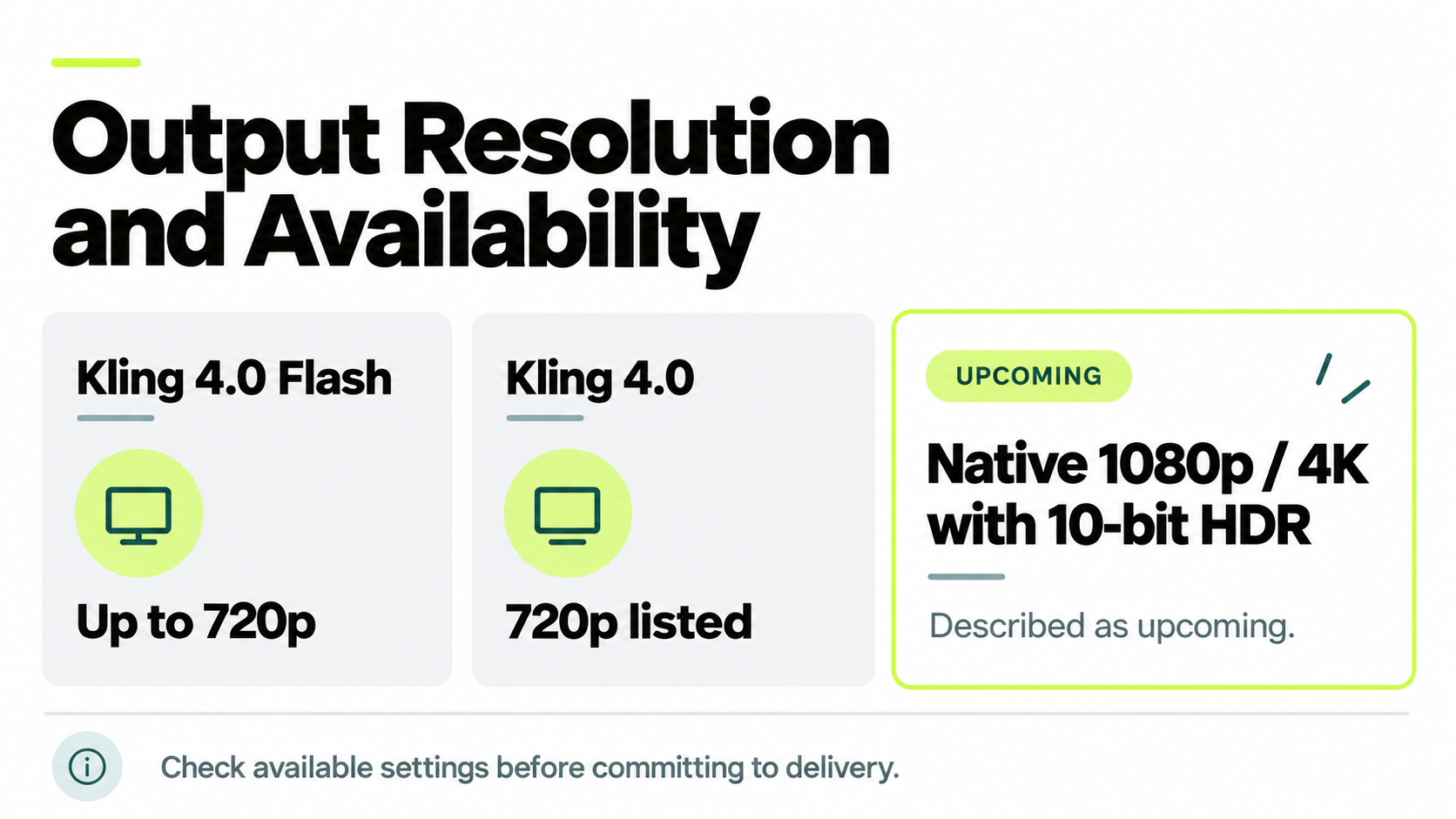
| Resolution | Up to 720p | 720p listed; native 1080p/4K HDR described as upcoming |
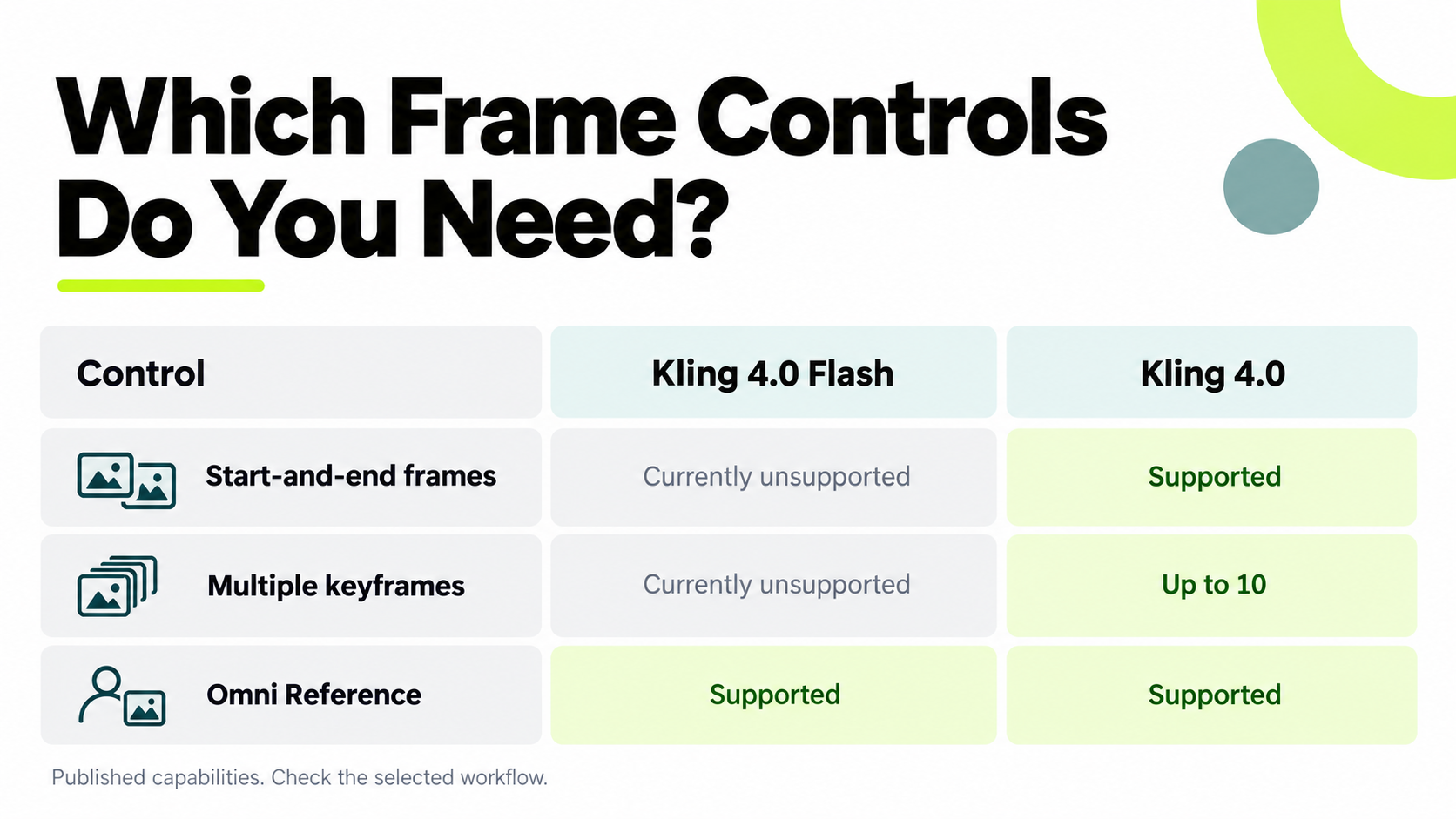
| Start-and-end frames | Currently unsupported | Supported |
| Multiple keyframes | Currently unsupported | Up to 10 |
| Omni Reference | Supported | Supported |
| Main selection reason | Short, flexible creative briefs | Longer sequences and prescribed visual milestones |
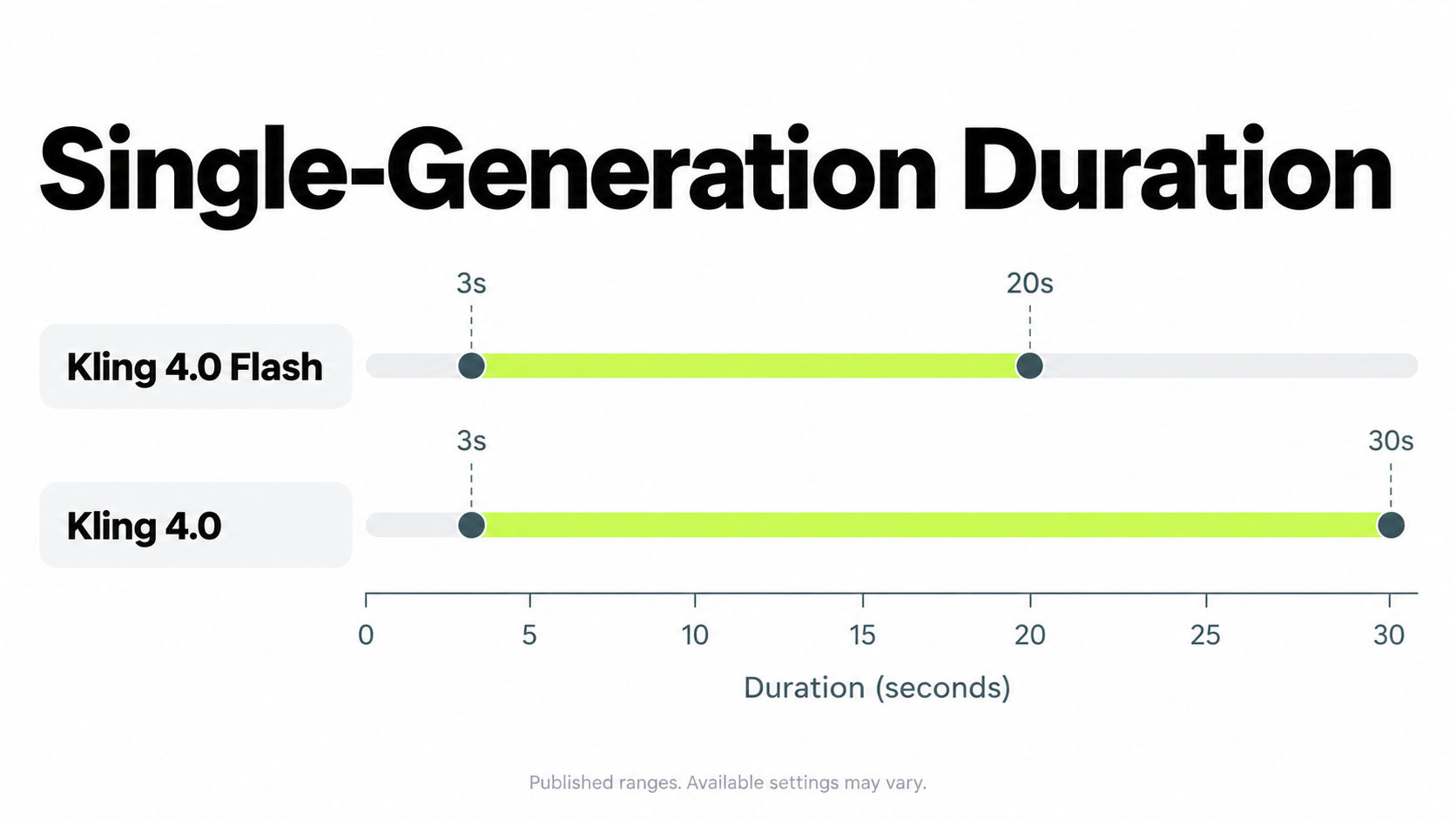
The Kling user guide describes these version boundaries and states that capabilities remain subject to the product interface. Use the table to shortlist a workflow, then check the options available in the selected account.
The full model’s maximum generation window is 10 seconds longer, or 50% longer, than Flash’s. This creates more room for an action or narrative to unfold. It does not prove that the longer result will have better continuity.
Higher-resolution output needs particular care. Kling’s feature page still describes native 1080p and 4K output with 10-bit HDR as upcoming. Do not treat those formats as confirmed delivery options until the required settings and output are available.
A published specification tells you what to investigate. It does not replace checking the actual workflow and file.
Which Kling Version Fits Your Video?
Start with the requirement that would make a result unusable. Flexible framing gives Flash more room to satisfy a brief; required endpoints and visual milestones make the full model more relevant.
| Your requirement | Recommended starting point |
|---|---|
| Explore a short visual concept | Flash |
| Publish a clip within Flash’s limits | Evaluate Flash against the final brief |
| Reach an approved ending composition | Full model’s endpoint controls |
| Follow several required visual states | Full model’s multiple-keyframe workflow |
| Generate beyond Flash’s duration limit | Full model |
| Preserve an exact approved take | Check an editing or enhancement workflow before regenerating |
Choose Flash When Several Outcomes Would Work
Flash is worth evaluating for atmospheric footage, simple product movement, and short character moments where different compositions could all be acceptable.
Consider a cup on a table with a slow camera move. If the final camera position is flexible, the important questions are whether the cup remains recognizable, the movement is coherent, and the result fits the intended edit.
Flash can be a final-output candidate. It should not be dismissed as a drafting tool simply because another version offers more controls.
Choose the Full Model When Visual Milestones Matter
The full model is more relevant when a sequence must arrive at specific compositions: an approved package reveal, a clearly staged interaction, or a closing shot with a prescribed layout.
Kling’s multiple-keyframe guide describes using images to guide important visual states along the timeline. Its practical value is reducing how much the model must infer about those states.
Additional controls still require review. Keyframes communicate the intended destinations; the generated movement between them must also work.
Research Cases: What They Reveal About Flash and Full Kling 4.0
The most useful cases explain a production decision rather than merely displaying an attractive clip. Our research identified three relevant approaches: planning a short narrative, testing reference preservation, and connecting existing segments.
Lighthouse Case: A Story Planned Across 20 Seconds
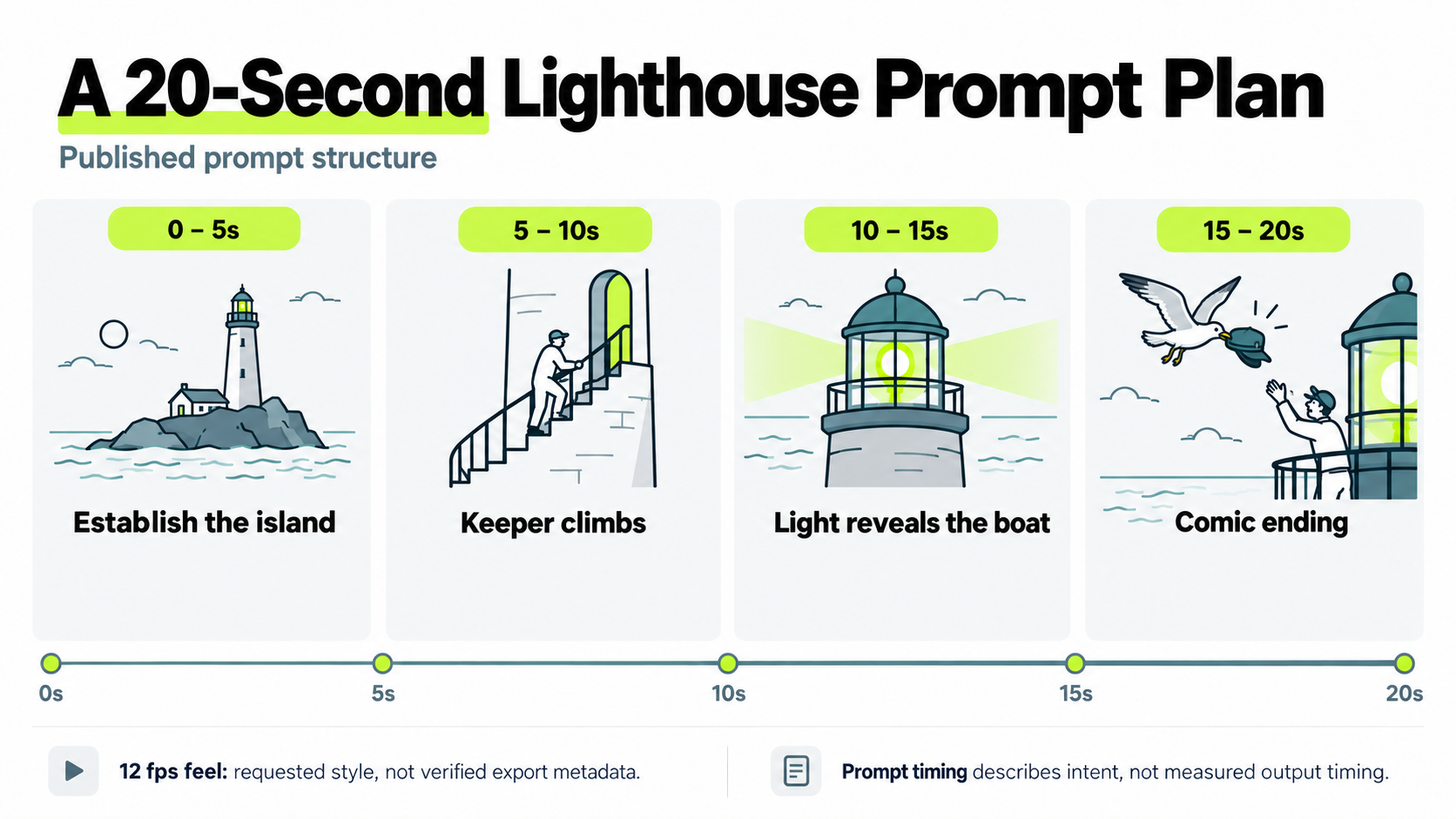
A published Flash prompt example divided a miniature lighthouse story into four five-second sections. The planned progression established the island, followed the keeper climbing, illuminated a lost boat, and ended with a comic interaction.
The prompt requested a 12 fps stop-motion feel. This was a stylistic instruction, not verified export metadata.
The useful lesson is how the brief assigns each section a distinct purpose. Instead of listing unrelated visual details, it connects an opening, action, consequence, and ending.
For a comparable short narrative, first identify what the audience must understand at each stage. Then describe the action and camera movement that connect those stages.
Prompt timing provides narrative direction; it should not be mistaken for locked visual control. When approval depends on exact compositions, consider whether image-based milestones are necessary.
Coastal Case: Preserve the Location While Changing the Action
A published coastal-scene exploration reused one starting image for different directions, including environmental effects, dialogue, camera action, and destruction.
Its stated evaluation goal was to examine whether the original setting remained recognizable as the events changed. The prompts identified landmarks such as the shoreline, path, pier, and distant rock wall.
This is a useful reference-fidelity question: what must remain stable while the model introduces change?
Apply it to commercial work by identifying the essential features before generating. For a product, these might be packaging and proportions. For a character, they might be identity and clothing. For a location, they might be geography and recognizable structures.
The case supplies a concrete evaluation setup, rather than a measured success rate or a comparison proving one version superior.
Connector Case: Joining Two Flash Segments
Our review of questions about Flash keyframes and clip continuity identified a proposed workflow using another model with endpoint controls to bridge existing segments. The suggested connector was approximately three seconds.
The approach uses the preceding clip’s last frame and the following clip’s opening frame as visual targets.
It may be worth investigating when both original segments are usable, but it adds another generation and review step. Check position, subject scale, lighting, screen direction, and movement at both joins.
A connector is a repair strategy, not evidence that Flash offers the full model’s endpoint controls. When required transitions are known in advance, planning them before generation may simplify production.
Keyframes and Omni Reference: What Controls Do You Need?
Keyframes help define required visual moments; references communicate appearance, movement, style, or other creative information. These roles are related, but they are not interchangeable.
Choose the Entry Point Before Preparing Every Asset
The current user guide distinguishes Omni Reference from the separate Keyframes entry point. It states that their capabilities cannot be combined in one generation task, while also noting keyframe-to-video functionality within Omni.
Check the selected workflow rather than assuming every reference and frame control can be stacked together.
If an approved ending is indispensable, establish the endpoint workflow first. Then check which additional assets it accepts and what they can influence.
Begin with the control your brief cannot do without. This prevents unnecessary asset preparation around an unsupported combination.
Reference Limits Are Shared
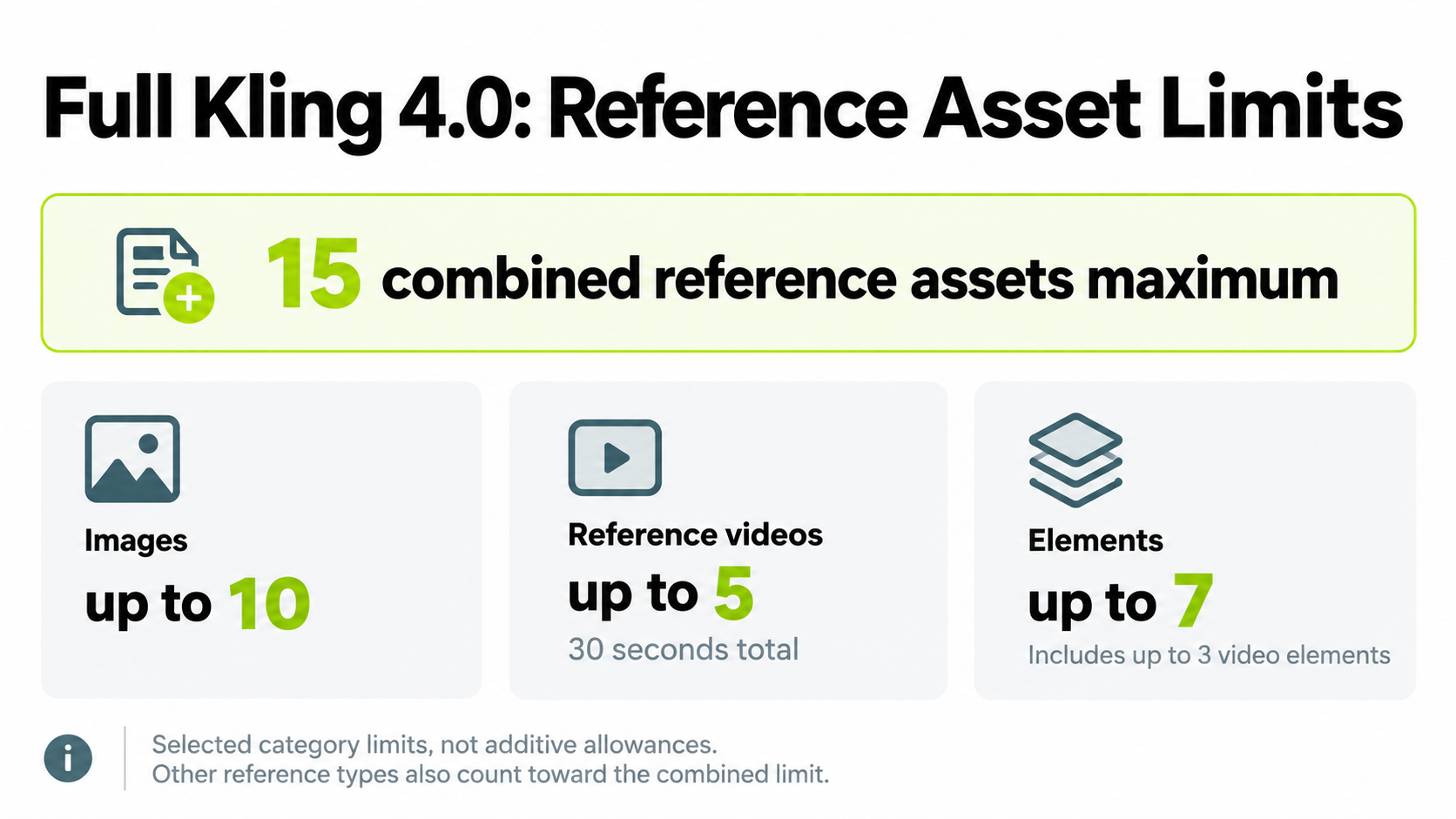
The full model’s documented reference allowances include up to 15 combined assets, with additional limits by category:
| Reference category | Published limit |
|---|---|
| Images | Up to 10 |
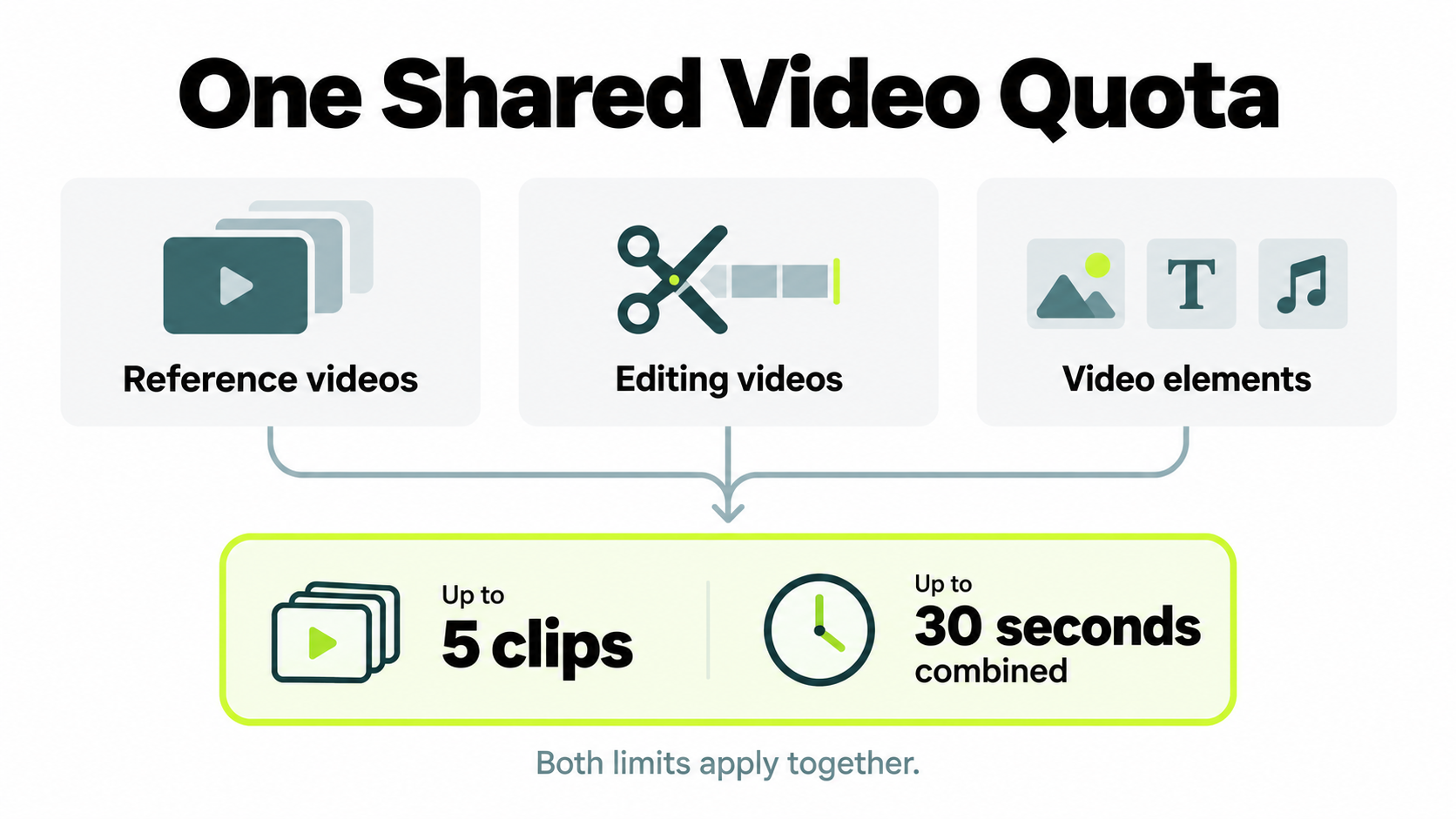
| Reference videos | Up to 5, totaling no more than 30 seconds |
| Elements | Up to 7, including up to 3 video elements |
The combined and category limits apply together. Reference videos, editing videos, and video elements also share the video quota.
Do not transfer these full-model allowances to Flash without checking its own available configuration.
Assign each asset a clear purpose. A product image can define appearance while a video reference guides camera movement. Conflicting product versions or character designs make the intended result harder to interpret.
Use references to resolve uncertainty, rather than to fill every available slot.
Kling 4.0 Flash vs Kling 4.0 Quality: What the Evidence Can Tell You
The reviewed evidence does not establish a universal quality winner. Published capabilities explain available controls; selected examples and individual experiences do not establish average performance.
Our review of early-use observations and questions identified movement, unexpected cuts, added music, and lip synchronization as useful evaluation topics. These observations should guide inspection rather than become generalized failure claims.
Use one acceptance checklist across the versions:
| Dimension | What must work |
|---|---|
| Identity | Required faces, clothing, products, and branding remain recognizable |
| Motion | Actions, contact, and object behavior are coherent |
| Continuity | Geography and camera progression remain understandable |
| Direction | Events and visual milestones follow the brief |
| Audio | Wording, speakers, timing, and sound match the intended use |
For a continuous shot, describe the camera’s path and inspect whether the result preserves it. For a product reveal, review packaging during movement, not only in the opening frame.
For dialogue, check the complete exchange. Correct pronunciation does not establish accurate speaker assignment or synchronization.
The full model’s published specification includes two-channel stereo. That describes an audio format, rather than proving speech accuracy.
Choose based on the result your project requires. A broader feature set can be valuable without guaranteeing that every simple scene will look better.
Kling 4.0 Flash vs Kling 4.0 Pricing and Speed
Flash is positioned for faster, more economical creation, but the reviewed evidence does not establish a reliable like-for-like price ratio or speed multiplier. Specific savings claims would require applicable rates, equivalent settings, and complete generation records.
For budgeting, distinguish the cost of an attempt from the cost of usable output:
Generation cost per accepted clip = total generation spend, including paid retries, divided by accepted clips.
This is a production-accounting method. It does not mean a provider charges only for clips you approve.
Track the following information when evaluating either version:
| Record | Why it matters |
|---|---|
| Settings and output requirements | Establishes a comparable task |
| Waiting and generation time | Captures turnaround |
| Charges for all attempts | Includes the cost of iteration |
| Accepted outputs | Connects spending to usable footage |
| Editing effort | Reveals work remaining after generation |
Keep editing time separate unless you convert it into money using an explicit labor rate.
Measure time to approval as well as generation time. A quick attempt that needs several replacements may not deliver the finished video sooner.
For current integration details, our Kling 4.0 API guide tracks access and configuration separately.
Can You Finish a Flash Draft in Full Kling 4.0?
Use a Flash draft to approve a creative direction, but do not assume another generation will preserve the take. Reusing a prompt and references can still change composition, movement, identity, and timing.
Before moving to final production, decide whether approval applies to the idea or the exact footage.
If the idea is approved, identify the required details and rebuild the final request around the appropriate controls. If the footage itself is approved, investigate a supported editing or enhancement operation before regenerating.
For example, approval of a slow product reveal may allow a different camera path. Approval of an exact closing composition may not.
The research cases above demonstrate ways to plan and evaluate a sequence. They do not establish a guaranteed conversion between Flash and the full model.
Treat a newly generated result as a new approval decision. This is especially important when branding, dialogue timing, or a prescribed ending determines usability.
Frequently Asked Questions
Which Is Better for Final Videos: Kling 4.0 Flash or Kling 4.0?
Flash can be suitable when its limits and controls meet the brief. Choose the full model when longer generation, required endpoints, or multiple visual milestones are essential. Neither version should be selected on its name alone.
Does Kling 4.0 Flash Support Start-and-End Frames?
The current documentation says Flash does not support paired start-and-end frames or multiple keyframes. Starting from an image is different from prescribing both endpoints. Choose the appropriate frame-control workflow when the ending must match an approved image.
How Can I Connect Two Kling 4.0 Flash Clips?
One researched suggestion uses a separate model with endpoint controls to generate a bridge. Inspect both joins for identity, position, lighting, and movement changes. Plan transitions before generation when continuity is a central requirement.
Is Kling 4.0 Flash Cheaper and Faster Than Kling 4.0?
Kling positions Flash for faster, more economical creation, but the reviewed evidence does not establish a matched price ratio or speed multiplier. Compare applicable charges, paid retries, and time to approval for equivalent tasks.
Can I Upgrade a Flash Draft Without Changing It?
Do not assume regeneration will preserve the footage. Check whether a supported editing or enhancement operation can retain the necessary details. A new generation requires a fresh review against the approved brief.
Conclusion
Choose Kling 4.0 Flash for short, flexible briefs within its output limits; choose Kling 4.0 when longer generation and explicit visual controls are necessary. The useful distinction is the production requirement each version can address, not an unsupported claim of universal superiority. Check available settings, define what must remain stable, and account for retries and editing before committing to a workflow. That produces a more defensible decision than comparing isolated showcase clips or unverified savings claims.