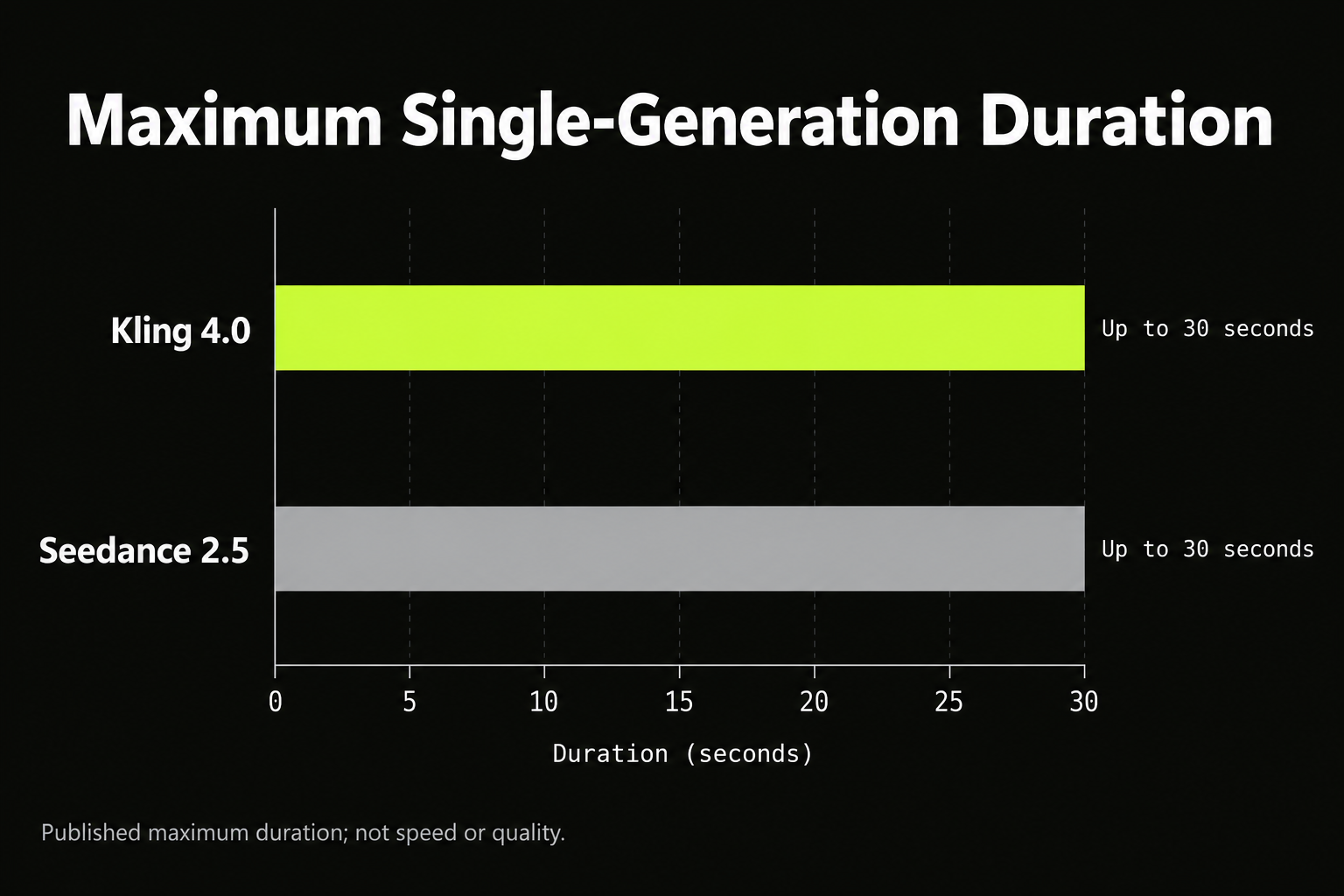
Kling 4.0 offers explicit multi-keyframe direction, while Seedance 2.5 documents extensive multimodal references and timestamp-based editing. Both support clips up to 30 seconds. Start with the controls your project requires, then compare whether the resulting footage preserves your subject, completes the action, and meets your delivery requirements.
The expensive mistake is choosing a model because its showcase looks cinematic. A changing product label, drifting face, or skipped action can make an attractive clip unusable. Those failures turn a low generation price into additional attempts and editing work.
For teams choosing Seedance, LinkModel offers Seedance 2.5 with approximately 53% savings against the fal reference rates displayed in its pricing comparison. Listed output-token rates start at $10.165 per million tokens without video input, giving teams more room to explore creative variations within a generation budget. Kling 4.0 is coming soon to LinkModel.
Kling 4.0 vs Seedance 2.5: Key Differences
The strongest documented distinction is how you direct and revise a scene—not a proven overall lead in video quality.
| Capability | Kling 4.0 | Seedance 2.5 |
|---|---|---|
| Single-generation duration | Up to 30 seconds | Up to 30 seconds |
| Reference allowance | Up to 15 combined assets | Up to 30 images, 10 videos, and 10 audio clips |
| Explicit scene control | Up to 10 keyframe inputs | Multimodal references and timestamp-directed editing |
| Workflow to examine first | Approved storyboard milestones | Reference-heavy creation and localized revisions |
Kuaishou documents Kling’s controls in its official release announcement, while ByteDance describes Seedance’s reference and editing capabilities in its model introduction. Individual applications and API routes may expose different subsets.
Input capacity is not output reliability. More references can communicate a complicated brief, but they cannot establish how consistently the model will preserve every detail. Keyframes communicate intended visual moments, but their number does not prove that movement between them will be correct.
Creative Control: Which Model Matches Your Brief?
Evaluate Kling’s keyframes when compositions are already approved; evaluate Seedance’s references and editing when the brief depends on combining assets or revising existing footage. Both recommendations concern documented controls, not exclusive capabilities or measured superiority.
Kling 4.0 for Storyboard-Led Scenes
A storyboard-led production begins with specific visual commitments: the opening composition, a product reveal, a character’s position, or the closing image.
For a product advertisement, those moments might show packaging first, a demonstration next, and a hero composition at the end. Keyframes give the model visual targets that prose alone may leave ambiguous.
The practical challenge is the transition. The product must retain its shape, the action must happen in the correct order, and the camera must arrive naturally at the intended composition.
Choose this workflow when visual milestones matter, then inspect the movement connecting them. Matching approved stills does not establish that the entire shot is usable.
Seedance 2.5 for Multimodal References
A reference-heavy brief may combine a product photograph, character sheet, location image, movement example, and audio guidance. Seedance’s documented reference allowance makes this a relevant workflow to evaluate.
Assign a clear job to each input. Specify which asset controls appearance, which establishes the environment, and which supplies movement or sound direction.
A larger reference set is useful only when it resolves ambiguity. Conflicting character proportions, lighting, or spatial layouts can make the request less coherent.
Begin with the references essential to the scene, then add assets that clarify a specific missing detail. Filling the allowance is not a production objective.
Targeted Editing for Partially Successful Footage
When a clip is mostly correct, the next task is often a narrow revision rather than another complete generation.
For example, changing a background should not alter approved packaging, hand placement, performance, or timing. Define the requested change and the elements that must remain intact.
Seedance documents timestamp-directed audio and video editing, making localized revision an important capability to examine. Confirm that your chosen route exposes the required mode.
Judge an edit on two outcomes: whether it fixes the problem and whether it preserves the successful material.
Video Quality: Realism, Identity, and Continuous Action
The reviewed evidence does not establish a repeatable quality winner between full Kling 4.0 and Seedance 2.5. Their practical suitability depends on the failure conditions of the intended scene.
Product Fidelity
For commercial footage, recognizable product details can matter more than dramatic lighting. Inspect packaging geometry, label placement, color, material, and proportions throughout the clip.
Occlusions and camera changes deserve particular attention. A hand can cover the product briefly, after which the model may reconstruct a different label or shape.
The acceptance question is specific: does the video still depict the approved product after movement and interaction? Review against the original asset rather than judging only whether the result looks plausible.
Character Consistency and Dialogue
A recognizable opening face does not establish consistency through a complete scene. Inspect identity after turns, changes in lighting, and transitions between compositions.
For dialogue, also check speaker assignment, intelligibility, lip timing, and voice continuity. A visually convincing conversation can still fail if the wrong character speaks.
Evaluate the actual language and performance required by the project. A successful short demonstration cannot establish equivalent reliability for every dialogue task.
Continuous Motion and Physical Interaction
A model can produce convincing endpoints while omitting the movement needed to connect them. This matters for product demonstrations, instructional footage, and any shot requiring uninterrupted action.
Inspect grip, contact, weight transfer, trajectory, and object persistence. If a person picks up an item, it should remain in the correct hand as the sequence develops.
Action completion and visual appeal are separate acceptance criteria. A beautiful final frame cannot repair an action that never occurred.
What Flash Comparisons Reveal About Video Failures
Public Flash comparisons provide useful inspection examples, but they cannot establish full Kling 4.0 performance. Our research uses these cases to identify production risks rather than assign an overall winner.
A published comparison describes three selected tasks:
| Task | Reported observation | Useful inspection point |
|---|---|---|
| Running shoes using five references | Seedance retained more material detail; Flash showed detail softening | Product identity across camera changes |
| Ten-second dialogue using three references | Seedance had smoother lighting transitions; Flash had abrupt changes | Character and environment continuity |
| Ten-second cup-carrying action | Seedance used a jump cut; Flash showed spatial deformation | Complete motion between endpoints |
The most useful finding is the cup task: correct opening and closing poses can conceal an incorrect middle sequence. For an uninterrupted demonstration, a hidden cut is a failure even if the subject remains recognizable.
This is why comparing isolated frames can produce a different verdict from reviewing the complete video.
Resolution and HDR: What Can You Actually Deliver?
Treat announced specifications and available output settings as separate information. The selected route must deliver the file your project requires.
Kuaishou’s launch announcement describes output up to 10-bit HDR while using forthcoming language for 4K, 1080p, and 21:9 support. LinkModel’s supplied Kling 4.0 API launch messaging also identifies HDR at 1080p and 4K as coming soon. Those statements concern different rollout contexts and should not be flattened into a universal availability claim.
The supplied LinkModel Seedance pricing table lists 480p and 720p.
Before committing to strict delivery specifications, inspect:
- Output dimensions and visible detail.
- Whether the generation is native or upscaled.
- Codec and color information.
- Compatibility with the required crop, grade, and final export.
Resolution, color depth, and HDR are different attributes. A larger file does not establish native detail, and 10-bit color alone does not establish a complete HDR delivery workflow.
Generation Speed: Compare Time to a Usable Video
No matched latency dataset reviewed here establishes which full model is faster. Flash claims must remain separate, and performance can differ across providers and configurations.
For a production schedule, distinguish:
| Measurement | What it answers |
|---|---|
| Queue time | How long before processing starts? |
| Generation time | How long until an output is ready? |
| Time to an accepted result | How long including attempts and revisions? |
The final measure connects speed to the actual deliverable. A quickly generated clip may still require repeated repair.
Match duration, resolution, input type, and audio settings when comparing processing time. Record unsuccessful attempts alongside accepted results.
A 30-second generation limit describes clip length, not waiting time. Do not use output duration or selected showcase examples as evidence of a speed advantage.
Kling 4.0 vs Seedance 2.5 Pricing
A matched cost winner between Kling and Seedance is not established here. LinkModel’s Seedance pricing provides a specific comparison against its displayed fal reference rates.
LinkModel Seedance 2.5 Token Rates
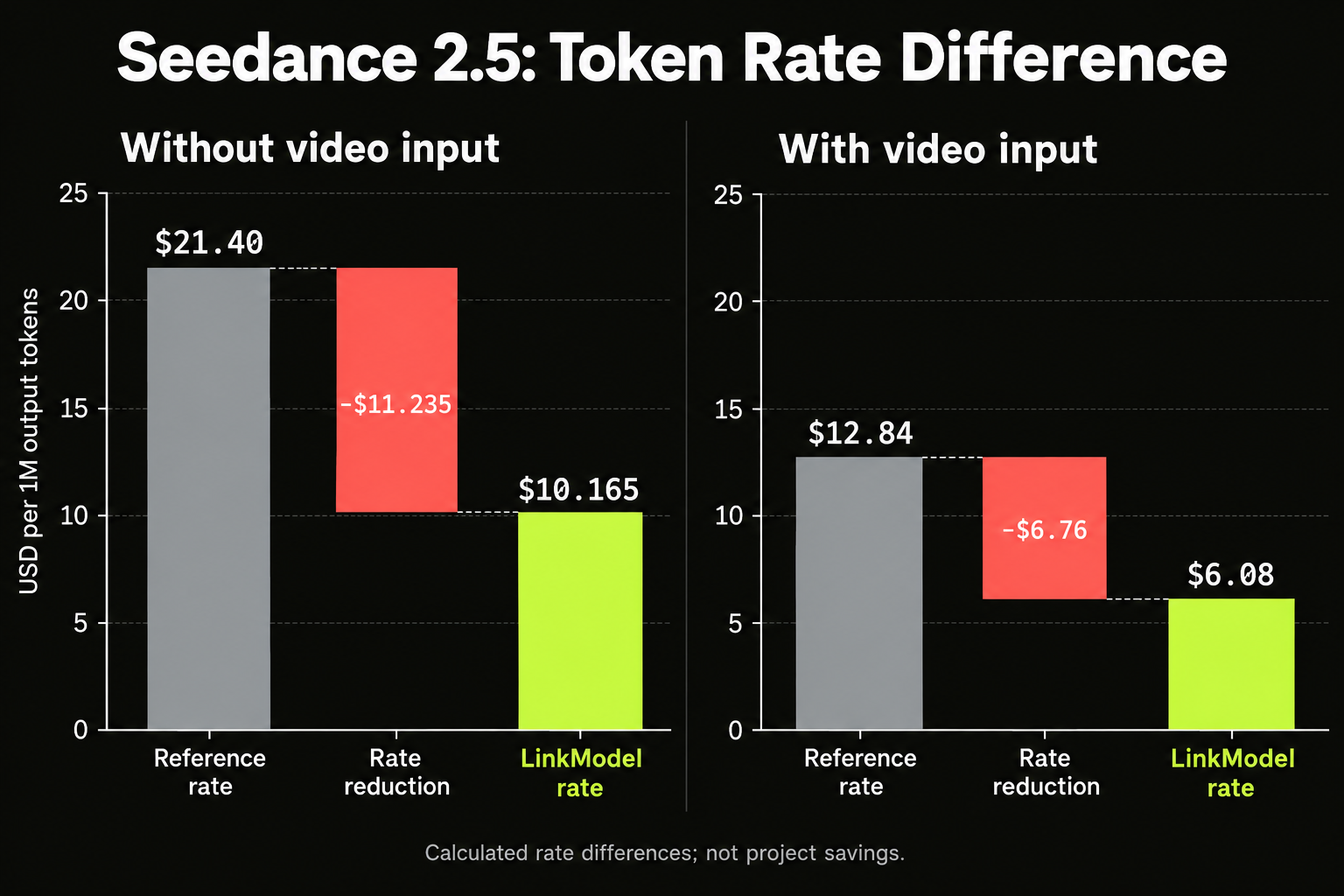
The supplied LinkModel pricing table lists these output-token rates for its displayed 480p and 720p tiers:
| Request category | LinkModel per 1M tokens | Displayed fal reference |
|---|---|---|
| Without video input | $10.165 | $21.40 |
| With video input | $6.08 | $12.84 |
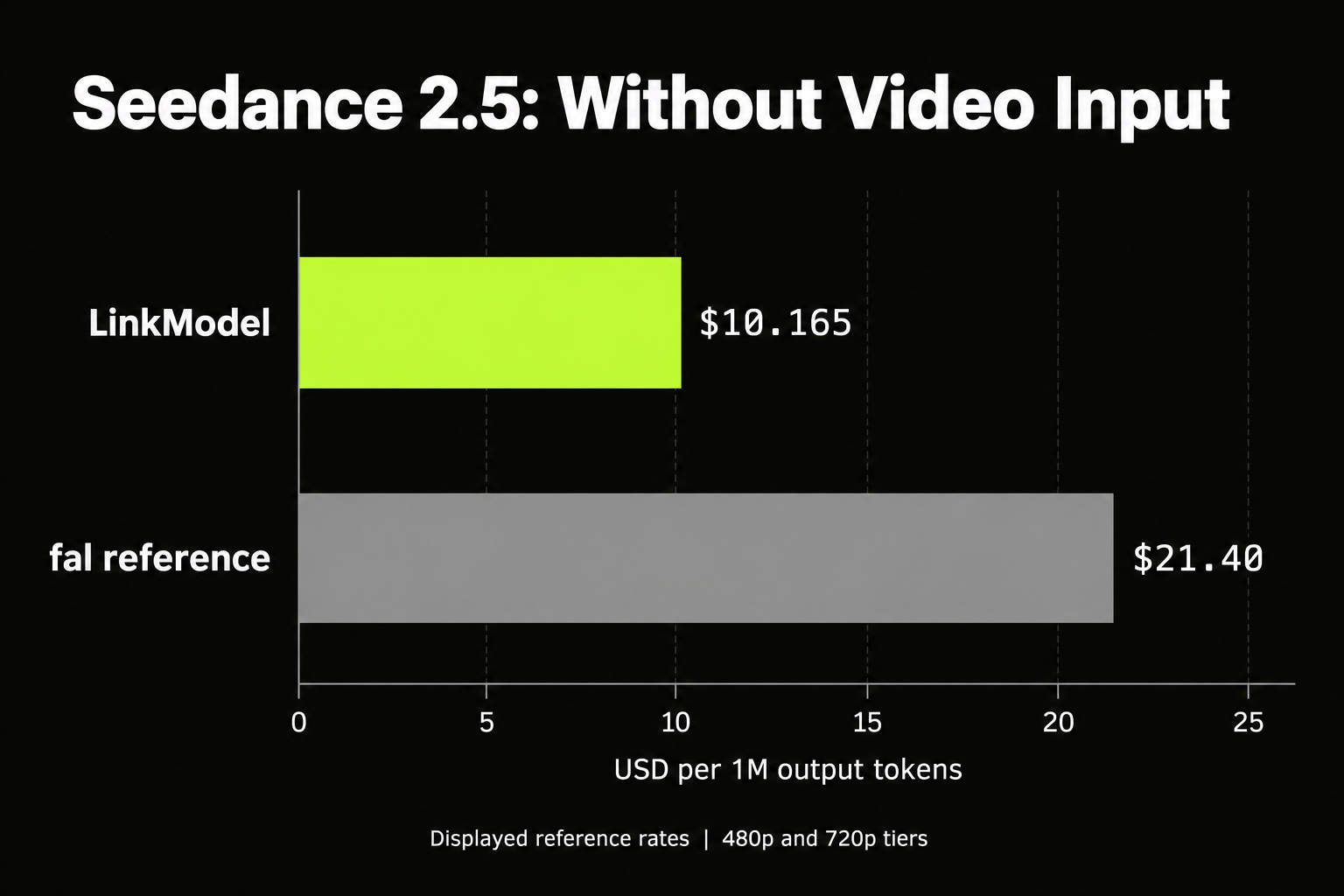
The reductions calculate to approximately 52.5% and 52.65%, supporting the description approximately 53% savings against those reference rates.
The request category matters. A lower token rate with video input does not automatically mean a lower complete bill, because the billable quantity can differ.
Per-Second and Clip Estimates
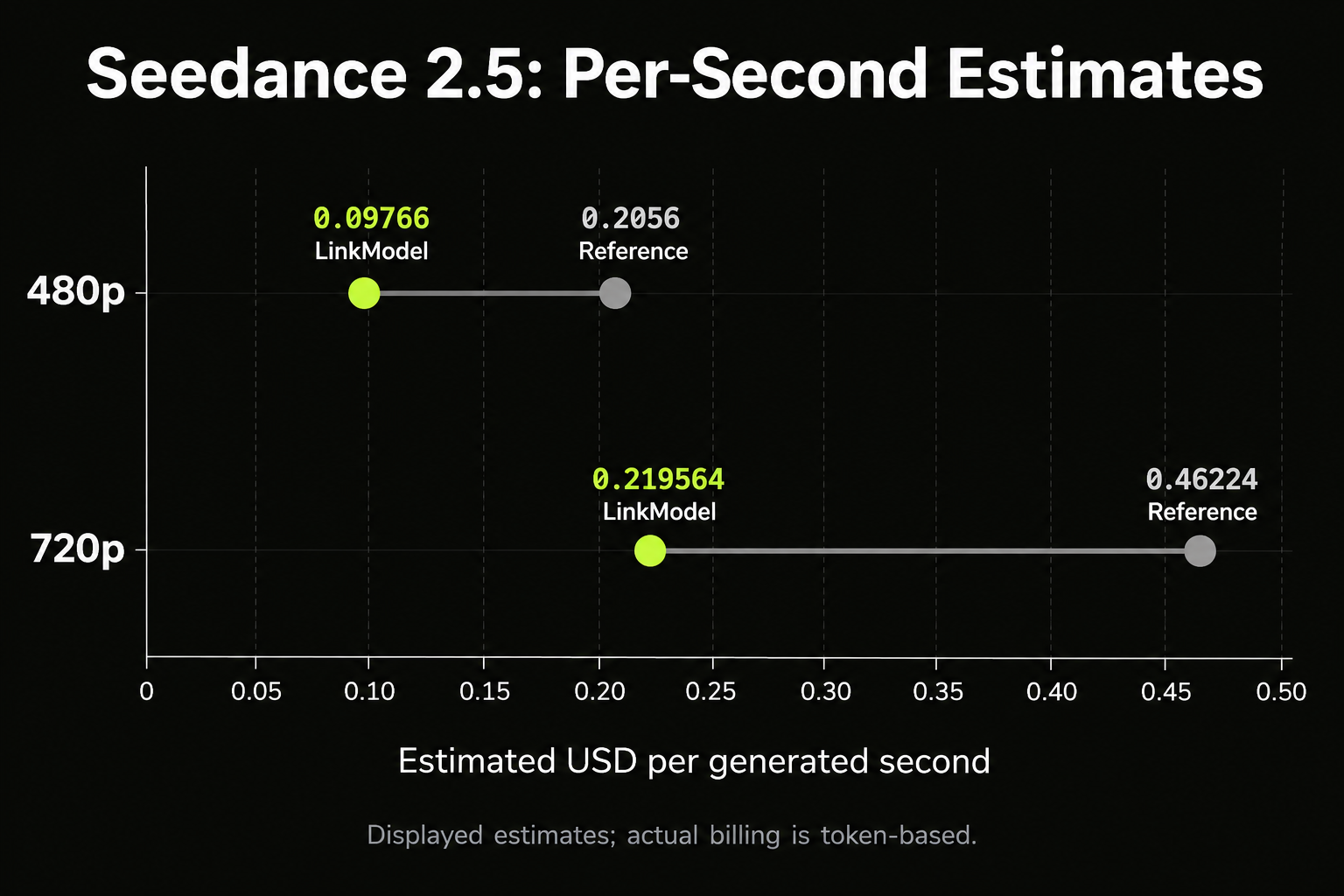
The table also displays these approximate per-second figures:
| Output tier | LinkModel per second | Displayed fal reference |
|---|---|---|
| 480p | $0.09766 | $0.2056 |
| 720p | $0.219564 | $0.46224 |
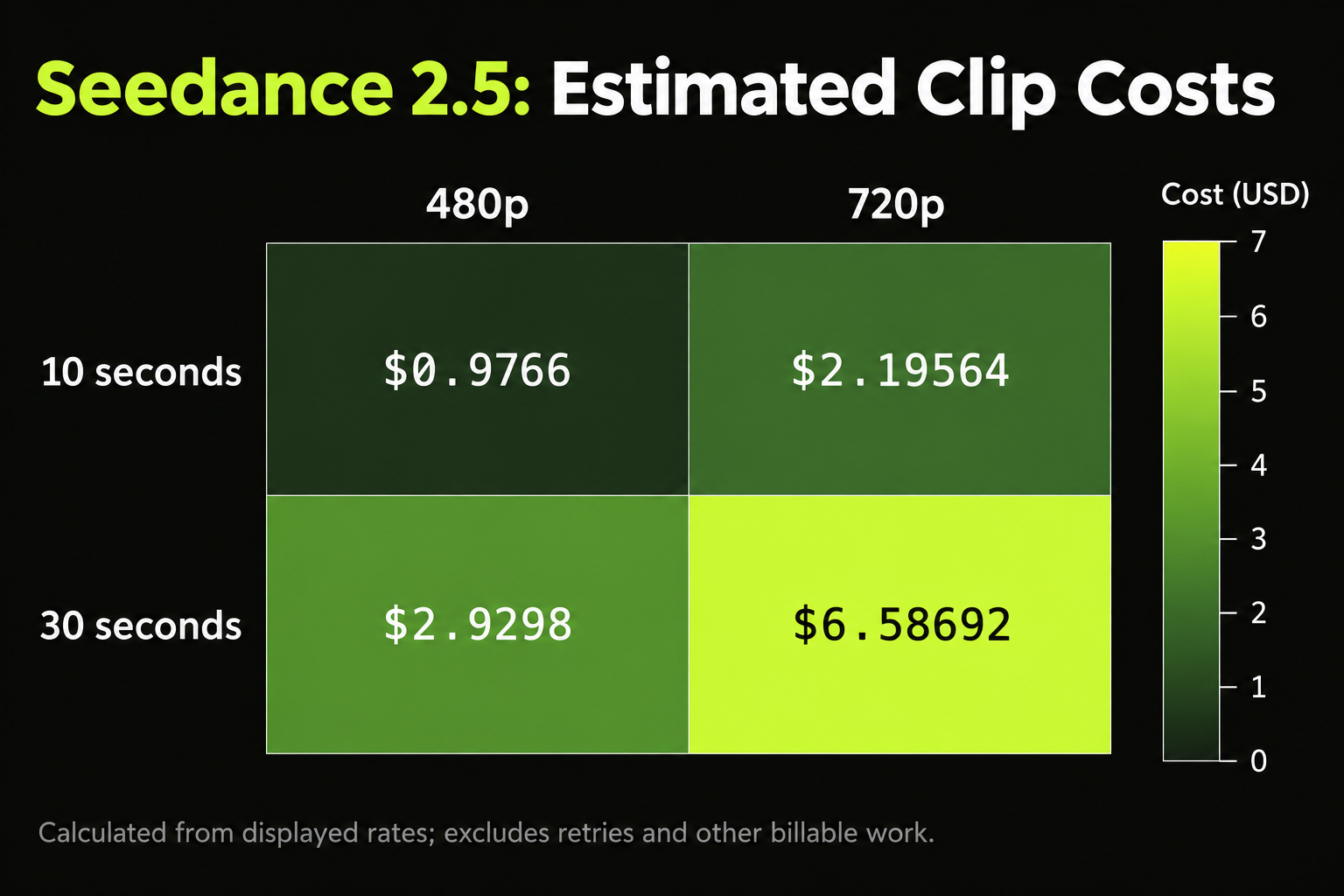
Using those displayed estimates gives:
| Duration | 480p estimate | 720p estimate |
|---|---|---|
| 10 seconds | $0.9766 | $2.19564 |
| 30 seconds | $2.9298 | $6.58692 |
These are calculations for one output under the displayed pricing assumptions, excluding retries and other billable work. Actual charges follow token-based billing.
The reviewed fal endpoint documentation publishes $21.40 per million tokens for 480p and 720p, but its approximate per-second figures differ from the reference figures above. Compare identical token categories and request settings before treating per-second quotes as interchangeable.
Generation Price vs Accepted-Clip Cost
For a production budget, calculate total billed generation spend divided by accepted clips, then track preparation and manual repair time separately.
This captures the expense that a rate table cannot predict: how many attempts satisfy the brief.
Which Should You Choose for Your Project?
Select the control that addresses your main production constraint, then judge whether it delivers the required result.
| Project requirement | Recommended starting point |
|---|---|
| Approved storyboard compositions | Evaluate Kling’s keyframe workflow |
| Extensive visual and audio references | Evaluate Seedance’s reference workflow |
| Localized revisions | Evaluate Seedance’s editing controls |
| Uninterrupted product interaction | Compare complete outputs from both |
| Strict resolution or HDR delivery | Verify the selected route and file |
| Seedance generation at LinkModel rates | Use the available Seedance route |
For a fair comparison, define rejection criteria before generating. Preserve the source assets, actual model version, settings, complete outputs, and billed attempts.
First compare shared capabilities under equivalent conditions. Then allow each model its distinctive controls while recording additional preparation.
The right choice is the workflow that produces acceptable footage within your budget and schedule. A feature advantage matters only when it addresses the task you need to complete.
Frequently Asked Questions
Is Kling 4.0 better than Seedance 2.5?
Neither is established as the overall winner here. Kling documents explicit multi-keyframe direction, while Seedance documents extensive multimodal references and timestamp-based editing. Compare their execution against your production brief.
Can both generate 30-second videos?
Yes. Both developers document single-generation clips up to 30 seconds. That limit does not establish equal quality, consistency, or processing speed.
Does Kling 4.0 Flash represent full Kling 4.0?
No. Keep Flash results separate by version, settings, and provider. They can reveal useful failure modes but cannot establish full-model performance.
Which API is cheaper?
A matched Kling-versus-Seedance price comparison was not verified here. LinkModel’s Seedance table lists $10.165 per million output tokens without video input and $6.08 with video input, approximately 53% below its displayed fal reference rates.
Can I use both models through LinkModel?
Seedance 2.5 is available through LinkModel, and Kling 4.0 is coming soon. Model-level announcements should not be assumed to describe every control available through an individual route.
Conclusion
Evaluate Kling 4.0 for explicit keyframe direction and Seedance 2.5 for extensive references and targeted editing. Judge complete footage for product fidelity, character identity, action continuity, sound, and delivery requirements, then compare accepted-output cost. For teams choosing Seedance, LinkModel offers approximately 53% savings against its displayed fal reference rates, providing a concrete budget advantage to evaluate alongside creative fit.