Kling 4.0 offers longer clips, 4K output, and explicit multi-keyframe control; MiniMax H3 offers multimodal creation and published-weight deployment, with up to 15-second, 2K video. Choose Kling for requirements that depend on its higher output limits; consider H3 for reference-driven production and customizable workflows.
The expensive mistake is choosing from a showcase clip alone. Changing faces, unstable product details, unwanted audio, and repeated attempts can turn an attractive result into more editing work. The useful comparison is how reliably each workflow delivers your scene—not simply how impressive its best sample looks. This matters especially for AI video advertising.
For teams using several AI providers, LinkModel brings MiniMax H3 into the same account as other supported image, video, and language models. Evaluate a shot in the Playground, then integrate through the API without operating GPU infrastructure. Kling 4.0 is not yet available on LinkModel; we’re working to bring it to the platform as soon as possible.

Kling 4.0 vs MiniMax H3: Key Differences
Start with the requirements that determine whether a model can support your project. Clip duration, output resolution, reference controls, and deployment options provide clearer initial selection criteria than unsupported overall scores.
| Capability | Kling 4.0 | MiniMax H3 |
|---|---|---|
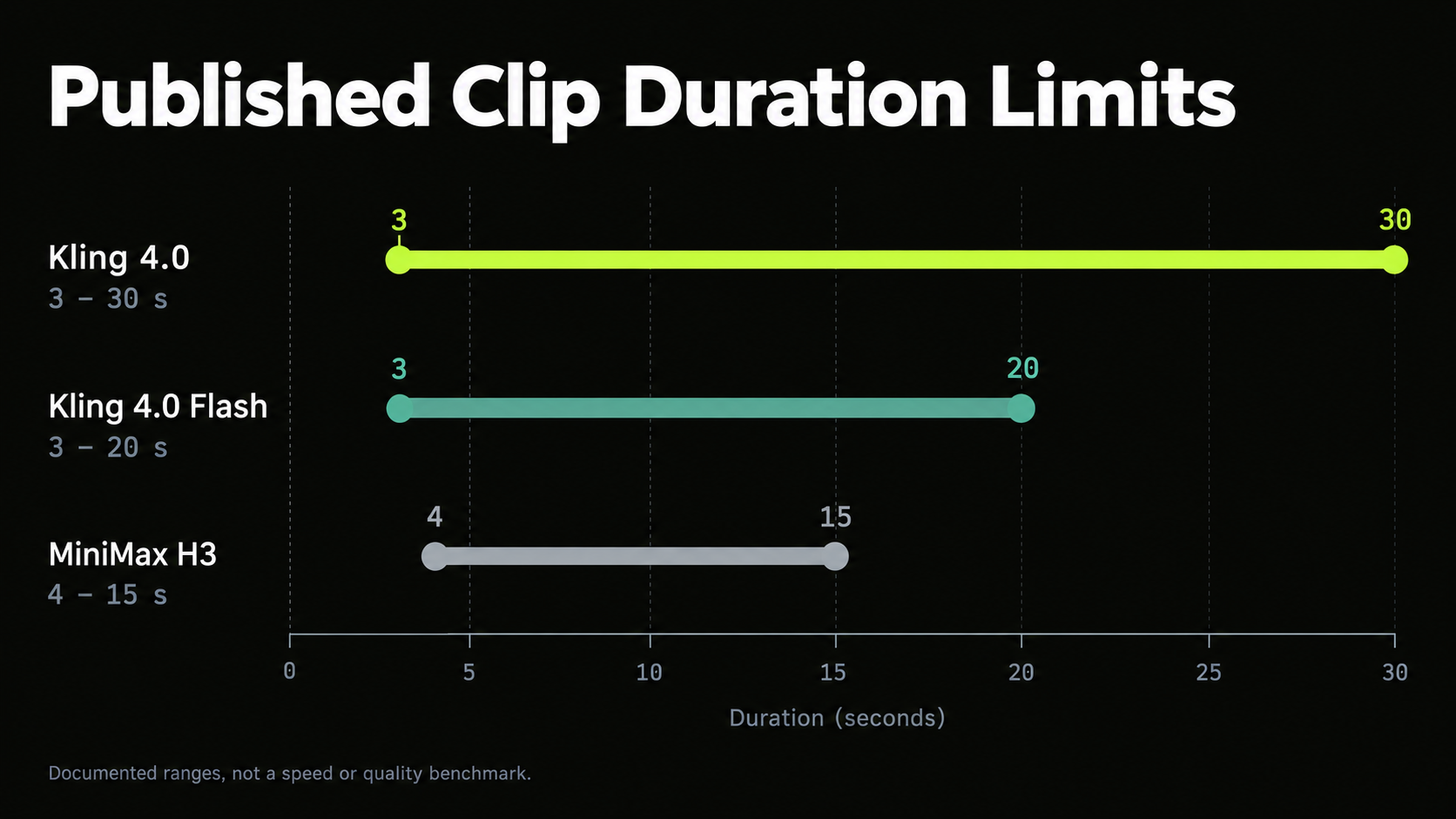
| Clip duration | 3–30 seconds | 4–15 seconds |
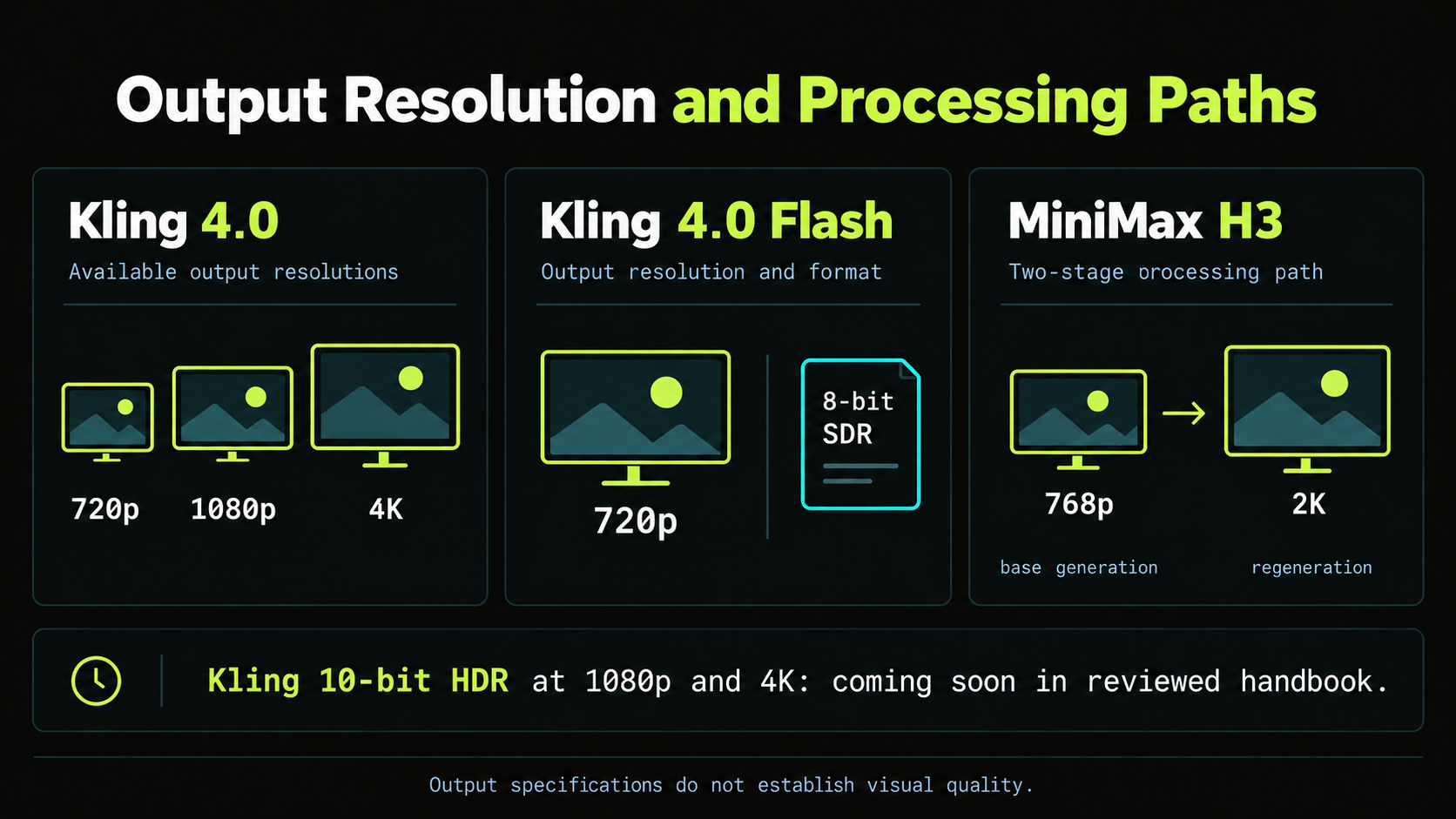
| Resolution | 720p, 1080p, 4K | 768p base; 2K regeneration |
| Combined references | Up to 15 inputs | Up to 12 files |
| Frame controls | Up to 10 keyframes | First-frame and last-frame modes |
| Audio | Two-channel stereo | Native stereo |
These specifications come from Kling’s official user guide and the MiniMax H3 repository. They describe the model systems; individual applications and hosted endpoints may expose fewer options.
Which Model Should You Choose?
Kling is the clearer starting point when the brief requires a continuous shot beyond H3’s documented duration limit, 4K output, or multiple explicit keyframes. H3 is worth prioritizing when published weights and a customizable local workflow are important.
| Your requirement | Starting point | Reason |
|---|---|---|
| A continuous shot longer than 15 seconds | Kling 4.0 | Higher documented duration ceiling |
| 4K delivery | Kling 4.0 | Published 4K option |
| Several prescribed visual moments | Kling 4.0 | Up to 10 keyframes |
| Published-weight deployment | MiniMax H3 | Official weights available |
| Visual and audio reference conditioning | Evaluate both | Check supported inputs and adherence |
| Better quality, speed, or production value | Matched evaluation | Specifications alone cannot settle the result |
For product campaigns and recurring characters, neither resolution nor maximum duration settles the choice. Packaging accuracy, identity preservation, and the amount of repair required can matter more.
Kling 4.0 vs Flash: Keep the Versions Separate
The Kling 4.0 model handbook lists Flash at 3–20 seconds, 720p, and 8-bit SDR, with text-to-video, image-to-video, and reference-based generation.
Those are different limits from the full model’s 30-second ceiling and 4K specification. Do not combine Flash generation times with the full model’s maximum output settings.
Kling positions Flash for frequent creation and shorter generation times, but the handbook does not establish how much faster it is than H3 under equivalent conditions. Any speed comparison should identify the exact version and settings.
Video Quality: Resolution, Motion, and Character Consistency
Kling has the higher published resolution ceiling; the stronger result for your scene depends on motion, detail preservation, and instruction following. A larger file can still contain changing faces, incorrect labels, or broken object interactions.
4K Output vs H3’s 2K Regeneration
MiniMax documents a base generation stage at 768p, followed by H3-Regenerate-2K. The higher-resolution stage uses the original context alongside the base result.
H3’s 2K pipeline includes regeneration, so quality and timing comparisons should account for that stage. Comparing a base H3 result with a finished higher-resolution output would answer a different question.
For a product shot, examine label spelling, package geometry, and reflections as the camera moves. For a portrait, inspect the face during head turns and changes in light. These details determine whether the extra resolution improves the deliverable.
Kling’s handbook marks 10-bit HDR at 1080p and 4K as coming soon. Verify availability in the selected mode before including HDR in a production commitment.
Character Continuity and Product Accuracy
Character consistency includes clothing, accessories, props, and spatial relationships—not only facial resemblance.
A useful scene might show a character placing a cup on a table, turning away, and returning. The cup should remain present, the clothing should stay consistent, and the character should retain the same identity after the turn.
For a product campaign, apply the same logic to labels, caps, handles, and proportions. A visually attractive clip can fail commercially when the product changes.
Evaluate continuity within one generation and across separate shots. A model may preserve a character during a short action yet require more reference preparation when returning to that character later.
Motion Quality vs Visual Impact
Fast cuts and dramatic camera moves can hide mistakes. If the brief requests a continuous tracking shot, judge whether the output preserves uninterrupted movement and completes the requested action.
Check contact with the ground, hand-to-object interactions, and the relationship between camera and subject. A spectacular sequence that introduces an unwanted cut may still be unsuitable.
For continuous action, prioritize coherent movement; for advertising, prioritize accurate interactions and protected product details.
Creative Control: Keyframes, References, and Video Editing
Kling’s explicit keyframe allowance is useful for storyboarded scenes, while both systems describe reference-driven creation. The important distinction is how precisely you need to specify appearance, timing, movement, and sound.
Keyframes for Storyboarded Scenes
Kling supports up to 10 keyframe inputs. These provide concrete visual targets for moments such as a character entrance, a product reveal, or a final composition.
H3 documents first-frame and last-frame modes, including generation constrained by both endpoints. That is useful when the shot’s opening and closing states matter, but it should not be presented as equivalent to Kling’s multi-keyframe allowance.
Choose the control method that matches the storyboard. Then inspect the generated transitions, where objects, poses, or camera direction may depart from the intended sequence.
Multimodal References and Their Limits
In MiniMax’s official H3 introduction, an example combines camera movement from a video, a character from an image, and vocals from an audio reference.
The practical value of multimodal API inputs is the ability to assign different creative roles to different assets. For example, one reference may define packaging, another the environment, and another the movement or voice.
| Reference constraint | Kling 4.0 | MiniMax H3 |
|---|---|---|
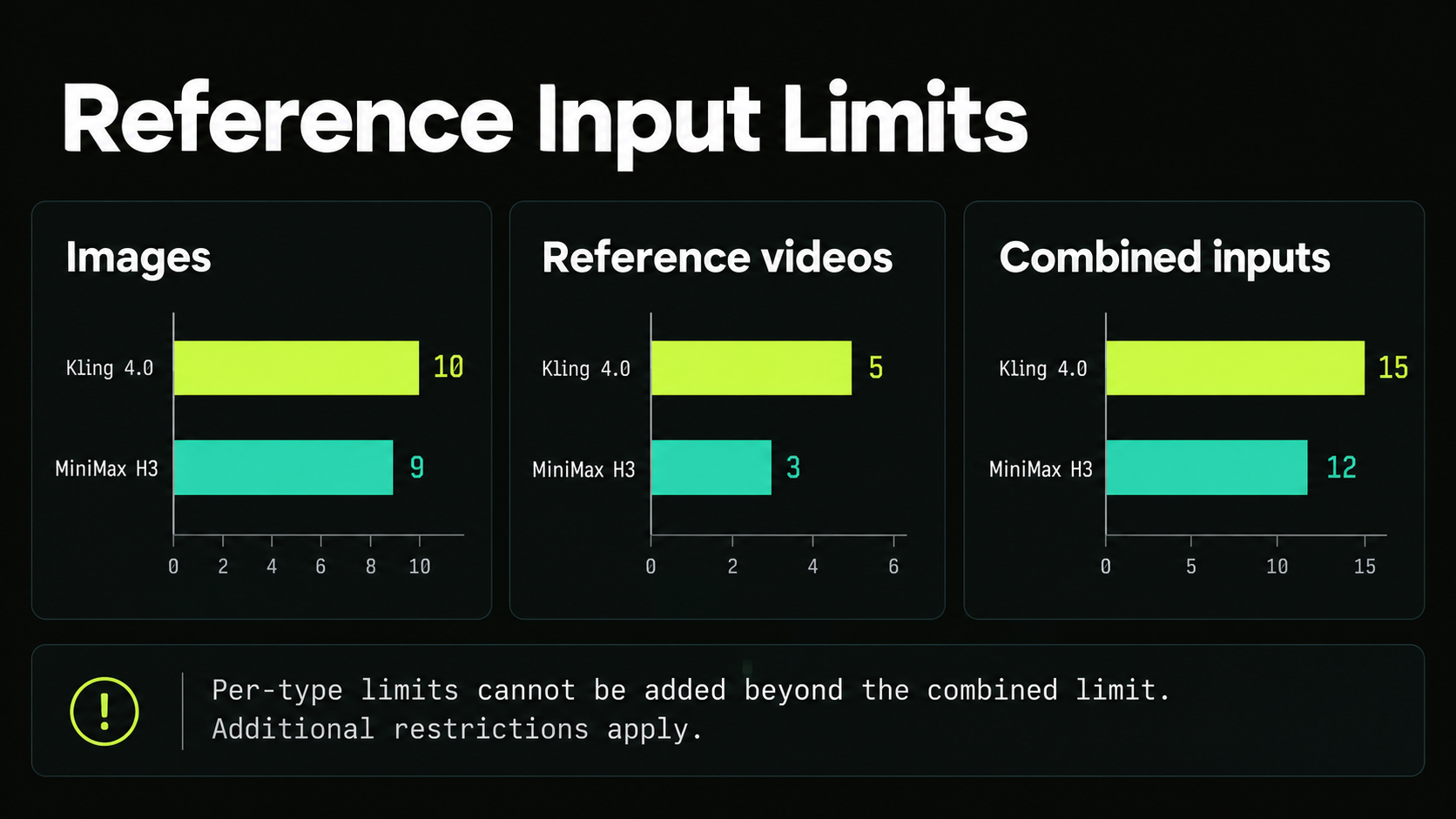
| Images | Up to 10 | Up to 9 |
| Reference videos | Up to 5 | Up to 3 |
| Combined reference inputs | Up to 15 | Up to 12 |
Kling limits total reference-video duration to 30 seconds, including video subjects. H3 limits reference videos to 2–15 seconds each and 15 seconds combined; it also documents up to three audio references with additional duration restrictions.
The per-type allowances cannot be added together beyond the combined limit. Reference capacity describes input flexibility, while the output determines whether the assigned attributes were preserved.
Targeted Editing of Existing Footage
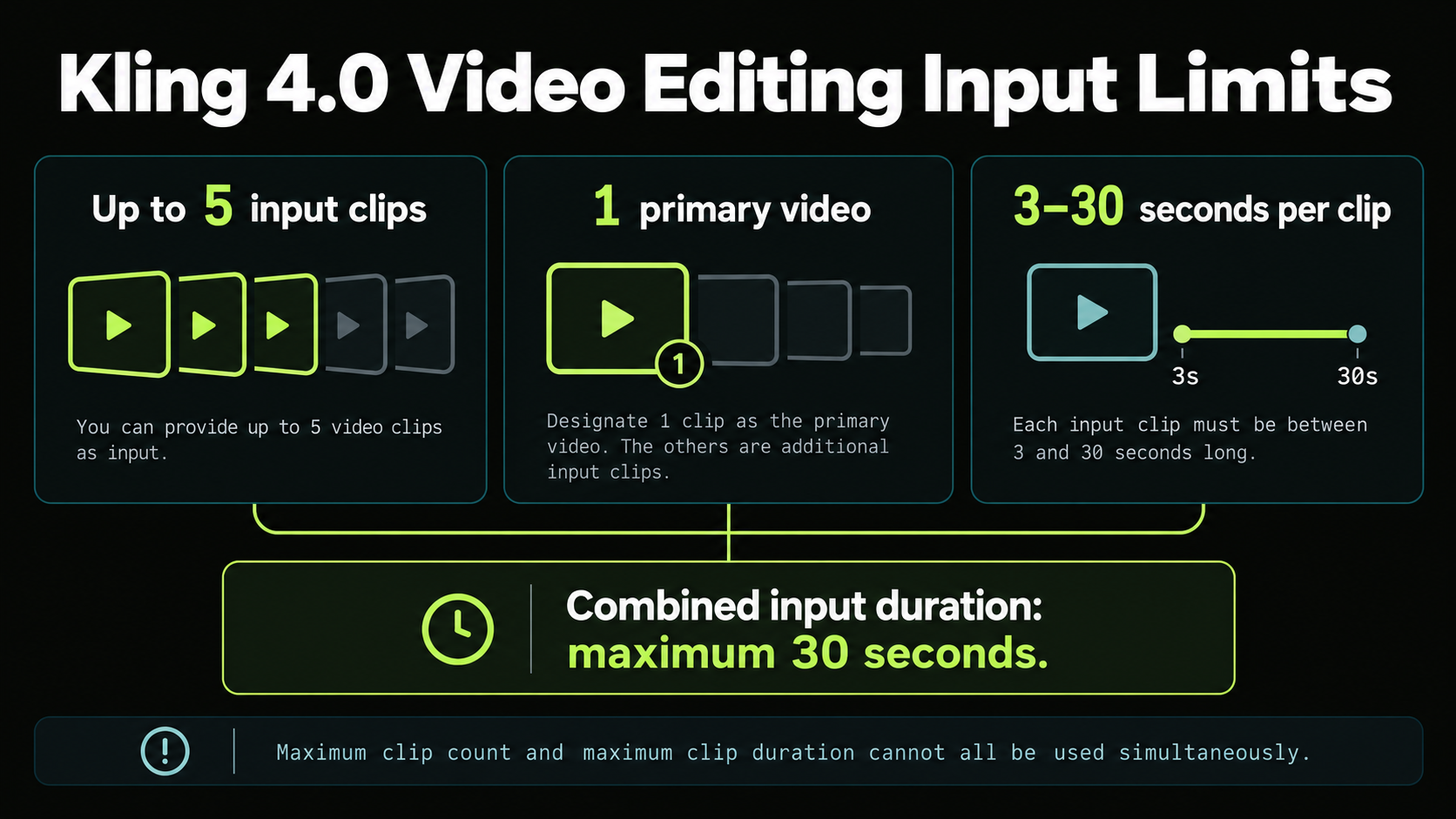
Kling’s handbook supports up to five video inputs for editing, including one primary clip. Each must be 3–30 seconds long, with no more than 30 seconds combined.
The described operations include changing subjects, backgrounds, style, weather, color, materials, framing, and viewpoint. MiniMax also documents generalized reference and editing capabilities.
A practical comparison would ask both systems to change a product video’s background while preserving the product, label, camera movement, and timing. The success criterion is a controlled revision with protected details intact.
Generating an appealing replacement scene is a different task. Keep generation quality and editing precision separate when deciding which workflow fits an existing campaign.
Longer Videos: What a Three-Minute H3 Production Shows
Kling’s longer clip limit matters for uninterrupted shots; H3 can contribute shorter clips to a longer edited film. Final-film duration should not be confused with single-generation capability.
Case: Ten-Second Clips Assembled Into a Film
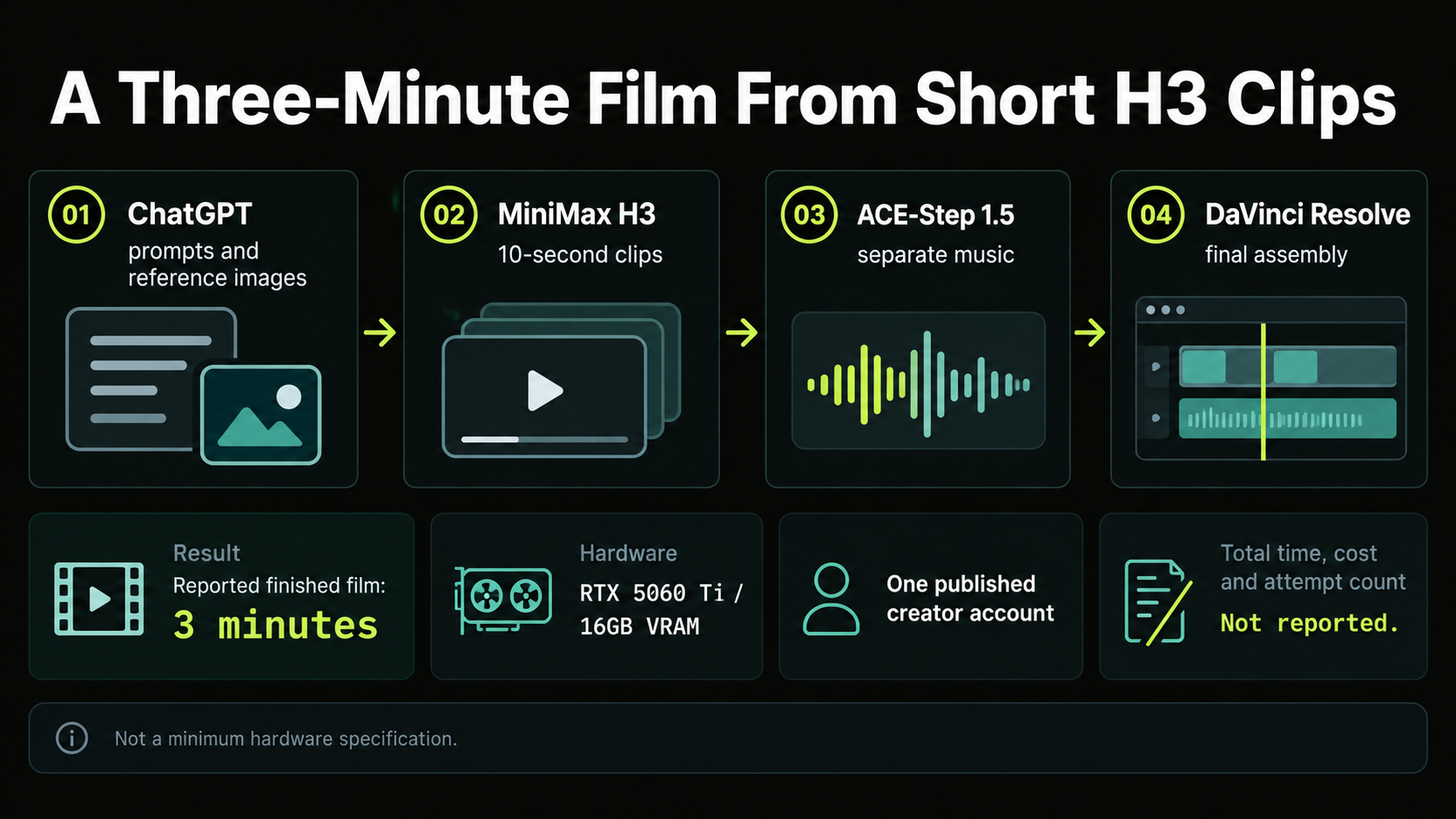
A published production account by DanielVeres describes a three-minute historical video made using an RTX 5060 Ti with 16GB of VRAM.
The workflow used ChatGPT for prompts and reference images, H3 for ten-second video segments, ACE-Step 1.5 for music, and DaVinci Resolve for final assembly.
| Production detail | Reported setup |
|---|---|
| Finished duration | Three minutes |
| Generated segments | Ten-second H3 clips |
| GPU | RTX 5060 Ti |
| VRAM | 16GB |
| Editing | DaVinci Resolve |
This case demonstrates a shot-based production route on one reported hardware configuration.
The Selection Lesson: Continuous Take or Edited Sequence?
For an uninterrupted action exceeding H3’s documented ceiling, Kling’s longer generation window is directly relevant.
For a film built from close-ups, establishing shots, and cutaways, shot matching and continuity may outweigh maximum clip length. The H3 case also shows how separately produced music can unify an edited sequence.
Kling describes repeated extension up to two minutes as coming soon. That concerns extending footage through multiple operations, rather than a single two-minute generation.
Generation Speed: Interpreting the H3 RefMod Data
The available timing case compares two H3 workflows, not H3 against Kling. Its value is showing how reference processing can affect generation time.
Case: 248 Seconds vs 193 Seconds
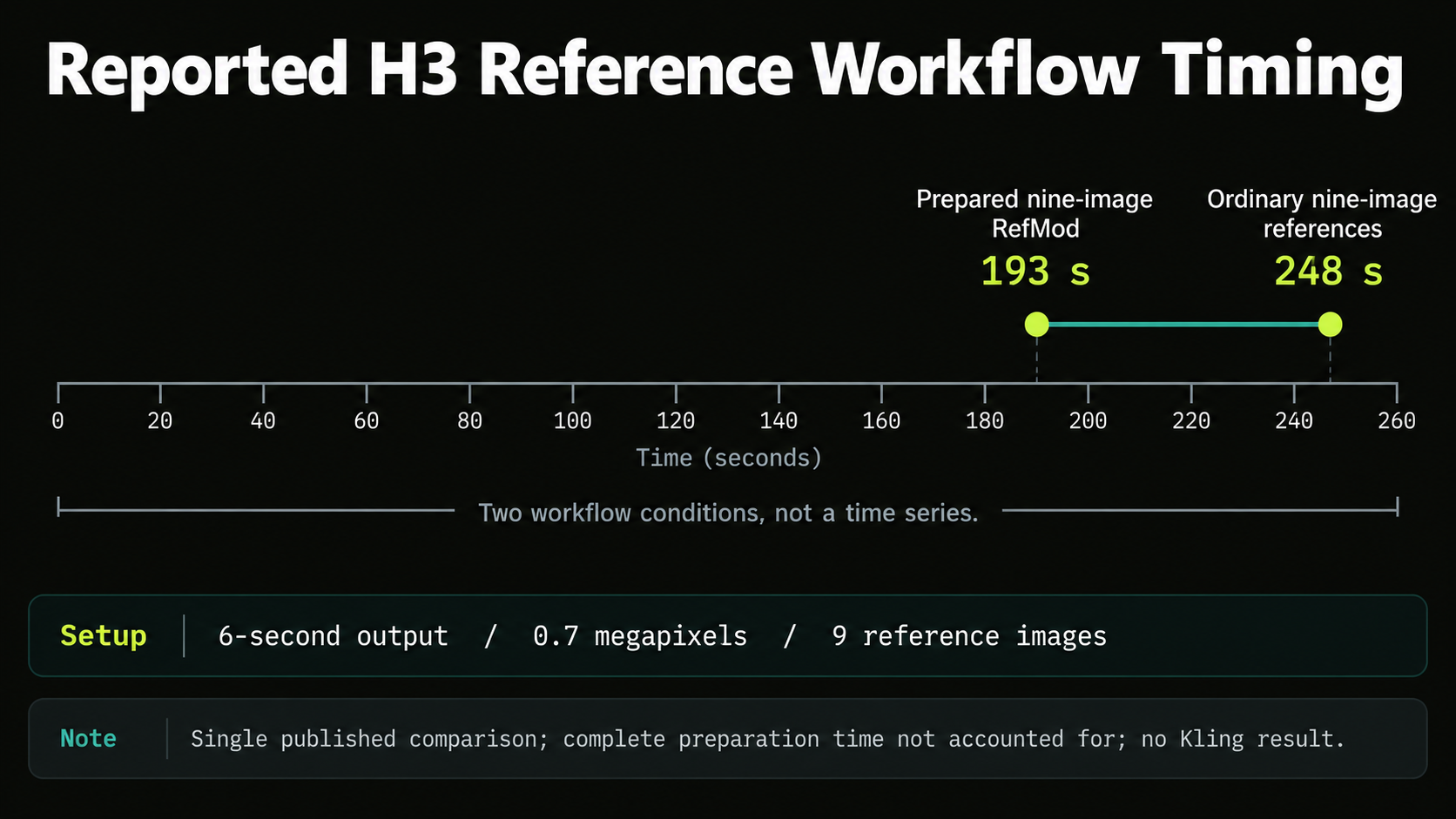
A published H3 reference-workflow comparison reports a six-second, 0.7-megapixel output using nine reference images.
| Reported workflow | Generation time |
|---|---|
| Ordinary nine-image referencing | 248 seconds |
| Prepared nine-image RefMod | 193 seconds |
| Calculated difference | 55 seconds |
The prepared RefMod result took approximately 22% less generation time in that reported comparison. The calculation uses the two stated timings.
What to Measure in a Kling vs H3 Comparison
For hosted production, record submission-to-download time, paid retries, and remaining editing work. An inference-only number can exclude API latency factors such as queueing, preprocessing, encoding, or higher-resolution processing.
For H3, identify whether 2K regeneration is included. For Kling, identify Flash or the full model. Without those conditions, a faster number may describe a different service or output rather than a faster equivalent workflow.
The reviewed evidence therefore supports workflow-specific timing observations, without establishing a model-wide speed winner.
Native Audio: Dialogue, Synchronization, and Repair
Both models document stereo output, but the useful question is whether the generated soundtrack meets the scene’s requirements. Sound format alone cannot establish accurate dialogue or reliable synchronization in AI video with audio.
Our review of H3 character and workflow questions identified concerns about unwanted sounds, character references, and reusable workflows. These are useful evaluation questions, rather than evidence of a general failure rate.
For dialogue, check the wording, speaker assignment, pronunciation, and mouth movement. For action, inspect whether footsteps and impacts align with visible events. For a quiet product video, unwanted music or speech can make an otherwise usable shot unsuitable.
Review picture and sound as separate acceptance requirements. When the visuals work, replacing part of the soundtrack may be preferable to regenerating the scene. Dialogue replacement can require additional synchronization, so include that finishing effort in the decision.
Production Cost: What Changes the Cost of Usable Footage?
Retries, reference processing, output settings, and editing can change the practical cost of the finished scene. A single-generation charge does not reveal how much production will cost.
Use this metric to compare generation spend:
Cost per accepted second = total billed generation spend ÷ accepted video seconds.
Include paid attempts that failed the brief and separately billed processing required for the selected output. Track editing time separately to keep service charges and labor visible.
The reviewed production cases do not provide complete invoices or acceptance rates, so they cannot establish a numerical cost winner. A fair comparison needs the same duration, resolution, sound requirements, reference package, and acceptance criteria.
From Evaluation to API Integration
Model capability and endpoint support are different checks. Before integrating Kling 4.0, confirm that the chosen route exposes the duration, resolution, reference inputs, and audio options your workflow requires.
For teams already using several providers, the MiniMax H3 model page on LinkModel connects the available model with its Playground and API options. The practical benefit is evaluating H3 within the same account used for other supported models, rather than maintaining a separate provider account for each workload.
Start with the scene most likely to expose a failure: a moving product label, a recurring character, a controlled camera move, or assigned dialogue. Its result is more useful for integration planning than an easy showcase prompt.
Hosted Access vs Local H3 Deployment
H3’s published weights create an additional deployment choice for technical teams. The official model repository identifies a community license whose terms should be reviewed for the intended use.
Local operation can support customized reference workflows such as those in the RefMod case. It also introduces hardware, setup, compatibility, and maintenance work.
There is an important pipeline boundary: MiniMax documents H3-Context-IR as a hosted preprocessing and orchestration component that is not included in the published release. A local installation should not be assumed to reproduce the complete official hosted system automatically.
Choose local deployment when customization justifies those responsibilities. Choose hosted generation APIs when generating scenes and integrating supported capabilities is the priority.
Frequently Asked Questions
Is Kling 4.0 better than MiniMax H3?
Kling has higher published duration and resolution limits, plus explicit multi-keyframe control. H3 offers multimodal generation and published-weight deployment. For quality, speed, and usable cost, the better choice depends on matched outputs and the requirements of the scene.
Is MiniMax H3 faster or cheaper than Kling 4.0?
The reviewed evidence does not establish an equivalent overall comparison. The 248-second versus 193-second case concerns two H3 reference workflows, without a Kling result or complete production-cost record.
Can H3 make videos longer than 15 seconds?
H3 clips can be assembled into longer films. The reviewed three-minute production used ten-second segments and external editing, rather than one generation exceeding H3’s documented limit.
How can I avoid unwanted audio and inconsistent characters?
Assign clear roles to reference assets, specify who speaks and what sounds belong in the scene, and avoid conflicting instructions. Review identity, clothing, props, and audio throughout the output. These steps make the brief easier to evaluate, but they do not guarantee a flawless generation.
Which model should I choose for product videos?
Prioritize packaging, lettering, geometry, and movement. Kling’s keyframes are relevant when compositions must follow a storyboard; H3’s multimodal references are relevant when appearance, movement, and sound come from different assets. Compare how well each preserves the details that determine whether the advertisement is usable.
Conclusion
Choose Kling 4.0 when longer continuous shots, 4K output, or explicit multi-keyframe direction are essential; consider MiniMax H3 when multimodal creation and published-weight workflows fit the project. The H3 production cases provide useful evidence about edited films and reusable reference processing, without establishing superiority over Kling. Make the final decision around the scene you need to deliver, the details that must remain correct, and the time and cost required to obtain accepted footage.