
Yes, you can use Kimi K3.1 Pro for free through its official web and mobile interfaces, while third-party API trial credits provide additional ways to try the model without an upfront recharge. Three ways to get started are Kimi Web Chat, Kimi Mobile, and LinkModel's $1 signup Credits for API testing.
The important distinction is that free access does not mean unlimited usage. Kimi's free chat experience, Kimi Code subscriptions, Highspeed access, and coding APIs operate under different limits and payment structures. Developers also need to consider how much a coding task actually consumes rather than relying on the price of a single token.
For a low-cost API starting point, LinkModel offers Kimi K3.1 Pro at $1.90 per million input tokens and $9.50 per million output tokens, 5% below the published official standard rates. New users automatically receive $1 in free Credits upon signup, with no payment card or recharge required. This one-time reward cannot be claimed repeatedly by existing users, never expires, and applies to all models currently available on LinkModel. With $0 minimum spend and $0 monthly platform fee, you can evaluate Kimi K3.1 Pro before deciding whether to add funds.
Is Kimi K3.1 Pro Free? Compare 4 Ways to Try It
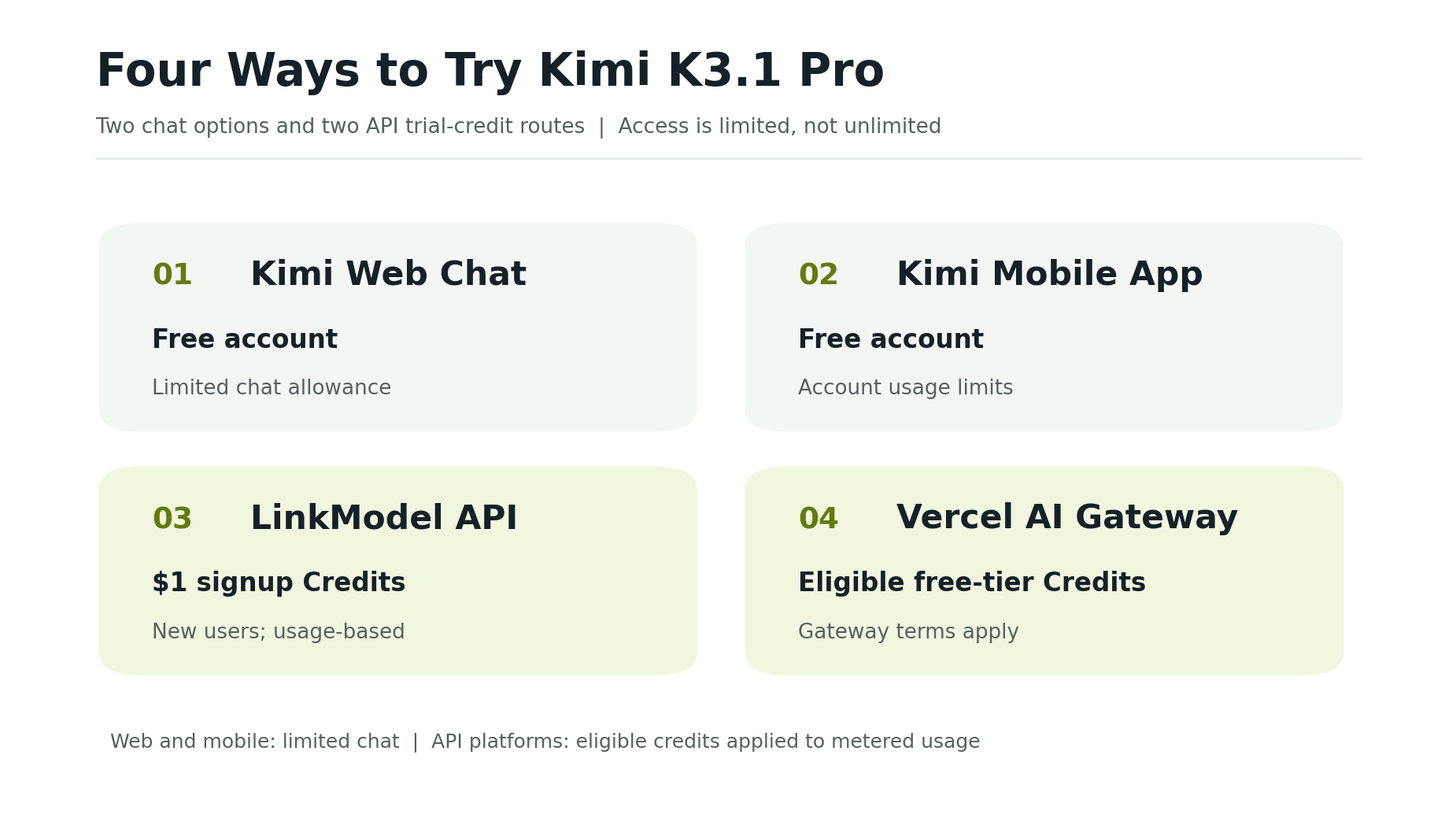
Kimi K3.1 Pro has three straightforward ways to get started: official web chat, official mobile access, and LinkModel's new-user API Credits.
The first two are intended for ordinary chatting. LinkModel is useful for developers who need programmatic API access.
| Access method | How to start | Main limitation |
|---|---|---|
| Kimi Web Chat | Register a free Kimi account | Limited chat usage |
| Kimi Mobile App | Sign in with a free Kimi account | Account usage limits |
| LinkModel API | Receive $1 in signup Credits | Charges deducted from available Credits |
For casual questions, writing, or occasional coding assistance, Kimi's official website or mobile application is the simplest starting point.
For developers building applications, LinkModel offers a more direct way to experiment with actual API requests and inspect token consumption.
What About Kimi Work, Kimi Code, and Highspeed?
These are separate access methods or product tiers, so their eligibility rules should not be confused with free Kimi chat.
| Product | Access conditions |
|---|---|
| Kimi Work | Limited features on the Free membership |
| Kimi Code with K3.1 Pro | Plus / Moderato or higher |
| K3.1 Pro Highspeed in Kimi Code | Pro / Allegretto or higher |
| Official standard API | Usage-based billing |
Kimi Work provides a workspace-oriented experience, while Kimi Code is designed for programming workflows.
A free Kimi account does not automatically include the paid coding-plan benefits or an unrestricted developer API allowance.
How to Use Kimi K3.1 Pro for Free on Web and Mobile
The easiest way to use Kimi K3.1 Pro without setting up an API is through the official Kimi website or mobile application.
Use Kimi K3.1 Pro on the Official Website
Follow these steps:
1. Visit https://www.kimi.com/.
2. Register or sign in with a free Kimi account.
3. Open the model selector and choose K3.1 Pro if it is not already selected.
4. Enter a prompt related to the task you want to evaluate.
5. Review the response and continue within the available free allowance.
For example, you can ask Kimi to explain a JavaScript function, suggest an improvement, or generate a basic web component.
A focused task provides a clearer impression of the model's usefulness than a generic conversational prompt.
If your main goal is to explore the model's writing or coding capabilities, begin with the free web interface before considering additional access options.
Try Kimi K3.1 Pro on Mobile
Kimi also provides mobile applications for supported devices.
Install the official app, sign in, and check the model selector for K3.1 Pro.
The mobile interface is convenient for asking questions, drafting content, examining documents, and exploring short coding problems.
Like web access, free mobile use remains subject to account limits.
Can You Use Kimi Work for Free?
Yes. Kimi Work includes limited functionality under the Free membership.
It is useful for exploring a workspace-oriented interface beyond conventional chatting.
However, more extensive usage allowances and selected capabilities require the appropriate membership tier.
Users interested specifically in Kimi Code or larger agent-based workflows should review those products' separate membership requirements rather than assuming that Kimi Work's free access includes them.
What Are the Free Usage Limits for Kimi K3.1 Pro?
Moonshot has not published a fixed universal daily message count for free Kimi K3.1 Pro users. Its Free membership includes limited usage, but the published plan information does not provide one consistent number of messages applicable to every account.
Check your account's displayed usage information rather than relying on unofficial claims about daily message allowances.
Why Can Kimi K3.1 Pro Reach Its Usage Limit Quickly?
Different tasks require different amounts of computation.
A short question may consume relatively little usage, while lengthy coding conversations, document analysis, and repeated revisions may require more.
This distinction becomes especially important when the task involves generating large amounts of code or processing an extensive conversation history.
In Reddit discussions following K3.1 Pro's release, users reported consuming their available allowances more quickly than expected.
Some reports concerned paid five-hour limits. These experiences highlight user concerns about quota transparency, but they do not establish a universal free-account limit.
What Happens When You Reach the Free Limit?
If your free allowance is exhausted, check the account interface for reset information or available upgrade options.
For occasional personal use, waiting for the applicable allowance to become available again may be sufficient.
For repeated programming or automated workflows, API access provides a different cost model based on usage rather than a conventional chat membership allowance.
The practical decision depends on how frequently you use the model and whether you need a chat interface or programmatic integration.
Does Kimi K3.1 Pro Highspeed Require a Paid Plan?
Yes. Kimi Code provides K3.1 Pro Highspeed to Pro / Allegretto members and above.
Standard K3.1 Pro is available in Kimi Code to Plus / Moderato members and above, while Pro / Allegretto membership also unlocks its larger context-window option.
According to Moonshot's Kimi Code documentation, Highspeed provides approximately two to three times the output speed of standard K3.1 Pro, with about twice the coding-plan quota consumption.
Users primarily interested in evaluating model quality can begin with standard K3.1 Pro before considering whether faster responses justify the additional quota usage.
How to Try the Kimi K3.1 Pro API With Free Credits
Developers can begin testing Kimi K3.1 Pro API requests with LinkModel's $1 new-user signup Credits. These Credits cover token-based usage within the available balance, allowing initial experimentation without an upfront recharge.
Try Kimi K3.1 Pro With LinkModel's $1 Signup Credits
LinkModel provides access to Kimi K3.1 Pro through a unified API platform, using the published model identifier kimi-k3.1-pro.
To get started:
1. Visit https://www.linkmodel.ai/ and create a new account.
2. Open the dashboard and check the automatically granted $1 registration Credits.
3. Find Kimi K3.1 Pro in the model library.
4. Review its model information and API documentation.
5. Create an API key in your dashboard.
6. Configure a request using the documented API endpoint and model identifier.
7. Send a small request and inspect the returned response.
8. Review the token usage before expanding to larger tasks.
New users can use their signup Credits for API testing without first entering payment-card information or adding funds.
LinkModel also provides a common account and API workflow for supported models, making it easier to explore different available models without maintaining separate provider billing accounts.
Its OpenAI-compatible integration path can help developers reuse familiar request structures, although model-specific reasoning and tool parameters should be checked against the current documentation.
A Real Kimi K3.1 Pro API Coding Example
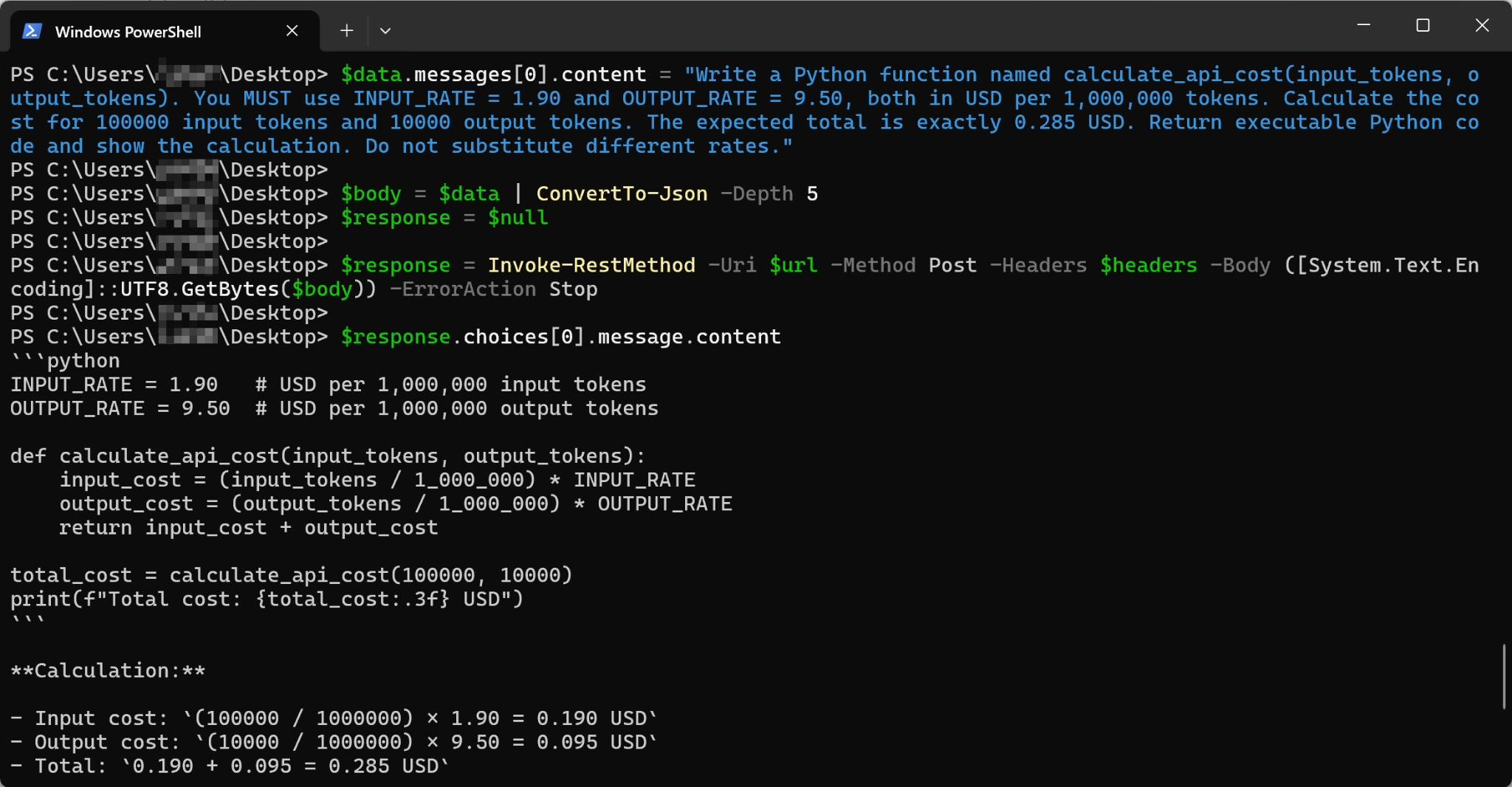
To examine the API workflow, we submitted a coding request to Kimi K3.1 Pro through LinkModel using Windows PowerShell.
The request asked the model to generate a Python function named calculate_api_cost(input_tokens, output_tokens) for estimating token-based API costs.
We supplied the published LinkModel input and output rates and instructed the model to return Python code together with a worked calculation.
The API successfully returned a Python function containing the requested rate constants, cost calculation, and printed output statement.
The response identified the model as kimi-k3.1-pro and returned a completion status of stop.
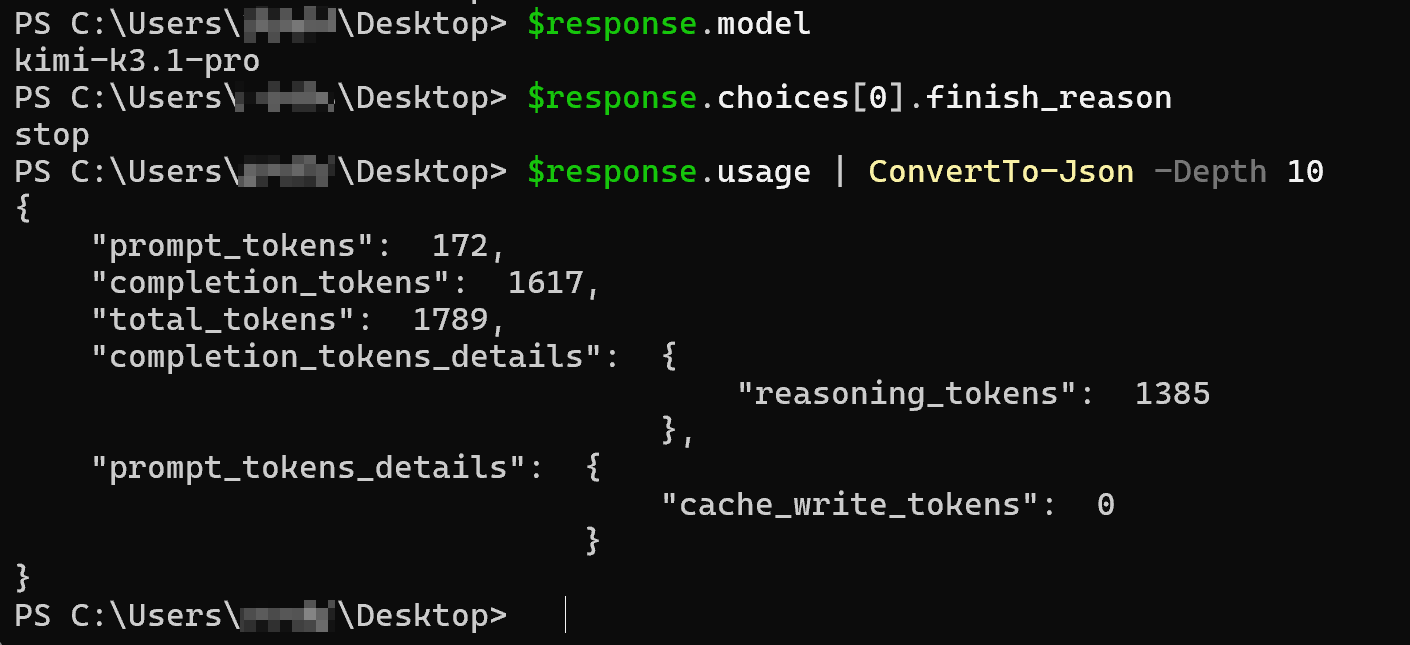
Recorded API usage:
| Usage metric | Recorded result |
|---|---|
| Input tokens | 172 |
| Output tokens | 1,617 |
| Reasoning tokens | 1,385 |
| Total tokens | 1,789 |
| Completion status | stop |
| Estimated request cost | $0.0156883 |
The 1,385 reasoning tokens are included within the 1,617 output tokens and should not be counted twice.
At LinkModel's published standard rates, the request's estimated cost was approximately $0.0157, or 1.57 cents.
For developers testing an API, the most useful takeaway is the ability to connect a real model response with the exact token quantities used to generate it.
Kimi K3.1 Pro API Pricing: How Much Does a Real Request Cost?
Our recorded Kimi K3.1 Pro coding request used 1,789 tokens and had an estimated cost of $0.0156883 at LinkModel's published rates. This example illustrates how inexpensive an individual small API experiment can be, while also showing why the amount of reasoning and generated output matters.
Developers should evaluate real token consumption rather than assume that every request has the same cost.
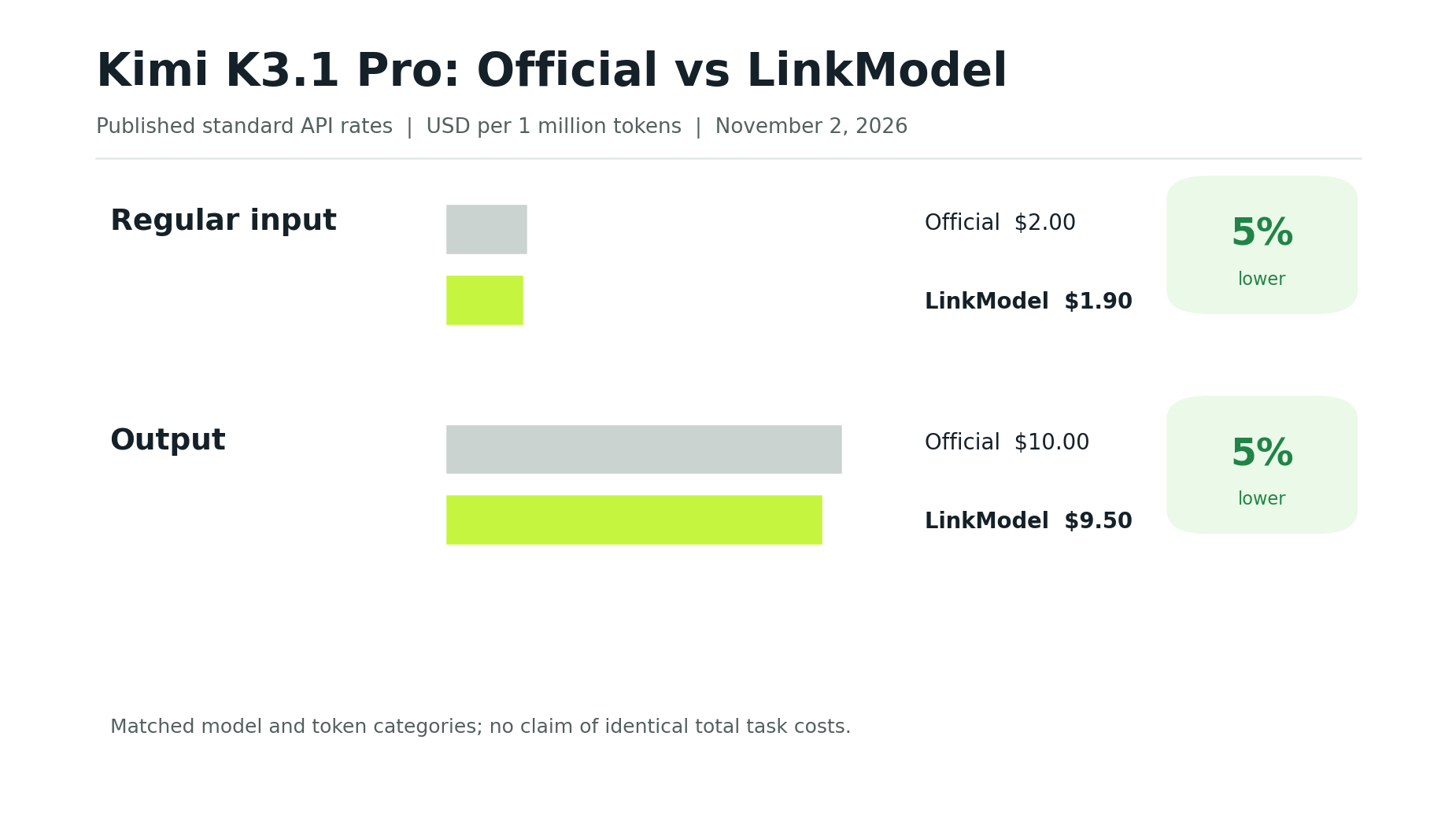
Official Kimi K3.1 Pro API vs LinkModel Pricing
The following published rates were checked on November 2, 2026.
| Token type | Official API | LinkModel | Savings |
|---|---|---|---|
| Regular input | $2.00 | $1.90 | 5% |
| Cached input | $0.20 | $0.19 | 5% |
| Cache write, 5 minutes | $2.00 | $1.90 | 5% |
| Cache write, 1 hour | $4.00 | $3.80 | 5% |
| Output | $10.00 | $9.50 | 5% |
All rates are in USD per million tokens.
The published LinkModel rate is 5% lower for each matching standard pricing category.
For every million regular input tokens, the rate difference is $0.10. For every million output tokens, it is $0.50.
These differences become more meaningful as the amount of billable usage increases, although total project spending also depends on the workload and any additional chargeable features.
How We Calculated the Real API Request Cost
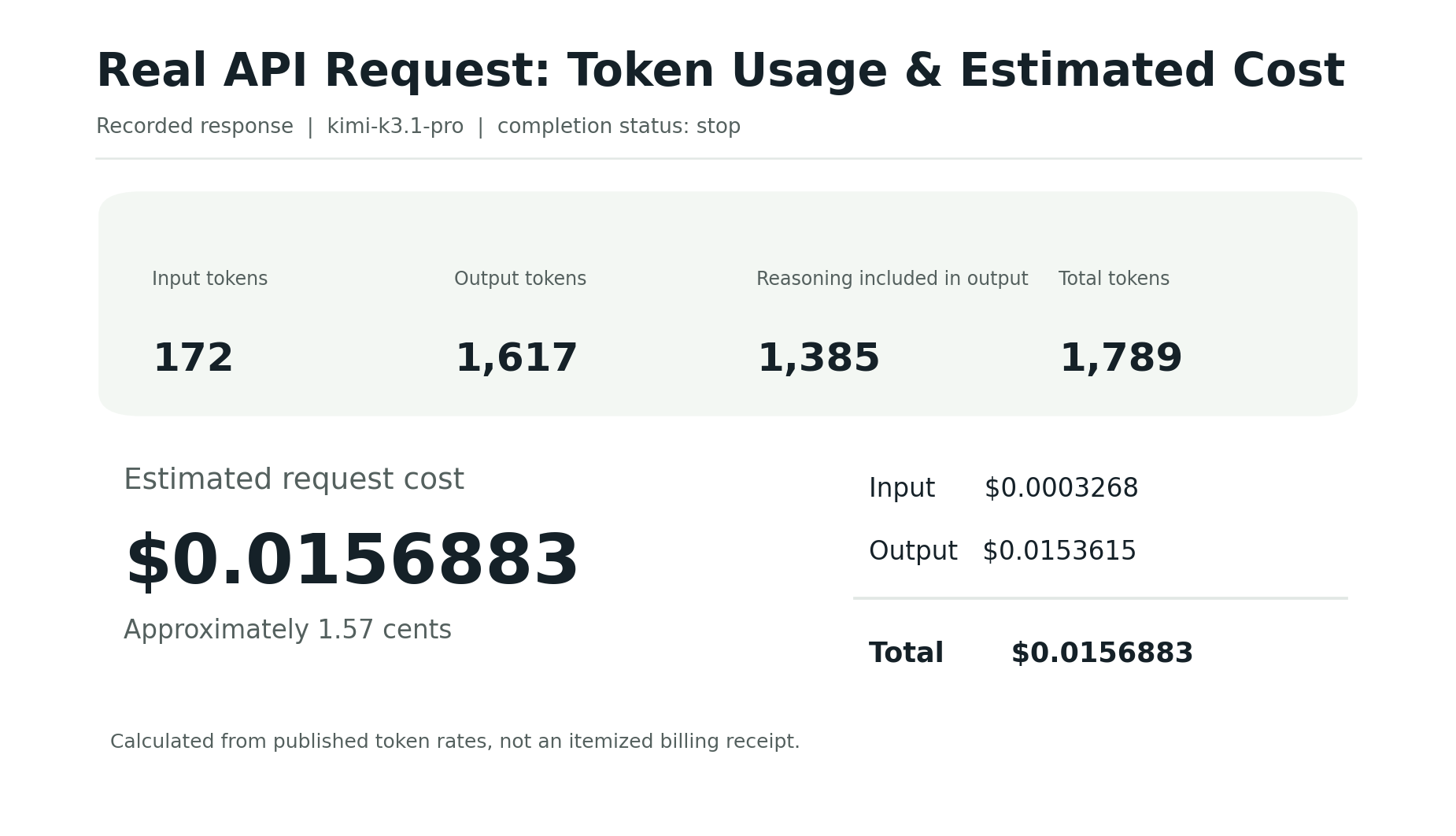
The API response reported 172 input tokens and 1,617 output tokens.
Using the published LinkModel rates:
| Cost component | Calculation | Estimated cost |
|---|---|---|
| Input | 172 × $1.90 / 1,000,000 | $0.0003268 |
| Output | 1,617 × $9.50 / 1,000,000 | $0.0153615 |
| Total | Input + output | $0.0156883 |
Therefore, the estimated cost was approximately $0.0157.
This estimate uses the published standard input and output rates and the recorded API usage. It is not presented as an independently itemized billing charge.
The API reported zero cache-write tokens, and the response did not identify a separate cached-input quantity.
The output tokens accounted for most of the estimated cost. This is relevant because the response included 1,385 reasoning tokens within the completion total.
For reasoning-intensive tasks, output consumption can have a substantial impact on total spending even when the visible final answer is relatively short.
What Does the $1 Signup Credit Mean for API Testing?
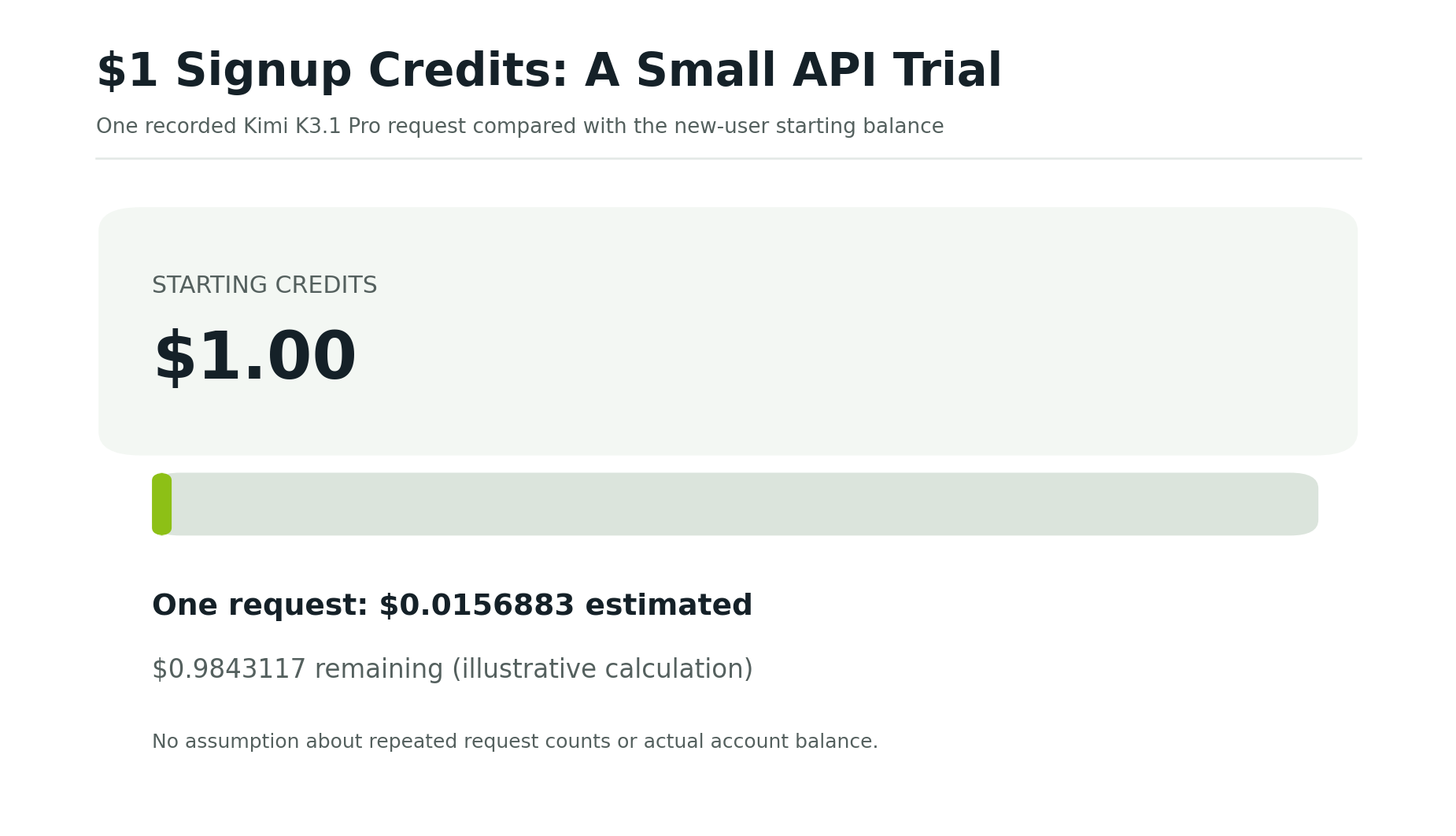
LinkModel's $1 new-user Credits provide a starting balance for experimenting with available models.
At the estimated cost of this recorded request, $0.0157 represents only a small portion of the $1 starting balance.
However, this does not imply that all coding requests will cost approximately 1.57 cents.
Longer prompts, more extensive reasoning, larger generated outputs, and repeated requests can increase token consumption.
A useful first test is therefore a short, representative task with a clearly defined expected output.
After receiving a response, developers can examine the usage fields, estimate its cost from the published rates, and decide whether to attempt a larger workflow.
This approach turns the initial Credits into a practical opportunity to understand real workload consumption rather than relying on a fixed assumption about messages or requests.
How Can Developers Control Kimi K3.1 Pro API Costs?
Begin with tasks that have a limited scope and an output you can evaluate.
For example, request a short code function, review its correctness, and inspect the returned usage before expanding to a multi-file programming task.
Useful measurements include total input tokens, output tokens, reasoning-token details when available, the number of requests, and whether the result meets the task requirements.
The purpose is not to minimize every individual API call at the expense of useful output.
Instead, the objective is to understand how much a successful task costs and whether that level of consumption is appropriate for your application.
What Our Research Found About Real Kimi K3.1 Pro Coding Costs
The price of an individual Kimi K3.1 Pro API request is only one part of the cost of a completed coding task. Longer agent workflows can involve repeated calls, extensive output, retries, and additional revisions.
Our own small coding request had an estimated cost of approximately 1.57 cents. Developer-reported examples involving larger applications show why this number should not be generalized to every programming task.
A Developer Reported 105 Calls for a Three.js Project
In an October 2026 r/kimi discussion, a developer described using Kimi K3.1 Pro with AgenC Core to generate an interactive Three.js aircraft hangar.
The reported workflow included:
| Metric | Developer-reported result |
|---|---|
| Total duration | 38 minutes |
| Model calls | 105 |
| API cost | Approximately $6.70 |
| Generated JavaScript | Approximately 2,100 lines |
Based on those reported figures, the arithmetic average was approximately $0.064 per model call.
That average does not identify the token consumption or charge of each individual request.
The developer also reported API overload responses and the use of retry and backoff handling during the task.
These details illustrate an important difference between a small isolated prompt and an automated workflow that makes many model calls to complete a larger project.
The example was shared by the developer in a Reddit discussion of the Three.js project.
Why Cost per Completed Task Matters More Than Cost per Request
A model with a lower token price does not automatically produce the lowest total cost for every task.
One model might require fewer requests to reach an acceptable result, while another might require extensive corrections or repeated attempts.
Developer discussions have described situations in which lower-priced model attempts consumed less money but struggled to complete parts of a task that another model eventually resolved.
These individual reports are useful examples of the tradeoff, rather than universal evidence that one model always performs better.
To compare model costs meaningfully, examine the overall workflow:
- Total input and output tokens
- Number of model calls and retries
- Total API spending
- Whether the requested task was completed
- Additional manual revisions required
For simple experiments, request-level pricing can provide a useful starting estimate.
For longer coding-agent workflows, successful completion and total resource consumption become more important.
Our real API example shows how to obtain the first layer of evidence: model identity, a generated response, and recorded token usage. Larger projects require tracking that information across multiple requests.
Frequently Asked Questions
Can I use Kimi K3.1 Pro for free without a subscription?
Yes. Kimi offers limited K3.1 Pro access through its official free web and mobile interfaces. A paid membership is not required for basic chatting within the available free allowance.
How many free Kimi K3.1 Pro messages do I get?
Moonshot has not published a fixed universal daily message count for free K3.1 Pro users. Check your account's current allowance and applicable reset information rather than relying on unofficial quota estimates.
Can I try the Kimi K3.1 Pro API without adding money?
Yes. Eligible new LinkModel users automatically receive $1 in signup Credits without a payment card or recharge. These Credits can cover initial API requests, with usage deducted according to the applicable token rates.
Is Kimi K3.1 Pro free in Kimi Code or OpenCode?
Kimi Code requires Plus / Moderato or higher membership to access K3.1 Pro. Pro / Allegretto or higher enables K3.1 Pro Highspeed and the larger context-window option. OpenCode is a separate coding tool, and model charges depend on the selected provider or subscription.
Is Kimi K3.1 Pro worth paying for after the free trial?
It depends on your workload. Occasional users may find free web chat sufficient, while developers can use API trial Credits to examine code generation, integration requirements, and token consumption. Our recorded LinkModel coding request cost an estimated $0.0157, but larger tasks may consume significantly more. Evaluate a representative workload before committing to additional spending.
Conclusion
Kimi K3.1 Pro is free to try through official chat interfaces and LinkModel's new-user API Credits, with limits that vary by access method. Casual users can begin with Kimi Web Chat or the mobile app, while developers can explore the API with LinkModel's $1 new-user Credits. Our real Kimi K3.1 Pro API request returned a Python coding response using 1,789 tokens, at an estimated cost of approximately $0.0157. Together with LinkModel's 5% lower published standard token rates, this provides a concrete way to evaluate the model's usage and costs before moving to larger coding workflows.