The GLM 5.3 Flash API costs $0.15 per million input tokens and $0.50 per million output tokens at Z.ai's standard rates. On LinkModel, the same model costs just $0.135/M input and $0.45/M output—10% less than the official standard pricing. But choosing the right API provider also means evaluating prompt caching, reasoning performance, integration compatibility, and the real cost of completed tasks.
A lower token price does not always mean a cheaper coding workflow. Long reasoning sessions, failed tool calls, repeated context processing, and provider-specific errors can increase costs and delay results. For developers using GLM 5.3 Flash in coding agents or automated applications, cost per successful task matters more than token price alone.
With LinkModel, you can access GLM 5.3 Flash alongside text, image, and video models through one platform, with 10% lower GLM 5.3 Flash API rates, $0 minimum spend, and $0 monthly platform fee. New users automatically receive $1 in free Credits upon signup, with no payment card or recharge required. This one-time new-user benefit cannot be claimed repeatedly by existing users; the gifted Credits do not expire and can be used with all models currently available on LinkModel. Start testing your workflow before deciding whether to recharge.
What Is the GLM 5.3 Flash API?
GLM 5.3 Flash is Z.ai's open-weight, multimodal language model designed for cost-efficient coding, agent workflows, document understanding, and visual tasks. It supports text, images, video, and file-based input while generating text-based responses.
Its mixture-of-experts architecture activates a subset of its total parameters during inference, helping balance model capability and computational efficiency.
GLM 5.3 Flash Specifications
| Feature | GLM 5.3 Flash |
|---|---|
| Developer | Z.ai |
| Model family | GLM 5 |
| Total parameters | 320 billion |
| Active parameters | 18 billion |
| Context window | Up to 1 million tokens |
| Maximum output | Up to 128,000 tokens |
| Input modalities | Text, images, video, files |
| Output modality | Text |
| Function calling | Supported |
| Structured output | Supported |
| Reasoning levels | Low, High, Max |
| Public model identifier | glm-5.3-flash |
| Open weights | MIT license |
The distinction between total and active parameters matters. Although the architecture activates approximately 18 billion parameters per token, this does not mean the complete model can run on consumer hardware with the memory requirements of a conventional 18-billion-parameter model.
For developers who do not want to manage GPU infrastructure, a hosted API provides a more straightforward starting point.
What Is GLM 5.3 Flash Best Used For?
GLM 5.3 Flash is particularly relevant to four types of workloads.
Everyday coding and repository maintenance. Developers can use it to modify files, generate tests, explain unfamiliar code, and propose targeted fixes. Automated tests make these workflows more reliable because the application can verify whether the proposed changes work.
Visual coding and UI debugging. The model supports image inputs, making it useful for examining screenshots alongside source code. For example, a developer can provide a screenshot of a broken responsive layout and request a targeted CSS fix.
Document-heavy applications. Its large context window can accommodate extensive technical documentation, code references, and project materials. However, a large supported context window does not guarantee consistent reasoning quality at every possible context length.
Tool-using agents. Function calling and structured output support multi-step workflows in which the application executes tools and returns the results to the model.
The strongest applications use verifiable completion criteria. A code change that passes automated tests is more useful than a long explanation claiming that the problem has been fixed.
GLM 5.3 Flash API Pricing: Official vs LinkModel
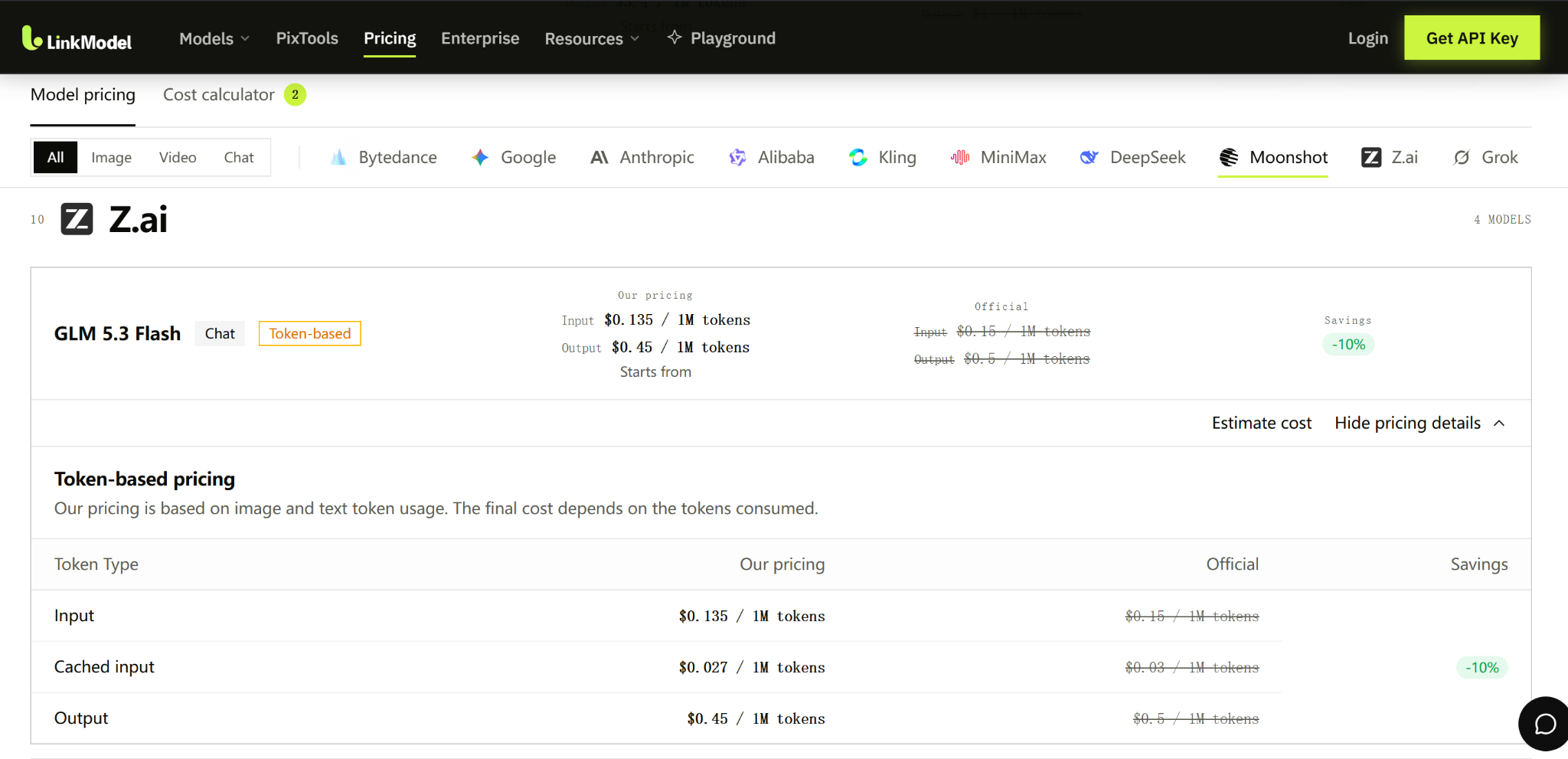
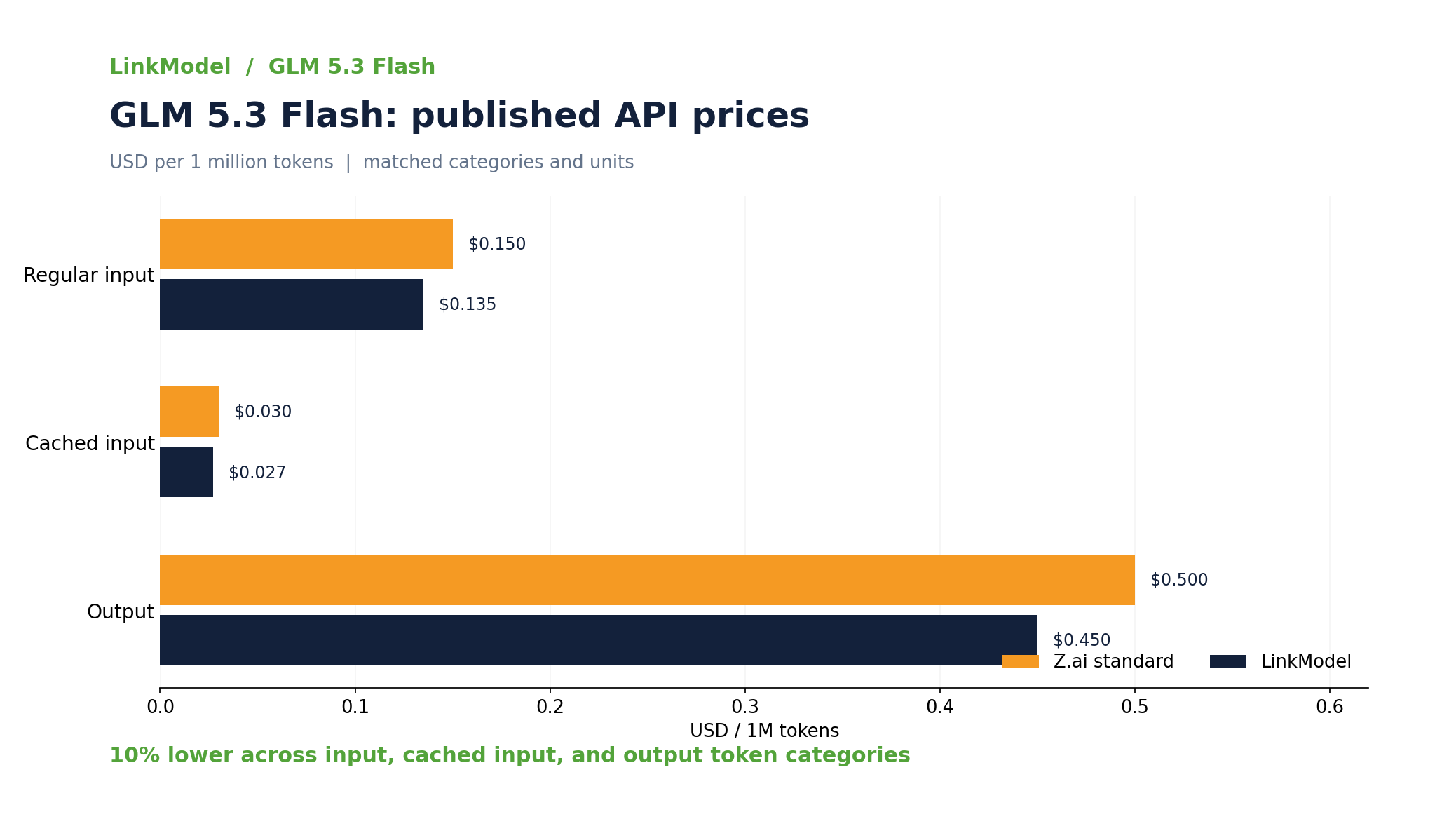
LinkModel offers GLM 5.3 Flash API pricing 10% below Z.ai's published standard rates across regular input, cached input, and output tokens.
This price difference makes LinkModel worth considering for developers who want lower token charges without committing to a monthly subscription.
GLM 5.3 Flash API Price Comparison
All prices below are in USD per million tokens.
| Token Type | Z.ai Official | LinkModel | Savings |
|---|---|---|---|
| Input | $0.150 | $0.135 | 10% |
| Cached input | $0.030 | $0.027 | 10% |
| Output | $0.500 | $0.450 | 10% |
At these published rates, each million regular input tokens costs $0.015 less through LinkModel, while each million output tokens costs $0.05 less.
For cached input, LinkModel charges $0.027 per million tokens instead of the official $0.03 standard rate.
The lower token rates are particularly useful when workloads involve repeated requests or substantial output generation.
However, the final bill also depends on actual token consumption, cache usage, retries, and separately billed services where applicable.
How Much Does a GLM 5.3 Flash API Request Cost?
API token charges can be calculated using three components:
Request cost = (Regular input tokens × Input rate + Cached input tokens × Cached rate + Output tokens × Output rate) / 1,000,000
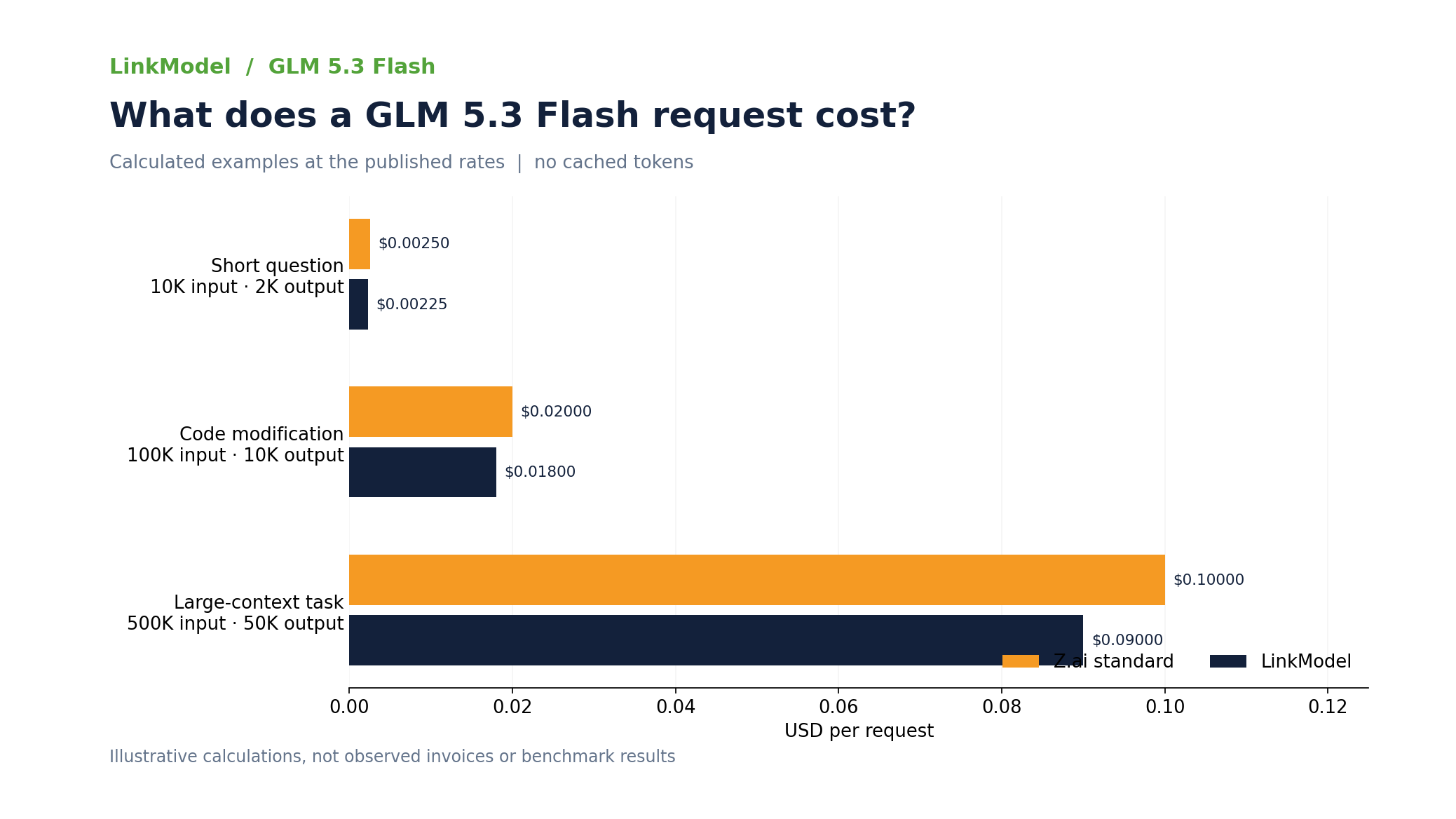
For requests without cached tokens, the following examples illustrate the difference between Z.ai's standard rates and LinkModel's published prices.
| Workload | Input Tokens | Output Tokens | Z.ai Cost | LinkModel Cost |
|---|---|---|---|---|
| Short question | 10,000 | 2,000 | $0.00250 | $0.00225 |
| Code modification | 100,000 | 10,000 | $0.02000 | $0.01800 |
| Large-context task | 500,000 | 50,000 | $0.10000 | $0.09000 |
These figures are calculated from the stated token quantities and published prices.
Consider a coding workflow that uses 100,000 input tokens and 10,000 output tokens per request.
At Z.ai's standard rates, the token charge is $0.020 per request. The equivalent LinkModel charge is $0.018.
Across 1,000 requests with the same token usage:
- Z.ai: $20
- LinkModel: $18
- Calculated savings: $2
The percentage difference is 10%, while absolute savings increase as usage grows.
How Prompt Caching Changes GLM 5.3 Flash API Costs
Prompt caching can have an even larger impact on input costs than a provider discount alone.
Suppose an agent request includes:
- 80,000 regular input tokens
- 20,000 cached input tokens
- 10,000 output tokens
At LinkModel's published prices, the calculated charge is:
(80,000 × $0.135 + 20,000 × $0.027 + 10,000 × $0.45) / 1,000,000 = $0.01584
Without cached-input billing, the same 100,000 input tokens and 10,000 output tokens would cost $0.018.
That is a difference of $0.00216 per request under these assumptions.
Caching is especially relevant to coding agents that repeatedly reuse system instructions, repository context, documentation, or tool definitions.
However, applications should inspect actual usage records rather than assume repeated messages automatically receive cached-input pricing.
When Does a 10% API Discount Stop Saving Money?
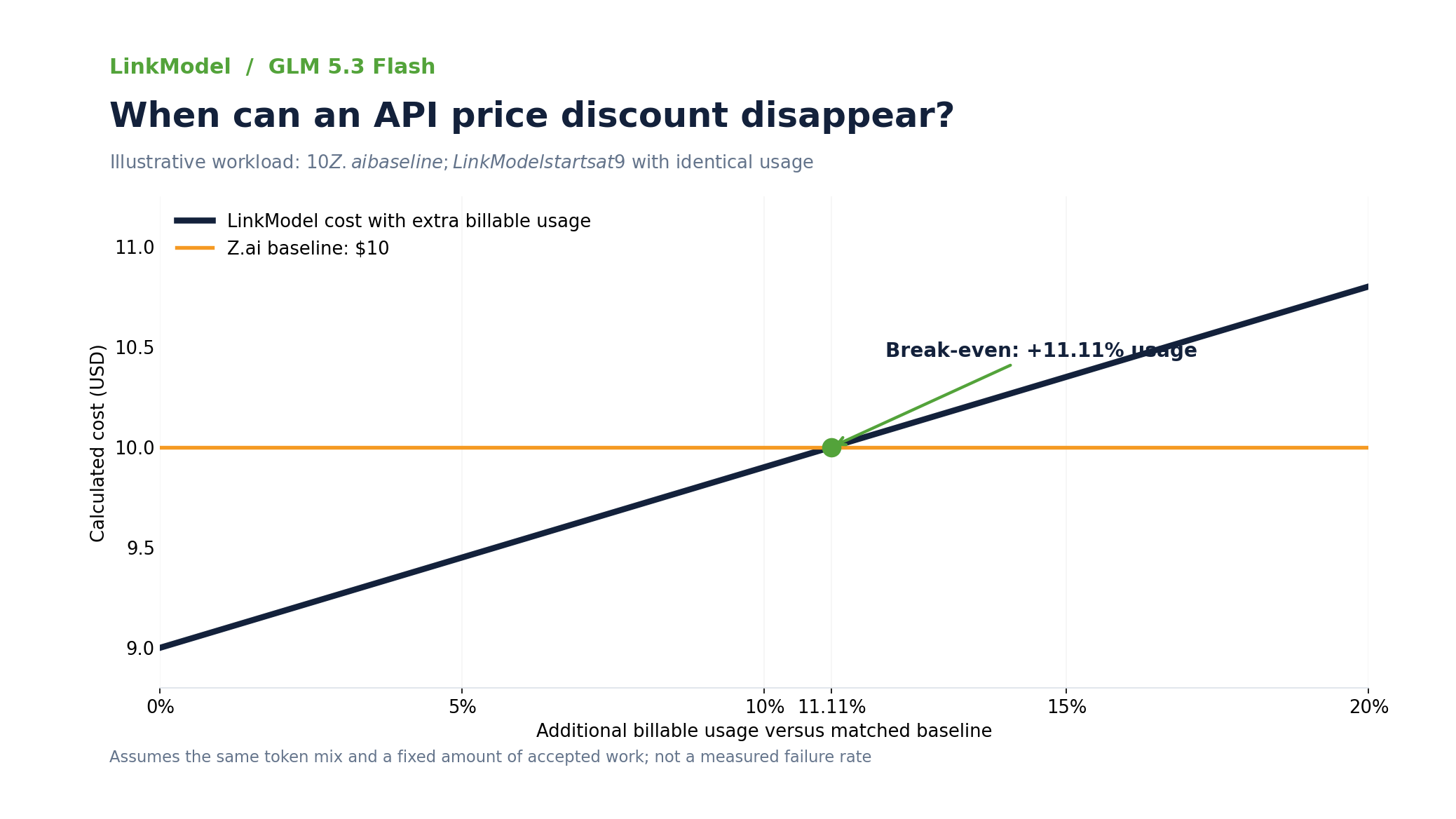
A 10% lower API token rate can lose its cost advantage if the cheaper workflow consumes more than 11.11% additional billable tokens through retries or repeated processing, assuming the same token mix, comparable billing conditions, and a fixed amount of accepted work.
For example, suppose a GLM 5.3 Flash workflow costs $10 at Z.ai's standard rates. Under identical token usage, LinkModel would cost $9.
If additional failed attempts increase the LinkModel workflow's billable token consumption by 10%, its cost becomes $9.90.
At approximately 11.11% additional consumption, the cost reaches $10, eliminating the initial savings.
The break-even relationship is:
0.90 × (1 + Additional billable usage) = 1
Therefore:
Break-even additional usage = 11.11%
This is a mathematical break-even example, not an observed provider failure rate.
The practical takeaway is to compare total billed tokens per accepted task, including retries, repeated context, and output generation. A lower price per million tokens is valuable, but reliable task completion determines whether the savings survive in production.
Best GLM 5.3 Flash API Providers Compared
The best GLM 5.3 Flash API provider depends on published pricing, integration requirements, caching behavior, and successful task completion.
No single provider should be considered universally fastest or most reliable based only on advertised token prices or isolated developer reports.
GLM 5.3 Flash API Provider Comparison
The following services offer different approaches to accessing or hosting GLM 5.3 Flash.
| Provider | Access Model | Published Pricing Reference | Main Reason to Consider |
|---|---|---|---|
| LinkModel | Unified multi-model API | $0.135/M input, $0.45/M output | 10% below Z.ai standard pricing |
| Z.ai | Direct model-provider API | $0.15/M input, $0.50/M output | Direct access and original model documentation |
| OpenRouter | Multi-provider routing | Depends on selected route | Provider selection and routing flexibility |
| Mistral | Hosted API integration | $0.15/M input, $0.50/M output reference | Alternative hosted integration |
| Baseten | Hosted inference | Provider-specific | Inference configuration options |
Pricing references are in USD per million tokens where stated.
Provider availability, routing policies, caching support, and current prices should be checked for the exact model configuration before deployment.
The table compares documented access approaches and published pricing information. It does not imply that every provider has been independently tested under identical conditions.
What Our Research Found About Provider Reliability
Our review of developer discussions found that provider-specific behavior can affect the perceived quality of the same model.
In a GLM 5.3 Flash provider-selection discussion, a developer reported the following figures:
| Provider | Reported Throughput | Reported Cache Hit Rate |
|---|---|---|
| Baseten | 107 tokens/s | 65.7% |
| Makora | 82 tokens/s | 52.8% |
| Z.ai | 39 tokens/s | 88.2% |
These measurements reflect the conditions described by that developer, rather than a standardized provider benchmark.
They illustrate an important tradeoff: higher throughput does not necessarily mean higher cache efficiency.
For interactive coding, prioritize first-token latency and successful tool execution. For repeated long-context agent workflows, prioritize effective cached-input costs alongside completion rates.
A provider with higher throughput may still be more expensive per accepted task if cache reuse is lower or retries are more frequent.
Another developer report involving provider routing described repetitive and incoherent responses on a particular upstream route. The user reported that excluding the affected route restored normal behavior.
This illustrates a practical diagnostic principle: when output quality suddenly changes, check the serving route and request configuration before concluding that the underlying model has become less capable.
Which GLM 5.3 Flash API Provider Should You Choose?
Choose LinkModel if your priority is lower published token prices and unified access to multiple AI models. Its GLM 5.3 Flash rates are 10% below Z.ai's standard pricing across regular input, cached input, and output tokens. Pay-as-you-go billing also makes it suitable for small experiments and variable workloads.
Choose Z.ai when direct access to the model developer's API and original model documentation is your priority.
Consider multi-provider routing services when selecting or switching upstream inference routes is an important application requirement.
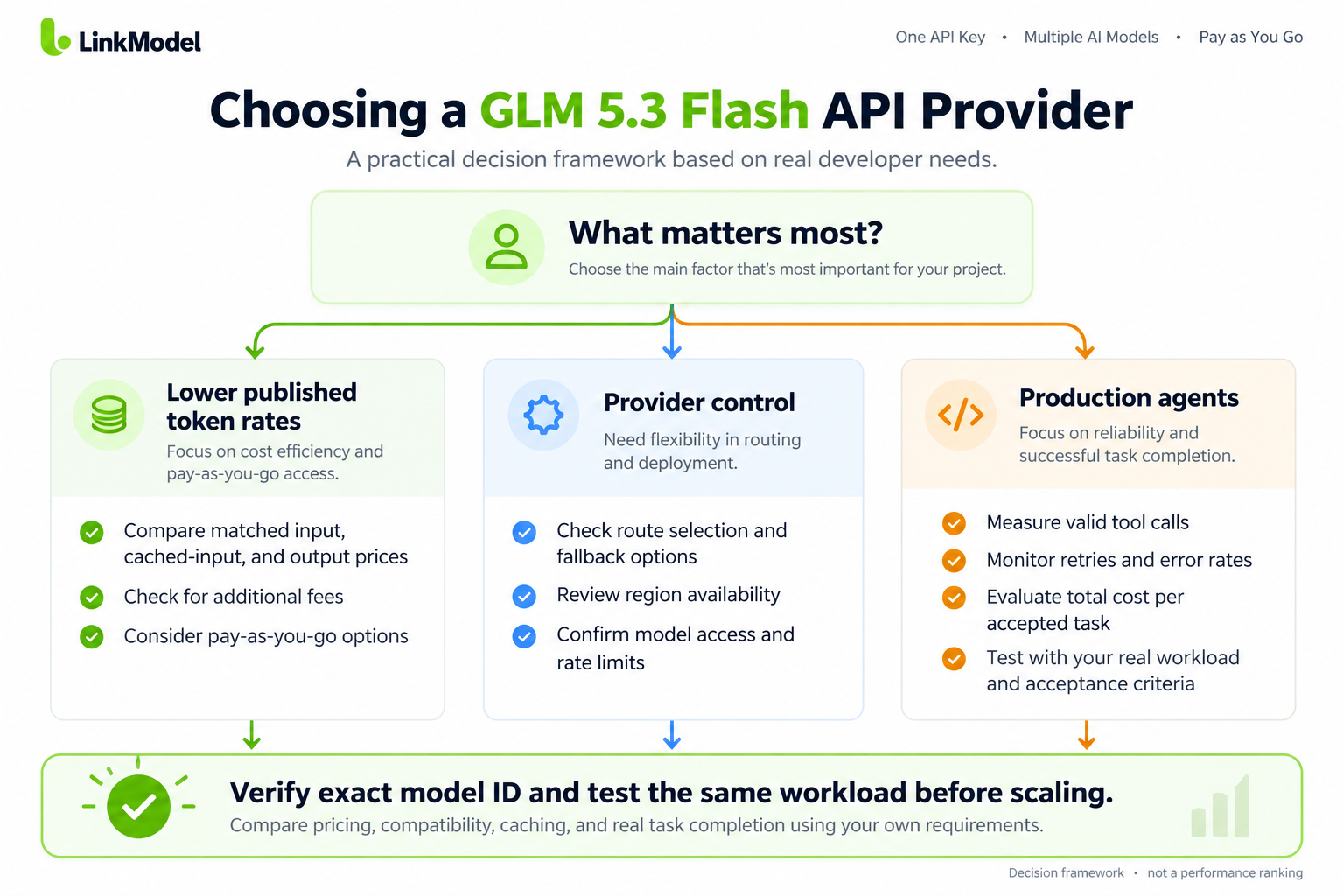
For production coding agents, do not select a provider based on advertised token rates or isolated throughput figures alone.
Evaluate API compatibility, tool-call correctness, cached-token usage, error behavior, and completed-task cost using representative workloads.
For cost-sensitive developers, LinkModel offers a verified price advantage. For performance-sensitive applications, the final decision should also depend on workload-specific reliability and completion results.
How to Compare API Providers Fairly
Use the same workload and acceptance criteria when evaluating different providers.
| Evaluation Area | What to Measure | Why It Matters |
|---|---|---|
| Pricing | Input, output, and cache rates | Determines token charges |
| First-token latency | Time to initial output | Affects interactive responsiveness |
| Throughput | Generated tokens per second | Affects longer responses |
| Task completion | Accepted results per attempted task | Measures practical usefulness |
| Error behavior | 429, 500, timeout frequency | Affects reliability and retries |
| Tool calling | Valid tool names and arguments | Essential for agents |
| Caching | Actual cached-token usage | Changes effective input cost |
| Integration | SDK and parameter compatibility | Reduces implementation work |
For coding tasks, use automated tests. For structured extraction, compare responses against known expected results. For tool-using agents, verify that the tool calls produce the intended outcomes.
A useful operating metric is:
Cost per accepted task = Total billed API cost / Number of accepted tasks
For example, if an application spends $9 on API requests and successfully completes 300 accepted tasks, its cost per accepted task is $0.03.
This metric is more useful for production decisions than token pricing alone because it accounts for wasted attempts.
How to Get and Integrate the GLM 5.3 Flash API
You can access GLM 5.3 Flash through LinkModel's OpenAI-compatible API using a single API key. Start by confirming the model's current API identifier, then send a chat completion request using cURL or Python.
Get Your LinkModel API Key
1. Visit LinkModel and register or sign in.
2. Open the dashboard and create an API key.
3. Visit the GLM 5.3 Flash model page.
4. Review model availability and published token prices.
5. Store your API key securely as an environment variable rather than embedding it directly in application source code.
LinkModel supports pay-as-you-go access with no minimum spend or monthly platform fee, making it suitable for both experimentation and ongoing API usage.
Verify the GLM 5.3 Flash Model ID
Before making your first GLM 5.3 Flash API request, confirm the exact model identifier in your LinkModel dashboard or current API model catalog.
The public GLM 5.3 Flash model page identifies the model as glm-5.3-flash. The callable identifier must match the configuration available to your account.
LinkModel documents a model-discovery endpoint:
GET https://api.linkmodel.ai/v1/models
You can inspect the current catalog using the following cURL command:
export LINKMODEL_API_KEY="YOUR_API_KEY"

curl -sS \ \
"https://api.linkmodel.ai/v1/models" \ \
-H "Authorization: Bearer $LINKMODEL_API_KEY"
Look for the available GLM 5.3 Flash identifier in the returned model information.
If the catalog or dashboard lists a different callable identifier, use that documented value in the requests below.
Call the GLM 5.3 Flash API Using cURL
After confirming your API key and model ID, make a Chat Completions request.
The LinkModel Chat Completions endpoint is:
POST https://api.linkmodel.ai/v1/chat/completions
The following example uses the public model identifier glm-5.3-flash.
curl -sS -X POST \ \
"https://api.linkmodel.ai/v1/chat/completions" \ \
-H "Authorization: Bearer $LINKMODEL_API_KEY" \ \
-H "Content-Type: application/json" \ \
-d '{ \
"model": "glm-5.3-flash", \
"messages": [ \
{ \
"role": "user", \
"content": "Explain prompt caching in two sentences." \
} \
], \
"stream": false \
}'
The request contains four essential elements: authentication, the selected model, a user message, and the requested response mode.
For an initial integration check, keep the prompt short and avoid combining multiple optional features.
Inspect the returned HTTP status and JSON before relying on the generated content in an application.
Call the GLM 5.3 Flash API Using Python
You can also use Python's requests library to send the same Chat Completions request.
Install the library:
pip install requestsSet the LINKMODEL_API_KEY environment variable in your terminal.
Then use the following code:
import os \
import requests

API_KEY = os.environ["LINKMODEL_API_KEY"]

url = "https://api.linkmodel.ai/v1/chat/completions"

headers = { \
"Authorization": f"Bearer {API_KEY}", \
"Content-Type": "application/json", \
}

payload = { \
"model": "glm-5.3-flash", \
"messages": [ \
{ \
"role": "user", \
"content": "Explain prompt caching in two sentences." \
} \
], \
"stream": False, \
}

response = [requests.post](https://requests.post)( \
url, \
headers=headers, \
json=payload, \
timeout=60, \
)

response.raise_for_status()

result = response.json() \
print(result["choices"][0]["message"]["content"])
The Python example follows the same endpoint and request structure as the cURL example.
If the live model catalog uses a different identifier, update the model field before sending the request.
For production applications, add suitable timeout handling, bounded retries, error logging, and response validation.
How to Verify Your GLM 5.3 Flash API Response
A successful standard Chat Completions request should return an HTTP success status and a response containing the assistant's message.
A typical response structure contains:
- id: Request or completion identifier
- choices: Generated response information
- message: Assistant message content
- usage: Token consumption information, when returned
The response structure can also contain metadata such as finish reasons or model information.
Verify the actual response fields before using them in application logic.
For your first request, confirm that:
1. Authentication succeeds.
2. The model identifier is accepted.
3. The response includes usable assistant content.
4. Token usage is recorded when available.
5. The request does not require an unexpected retry.
Once this works, introduce streaming, image inputs, reasoning configuration, and tool calling one feature at a time.
Add Image Inputs and Tool Calling
GLM 5.3 Flash supports multimodal inputs, including images.
For an image-understanding workflow, a request can combine text instructions with an image reference in the message content.
For example, a coding assistant might receive a screenshot of a broken page layout and the instruction:
"Identify the spacing and alignment problems in this screenshot and suggest targeted CSS fixes."
For tool calling, define each tool with a name, description, and structured argument schema.
Your application must execute the selected tool, validate the arguments, and return the tool result to the model before continuing the workflow.
Start with one deterministic tool before moving to complex multi-tool agent systems.
GLM 5.3 Flash Reasoning Settings and Common API Errors
GLM 5.3 Flash supports adjustable reasoning effort, including Low, High, and Max settings. The appropriate setting depends on task complexity, latency requirements, and the value of additional reasoning.
The goal is not always to maximize reasoning effort. It is to achieve reliable completion at an acceptable cost.
Low vs High vs Max Reasoning
| Reasoning Level | Suggested Starting Use | Main Tradeoff |
|---|---|---|
| Low | Classification, extraction, short answers | Lower reasoning effort |
| High | Multi-step coding and analysis | More reasoning work |
| Max | Difficult debugging and complex agents | Potentially longer responses |
In a developer report about PHP and HTML code repair, switching from High to Max was associated with improved planning and more thorough code checking.
That result reflects the developer's reported task, not a universal guarantee that Max produces better outcomes in every situation.
For routine work, compare Low and High. Increase reasoning effort when the additional quality or completion rate justifies the cost.
Use the exact reasoning parameter names and accepted values documented by your selected API provider, because provider-specific request formats may differ.
Why Does GLM 5.3 Flash Become Slow or Stop Reasoning?
Long-running agent tasks may encounter repeated tool calls, excessive reasoning, timeouts, or failure to meet the application's completion criteria.
One OpenCode and Ollama Cloud developer report described a task expected to take approximately 10–15 minutes but continuing for roughly two hours, including multiple reasoning stalls.
This type of failure is particularly costly for automated development workflows because token consumption and elapsed time may continue increasing without producing a usable result.
A practical troubleshooting approach is to:
1. Split large tasks into smaller operations.
2. Define clear acceptance criteria.
3. Set appropriate request and workflow timeouts.
4. Limit automatic retries.
5. Reduce redundant context.
6. Use lower reasoning effort for simpler subtasks.
7. Record whether the required result was actually completed.
For example, instead of asking an agent to refactor an entire codebase in one operation, assign a specific module and require its tests to pass.
The objective is to improve accepted task completion rather than generate longer reasoning traces.
How to Fix 429, 500, Blank Outputs, and Context Problems
| Problem | Possible Cause | Recommended Check |
|---|---|---|
| HTTP 401 | Invalid authentication | Verify API key and Authorization header |
| HTTP 429 | Rate or quota limitation | Inspect rate limits and retry guidance |
| HTTP 500 | Provider-side processing error | Use bounded retries and inspect error details |
| Timeout | Long reasoning or slow execution | Review timeouts and task size |
| Blank response | Output limit or streaming handling | Inspect response fields and finish reason |
| Repetitive output | Context or serving-route issue | Test reduced context and compare routes |
| Invalid tool call | Tool schema or integration mismatch | Validate tool definitions and arguments |
| Unexpected cost | Repeated inputs or excessive output | Review token usage and retries |
For HTTP 429 errors, follow the provider's retry guidance and reduce concurrency when appropriate. Avoid repeatedly sending requests without delay.
For HTTP 500 errors, record the request identifier, timestamp, model, and error details. Retry only when repeating the operation is safe.
For blank or truncated responses, check output token limits, stop sequences, finish reasons, and streaming-event handling.
For repetitive or corrupted responses, reduce context size and inspect the selected serving route.
A one-million-token context window is a maximum capacity specification, not a guarantee of consistent reasoning quality for every extremely long task.
Applications should monitor context growth, repeated messages, tool-response sizes, and cached-token usage.
How to Reduce GLM 5.3 Flash API Costs
A practical cost optimization workflow begins with the model's published prices but extends to actual execution behavior.
Use lower published token rates. LinkModel's GLM 5.3 Flash rates are 10% below Z.ai's direct standard pricing.
Improve cache reuse. Keep repeated instructions and stable reference content consistent when the API supports caching.
Adjust reasoning effort. Use deeper reasoning only when it improves accepted results enough to justify the additional time or tokens.
Reduce redundant context. Avoid repeatedly sending large documents or conversation histories when targeted context is sufficient.
Control retries. Use bounded retry strategies and monitor failed attempts instead of allowing agents to repeat indefinitely.
Measure successful task costs. Track actual billed tokens, attempts, latency, and accepted results.
Together, these practices provide a more realistic basis for API cost optimization than input-token price alone.
GLM 5.3 Flash vs GLM 5.3: Which Should You Use?
Choose GLM 5.3 Flash for frequent, cost-sensitive coding and multimodal workflows. Consider GLM 5.3 for demanding text-based engineering and complex reasoning tasks when improved completion quality justifies its higher cost.
The two models belong to the same family, but they target different workload requirements.
GLM 5.3 Flash vs GLM 5.3 Pricing
Z.ai's published standard pricing provides the following comparison.
| Feature | GLM 5.3 Flash | GLM 5.3 |
|---|---|---|
| Input / 1M tokens | $0.15 | $1.40 |
| Cached input / 1M tokens | $0.03 | $0.26 |
| Output / 1M tokens | $0.50 | $4.40 |
| Context window | 1M | 1M |
| Main focus | Cost-efficient multimodal and coding workflows | Complex engineering and reasoning |
For a workload containing 100,000 regular input tokens and 10,000 output tokens:
- GLM 5.3 Flash at Z.ai standard rates: $0.020
- GLM 5.3 at Z.ai standard rates: $0.184
- GLM 5.3 Flash at LinkModel rates: $0.018
The full model's higher price should be evaluated against measurable improvements in task quality or completion rate.
A more expensive model may still be economical when it substantially reduces failed attempts, corrections, or engineering time.
When Should You Upgrade from Flash to GLM 5.3?
Continue using Flash when it consistently completes the required tasks and passes automated checks.
Consider the full model when Flash repeatedly fails difficult architectural changes, multi-file refactoring, or complex debugging tasks.
For image-based debugging, verify which model supports the required input modalities before switching.
For long-running agents, compare accepted completion rate, total task duration, and token consumption rather than judging the models only by response length.
A useful evaluation should record:
- First-pass accepted tasks
- Total attempts, including retries
- Total billed tokens
- Time to completion
- Human correction required
Upgrade when the improvement in accepted results justifies the additional cost—not simply because the full model has a higher price or larger architecture.
Frequently Asked Questions
How much does the GLM 5.3 Flash API cost?
Z.ai's standard GLM 5.3 Flash API pricing is $0.15 per million input tokens, $0.03 per million cached input tokens, and $0.50 per million output tokens. LinkModel charges $0.135, $0.027, and $0.45 respectively, representing a 10% discount across these matched token categories.
Is GLM 5.3 Flash good enough for coding?
GLM 5.3 Flash supports coding, tool calling, long-context processing, and multimodal input. It is suitable for evaluating routine development, repository maintenance, and visual debugging workflows. For demanding engineering tasks, compare accepted completion rates and total retry costs against GLM 5.3.
Which GLM 5.3 Flash API provider should I choose?
LinkModel is a strong option for developers prioritizing lower published standard token prices and unified multi-model access. Z.ai provides direct access and original model documentation, while other providers offer different routing or hosting arrangements. Evaluate task completion, caching, latency, and compatibility before choosing a production provider.
Should I use High or Max reasoning with GLM 5.3 Flash?
High is a reasonable starting point for complex coding and analysis, while Max is worth evaluating for difficult debugging or multi-step agent tasks. Low can be useful for simpler workloads. Compare accepted results, latency, and token consumption instead of assuming the highest setting is always best.
Why does GLM 5.3 Flash produce blank, repetitive, or failed responses?
Possible causes include token limits, incorrect streaming handling, invalid tool schemas, excessive context, rate limits, and provider-specific serving problems. Start with a short text request, inspect the HTTP response and usage fields, verify the model identifier, and isolate optional features before changing the entire application.
Conclusion
The GLM 5.3 Flash API combines affordable token pricing, multimodal input, long-context capabilities, and support for coding agents. The right provider should reduce both API charges and the cost of successfully completed tasks. LinkModel offers GLM 5.3 Flash at 10% below Z.ai's official standard rates, with $0 minimum spend, $0 monthly platform fee, and unified access to supported AI models. Compare real token usage, caching, retries, and task completion before scaling your workflow. Get your LinkModel API key and start with a small, measurable task.