GPT Image 2.6 vs GPT Image 2.5 comes down to speed, creative control, and actual cost per usable image. Released on November 4, 2026, GPT Image 2.6 adds independent complexity control, animated GIF generation, and SVG output, while delivering substantial speed improvements with Flare. However, the newer model can consume over four times as many output tokens at Low quality, even though OpenAI charges the same standard rate per million tokens for both generations.
That difference creates a real upgrade dilemma. Developers generating hundreds of draft images may find GPT Image 2.5 Flare more economical, while creative teams producing high-quality marketing visuals could benefit from GPT Image 2.6's faster iteration and editing controls. Choosing the newer version without comparing output tokens, latency, and usable results can increase production costs without improving the finished work.
LinkModel makes that comparison more affordable by offering GPT Image 2.6 at 35% below OpenAI's official standard token rates and GPT Image 2.5 at 25% below. The 2.6 discount is available through November 30, 2026, at 11:59 PM PST. With $0 minimum spend, $0 monthly platform fee, and a unified API platform, developers can evaluate both generations without committing to a subscription. New users also automatically receive $1 in free Credits upon registration, with no card binding or recharge required. The credit does not expire, cannot be claimed repeatedly by existing users, and applies to all models currently available on LinkModel.
GPT Image 2.6 vs 2.5: Key Differences at a Glance
GPT Image 2.6 is the better choice for new creative capabilities and faster Flare workflows, while GPT Image 2.5 remains valuable for low-cost drafts and established integrations.
Both generations include Flare and Sunburst. Flare prioritizes fast image generation and iteration, while Sunburst is positioned for detailed visual work and more demanding editing tasks.
The differences become clearer when comparing supported features, API costs, and production requirements.
| Feature | GPT Image 2.6 | GPT Image 2.5 |
|---|---|---|
| Release | November 4, 2026 | September 2026 |
| Available variants | Flare and Sunburst | Flare and Sunburst |
| Official image output rate | $30 / 1M tokens | $30 / 1M tokens |
| Generation speed | Faster Flare in published tests | Slower Flare in those tests |
| Low/Medium output tokens | Higher in published comparisons | Lower in those comparisons |
| High/XHigh/Max output tokens | Similar in matched-size comparisons | Similar in matched-size comparisons |
| Independent complexity control | Low, Medium, High | Not available as the same separate control |
| Animated GIF generation | Supported | No equivalent native GIF workflow |
| SVG output | Supported | No equivalent native SVG workflow |
| Markup-guided editing | Supported | Supported in eligible workflows |
| LinkModel image output rate | $19.50 / 1M tokens | $22.50 / 1M tokens |
| Recommended starting point | Final renders, fast iteration, advanced editing | Budget drafts, existing production workflows |
The key point is that a newer model does not automatically mean a cheaper or more accurate result.
GPT Image 2.6 introduces useful capabilities, but whether they justify switching depends on the task.
GPT Image 2.6 Flare vs Sunburst
GPT Image 2.6 Flare is designed for responsive creative workflows. It is particularly relevant for marketing asset generation, thumbnails, advertising variations, and applications where users expect quick visual feedback.
GPT Image 2.6 Sunburst focuses on detailed image generation and stronger consistency across edits, especially at Medium and High quality.
Both variants share the same official token rates. Consequently, the choice between Flare and Sunburst should be based on required visual precision, generation time, and editing behavior, rather than assuming one variant always has a higher per-token price.
OpenAI's Images 2.6 announcement confirms that Flare can generate Low-quality images in as little as six seconds, while Sunburst is intended for more demanding visual tasks.
For most new workflows, start with Flare and move to Sunburst when the editing requirements justify it.
Image Quality and Prompt Accuracy: Is GPT Image 2.6 Actually Better?
GPT Image 2.6 offers more control over complex visual tasks, but published comparisons do not show a consistent quality advantage in every category.
Image quality is more than sharpness or visual appeal. Professional users need images that follow the requested composition, preserve important details, and avoid introducing unwanted elements.
Our review of published comparisons identified three areas where the distinction matters most: product photography, text-heavy layouts, and strict prompt adherence.
Product Photography and Fine Details
In a published comparison covering bakery imagery, portraits, and perfume photography, both generations produced detailed images.
The bakery example revealed a useful difference in instruction adherence. GPT Image 2.5 introduced an additional shop name that was not requested, while GPT Image 2.6 more closely followed the specified text and composition.
The perfume example also showed improvements in certain fine visual details with the newer model. Portrait outputs, however, were relatively close.
These results suggest that GPT Image 2.6 can be useful when exact product details and visual instructions matter, but the benefits depend on the image being generated.
For e-commerce teams evaluating image-generation APIs, the most useful comparison is whether a model preserves product packaging, label text, shape, and color while producing a marketable image.
An image with more attractive lighting is not necessarily better if it changes the product's identity.
A Same-Prompt Playground Comparison
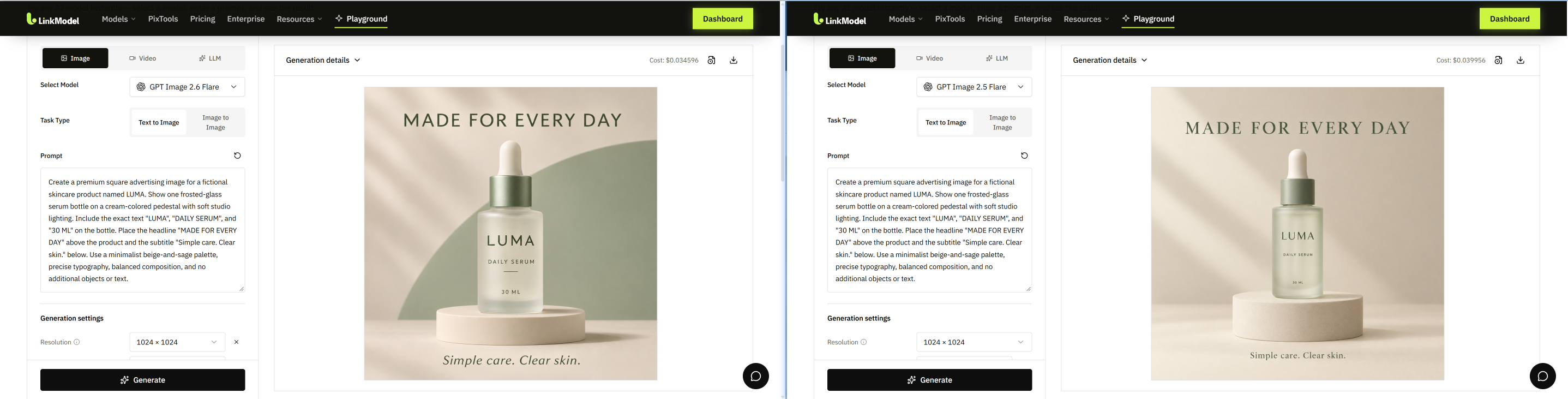
To compare the two generations under the same creative brief, we generated a skincare product advertisement using GPT Image 2.6 Flare and GPT Image 2.5 Flare through LinkModel's Playground.
Both models received the same prompt and used a 1024 × 1024 output resolution.
In this particular comparison, GPT Image 2.6 produced a more prominent headline, a larger product presentation, and a more visually distinctive background. GPT Image 2.5 delivered a simpler composition with more restrained typography.
The Playground displayed generation costs of $0.034596 for GPT Image 2.6 Flare and $0.039956 for GPT Image 2.5 Flare, making the 2.6 request approximately 13.4% less expensive in this specific run.
This is a single-task comparison rather than a controlled benchmark across multiple prompts. Nevertheless, it provides a useful example of how actual generation costs and visual results can differ even when the same prompt is used.
Text Rendering and UI Layout Accuracy
Text-heavy image generation remains an important challenge for AI image models.
Advertising posters, dashboards, infographics, and interface mockups require more than correct spelling. The model must also place text in the correct location, preserve the intended hierarchy, and include every requested element.
A published advertising comparison by Mockingbird found that both GPT Image 2.5 Sunburst and GPT Image 2.6 Sunburst reproduced product-label text accurately.
The newer model used larger typography and changed the balance of the layout, but the earlier model was not clearly inferior in text accuracy.
A different result emerged from a UI-generation evaluation discussed in r/codex.
An operator of a UI-generation service reported the following preference results:
| Comparison | Reported reviewer preference |
|---|---|
| GPT Image 2.5 Flare Medium vs 2.6 Flare Medium | 25–11 in favor of 2.5 |
| GPT Image 2.5 Flare Medium vs 2.6 Flare Low | 30–6 in favor of 2.5 |
The evaluator reported recurring issues in some 2.6 outputs, including placeholder-like text and omitted interface functionality.
The same discussion reported that 2.6 Flare Medium cost 1.71 times as much as 2.5 Flare Medium for the evaluated UI workload.
These were results reported by the service operator, rather than a large public benchmark with independently reproduced scores.
Nevertheless, the findings highlight an important distinction:
A visually polished image is not necessarily a functionally accurate UI design.
For automated interface generation, missing components, incorrect layouts, or unusable text can make an otherwise attractive result unsuitable for production.
Does More Visual Detail Mean Better Prompt Following?
Not always.
A same-prompt event-poster comparison tested GPT Image 2.5 and 2.6 at 1024 × 1024 and High quality.
Both versions correctly reproduced nine required text elements.
However, GPT Image 2.6 added more decorative content, including additional layout elements, while GPT Image 2.5 produced a simpler grid.
For creative advertising, those additions may improve visual interest. For a brand with strict design requirements, they can create extra revision work.
This is why professional image evaluation should separate visual appeal, text accuracy, layout compliance, and unwanted changes. Teams refining prompts can also consult the GPT Image prompting guide for practical prompt-structure considerations.
If the main requirement is faithful reproduction of an established design, the model that follows the brief more closely may be the better choice, regardless of generation number.
Generation Speed and Editing Consistency: Flare vs Sunburst
GPT Image 2.6 Flare is substantially faster than GPT Image 2.5 Flare in several published comparisons, but Sunburst does not show the same consistent improvement.
OpenAI reports that Images 2.6 generates images approximately 50% faster than the previous generation.
Actual task results provide a more detailed picture.
GPT Image 2.6 vs 2.5 Generation Speed
A three-prompt comparison published on November 6, 2026 measured High-quality, 1024 × 1024 image generation.
| Metric | GPT Image 2.5 Flare | GPT Image 2.6 Flare |
|---|---|---|
| Fastest recorded generation | 20.5 seconds | 7.9 seconds |
| Slowest recorded generation | 23.1 seconds | 9.7 seconds |
| Test tasks | Bakery, portrait, perfume | Same tasks |
In this test, the newer Flare model was approximately 2.4–2.6 times faster across the reported timing ranges.
A separate comparison by CellCog found similar advantages for Flare.
For the same Max-quality pictogram task, GPT Image 2.5 Flare took 45.1 seconds, compared with 18.0 seconds for GPT Image 2.6 Flare.
But Sunburst presented a different pattern.
Mockingbird published the following results on November 5, 2026, using the same inputs at High quality:
| Task | 2.5 Sunburst | 2.6 Sunburst | 2.6 Flare |
|---|---|---|---|
| Dashboard advertisement | 37s | 51s | 16s |
| Packaging advertisement | 39s | 55s | 26s |
| 16:9 thumbnail | 30s | 40s | 16s |
| One-line image edit | 33s | 47s | 15s |
In these four tasks, GPT Image 2.6 Sunburst was slower than 2.5 Sunburst, while 2.6 Flare completed every task fastest.
The results indicate that Flare is the more compelling speed upgrade, whereas Sunburst should be evaluated primarily for its editing and detail requirements.
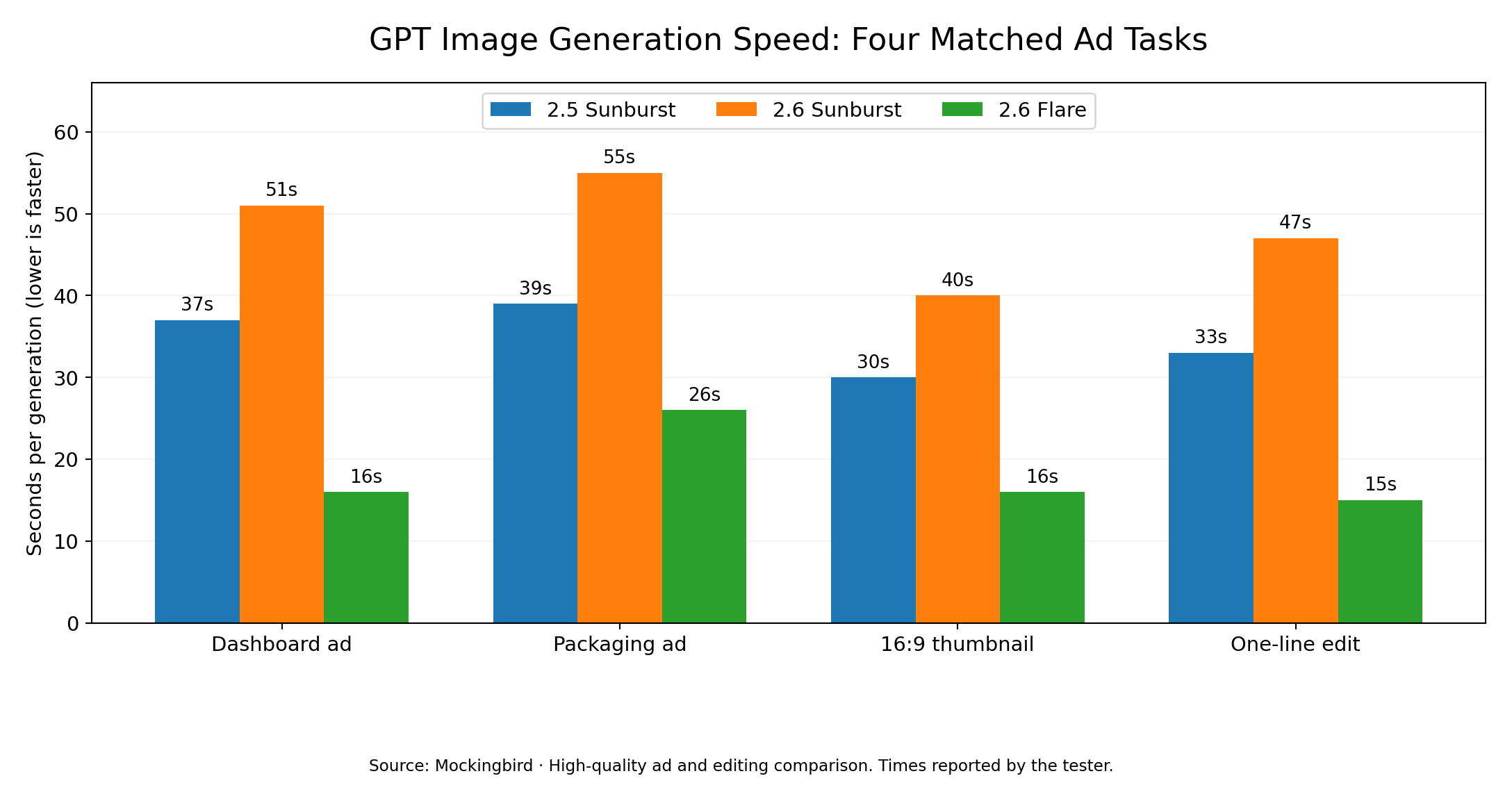
Image Editing: Preserving Details Across Multiple Changes
Editing consistency matters when an image must undergo several revisions without changing the original subject.
Consider a product photography workflow in which a bottle is first generated in a studio, moved into a forest scene, and then adjusted to sunset lighting.
A 28-generation comparison of GPT Image 2.6 Flare and Sunburst included this type of multi-step editing task.
The creator reported:
| Measurement | 2.6 Flare | 2.6 Sunburst |
|---|---|---|
| Initial image generation | 15–20s | 24–47s |
| Each editing step | 24–34s | 47–62s |
Both models preserved important product details, including the logo, label typography, and water droplets.
Sunburst maintained certain background elements more consistently. However, both variants had difficulty adjusting the bottle's original studio lighting to match the new dusk environment.
This exposes a practical challenge in image editing:
Preserving a subject's identity and adapting its lighting are two different requirements.
For product photography, editing instructions should explicitly distinguish the details that must remain unchanged from the properties that should adapt to the new environment.
For example, preserving the product silhouette and label does not necessarily mean preserving the original highlights and shadows.
How Complexity Control Improves Targeted Editing
GPT Image 2.6 introduces an independent complexity parameter that controls how much planning the model applies before rendering.
OpenAI supports three settings:
| Complexity | Recommended starting use |
|---|---|
low | Focused edits, text replacements, limited background changes |
medium | Moderate compositional changes |
high | Dense scenes, multiple objects, complicated visual relationships |
The default setting is high.
Importantly, complexity and quality are separate controls.
Quality affects visual fidelity, while complexity affects how the model approaches the generation or editing task. Changing complexity does not carry a separate parameter fee, although request latency and the resulting token usage may vary.
For an already-approved advertisement that only needs a headline replaced, low complexity is often the more sensible starting point.
Mockingbird measured changes between an original advertisement and edited outputs using a pixel-difference scale from 0 to 255, where lower values indicated fewer changes.
Its reported results included:
| Editing configuration | Reported image difference |
|---|---|
| 2.5 Sunburst | 11.7 |
| 2.6 Sunburst, default complexity | 12.5 |
| 2.6 Sunburst, low complexity | 8.6 |
| 2.6 Flare, low complexity | 6.4 |
These results suggest that lowering complexity can reduce unwanted changes in targeted editing tasks.
The broader production lesson is straightforward: do not regenerate an entire approved image when a focused edit can accomplish the task.
GPT Image 2.6 vs 2.5 API Pricing: Why the Same Token Rate Can Cost More
GPT Image 2.6 and GPT Image 2.5 share the same official standard API token rates, but their output token consumption can differ significantly at Low and Medium quality.
This is one of the most important differences for developers building high-volume image applications.
Official OpenAI API Pricing
OpenAI publishes the same standard token prices for GPT Image 2.5 and 2.6 Flare and Sunburst.
| Token type | GPT Image 2.5 | GPT Image 2.6 |
|---|---|---|
| Image input | $8.00 / 1M | $8.00 / 1M |
| Text input | $5.00 / 1M | $5.00 / 1M |
| Cached image input | $2.00 / 1M | $2.00 / 1M |
| Cached text input | $1.25 / 1M | $1.25 / 1M |
| Image output | $30.00 / 1M | $30.00 / 1M |
Source: OpenAI API Pricing.
The basic calculation is:
Image output cost = Output tokens × Price per million output tokens ÷ 1,000,000
For example, if a request generates 1,000 billable image output tokens, the official output charge is:
1,000 × $30 ÷ 1,000,000 = $0.03
The key variable is the number of tokens consumed by the generation.
Why Can GPT Image 2.6 Cost More at Low Quality?
A published comparison by CellCog examined output token consumption across quality settings for a 1024 × 1024 pictogram.
The results showed that GPT Image 2.6 used substantially more tokens at the lower quality settings.
| Quality | GPT Image 2.5 output tokens | GPT Image 2.6 output tokens | Relative consumption |
|---|---|---|---|
| Low | 196 | 824 | 4.20× |
| Medium | 439 | 1,449 | 3.30× |
| High | 1,758 | 1,758 | 1.00× |
| XHigh | 3,122 | 3,122 | 1.00× |
| Max | 7,024 | 7,024 | 1.00× |
Source: CellCog — GPT Image 2.6 vs 2.5, November 5, 2026.
The authors reported more than 80 generations across model variants, prompts, sizes, and quality settings.
A separate Reddit API usage report also observed approximately 4.2× Low-quality and 3.3× Medium-quality token consumption with GPT Image 2.6, using a different image size.
These results highlight why equal token rates do not necessarily produce equal image-generation bills.
For high-volume draft production, output token consumption matters just as much as the advertised per-million-token price.
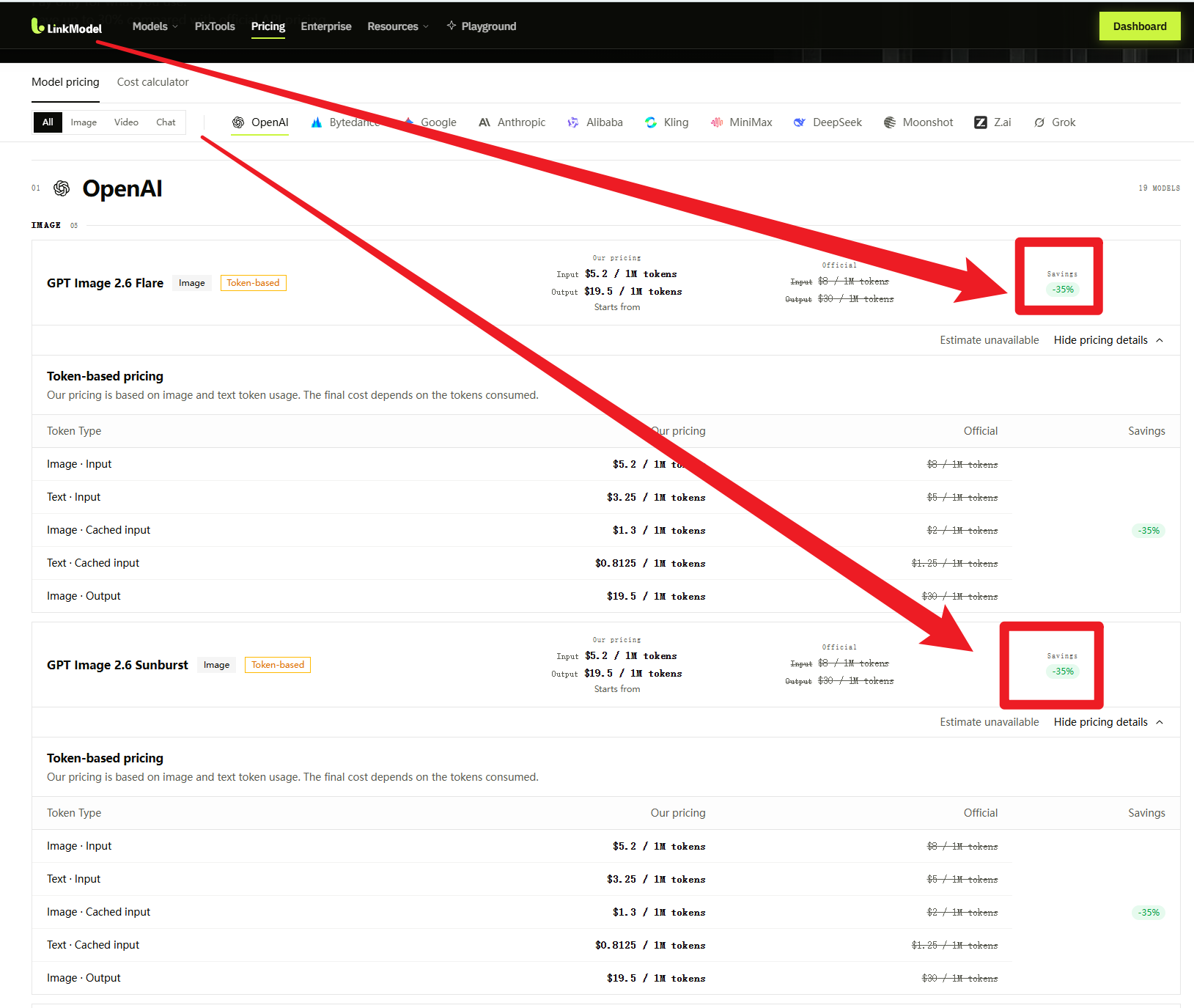
LinkModel Pricing: Save 35% on GPT Image 2.6
LinkModel offers the two generations at different discounts from OpenAI's official standard rates.
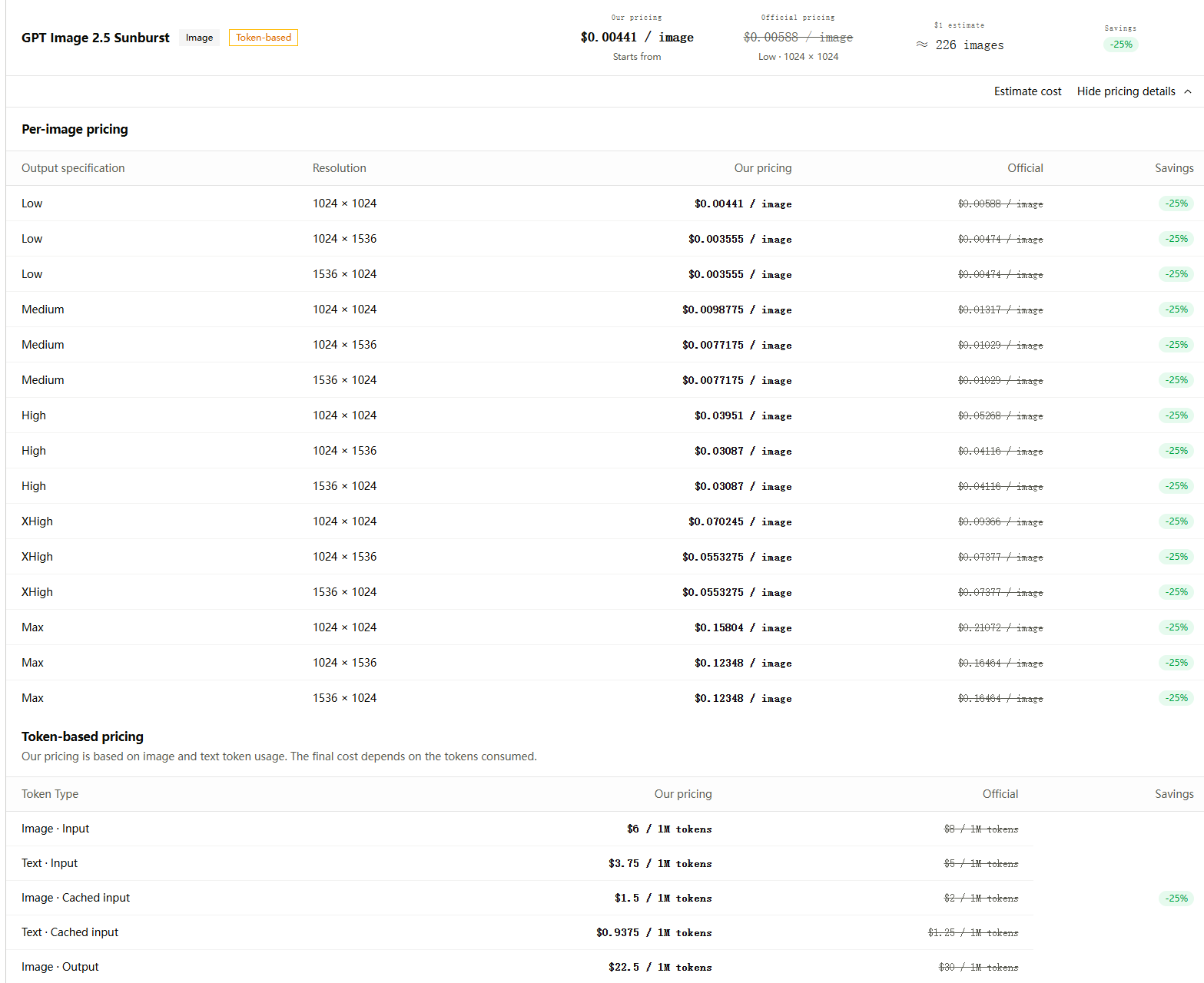
GPT Image 2.6 is priced 35% below OpenAI's standard token rates, while GPT Image 2.5 is priced 25% below.
| Token type | OpenAI official | LinkModel 2.6 | LinkModel 2.5 |
|---|---|---|---|
| Image input | $8.00 | $5.20 | $6.00 |
| Text input | $5.00 | $3.25 | $3.75 |
| Cached image input | $2.00 | $1.30 | $1.50 |
| Cached text input | $1.25 | $0.8125 | $0.9375 |
| Image output | $30.00 | $19.50 | $22.50 |
All prices are in USD per 1 million tokens. LinkModel's published 35% GPT Image 2.6 offer ends November 30, 2026, at 11:59 PM PST.
At matching output token usage, each million image output tokens costs:
- $10.50 less with GPT Image 2.6 on LinkModel than through OpenAI's standard API pricing.
- $7.50 less with GPT Image 2.5 on LinkModel than through OpenAI's standard API pricing.
This creates an additional consideration when comparing the two generations.
GPT Image 2.6 has the lower LinkModel unit rate, but GPT Image 2.5 may consume fewer tokens for certain quality settings.
Real Cost Comparison: Low, Medium, High, XHigh and Max
To illustrate the effect of these different rates, we applied LinkModel's published image output prices to CellCog's 1024 × 1024 output token data.
The following values are calculated from the reported tokens and published rates.
| Quality | 2.5 output tokens | 2.6 output tokens | LinkModel 2.5 output cost | LinkModel 2.6 output cost |
|---|---|---|---|---|
| Low | 196 | 824 | $0.004410 | $0.016068 |
| Medium | 439 | 1,449 | $0.0098775 | $0.0282555 |
| High | 1,758 | 1,758 | $0.039555 | $0.034281 |
| XHigh | 3,122 | 3,122 | $0.070245 | $0.060879 |
| Max | 7,024 | 7,024 | $0.158040 | $0.136968 |
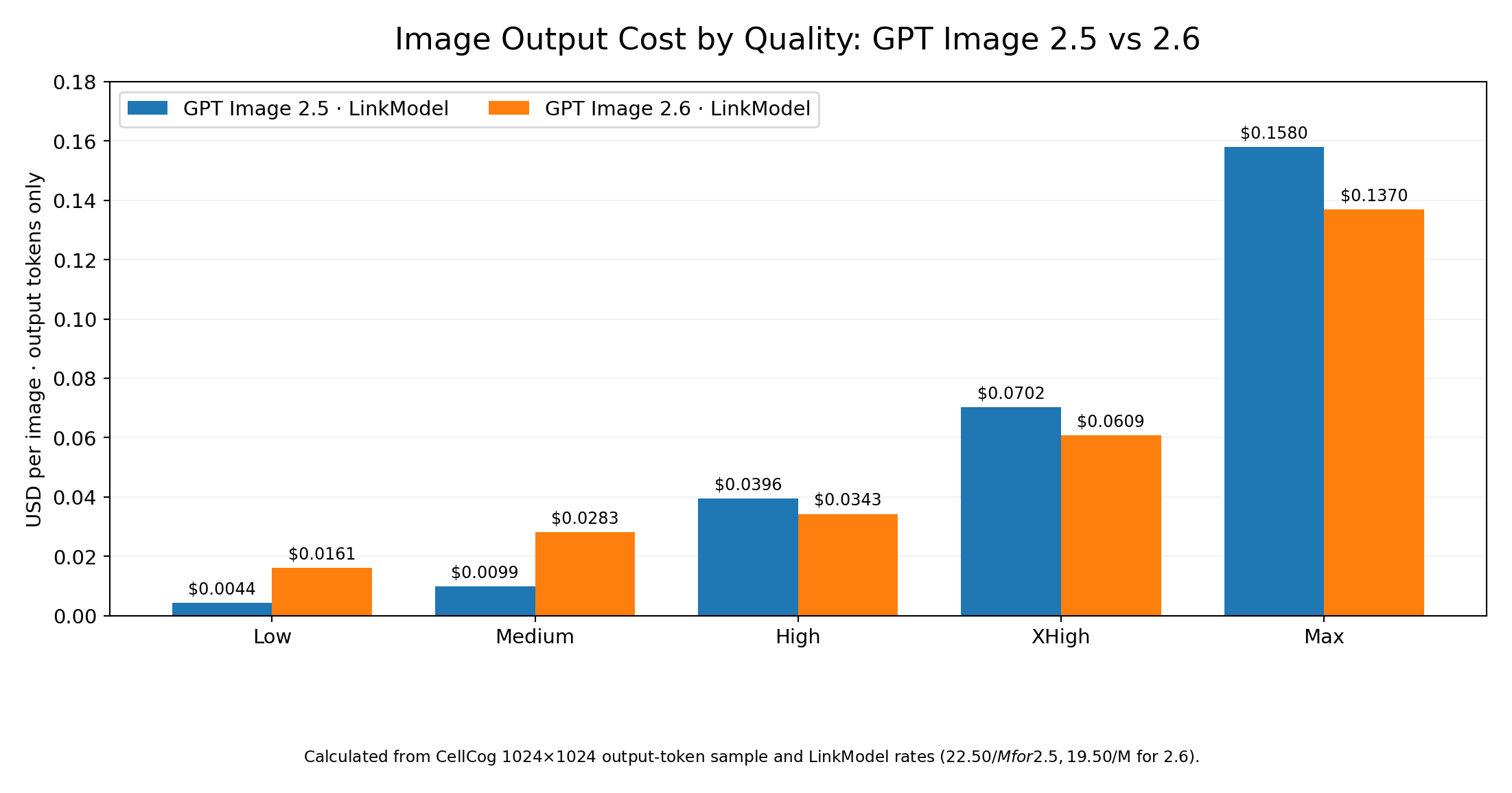
For Low quality, the GPT Image 2.6 output calculation is:
824 × $19.50 ÷ 1,000,000 = $0.016068 per image
For GPT Image 2.5 at the same quality:
196 × $22.50 ÷ 1,000,000 = $0.004410 per image
This makes the 2.6 output charge approximately 3.64 times higher in the reported Low-quality sample, even after LinkModel's larger discount.
At High quality, the comparison reverses.
Both versions consumed 1,758 output tokens in the published sample, but GPT Image 2.6 benefits from LinkModel's lower per-token rate.
The result is a useful distinction: GPT Image 2.5 can be cheaper for Low and Medium drafts, while GPT Image 2.6 can deliver lower output-token costs at High quality and above.
These values describe the sampled output-token workload. Complete requests also incur applicable input-token charges.
How Much Would 1,000 Images Cost?
The difference becomes easier to understand at production scale.
Using the same output token counts:
| Workload | GPT Image 2.5 on LinkModel | GPT Image 2.6 on LinkModel | Lower output cost |
|---|---|---|---|
| 1,000 Low-quality images | $4.41 | $16.07 | 2.5 |
| 1,000 Medium-quality images | $9.88 | $28.26 | 2.5 |
| 1,000 High-quality images | $39.56 | $34.28 | 2.6 |
| 1,000 XHigh-quality images | $70.25 | $60.88 | 2.6 |
| 1,000 Max-quality images | $158.04 | $136.97 | 2.6 |
For 1,000 High-quality images with the sampled output token usage, choosing GPT Image 2.6 on LinkModel reduces the output charge by approximately $5.27 compared with GPT Image 2.5 on LinkModel.
For 1,000 Low-quality drafts, however, GPT Image 2.5 has a much stronger output-cost advantage.
The practical implication is that a mixed-model workflow can be more economical than moving every image-generation task to the newest model.
When Does GPT Image 2.6 Become Cheaper per Usable Image?
The lowest cost per generation is not necessarily the lowest cost per finished asset.
A model that produces inexpensive images but requires many retries may cost more per approved image than a model with a higher initial generation price.
A useful production metric is:
Cost per usable image = Total generation and editing cost ÷ Number of approved images
Consider an illustrative workflow using the Low-quality output costs calculated above.
Suppose a team generates 100 images with each model and approves:
- 20% of GPT Image 2.5 outputs.
- 80% of GPT Image 2.6 outputs.
The resulting calculation would be:
| Metric | GPT Image 2.5 | GPT Image 2.6 |
|---|---|---|
| Output cost per generation | $0.004410 | $0.016068 |
| Illustrative approval rate | 20% | 80% |
| Output cost per approved image | $0.02205 | $0.02009 |
In this example, GPT Image 2.6 becomes more economical per approved image despite its higher initial output cost.
However, it requires a large improvement in approval rate.
At these Low-quality output prices, GPT Image 2.6 needs an approval rate approximately 3.64 times that of GPT Image 2.5 to break even on output cost per approved image.
If GPT Image 2.5 already achieves a 50% approval rate, no model can reach a 3.64-times-higher approval rate because that would exceed 100%.
The approval percentages above are an illustrative calculation, not observed benchmark results.
This analysis establishes a practical buying rule:
Before upgrading a production workflow, compare the total cost of accepted outputs—not just the cost of individual generation requests.
Teams should evaluate approval rate, revision count, latency, and token consumption together.
What's New in GPT Image 2.6? Features and API Compatibility
GPT Image 2.6 introduces three major workflow additions: animated GIF generation, SVG output, and independent complexity control.
It also brings markup-guided editing to the API alongside supported GPT Image 2.5 models.
These capabilities expand what developers can create without changing the fundamental distinction between Flare and Sunburst.
Animated GIF Generation
GPT Image 2.6 can create animated GIFs through the Image API.
This makes it useful for short looping graphics, social media animations, product demonstrations, animated mascots, and visual storytelling concepts.
According to the OpenAI image generation documentation, GIF output supports:
| Parameter | Supported behavior |
|---|---|
output_format | gif |
frame_count | 2–16 frames |
frame_duration_ms | 20–2,000 ms per frame |
| Default frame count | 9 |
| Default frame duration | 200 ms |
GIF generation works through the image generation and image editing endpoints.
For example, a marketing team could animate a brand mascot waving while maintaining a consistent character appearance across frames.
The advantage is creating short animated assets within an image-generation workflow, without requiring every small animation to become a separate video-production project.
SVG Output for Scalable Graphics
GPT Image 2.6 also supports SVG creation for vector-based assets.
Unlike PNG or JPEG output, SVG graphics contain vector elements that can be scaled without the same loss of sharpness.
This makes SVG useful for icons, diagrams, logos, website graphics, and illustrations that must work at different sizes.
OpenAI's documented SVG workflow uses output_format: "svg" with the image generation endpoint.
The API first creates a reference image and then produces the SVG document. The total cost can therefore include both the image model's token usage and the authoring model's token usage.
SVG output requires n=1 and does not support the image edit endpoint.
For developers building scalable design assets, this is a meaningful expansion beyond conventional raster image generation.
Markup-Guided Editing and Complexity Control
Markup-guided editing lets developers provide visual annotations that indicate where changes should occur.
For example, a designer could identify the headline area of an approved product advertisement and request a specific text replacement.
Combining that targeted instruction with Low complexity can help reduce unnecessary changes elsewhere in the image.
Markup-guided editing is available in supported GPT Image 2.5 and 2.6 workflows, so it is not an exclusive 2.6 capability.
The important upgrade is the broader combination of editing controls, output formats, and complexity settings available with the new generation.
GPT Image 2.6 API Model IDs and Migration
Developers comparing these models should use their exact API identifiers.
| Model | API model ID |
|---|---|
| GPT Image 2.5 Flare | gpt-image-2.5-flare |
| GPT Image 2.5 Sunburst | gpt-image-2.5-sunburst |
| GPT Image 2.6 Flare | gpt-image-2.6-flare |
| GPT Image 2.6 Sunburst | gpt-image-2.6-sunburst |
OpenAI documents GPT Image 2.6 generation and editing through the Image API.
For developers already using GPT Image 2.5 through the Responses API or Batch processing, the supported endpoint and pricing structure should be checked before migration. As of this comparison, GPT Image 2.5 has documented Batch pricing, while GPT Image 2.6 does not have the same listed Batch option.
When moving between providers, use the model IDs and request schema published by that provider rather than assuming every OpenAI-native parameter maps identically.
LinkModel offers individual model pages for both generations, along with an OpenAI-compatible API platform and Playground.
That makes it possible to compare model options, review their published prices, and manage usage from a single account.
Which Model Should You Choose? Recommendations by Use Case
Choose GPT Image 2.6 when faster Flare generation, higher-quality production, or new creative controls matter. Keep GPT Image 2.5 when inexpensive drafts and established workflows offer better value.
The strongest decision is based on the work being performed, not the version number alone.
| Use case | Recommended starting model | Main reason |
|---|---|---|
| Bulk Low-quality image drafts | GPT Image 2.5 Flare | Lower output-token cost in published comparisons |
| Medium-quality UI mockups | GPT Image 2.5 Flare | Favorable results in a reported UI preference evaluation |
| High-quality marketing graphics | GPT Image 2.6 Flare | Faster generation and lower LinkModel output rates at matching token counts |
| Fast advertising variations | GPT Image 2.6 Flare | Strong speed results |
| Complex precision editing | GPT Image 2.6 Sunburst | Worth testing for detail preservation and editing consistency |
| Small targeted image edits | GPT Image 2.6 Flare, Low complexity | Faster iteration and more focused modifications |
| Animated GIF production | GPT Image 2.6 | Supported GIF workflow |
| SVG illustrations and icons | GPT Image 2.6 | Supported vector output |
| Existing stable 2.5 integrations | Keep 2.5 while evaluating 2.6 | Avoid unnecessary migration costs |
These recommendations combine documented capabilities, published third-party results, and the cost calculations above.
For complex editing, Sunburst is a reasonable starting candidate rather than a guaranteed winner on every task.
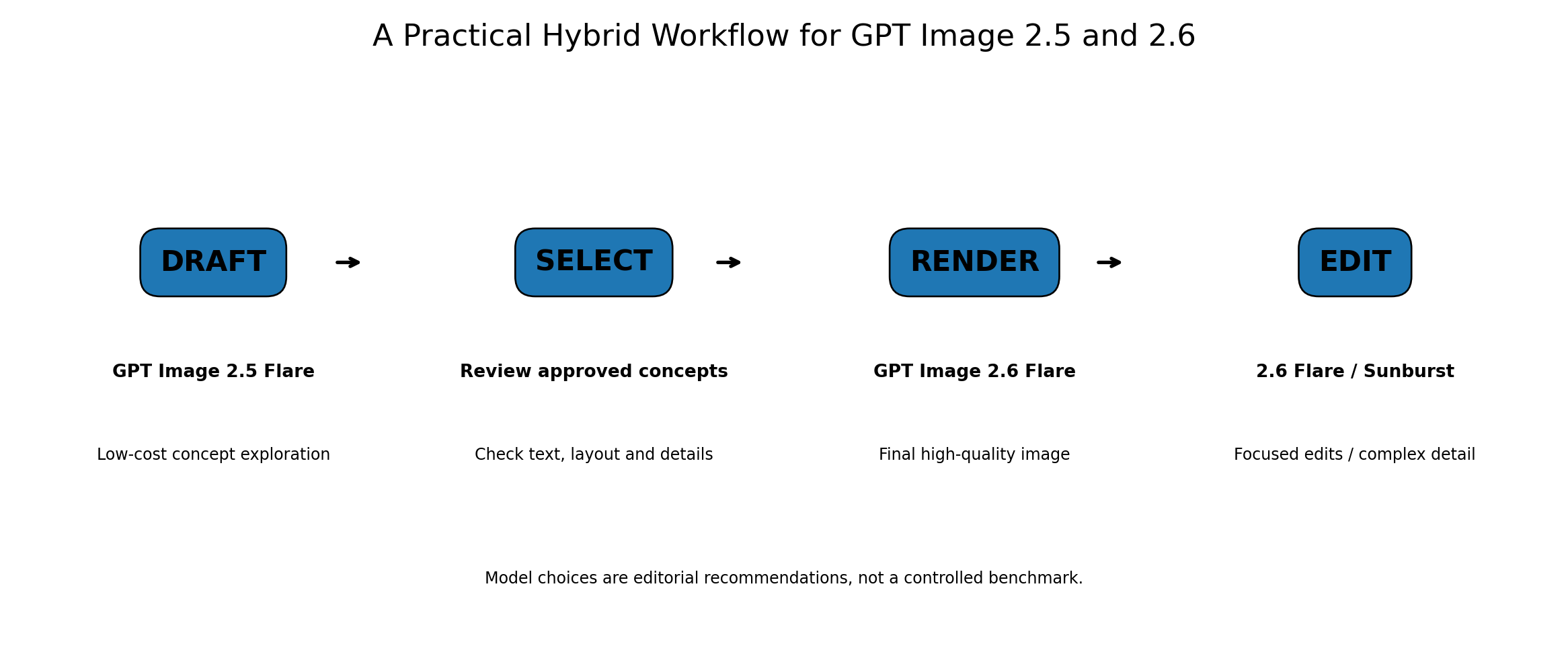
A More Efficient Hybrid Workflow
Instead of choosing one model for an entire project, developers can divide image production into stages.
Draft → Select → Render → Edit
Draft: Use GPT Image 2.5 Flare for inexpensive Low-quality exploration when the task does not require the newest capabilities.
Select: Review generated images for prompt adherence, composition, text accuracy, and visual usefulness.
Render: Use GPT Image 2.6 Flare for high-quality final production when speed and current output-token rates make it attractive.
Edit: Use GPT Image 2.6 Flare with Low complexity for focused changes. Evaluate Sunburst when complex relationships or detailed subject preservation justify a more demanding editing workflow.
This approach avoids using expensive generation settings during early brainstorming while preserving access to stronger controls when final visual quality matters.
It also makes model selection easier to evaluate using measurable outcomes.
Why Use LinkModel for GPT Image 2.5 and 2.6?
For teams that need multiple image models, managing different APIs and billing systems can complicate experimentation.
LinkModel brings supported models into one platform, with a unified API key, published model pricing, and a Playground for comparing outputs.
Its current GPT Image 2.6 image output rate is $19.50 per million tokens, compared with OpenAI's official $30 per million tokens.
That is a 35% reduction in the standard image output token rate during the published offer period.
The platform also supports pay-as-you-go usage, making it practical to keep GPT Image 2.5 for economical drafts while using GPT Image 2.6 for tasks that benefit from newer capabilities.
Developers can start by reviewing GPT Image 2.6 Flare or GPT Image 2.6 Sunburst, compare the model requirements, and select the appropriate workflow before scaling usage.
The value of LinkModel is not simply that it offers a lower rate. It provides a way to manage model choice and API spending within one image-production workflow.
Frequently Asked Questions
Is GPT Image 2.6 better than GPT Image 2.5?
GPT Image 2.6 is better suited to workflows requiring faster Flare generation, complexity control, animated GIFs, and SVG output. However, GPT Image 2.5 can remain more economical for Low-quality drafts, and some published UI comparisons favor its instruction adherence.
Why does GPT Image 2.6 cost more at Low quality?
GPT Image 2.6 can consume approximately 4.2 times as many output tokens at Low quality in matched-size published comparisons. Both generations share the same official token rate, so higher token consumption increases the output charge.
Is GPT Image 2.6 faster than GPT Image 2.5?
OpenAI reports an overall generation speed improvement of approximately 50%. Published Flare tests also show substantial gains, including a Max-quality comparison of 18.0 seconds for 2.6 versus 45.1 seconds for 2.5. Sunburst results are more mixed.
Should I upgrade from GPT Image 2.5 to 2.6?
Upgrade when faster iteration, GIF generation, SVG output, or independent complexity control will improve your workflow. Keep GPT Image 2.5 for cost-sensitive drafts and established tasks where the newer version does not provide a measurable benefit.
Can I use both GPT Image 2.5 and 2.6 through LinkModel?
Yes. LinkModel lists Flare and Sunburst models from both generations and provides a unified platform for model selection and API usage. GPT Image 2.6 currently offers 35% lower standard token rates than OpenAI's official pricing through November 30, 2026, at 11:59 PM PST.
Conclusion
GPT Image 2.6 is a valuable upgrade, but GPT Image 2.5 remains a practical choice for cost-sensitive image production. The newer generation delivers faster Flare rendering, independent complexity control, animated GIF generation, and SVG output, while published tests show that Low and Medium output token consumption can increase substantially. For developers and creative teams, the best strategy is to evaluate image quality, editing accuracy, generation speed, and cost per usable image together. With LinkModel providing both generations and 35% lower standard token rates for GPT Image 2.6 during its current offer, teams can build a flexible workflow that takes advantage of the newer capabilities without abandoning economical drafting and editing options.