The Gemini Omni 1.2 Flash API generates videos up to 15 seconds with synchronized audio, reference-guided control, and 4K support. Google has reduced 720p video output pricing by approximately 30% to $0.07 per second, but the actual cost depends on resolution, input tokens, editing, and upscaling. A 15-second 720p video alone costs approximately $1.04 in output tokens.
Lower prices don't always mean cheaper finished videos. Repeated generations, inconsistent characters, and additional edits can quickly increase spending. For developers, cost per usable video matters more than the advertised price per second. Choosing the right resolution and understanding when to edit or upscale can make a significant difference to the production budget.
LinkModel gives you access to Gemini Omni 1.2 Flash at the same published token rates as Google—just $1.50 per million input tokens and $12 per million video output tokens—with $0 minimum spend, $0 monthly platform fee, and unified access to multiple AI models. New users automatically receive $1 in free Credits upon registration, with no credit card or recharge required. These Credits never expire and work across all currently available models; the offer is limited to new users and cannot be claimed repeatedly. Start creating AI videos on LinkModel without committing to a subscription.
What Is Gemini Omni 1.2 Flash API?
Gemini Omni 1.2 Flash is Google's multimodal video generation and editing model, designed to create videos with synchronized audio while accepting text, image, and video references.
The official model ID is gemini-omni-1.2-flash.
Released on November 5, 2026, the model supports standard video generation and editing from 3 to 15 seconds, with shorter duration limits for specific operations such as first-and-last-frame interpolation and video extension.
Unlike traditional text-to-video systems that focus primarily on producing a new clip, Gemini Omni 1.2 Flash also supports refining existing videos, extending scenes, and upscaling selected results.
Gemini Omni 1.2 Flash Features and Specifications
| Feature | Gemini Omni 1.2 Flash |
|---|---|
| Official model ID | gemini-omni-1.2-flash |
| Release date | November 5, 2026 |
| Standard generation duration | 3–15 seconds |
| Video editing duration | 3–15 seconds |
| First-and-last-frame output | 3–10 seconds |
| Video extension output | 3–10 seconds per extension |
| Video resolution | 360p, 720p, 1080p, 4K |
| Aspect ratios | 16:9, 9:16 |
| Supported video tasks | Text-to-video, image-to-video, reference-to-video, editing, extension, upscaling |
| Sound generation | Speech, music, and sound effects |
| Google Cloud API | Interactions API |
| Standalone upscaling | Supported |
Google Cloud also documents input video limits that depend on the selected task. Editing accepts source videos up to 15 seconds, while upscaling is limited to videos up to 15 seconds. Extension can accept longer source videos but uses the relevant trailing portion of the clip.
The model also supports image and video references, allowing developers to describe visual details through existing assets instead of relying on written prompts alone.
What Makes Gemini Omni 1.2 Flash Different?
Google's update introduces three particularly useful improvements.
Longer videos: The maximum standard generation duration increases from 10 to 15 seconds, giving creators more room for product demonstrations, advertisements, and short narrative sequences.
Stronger reference adherence: Google reports improvements in preserving characters, products, clothing, and scene details across camera movement and transitions.
Conversational video editing: Developers can provide follow-up instructions to revise an existing clip, including changes to backgrounds, lighting, objects, and other visual elements.
Google's official launch demonstrations illustrate these improvements through product visuals, character animation, continuous camera movements, and multi-turn video editing.
For developers, the practical advantage is the ability to organize generation and revision into a more controlled workflow.
Gemini Omni 1.2 Flash API Pricing
Gemini Omni 1.2 Flash API pricing starts at $1.50 per million input tokens, with video output priced at $12 per million tokens.
The model uses different rates for input, text output, and video output. The number of video output tokens increases with resolution and duration.
For 720p generation, the published output rate corresponds to approximately $0.0695 per second, commonly rounded to $0.07.
Gemini Omni 1.2 Flash Official Pricing vs LinkModel
LinkModel's published standard token prices for Gemini Omni 1.2 Flash match Google's official rates.
| Token Type | Google Official | LinkModel |
|---|---|---|
| Text input | $1.50 / 1M | $1.50 / 1M |
| Image input | $1.50 / 1M | $1.50 / 1M |
| Video input | $1.50 / 1M | $1.50 / 1M |
| Audio input | $1.50 / 1M | $1.50 / 1M |
| Text output | $9.00 / 1M | $9.00 / 1M |
| Reasoning output | $9.00 / 1M | $9.00 / 1M |
| Video output | $12.00 / 1M | $12.00 / 1M |
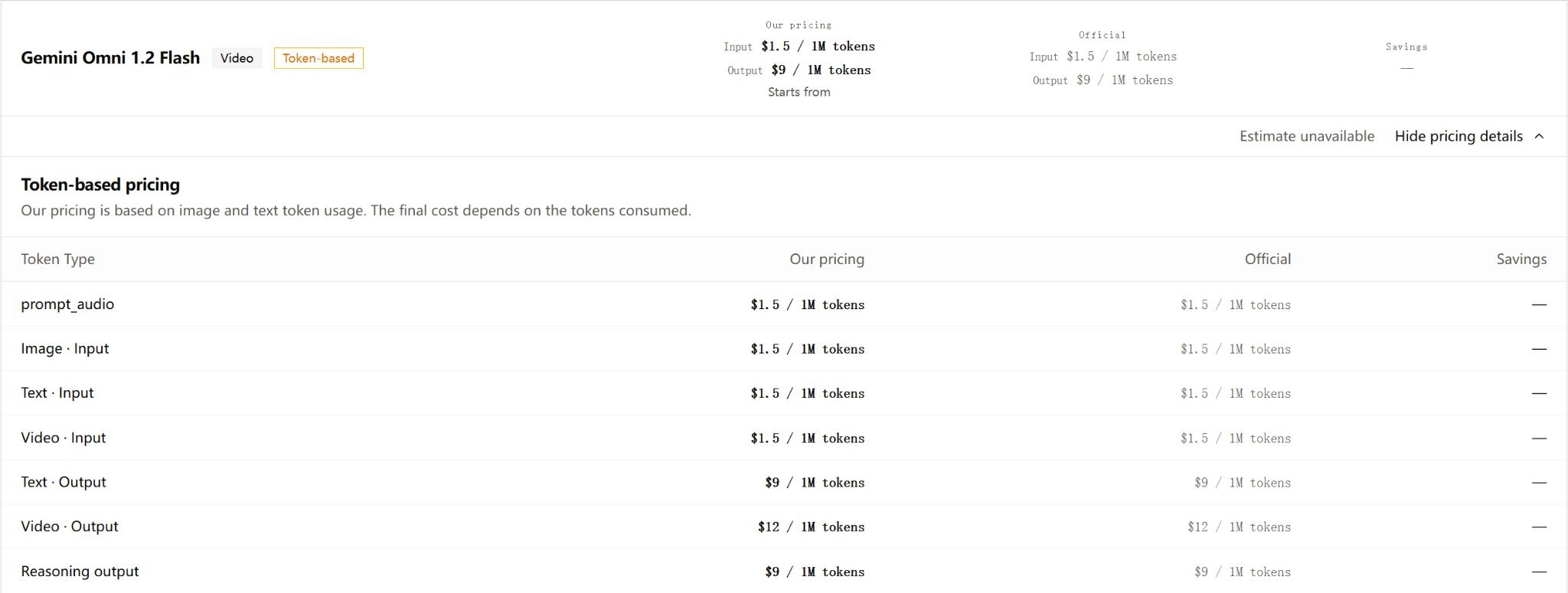
All prices are in USD per million tokens.
The 30% price reduction announced by Google compares Omni 1.2 Flash with the previous Omni 1.1 Flash model. It is not an additional discount offered by LinkModel.
The pricing comparison gives developers a clear starting point: both platforms publish the same standard token rates for this model, while account management, available models, and supported workflows may differ.
How Much Does a Gemini Omni 1.2 Flash Video Cost?
Google's published video output token rates provide a way to estimate the output cost of an initial video generation.
| Resolution | Output Tokens/Second | Cost/Second | 5-Second Video | 15-Second Video |
|---|---|---|---|---|
| 360p | 1,931 | $0.0232 | $0.116 | $0.348 |
| 720p | 5,792 | $0.0695 | $0.348 | $1.043 |
| 1080p | 8,688 | $0.1043 | $0.521 | $1.564 |
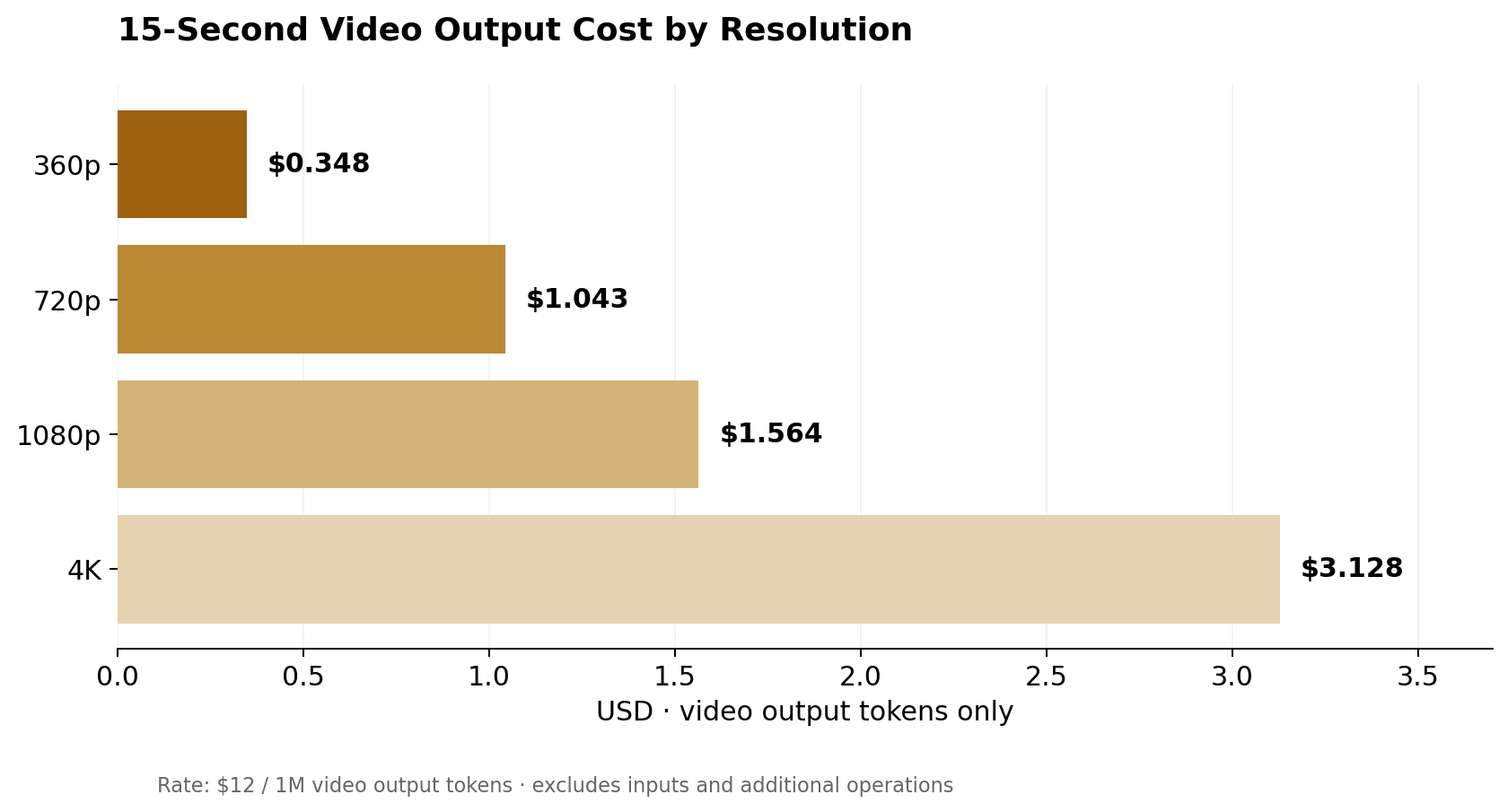
| 4K | 17,376 | $0.2085 | $1.043 | $3.128 |
These figures represent video output token charges for the specified duration and resolution.
For example, producing a 15-second video at 720p costs approximately $1.04 in video output tokens. At 4K, the corresponding output cost rises to approximately $3.13.
The difference becomes more important for applications that repeatedly generate product videos, advertising variations, or short-form content.
Gemini Omni 1.2 Flash API Cost Formula
The video output calculation is:
Video output cost = Video duration × Output tokens per second × $12 / 1,000,000
For a 10-second 720p video:
10 × 5,792 × $12 / 1,000,000 = $0.69504
The broader token cost calculation is:
Total token cost = Input token cost + Text/reasoning output cost + Video output cost
With the published rates:
Total token cost = Input tokens × $1.50 / 1M + Text/reasoning output tokens × $9 / 1M + Video output tokens × $12 / 1M
For workflows involving multiple generation, editing, or upscaling operations, calculate each operation using its corresponding token usage.
For example, a workflow might include an initial 720p generation, a conversational edit, and a final upscaling operation. These are separate activities that contribute to the overall production budget.
How Much Does Gemini Omni 1.2 Flash Upscaling Cost?
Standalone video upscaling uses a different output token schedule from initial video generation.
Google documents specific supported resolution transitions.
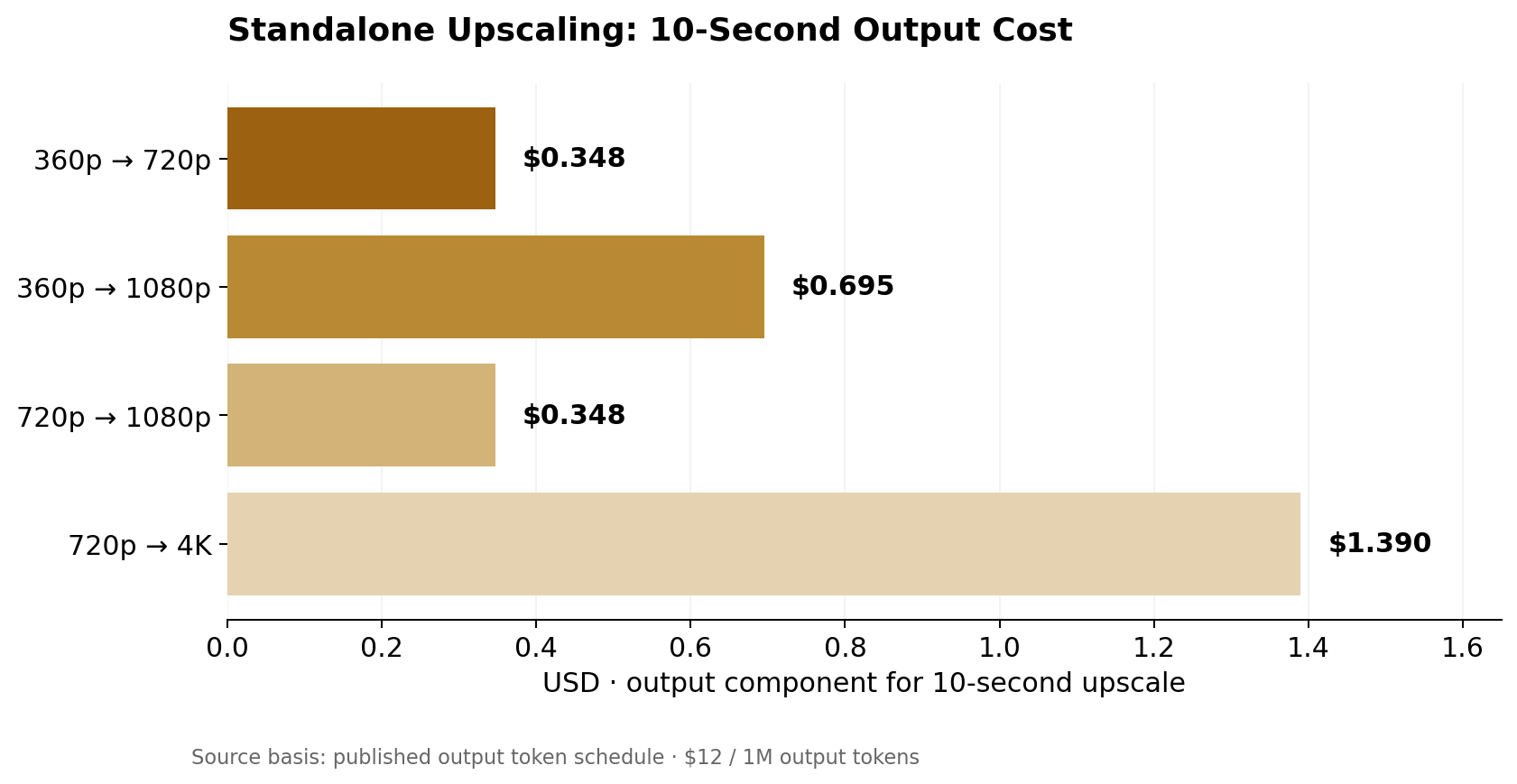
| Upscaling Operation | Output Tokens/Second | Estimated Cost for 10 Seconds |
|---|---|---|
| 360p → 720p | 2,896 | $0.348 |
| 360p → 1080p | 5,792 | $0.695 |
| 720p → 1080p | 2,896 | $0.348 |
| 720p → 4K | 11,584 | $1.390 |
| 1080p → 4K | 11,584 | $1.390 |
For example, upscaling a 10-second 720p video to 1080p has an estimated video output cost of $0.348.
Google's published pricing assigns zero input tokens to the standalone upscaling operation, while charging for its video output tokens.
This makes upscaling a distinct budget decision rather than simply applying the standard 1080p or 4K generation price to the same clip.
For teams producing large numbers of high-resolution videos, separating draft generation from final resolution enhancement can make spending easier to plan.
How to Access Gemini Omni 1.2 Flash API
Developers can access Gemini Omni 1.2 Flash through Google's supported API offerings or through LinkModel's model platform.
The important technical distinction is that video generation requires a model-supported task interface, not an assumption that every Gemini model follows the same text-chat API format.
Access Through Google's Official API
Google makes Gemini Omni 1.2 Flash available through its Gemini API ecosystem and Google Cloud. In Google Cloud's Gemini Enterprise Agent Platform, the model uses the Interactions API, while the documented model offering does not support Chat Completions API or GenerateContent API.
| Google Cloud API | Support |
|---|---|
| Interactions API | Supported |
| Count Tokens API | Supported |
| Chat Completions API | Not supported |
| GenerateContent API | Not supported |
| Gemini Live API | Not supported |
For an official Google Cloud integration, the workflow is:
- Prepare access. Configure a Google Cloud project, billing, the relevant API permissions, and authentication credentials.
- Select the model. Use the model ID gemini-omni-1.2-flash.
- Choose the video task. Determine whether the application will generate a video from text, use image references, edit an existing clip, extend a video, or upscale an output.
- Configure generation settings. Supply the relevant prompt, source assets, duration, aspect ratio, and resolution according to the selected task.
- Submit the interaction. Use the documented Interactions API request format and handle the response or asynchronous operation as required by the selected workflow.
- Retrieve and review the result. Obtain the generated video and check visual details, audio synchronization, duration, and output quality.
Google Cloud documents the Interactions endpoint under the Agent Platform API, while the Gemini API has its own product documentation and authentication setup.
LinkModel provides its own model-specific task interface, so developers should follow LinkModel's published parameters and request documentation rather than copying a Google Cloud request format.
Access Gemini Omni 1.2 Flash Through LinkModel
LinkModel lists Gemini Omni 1.2 Flash as an available video generation and editing model, with published pricing and model-specific task parameters.
Developers can open the LinkModel model page, inspect the available operations, and use the corresponding API documentation to build an integration.
The published model identifier is gemini-omni-1.2-flash.
LinkModel identifies several video tasks through the extends.omni.task parameter.
| Task | Purpose | Typical Input |
|---|---|---|
| text_to_video | Generate a video from a prompt | Text |
| image_to_video | Animate a starting image | Image and prompt |
| reference_to_video | Generate with reference assets | Prompt and references |
| edit | Modify an existing clip | Source video and edit instructions |
| extend | Add a continuation to a video | Source video and continuation instructions |
| upscale | Increase video resolution | Source video and target resolution |
These task names identify different operations. A parameter that is useful for one task may be unnecessary or invalid for another.
Gemini Omni 1.2 Flash API Request Parameters
LinkModel's published model parameter table provides the following controls.
| Parameter | Purpose | Important Detail |
|---|---|---|
| prompt | Describes the requested content | Not required for upscale mode |
| duration | Sets generation duration | Default 5; mode-specific limits apply |
| resolution | Sets target output resolution | Default 720P |
| size | Sets aspect ratio | 16x9 or 9x16 |
| extends.omni.task | Selects the video operation | Can be omitted for automatic mode |
| first_frame_image | Supplies an opening frame | URL or Base64 data URI |
| last_frame_image | Supplies a closing frame | Used for frame-guided generation |
| image_list | Supplies image references | Mode-specific reference limits |
| video_list | Supplies video inputs | Required for edit, extend, and upscale |
| seed | Sets a generation seed | Used for reproducible settings |
Several constraints matter during implementation.
Duration: Standard generation and editing support up to 15 seconds, while first-and-last-frame interpolation and extension output are limited to 3–10 seconds. LinkModel's parameter documentation also indicates when duration should be omitted for specific modes.
Source videos: Editing, extension, and upscaling require an existing video input. The supported reference count depends on the selected task.
Reference images: LinkModel lists up to 10 image entries in its general parameter table, but editing and extension accept at most two reference images, and upscaling accepts none.
Upscaling: The upscale operation requires an explicit supported target resolution. It does not require a text-generation prompt.
Audio references: LinkModel's model specification notes that audio references require allowlisting.
For a reliable integration, developers should select the intended task first, then configure only the parameters supported by that task.
Why Use LinkModel Instead of Google's Direct API?
Google's direct API is a natural choice for teams that already operate within Google Cloud and want to use Google's native infrastructure and API environment.
LinkModel offers a different practical advantage: access to multiple model families from a unified platform.
A developer building an application may need a language model for generating a script, an image model for preparing visual assets, and Gemini Omni 1.2 Flash for producing the final video.
Managing these capabilities through one platform can simplify model discovery, account administration, and consolidated billing.
LinkModel also offers a Playground for exploring available models and a pay-as-you-go structure without a recurring platform subscription.
The key distinction is not lower Gemini Omni 1.2 Flash token prices. Its published rates match Google's standard model pricing.
Instead, developers should evaluate whether unified model access, flexible spending, and streamlined account management are valuable for their application.
Gemini Omni 1.2 Flash Video Generation and Editing Features
Gemini Omni 1.2 Flash supports video workflows that combine generation, visual references, audio, targeted editing, and resolution enhancement.
Google's official demonstrations show how these capabilities can be used in product content, character animation, and more complex camera sequences.
Text-to-Video, Image-to-Video, and Product Videos
Text-to-video generation produces a clip from written instructions describing the subject, action, camera movement, and sound.
Image-to-video begins with visual input, helping define the appearance of a product, character, or scene.
For product advertising, a useful workflow might begin with a product photograph and a prompt requesting a slow camera orbit, consistent packaging, and a short closing shot.
The important details to specify include the product's appearance, the intended movement, the setting, and any text or visual features that must remain visible.
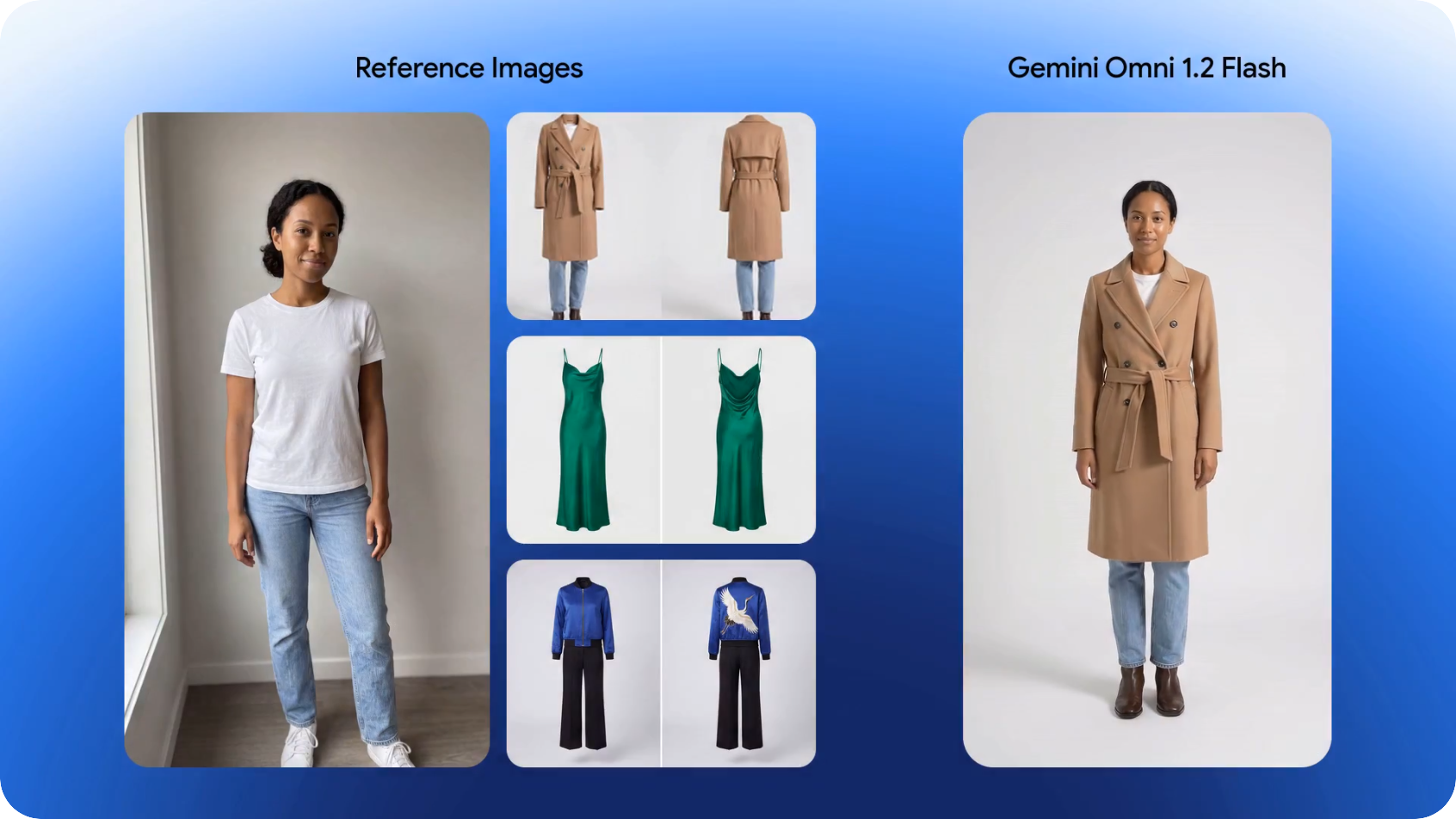
Google's official launch demonstrations include a 15-second virtual try-on example combining a model image with multiple clothing references.
The demonstration illustrates how reference-guided generation can create transitions between outfits while attempting to preserve the model's identity and garment details.
For an e-commerce workflow, this suggests a practical approach: begin with consistent product images, define the desired motion, and review the output for visual accuracy before publishing.
Character Consistency, Audio, and Conversational Editing
Gemini Omni 1.2 Flash supports reference-guided character generation and synchronized audio.
Google's official demonstrations include multi-character scenes in which voice references help guide dialogue and lip synchronization.
The model also supports conversational editing, allowing users to make successive changes to an existing video.
In one official demonstration, a generated scene is modified through several follow-up instructions that change the background while retaining the characters and much of the original composition.
This is particularly relevant for advertising campaigns where a team wants several variations of the same creative.
For example, a product video could begin with a neutral studio background. Follow-up edits could request warmer lighting, a different setting, or a new promotional atmosphere.
Instead of rewriting the entire creative brief for each variation, the editor can focus on the specific change.
However, reference adherence is not equivalent to perfect preservation.
Product markings, clothing details, faces, and motion continuity still need to be checked in the generated output.
Video Extension, Frame Control, and Upscaling
Gemini Omni 1.2 Flash offers several ways to continue or improve a video.
Video extension: Generates an additional segment of 3–10 seconds. The source video provides continuity information for the next part of the sequence.
First-and-last-frame control: Uses two visual keyframes to guide a transition between a starting and ending image, with an output duration of 3–10 seconds.
Standalone upscaling: Enhances an existing video through specific supported resolution transitions, including 360p to 720p or 1080p, and 720p to 1080p or 4K.
These operations address different production needs.
Extension is useful when a scene needs to continue beyond its original ending.
Frame control is useful when the creator knows how a shot should begin and end.
Upscaling is useful when a lower-resolution video has already passed creative review and needs a higher-resolution deliverable.
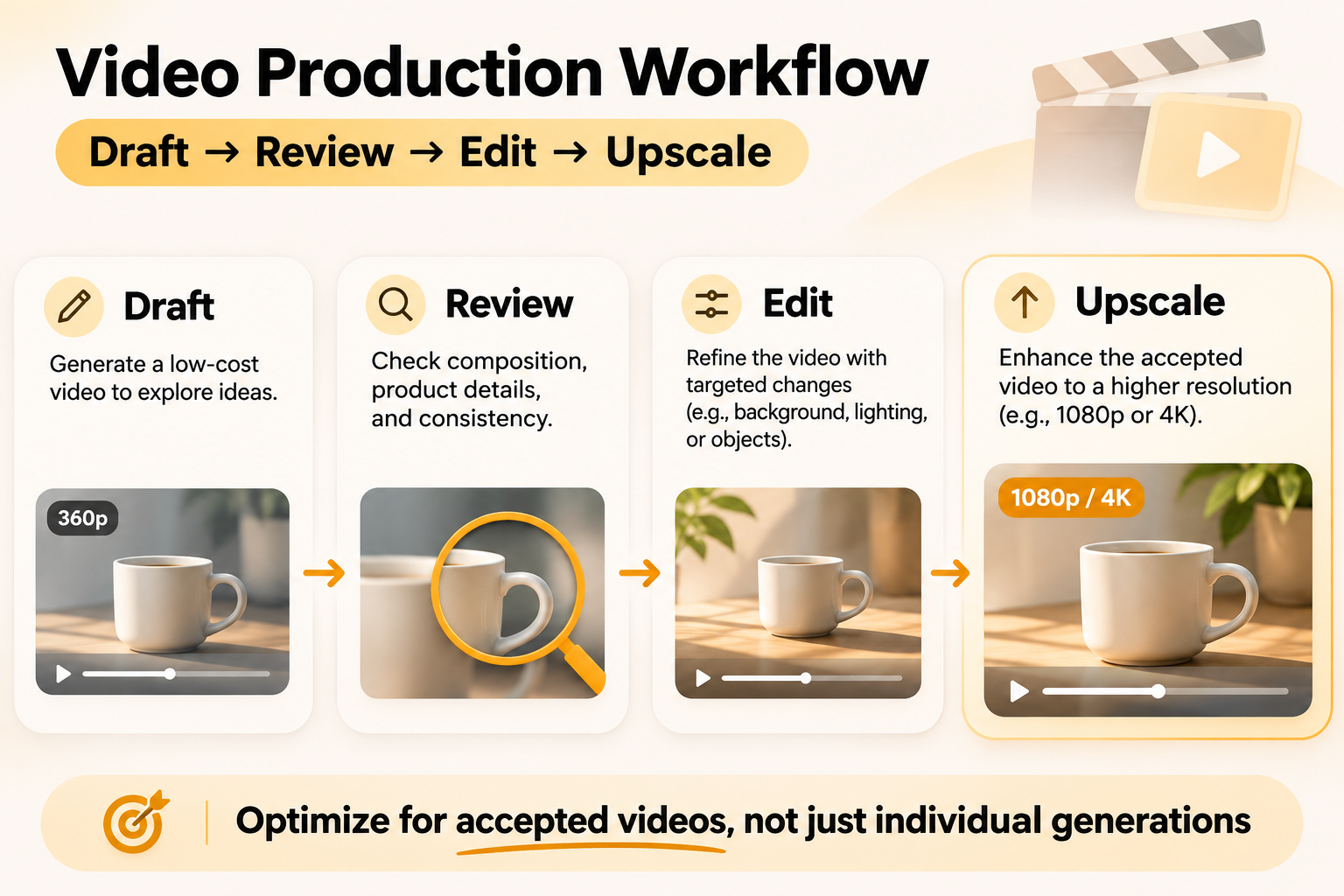
A practical workflow is therefore to generate a draft, review the result, refine specific details, and upscale the selected version.
The financial benefit depends on the number and cost of the operations performed, not simply on choosing a lower initial resolution.
Gemini Omni 1.2 Flash vs Gemini Omni 1.1 Flash
Google introduced Gemini Omni 1.2 Flash as a lower-cost and more controllable successor to Omni 1.1 Flash.
The most measurable changes concern maximum standard video duration and video output token pricing.
| Feature | Gemini Omni 1.1 Flash | Gemini Omni 1.2 Flash |
|---|---|---|
| Standard maximum video duration | 10 seconds | 15 seconds |
| Input price | $1.50 / 1M tokens | $1.50 / 1M tokens |
| Text/reasoning output | $9 / 1M tokens | $9 / 1M tokens |
| Video output | $17.50 / 1M tokens | $12 / 1M tokens |
| Approximate 720p price/second | $0.101 | $0.0695 |
| Reference adherence | Previous generation | Improved in Google's demonstrations |
| Multi-turn editing | Available | Supports longer clips and updated controls |
| Standalone upscaling | Earlier workflow capabilities | Documented resolution transitions |
Is Gemini Omni 1.2 Flash Really 30% Cheaper?
At $12 per million video output tokens, Gemini Omni 1.2 Flash is approximately 31.4% cheaper per video output token than Omni 1.1 Flash at $17.50 per million.
For a 10-second 720p clip, that translates to approximately $0.695 versus $1.014 in video output costs.
| Model | Estimated Video Output Cost |
|---|---|
| Omni 1.1 Flash | $1.014 |
| Omni 1.2 Flash | $0.695 |
| Difference | $0.319 lower with Omni 1.2 |
The comparison uses the same output token count for both models.
For applications generating many videos of the same duration and resolution, the reduction in output token pricing can become significant.
When Is Upgrading to Omni 1.2 Flash Worth It?
Choose Omni 1.2 Flash when the application benefits from longer single-shot videos, reference-guided content, conversational revisions, or lower published video output pricing.
The longer maximum duration is particularly useful for short advertisements, product demonstrations, and scenes that previously required more than one generation segment.
For reference-heavy projects, Google's official demonstrations show improvements in character and product consistency.
However, the economic value of an upgrade depends on the complete creative process.
A lower generation price provides the clearest advantage when it also supports an efficient workflow with acceptable outputs and manageable revision costs.
What Our Research Found About Real Video Costs
Our review of early Reddit discussions around Gemini Omni 1.2 Flash identified recurring concerns about usage costs, model availability, prompt adherence, and the difficulty of producing consistent results.
A recurring theme is that a cheaper generation does not automatically mean a cheaper finished video.
This matters when comparing API providers, planning production budgets, or deciding whether a model upgrade is worthwhile.
Why API Prices and Google Flow Credits Can Tell Different Stories
In a discussion on r/GoogleFlow titled Costs for Omni 1.2 seem higher, not lower!, a user reported that generating a 10-second video had increased from 15 to 30 Flow credits.
Other comments raised concerns about the credit requirements for longer videos and the ability to use lower-resolution drafts before final delivery.
These reports concern Google Flow's credit system, while Google's 30% price reduction concerns the direct video API output rate.
| System | What Users Pay or Consume | Main Decision |
|---|---|---|
| Gemini Omni API | Token-based charges | Cost of programmatic video generation |
| Google Flow | Flow credits | Videos available within a Flow credit budget |
| Gemini App | Product-specific usage allowance | Access and available generations |
| Video production workflow | Combined spending across operations | Cost of each accepted deliverable |
A change in Flow credits cannot be converted directly into an API price increase without matching the underlying billing systems.
For developers, the better approach is to calculate spending from the actual API task, token rate, and number of operations.
Why Character Consistency and Prompt Adherence Affect Costs
Another Reddit discussion, Omni 1.2 Test / Work in Progress, described improvements in character movement but also noted changes in clothing details.
This is particularly relevant for projects involving recurring characters, product identity, or consistent visual branding.
Consider an advertising team creating several clips featuring the same product.
A generation that looks visually attractive may still require revision if the product label changes, the clothing differs from the reference, or the intended camera movement is not followed.
Each additional generation or editing operation can add to the total production budget.
Google's official examples show improvements in reference adherence, but practical production still benefits from a review process that checks the specific details that matter to the project.
For commercial applications, visual consistency should be treated as a production requirement rather than an optional quality preference.
How Much Does One Usable Video Actually Cost?
A more useful budget measure is the cost per accepted video.
The calculation is:
Cost per accepted video = Total production spending / Number of accepted videos
Consider a project generating 10-second 720p video clips.
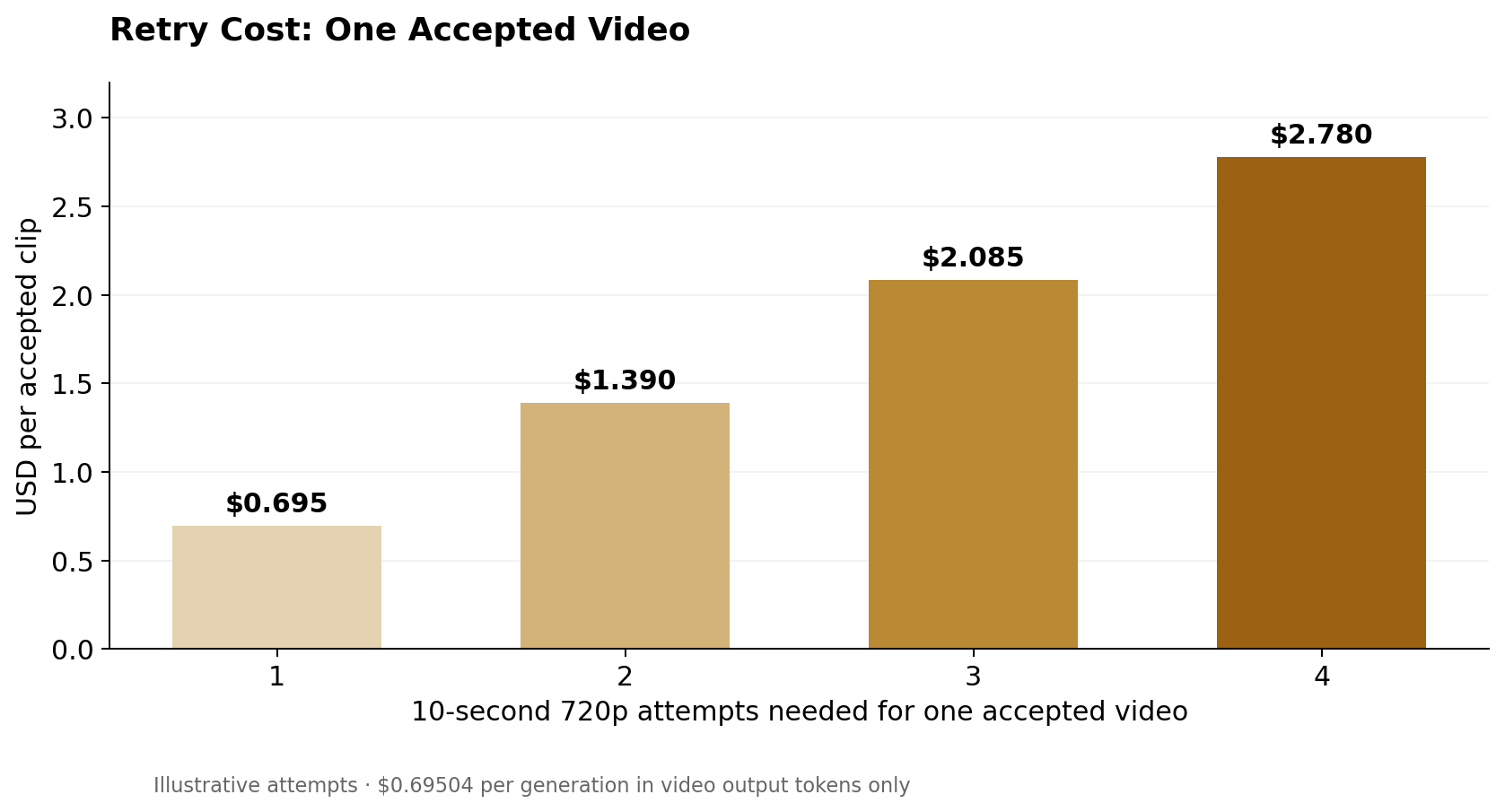
At $0.69504 per generation in video output tokens, the cost changes as the number of attempts increases.
| Scenario | Generations | Accepted Videos | Output Cost | Cost per Accepted Video |
|---|---|---|---|---|
| First attempt accepted | 1 | 1 | $0.695 | $0.695 |
| Third attempt accepted | 3 | 1 | $2.085 | $2.085 |
| Fourth attempt accepted | 4 | 1 | $2.780 | $2.780 |
| Two accepted from four attempts | 4 | 2 | $2.780 | $1.390 |
The scenarios assume 10-second 720p generations at the published video output rate, before other charged operations.
Four generations required to produce one accepted video increase the generation-output spending per accepted clip to four times the one-attempt cost.
This is why prompt adherence, editing support, and reference consistency can matter as much as the published price per second.
Comparing a High-Resolution Generation With Draft and Upscale
Suppose a creator wants a 10-second 1080p video.
Using the published output token rates:
| Workflow | Calculation | Estimated Video Output Cost |
|---|---|---|
| Initial 1080p generation | 10 × 8,688 × $12 / 1M | $1.043 |
| 720p draft only | 10 × 5,792 × $12 / 1M | $0.695 |
| Upscale 720p → 1080p | 10 × 2,896 × $12 / 1M | $0.348 |
| 720p generation + upscale | $0.695 + $0.348 | $1.043 |
For this one-clip example, the video output token costs are approximately equal.
The benefit of generating a lower-resolution draft is therefore not an automatic discount on every finished clip.
The advantage emerges when the team uses lower-resolution generations to explore multiple creative options and reserves high-resolution output for selected results.
For example, three 10-second drafts at 360p cost approximately $0.695 in video output tokens combined.
If one draft is accepted and then upscaled from 360p to 1080p, the upscaling output costs approximately $0.695.
The combined video output cost is approximately $1.390.
This workflow can be compared with generating several full-resolution alternatives. The most economical choice depends on how many drafts are required, which clips are accepted, and whether additional editing is needed.
A Practical Workflow for Controlling Video Costs
The most effective cost strategy is to connect video quality review with production spending.
Define acceptance criteria before generation. Specify the required subject appearance, product details, action, camera movement, and audio.
Use lower-resolution drafts for exploration. Start at 360p or 720p when high-resolution output is not needed to judge the creative direction.
Apply reference assets deliberately. Use consistent images and source videos for tasks that depend on identity or product appearance.
Prefer targeted revisions when appropriate. A specific editing request may preserve useful parts of an existing video, although the operation still has its own cost.
Upscale selected outputs. Use the supported standalone upscaling operation for videos that have already passed review.
Measure completed results. Record total API spending, accepted clips, average attempts, and cost per accepted deliverable.
These practices give developers a more realistic basis for evaluating Gemini Omni 1.2 Flash than comparing a single published price per second.
For applications that use several AI models throughout the process, LinkModel's unified access and billing model can also make cross-model workflow administration more convenient.
Frequently Asked Questions
Is Gemini Omni 1.2 Flash API free?
Gemini Omni 1.2 Flash API uses paid, token-based pricing, with video output starting at approximately $0.023 per second at 360p and $0.07 per second at 720p. Google's separate video creation products may provide limited free generation, but those allowances are not the same as free API usage. On LinkModel, eligible new users automatically receive $1 in free Credits to explore available models without linking a payment card or making a recharge.
How much does a 15-second Gemini Omni 1.2 Flash video cost?
A 15-second 720p video costs approximately $1.04 in video output tokens. At 1080p, the corresponding amount is approximately $1.56, while 4K output costs approximately $3.13. Input tokens, additional editing, and standalone operations can affect the total spending.
Is Gemini Omni 1.2 Flash API cheaper than Google Flow?
The two services use different billing systems. The Gemini Omni API charges by tokens, while Google Flow uses credits. Google announced lower Omni 1.2 API output pricing compared with Omni 1.1, but that does not establish an equivalent change in Flow credit requirements.
Can Gemini Omni 1.2 Flash upscale videos to 4K?
Yes. Google documents standalone upscaling from 720p to 4K, as well as 360p to 720p or 1080p and 720p to 1080p. The operation has its own output token schedule, so its cost should be calculated separately from initial generation.
Does Gemini Omni 1.2 Flash support Chat Completions API?
Google Cloud documents Gemini Omni 1.2 Flash through the Interactions API, while marking Chat Completions API and GenerateContent API as unsupported for this model offering. Developers using LinkModel should follow its published task-specific interface and parameter documentation.
Conclusion
Gemini Omni 1.2 Flash API delivers up to 15-second video generation, synchronized audio, reference-guided editing, and output resolutions up to 4K, with 720p video output costing approximately $0.07 per second. However, the smarter budget decision is to evaluate cost per usable video, including retries, editing, and upscaling. For developers building workflows across multiple AI models, LinkModel offers Gemini Omni 1.2 Flash at the same published token rates as Google, with unified model access, flexible pay-as-you-go billing, and $0 monthly platform fee. Explore the model on LinkModel and start with a production budget you control.