Seedance 2.5 Flash is the better-value choice for affordable 480p and 720p videos, social media content, talking-head scenes, and rapid creative iteration. Seedance 2.5 is worth the upgrade for native 1080p or 4K output, reference-heavy projects, and demanding physical interactions. On LinkModel, Flash costs approximately 38% less than the standard model at matching 480p and 720p resolutions.
But the cheapest generation isn't always the cheapest finished video. Our research found that Flash completed selected tasks 2–3× faster in published comparisons, while missed physical interactions and inconsistent product details sometimes made the standard model more attractive. Choosing the wrong model can turn a lower per-second price into additional attempts and unnecessary production costs.
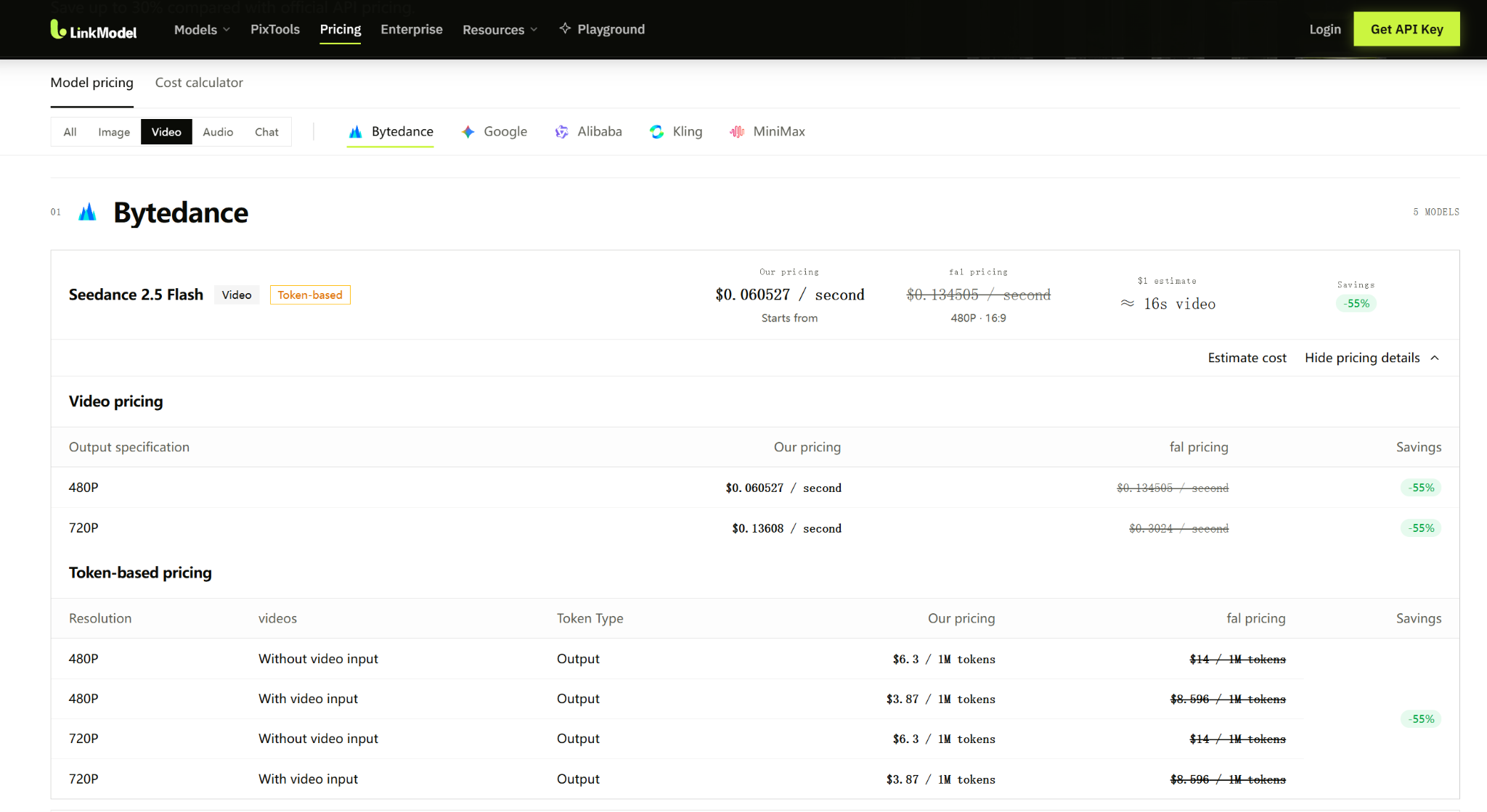
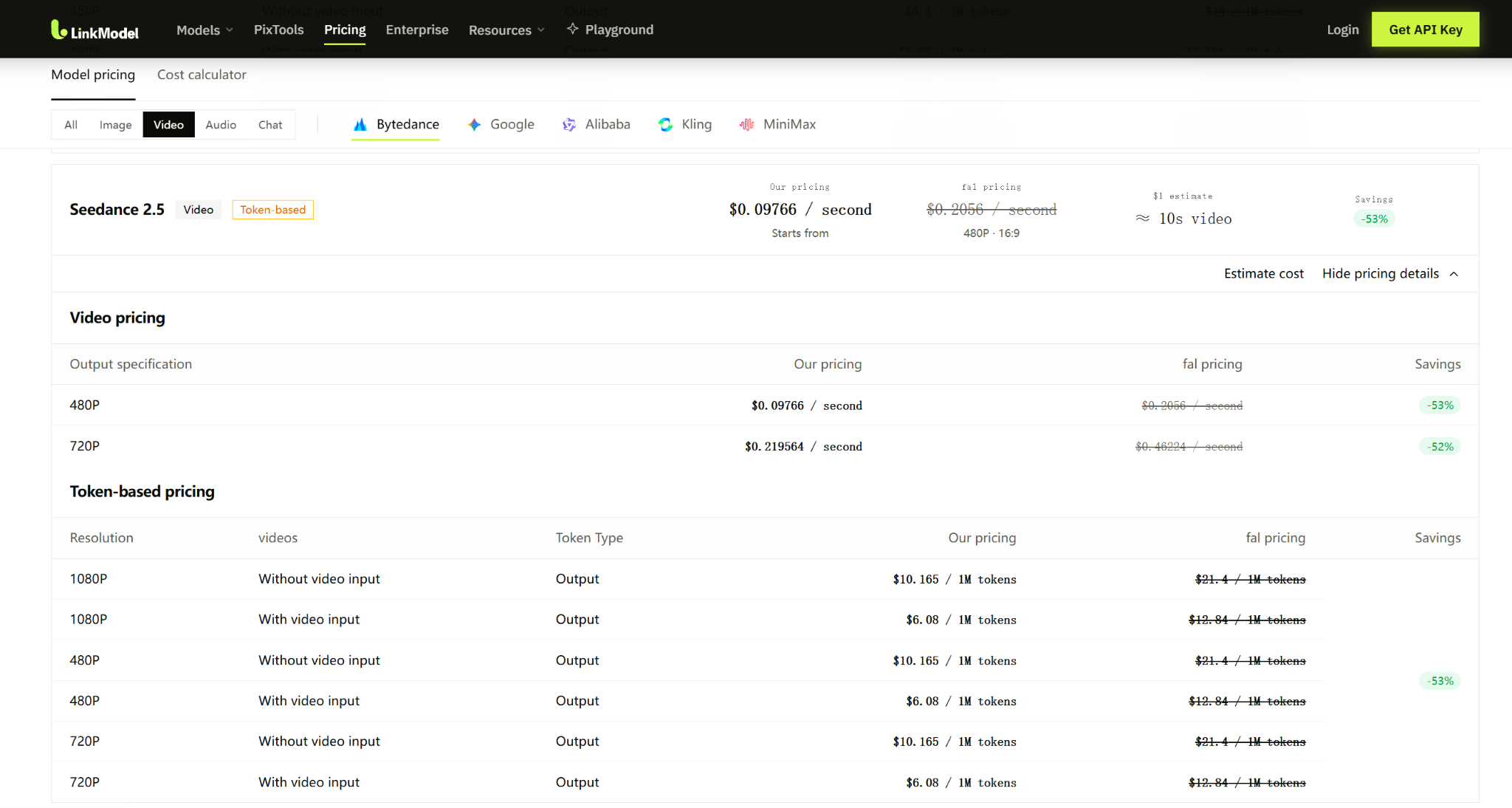
LinkModel makes Seedance video generation significantly more affordable: Flash starts at just $0.060527/s, 55% less than fal at matching listed configurations, while standard Seedance 2.5 starts at $0.097660/s. A 10-second 720p Flash video costs approximately $1.36, with $0 minimum spend and $0 monthly platform fee. New users automatically receive $1 in free Credits, with no credit card or recharge required. These Credits never expire, apply to all currently available models, and are a one-time benefit for new users.
Seedance 2.5 Flash vs Seedance 2.5: Key Differences
Seedance 2.5 Flash prioritizes lower costs and faster generation, while standard Seedance 2.5 offers higher output resolutions, more multimodal references, and a dedicated Draft Mode. Both models support audiovisual video generation and clips lasting up to 30 seconds.
The most important differences are not abstract quality labels. They are the technical limits that determine whether a model can complete your intended project.
Seedance 2.5 Flash vs Seedance 2.5 Specifications
| Feature | Seedance 2.5 Flash | Seedance 2.5 |
|---|---|---|
| Main advantage | Fast, affordable generation | Greater production flexibility |
| Official output resolutions | 480p, 720p | 480p, 720p, 1080p, 4K |
| Maximum duration | 30 seconds | 30 seconds |
| Text-to-video | Supported | Supported |
| Image-to-video | Supported | Supported |
| First- and last-frame guidance | Supported | Supported |
| Native audio | Supported | Supported |
| Dialogue and synchronized sound | Supported | Supported |
| Maximum image references | 10 | 30 |
| Maximum video references | 5 | 10 |
| Maximum audio references | 5 | 10 |
| Maximum reference capacity | 20 | 50 |
| Video editing and extension | Supported capabilities | Supported capabilities |
| Dedicated Draft Mode | Not available | Available |
| Starting LinkModel price | $0.060527/s | $0.097660/s |
The official BytePlus specifications list 1080p and 4K output for standard Seedance 2.5, while Flash remains limited to 480p and 720p. The higher-resolution standard outputs also support 10-bit color depth and H.265/HEVC encoding.
These differences are especially important for professional delivery.
A short social media advertisement may look sufficiently detailed at 720p. A project requiring a native 4K master needs the standard model's official capabilities.
Reference Images, Videos, and Audio: When Does the Standard Model Matter?
Both models support multimodal references, allowing creators to guide appearance, movement, composition, and sound. These capabilities are increasingly useful in image-to-video production workflows where the source image must remain recognizable throughout a scene.
However, their maximum input capacities differ substantially.
Flash supports up to 10 images, 5 videos, and 5 audio references, while standard Seedance 2.5 supports 30 images, 10 videos, and 10 audio references.
Consider a product advertisement with four product photographs, two visual style images, and one camera-motion reference. Flash has enough reference capacity for that type of workflow.
Now consider a campaign featuring multiple products, recurring characters, different environments, and several motion examples. If the project requires 15 image references, Flash's published image limit is already exceeded.
The standard model becomes the practical choice because of its input capacity, even before considering visual quality.
Our analysis also suggests a useful production principle: more reference assets do not automatically improve consistency.
A poor starting image, contradictory motion references, or unclear object descriptions can make the result harder to control.
For example, if a product photograph shows an ambiguous handle or label, the video model may reinterpret that feature during movement.
Starting with clear, consistent references can reduce unnecessary iterations regardless of which Seedance model you use.
Seedance 2.5 Draft Mode vs Flash: Are They the Same?
No. Seedance 2.5 Flash is a separate generation model, while Draft Mode is a feature of the standard Seedance 2.5 workflow.
Flash is useful for exploring multiple creative directions at a lower cost.
The standard model's dedicated Draft workflow allows creators to prepare a preliminary result for a supported draft-to-final process.
This matters when moving toward final delivery.
Suppose you create a 10-second Flash video with the exact camera angle and movement you want. Submitting the same prompt to standard Seedance 2.5 does not guarantee identical framing, object positions, or motion.
It creates a different generation.
By contrast, the standard model's supported Draft workflow is designed for a more directly connected production process.
For generating many alternative ideas, Flash is often the more economical starting point. For projects requiring a structured draft-to-final process, the standard model's Draft capability deserves closer attention.
Seedance 2.5 Flash vs Seedance 2.5 Pricing: How Much Can You Save?
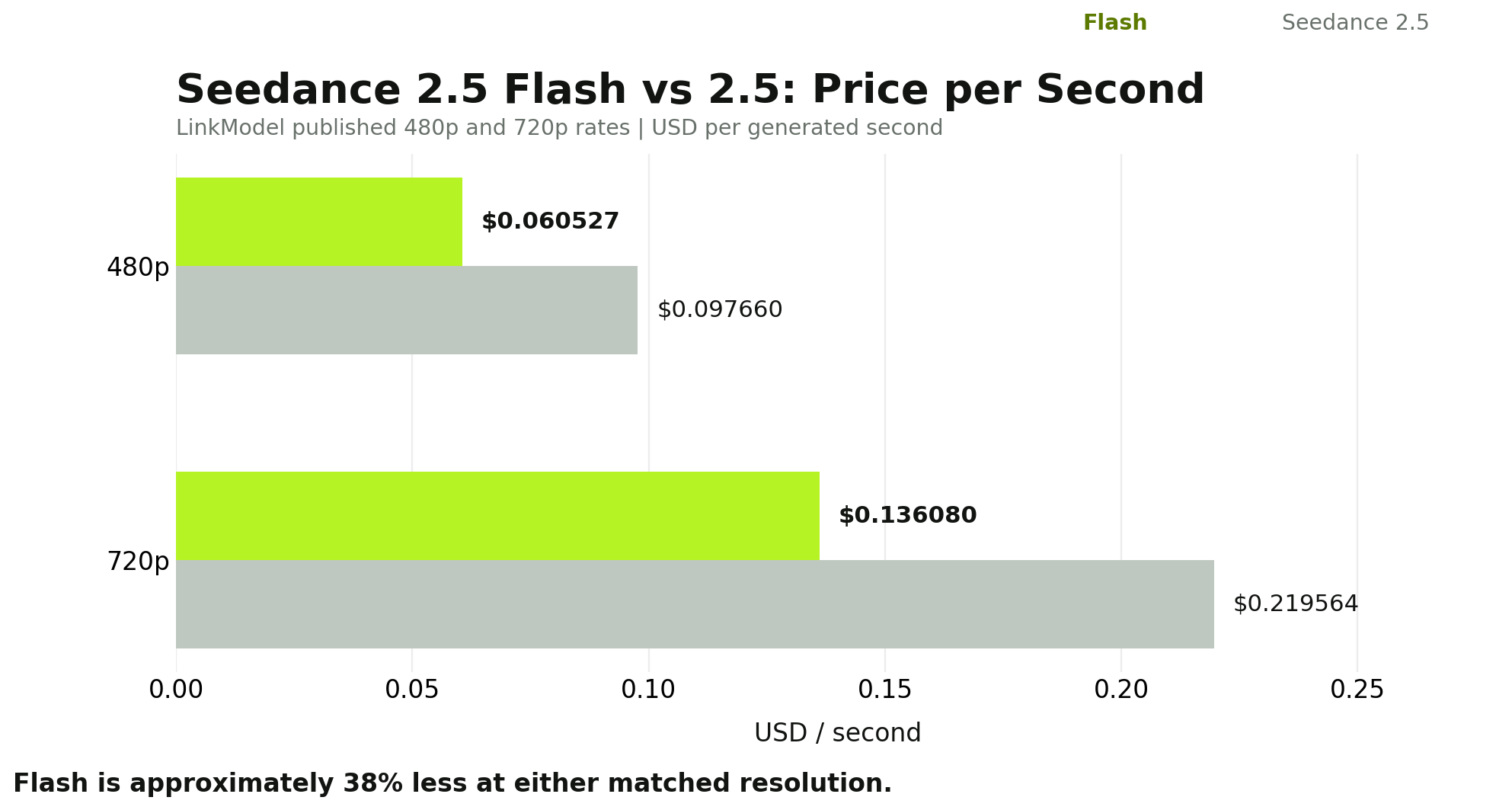
On LinkModel, Seedance 2.5 Flash costs approximately 38% less than standard Seedance 2.5 at the same 480p or 720p resolution.
This saving becomes particularly valuable when creators generate multiple candidates, refine prompts, or develop several videos for the same campaign. For a closer look at the standard model's costs, see the Seedance 2.5 API pricing comparison.
LinkModel Pricing: Flash vs Standard Seedance 2.5
| Resolution | Seedance 2.5 Flash | Seedance 2.5 | Flash Savings |
|---|---|---|---|
| 480p | $0.060527/s | $0.097660/s | 38.0% |
| 720p | $0.136080/s | $0.219564/s | 38.0% |
At 480p, Flash costs $0.037133 less per generated second.
At 720p, the difference increases to $0.083484 per second.
These are the matched-resolution LinkModel rates used throughout the following examples.
How Much Do 5-, 10-, and 30-Second Videos Cost?
For a straightforward generation scenario without video-reference input, a useful budget formula is:
Estimated video cost = output duration × applicable per-second price
| Duration | Resolution | Flash Cost | Standard Cost | Savings |
|---|---|---|---|---|
| 5 seconds | 480p | $0.30 | $0.49 | $0.19 |
| 10 seconds | 480p | $0.61 | $0.98 | $0.37 |
| 30 seconds | 480p | $1.82 | $2.93 | $1.11 |
| 5 seconds | 720p | $0.68 | $1.10 | $0.42 |
| 10 seconds | 720p | $1.36 | $2.20 | $0.83 |
| 30 seconds | 720p | $4.08 | $6.59 | $2.50 |
The figures are rounded from the published per-second rates.
For a 10-second 720p video, Flash costs approximately $1.36, compared with $2.20 for standard Seedance 2.5.
For a 30-second 720p video, the estimated costs increase to $4.08 and $6.59.
This is why Flash can be attractive for early creative exploration. A team working through several possible scenes can generate more alternatives for the same budget.
Batch Production: The Cost of 10, 30, or 100 Videos
The cost difference becomes even clearer when generating large volumes of content.
Consider a creator producing 10-second 720p videos with the same basic generation settings.
| Number of Generations | Flash Total | Standard Total | Flash Savings |
|---|---|---|---|
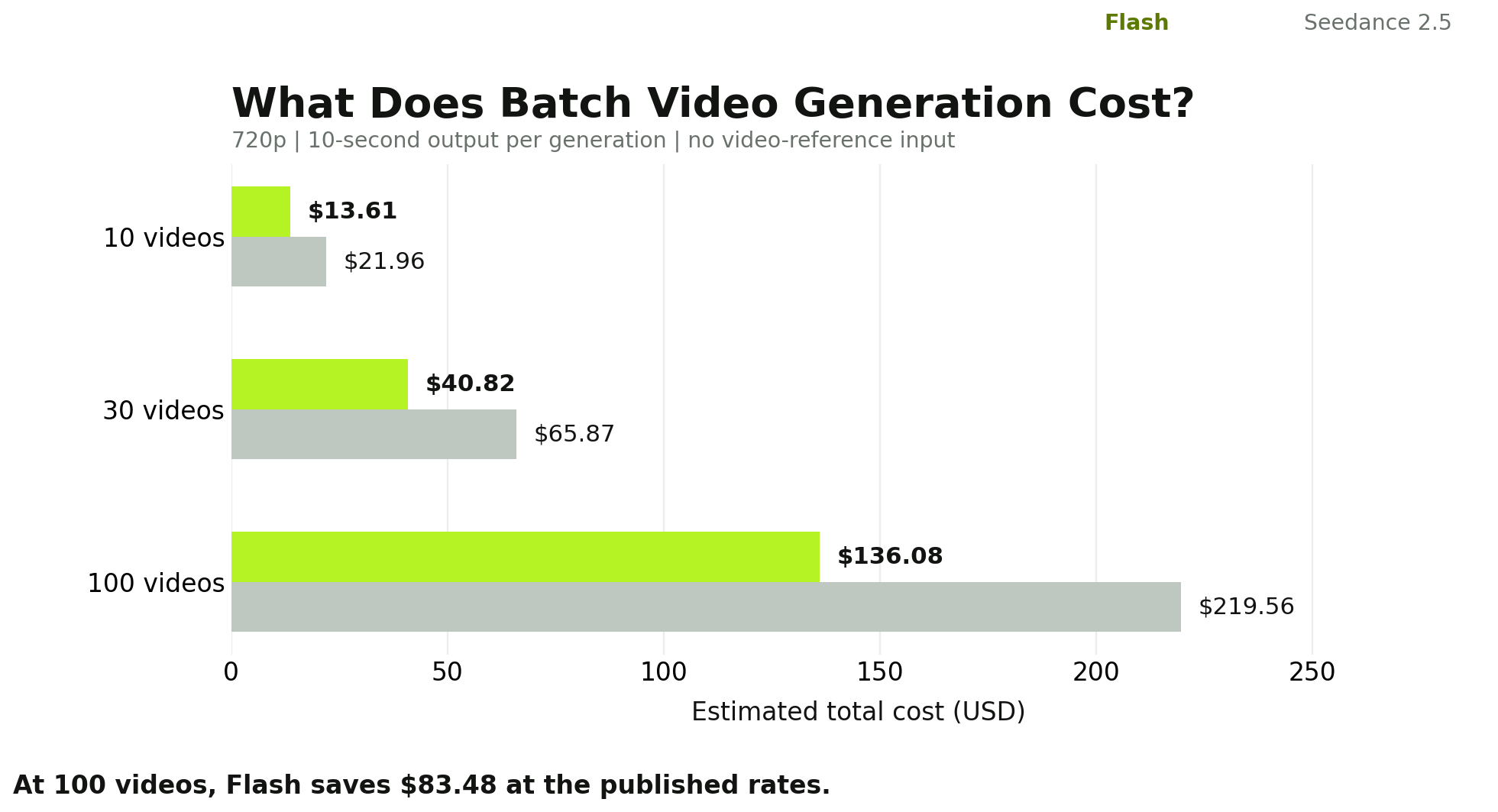
| 10 | $13.61 | $21.96 | $8.35 |
| 30 | $40.82 | $65.87 | $25.05 |
| 100 | $136.08 | $219.56 | $83.48 |
For 100 generated videos, Flash saves approximately $83.48 at LinkModel's listed rates.
That saving could support additional concepts, prompt revisions, or more selective use of the standard model.
For agencies and content teams, the financial advantage is not limited to producing cheaper videos. It also creates more opportunities to explore different creative directions without increasing the original generation budget.
LinkModel vs fal: Up to 55% Lower Published Prices
Our analysis also compared the same model and output resolution across LinkModel and fal.
| Model | Resolution | LinkModel | fal | Savings |
|---|---|---|---|---|
| Seedance 2.5 Flash | 480p | $0.060527/s | $0.134505/s | 55% |
| Seedance 2.5 Flash | 720p | $0.136080/s | $0.302400/s | 55% |
| Seedance 2.5 | 480p | $0.097660/s | $0.205600/s | About 53% |
| Seedance 2.5 | 720p | $0.219564/s | $0.462240/s | About 52% |
LinkModel's Flash prices are 55% below the corresponding fal rates at both listed resolutions.
For example, generating a 30-second 720p Flash video costs approximately $4.08 on LinkModel versus $9.07 at the listed fal rate.
That is about $4.99 saved on a single generation.
For the same 100 ten-second 720p Flash generations used earlier, the estimated cost is $136.08 on LinkModel versus $302.40 at the listed fal rate, a difference of $166.32.
These figures show how model choice and provider pricing can affect a production budget separately.
Token-Based Pricing and Video-Reference Inputs
Video generation may also involve token-based billing, especially when requests use video-reference inputs.
LinkModel's listed output-token prices include:
| Model | Video Input | Output Token Price |
|---|---|---|
| Seedance 2.5 Flash | Without video input | $6.30 / 1M tokens |
| Seedance 2.5 Flash | With video input | $3.87 / 1M tokens |
| Seedance 2.5 | Without video input | $10.165 / 1M tokens |
| Seedance 2.5 | With video input | $6.08 / 1M tokens |
The output-token price alone does not determine the complete cost of a request containing video references.
For simple budgeting, use the applicable per-second price for the selected video-generation configuration.
For workflows involving video-reference inputs, review the corresponding token usage and charging basis.
Seedance 2.5 Flash vs Seedance 2.5 Speed and Quality: What Real Comparisons Show
Seedance 2.5 Flash can finish selected generation tasks two to three times faster than standard Seedance 2.5, but visual quality differences depend heavily on the scene.
Our research examined published same-prompt comparisons involving physical interactions, dialogue, product shots, fast movement, crowds, and long continuous sequences.
The strongest findings come from the specific details each model successfully reproduces, rather than an overall quality label.
Case Study 1: Twelve Videos Comparing Speed, Physical Motion, and Prompt Accuracy
One published comparison generated 12 videos using three different prompts at 480p and 720p.
The scenes included a dog catching a frisbee, a baker speaking to the camera, and a bicycle courier traveling through a multi-stage sequence.
Each model and resolution configuration was generated once.
Reported 720p completion times
| Video Scenario | Flash | Seedance 2.5 | Flash Advantage |
|---|---|---|---|
| Dog catching a frisbee, 10s | 100s | 230s | 2.3× |
| Baker speaking, 12s | 110s | 363s | 3.3× |
| Bicycle courier, 30s | 144s | 443s | 3.1× |
These measurements include the time required for each task to complete.
Across these three reported 720p tasks, Flash finished 2.3–3.3× faster, making the turnaround-time advantage particularly noticeable for repeated creative work.
The visual results revealed three different patterns.
Frisbee-catching scene: The standard model handled the critical interaction better.
The requested sequence involved a border collie running, jumping, catching a flying frisbee, landing, and returning toward the camera.
In the reported comparison, standard Seedance 2.5 showed the frisbee traveling through the air and the dog catching it.
Flash omitted the visible flight of the frisbee, moving directly to a result where the disc was already in the dog's mouth.
For an action scene, the missing interaction is more important than a minor difference in sharpness.
Baker dialogue scene: The visual gap was relatively small.
Both models reproduced the central subject handling bread and speaking toward the camera.
The results suggest that for ordinary dialogue and lifestyle footage, the lower-priced Flash model can be sufficient when it follows the key instructions.
Bicycle courier scene: Flash preserved some prompt details better.
The 30-second prompt contained multiple actions, location changes, and visual details.
Flash retained details such as a yellow parcel and green clothing more consistently in this specific generation, while the standard model changed or omitted some elements.
This is an important counterexample to the assumption that the standard model always performs better on longer prompts.
Our analysis suggests that complex physical interaction and complex narrative sequencing should be evaluated separately.
A model that handles one type of challenge well does not necessarily win every other category.
Case Study 2: Six Five-Second Videos Comparing Portraits, Skateboarding, and Crowds
Another comparison generated six five-second videos using three matched prompts at 720p and a 3:4 aspect ratio.
The scenes included a woman standing in a wheat field, a skateboarder performing a kickflip, and a crowded night market.
Reported generation costs and completion times
| Metric | Flash | Seedance 2.5 |
|---|---|---|
| Clip duration | 5s | 5s |
| Resolution | 720p | 720p |
| Aspect ratio | 3:4 | 3:4 |
| Cost per video | $0.80 | $1.52 |
| Completion time | 75s | 160–169s |
| Three-video total | $2.40 | $4.56 |
For this platform's reported charges, Flash cost 47.4% less and completed the selected tasks much faster.
The quality differences were task-specific.
Portrait close-up: Flash followed the requested composition and produced a convincing facial expression. The standard version showed more natural-looking skin texture and a different cinematic presentation.
Skateboard kickflip: Both models completed the fast action successfully, including the landing. This suggests that Flash's physical-motion weaknesses are not universal across fast-moving scenes.
Night market crowd: Both outputs maintained generally believable faces and hands. The standard version showed greater perceived background depth and atmospheric detail.
These cases illustrate an important purchasing distinction.
For a short social media portrait or a fast-moving promotional clip, Flash may provide enough visual quality at a lower cost.
For a cinematic shot where subtle texture, depth, and overall presentation matter, the standard model may justify the extra spending.
The practical question is not simply whether one model looks better. It is whether the additional visual quality changes the video's usefulness.
Case Study 3: Eleven Generations Testing Real Workflow Capabilities
A separate published investigation involved 11 generations across multiple workflow types.
The test included two same-prompt, same-seed head-to-head comparisons, a resolution comparison, and additional tests involving image-to-video, reference images, vertical output, longer scenes, fast motion, and editing.
At 720p, the reported measurements included:
| Measurement | Flash | Seedance 2.5 |
|---|---|---|
| 10-second generation cost | $1.598 | $2.443 |
| First matched completion | 88.5s | 166.3s |
| Second matched completion | 76.2s | 175.3s |
| Cost advantage | 34.6% lower | Baseline |
The two matched tasks showed Flash completing the generation in substantially less time.
The broader set of workflow tests demonstrated that Flash retained useful production capabilities rather than offering only basic text-to-video generation.
These included image-guided creation, reference-based generation, vertical video, multi-shot sequences, and editing.
For content creators, this matters because practical production usually requires more than generating a single clip from a paragraph of text.
A creator may begin with a reference image, adjust a camera movement, develop an alternate framing, and prepare several versions for different publishing formats.
Flash's value comes from combining lower generation costs with access to much of that creative workflow.
At the same time, the test did not establish that Flash always matched the standard version's visual quality. Its most useful conclusion is that many ordinary production tasks can benefit from Flash's speed and cost advantages without immediately requiring the standard model.
Case Study 4: Eleven Paired Outputs Comparing Quality and Usability
Another published evaluation compared 11 same-prompt video pairs, primarily at 480p, and used an AI judge to assess visual quality and basic usability.
Standard Seedance 2.5 received the preferred ranking in 8 of the 11 pairs, including all four text-only prompt comparisons.
However, the same assessment classified 9 Flash outputs and 10 standard outputs as usable.
This reveals a meaningful distinction between preferred visual quality and whether a video meets its basic purpose.
A standard-model video may be ranked higher because it looks more polished, while the Flash version can still be acceptable for publication or creative development.
One of the clearest examples involved a sage-green kettle.
The prompt required a close-up product shot, a controlled pour into a coffee dripper, and a final hero shot.
Flash maintained the overall product appearance during several shots, but its walnut handle disappeared during the pouring sequence and the expected steam was missing.
The standard model preserved the handle and steam more effectively, although the handle's wood tone shifted between shots.
For a product advertisement, the disappearing handle is a significant problem because it changes a defining feature of the item.
For early concept development, however, the Flash version could still help evaluate framing, camera movement, and the overall scene.
Our analysis found that the standard model has a stronger case for final shots where small inconsistencies would undermine the deliverable, even when Flash remains useful for earlier production stages.
What These Comparisons Mean for Video Creators
Across the published comparisons, several patterns emerge.
| Comparison Dimension | What Our Research Found | Practical Implication |
|---|---|---|
| Turnaround time | Flash often completed selected jobs substantially faster | Useful for frequent iteration |
| Dialogue and close-ups | Some scenes produced relatively similar results | Flash is a sensible starting choice |
| Physical interactions | Standard model handled certain critical actions better | Prioritize it when exact action matters |
| Fast motion | Flash succeeded in some skateboard examples | Motion alone does not require an upgrade |
| Long narrative sequences | Flash sometimes preserved more prompt details | Worth testing for story exploration |
| Product consistency | Standard version preserved some details more successfully | More attractive for final product shots |
| Overall quality preferences | Standard model led in one 11-pair AI assessment | Supports selective upgrades |
These findings support a more useful strategy than choosing one model for every task: use the model that meets the acceptance criteria of the individual shot.
Seedance 2.5 Flash vs Seedance 2.5: Which Model Is Better for Different Tasks?
Choose Flash when 720p output, rapid generation, and affordable experimentation matter most. Choose standard Seedance 2.5 when higher resolution, more reference assets, or demanding visual details make the extra cost worthwhile.
The right choice becomes clearer when tied to the actual video being produced.
Task-Based Model Selection Guide
| Video Task | Best Starting Model | When to Upgrade or Switch |
|---|---|---|
| Social media shorts | Flash | If key actions repeatedly fail |
| Talking-head video | Flash | If fine facial or scene details are essential |
| Prompt exploration | Flash | When moving into demanding final production |
| High-volume creative variations | Flash | If retries eliminate the cost advantage |
| Basic image-to-video | Flash | If reference limits are exceeded |
| Long multi-step storytelling | Flash first | If critical story beats are missing |
| Product hero advertisements | Seedance 2.5 | Use Flash for early concept exploration |
| Sports with precise contact | Seedance 2.5 | Flash may still work for less demanding motion |
| Reference-heavy branded scenes | Seedance 2.5 | Required when Flash's capacity is insufficient |
| Native 1080p or 4K delivery | Seedance 2.5 | Required by official resolution capability |
| Dedicated Draft workflow | Seedance 2.5 | Flash is a separate model, not Draft Mode |
Social Media, Talking-Head Videos, and Content Variations
Flash is particularly attractive for social media production because creators often need many alternatives before choosing the final version.
A campaign might require different opening scenes, camera angles, product placements, or speaking styles.
At LinkModel's 720p rate, 30 ten-second Flash generations cost approximately $40.82, compared with $65.87 for standard Seedance 2.5.
The $25.05 difference provides additional room for experimentation.
The baker dialogue and portrait close-up comparisons also suggest that ordinary speaking scenes do not necessarily benefit enough from the standard model to justify using it for every candidate.
For 720p social media content, Flash should usually be the first model considered.
If the generated clips already satisfy the intended visual and storytelling requirements, moving to the standard model is optional rather than necessary.
Product Advertising and Physically Demanding Actions
Product advertising requires closer attention to object consistency. These are also important selection criteria when evaluating the best AI video APIs for advertising.
A video may look cinematic but still be unsuitable if the model changes the shape, label, handle, or color of the item being advertised.
The sage-green kettle example illustrates this problem: Flash preserved the general appearance but lost a defining feature during the pouring action.
The frisbee-catching example shows a related issue in physical interaction.
When an action is essential to the message, skipping the moment of contact may invalidate the entire video.
For these cases, standard Seedance 2.5 deserves priority because selected published comparisons show stronger results on important motion and product details.
However, the skateboard example also shows that Flash can successfully complete certain fast-moving actions.
A useful evaluation should focus on three questions:
- Action completeness: Does the video show every essential movement?
- Object continuity: Does the important object retain its identity throughout the scene?
- Prompt adherence: Does the sequence preserve the requested details and order?
The model that satisfies those requirements with fewer attempts is often the better production choice.
Long Continuous Shots and Reference-Heavy Projects
Both models can generate clips lasting up to 30 seconds, so duration alone does not require the standard version.
In the bicycle courier comparison, Flash followed a long multi-stage sequence and preserved certain specified details more consistently.
That makes it useful for exploring narratives, camera movements, and scene transitions.
However, reference-heavy productions introduce another constraint.
A project involving 15 product or character images cannot fit within Flash's 10-image limit.
Likewise, a project requiring native 1080p or 4K delivery needs the standard model's official higher-resolution capabilities.
These technical requirements can make the decision straightforward, regardless of subjective differences in image quality.
Seedance 2.5 Flash vs Seedance 2.5: Cost per Usable Video and Regeneration
Flash's 38% lower per-second price creates a meaningful budget advantage, but the actual saving depends on how many generations are needed to produce an acceptable video.
For repeated creative production, the most useful financial metric is not the price of the first attempt.
It is the total spending required to reach a result that meets the project's requirements.
Real Production Experience: Approximately 60 Video Generations
Our review of a creator's approximately 60 Seedance 2.5 generations highlights how draft iterations influence production budgets.
The creator developed two 30-second shorts using a combination of lower-resolution drafts and higher-resolution renders.
The reported production summaries were:
| Project | Production Workflow | Reported Spend |
|---|---|---|
| Short film 1 | Five 480p drafts and two 720p renders | Approximately $23 |
| Short film 2 | Two 480p drafts and one 720p render | Approximately $13 |
The creator also encountered continuity problems, including disappearing objects, changing scene states, and unexpected hands appearing in a piano scene.
These observations matter because a higher-resolution render does not automatically correct a problem in the underlying scene.
If a character changes position unexpectedly or an important object disappears, the production may require another generation rather than a simple export adjustment.
The experience illustrates the cost of creative iteration even when using the standard Seedance 2.5 model.
For budget planning, it is useful to separate creative exploration, correction attempts, and final delivery instead of assuming that every requested generation will become a finished video.
Cost per Usable Video: The More Useful Pricing Metric
A practical production formula is:
Cost per usable video = total generation spending ÷ number of accepted videos
For a single accepted clip, that spending includes all attempts made to produce it.
Using LinkModel's 720p prices for a 10-second video:
Flash cost per generation: $1.3608
Seedance 2.5 cost per generation: $2.19564
Now compare several hypothetical workflows where both models eventually produce one acceptable result.
| Generation Attempts | Flash Total | Standard Total | Lower Cost |
|---|---|---|---|
| 1 Flash vs 1 standard | $1.36 | $2.20 | Flash |
| 3 Flash vs 2 standard | $4.08 | $4.39 | Flash |
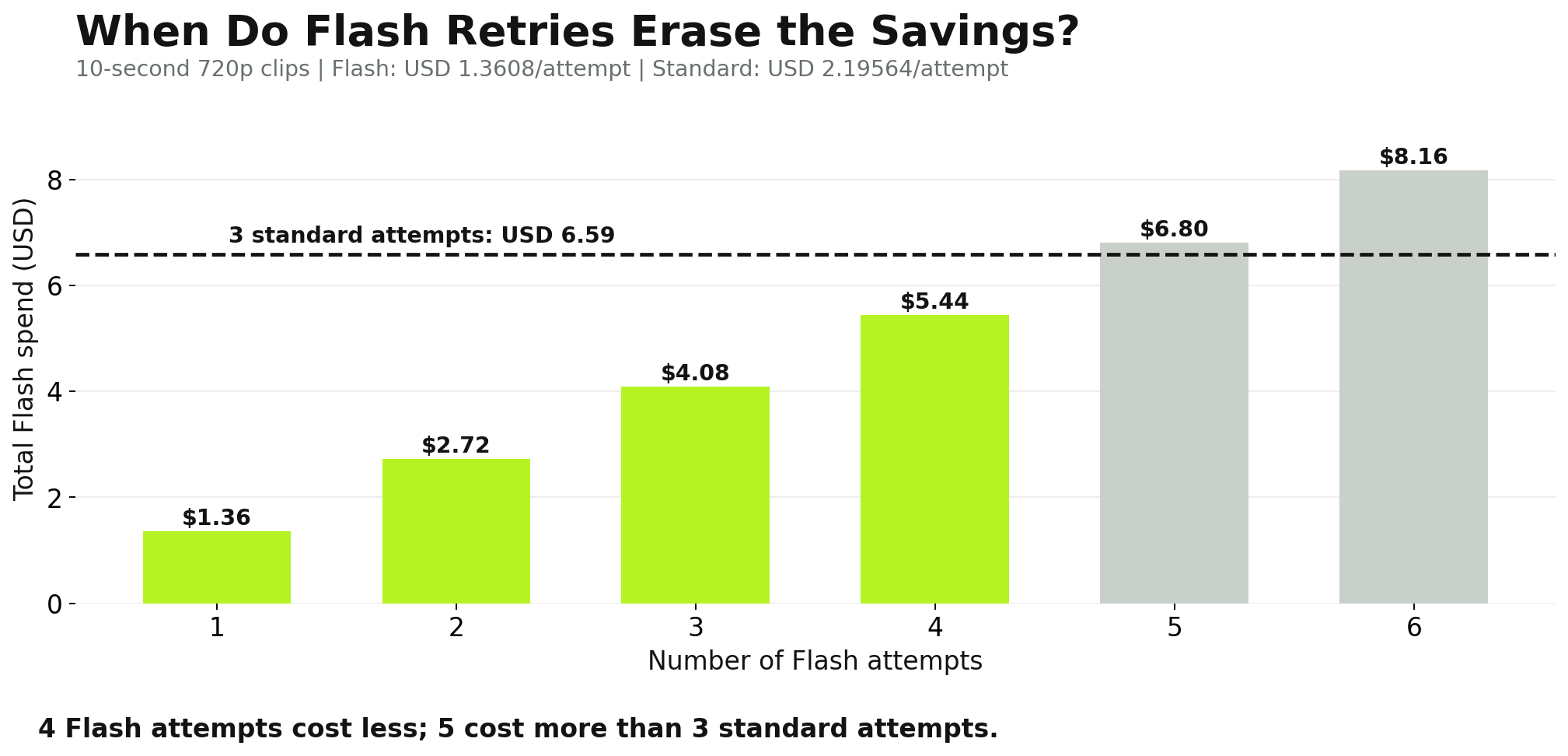
| 4 Flash vs 3 standard | $5.44 | $6.59 | Flash |
| 5 Flash vs 3 standard | $6.80 | $6.59 | Standard |
| 8 Flash vs 5 standard | $10.89 | $10.98 | Flash |
These calculations use identical 720p output durations for each attempt.
They show why the cheapest model per generation may not always be the cheapest model per finished video.
For example, if standard Seedance 2.5 produces an acceptable clip in three attempts, it costs approximately $6.59.
Flash remains cheaper with four attempts, costing about $5.44. However, a fifth Flash attempt raises its total cost to approximately $6.80.
In that situation, the standard model becomes slightly cheaper.
The Break-Even Point: How Many More Retries Can Flash Afford?
The price ratio provides a useful general rule.
Break-even attempt ratio = standard model price ÷ Flash price
At LinkModel's 720p rates:
$0.219564 ÷ $0.136080 ≈ 1.61
At 480p, the ratio is almost identical.
This means Flash has room for approximately 61% more generation attempts before reaching the same total spending, assuming matching duration and resolution.
The following table translates that relationship into practical production decisions.
| Standard Model Attempts | Standard Cost at 720p, 10s | Maximum Whole Flash Attempts Still Cheaper |
|---|---|---|
| 1 | $2.20 | 1 |
| 2 | $4.39 | 3 |
| 3 | $6.59 | 4 |
| 4 | $8.78 | 6 |
| 5 | $10.98 | 8 |
| 10 | $21.96 | 16 |
For example, if a scene requires five standard-model attempts, Flash can complete eight attempts while maintaining a slightly lower generation budget.
This framework is useful because it connects model reliability to spending without assuming a universal success rate.
The actual number of attempts still depends on the prompt, reference quality, intended visual result, and acceptance criteria.
When Should You Stop Retrying Flash?
Repeated Flash generations make sense when the model is already close to producing a usable result.
Suppose a talking-head scene has good framing and accurate dialogue, but the timing needs minor adjustment. Another Flash attempt may be worthwhile.
Now consider a product demonstration where the object repeatedly disappears during contact.
If the issue persists despite clearer references and prompt adjustments, continuing with Flash may be less economical than trying the standard model.
The key is to identify whether the problem is a minor variation or a failure of a critical requirement.
For higher-value shots, define the acceptance criteria before generating the video.
A product demonstration might require the exact product shape, a complete pouring action, recognizable packaging, and stable color across the entire clip.
A social media concept might only require the right mood, subject, and message.
Different acceptance criteria justify different amounts of spending.
A Practical Flash-to-Final Production Workflow
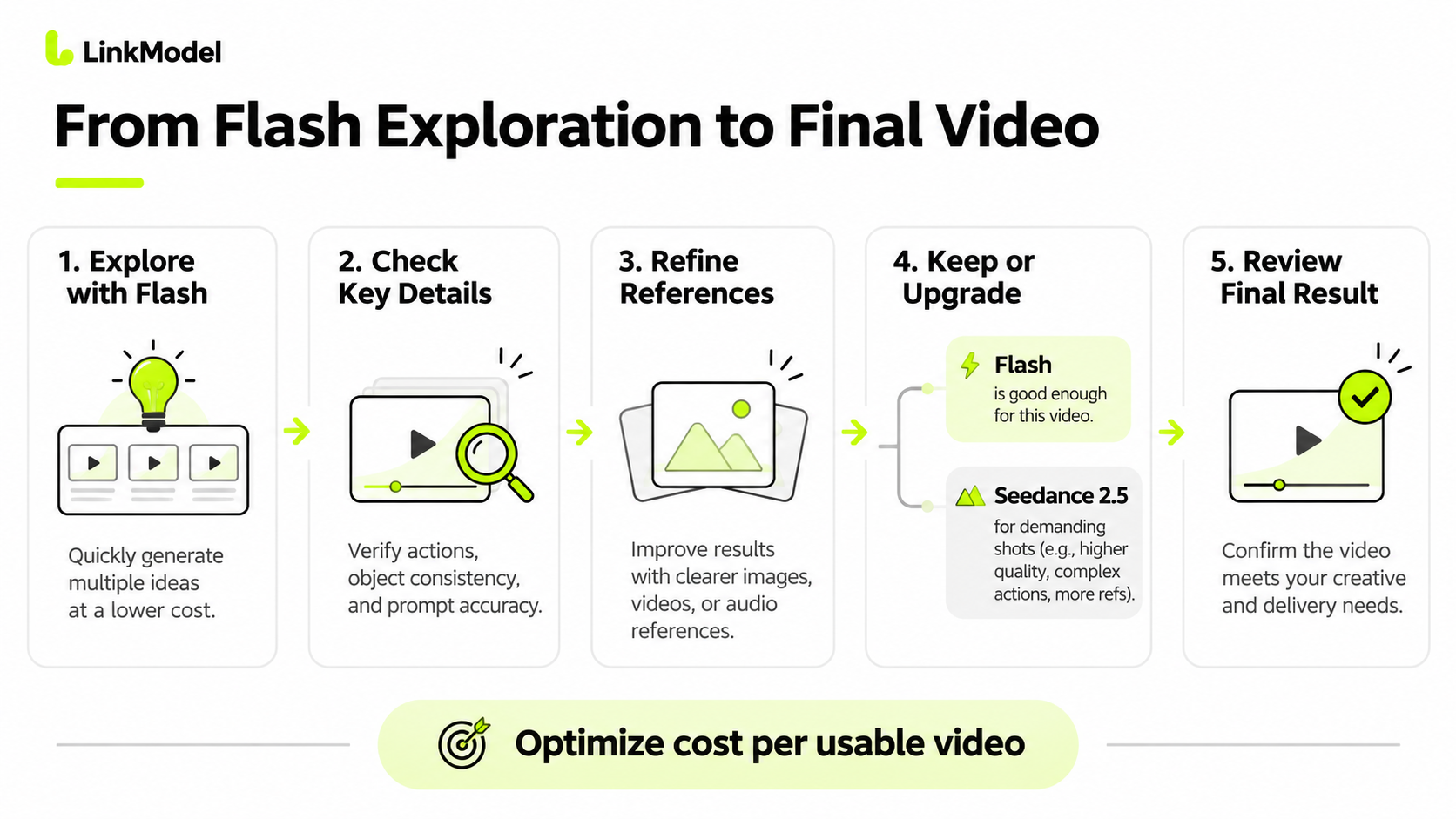
For mixed production workloads, a staged workflow can preserve much of Flash's cost advantage while reserving the standard model for demanding tasks.
Stage 1 — Explore concepts with Flash.
Generate short candidate videos to evaluate framing, camera movement, subject placement, pacing, and general prompt direction.
Stage 2 — Review the essential details.
Check whether the requested actions occur in the correct sequence and whether important objects remain recognizable throughout the clip.
Stage 3 — Improve prompts and references.
If a shot contains inconsistent details, correct ambiguous instructions or conflicting source images before generating more candidates.
Stage 4 — Keep acceptable Flash results.
If a 720p Flash video already meets the delivery requirements, there is no automatic reason to regenerate it with the standard model.
Stage 5 — Use Seedance 2.5 selectively.
Choose the standard version for higher-resolution delivery, larger reference sets, demanding physical interactions, or shots where additional Flash attempts are no longer economical.
Stage 6 — Evaluate the new output.
Moving from Flash to standard Seedance 2.5 creates a new generation, so composition, timing, and motion may change.
For projects using standard Seedance 2.5's dedicated Draft Mode, follow that model's supported draft-to-final process rather than assuming a Flash output can be converted directly into the same final take.
The objective is to minimize the cost of acceptable finished videos, not simply maximize the number of inexpensive attempts.
How to Choose Seedance 2.5 Flash or Seedance 2.5 on LinkModel
For affordable 720p video generation, start with Flash. For projects requiring additional reference capacity, more demanding motion, or the standard model's higher-resolution capabilities, choose Seedance 2.5.
LinkModel offers dedicated model pages for both options, with pricing information, Playground entry points, and API access.
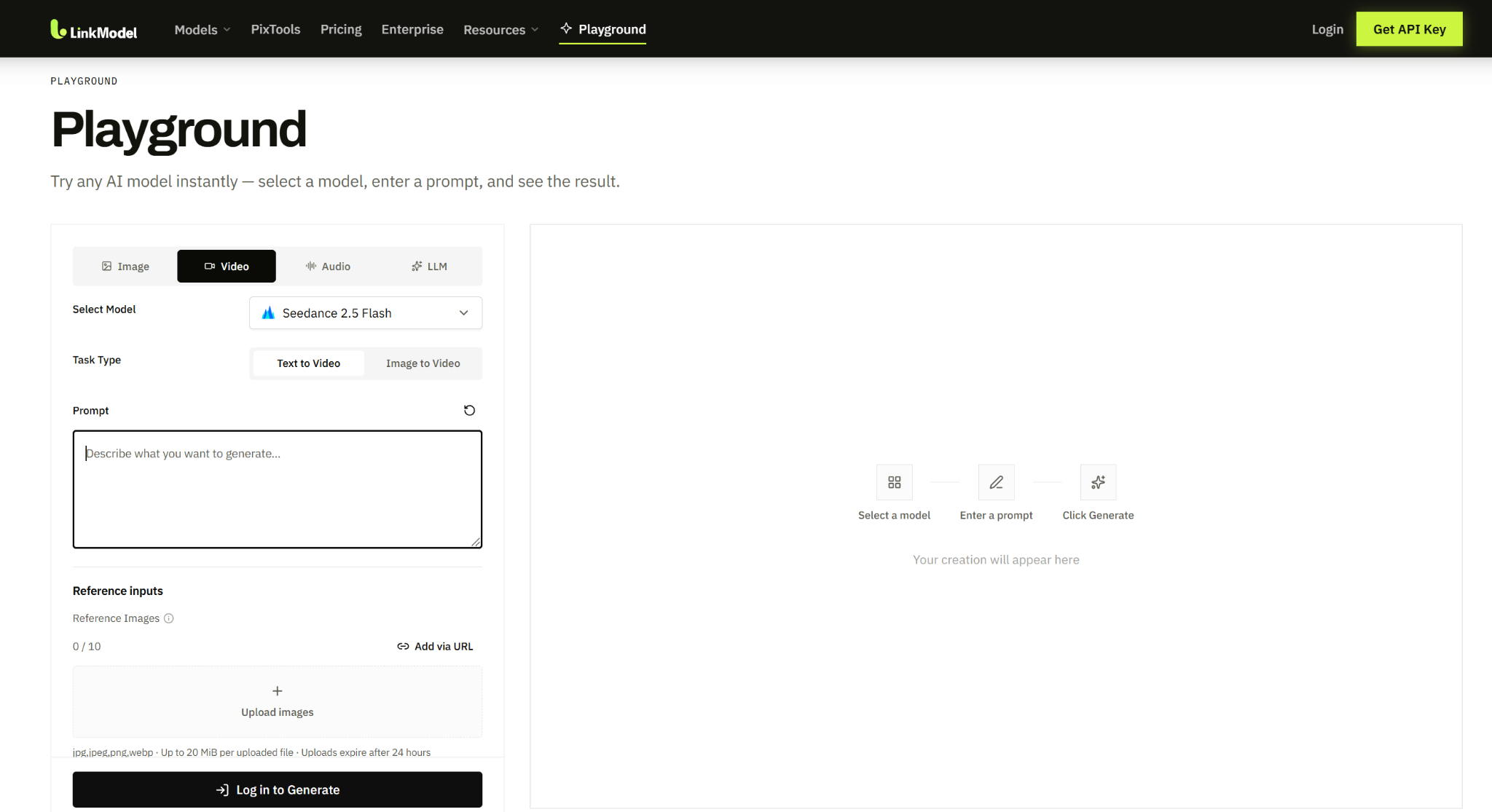
Start Creating Seedance Videos From $0.060527/s
LinkModel's published pricing makes the initial budget straightforward.
Seedance 2.5 Flash starts at $0.060527 per second for 480p, while its 720p rate is $0.136080 per second.
A 10-second 720p Flash video therefore costs approximately $1.36 under the same straightforward generation scenario used in the pricing analysis.
For creators who want to explore ideas before producing a final shot, that lower entry cost makes experimentation more accessible.
The platform also offers $0 minimum spend and $0 monthly platform fee, allowing users to pay according to actual generation requirements.
The model-selection process is simple: start with your delivery resolution, consider the required reference assets, then choose the price and capabilities that fit the task.
Compare Flash and Standard Seedance 2.5 Through One Platform
LinkModel provides access to both models within its broader AI model platform.
For a straightforward first comparison, use a text-to-video or image-to-video configuration supported by the selected model.
Choose a 720p duration that both models support, keep the prompt consistent, and compare the results against the project's requirements.
For a product scene, focus on object identity and action continuity.
For dialogue, examine expression, timing, and how closely the generated video follows the prompt.
For a multi-step narrative, check whether the important story beats appear in the intended order.
LinkModel's model pages and API documentation provide the corresponding access information for developers who want to incorporate supported video generation into an application. Developers can also follow the Seedance 2.5 API setup and usage guide for additional integration details.
This same-platform approach is useful when a production needs both models rather than committing every request to a single option.
Why LinkModel Offers Better Value for Seedance Generation
LinkModel's price advantage is particularly compelling for Flash.
At the listed 720p rate, a 30-second Flash video costs approximately $4.08 on LinkModel, compared with $9.07 at the corresponding fal price.
That is about 55% less for the same listed model and resolution.
For 100 ten-second 720p generations, the published-rate difference reaches $166.32.
The ability to choose between Flash and the standard model while maintaining one platform for supported AI generation also makes it easier to allocate a video-production budget across different types of shots.
The most economical choice is not necessarily one model for the entire project. It is using Flash where the result is already good enough and paying for Seedance 2.5 only where additional capabilities or visual quality create meaningful value.
Frequently Asked Questions
Is Seedance 2.5 Flash as good as Seedance 2.5?
Flash can be good enough for many 720p social videos, talking-head scenes, and creative previews. Published comparisons show relatively similar results in some everyday scenes, while standard Seedance 2.5 performs better in selected product-detail and physical-interaction tests. The standard model also offers native 1080p and 4K capabilities in official specifications, greater reference capacity, and Draft Mode.
How much cheaper and faster is Seedance 2.5 Flash?
On LinkModel, Flash costs approximately 38% less than standard Seedance 2.5 at matching 480p and 720p resolutions. Its listed rates are also 55% below fal for matching Flash configurations. Published same-prompt comparisons have reported Flash completing selected tasks approximately two to three times faster, though generation time varies across requests and platforms.
Which model handles fast motion and physical interactions better?
Standard Seedance 2.5 is a stronger starting choice when precise object interaction is essential. In one published comparison, it represented a frisbee-catching action more completely than Flash. However, Flash successfully generated a skateboard kickflip in another comparison. The best choice depends on the required action and whether critical movements remain consistent throughout the clip.
Can Seedance 2.5 Flash generate 1080p or 4K videos?
No. Seedance 2.5 Flash supports 480p and 720p output. Official BytePlus specifications list 1080p and 4K for standard Seedance 2.5. Higher-resolution output availability on a particular API platform depends on the configurations currently offered by that provider.
Can I use Flash for drafts and switch to Seedance 2.5 without changing the video?
You can reuse compatible prompts and reference assets, but switching from Flash to standard Seedance 2.5 creates a new generation. Camera movement, object positions, and timing may change. Flash is useful for exploring concepts, while standard Seedance 2.5's dedicated Draft Mode offers a separate supported draft-to-final workflow.
Conclusion
Seedance 2.5 Flash is the better-value starting point for affordable 480p and 720p videos, social content, dialogue, and rapid creative exploration, while standard Seedance 2.5 is worth the upgrade for demanding physical interactions, larger reference sets, and projects requiring its official 1080p or 4K capabilities. Our research found that Flash can generate selected tasks substantially faster and deliver competitive results across many everyday scenes, although the standard model has advantages in certain product and motion details. On LinkModel, Flash costs approximately 38% less than standard Seedance 2.5 at matched resolutions and 55% less than fal for the listed Flash configurations. By evaluating the cost per usable video, creators can keep successful Flash outputs, avoid unnecessary regeneration, and invest in the standard model where its capabilities genuinely improve the final result.