
Yes, you can try Seedance 2.5 Flash for free, but free credits may only cover one short video. VisionMorphic offers 40 daily credits, enough for a 5-second 480p Flash video, while other platforms may require payment or limit free access to certain models. The key is knowing which free trials actually support Flash and how much video you can generate.
Free credits can disappear after a single attempt, while higher resolutions, watermarks, and disappointing results can increase the cost of creating a usable video. Our research into Seedance 2.5 video prompting found meaningful differences in Flash generation speed, motion accuracy, and provider pricing. Choosing the right platform and resolution can matter as much as choosing the model itself.
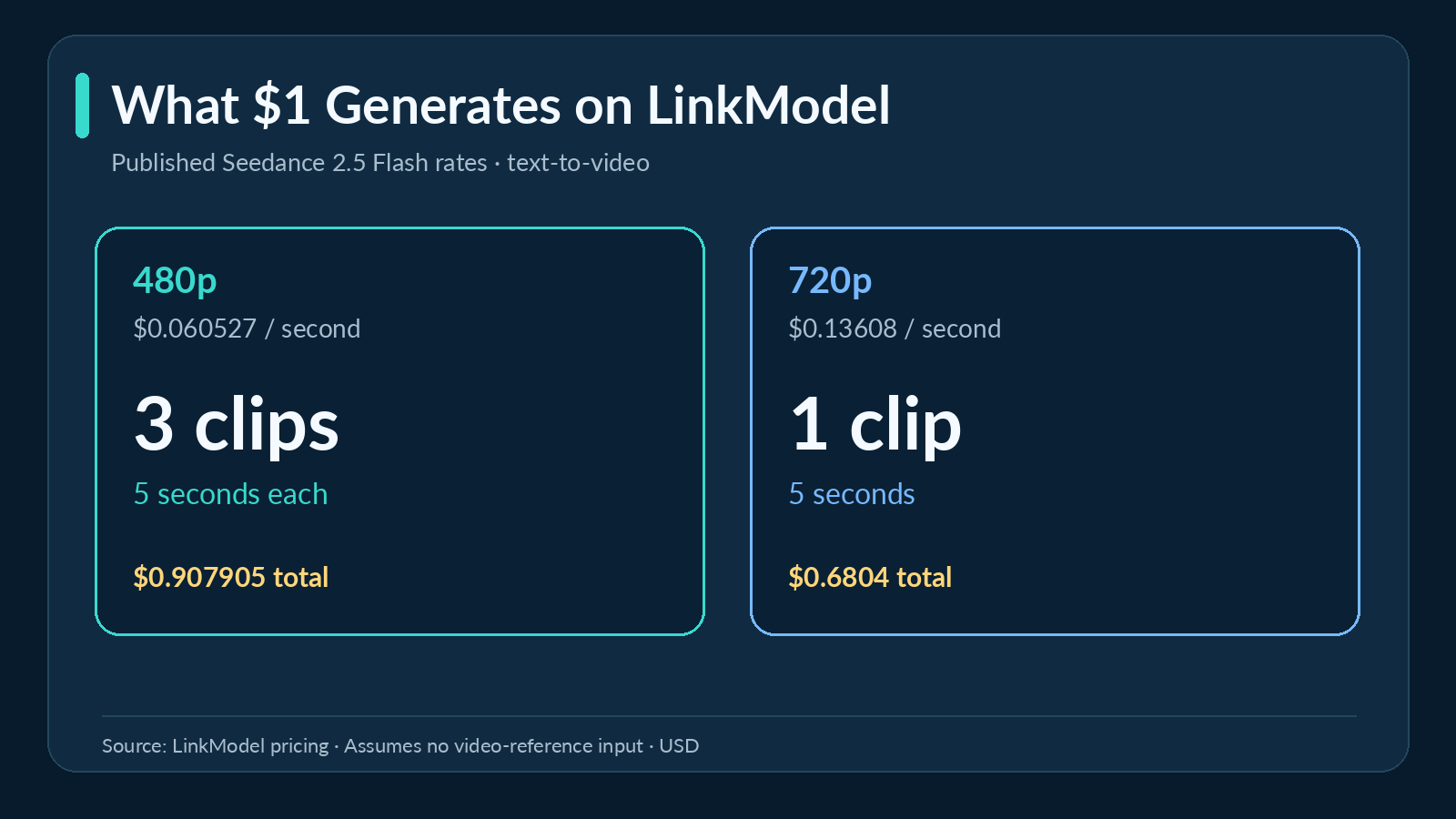
LinkModel offers Seedance 2.5 Flash text-to-video rates over 55% lower than fal.ai's displayed estimates at both supported resolutions, starting at $0.060527/second for 480p and $0.13608/second for 720p, with $0 minimum spend and $0 monthly platform fee. New users automatically receive $1 in free Credits, enough for three 5-second 480p videos at the listed rates. No card or recharge is required. The Credits never expire, can be claimed once by eligible new users, and work across all available LinkModel models. Start with free Credits, then pay only for the generation you need.
Is Seedance 2.5 Flash Free in 2026?
Seedance 2.5 Flash is a paid AI video model with limited free trial options, not an unlimited free video generator. Whether you can use it without paying depends on the platform, available credits, and the exact model included in the offer.
ByteDance introduced Flash as a faster, lower-cost alternative to standard Seedance 2.5. Official API access became available in November 2026.
The model supports 480p and 720p output, 4–30-second videos, native audio, and multimodal references. These capabilities make it relevant for short-form content, dialogue, product concepts, and longer creative sequences.
However, free access to a Seedance platform does not automatically include Seedance 2.5 Flash.
What Does Free Seedance 2.5 Flash Access Include?
Our review of available services identified four common access models.
| Access type | What you receive | What matters most |
|---|---|---|
| Daily free credits | A recurring credit allowance | Enough credits for a valid Flash video |
| Signup credits | A starting generation budget | Eligible models and actual generation cost |
| Free platform account | Access to the generator interface | Whether Flash is included |
| Usage-based API | Generation billed by usage | Price per video and starting balance |
These options can create very different user experiences.
A free account might support Seedance 2.0 while requiring payment for Flash. Another platform may provide Flash credits that only cover a low-resolution clip.
The most important distinction is free registration versus actually being able to generate a usable Flash video.
For anyone testing the model, the available credit balance should be compared with the shortest valid generation at the desired resolution.
Why Free Credits May Not Cover One Video
Our review of user questions identified insufficient credits as a recurring obstacle.
In one documented Seedance 2.5 experience, a creator received 320 signup credits but discovered that the desired video required more than the available balance.
The account had promotional credits, but those credits could not cover the selected task.
The same problem can occur with Flash when resolution and minimum video duration are overlooked.
For example, a platform charging 16 credits per second at 720p requires 64 credits for a 4-second video. A 40-credit allowance is therefore insufficient for that configuration.
Before choosing a free platform, check the exact Flash model, credit cost, minimum duration, resolution, and output restrictions.
This simple comparison helps distinguish a genuinely usable free trial from an offer that only provides access to the interface.
Where Can You Try Seedance 2.5 Flash for Free?
VisionMorphic publishes a specific free allowance for Seedance 2.5 Flash. Other services, including Dreamina, BytePlus, and Morphic, offer different creative or API access arrangements, but their free eligibility is not equivalent.
The most useful starting point depends on whether you want one short experiment, a browser-based creative tool, or continued generation without a subscription.
VisionMorphic: Try a 5-Second 480p Flash Video for Free
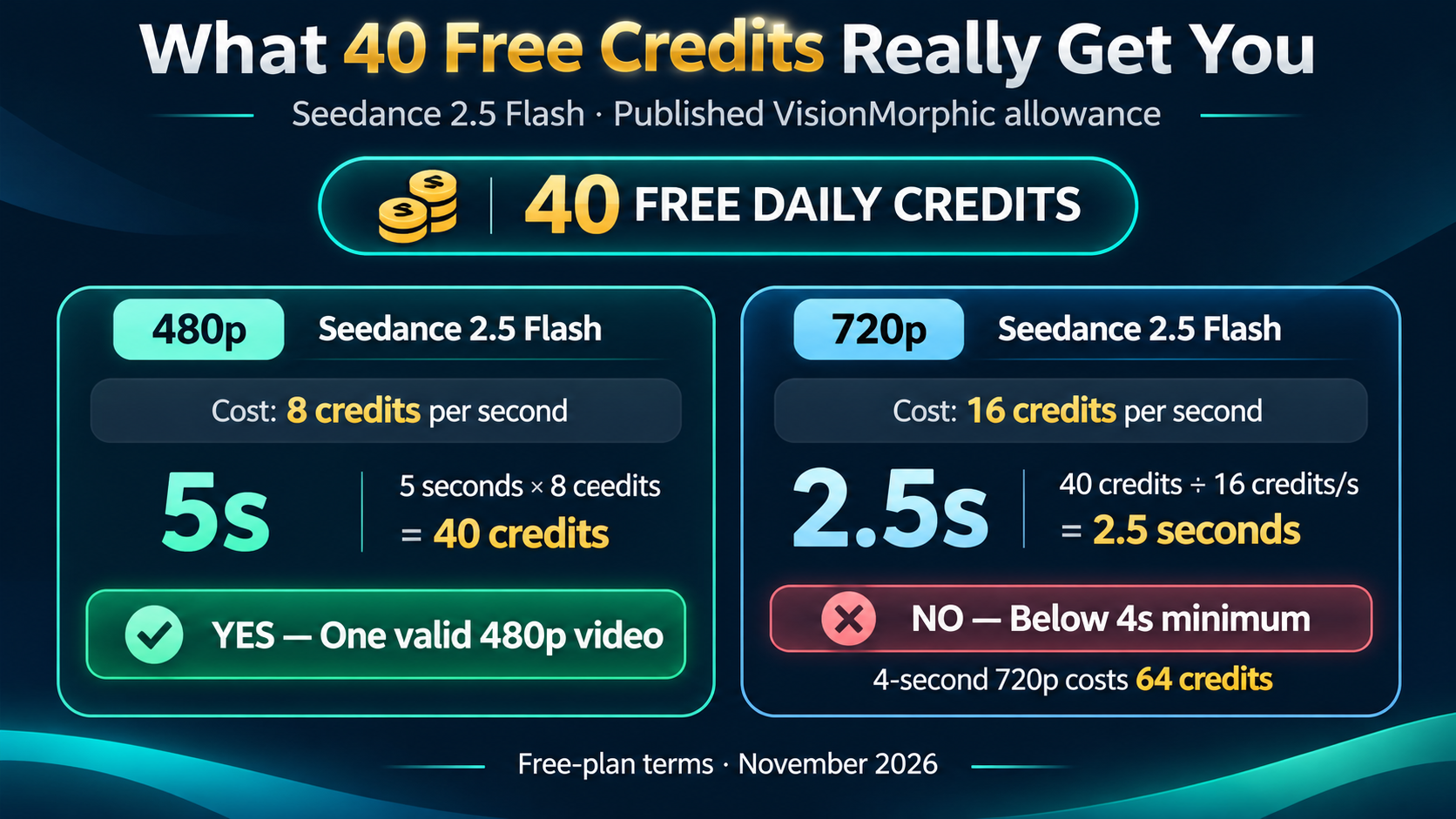
VisionMorphic advertises 40 daily free credits for eligible accounts, with no payment card required.
Its published Flash rates are 8 credits per second at 480p and 16 credits per second at 720p.
| Feature | Published free-plan conditions |
|---|---|
| Daily credits | 40 |
| 480p rate | 8 credits/second |
| 720p rate | 16 credits/second |
| Minimum duration | 4 seconds |
| Maximum duration | 30 seconds |
| Free 480p generation | One 5-second video |
| Free 720p generation | Insufficient credits for 4 seconds |
| Watermark | Included |
| Commercial usage | Not included |
| Video retention | 7 days |
The most practical configuration is 480p at 5 seconds, which consumes the full 40-credit daily allowance.
How to try Seedance 2.5 Flash for free:
- Open the VisionMorphic Seedance 2.5 Flash generator.
- Sign in with Google and check the available free-credit balance.
- Select Seedance 2.5 Flash as the model.
- Choose 480p resolution and set the duration to 5 seconds.
- Enter a short prompt describing one subject, one action, and a simple camera movement.
- Confirm that the Generate button displays 40 credits before submitting.
- Generate the clip and inspect the result, including its watermark and output quality.
The platform states that free credits refill to 40 daily.
A short experiment can help you evaluate subject appearance, basic motion, camera framing, and how closely the model follows your prompt.
The main limitation is that free output includes a watermark and is not licensed for commercial use under the published free-plan terms.
This option is most useful for personal experimentation, not unrestricted production.
Dreamina: Verify Whether Your Free Credits Cover Flash
Dreamina is a ByteDance creative platform that offers access to Seedance video generation.
However, the availability of general free credits does not establish that every account can use those credits with Seedance 2.5 Flash.
Some published promotions apply to earlier Seedance versions, and model access can vary by account.
To check your eligibility, sign in to Dreamina, open the video generator, and look for Seedance 2.5 Flash in the model selector.
Select the shortest supported video duration and inspect the credit requirement.
If the available balance cannot cover the selected Flash configuration, a different Seedance model's free allowance does not solve the original problem.
Dreamina is worth considering when you prefer a creative application rather than an API-focused workflow, provided your account offers an eligible Flash option.
BytePlus and Morphic: Different Access Requirements
BytePlus ModelArk provides an official API route for Seedance 2.5 Flash.
Its published model identifier is dreamina-seedance-2-5-flash-261115. Access involves eligible account activation conditions, which may include a qualifying balance, plan, or model resource package.
This makes BytePlus relevant for developers who specifically want the official provider's API infrastructure, rather than a guaranteed no-payment Flash trial.
Morphic also lists Seedance 2.5 Flash, but its published information states that Flash is not included in the Free plan.
These differences matter because a platform offering a free AI video account does not necessarily provide free access to Flash.
Seedance 2.5 Flash Free Platforms Compared
| Platform | Flash access | Free eligibility | Best use |
|---|---|---|---|
| VisionMorphic | Available | 40 daily credits | First 480p experiment |
| Dreamina | Official creative platform | Check account eligibility | Browser-based creation |
| BytePlus | Official API | Account activation required | Direct API integration |
| Morphic | Paid plans | Flash excluded from Free | Subscription workflows |
| LinkModel | API and Playground | $1 Credits for eligible new users | Low-cost generation and development |
Want more than one short video without committing to a subscription? LinkModel's $1 new-user Credits cover three 5-second 480p Flash generations at its published rates, while its ongoing text-to-video prices are over 55% lower than fal.ai's displayed estimates. This gives creators a practical starting budget and a usage-based path for longer clips or additional variations.
How Many Seedance 2.5 Flash Videos Can Free Credits Generate?
The number of free videos depends on your credit balance, resolution, video duration, and the platform's minimum generation length.
Comparing advertised credit amounts without these details can be misleading.
The more useful calculation is how much eligible video duration the allowance actually covers.
VisionMorphic Free Credits: 480p vs 720p
For a platform charging a fixed amount per generated second:
Available video seconds = Free credits ÷ Credits per second
With VisionMorphic's 40 daily free credits, the generation requirements are:
| Video duration | 480p credits required | 720p credits required |
|---|---|---|
| 4 seconds | 32 | 64 |
| 5 seconds | 40 | 80 |
| 10 seconds | 80 | 160 |
| 15 seconds | 120 | 240 |
| 30 seconds | 240 | 480 |
At 480p, 40 credits are enough for one 5-second video.
At 720p, the same balance covers only 2.5 theoretical seconds, which is shorter than the minimum supported 4-second duration.
The result: one valid 5-second 480p Flash generation, but no valid 720p generation using the daily allowance alone.
This is why understanding the conversion between credits and video duration matters more than comparing large-looking promotional balances.
How Much Seedance 2.5 Flash Can $1 Generate on LinkModel?
LinkModel publishes text-to-video output rates of $0.060527 per second at 480p and $0.13608 per second at 720p.
The following calculations use those published per-second rates for output generation without additional video-reference input.
| Video length | LinkModel 480p | LinkModel 720p |
|---|---|---|
| 5 seconds | $0.302635 | $0.6804 |
| 10 seconds | $0.60527 | $1.3608 |
| 15 seconds | $0.907905 | $2.0412 |
| 20 seconds | $1.21054 | $2.7216 |
| 30 seconds | $1.81581 | $4.0824 |
At these rates, the $1 starting balance can fund three 5-second 480p videos or one 5-second 720p video.
For creators exploring several visual concepts, multiple short 480p attempts can provide more opportunities to compare ideas.
For creators inspecting facial details, textural quality, or a particular final composition, a higher-resolution 720p sample may provide greater value.
The prices are also easier to evaluate than proprietary credit systems because each video can be estimated directly from its duration and resolution.
Which Resolution Gives You More Value?
The best resolution depends on what you need to learn from the generation.
| Goal | Suggested starting point | Why it helps |
|---|---|---|
| Test prompt interpretation | 480p, 5 seconds | Lower cost per attempt |
| Explore visual concepts | Several short 480p clips | More variations within a fixed budget |
| Review facial details | 720p, 5–10 seconds | Higher output resolution |
| Explore a longer narrative | 480p, 10–30 seconds | More affordable sequence testing |
| Prepare a demanding final shot | 720p or standard Seedance 2.5 | Better suited to higher output requirements |
Higher resolution is not always the best starting point.
If a prompt produces the wrong subject, camera movement, or action, increasing resolution alone will not resolve the underlying creative problem.
Begin with the lowest-cost configuration that can answer your current question, then increase quality when the concept works.
Seedance 2.5 Flash Free vs Paid API: When Should You Upgrade?
Free credits are most useful for an initial experiment. Usage-based API access becomes more valuable when you need multiple generations, longer clips, or predictable budgets without a recurring subscription.
Our review of creator experiences found that the practical value of an AI video service depends on the number of usable results it produces, not only its advertised allowance.
Free Credits vs Unlimited Plans vs Pay-as-You-Go
Each payment model fits a different type of user.
| Access method | Main advantage | Main tradeoff |
|---|---|---|
| Limited free trial | Minimal initial commitment | Few generations and possible output restrictions |
| Unlimited subscription | Potentially useful for frequent creation | Queue, resolution, and plan conditions |
| Usage-based API | Predictable cost per eligible generation | Each additional generation consumes budget |
Our review of broader Seedance subscription experiences found reports of lengthy generation queues and restrictions on output duration or resolution.
For a creator producing only several short clips per month, a monthly subscription may offer more capacity than needed.
For someone producing large volumes of content regularly, a subscription can still be worthwhile when the available generation capacity and workflow match the project.
For users who need flexibility, usage-based pricing makes it possible to budget each generation separately.
LinkModel vs fal.ai: Over 55% Lower Flash Text-to-Video Rates
One of LinkModel's strongest advantages is its published Seedance 2.5 Flash generation price.
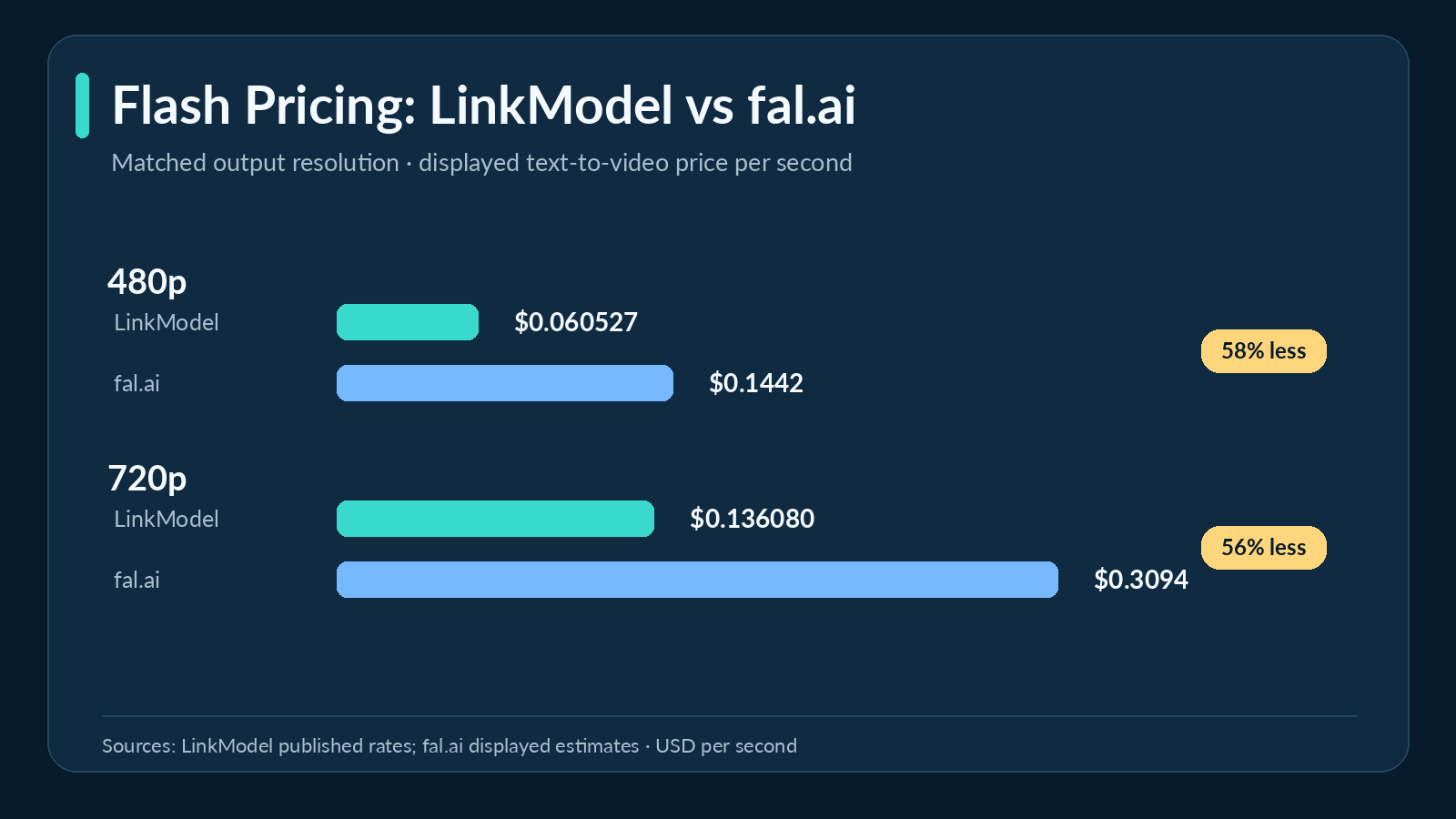
Compared with fal.ai's displayed text-to-video estimates, LinkModel's rates are over 55% lower at both 480p and 720p.
| Resolution | LinkModel | fal.ai displayed estimate | Price advantage |
|---|---|---|---|
| 480p | $0.060527/s | $0.1442/s | Over 55% lower |
| 720p | $0.13608/s | $0.3094/s | Over 55% lower |
The difference becomes more meaningful as video duration or production volume increases.
| Generation workload | LinkModel | fal.ai displayed estimate |
|---|---|---|
| 5s at 480p | $0.30 | $0.72 |
| 10s at 480p | $0.61 | $1.44 |
| 10s at 720p | $1.36 | $3.09 |
| 30s at 720p | $4.08 | $9.28 |
| Ten 10s videos at 480p | $6.05 | $14.42 |
For ten 10-second 480p generations, LinkModel costs approximately $6.05 versus $14.42 at fal.ai's displayed estimate.
That is approximately $8.37 in savings for the matched output duration and resolution.
These are text-to-video pricing comparisons. Workflows involving video-reference inputs have different applicable billing conditions.
For creators developing multiple versions of a scene, the difference in generation rates provides a concrete reason to consider LinkModel after the initial free trial.
How to Start Using Seedance 2.5 Flash on LinkModel
Seedance 2.5 Flash is listed in LinkModel's model catalog, with a dedicated model page, Playground entry, and documented video generation API.
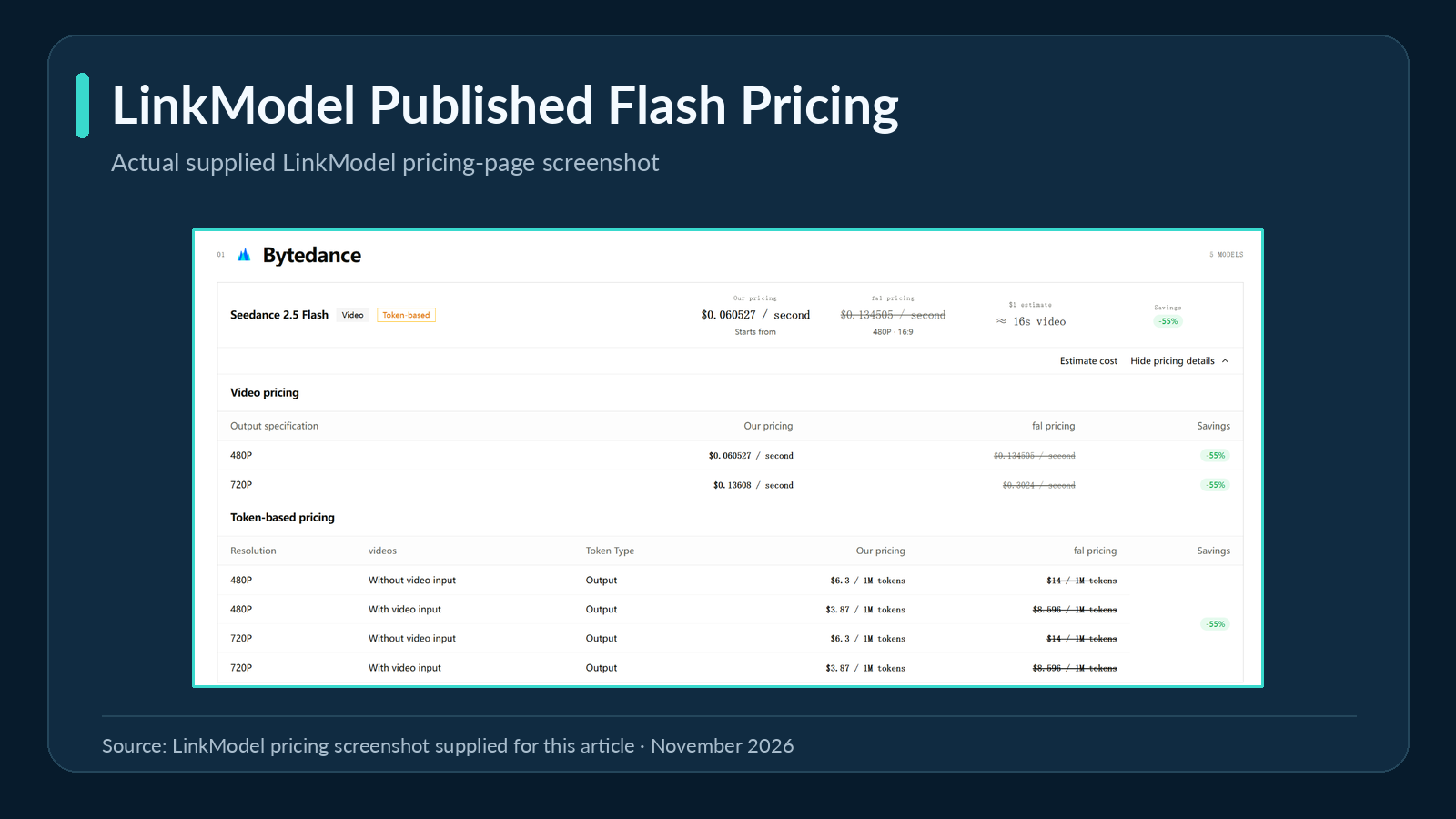
New users receive their eligible signup Credits automatically after registration, allowing them to begin with a small usage budget.
Open the Seedance 2.5 Flash model page and select Playground to review the available generation interface and settings.
For a low-cost first experiment, the documented model supports 480P and a 5-second duration. Enter a clear, short prompt and review the applicable generation configuration and cost before submitting.
For developers, LinkModel provides the model ID seedance-2-5-flash through its asynchronous video generation API.
The documented API uses the endpoint https://api.linkmodel.ai/v1/videos/generations.
Its workflow submits a generation task, retrieves the task status, and provides the resulting video when the task completes. The documented defaults are a 5-second duration, 720P resolution, and audio enabled.
This provides a route for integrating Flash into an application without requiring users to maintain separate model-provider integrations for every supported service.
Which Access Method Should You Choose?
Choose a free trial when you need one short personal experiment and the allowance is enough for a complete video.
Choose a creative application when its editing workflow and current model eligibility are more important than API flexibility.
Choose direct official API access when your project requires the original provider's infrastructure.
Choose LinkModel when you want over 55% lower published Flash text-to-video rates than fal.ai's displayed estimates, usage-based billing, and an API platform that supports multiple models.
The most practical progression for a budget-conscious creator is to test a simple scene first, evaluate whether Flash meets the creative requirement, and expand generation only when the results justify further spending.
Seedance 2.5 Flash vs Seedance 2.5: Speed, Quality, and Usable Results
Seedance 2.5 Flash is designed for faster, lower-cost video creation, but standard Seedance 2.5 remains relevant for higher-resolution output and scenes requiring precise motion.
Our research reviewed published same-prompt generation comparisons covering short physical actions, dialogue, continuous camera movement, and more demanding scene instructions.
These observations help explain when choosing Flash saves time and when its quality tradeoffs matter.
How Fast Is Seedance 2.5 Flash? Real Generation Data
A 12-video comparison used three prompts across both models at 480p and 720p.
The scenes involved a dog catching a frisbee, a baker speaking to camera, and a bicycle courier completing a 30-second continuous journey.
All generations used 16:9 framing with audio enabled.
| Scenario | Flash 480p | Standard 480p | Flash 720p | Standard 720p |
|---|---|---|---|---|
| Frisbee catch, 10s | 84s | 183s | 100s | 230s |
| Baker dialogue, 12s | 124s | 194s | 110s | 363s |
| Courier continuous shot, 30s | 120s | 261s | 144s | 443s |
Flash completed all six matched configurations faster in this comparison.
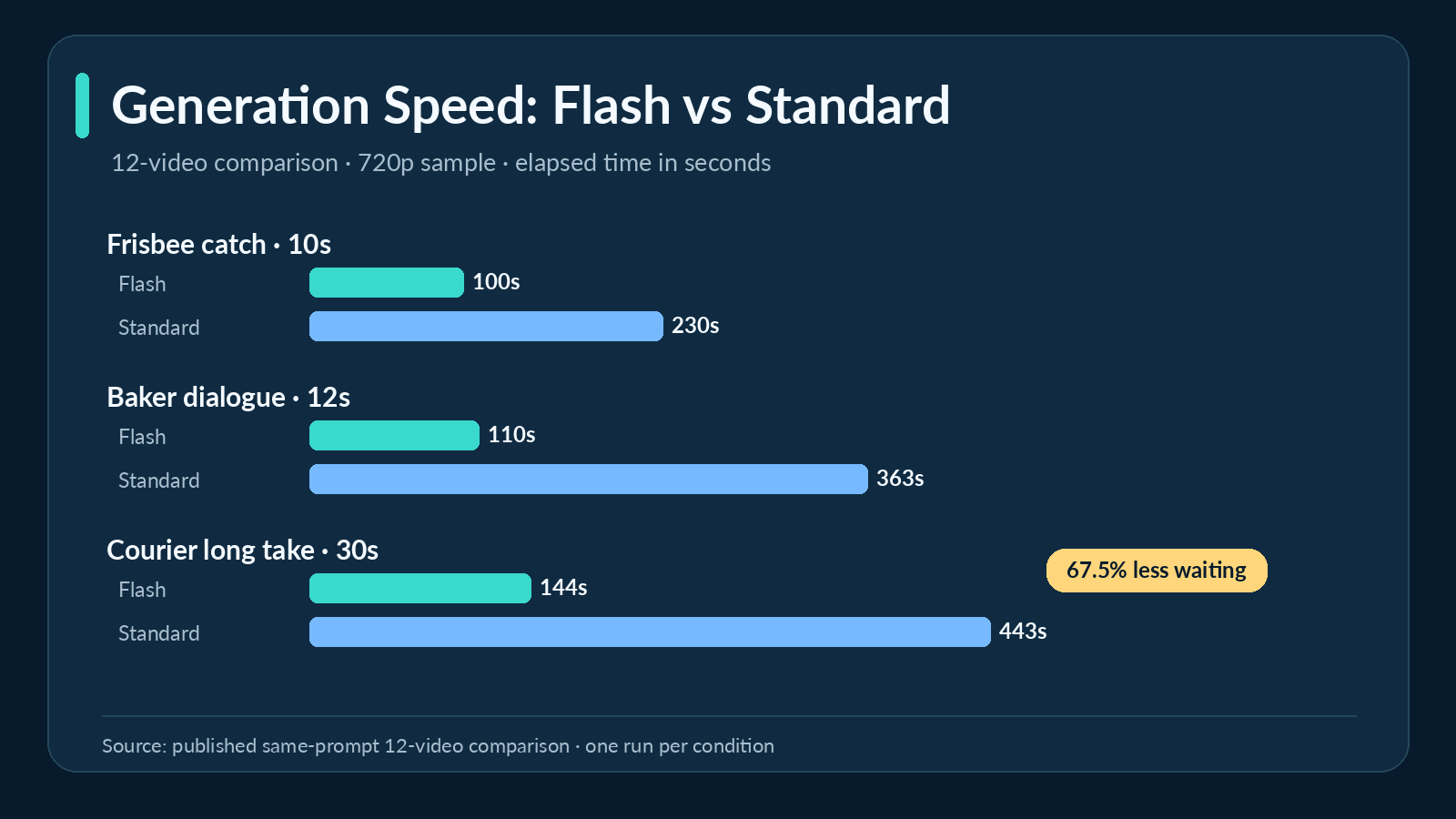
The largest practical difference appeared in the 30-second 720p courier scene: 144 seconds for Flash versus 443 seconds for standard Seedance 2.5.
That represents approximately 67.5% less waiting time in the recorded task.
Our research also reviewed an 11-generation evaluation that included two matched 10-second 720p comparisons.
In those two cases, Flash completed in 88.5 and 76.2 seconds, compared with 166.3 and 175.3 seconds for the standard model.
Another 11-prompt matched comparison reported median completion times of 147 seconds for Flash and 283 seconds for standard Seedance 2.5.
The pattern is consistent across these published examples: Flash can substantially reduce generation time, making it attractive for iterative creative work.
Actual waiting time still depends on the scene, settings, and generation environment.
Where Flash Video Quality Holds Up—and Where It Falls Short
Faster generation does not guarantee that every action will be represented correctly.
Our analysis of the 12-video comparison identified three useful examples.
Physical action: the frisbee-catching scene
The prompt required a dog to run across a park, jump, catch a flying red frisbee, land, and return toward the camera.
In the reviewed standard-model outputs, the disc traveled through the air and the catching action was represented.
In the Flash outputs, the dog jumped and later held the frisbee, but the visible flight and catch transition was missing.
The distinction matters because catching the frisbee was the central action, not a minor background detail.
For sports scenes, object handoffs, product interactions, or clips involving physical contact, this type of omission can make an otherwise attractive video unsuitable.
Dialogue: the bakery scene
The baker scene required character movement, a spoken line, camera framing, and a softly lit bakery environment.
Both models produced broadly comparable dialogue scenes.
At 720p, the early-morning atmosphere was represented more successfully than in the lower-resolution versions, illustrating how output resolution can affect the evaluation of visual details.
For talking-character content, slow promotional scenes, and simple narrative dialogue, Flash can be a practical first option.
Continuous movement: the bicycle courier scene
The 30-second courier prompt described a character wearing a green jacket, carrying a yellow parcel, traveling through an old town, and completing a delivery.
Both models followed the broad narrative.
In the reviewed Flash result, important colors and props remained more consistent in some parts of the sequence.
This demonstrates that Flash can perform competitively in longer guided scenes even when it struggles with certain fast-contact actions.
A separate 11-prompt comparison offers another useful perspective. In its AI-based quality evaluation, standard Seedance 2.5 was preferred in 8 of 11 matched pairs, while Flash was rated usable in 9 of 11.
The study illustrates a practical distinction between producing a usable clip and producing the strongest result in a direct comparison.
Flash can be a good low-cost choice for dialogue, creative exploration, and some longer guided scenes. Standard Seedance 2.5 deserves consideration when complex motion or fine scene accuracy is critical.
Should You Use Flash or Standard for Your First Video?
The right model depends on your output requirements.
| Requirement | Seedance 2.5 Flash | Standard Seedance 2.5 |
|---|---|---|
| Video duration | 4–30 seconds | 4–30 seconds |
| Output resolution | 480p, 720p | Higher-resolution options available |
| Native audio | Supported | Supported |
| Reference images | Up to 10 | Up to 30 |
| Reference videos | Up to 5 | Up to 10 |
| Reference audio clips | Up to 5 | Up to 10 |
| Official Draft workflow | Not supported | Supported |
| Main advantage | Faster, lower-cost exploration | More advanced production options |
For an initial concept, Flash is often the more economical starting point, especially when 480p or 720p is sufficient.
It is suitable for comparing visual ideas, testing dialogue, checking basic movement, and exploring short narrative sequences.
Standard Seedance 2.5 becomes more attractive when the final output requires higher resolution, more reference assets, or specific advanced functionality.
For precise physical interactions, the quality observations also support testing the standard model when Flash does not reproduce the required action.
Switching models starts a new generation, so the resulting movement and composition may differ from the earlier Flash clip.
The goal is to validate the creative direction before committing more of the budget to production.
How to Reduce Seedance 2.5 Flash Cost per Usable Video
The most economical video workflow is the one that produces an acceptable result with fewer unnecessary generations.
Our review of user questions found that creators are concerned not only about generation prices, but also about spending credits on videos that do not satisfy the prompt.
A documented broader Seedance generation experience described spending $25 on a whale-jumping video without obtaining the desired result.
This illustrates why the cost of a usable result can matter more than the price of a single generation.
Start with a Short, Focused 480p Prompt
For an initial Flash experiment, begin with a 5-second 480p video featuring one subject and one clear action.
Example prompt:
A friendly golden robot stands beside a café window on a rainy evening. It slowly turns toward the camera and raises one hand in a gentle wave. Medium shot, warm indoor lighting, soft rain reflections, natural movement, and quiet ambient sound.
The prompt establishes the subject, setting, action, camera framing, and atmosphere without introducing several unrelated events.
At LinkModel's published rate, a 5-second 480p output costs approximately $0.30.
This gives creators a relatively inexpensive way to explore visual styles and prompt interpretation before extending the scene.
Test the Critical Action Before Increasing Duration
Identify the movement or detail that determines whether the final video succeeds.
For a catching scene, the key requirement is the visible interaction between the subject and the object.
For product footage, the product's defining features and essential movement should remain consistent.
For dialogue, the speaker, spoken words, expression, and timing matter most.
The published comparison results show why this approach is useful: Flash preserved some details in a longer courier scene while missing an essential physical interaction in a shorter frisbee scene.
Testing the highest-risk part of a scene first can help reveal whether the prompt or model needs adjustment before increasing the duration.
Calculate Your Cost per Usable Video
At LinkModel's published 720p rate of $0.13608 per second, a 5-second Flash generation costs $0.6804 under the standard output configuration.
The total generation expenditure increases with the number of attempts.
| Generations needed | Total generation cost |
|---|---|
| 1 | $0.6804 |
| 2 | $1.3608 |
| 3 | $2.0412 |
| 5 | $3.4020 |
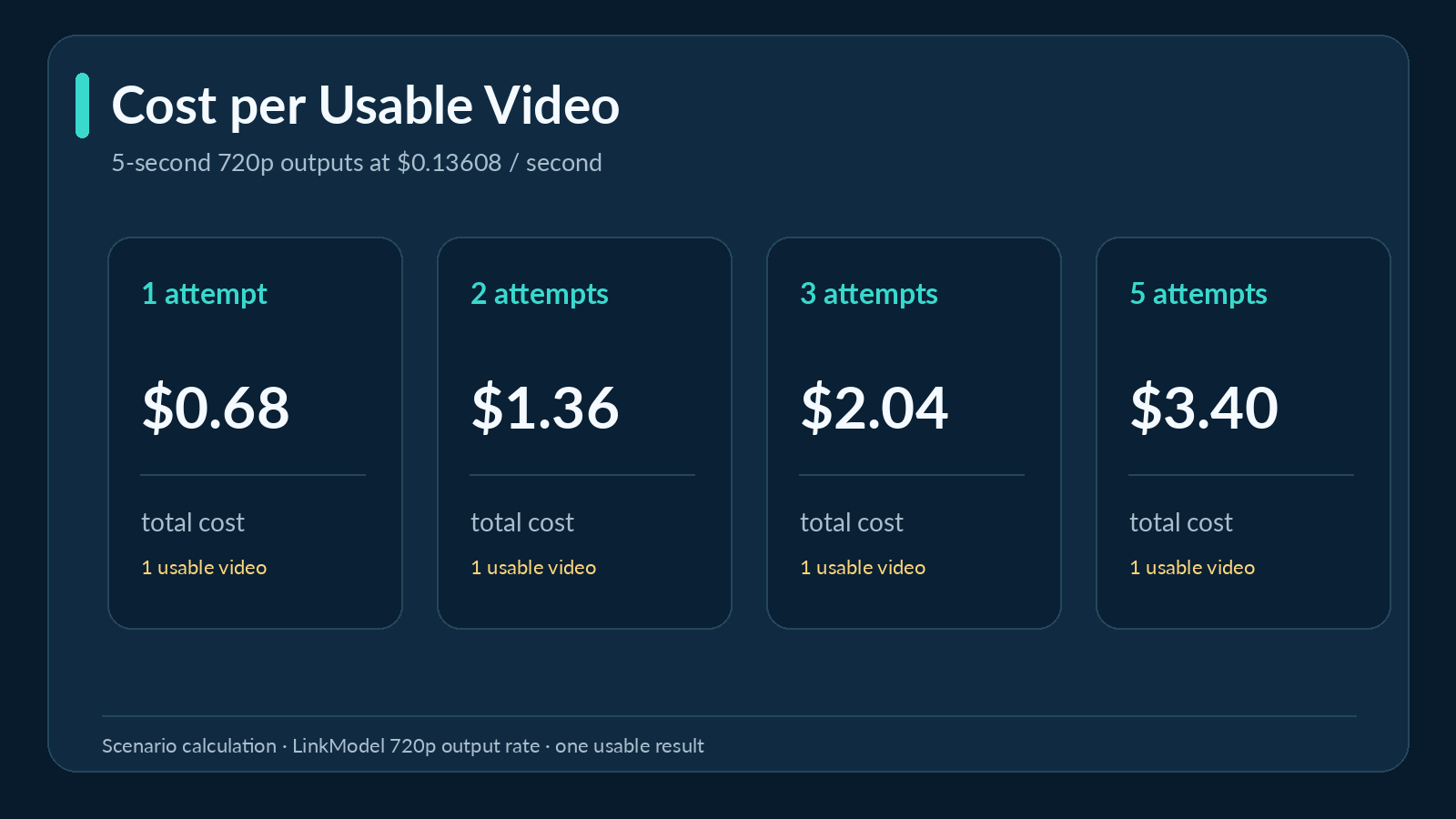
For example, if three generations are needed before one video is acceptable, the total output-generation expenditure is approximately $2.04 per usable result.
This is why prompt clarity, appropriate resolution, and short initial tests are valuable budgeting tools.
Choosing a cheaper model is only one part of controlling expenses. The number of generations needed to achieve the intended result also matters.
Start small, evaluate the essential action, and increase the generation budget when the concept is ready.
Frequently Asked Questions
Is Seedance 2.5 Flash free to use?
Yes, selected services provide limited free access. VisionMorphic advertises 40 daily credits, enough for one 5-second 480p Flash video. LinkModel also provides eligible new users with $1 in signup Credits that can be used across its available models, including Seedance 2.5 Flash. There is no verified universal unlimited free Flash plan.
Where can I try Seedance 2.5 Flash for free without a credit card?
VisionMorphic advertises a no-card free trial with 40 daily credits. LinkModel offers eligible new users $1 in Credits without requiring a payment card or recharge. Dreamina also offers a creative platform, but the specific Flash model and free-credit eligibility should be checked within the account.
How many free Seedance 2.5 Flash videos can I generate?
On VisionMorphic, 40 daily credits cover one 5-second 480p Flash video. On LinkModel, the one-time $1 signup balance covers three 5-second 480p generations or one 5-second 720p generation at the published text-to-video output rates.
Do free Seedance 2.5 Flash videos have watermarks?
Watermark and usage conditions depend on the platform. VisionMorphic states that its free-plan videos include watermarks and are not licensed for commercial use. Check the applicable provider terms before using generated content in a commercial project.
Is Seedance 2.5 Flash good enough for free video testing?
Yes, Flash is a practical starting point for short creative experiments, dialogue, and basic motion. Published same-prompt comparisons found substantially shorter generation times for Flash, although the standard model handled certain complex physical actions more accurately. Start with a short 480p clip, then consider higher resolution or standard Seedance 2.5 when the task requires it.
Conclusion
Seedance 2.5 Flash can be tried for free, but the most useful offer is one that provides enough credits to generate a complete video. VisionMorphic's daily allowance supports a short 480p experiment, while other platforms differ in Flash eligibility and output restrictions. Our research found that Flash can deliver meaningful speed advantages for dialogue, creative exploration, and some longer guided scenes, although demanding physical interactions may benefit from standard Seedance 2.5. For creators who want to continue without a subscription, LinkModel offers Seedance 2.5 Flash at over 55% lower text-to-video rates than fal.ai's displayed estimates, starting at $0.060527 per second, together with $0 minimum spend, $0 monthly platform fee, and $1 in free Credits for eligible new users. This combination makes it easier to test ideas, compare results, and expand video production with predictable usage-based pricing.