LinkModel's Halloween Bonus gives both new and existing users 50% extra API credits on eligible top-ups, up to $100 per account.** Recharge $100 to receive $150 in total credits, or top up $200 to unlock the maximum $100 bonus. No promo code or manual claim is required. The bonus is calculated automatically at checkout and credited 24 hours after successful payment. The offer ends November 8, 2026, at 11:59 PM PST.
AI image generation, video creation, and LLM development can quickly consume your budget, especially when testing prompts, comparing models, or refining outputs. Paying higher API rates limits how much you can experiment, while promotional credits restricted to specific models or short usage windows may not fit your workflow. What if you could get more credits now, use them across different AI models, and save them for future projects?
LinkModel helps you save on both your API usage and your Halloween recharge. Selected models cost less than corresponding official standard rates, including 25% savings on GPT-6 Astra and GPT-6.1 Sol, plus competitive AI image-generation pricing. Access text, image, and video models through one platform with $0 minimum spend and $0 monthly platform fee. New users also receive $1 in free credits automatically upon signup, with no payment card required, so you can test LinkModel before deciding whether to recharge. Claim your 50% Halloween bonus on LinkModel before the deadline.
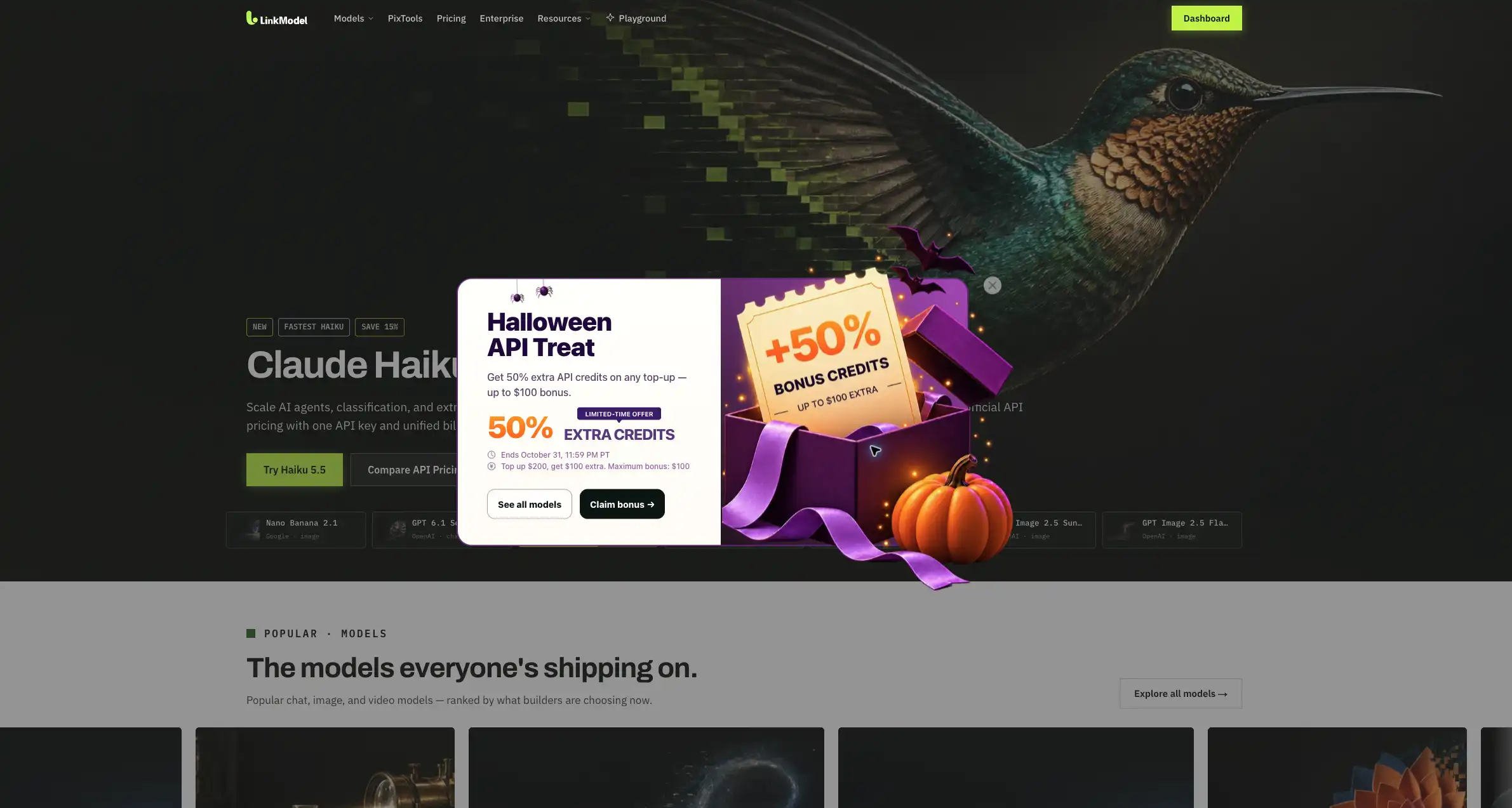
LinkModel Halloween Bonus 2026: Offer Details and Eligibility
The LinkModel Halloween Bonus 2026 adds 50% extra API credits to eligible recharges, with a maximum cumulative promotional reward of $100 per account.
Both new and existing customers qualify. The checkout interface automatically calculates your reward, shows the total expected credits, and processes the bonus without a coupon or separate redemption step.
Halloween API Credit Promotion: Key Facts
| Promotion Detail | LinkModel Halloween Offer |
|---|---|
| Bonus rate | 50% extra API credits |
| Maximum reward | $100 cumulative per account |
| Eligible users | New and existing customers |
| Recharge frequency | Multiple eligible top-ups allowed |
| Bonus calculation | Automatically displayed at checkout |
| Bonus delivery | 24 hours after successful payment |
| Promo code required | No |
| Manual claim required | No |
| Eligible models | All available LinkModel models |
| Bonus expiration | Never expires |
| Promotion start | October 29, 2026 |
| Promotion deadline | November 8, 2026, 11:59 PM PST |
| Monthly platform fee | $0 |
| Billing | Pay-as-you-go |
The $100 cap applies to the account's total Halloween bonus, not to each individual transaction.
For example, two eligible $100 recharges can earn $50 in bonus credits each, reaching the account's maximum promotional reward.
Who Can Claim the Halloween Bonus?
Both new and existing LinkModel users can participate in the 50% recharge promotion.
New customers also qualify for a separate signup reward.
| Benefit | New Users | Existing Users |
|---|---|---|
| $1 free Signup Bonus | Yes | Not repeated |
| No-card signup trial | Yes | Already registered |
| 50% Halloween recharge bonus | Yes | Yes |
| Maximum Halloween reward | $100 | $100 |
| Multiple eligible top-ups | Yes | Yes |
New users receive $1 in free Signup Bonus credits automatically upon registration, without a deposit or payment card.
The reward is recorded in the account's Payment History. A completed $1 credit entry provides a straightforward way to verify the signup reward.
You can explore the platform using that free credit before deciding whether to make your first paid recharge.
Existing users cannot claim the new-account reward again, but they remain eligible for the full Halloween promotion.

How Does the Automatic 50% Bonus Work?
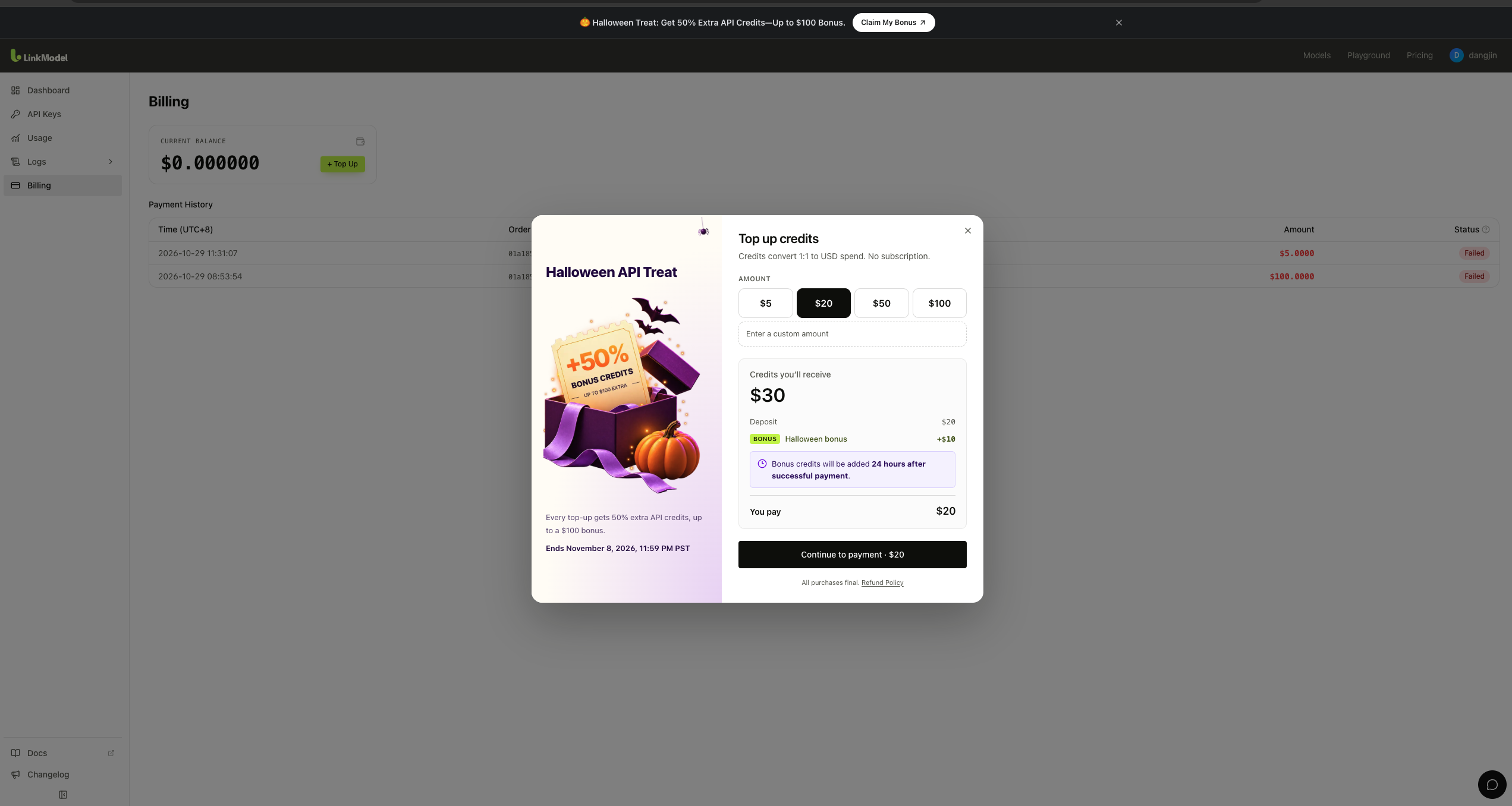
The LinkModel recharge window displays the reward before you continue to payment.
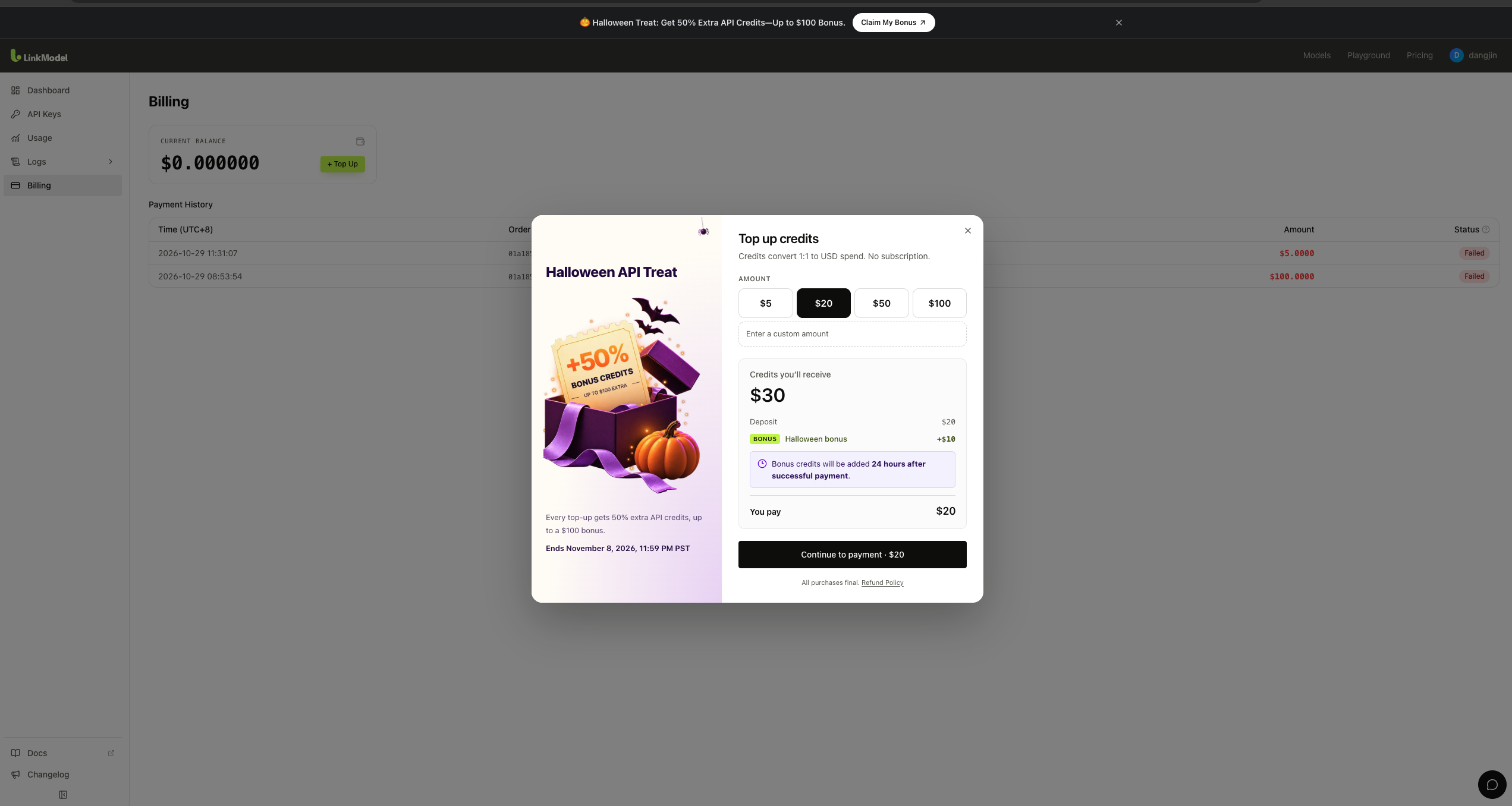
For example, selecting a $20 recharge shows:
- Deposit: $20
- Halloween bonus: +$10
- Credits you'll receive: $30
- You pay: $20
The interface calculates the 50% bonus automatically, so you know the expected credit amount before completing your transaction.
Bonus credits are added 24 hours after successful payment, as stated in the recharge interface.
This distinction matters: the full credit amount appears in the checkout calculation, but the promotional bonus follows the displayed delivery schedule.
You don't need to enter a coupon or manually activate the bonus.
How Much Extra API Credit Can You Get? Halloween Recharge Examples
Your Halloween reward equals 50% of eligible recharge amounts, subject to the cumulative $100 bonus cap per account.
For an account that hasn't previously claimed any Halloween reward:
Bonus credits = 50% of eligible recharge amounts, up to $100 in total.
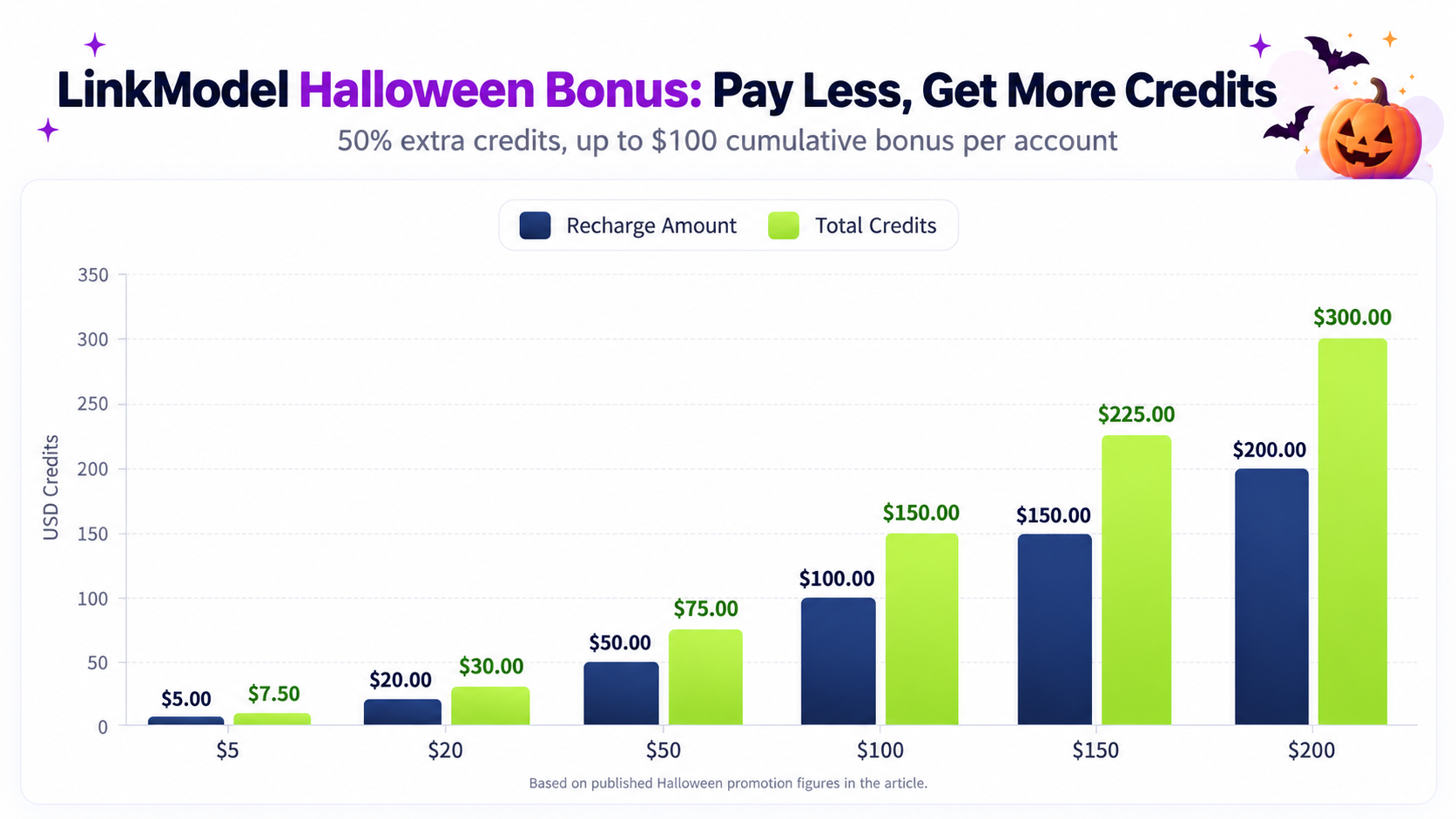
LinkModel Halloween Bonus Calculation Table
| Total Eligible Recharge | Extra Bonus Credits | Total Credits Added |
|---|---|---|
| $5 | $2.50 | $7.50 |
| $20 | $10 | $30 |
| $50 | $25 | $75 |
| $100 | $50 | $150 |
| $150 | $75 | $225 |
| $200 | $100 | $300 |
| $250 | $100 | $350 |
The calculations assume your account starts with its full $100 promotional allowance. Once the maximum bonus has been reached, further recharges add purchased credits without additional Halloween rewards.
A total of $200 in eligible recharges unlocks the maximum $100 bonus, giving you $300 in combined purchased and promotional credits.
$100 Recharge Example: Get $150 in Credits
Suppose you have $100 to allocate to an AI application or creative project.
Under normal prepaid billing, a $100 payment provides $100 in available credit value.
During the Halloween promotion, the same eligible recharge earns an additional $50.
Your total credit value becomes $150.
The extra $50 can fund additional prompt experiments, image-generation attempts, model comparisons, or development tasks.
This gives you 50% more credit value without increasing your initial payment.
Should You Recharge $20, $50, $100, or $200?
The right recharge amount depends on your actual usage requirements.
| Recharge | Total Credits | Recommended Situation |
|---|---|---|
| $20 | $30 | First paid experiments or small tasks |
| $50 | $75 | Small image-generation or API projects |
| $100 | $150 | Regular creative and development workloads |
| $200 | $300 | Larger planned workloads and maximum bonus |
If you're new to LinkModel, start with the $1 free Signup Bonus to explore the platform before paying.
For occasional users, $20 or $50 may provide enough credits to test models and complete smaller projects.
For developers or creators with predictable recurring API demand, a $100 recharge provides more room for experimentation.
And if you already expect to spend $200 on future AI usage, completing eligible top-ups during the promotion unlocks the maximum reward.
You don't need to recharge $200 to participate. Smaller eligible amounts receive the same 50% bonus rate while your account has remaining promotional allowance.
Can You Recharge Multiple Times to Get the Full $100 Halloween Bonus?
Yes. LinkModel allows multiple eligible top-ups during the Halloween promotion. Rewards accumulate across transactions until your account has received $100 in bonus credits.
You don't have to make a single $200 payment.
This flexibility is useful if you want to begin with a smaller balance and add more funds after evaluating a model or confirming your project requirements.
Multiple Top-Up Example: Claiming the $100 Bonus Gradually
Consider a developer funding an AI project in stages.
The first recharge supports initial testing. Later payments fund additional model evaluations and production usage.
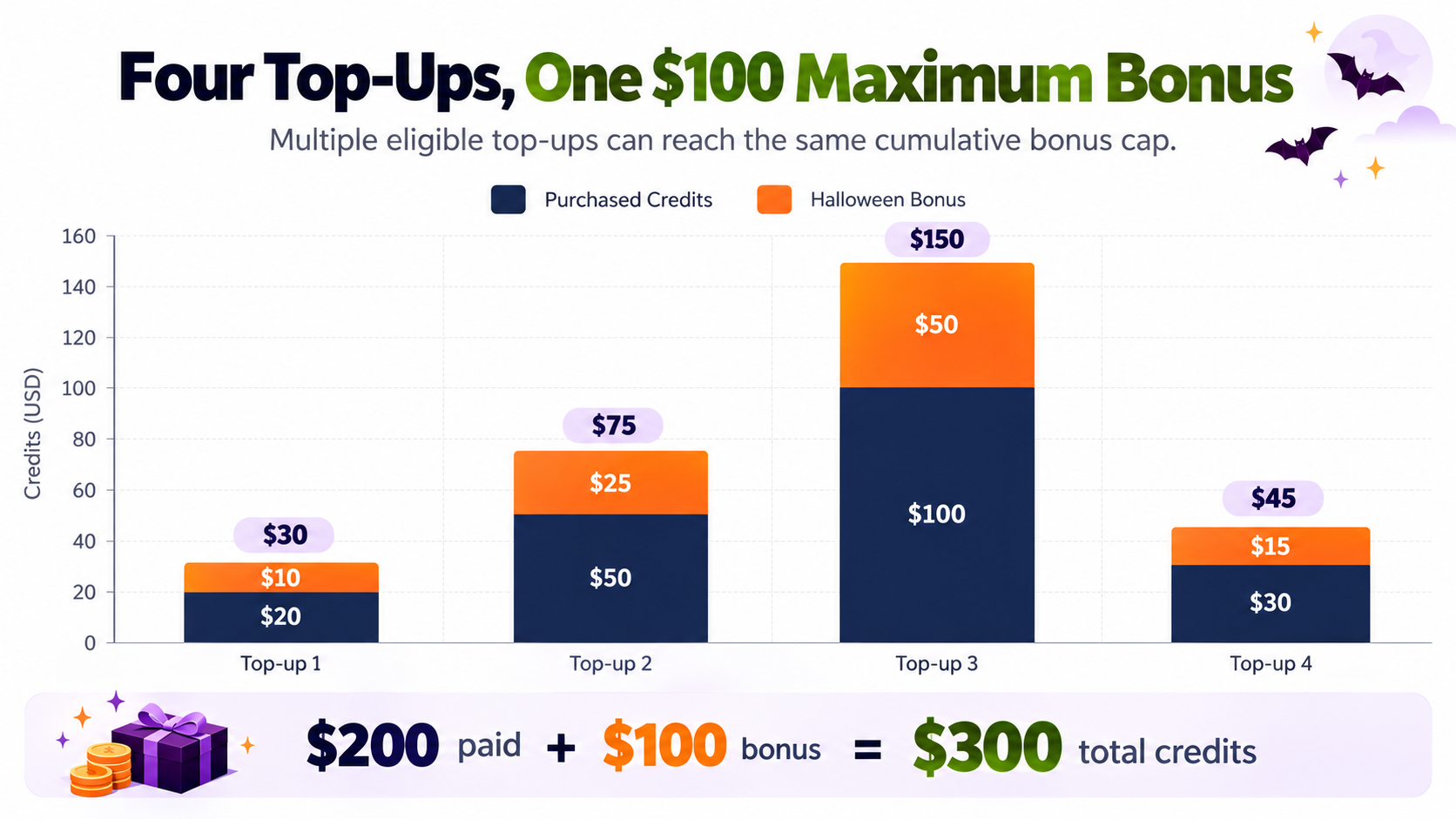
| Transaction | Recharge | Automatic Bonus | Cumulative Bonus |
|---|---|---|---|
| First | $20 | $10 | $10 |
| Second | $50 | $25 | $35 |
| Third | $100 | $50 | $85 |
| Fourth | $30 | $15 | $100 |
| Total | $200 | $100 | $100 |
After four eligible recharges, the account has earned the maximum $100 promotional reward.
The customer has paid $200 and receives $300 in combined credit value.
The result is the same as making one eligible $200 recharge, allowing customers to spread their payments across the promotional period.
What Happens If You've Already Claimed Part of the Bonus?
Suppose you've previously received $85 in Halloween bonus credits.
Your remaining allowance is $15.
If you complete another eligible $50 recharge, the standard 50% rate would normally generate $25 in bonus credits.
However, because the account has only $15 of promotional allowance remaining, the transaction adds $50 in purchased credits and $15 in bonus credits.
Your cumulative reward reaches $100.
Additional recharges are still possible, but they won't earn further Halloween promotional rewards once the cap is reached.
The key rule: multiple top-ups are allowed, but the $100 bonus cap applies to your account's cumulative total.
How to Claim the LinkModel Halloween Bonus Automatically
You can participate directly through the LinkModel Billing dashboard.
The recharge interface shows the deposit amount, calculated Halloween reward, total expected credits, and payment amount before you complete the transaction.
Step 1: Create a LinkModel Account or Sign In
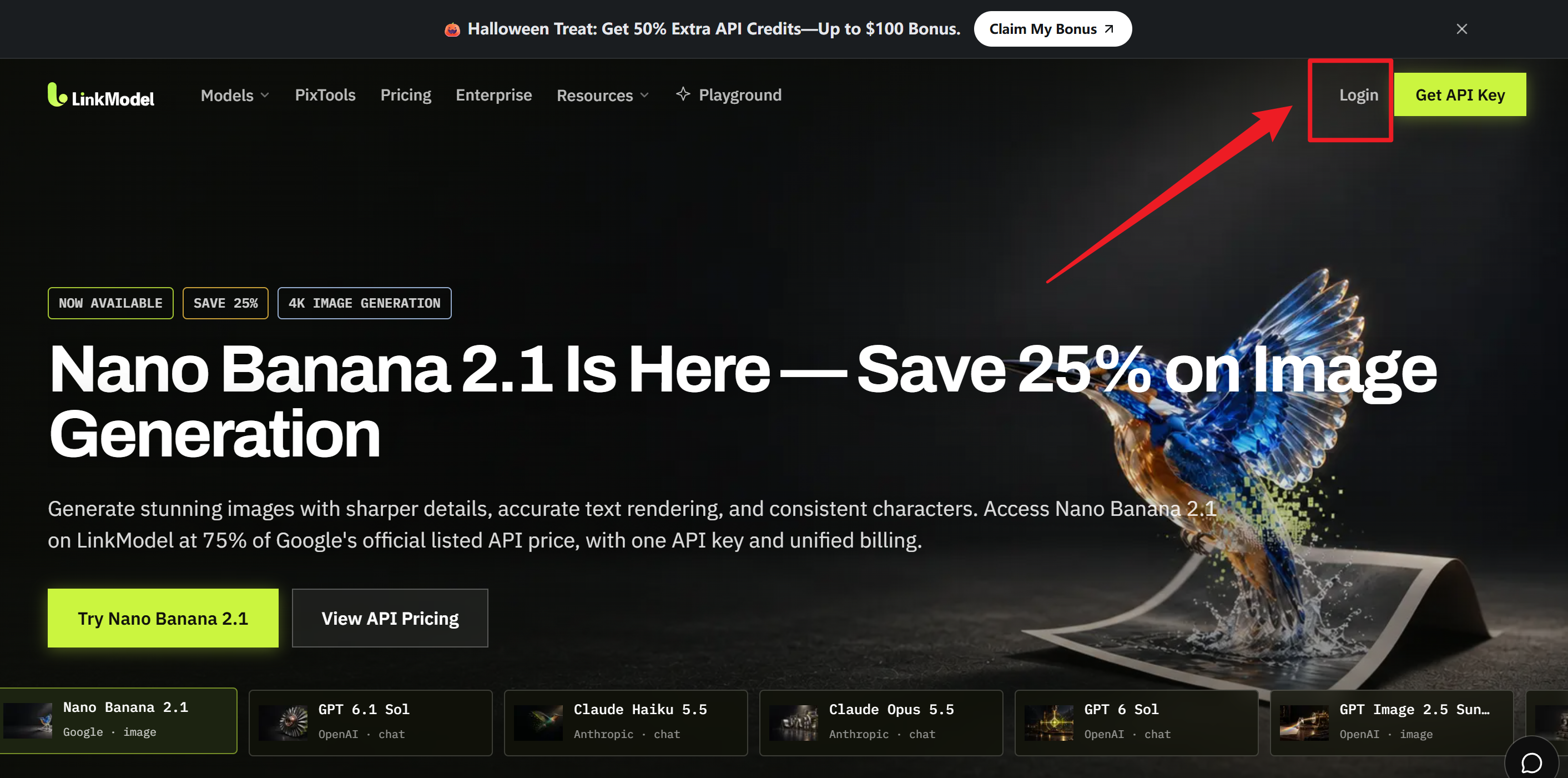
Visit LinkModel and sign in using an available account login method.
If you're new to the platform, register for an account.
New users automatically receive $1 in free Signup Bonus credits without entering a payment card.
Use these credits to explore available models and evaluate the platform before deciding whether to recharge.
Existing users can proceed directly to billing.
Step 2: Open Billing and Choose Your Recharge Amount
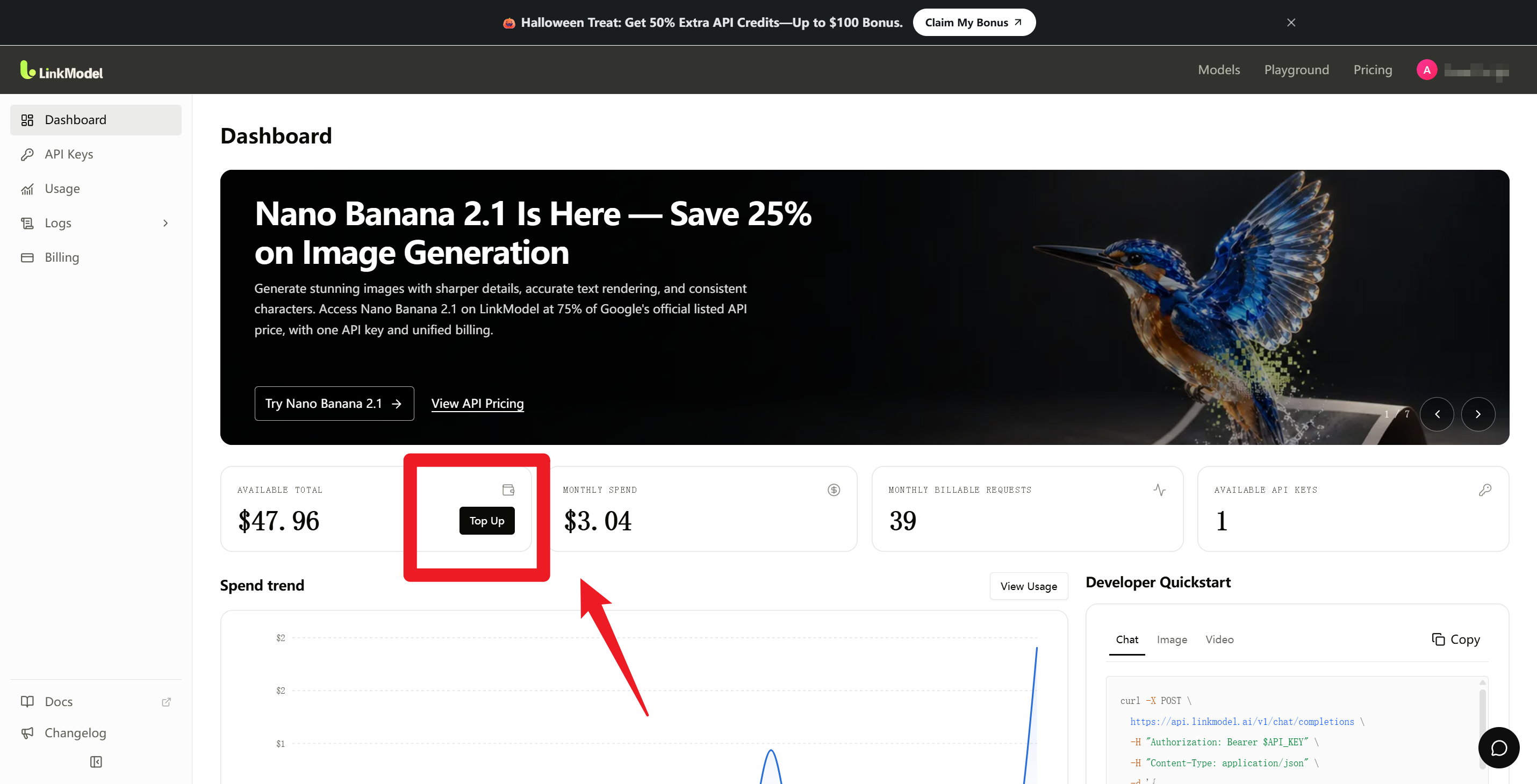
From your dashboard, open Billing and select Top Up.
The recharge window displays the Halloween promotion, available preset amounts, and a custom amount field.
Choose the amount that matches your planned API budget.
For example, selecting $20 shows a $10 promotional reward, providing $30 in total credit value.
Step 3: Review Your Halloween Bonus at Checkout
Before proceeding to payment, check the displayed credit calculation.
Verify the selected deposit, the additional Halloween reward, and the total credit amount.
For a $20 eligible recharge, the checkout interface shows $20 paid, $10 bonus, and $30 total credits.
There is no promotional code and no manual redemption process.
The reward is calculated automatically when you select the recharge amount.
Step 4: Complete Payment and Verify Your Credits
Select Continue to payment and finish the transaction.
Once payment is successful, LinkModel processes the recharge and schedules the promotional reward.
The Halloween bonus is credited 24 hours after successful payment.
You can review your Billing dashboard and Payment History to verify payment status and your available balance.
The checkout interface provides the expected bonus calculation, while the account dashboard allows you to review the resulting credits.
Open LinkModel Billing and Claim Your 50% Halloween Bonus
Why Choose LinkModel? Lower API Prices and Extra Halloween Credits
The Halloween bonus increases the credits you receive, while LinkModel's regular model pricing can reduce the cost of selected API workloads.
This combination is particularly useful for developers and creators who regularly generate content, compare AI models, or build applications involving several providers.
Save 25% on Selected GPT API Token Rates
LinkModel publishes GPT-6 Astra and GPT-6.1 Sol prices below their corresponding OpenAI Standard rates.
For text requests within the short-context tier of up to 272K input tokens:
| Model | LinkModel Input / 1M | LinkModel Output / 1M | Savings vs. OpenAI Standard |
|---|---|---|---|
| GPT-6.1 Sol | $1.50 | $7.50 | 25% |
| GPT-6 Astra | $7.50 | $37.50 | 25% |
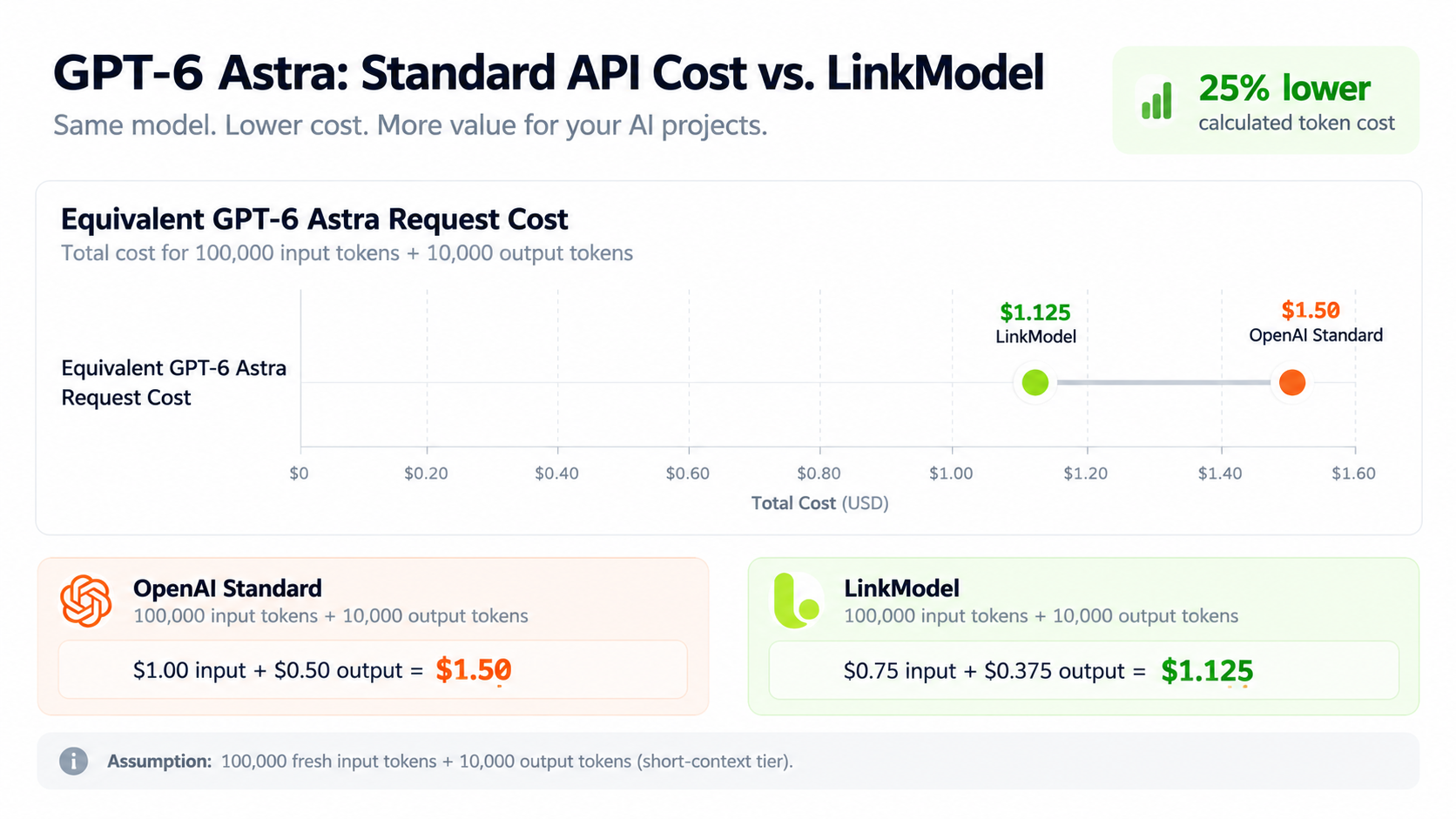
For GPT-6 Astra, the corresponding OpenAI Standard rates are $10 per million fresh input tokens and $50 per million output tokens.
That puts LinkModel's listed Astra rates 25% below the corresponding Standard prices for these token categories.
Different context lengths, caching categories, or processing modes can produce different costs. The comparison above uses matching short-context rates.
GPT-6 Astra Price Example: $100 vs. $150 in Credits
Consider a GPT-6 Astra request using 100,000 fresh input tokens and 10,000 output tokens.
At the corresponding OpenAI Standard rates:
- Input cost: $1.00
- Output cost: $0.50
- Total: $1.50
At LinkModel's published rates:
- Input cost: $0.75
- Output cost: $0.375
- Total: $1.125
That's a 25% lower calculated token cost for the same usage quantities.
Now consider the Halloween promotion.
A $100 eligible recharge gives you $150 in total credit value.
At $1.125 per equivalent request, that balance could support approximately 133 requests, assuming identical token usage and no additional charges.
Without the Halloween bonus, a $100 credit balance would support approximately 88 equivalent requests at the same LinkModel rate.
This illustrates how extra promotional credits can extend the usage budget for a model that already has lower listed token prices.
For a deeper pricing comparison, see the GPT-6 API Pricing Guide.
Save 25% on GPT Image 2.5 Starting Prices
LinkModel also provides competitive image-generation pricing.
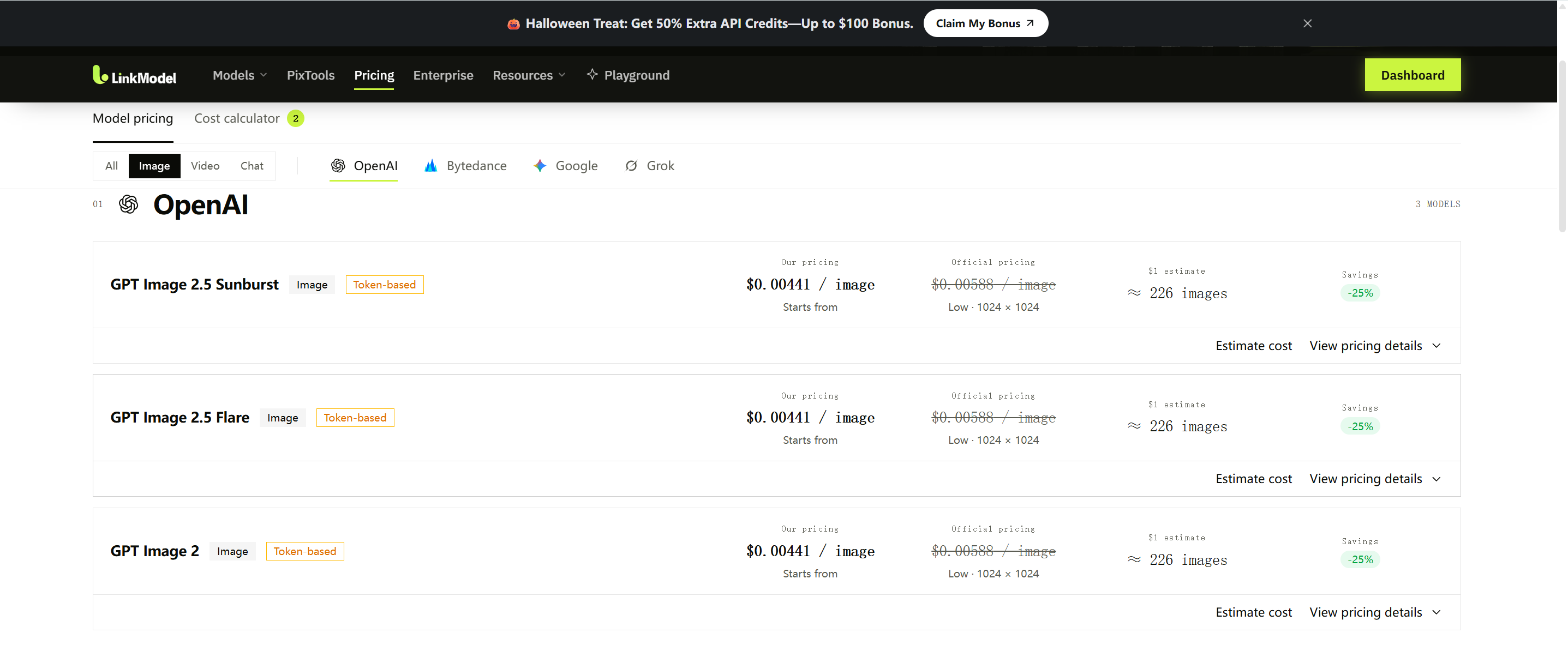
Its pricing page lists the following starting rates for GPT Image 2.5:
| Model | LinkModel Starting Price | Official Comparison Price | Savings |
|---|---|---|---|
| GPT Image 2.5 Flare | $0.00441/image | $0.00588/image | 25% |
| GPT Image 2.5 Sunburst | $0.00441/image | $0.00588/image | 25% |
These prices correspond to the displayed low-quality 1024 × 1024 configuration. Different generation settings can change the cost.
At the listed $0.00441 starting price, $1 in credits could fund approximately 226 image generations, assuming the selected requests qualify for that rate.
For designers or creators working on advertising visuals, social media content, or product concepts, lower starting prices can provide more room for prompt iteration.
The Halloween reward adds further credit capacity without limiting the bonus to a specific image model.
One API Platform for Text, Image, and Video Workflows
LinkModel provides unified access to supported models across multiple AI categories.
A single project might involve an LLM for copywriting and automation, an image model for visual assets, and a video model for short-form creative content.
Rather than managing multiple provider billing accounts, customers can explore supported models through one LinkModel account and billing environment.
Halloween promotional credits can be used across all available LinkModel models, including supported text, image, and video models.
Explore the LinkModel Model Library to review current options and published prices.
Pay-as-You-Go Billing With No Monthly Platform Fee
LinkModel offers $0 minimum spending commitment and $0 monthly platform fee.
You pay for API usage based on the model and applicable billing units.
This works for both smaller experiments and larger planned workloads because you can add credits according to your requirements.
The Playground also allows you to explore supported models before integrating them into an application.
You can start with $1 in free signup credits, evaluate the platform, and then decide whether the Halloween recharge bonus fits your needs.
How to Get More Value From Your Halloween API Credits
The most useful approach is to match your promotional credits to actual projects and expected usage.
A larger balance can give you more flexibility, but efficient model selection and careful testing are equally important.
Example: Allocate $150 Across Multiple AI Projects
Suppose you make an eligible $100 Halloween recharge and receive $150 in combined credits.
You could plan to allocate the balance as follows:
| Planned Project | Credit Budget |
|---|---|
| AI image generation and editing | $30 |
| AI video experiments | $45 |
| LLM testing and development | $25 |
| Future revisions and additional projects | $50 |
| Total | $150 |
The number of outputs depends on the selected models, generation settings, token consumption, and number of attempts.
The extra $50 provides room for further experiments or future work without increasing the initial $100 payment.
Compare Cost per Accepted Result, Not Just Price per Request
A lower API price doesn't always produce a lower total project cost.
For example, an inexpensive image model might require several revisions before generating an acceptable asset, while a more expensive model could produce a usable result in fewer attempts.
The meaningful comparison is often cost per accepted result.
Before scaling a workflow, consider the cost of each generation, the number of attempts required, and whether the outputs meet your project requirements.
For LLM tasks, monitor token usage and output quality. For image and video projects, test smaller batches before committing to larger generations.
This can help your promotional credits go further.
Claim the Halloween Bonus Now and Use Credits Later
LinkModel Halloween bonus credits never expire and can be used across all available models.
You don't have to spend them before November 8.
For example, you can recharge during Halloween and use the credits for future marketing projects, application development, or AI experiments.
The promotional deadline determines when you can earn additional credits, not when you must complete your projects.
The offer ends November 8, 2026, at 11:59 PM PST.
Claim Your 50% Extra API Credits Before the Deadline
Frequently Asked Questions
How do I claim the 50% Halloween bonus? Do I need a promo code?
No promo code or manual claim is required. Both new and existing users can complete an eligible recharge through LinkModel Billing. The 50% bonus is calculated automatically at checkout and credited 24 hours after successful payment, subject to the cumulative $100 reward cap.
Can I recharge multiple times to get the full $100 bonus?
Yes. Multiple eligible recharges are allowed during the promotion. A total of $200 in qualifying top-ups earns the maximum $100 bonus per account. For example, two $100 recharges can each earn $50 in promotional credits.
Is the Halloween bonus available to existing users? What about the $1 signup reward?
Both new and existing users qualify for the 50% Halloween promotion. Separately, new users automatically receive $1 in free Signup Bonus credits upon registration, without a payment card or deposit. Existing users cannot claim the new-user signup reward again.
Do Halloween bonus credits expire or have model restrictions?
No. Halloween bonus credits never expire and can be used across all available LinkModel models, including supported language, image, and video generation models. You can use the credits after the promotion ends.
When does the LinkModel Halloween Bonus end?
The promotion ends on November 8, 2026, at 11:59 PM PST (UTC−8). Eligible recharges must be completed before that deadline. Bonus credits are then added according to the 24-hour delivery schedule, and previously earned credits remain available afterward.
Conclusion
The LinkModel Halloween Bonus 2026 gives both new and existing users 50% extra API credits on eligible top-ups, up to $100 per account. Recharge $100 to receive $150 in combined credits, or recharge $200 across one or multiple transactions to unlock the full $100 bonus. Your reward is calculated automatically at checkout, requires no promo code, and is credited 24 hours after successful payment. Bonus credits never expire and work across all available LinkModel models. New users can also claim $1 in free Signup Bonus credits without a payment card, while selected models offer competitive API prices and flexible pay-as-you-go billing. The promotion ends November 8, 2026, at 11:59 PM PST. Claim your LinkModel Halloween Bonus today.