Gemini 4 Argon API costs $2 per million input tokens and $10 per million output tokens through November 30, 2026, rising to $4 and $20 on December 1. Access requires paid API billing. Its 1,048,576-token context is shared across input, thinking, and output; foreground Interactions calls have a 65,536-token thinking-and-output ceiling.
The visible answer is only part of the bill. At introductory Standard rates, 10,000 input tokens, 2,000 answer tokens, and 8,000 thinking tokens cost $0.12, versus a $0.04 estimate that ignores reasoning. Retries and additional agent calls can further increase the cost of completing a task.
LinkModel lists Gemini 4 Argon at $1.50 per million input tokens and $7.50 per million output or reasoning tokens—25% below Google’s introductory Standard rates. Its cached-input rate is $0.075 per million tokens. These published LinkModel prices give developers a lower-rate Argon option to evaluate against their workload’s feature and quality requirements.
Gemini 4 Argon API Features and Access
Argon accepts text, images, video, audio, and PDFs, and returns text. Google’s model specifications list reasoning, tools, and structured responses among its supported capabilities.
| Specification | Official details |
|---|---|
| Model identifier | gemini-4-argon |
| Inputs | Text, image, video, audio, PDF |
| Output | Text |
| Shared context | 1,048,576 tokens |
| Foreground Interactions ceiling | 65,536 thinking and output tokens |
| Thinking levels | Low, medium, high |
| Context caching | Implicit only |
Function calling, structured outputs, code execution, search grounding, and file search are supported. Native image generation, audio generation, and the Live API are not.
For example, Argon can interpret a screenshot and write interface code. A separate rendering or image tool may still be needed to produce the finished experience. Multimodal input does not mean every output modality is available.
Google’s developer access announcement describes paid Gemini API access and access through development products. Consumer-product allowances and API project billing should be treated separately.
Choose the API route before configuring credentials. The walkthrough below uses the Gemini Developer API’s Interactions interface.
Gemini 4 Argon API Pricing and Processing Tiers
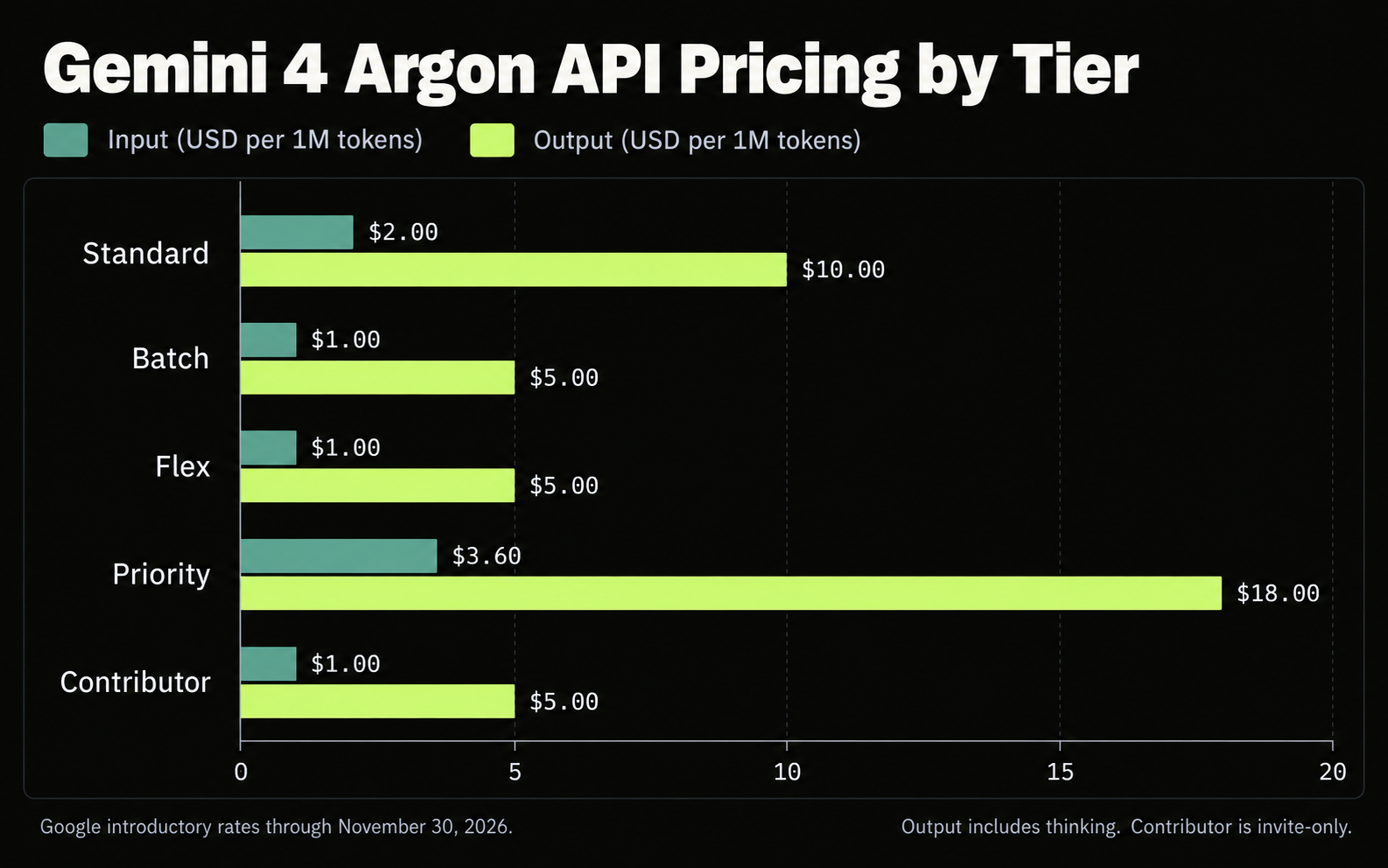
Standard pricing is $2/M input and $10/M output during the introductory period. Google’s official pricing table lists these USD rates per million tokens; each pair means input / output, including thinking.
| Tier | Through Nov. 30, 2026 | From Dec. 1, 2026 |
|---|---|---|
| Standard | $2 / $10 | $4 / $20 |
| Batch | $1 / $5 | $2 / $10 |
| Flex | $1 / $5 | $2 / $10 |
| Priority | $3.60 / $18 | $7.20 / $36 |
| Contributor | $1 / $5 | $2 / $10 |
Standard cached input costs $0.10/M now, increasing to $0.20/M in December.
Contributor is invite-only, and Google lists submitted content as used to improve products. Google Search grounding includes a shared monthly allowance of 5,000 requests across Gemini 3 and newer models, followed by $14 per 1,000 queries. A model request can trigger multiple queries.
Standard vs. Batch vs. Flex
Select the execution conditions before selecting the lowest rate.
Google’s Batch API guide describes asynchronous processing with a target turnaround of 24 hours, currently through GenerateContent. It fits independent jobs such as scheduled evaluations or document processing.
Google’s Flex guide describes synchronous processing with variable latency and best-effort availability. Requests can be interrupted, so applications need retry handling.
| Workload | Starting point |
|---|---|
| Interactive application | Standard |
| Independent, non-urgent jobs | Batch |
| Sequential work that tolerates delays | Flex |
| Responsiveness worth a premium | Evaluate Priority |
An overnight document queue and a live support assistant have different operating requirements. Comparing their token rates alone hides that difference.
Monthly Budget After the Introductory Period
Budget production usage at the rate that will apply after the pilot.
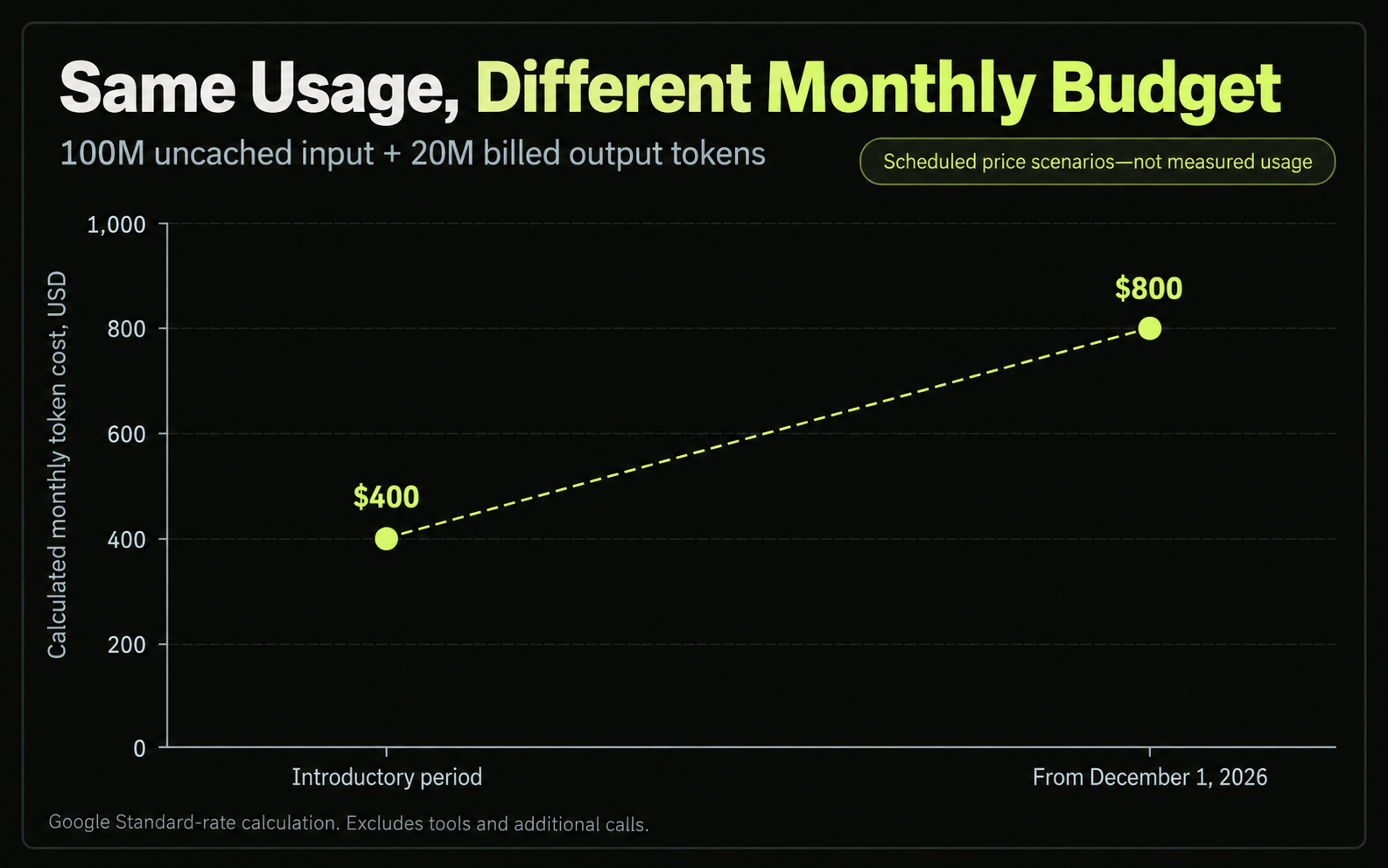
For 100 million uncached input tokens and 20 million billed output tokens, calculated Standard charges are:
| Token charges | Introductory period | From December |
|---|---|---|
| Input | $200 | $400 |
| Output | $200 | $400 |
| Total | $400 | $800 |
These figures exclude tools and additional calls. A workload that fits an October budget may need a larger allowance in December without any change in request volume.
How to Use Gemini 4 Argon API: First-Request Setup
Start with one small request whose answer you can verify independently. This separates access and configuration problems from the difficulty of a real production task.
Prepare the Project and API Key
Google’s getting-started instructions explain key creation and paid-tier setup in AI Studio.
1. Select the project that will own the API usage.
2. Open its billing setup and complete the required Cloud Billing steps.
3. Create an API key associated with that project.
4. Keep the key on your server or in your local environment.
5. Use the current Google GenAI SDK or a REST client.
6. Select gemini-4-argon, rather than the model used in a generic quickstart example.
Google’s current setup instructions include a minimum $5 prepaid credit purchase, or currency equivalent, when upgrading through the documented paid-tier flow. Follow the requirements shown for your account.
The Interactions REST route uses POST to the v1beta Interactions endpoint, authenticated with the x-goog-api-key header.
First-Request Configuration Table
The following starting configuration follows Google’s documented Interactions workflow. Use a plain-text request without external tools to check access and response handling before moving to a production workload.
| Setting | Initial configuration |
|---|---|
| API interface | Interactions |
| Model | gemini-4-argon |
| Input | The order-check task below |
| Thinking level | Medium |
| Background execution | False |
| Streaming | Off for simpler inspection |
| Output allowance | Default 65,536-token ceiling |
| External tools | None |
The output ceiling is an allowance, not a target. Inspect actual consumption after the request.
Use this small task:
Using only these orders, return three lines: total units, total amount in USD, and the highest-value order ID. S-101: 2 units at $12 each. S-102: 3 units at $7 each. S-103: 1 unit at $15 each.
The expected result is 6 units, $60, and S-101. The three order values are $24, $21, and $15, making S-101 the highest-value order.
Compare your response against these independently calculated values. A correct answer confirms this small task passed; it does not establish production accuracy or coding ability.
How to Check a Successful API Call
A returned response and a correct result are separate checks.
| Check | What to confirm |
|---|---|
| Request accepted | No authentication or billing error |
| Model selected | Returned model matches the intended route |
| Execution finished | Status indicates completion |
| Answer present | Text is available in the response |
| Task passed | Values match 6, $60, and S-101 |
| Usage recorded | Input, output, thinking, and cache usage where exposed |
Keep the interaction ID with the result. Inspect the returned usage information, then reconcile project usage in the dashboard when available.
If the status is incomplete, do not count the attempt as a successful task. If execution completed but the answer is wrong, the connection worked while the acceptance test failed.
Only move to a representative production task after the access check passes.
Google Cloud Setup and Existing-Application Migration
Google Cloud deployments should follow their own authentication and endpoint instructions. Google’s Cloud developer guide documents Application Default Credentials and API-key options.
Avoid mixing a Cloud endpoint with Developer API assumptions about request structure or execution limits.
For an existing integration, Google’s Argon migration guidance calls for reviewing output limits and thinking levels, removing explicit cached-content references, and removing temperature, top_p, and top_k, which Argon ignores.
Begin with medium thinking, then evaluate low and high against the same acceptance criteria. Validate conversation state, tool-result handling, and timeouts before expanding traffic.
Gemini 4 Argon API Cost: Thinking and Caching
Calculate fresh input, cached input, and billed output separately. Include chargeable reasoning, while avoiding double-counting if your reporting already combines it with answer tokens.
Token cost = (fresh input × input rate + cached input × cache rate + billed output × output rate) ÷ 1,000,000
Add tools and other applicable charges separately.
Worked Request Costs
These calculated scenarios use introductory Standard rates with no tools or cache hits.
| Request usage | Input + billed output | Total |
|---|---|---|
| 10K input + 5K output | $0.02 + $0.05 | $0.07 |
| 10K input + 10K output | $0.02 + $0.10 | $0.12 |
| 100K input + 20K output | $0.20 + $0.20 | $0.40 |
The second scenario could contain 2,000 answer tokens and 8,000 thinking tokens. At 10,000 matching requests, token charges total $1,200 before tools or additional attempts.
For an agent, count all model calls required to complete the task. A short final response may follow substantial reasoning and multiple tool cycles.
Implicit Cache Savings
Argon’s implicit cache requires at least 4,096 input tokens, but eligibility does not guarantee a hit. Google’s caching documentation recommends putting reusable content first and sending similar prefixes close together.
For a repository assistant, stable architecture notes can precede the changing task. Measure reported cached usage before forecasting prompt caching savings.
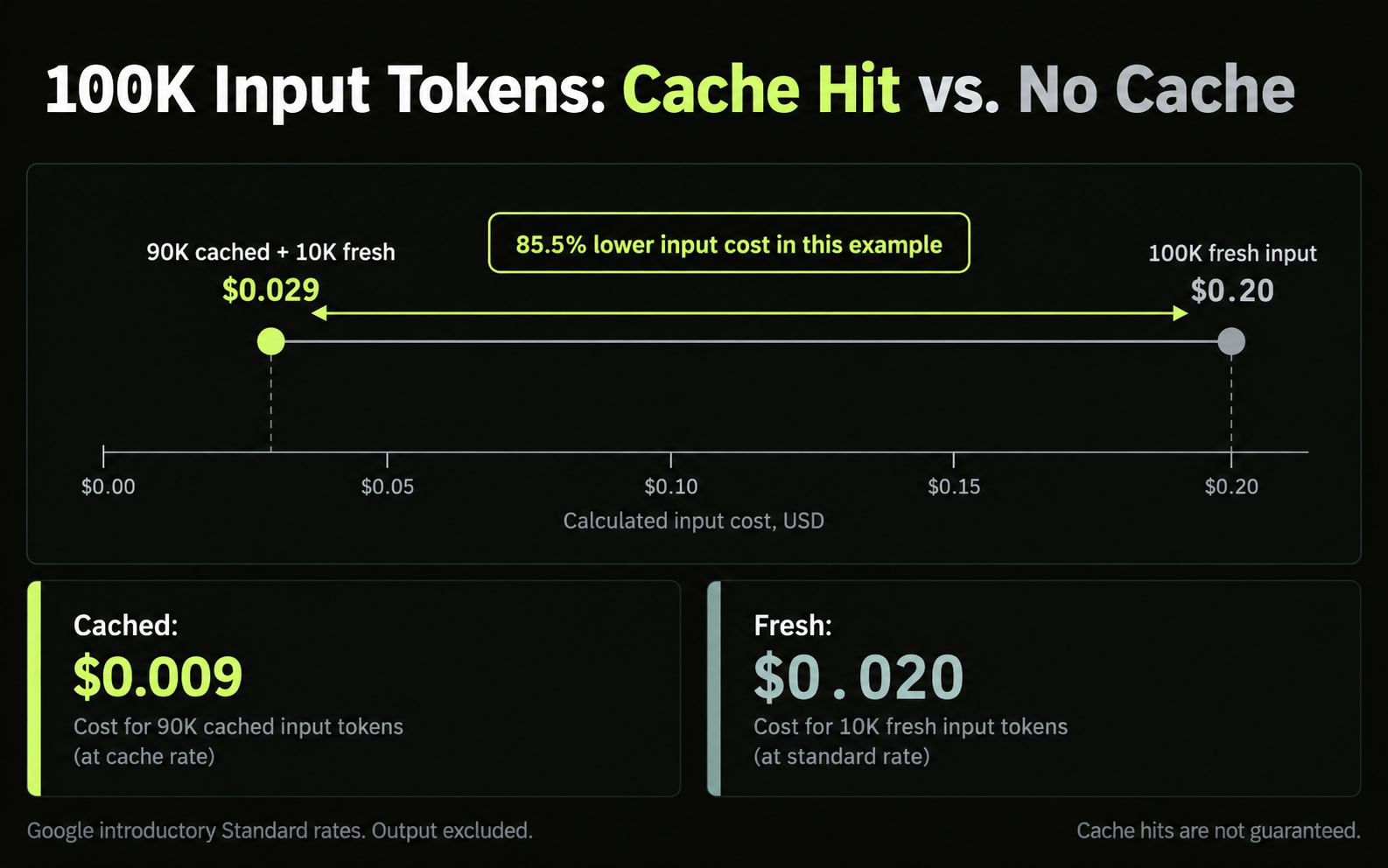
Consider 100,000 input tokens consisting of 90,000 cached and 10,000 fresh tokens:
| Input category | Cost |
|---|---|
| 90K cached at $0.10/M | $0.009 |
| 10K fresh at $2/M | $0.020 |
| Total input | $0.029 |
The uncached input would cost $0.20. This example reduces input cost by 85.5%; output is additional.
Initial requests, misses, and changing prefixes affect the actual result. Explicit cache creation is unsupported for Argon.
Gemini 4 Argon Context and Long Decode Limits
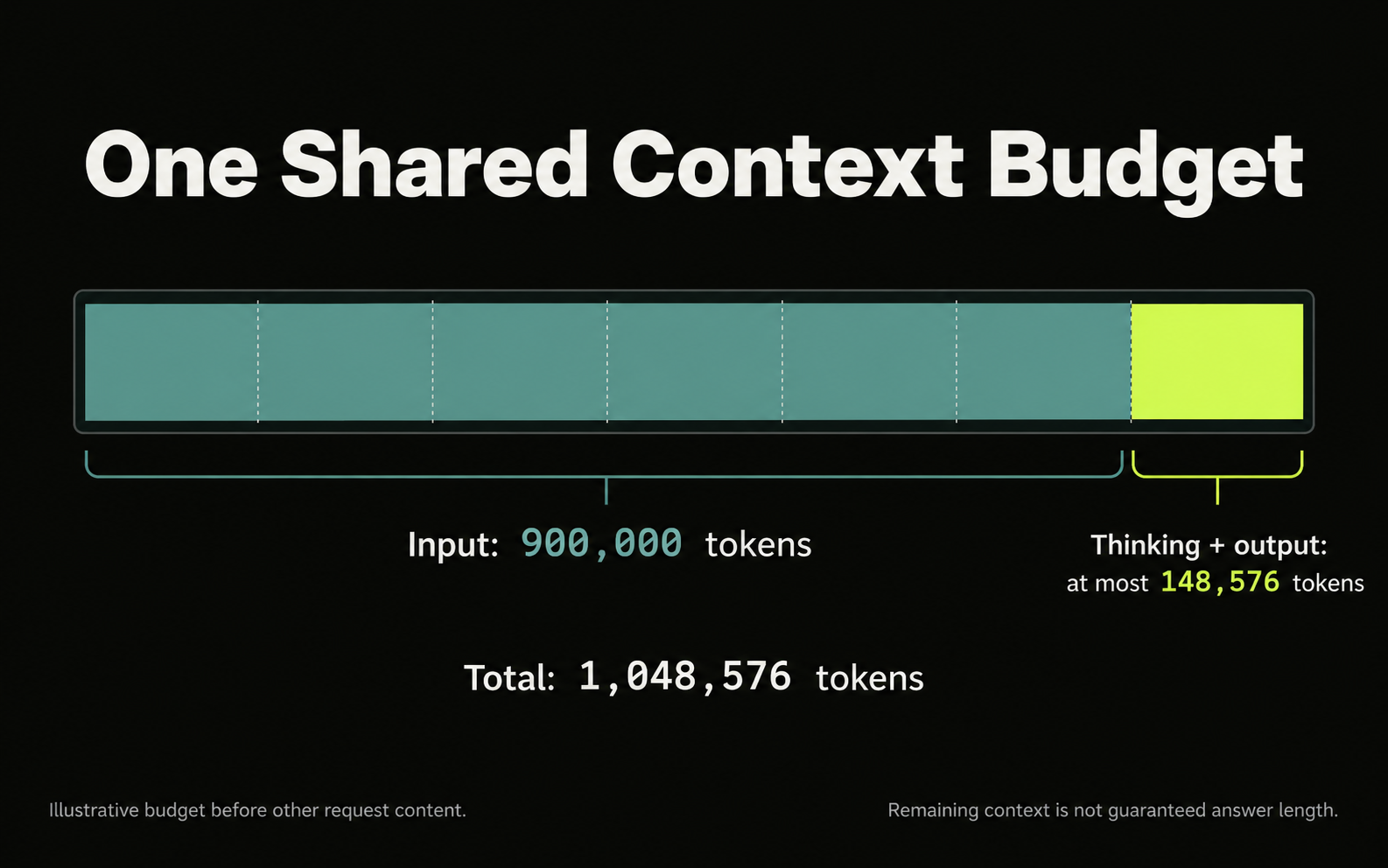
Input, thinking, and output share 1,048,576 tokens. A 900,000-token input leaves at most 148,576 tokens for thinking and output before other request content.
Google’s Long Decode guide distinguishes these Interactions settings:
| Execution setting | Thinking and output ceiling |
|---|---|
| Foreground | 65,536 tokens |
| Background without a larger limit | 65,536 tokens |
| Background with a larger explicit limit | Up to remaining shared context |
For Long Decode, enable background execution and set max_output_tokens above 65,536. Retain the interaction ID, monitor status, and collect text across model_output steps. Background execution requires server-side storage.
Long Decode also resends earlier content as input in continuation hops. Google’s example of a 1,000-token prompt and 200,000 generated tokens accumulates 397,216 input tokens across four hops, with repeated input receiving the documented cache discount.
Cumulative input usage is not the context size at one moment. Use usage totals for billing and a separate calculation for remaining context capacity.
Cancelled or failed execution can still incur charges for completed work. Enable Long Decode when a task needs the additional reasoning headroom, then verify whether it improves acceptance.
Gemini 4 Argon Coding Evidence and Practical Lessons
Use engineering evidence to design acceptance tests, rather than treating a leaderboard score as a production forecast.
The Vals Index, updated October 13, reports 68.90% for Argon, compared with 67.04% for Sonnet 5.5 and 66.97% for Opus 5.5. Its GDP-weighted finance, coding, legal, and tax mix may differ from your workload.
Component leaders vary: Argon leads Finance Agent v2, Sonnet leads Vibe Code Bench and Code Migration, and Opus leads Terminal-Bench 4.0. Some competing-model results include fallback handling after refusals; Argon had no fallbacks in that evaluation.
ADK Python Case: Review Determines What Ships
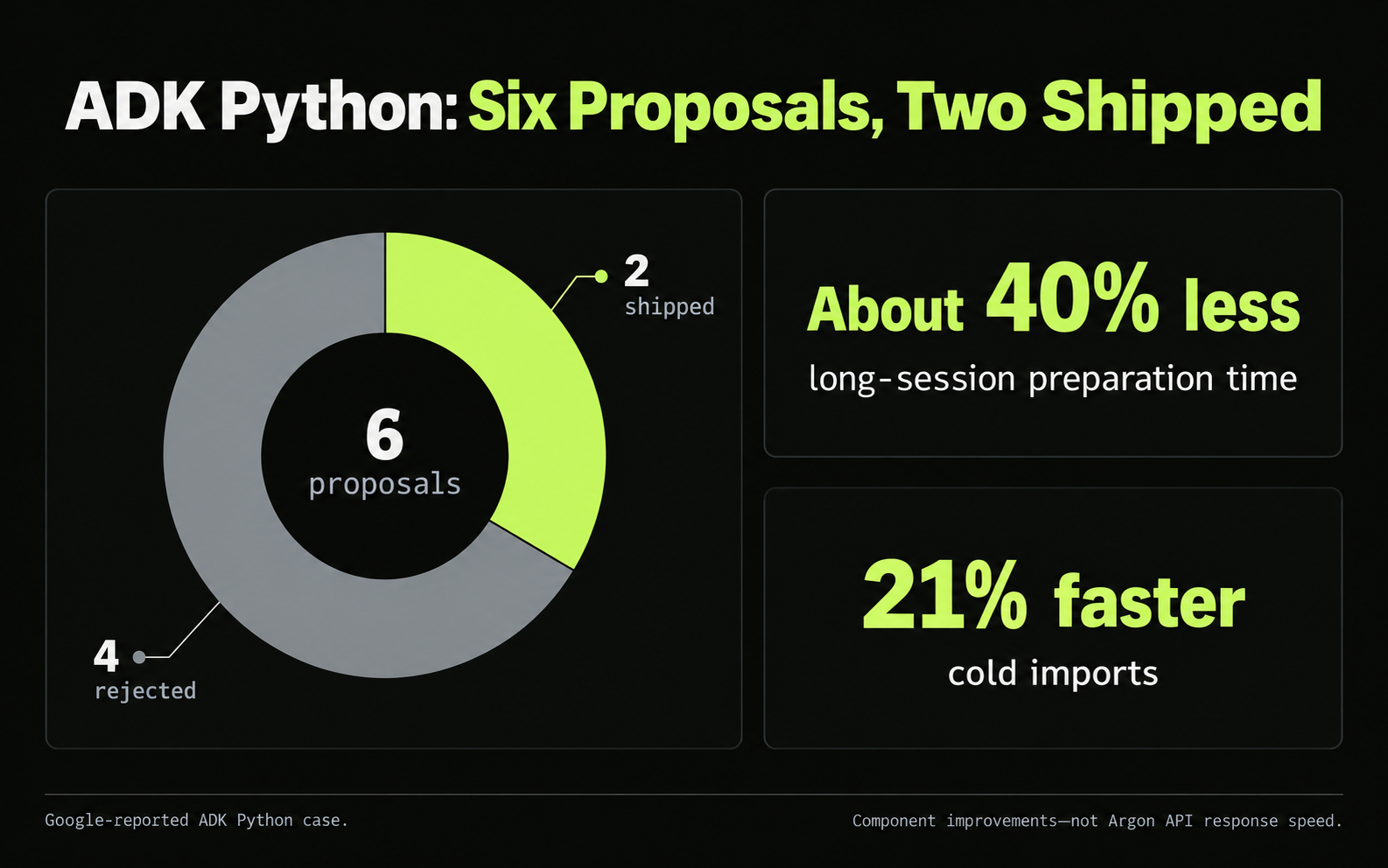
Google’s ADK Python engineering account describes an 11-hour run on roughly 205,000 lines across nearly 800 source files.
The run proposed six optimizations across 32 files and executed 16,892 unit tests. Maintainers shipped two optimizations and rejected four.
Accepted changes reduced long-session preparation time by about 40% and improved cold imports by 21%. However, new-process time to the first model request remained essentially flat at 3.07 versus 3.09 seconds. One implementation passed open-source tests but broke 25 internal test targets.
The lesson is concrete: test the behavior users depend on, including compatibility outside the edited component. Ask for baseline measurements, a reviewable patch, and regression evidence.
Developer Evaluation: Empty Answers Need Diagnosis
Our research reviewed a public Python-backend evaluation in which a GPT-6 Astra judge assigned implementation plans 59/100 for Argon High and 77/100 for Opus 5.5 Extra High. That describes one model-judged planning exercise.
A separate developer report in the discussion described approximately $3.26 for an Argon 12-task run versus $10.21 for Sonnet 5.5. A difficult counting task exhausted its configured reasoning allowance and produced empty answers; a lower-effort attempt returned an incorrect result.
These reports suggest useful test conditions, without establishing general model rankings. Inspect completion status, output allowance, correctness, and spend together.
An empty answer is an execution outcome to investigate, not an automatic reason to repeat the same request.
Gemini 4 Argon API Evaluation Checklist
Evaluate complete tasks using a fixed acceptance standard. Begin with a contained workload you can verify, then record every attempt needed to finish it.
| Record | What to capture |
|---|---|
| Task and acceptance | Required result, tests, or validated fields |
| Configuration | Model, route, thinking, execution mode |
| Attempts | Calls, retries, and repair cycles |
| Usage and spend | Fresh input, cache, billed output, tools |
| Outcome | Accepted or rejected, with reason |
For a coding pilot, require the intended behavior and relevant regression tests. For extraction, validate source agreement and field completeness. For analysis, identify which claims require independent checking.
Calculate:
Cost per accepted result = total API spend ÷ accepted results
Record human repair time separately. If no result passes, report the spend and failures rather than presenting a misleading unit cost.
Before paying for a gateway, verify the exact model identifier, required tools, structured outputs, reasoning controls, and usage reporting. Establish applicable funding, refund, and data-handling terms before committing sensitive work or a larger balance.
A public price is evidence of the listed rate. It does not establish compatibility, reliability, or final task cost.
Gemini 4 Argon Rate Limits and Troubleshooting
API quotas belong to the project and account; they are separate from consumer message allowances. Google’s rate-limit guide describes request, input-token, daily, and applicable spend-based restrictions.
Another key within the same project does not create a separate quota pool.
| Symptom | First check |
|---|---|
| Authentication or access failure | Key, project, billing, model access |
| 429 resource exhaustion | Request, token, and applicable spend limits |
| Empty response | Status and thinking/output allowance |
| Interactions stops near 64K | Background mode and explicit limit |
| Unexpected charge | Reasoning, retries, tools, cache misses |
Inspect the active limits before testing concurrency. Use capped retries with backoff, and retain request or interaction IDs.
For agents, monitor model calls per completed task, not just user requests. This connects operational load to the work the application actually delivers.
Gemini 4 Argon API Pricing: Google vs. LinkModel
LinkModel’s published Argon input, cached-input, output, and reasoning-output rates are 25% below Google’s introductory Standard rates. The LinkModel pricing page lists the following USD prices per million tokens.
| Token category | Google introductory Standard | LinkModel |
|---|---|---|
| Input | $2.00 | $1.50 |
| Cached input | $0.10 | $0.075 |
| Output | $10.00 | $7.50 |
| Reasoning output | $10.00 | $7.50 |
The Google comparison applies through November 30, 2026. Google’s output rate includes thinking; the separate reasoning row identifies its applicable rate, not an additional charge on the same tokens.
What the Rate Difference Means for a Request
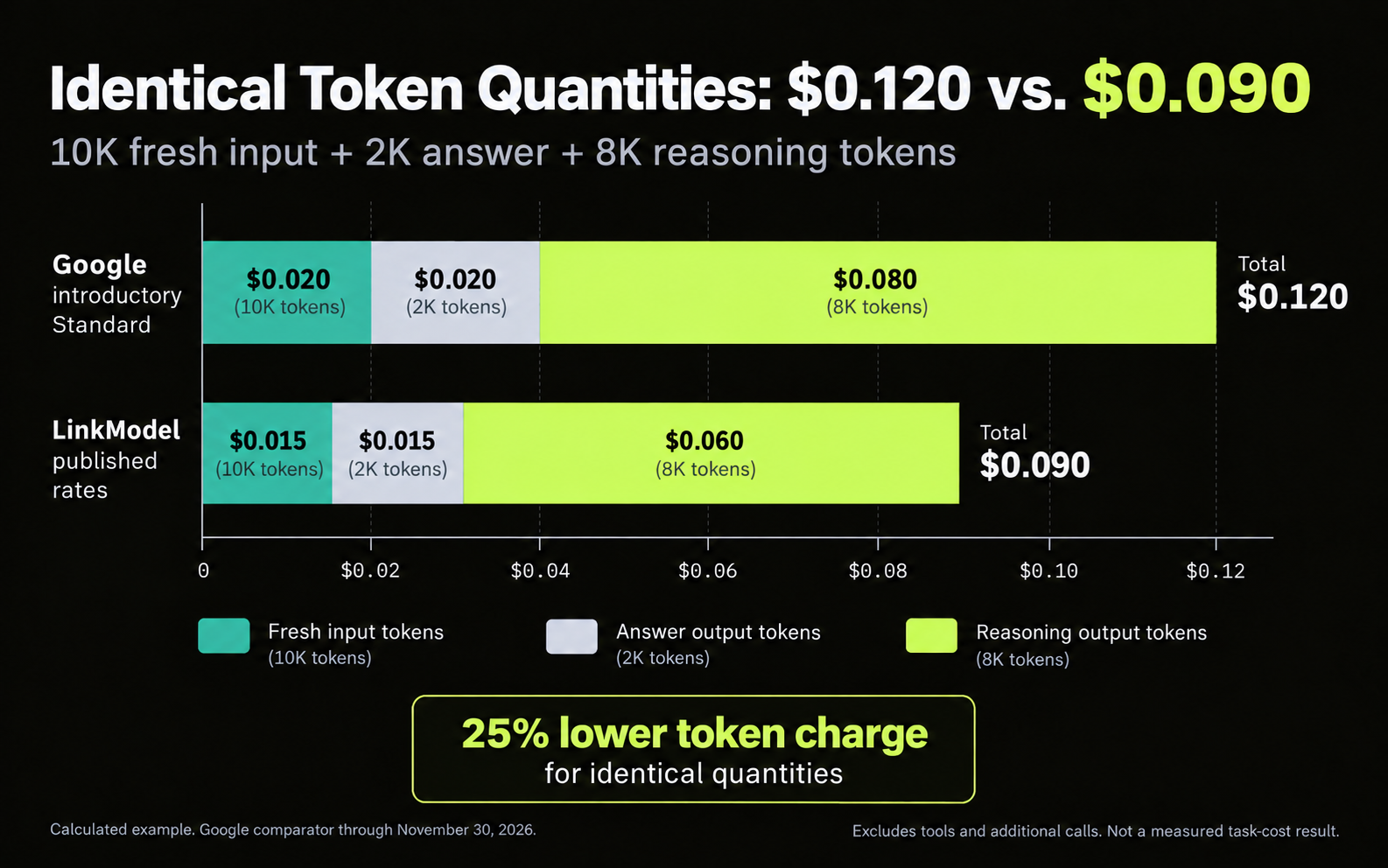
For identical billable token quantities, the listed LinkModel rates produce a 25% lower token charge.
Using the article’s example of 10,000 fresh input tokens, 2,000 answer tokens, and 8,000 thinking tokens:
| Charge | Google introductory Standard | LinkModel |
|---|---|---|
| 10K fresh input | $0.020 | $0.015 |
| 2K answer output | $0.020 | $0.015 |
| 8K reasoning output | $0.080 | $0.060 |
| Total token cost | $0.120 | $0.090 |
This calculated example excludes tools and additional calls. Actual task costs depend on the tokens consumed, retries, and whether the result passes acceptance.
Google’s scheduled December increase does not establish a future LinkModel rate. The LinkModel figures here reflect the published prices reviewed for this article.
What to Check Before Choosing the Route
Use price to shortlist a provider, then verify the execution features your application requires. A pricing listing does not establish identical API behavior.
Confirm the model identifier, authentication method, reasoning controls, tool-call handling, structured responses, and usage reporting. If the workload requires Long Decode, verify its support on the selected route before relying on it.
Start with the small acceptance task described above, then evaluate a representative workload. Compare completed results and reconciled usage before increasing traffic.
Frequently Asked Questions
How much does Gemini 4 Argon API cost, and is it free?
Standard pricing is $2/M input and $10/M output through November 30, 2026, rising to $4/M and $20/M on December 1. Thinking is billed at the output rate. Argon is unavailable on the Gemini API Free tier.
How do I confirm my first Argon API request worked?
Check that the request was accepted, the intended model returned, execution completed, text is present, and the answer passes an independent check. Retain the interaction ID and usage information. A completed response can still contain an incorrect answer.
Why does Argon return an empty answer?
Reasoning can exhaust the configured output allowance before visible text appears. Inspect status and usage, then evaluate a lower thinking level or an appropriate larger allowance. Do not retry indefinitely without identifying the cause.
Can Gemini 4 Argon output one million tokens?
Long Decode can exceed the normal foreground Interactions ceiling, within the shared context budget. Input and thinking consume part of that capacity. Background execution and a larger explicit output allowance are required for the Interactions Long Decode workflow.
Is Gemini 4 Argon API cheaper through LinkModel?
LinkModel’s published token rates are 25% below Google’s introductory Standard rates: $1.50/M input, $0.075/M cached input, and $7.50/M output or reasoning tokens. This compares unit rates, not guaranteed savings per completed task. Google’s comparison rates apply through November 30, 2026.
Conclusion
Gemini 4 Argon API is most useful when its reasoning and context capabilities produce accepted results within your budget. Establish access with a small verifiable request, inspect usage and completion status, and evaluate representative tasks before increasing traffic or enabling Long Decode. LinkModel’s published Argon rates offer a 25% lower token-price option than Google’s introductory Standard rates; verify the required execution features and compare complete-task costs before committing a larger workload.