Grok Imagine Image 2.0 offers straightforward per-image budgeting, while GPT Image 2.5 provides Flare for speed-focused workflows and Sunburst for demanding quality requirements. For editing, GPT has documented mask and transparency controls; Grok supports multi-reference composition. The better choice depends on subject preservation, required output controls, and complete API costs, rather than a universal quality ranking.
A convincing image can still fail the brief. An edit may improve the background while changing the product, or reproduce attractive lettering while adding unwanted content. The cost that matters is what you spend reaching an approved asset, including reference inputs and revisions.
LinkModel offers a 30% discount on Grok Imagine Image 2.0 generation pricing, giving teams a concrete way to reduce generation spend while evaluating creative variations. Combine that price advantage with a clear acceptance checklist, then scale the configurations that preserve your product, character, or campaign requirements.
Grok Imagine Image 2.0 vs GPT Image 2.5: Key Differences
Compare Grok against Flare and Sunburst separately. They are distinct GPT Image 2.5 model choices, even though they publish the same token rates.
OpenAI’s official model-selection guidance recommends Flare when speed is the priority and Sunburst when demanding quality requirements are the priority. That positioning helps select a starting candidate; it does not establish their performance against Grok.
| Decision factor | Grok Imagine Image 2.0 | GPT Image 2.5 |
|---|---|---|
| Model choices | Grok Imagine Image 2.0 | Flare and Sunburst |
| Billing | Output images plus reference inputs | Text and image tokens |
| Reference composition | Up to five source images documented | Image-input editing supported |
| Local editing | Natural-language editing | Natural-language and mask-based editing |
| Transparency | Not confirmed in the documentation reviewed here | Explicit transparent-background option |
| Main reason to evaluate | Image-based budgeting and reference workflows | Model choice and specific output controls |
A documented feature and a reliable result are different things. Reference support does not guarantee product fidelity, and a quality-focused model does not necessarily deliver the best result for every brief.
Our research separates official capabilities, published prices, and reviewed creative cases. This distinction makes the comparison useful without turning isolated examples into unsupported performance rankings.
Image Quality: Portraits, Products, Text, and Resolution
Judge quality by the asset you need to deliver. Portrait identity, packaging accuracy, typography, and campaign consistency require different checks.
Portraits: Natural Appearance and Identity Preservation
Our review of user questions identified concerns about portrait appearance following Grok version changes, including artificial-looking skin and less varied faces. A reviewed version-comparison discussion also contained disagreement about the examples and whether the prompts supported broad conclusions.
The decision value is specific: portrait realism deserves close inspection, but those reports do not establish that GPT Image 2.5 consistently beats Grok. Consumer-interface experiences also should not automatically be treated as measurements of a particular API configuration.
For reference-based portraits, compare recognizable features before judging visual polish. Check facial proportions, eyes, hairline, skin texture, hands, and lighting. Repeat the comparison after changing pose, clothing, or environment.
A polished portrait is insufficient if the subject no longer looks like the reference. For recurring characters or identity-sensitive work, repeatability should outweigh the strongest isolated sample.
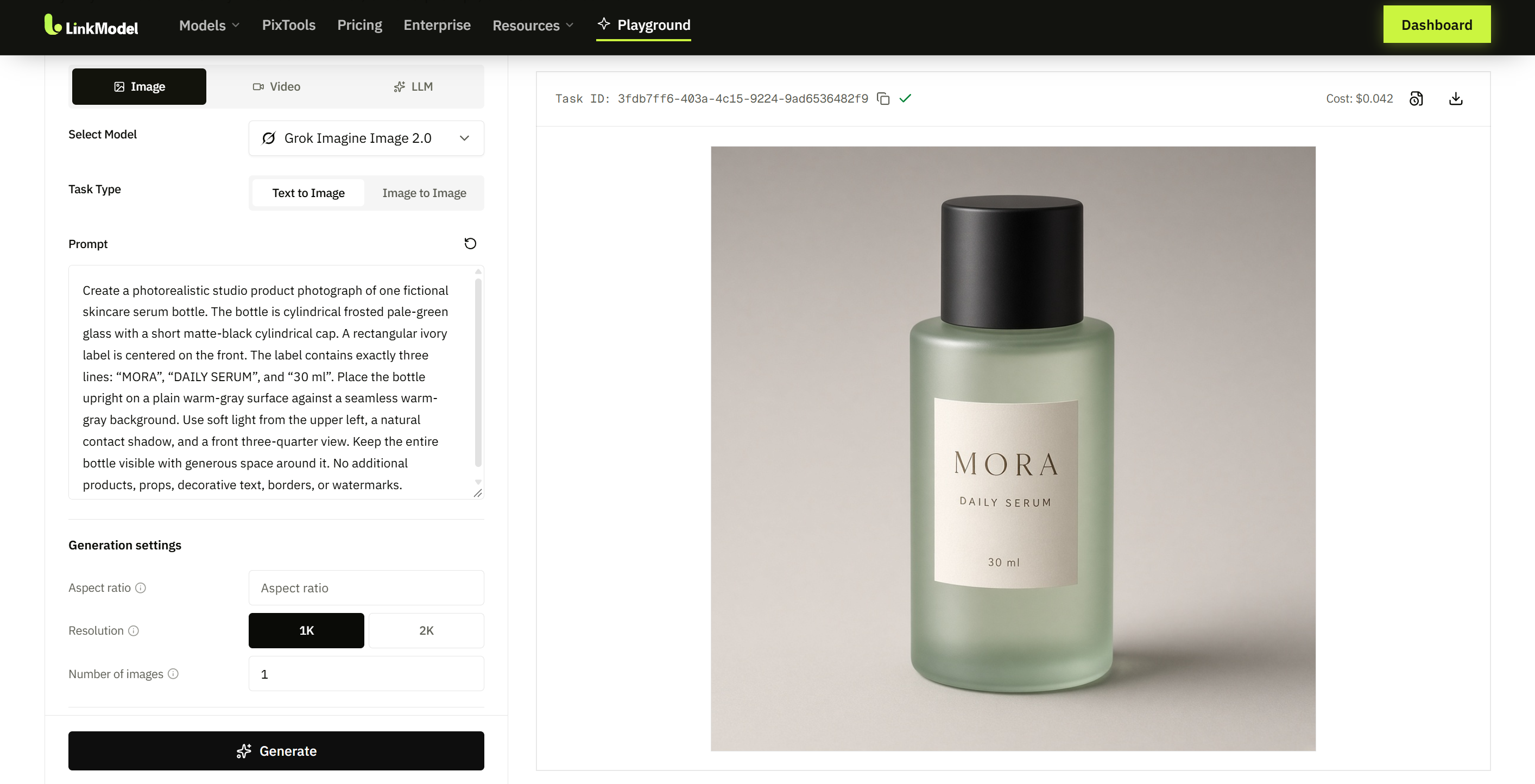
Product Photography: Preserve the Product Before Improving the Scene
For ecommerce imagery, the correct product is the primary requirement. An attractive background cannot compensate for redesigned packaging.
xAI’s official prompting guide emphasizes recognizable subject details, materials, placement, and composition. That is a useful way to structure a product brief and evaluate whether the output fulfills it.
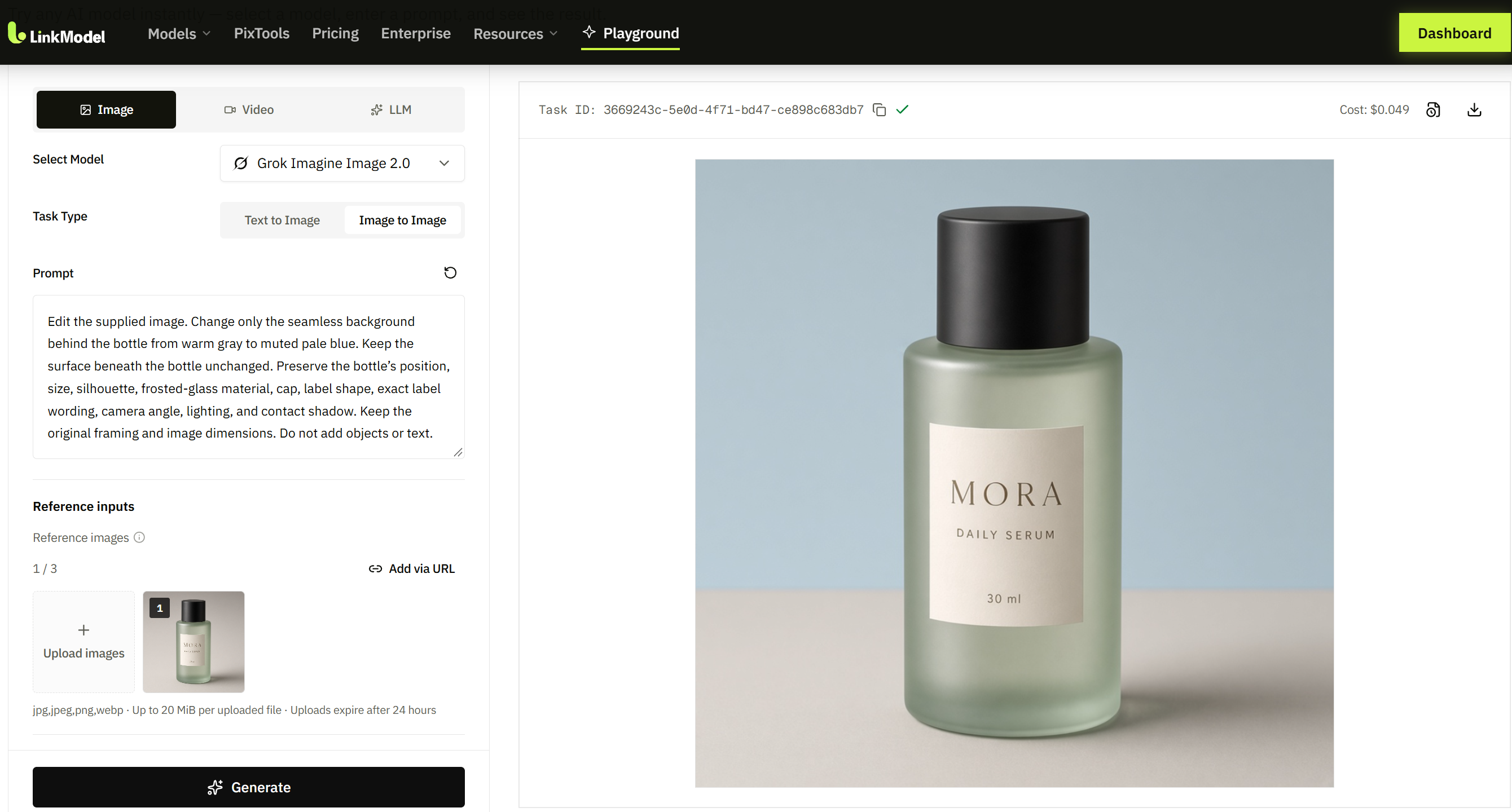
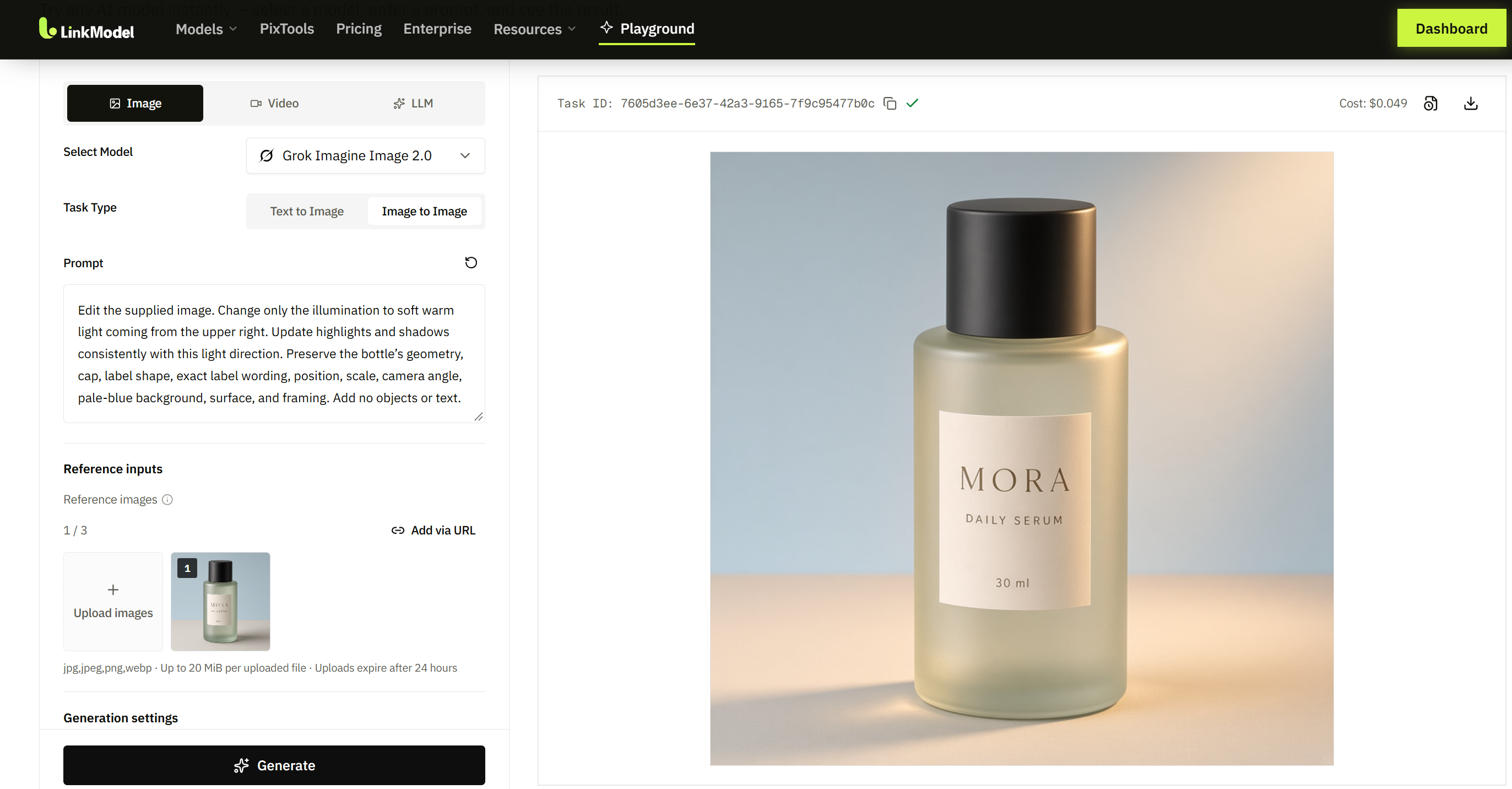
For a skincare bottle moved into a new setting, inspect the silhouette, cap, label position, and proportions first. Then assess the environment and lighting.
| Priority | Acceptance check |
|---|---|
| Product identity | Correct shape, components, packaging, and proportions |
| Material realism | Plausible surfaces, reflections, and transparency |
| Scene integration | Consistent scale, perspective, shadows, and lighting |
| Commercial usability | No invented labels, duplicate products, or altered branding |
Evaluate product fidelity separately from aesthetic appeal. This prevents dramatic lighting or decorative detail from concealing an inaccurate object.
Typography: Font Quality and Prompt Adherence Are Separate
A direct comparison reviewed during our research drew praise for Sunburst’s handling of an existing font. In the same discussion, the comparison author also noted GPT outputs that introduced content beyond the prompt.
This is a useful case because it exposes a trade-off hidden by simple “better text” claims: an image can handle lettering well while still failing the composition brief.
OpenAI’s image-generation documentation acknowledges remaining limitations in text placement, clarity, and structured composition. Exact wording therefore remains something to verify rather than assume.
For advertising, inspect spelling, punctuation, line breaks, reading order, and unwanted additions. When text must remain exact, generate the visual first and add final typography in a design tool.

Resolution and Consistency: More Detail Is Not Automatic Accuracy
GPT Image 2.5 supports custom dimensions up to its documented 4K pixel limit, while OpenAI describes resolutions above 2560 × 1440 as experimental. Large-output support should be considered with that qualification.
The supplied LinkModel Grok pricing table lists 1K and 2K configurations. These describe the priced configurations in that table rather than every possible interface offering the model.
Inspect outputs at the intended delivery size. Higher resolution can reveal useful texture, but also makes lettering errors, implausible materials, and inconsistent edges more visible.
For illustrations and campaigns, compare multiple assets against the same approved reference. Consistent character proportions, palette, and visual treatment matter more than whether each image looks impressive on its own.
Image Editing: Local Changes, References, and Subject Preservation
The strongest editing workflow changes what you request while preserving what you already approved. Assess those requirements independently.
Local Editing: Review Protected Details
In an editing account reviewed during our research, the reported problem extended beyond a missed instruction. An existing image appeared less realistic after editing, and details outside the requested change were modified despite preservation instructions.
The account does not establish a measured failure rate or a controlled API comparison. It does identify an important production risk: a local request can produce changes elsewhere in the image.
After a background replacement, inspect the foreground subject. After changing clothing, compare the face, hands, pose, and body proportions. After relighting, check whether geometry or identity changed unnecessarily.
GPT Image 2.5 documents mask-based editing, providing an additional way to specify the intended region. A mask is useful control, but the final image still needs inspection.
Multi-Reference Composition: Define What Each Input Contributes
Grok’s official multi-image editing documentation supports up to five source images. The first reference determines the default output aspect ratio unless it is overridden.
This resolves a common source of confusion: a platform exposing fewer upload slots does not necessarily describe the native API’s capacity.
For an advertising composition, assign clear roles to the inputs. Identify the product reference, environment reference, and visual-treatment reference. Then verify that the output uses the correct attributes without duplicating subjects or changing the product.
More references increase input capacity, not guaranteed accuracy. The useful measure is whether the intended attributes survive the composition.
Repeated Editing: Compare Against the Original
xAI’s editing guide documents progressive refinement by passing an output into the next request. This supports iterative work, but does not establish unlimited preservation through a long editing sequence.
Keep the original asset and approved intermediate versions. Compare protected details with the original after each substantial revision.
Small shifts can accumulate: a label moves, a face becomes more generic, or a product changes shape. If an edit introduces drift, return to an approved version before continuing.
For multi-turn work, consistency across revisions is more important than the success of the final change alone.
Transparent Assets: Inspect the Delivered Alpha Channel
GPT Image 2.5 has an explicit documented transparent-background option, using PNG or WebP for transparent output. This makes it a clear candidate when a deliverable needs to be placed over other designs.
Inspect fine edges, halos, and the actual alpha channel. A checkerboard rendered inside an opaque image is not transparency.
Grok vs GPT Image 2.5 API Pricing
Grok uses image-component charges; GPT Image 2.5 uses token billing. Compare complete requests before deciding which is cheaper.
All prices below are in USD. Provider list rates were checked on October 19, 2026. LinkModel’s 30% generation discount is presented separately from the list rates and reference-input charge.
Grok Pricing: List Rates and the LinkModel Discount
xAI’s official Grok Imagine Image 2.0 model page publishes the following rates for the configurations also shown in the supplied LinkModel pricing table.
| Output configuration | Published output rate | LinkModel generation offer |
|---|---|---|
| 1K, low | $0.04/image | 30% discount |
| 1K, medium | $0.06/image | 30% discount |
| 2K, low | $0.06/image | 30% discount |
| 2K, medium | $0.08/image | 30% discount |
The published reference-input price is $0.01 per image. The generation discount is not extended to that input charge in this comparison.
Keep the output discount separate from total-request savings. A request containing reference images includes input charges as well as output charges; a generation discount should not be described as the same percentage reduction on every component of the bill.
Through LinkModel’s Grok offering, the 30% generation discount provides a direct commercial reason to evaluate the service when Grok meets your creative requirements.
GPT Image 2.5 Pricing: Flare and Sunburst
The official pages for GPT Image 2.5 Flare and GPT Image 2.5 Sunburst publish the same Standard token rates.
| Billed component | Price per million tokens |
|---|---|
| Text input | $5.00 |
| Cached text input | $1.25 |
| Image input | $8.00 |
| Cached image input | $2.00 |
| Image output | $30.00 |
Both model pages also publish $15.00 per million image-output tokens with Batch processing. That is an output-token rate for a different processing mode, not a flat image price.
Equal token rates do not establish equal request costs. Billed quantities still determine the total. OpenAI also states that the GPT Image 2 calculator does not estimate GPT Image 2.5 token consumption.
Caching is route-specific. OpenAI documents cached image-generation input pricing for its Responses API image tool rather than direct Images API requests. Responses workflows can also include the main model’s token charges.
Which Model Costs Less for the Same Task?
The published rates alone do not establish the cheaper model for a matched creative task.
Grok makes image-component budgeting straightforward. GPT requires the selected request’s token usage. Neither rate table supplies the missing information about revisions or accepted outputs.
Record generation charges, reference inputs, edit rounds, and any additional model usage. Then calculate:
API cost per accepted asset = total API charges ÷ accepted assets.
Keep review and correction time separate unless you are deliberately calculating broader production costs.
For LinkModel, the generation discount improves Grok’s price proposition. It does not by itself establish lower total costs than GPT Image 2.5, because the two workflows can require different usage and revision patterns.
Generation Speed: Grok vs Flare and Sunburst
Flare is the recommended GPT starting point for speed-sensitive work; a controlled speed ranking against Grok is not established by the reviewed evidence.
The research materials included platform timings from different routes and settings. Those measurements should not be combined into one leaderboard without comparable conditions.
A useful comparison records model choice, provider route, dimensions, quality, reference count, and request duration. Repeat representative tasks rather than timing a single successful output.
One documented Grok detail affects the comparison: automatic quality currently selects low for generation and medium for editing. Explicit quality settings help prevent an accidental comparison of different defaults.
For creative teams, measure time to approval. For interactive applications, also examine slower responses and variability. The fastest initial image may not produce the shortest overall workflow if it needs more corrections.
API Integration: Native Features and Provider Settings
Validate generation and editing separately before moving an application. Familiar endpoint names do not guarantee identical request formats.
xAI’s editing documentation states that its native endpoint expects JSON, while the OpenAI SDK’s image-edit method uses multipart form data and is not supported for that native operation.
A gateway may expose a different interface. Separate the underlying model’s capabilities from the native API format and the selected route’s supported parameters.
Validate a representative request containing your actual references, dimensions, quality setting, and output format. Check how unsupported settings and errors are handled.
Successful text-to-image generation alone does not establish editing compatibility. For LinkModel, assess the selected route’s behavior alongside the generation discount rather than assuming the price offer guarantees identical controls across providers.
Which Should You Choose: Grok, Flare, or Sunburst?
Start with the model whose documented controls and billing fit the task, then verify the details that determine whether you can publish the output.
| Your requirement | Starting candidate | What decides |
|---|---|---|
| Clear image-based budgeting | Grok Imagine Image 2.0 | Accepted output quality and complete charges |
| Discounted Grok generation | Grok through LinkModel | Suitability of the output and supported route |
| Fast GPT iteration | GPT Image 2.5 Flare | Useful latency at acceptable quality |
| Demanding GPT quality requirements | GPT Image 2.5 Sunburst | A meaningful improvement on the brief |
| Masks or transparent assets | GPT Image 2.5 | Preservation and delivered-file quality |
For product and character work, compare candidates against the same original assets. For typography, separate exact wording from aesthetic appeal. For editing, score protected details independently from the requested modification.
The reviewed cases show why these distinctions matter: lettering can be strong while instruction adherence fails, and a successful local change can accompany unwanted changes elsewhere.
Use LinkModel’s 30% Grok generation discount when Grok meets the brief—not as a substitute for checking the result. This connects a specific price advantage to a production decision without assuming that one model is best for every job.
Frequently Asked Questions
Is Grok Imagine Image 2.0 better than GPT Image 2.5?
There is no verified overall winner in the reviewed evidence. Grok offers straightforward image-based billing and reference workflows. GPT Image 2.5 offers Flare and Sunburst choices, plus documented mask and transparency controls. Compare the requirements of your actual asset.
Is Flare faster than Grok?
Flare is OpenAI’s speed-focused option, but that does not establish its latency against Grok. A useful comparison needs repeated requests with documented dimensions, quality settings, references, and provider routes.
Which is better for editing and character consistency?
Both require checking the requested change and protected details. GPT has a documented mask workflow; Grok supports up to five reference images. Neither feature alone establishes more reliable preservation across repeated edits.
Which model produces more accurate text?
A reviewed comparison praised Sunburst’s font handling while also identifying unwanted additions in GPT outputs. That case does not establish a universal ranking. Inspect exact wording, layout, and instruction adherence separately.
What does LinkModel’s 30% Grok discount cover?
The offer described here is a 30% discount on Grok Imagine Image 2.0 generation pricing. The published reference-input rate is $0.01 per image, and this comparison does not apply the discount to that input fee. Total-request savings depend on the components used.
Conclusion
Choose Grok Imagine Image 2.0 for straightforward image-based budgeting, evaluate Flare for speed-sensitive GPT workflows, and consider Sunburst when demanding quality requirements justify the quality-focused option. Subject fidelity, exact text, and preservation across edits should determine whether the result is usable. When Grok meets those requirements, LinkModel’s 30% generation discount supplies a concrete reason to reduce generation spend while keeping reference charges and complete workflow costs in view.