
Gemini Omni 1.2 Flash pricing starts at $1.50 per million input tokens, $9 per million text output tokens, and $12 per million video output tokens. At 720p, video generation costs approximately $0.07 per second or $1.04 for a 15-second clip—about 30% less per second than Omni 1.1 Flash. Yet the advertised price reduction doesn't tell the whole story.
While API prices have dropped, Google Flow credits for a 10-second 720p video have doubled from 15 to 30. Our research also highlights how resolution, repeated generations, and prompt consistency affect the real cost of a usable video. In our own LinkModel Playground test, a five-second 720p video cost $0.356112 and took 72 seconds to complete, showing why actual production data matters alongside published rates.
LinkModel offers Gemini Omni 1.2 Flash at the same official token rates, with $0 minimum spend, $0 monthly platform fee, and unified billing across multiple AI models—so you can control spending without paying for another platform subscription. New users automatically receive $1 in free Credits upon signup, with no credit card or deposit required. The one-time offer is for new users, cannot be claimed repeatedly by existing users, never expires, and works across all models currently available on LinkModel. Start with the free credit, explore the model, and scale your video-generation budget as needed.
How Much Does Gemini Omni 1.2 Flash Cost?
Gemini Omni 1.2 Flash costs $12 per million video output tokens through the standard API. At 720p, a five-second video costs approximately $0.35 in video output fees, while a 15-second video costs approximately $1.04.
The model uses token-based pricing rather than a fixed per-video fee. Video duration, resolution, input assets, and editing operations can all influence the amount charged.
Our own five-second generation provides a useful reference point: LinkModel charged $0.356112 for a completed 720p video, compared with the published video-output-only estimate of $0.347520.
Official Gemini Omni 1.2 Flash API Pricing
The current published standard pricing is:
| Token Type | Google Official | LinkModel |
|---|---|---|
| Text input | $1.50 / 1M tokens | $1.50 / 1M tokens |
| Image input | $1.50 / 1M tokens | $1.50 / 1M tokens |
| Video input | $1.50 / 1M tokens | $1.50 / 1M tokens |
| Audio prompt input | $1.50 / 1M tokens | $1.50 / 1M tokens |
| Text output | $9.00 / 1M tokens | $9.00 / 1M tokens |
| Reasoning output | $9.00 / 1M tokens | $9.00 / 1M tokens |
| Video output | $12.00 / 1M tokens | $12.00 / 1M tokens |
Google and LinkModel publish the same standard input and output token rates for Gemini Omni 1.2 Flash.
For ordinary text-to-video generation, the video output component typically represents the largest portion of the published token cost.
For reference-heavy editing, input processing and additional operations may also contribute to total spending.
The main reason to choose LinkModel for this model is therefore not a lower token price, but its usage-based access, centralized billing, and ability to manage multiple AI model providers through one platform.
Gemini Omni 1.2 Flash Cost per Second and Clip
Google's published 720p video output accounting uses 5,792 tokens per second.
The formula is:
Video output cost = Duration × Output tokens per second × $12 / 1,000,000
For a five-second video:
5 × 5,792 × $12 / 1,000,000 = $0.347520
For a fifteen-second video:
15 × 5,792 × $12 / 1,000,000 = $1.042560
This produces the following estimated output costs:
| Duration | Output Tokens | 720p Output Cost |
|---|---|---|
| 3 seconds | 17,376 | $0.21 |
| 5 seconds | 28,960 | $0.35 |
| 6 seconds | 34,752 | $0.42 |
| 8 seconds | 46,336 | $0.56 |
| 10 seconds | 57,920 | $0.70 |
| 12 seconds | 69,504 | $0.83 |
| 15 seconds | 86,880 | $1.04 |
The published output rate is especially useful for estimating production volume.
For example, 100 five-second 720p outputs represent approximately $34.75, while 100 fifteen-second outputs represent $104.26 in video output fees.
Choosing the shortest duration that satisfies the creative objective can therefore reduce spending without changing models.
Our Gemini Omni 1.2 Flash Test: Actual Cost, Speed, and Output
To compare published pricing with real generation costs, **we generated a five-second 720p product advertisement using Gemini Omni 1.2 Flash through LinkModel Playground.
The prompt requested a matte black perfume bottle on a dark stone pedestal, a continuous clockwise camera movement, warm golden studio lighting, and subtle atmospheric smoke.
We used Text-to-Video with a 16:9 aspect ratio, 720p resolution, and five-second duration, without uploaded reference images.
The generated file contained approximately five seconds of video at 1280 × 720 and 24 FPS.
The completed task was also recorded in LinkModel's Video Logs and Usage dashboard.
| Test Metric | Actual Result |
|---|---|
| Model | Gemini Omni 1.2 Flash |
| Platform | LinkModel Playground |
| Task type | Text-to-Video |
| Aspect ratio | 16:9 |
| Resolution | 1280 × 720 |
| Video duration | Approximately 5 seconds |
| Frame rate | 24 FPS |
| Task status | Completed |
| Task completion time | 72 seconds |
| Billable requests | 1 |
| Actual charge | $0.356112 |
| Published output-only estimate | $0.347520 |
| Difference | $0.008592 |
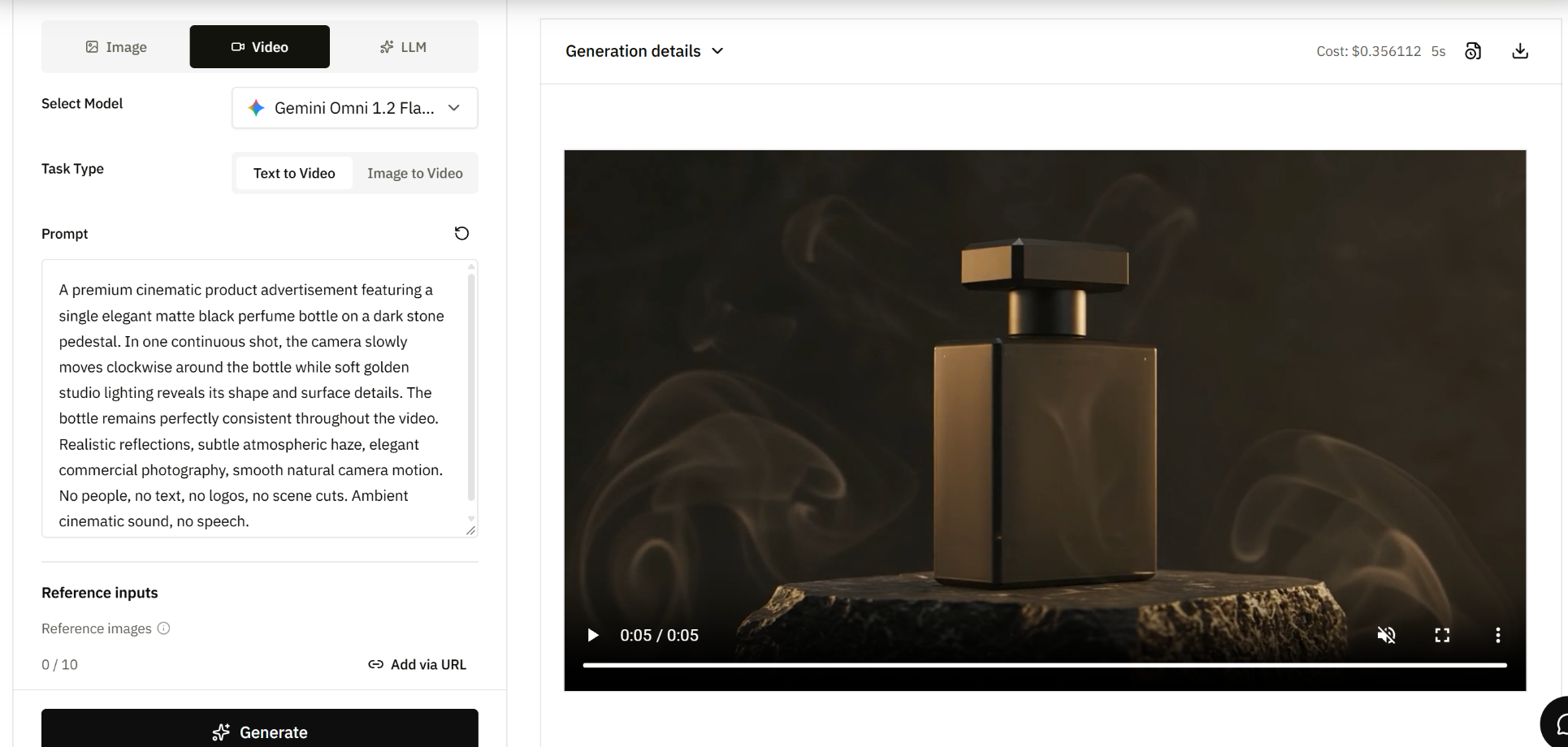
The actual charge was approximately 2.47% higher than the video-output-only estimate.
The Playground result, completed task log, and Usage dashboard all displayed the same $0.356112 charge.
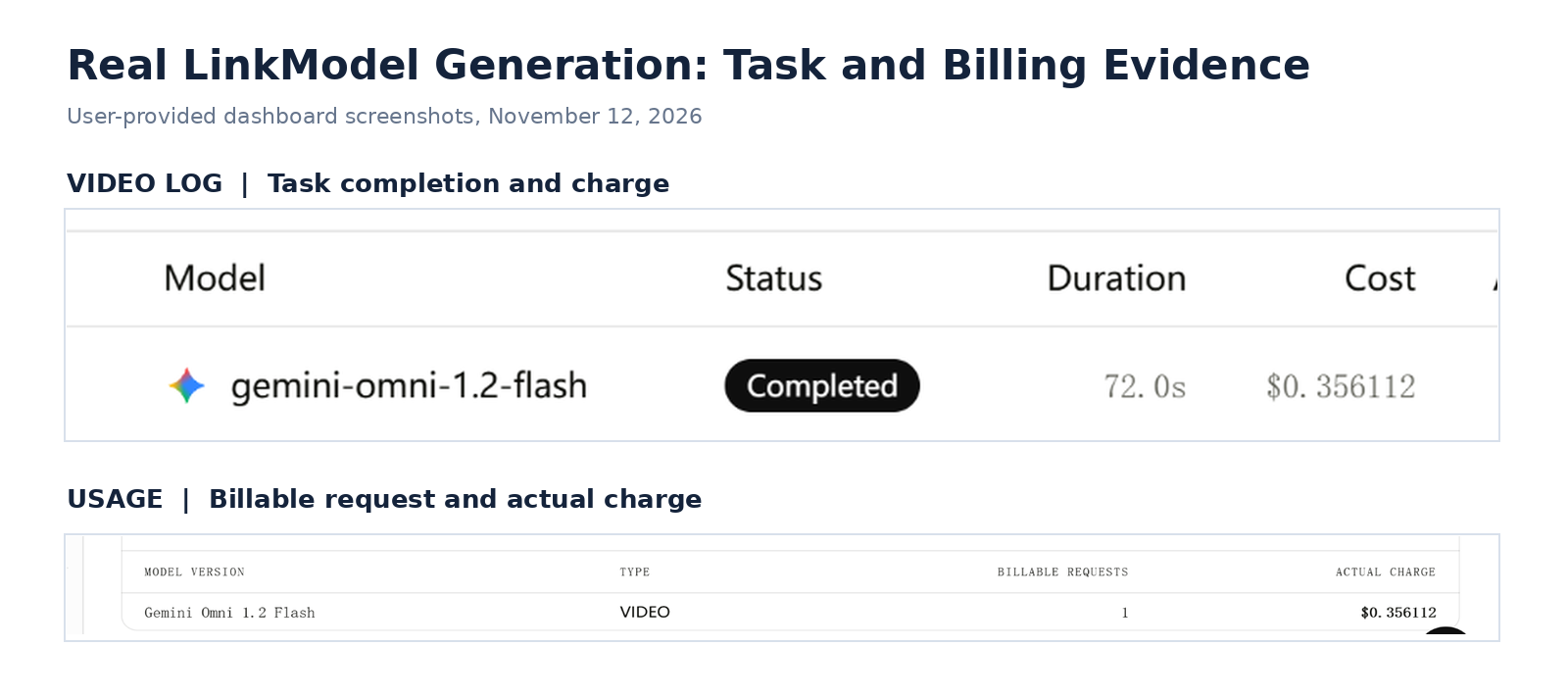
The Usage record confirmed one billable video request, while the task log recorded a completion duration of 72 seconds. The available billing view did not separately identify the token categories responsible for the difference.
What Did the Generated Video Actually Look Like?
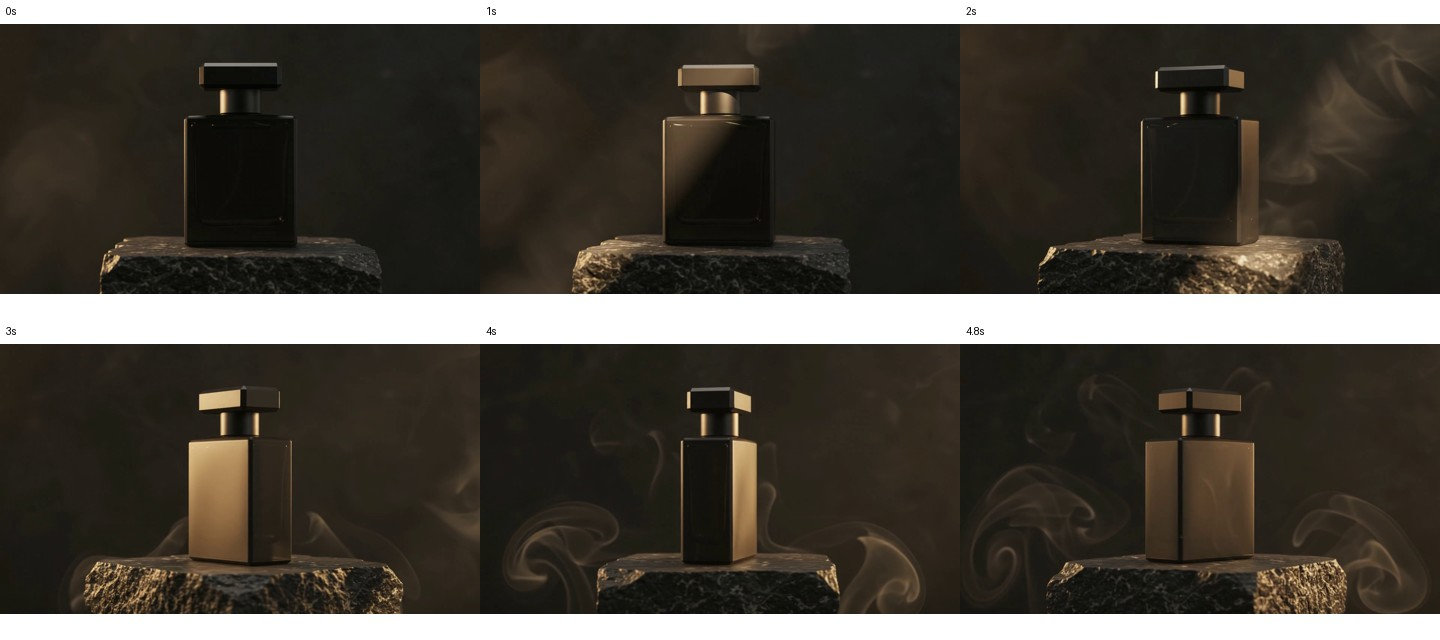
The resulting clip showed an elegant perfume bottle standing on a stone pedestal against a dark background.
Across the video, the camera perspective changed while warm lighting and atmospheric smoke created a cinematic commercial appearance.
Our frame-by-frame review found several useful observations.
Product identity remained recognizable. The bottle and cap retained broadly consistent shapes throughout the sequence.
The scene remained continuous. The stone pedestal, dark background, and atmospheric smoke were maintained as the camera perspective changed.
Lighting contributed strongly to the final appearance. Reflections and warm highlights changed across the bottle as the shot developed.
However, the result did not perfectly match every instruction.
Although the prompt requested a matte black perfume bottle, several frames showed a noticeably golden bottle surface. The result was visually coherent but did not fully preserve the requested material appearance.
This difference matters for commercial work involving strict product colors, materials, or brand identity.
A visually attractive clip may still require revision when product appearance must match an approved reference.
The test demonstrates three practical findings:
Pricing: Actual usage can differ slightly from the video-output-only calculation.
Speed: The completed five-second video required 72 seconds of task processing in this run.
Quality: The generated shot maintained overall scene continuity, but exact product-material consistency was imperfect.
For developers evaluating video-generation costs, these details offer a more useful starting point than a published price alone.
Do Reference Images, Audio, and Source Videos Increase Costs?
Yes. Additional reference inputs can increase input token consumption and may change the operations required to produce a video.
Gemini Omni 1.2 Flash supports multiple input types, including text, images, video, and supported audio references.
The difference becomes clear when comparing two production workflows.
Text-to-video: A creator supplies a written description and generates a new video. Our perfume advertisement used this approach, without uploaded reference images.
Reference-based video editing: A creator supplies an existing video or reference images and asks the model to preserve certain elements while changing others.
The second workflow processes additional source material, potentially increasing input usage.
For a product advertisement, reference images may help communicate the intended bottle shape, surface material, or brand appearance more precisely than text alone.
This is relevant to our perfume-video result, where the scene was coherent but the bottle's surface appeared more golden than requested.
A future reference-image workflow could investigate whether supplying a product photograph improves material consistency. The current test establishes the text-to-video baseline.
For video production budgets, separate input processing, video output, editing, and upscaling costs rather than treating every completed video as a single fixed-price operation.
Gemini Omni 1.2 Flash Pricing by Video Resolution
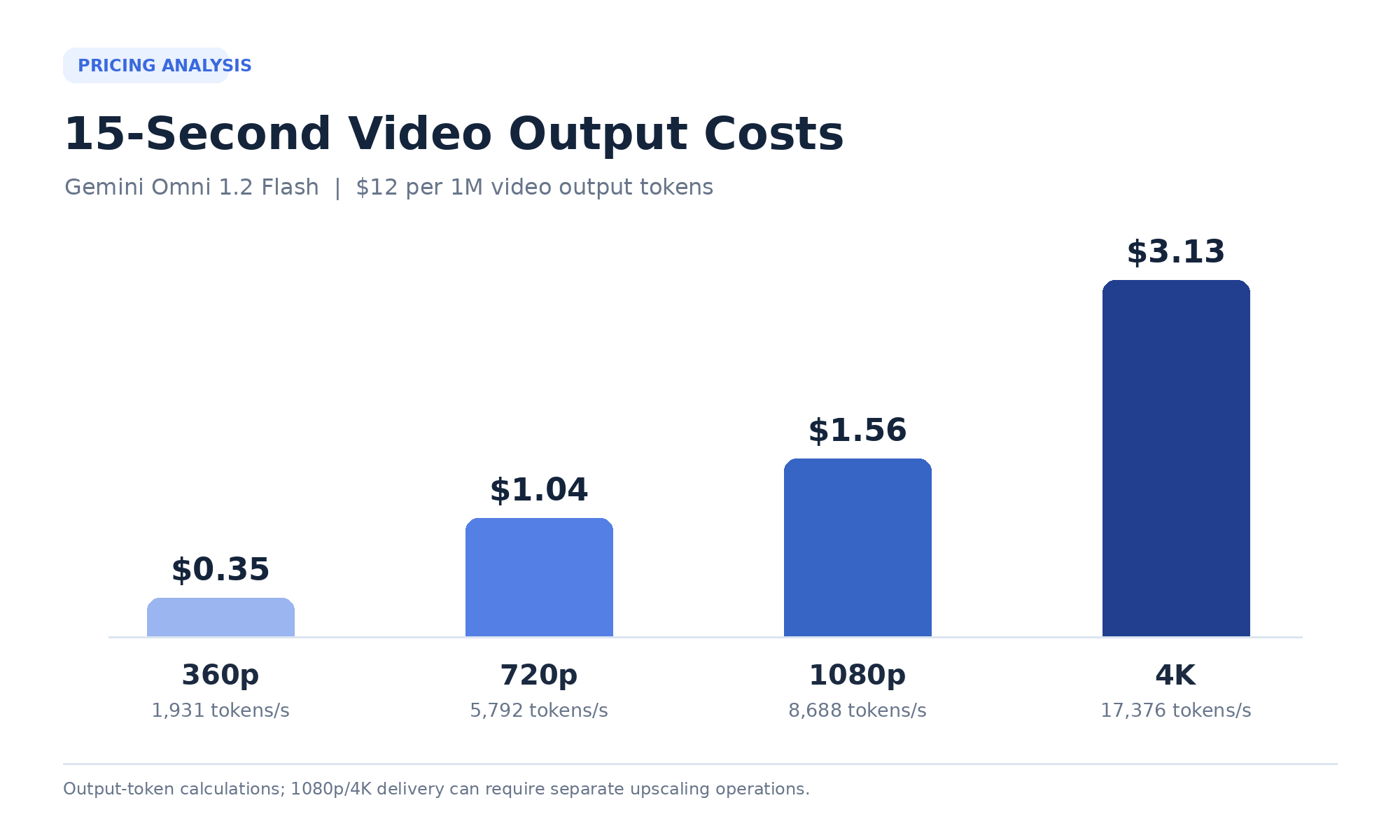
Gemini Omni 1.2 Flash video output costs approximately $0.023 per second at 360p and $0.070 per second at 720p. Published resolution-based token accounting also gives approximately $0.104 per second at 1080p and $0.209 per second at 4K.
Higher resolution increases video output token consumption, but it is important to distinguish output-token calculations from the actual generation and upscaling workflow.
Google supports lower-resolution drafting and higher-resolution delivery, including operations that upscale selected videos to 1080p or 4K.
Gemini Omni 1.2 Flash Video Output Token Costs by Resolution
| Resolution | Tokens per Second | Approx. Cost per Second | 10-Second Output | 15-Second Output |
|---|---|---|---|---|
| 360p | 1,931 | $0.023 | $0.23 | $0.35 |
| 720p | 5,792 | $0.070 | $0.70 | $1.04 |
| 1080p | 8,688 | $0.104 | $1.04 | $1.56 |
| 4K | 17,376 | $0.209 | $2.09 | $3.13 |
These figures describe output-token costs at the corresponding resolution accounting rates.
1080p and 4K delivery may involve separate upscaling operations. Their complete workflow costs should account for the specific generation, editing, and upscaling steps performed.
A 15-second 4K output uses nine times as many output tokens as a corresponding 360p output under the published accounting values.
For creators exploring multiple concepts, the difference makes resolution selection an important budgeting decision.
Which Gemini Omni 1.2 Flash Resolution Offers the Best Value?
The right resolution depends on the production stage rather than the highest setting available.
| Production Goal | Suggested Resolution | Main Benefit |
|---|---|---|
| Explore visual concepts | 360p | Lower drafting costs |
| Evaluate motion | 360p or 720p | Efficient iteration |
| Inspect product details | 720p | Greater visual detail |
| Prepare final social content | 1080p delivery | Higher-resolution presentation |
| Produce premium deliverables | 4K delivery | Maximum listed resolution |
360p is most useful when the creative concept is uncertain.
For example, a creator may need to compare several camera movements before deciding which one works best for an advertisement.
720p is more useful when reviewing important visual details.
Our perfume advertisement was generated at 720p. The resulting video provided enough visual detail to identify the bottle's changing surface color and examine scene continuity across frames.
Those observations would be important when deciding whether a clip is ready for final production.
1080p and 4K are best reserved for content that benefits from high-resolution delivery.
Higher resolution does not automatically solve inconsistent materials, unwanted dialogue, or incorrect scene movement.
For this reason, a cost-efficient workflow should validate the creative result before allocating additional spending to final-resolution output.
Production Example: Four Video Concepts at Different Resolutions
Consider an advertising project requiring four alternative 15-second video concepts.
At 360p, the combined output cost would be:
4 × 15 × 1,931 × $12 / 1,000,000 = $1.39
At 720p:
4 × 15 × 5,792 × $12 / 1,000,000 = $4.17
That is approximately $2.78 more for four concepts.
For 40 concepts, the difference increases to approximately $27.80.
Our real test also illustrates the importance of reviewing actual output before increasing resolution.
The perfume video had a coherent composition and camera movement, but its material color was not perfectly aligned with the prompt.
Generating the same creative direction at a higher resolution would not by itself guarantee that this issue disappeared.
The stronger workflow is to resolve important creative details first, then invest in higher-resolution delivery.
Gemini Omni 1.2 Flash vs Omni 1.1 Pricing: Is the Upgrade Worth It?
Gemini Omni 1.2 Flash reduces the standard video output token price from $17.50 to $12 per million tokens, a decrease of approximately 31.4%.
It also increases the maximum native video duration from ten to fifteen seconds and introduces improvements in editing and reference handling.
However, price, visual quality, and generation reliability are separate considerations.
Gemini Omni 1.2 Flash vs Omni 1.1 API Pricing
| Feature | Omni 1.1 Flash | Omni 1.2 Flash |
|---|---|---|
| Video output price | $17.50 / 1M tokens | $12 / 1M tokens |
| Approximate 720p price/second | $0.101 | $0.070 |
| 10-second 720p output | $1.01 | $0.70 |
| Maximum native duration | 10 seconds | 15 seconds |
| Input token price | $1.50 / 1M tokens | $1.50 / 1M tokens |
| Text output price | $9 / 1M tokens | $9 / 1M tokens |
| Editing | Conversational editing | Enhanced multi-turn editing |
| Reference handling | Previous-generation capabilities | Improved reference adherence |
At identical video duration and resolution, the newer model offers lower standard video output pricing.
For 100 ten-second 720p generations, the difference is approximately $31.86 in video output spending.
The longer native duration also provides more flexibility for narrative scenes that previously required shorter clips or multiple segments.
What Google's Official Omni 1.2 Evaluations Show
Google DeepMind published side-by-side preference comparisons between Omni 1.2 and Omni 1.1.
These results provide additional evidence for evaluating the model upgrade.
Text-to-Video Side-by-Side Preference
| Evaluation Metric | Omni 1.2 | Omni 1.1 |
|---|---|---|
| Prompt adherence | 55% | 45% |
| Visual consistency | 62% | 38% |
| Visual quality | 54% | 46% |
The largest reported difference in this table is visual consistency, where Omni 1.2 received a 62% preference share.
For creators producing character-driven scenes or recurring commercial content, visual consistency is an important quality dimension.
Image-to-Video Side-by-Side Preference
| Evaluation Metric | Omni 1.2 | Omni 1.1 |
|---|---|---|
| Overall preference | 59% | 41% |
| Reference identity consistency | 60% | 40% |
| Visual consistency | 57% | 43% |
Google also reported a 63% versus 37% preference result for multi-reference identity consistency.
These are Google-published side-by-side evaluation results, rather than production approval rates.
The practical implication is that Omni 1.2 offers documented improvements in important visual dimensions, particularly consistency and reference handling.
What Our Research Found About Prompt Migration
Our review of early creator experiences identified several cases where previously successful video prompts did not transfer smoothly to Omni 1.2.
Reported problems included unexpected character changes, unnatural movement, additional dialogue, and inconsistent camera behavior.
One account described approximately 20 attempts to obtain an acceptable result after transferring a previously successful prompt from an older video workflow.
These experiences illustrate a potential cost of model migration.
A recurring advertising workflow may depend on a particular character's clothing, product identity, camera framing, or dialogue sequence.
When the model interprets those instructions differently, the team may need additional generations or editing passes.
Our own perfume-video test provides a related example of instruction adherence.
The prompt asked for a matte black bottle, but the generated video showed golden reflections and a noticeably warmer surface appearance across multiple frames.
The video was visually coherent, yet the result did not perfectly match the requested material.
A model can improve on official quality evaluations while individual creative tasks still require revision.
For recurring video production, it is useful to compare established prompts and reference assets before switching an entire production workflow.
Which Gemini Omni 1.2 Generation Modes Support 15 Seconds?
Gemini Omni 1.2 Flash supports several generation and editing operations, but their duration limits differ.
| Generation Mode | Duration |
|---|---|
| Text-to-video | 3–15 seconds |
| Image-to-video | 3–15 seconds |
| Reference-guided generation | Up to 15 seconds where supported |
| General video editing | Outputs up to 15 seconds |
| First-and-last-frame generation | 3–10 seconds |
| Newly generated extension segment | 3–10 seconds |
| Video upscaling | Depends on eligible source video, up to 15 seconds |
The model supports both 16:9 and 9:16 aspect ratios.
For developers building automated video workflows, selecting the correct operation is essential to calculating duration, output cost, and the expected result.
An extension task adds generated footage to an existing video. An upscaling task increases resolution from a source clip. Neither should be confused with generating a completely new video from a text prompt.
Why Does Gemini Omni 1.2 Flash Cost More Google Flow Credits?
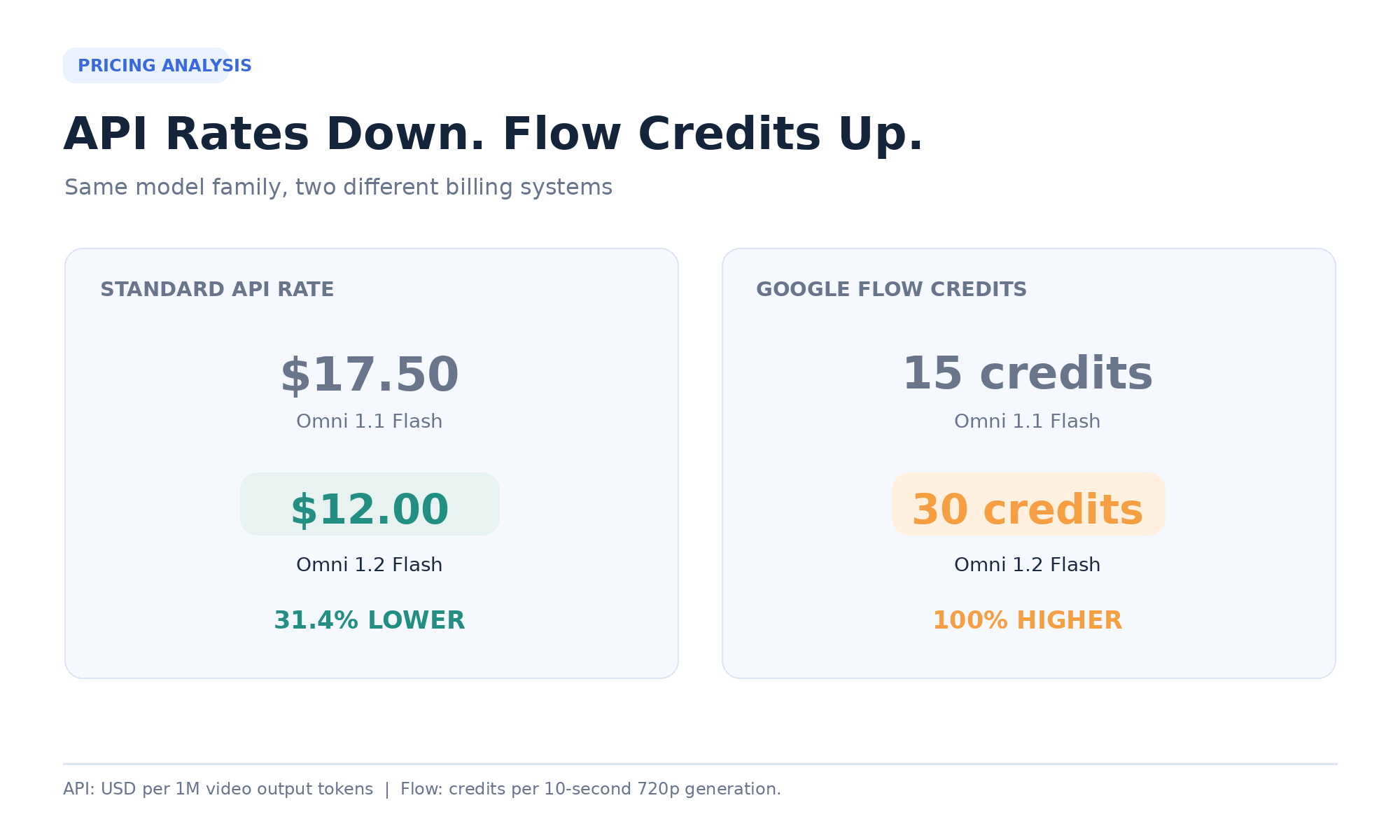
Google Flow charges 30 credits for a ten-second 720p Omni 1.2 generation, compared with 15 credits under the previous Omni Flash schedule.
This represents a 100% increase in Flow credit consumption for the matched duration and resolution.
Meanwhile, the standard API video output price decreased by approximately 30%.
The difference arises because Google Flow and the Gemini API use separate pricing systems.
Official Gemini Omni 1.2 Flash Google Flow Credits
Google's published Flow schedule lists the following 720p generation requirements.
| Video Duration | Omni 1.1 Flow Credits | Omni 1.2 Flow Credits |
|---|---|---|
| 6 seconds | 10 | 18 |
| 8 seconds | 12 | 24 |
| 10 seconds | 15 | 30 |
| 15 seconds | Not supported | 60 |
For Omni 1.2 at 720p:
The first ten seconds cost 3 credits per second.
Seconds 11–15 cost an additional 6 credits per second.
Therefore:
10 × 3 + 5 × 6 = 60 credits for a fifteen-second video
The fifteen-second option requires an eligible Google AI Plus, Pro, or Ultra subscription.
The higher Flow credit requirement is an important consideration for creators who previously planned their production around the older model's allowances.
Gemini API vs Google Flow: Same Video, Different Billing
| Video Duration at 720p | Gemini API Output Cost | Google Flow Credits |
|---|---|---|
| 5 seconds | $0.35 | 15 |
| 6 seconds | $0.42 | 18 |
| 8 seconds | $0.56 | 24 |
| 10 seconds | $0.70 | 30 |
| 15 seconds | $1.04 | 60 |
These two columns represent different billing units.
The API charges dollars based on token consumption. Google Flow deducts credits according to its product-specific pricing schedule.
The monetary value of Flow credits depends on the user's subscription or purchasing arrangement.
Therefore, a lower API token price does not automatically mean fewer Flow credits.
For users evaluating the two access methods, the more useful comparison is how many approved videos can be produced from the available budget.
How Much Can 360p Save in Google Flow?
Google Flow offers a meaningful credit difference between 360p and 720p.
For Omni 1.2, the first ten seconds at 360p cost one credit per second, compared with three credits per second at 720p.
For seconds 11–15, the rates increase to two and six credits per second, respectively.
| Duration | 360p Credits | 720p Credits |
|---|---|---|
| 5 seconds | 5 | 15 |
| 8 seconds | 8 | 24 |
| 10 seconds | 10 | 30 |
| 15 seconds | 20 | 60 |
A fifteen-second 720p generation therefore requires three times as many credits as the same duration at 360p.
Consider a hypothetical 1,000-credit allocation dedicated entirely to video generation.
| Generation Type | Credits per Video | Complete Videos |
|---|---|---|
| 10s at 360p | 10 | 100 |
| 15s at 360p | 20 | 50 |
| 10s at 720p | 30 | 33 |
| 15s at 720p | 60 | 16 |
This demonstrates why 360p can be a valuable drafting option in Flow.
Creators who need to explore many scene concepts can preserve more of their allocation by using lower-resolution drafts before final delivery.
Are Flow Credits Charged per Request or per Generation?
Google Flow charges credits per generation, not necessarily per request.
A single request may produce multiple video outputs, depending on the selected feature.
For example, if one request produces two ten-second 720p Omni 1.2 videos, the total credit consumption can be:
2 × 30 = 60 credits
Two fifteen-second 720p outputs can require:
2 × 60 = 120 credits
This distinction is important when estimating batch production costs or reviewing unexpected credit consumption.
The number of generated outputs, rather than only the number of submitted prompts, can determine the credits deducted.
Google Flow also applies separate rules to extension and upscaling.
When planning a production budget, check the selected output count, resolution, duration, and operation before generating.
What Our Review of User Questions Revealed
Our research identified three recurring concerns surrounding Omni 1.2 pricing.
API and Flow price expectations: The advertised API price reduction led some creators to expect lower credit consumption in Flow, even though the two systems have different schedules.
Prompt migration and consistency: Existing prompts sometimes produced different results after upgrading, requiring adjustments to character identity, camera motion, or dialogue.
Subscription value: Creators increasingly evaluated the model through the number of satisfactory videos they could produce within an available credit allowance.
These concerns are connected.
A creator may have enough credits for many nominal generations but still receive relatively few approved videos if the workflow requires repeated adjustments.
This is why cost per usable video is a more informative production metric than the advertised per-second rate alone.
What Does a 15-Second Gemini Omni 1.2 Flash Video Really Cost?
A fifteen-second 720p video costs approximately $1.04 in published API video output fees. However, production budgets also depend on the number of generations, input assets, editing operations, and approved final results.
Our real five-second LinkModel test illustrates the importance of distinguishing published output pricing from the recorded charge for a completed task.
The test cost $0.356112, compared with a video-output-only estimate of $0.347520.
For repeated production, small differences between estimates and actual charges become more relevant as usage increases.
Gemini Omni 1.2 Flash Video Costs at Scale
Using the exact video-output-only estimate of $1.04256 per fifteen-second 720p generation:
| Number of Videos | Video Output Cost |
|---|---|
| 1 | $1.04 |
| 10 | $10.43 |
| 25 | $26.06 |
| 50 | $52.13 |
| 100 | $104.26 |
| 250 | $260.64 |
| 500 | $521.28 |
| 1,000 | $1,042.56 |
These amounts help establish a starting budget for video output consumption.
Our own test additionally shows why real task charges are worth tracking when moving from estimated prices to production accounting.
For a team producing hundreds of clips, a usage dashboard can help connect generation volume, actual spending, and the number of usable outputs.
Gemini Omni 1.2 Flash Cost per Usable Video
A useful production metric is:
Cost per approved video = Total generation spending / Number of approved videos
Consider ten fifteen-second 720p generations.
The combined video output cost is approximately $10.43.
| Approved Videos | Output Cost per Approved Video |
|---|---|
| 10 | $1.04 |
| 8 | $1.30 |
| 5 | $2.09 |
| 3 | $3.48 |
| 2 | $5.21 |
| 1 | $10.43 |
If only two videos are approved, the output cost per usable result becomes approximately five times the nominal single-generation price.
This matters for branded campaigns, character-driven videos, and other production tasks with strict visual requirements.
Our perfume test demonstrates why the approval standard matters.
The scene was visually consistent enough for a cinematic product concept, but the bottle's appearance did not fully preserve the requested matte-black material.
For a creative concept review, this might be acceptable. For an advertisement requiring an exact product finish, it could require another generation or an editing pass.
The definition of a usable video depends on the requirements of the project.
Case Study: Five Promotional Videos on a Fixed Budget
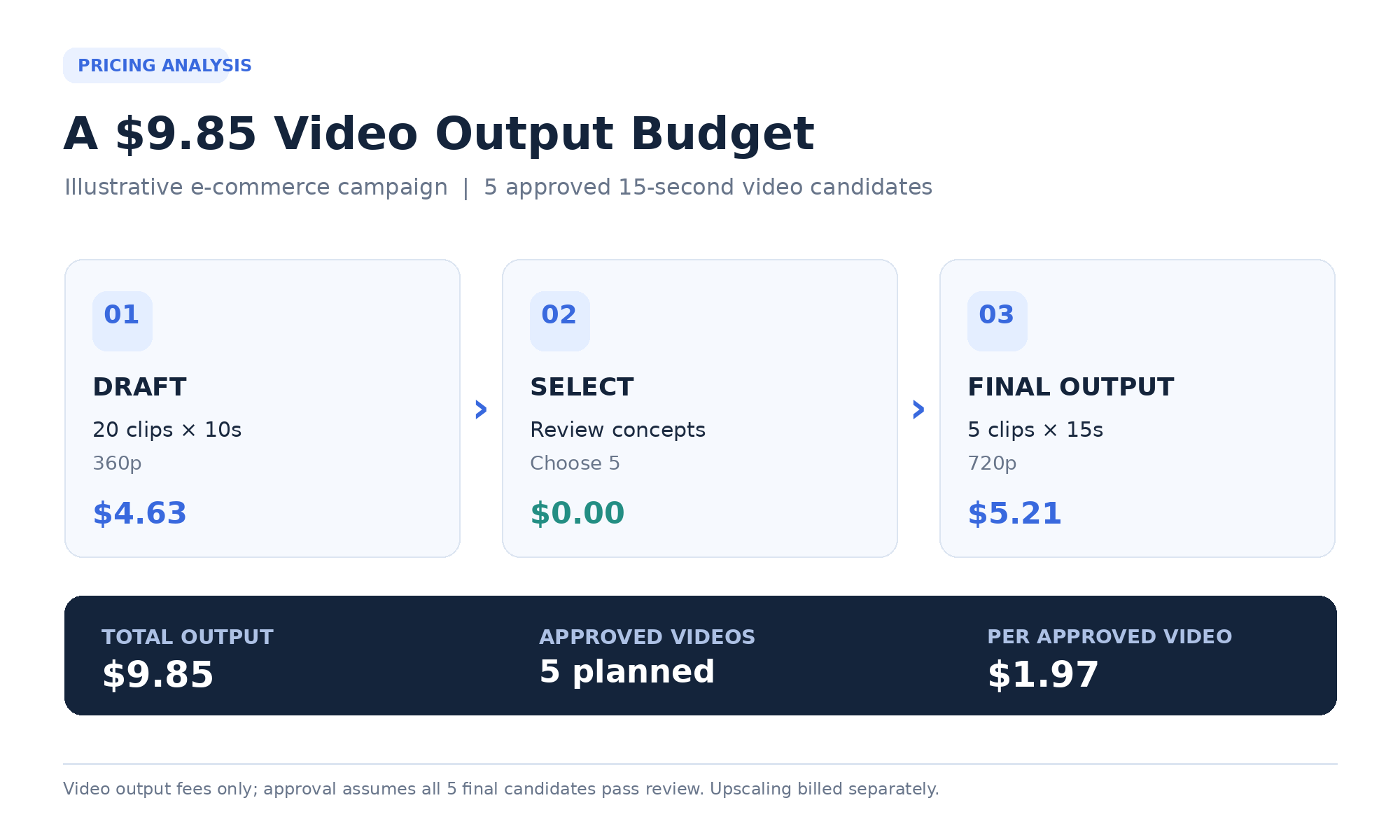
Consider an illustrative production plan for five approved fifteen-second product advertisements.
Each video must preserve the intended product identity, use a suitable camera movement, and communicate the desired visual message.
The workflow separates low-resolution concept exploration from final generation.
Stage 1: Generate twenty ten-second concept drafts at 360p.
The output cost is:
20 × 10 × 1,931 × $12 / 1,000,000 = $4.63
Stage 2: Select five concepts.
The team evaluates composition, camera movement, product appearance, and narrative clarity.
Stage 3: Generate five fifteen-second final candidates at 720p.
The output cost is:
5 × 15 × 5,792 × $12 / 1,000,000 = $5.21
The combined video output budget is:
| Production Stage | Volume | Output Cost |
|---|---|---|
| Concept drafts | 20 × 10s at 360p | $4.63 |
| Final candidates | 5 × 15s at 720p | $5.21 |
| Total | 25 generations | $9.85 |
If all five final candidates are approved, the video output cost per final deliverable is approximately $1.97.
The team can then apply supported editing or upscaling operations where required, accounting for their separate costs.
The example illustrates how lower-resolution drafting can reduce spending during the most uncertain part of the creative process.
Case Study: Prompt Migration and Additional Generation Costs
Our review of early creator experiences identified cases where established prompts required substantial revisions after moving to Omni 1.2.
One account described approximately twenty attempts to obtain a satisfactory result after reusing a previously successful video prompt.
At the standard 720p rate, twenty additional fifteen-second outputs would represent:
20 × $1.04256 = $20.85
For ten comparable production concepts, the same number of additional attempts per concept would represent approximately $208.51 in video output spending.
The actual amount depends on the duration and resolution of the repeated generations.
The relevance of this case becomes clearer when combined with our own test.
A product advertisement may successfully preserve the main subject and camera movement while still changing a critical visual attribute.
If that attribute is important to the brand, the production team may need to revise the prompt, add a reference image, or edit the existing video.
The economics of model migration therefore depend not only on lower token prices but also on how reliably the updated model produces the required result.
How to Reduce Gemini Omni 1.2 Flash Video Costs
Four strategies can help control production spending.
Choose shorter durations when possible. A five-second product shot uses fewer video output tokens than a fifteen-second narrative clip at the same resolution.
Use lower-resolution drafts. Generate early creative concepts at 360p or 720p before investing in final delivery.
Improve prompt specificity and reference quality. Clear instructions and suitable reference materials can make it easier to communicate important visual requirements.
Measure actual charges and approved outputs. Combine pricing estimates with usage records and creative review results.
Our LinkModel test shows why the final step matters.
The published output estimate was $0.347520, while the completed request cost $0.356112.
The difference was small for one video, but tracking real usage provides a stronger basis for forecasting repeated production.
Gemini Omni 1.2 Flash API vs Google Flow vs LinkModel: Which Is Better Value?
The direct Gemini API is suitable for Google-native development, Google Flow is designed for visual video creation, and LinkModel offers usage-based access across multiple AI model providers.
The three AI video API options serve different workflows, so the choice should be based on how videos will be created, managed, and paid for.
Gemini Omni 1.2 Flash Pricing Across Platforms
| Feature | Gemini API | Google Flow | LinkModel |
|---|---|---|---|
| Main access method | Developer API | Visual creation interface | Unified AI model platform |
| Billing | Token-based | Credits and subscriptions | Usage-based |
| Video output rate | $12 / 1M tokens | Separate credits | $12 / 1M tokens |
| 15s 720p output estimate | $1.04 | 60 credits | $1.04 output estimate |
| Multiple AI providers | Google ecosystem | Google creative tools | Multiple providers |
| Monthly platform fee | No separate API subscription | Depends on plan | $0 |
| Minimum platform spend | Usage-based | Depends on plan | $0 |
| Primary use case | Google-native applications | Visual video creation | Multi-model development |
When Should You Choose the Direct Gemini API?
The direct Gemini API is a natural choice for developers working primarily within Google's ecosystem.
It offers direct access to model capabilities and standard token-based billing.
For applications relying on Google's development environment, direct integration may simplify service management and deployment.
When Is Google Flow Better Value?
Google Flow is appropriate for creators who prefer a visual video-generation interface.
Its credit-based arrangement can be useful when the included creative workflow fits the user's needs.
However, budgeting should be based on the number of generations supported by the actual credit allowance.
For example, a hypothetical 1,000-credit allocation supports sixteen complete fifteen-second 720p Omni 1.2 generations.
At 360p, the same allocation supports fifty complete fifteen-second generations.
The difference makes resolution and duration important choices for Flow creators.
Why Consider LinkModel for Gemini Omni 1.2 Flash?
LinkModel provides Gemini Omni 1.2 Flash through a unified, usage-based platform, making it relevant to applications using several AI capabilities.
For example, a development team might use a language model to prepare advertising scripts, an image model to create product references, and Gemini Omni 1.2 Flash to generate videos.
Managing supported models through one platform can simplify billing and model administration.
With $0 minimum spend and $0 monthly platform fee, users can begin with a small budget and expand usage as their production needs grow.
The platform also provides Playground access for exploring supported models before building a larger application workflow.
Our own test provides a concrete example of this access.
Using LinkModel Playground, we generated a five-second 720p product video, completed the task in 72 seconds, and recorded an actual charge of $0.356112.
The completed task and the amount charged were visible in the platform's Logs and Usage views.
This made it possible to compare the published pricing estimate with an actual completed generation while inspecting the video output itself.
For Gemini Omni 1.2 Flash, LinkModel's standard published rates are the same as Google's direct API.
The platform's practical advantage is therefore flexible usage-based access, unified billing, and the convenience of managing multiple supported AI models through one account.
Explore Gemini Omni 1.2 Flash on LinkModel to review the current model pricing and available video-generation options.
Which Option Should You Choose?
Choose Google Gemini API when direct integration with Google's infrastructure is your priority.
Choose Google Flow when a visual creative workflow and its credit arrangement suit your production process.
Choose LinkModel when you need access to multiple supported AI models through one usage-based platform and want to avoid additional monthly platform charges.
For repeated video generation, compare the actual cost per approved result rather than relying only on headline pricing.
Frequently Asked Questions
How Much Does a 15-Second Gemini Omni 1.2 Flash Video Cost?
A fifteen-second 720p video costs approximately $1.04 in standard API video output tokens. At 360p, the corresponding output estimate is approximately $0.35. Higher resolutions use more output tokens, while workflows involving 1080p or 4K upscaling may require separate processing charges. In our five-second 720p LinkModel test, the actual completed request cost $0.356112.
Why Is Gemini Omni 1.2 Flash More Expensive in Google Flow?
Google Flow charges 30 credits for a ten-second 720p Omni 1.2 generation, compared with 15 credits under the previous Omni Flash schedule. That is a 100% increase for the matched Flow generation, while standard API video output pricing decreased by approximately 30%. Flow credits and API dollars are different billing units.
Is Gemini Omni 1.2 Flash API Free?
Google does not provide a free Gemini API tier for Omni 1.2 Flash. Some Google products offer separate limited video-generation allowances. LinkModel provides usage-based access with no monthly platform fee and automatically grants $1 in free Credits to eligible new users upon registration.
Is Gemini Omni 1.2 Flash Better and Cheaper Than Omni 1.1?
Omni 1.2 is approximately 31.4% cheaper per million standard API video output tokens and supports native video generation up to fifteen seconds. Google's published evaluations favor the newer model in visual consistency and reference identity. However, existing production prompts may require adjustments, and individual results can still differ from the intended visual requirements.
How Can I Reduce Gemini Omni 1.2 Flash Video Generation Costs?
Use 360p or 720p for early drafts, choose the shortest suitable duration, and refine selected footage before final-resolution delivery. Track actual task charges and the number of approved videos. Our LinkModel test showed an actual cost of $0.356112 for a five-second 720p video, compared with a $0.347520 video-output-only estimate, demonstrating the value of checking real usage.
Conclusion
Gemini Omni 1.2 Flash reduces standard API video output pricing while extending native generation to fifteen seconds, but the cost of producing usable video depends on more than its advertised $0.07-per-second rate. Google Flow uses a separate credit schedule, and factors such as resolution, reference inputs, editing, prompt consistency, and repeated generations can increase the overall production budget. Our own five-second 720p LinkModel test completed in 72 seconds at an actual charge of $0.356112, providing a practical example of how published estimates compare with real usage. For developers combining video generation with other AI capabilities, LinkModel offers Gemini Omni 1.2 Flash through a unified, usage-based platform with $0 minimum spend and $0 monthly platform fee, making it a practical option for managing multi-model workflows and controlling spending as production scales.