Kimi K3.1 Pro API pricing starts at $2 per million input tokens and $10 per million output tokens, while cached input costs $0.20 per million tokens. The Highspeed version charges $4/M input and $20/M output. But the real question for developers is how much a complete coding project or AI agent workflow will cost—not just a single request.
Long-running agents can make dozens of API calls, reuse large conversation histories, generate extensive reasoning tokens, and retry failed steps. That makes real spending harder to predict. Even when token prices are competitive, your cost per completed task may rise if the workflow consumes more tokens than expected. Learning how to reduce AI API costs becomes essential as usage grows.
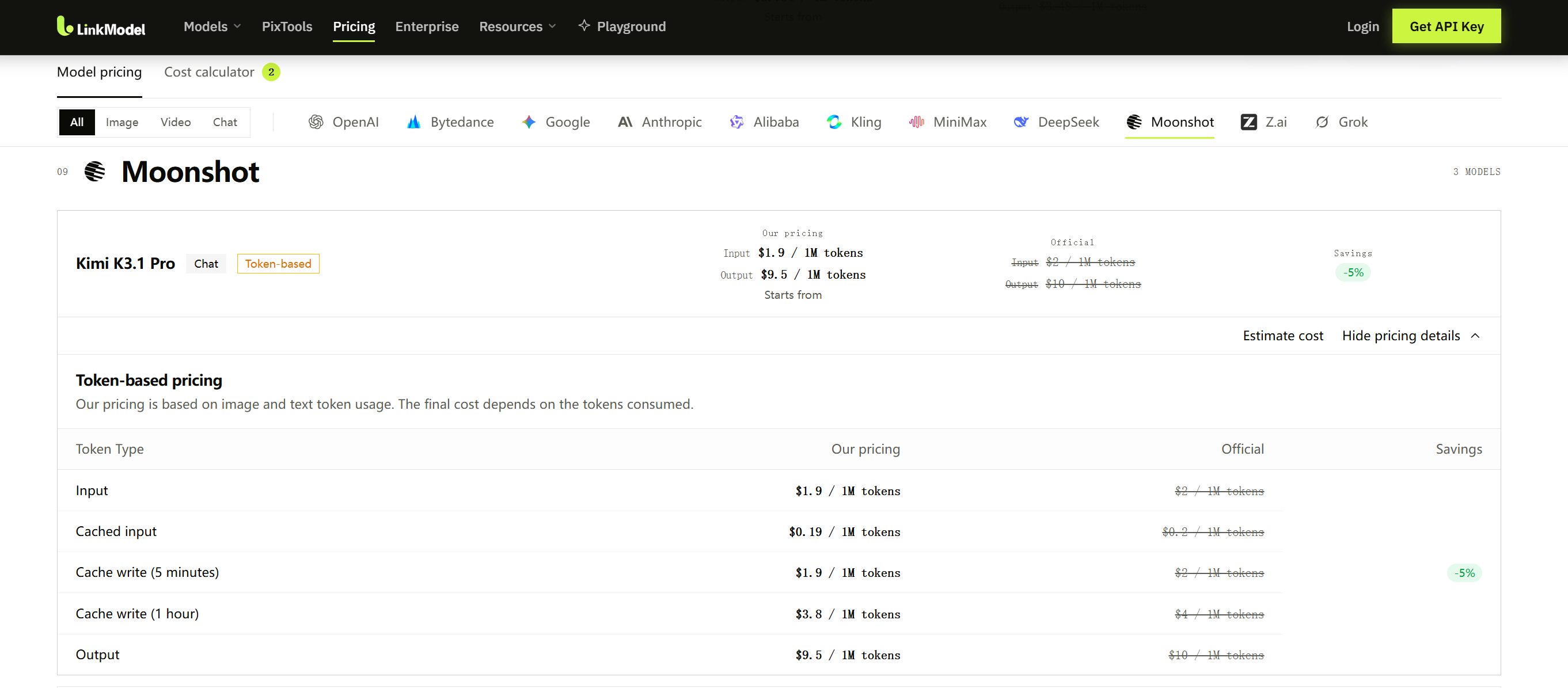
LinkModel offers Kimi K3.1 Pro Standard at $1.90/M input and $9.50/M output—5% below Moonshot's official rates. New users also receive $1 in free Credits automatically, with no credit card or deposit required. The Credits never expire and work across available models, making it easy to test Kimi before paying. LinkModel also offers a limited-time 50% extra top-up bonus, available to new and existing users on multiple recharges, with up to $100 in cumulative bonus Credits, credited within 24 hours. This offer ends November 8, 2026, at 11:59 PM PST.
Last updated: October 30, 2026. All prices are in USD unless otherwise stated.
Kimi K3.1 Pro API Pricing: Official Rates
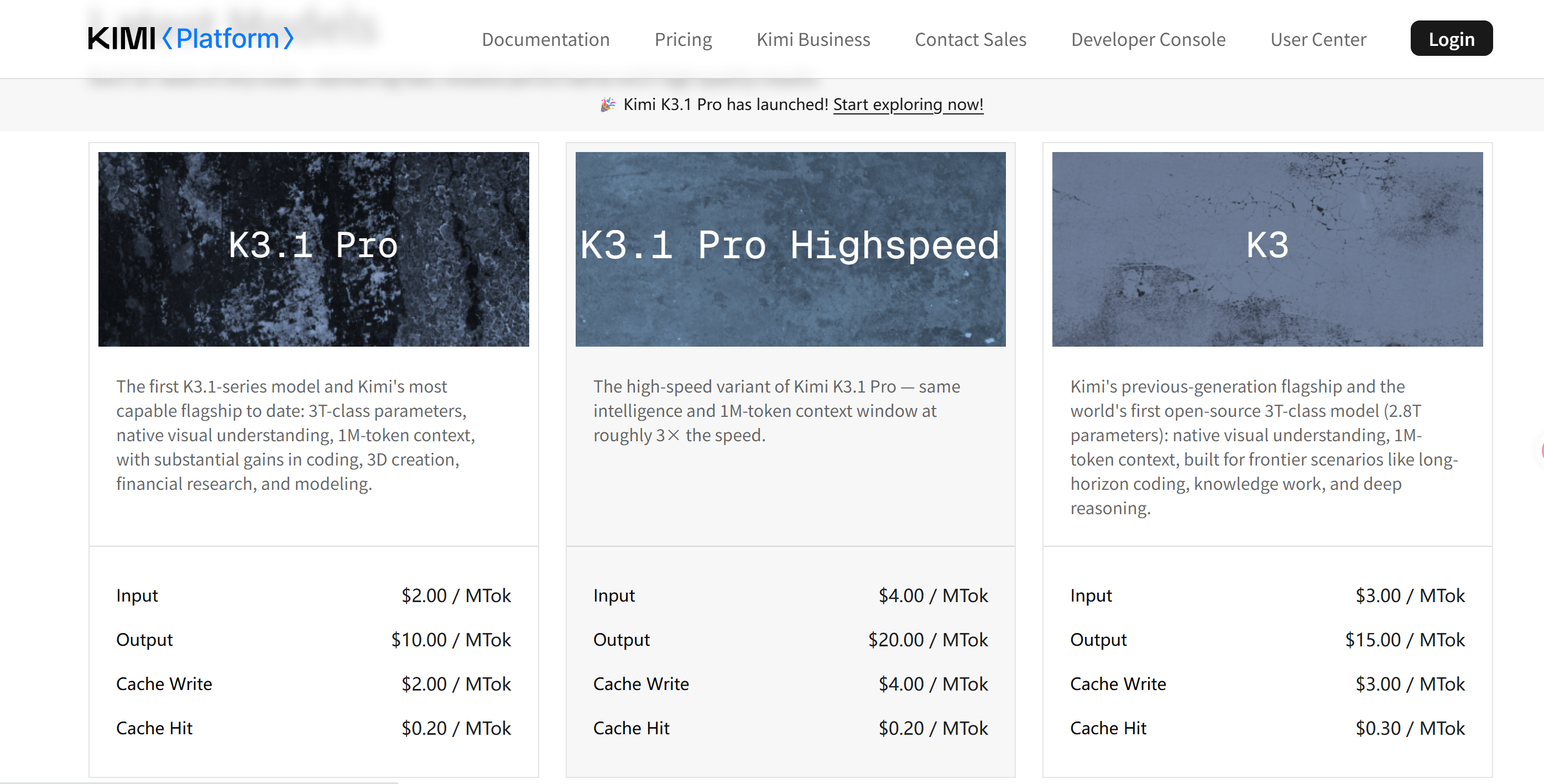
Moonshot AI's Kimi K3.1 Pro costs $2 per million fresh input tokens, $10 per million output tokens, and $0.20 per million cached input tokens. Its Highspeed version doubles the fresh-input and output rates but maintains the same cached-input reading price.
Official Kimi K3.1 Pro Pricing Table
According to the Kimi API pricing documentation, the following rates apply:
| Billing Type | Standard | Highspeed |
|---|---|---|
| Fresh input / 1M | $2.00 | $4.00 |
| Output / 1M | $10.00 | $20.00 |
| Cached input / 1M | $0.20 | $0.20 |
| 5-minute cache write / 1M | $2.00 | $4.00 |
| 1-hour cache write / 1M | $4.00 | $8.00 |
All rates are per million tokens and exclude applicable taxes.
Kimi K3.1 Pro supports a 1,048,576-token context window without a separate long-context pricing tier. Processing more context increases the total number of tokens billed, rather than automatically triggering a higher per-token rate.
The model also supports image and video input, tool calling, and configurable reasoning effort. Actual consumption depends on the request content and the workflow. Developers exploring the broader model ecosystem can consult this Kimi API guide.
How Does Kimi K3.1 Pro Compare With Kimi K3 Pricing?
Kimi K3.1 Pro reduces the official fresh-input and output rates by approximately 33.3% compared with Kimi K3.
| Model | Input / 1M | Output / 1M |
|---|---|---|
| Kimi K3 | $3.00 | $15.00 |
| Kimi K3.1 Pro | $2.00 | $10.00 |
| Price reduction | 33.3% | 33.3% |
For an identical workload of one million fresh input tokens and 200,000 output tokens, Kimi K3 costs $6.00, while Kimi K3.1 Pro costs $4.00.
This comparison assumes identical token consumption. The newer model's lower token rates do not automatically establish a lower cost for every completed task. For more context on the previous generation, see the Kimi K3 overview.
What Counts as Billable Tokens?
Kimi K3.1 Pro API billing distinguishes several usage categories:
- Fresh input: New instructions, prompts, documents, and conversation context billed at the regular input rate.
- Cached input: Previously cached, unchanged request prefixes billed at the lower cache-read rate.
- Cache writes: Newly cached prefixes billed according to the selected cache duration.
- Output: Generated response tokens, including applicable reasoning tokens.
These categories matter because the amount of text visible in the final answer does not necessarily represent the full amount of billable output.
For accurate budgeting, use token usage reported by the API instead of estimating spending from displayed response length.
Kimi K3.1 Pro Standard vs Highspeed: Which Is More Cost-Effective?
Standard is generally the lower-cost choice for background workloads, while Highspeed targets applications where faster model responses are worth paying for.
Highspeed charges twice as much for fresh input and output, but cached-input reading costs remain identical.
Standard vs Highspeed Pricing and Performance
| Factor | Standard | Highspeed |
|---|---|---|
| Fresh input / 1M | $2.00 | $4.00 |
| Output / 1M | $10.00 | $20.00 |
| Cached input / 1M | $0.20 | $0.20 |
| Published speed positioning | Standard | Approximately 2–3× faster |
| Suitable workload | Batch and background jobs | Interactive applications |
Moonshot describes Highspeed as approximately two to three times faster. Actual completion time also depends on API latency, network conditions, tool execution, request size, and application behavior.
Why Highspeed Does Not Always Double Your Total Bill
Consider two illustrative requests using identical token quantities:
| Token Usage | Standard Cost | Highspeed Cost |
|---|---|---|
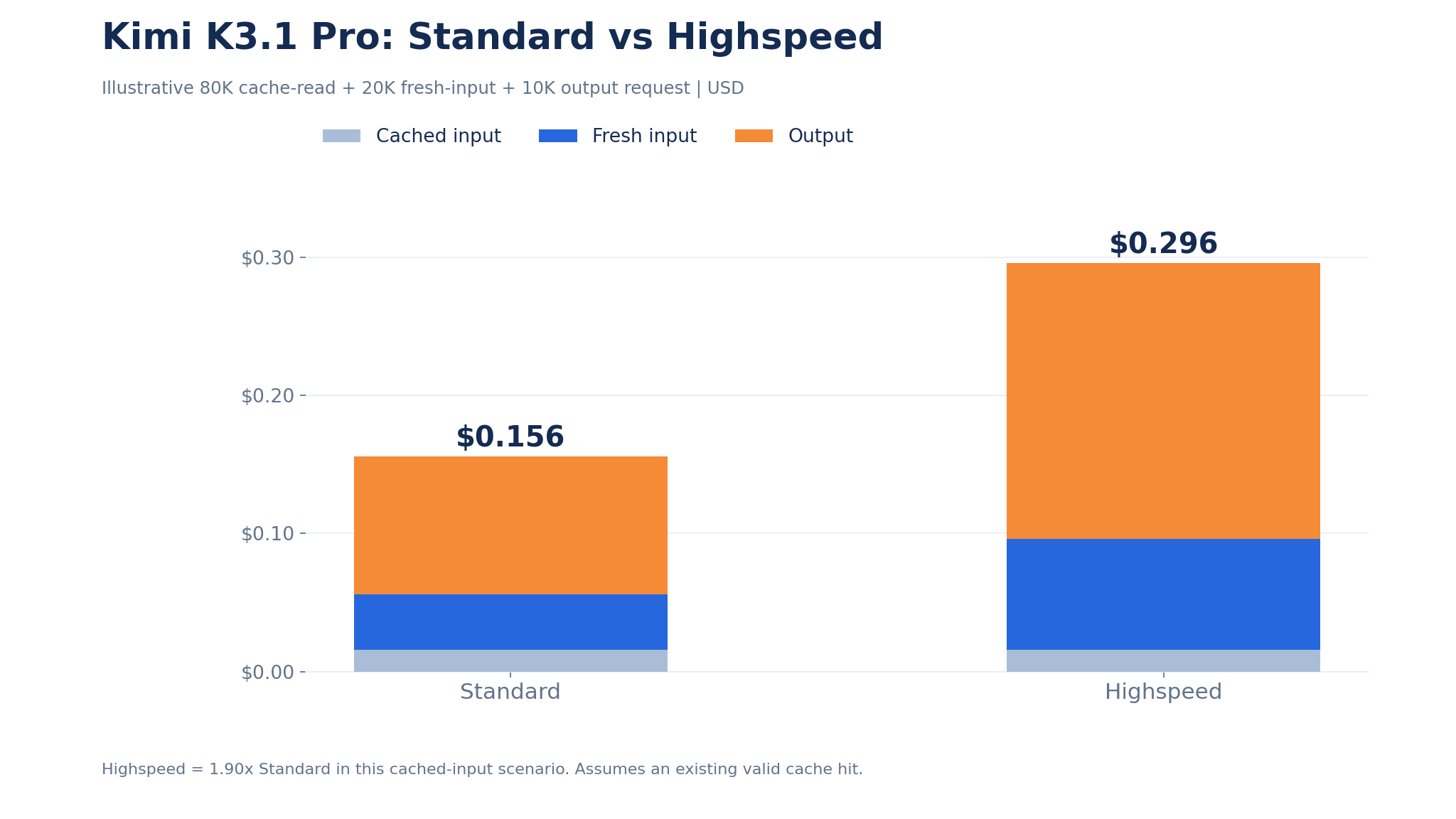
| 80K cached input | $0.016 | $0.016 |
| 20K fresh input | $0.040 | $0.080 |
| 10K output | $0.100 | $0.200 |
| Total | $0.156 | $0.296 |
Highspeed costs approximately 1.90 times as much in this example, rather than exactly twice as much.
The reason is that cached-input reading has the same price on both variants.
This calculation assumes an existing valid cache hit and excludes the earlier expense of creating that cache.
For workloads with little or no caching, the total price difference approaches the full twofold difference in fresh-input and output rates.
When Should You Pay for Highspeed?
Highspeed is worth considering when faster model generation directly improves the user experience or removes a meaningful operational bottleneck.
Examples include interactive coding assistants, real-time troubleshooting, and customer-facing applications where users are waiting for responses.
Standard is generally better suited to scheduled code analysis, background research, and asynchronous document processing.
For either variant, compare total completion time, billed token consumption, and cost per accepted result. Faster generation does not automatically guarantee better output quality.
How Much Does Kimi K3.1 Pro Cost for Real API Tasks?
A short coding request can cost only a few cents, while an extended coding agent workflow may cost several dollars or more, depending on token consumption and the number of model calls.
Kimi K3.1 Pro API Cost Formula
For Standard API requests without cached input:
API Cost = (Fresh Input Tokens × $2 + Output Tokens × $10) / 1,000,000
Here are three illustrative workloads using official Standard pricing.
| Workload | Fresh Input | Output | Total Cost |
|---|---|---|---|
| Short coding request | 10K | 2K | $0.04 |
| Large context analysis | 100K | 10K | $0.30 |
| Extended agent workflow | 1M | 200K | $4.00 |
The extended workflow represents aggregate usage across one or more calls, not necessarily a single request.
These calculations exclude caching, taxes, and additional calls beyond the stated token quantities.
Real Developer Case: 105 Calls and a $6.70 Coding Task
A developer shared a Kimi K3.1 Pro Three.js experiment in the r/kimi community on October 24, 2026.
The developer used Kimi K3.1 Pro through AgenC Core at maximum reasoning effort to build an interactive F-22 aircraft hangar from a natural-language description.
The resulting project reportedly included first-person navigation, an opening canopy, interactive hotspots, and configurable graphics.
| Reported Metric | Result |
|---|---|
| Execution time | 38 minutes |
| Model calls | 105 |
| API spending | Approximately $6.70 |
| JavaScript generated | Approximately 2,100 lines |
| Delivered result | Interactive Three.js application |
Dividing the reported spending by the number of calls gives approximately $0.064 per model call.
However, individual calls in a long-running agent can consume very different amounts of input and output. This average describes one reported project rather than a typical Kimi request.
The developer also encountered API overload errors during execution. Automated retries allowed the workflow to continue.
The case illustrates why the cost of a coding agent cannot be predicted from the initial prompt alone: useful results often emerge from many model interactions.
What Makes an Agent Task More Expensive?
An agent may plan a solution, generate code, execute tools, inspect errors, revise its implementation, and repeat the process.
Three mechanisms can increase spending.
First, each call generates new output tokens. Applicable reasoning tokens contribute to billed output even when they do not appear in the final response.
Second, later calls may reuse or resend earlier context, increasing aggregate input usage.
Third, unsuccessful attempts may require additional calls before the task is accepted.
Suppose an agent makes 20 calls and collectively consumes one million fresh input tokens and 100,000 output tokens.
The official Standard cost would be:
- Fresh input: $2.00
- Output: $1.00
- Total: $3.00
At LinkModel's listed Standard rates, equivalent billable usage would cost $2.85.
The 5% difference is straightforward, but the larger opportunity is to reduce unnecessary calls and output without lowering task quality.
Why Does Kimi K3.1 Pro Feel Expensive Despite Lower API Prices?
Kimi K3.1 Pro can feel expensive when complex requests generate extensive reasoning, require repeated calls, or consume subscription allowances faster than users expect.
However, subscription limits and pay-as-you-go API bills are different mechanisms.
Subscription Limits Are Not API Token Prices
Kimi membership, Kimi Code, third-party coding subscriptions, and pay-as-you-go APIs do not share a universal usage allowance.
| Access Method | Charging Model | Main Budget Concern |
|---|---|---|
| Kimi membership | Subscription | Plan-specific usage allowances |
| Kimi Code | Eligible plan access | Coding usage and entitlement limits |
| OpenCode Go | Third-party subscription | Provider-defined plan limits |
| Moonshot API | Pay as you go | Metered token usage |
| LinkModel API | Pay as you go | Metered token usage |
Some early Reddit users reported exhausting subscription allowances after only a small number of demanding requests.
Those reports help explain why developers may reserve expensive models for difficult bugs rather than routine tasks.
Why Reasoning Tokens Matter
Kimi K3.1 Pro uses reasoning and supports low, high, and max reasoning-effort settings, with max as the documented default.
Longer reasoning can increase output token consumption.
At the official Standard rate of $10 per million output tokens, generating 100,000 output tokens costs $1.00 before considering input and caching.
For repetitive, straightforward operations, testing a lower reasoning setting may reduce unnecessary output.
For difficult engineering tasks, higher reasoning effort may improve completion quality or reduce corrective calls.
The goal is not simply to generate fewer tokens. It is to minimize total spending while achieving an acceptable result.
Reliability and Retries Affect Task Economics
An API overload error does not automatically imply that a complete generation charge occurred.
However, interrupted workflows can cause repeated requests, regenerated context, and additional model interactions.
Record successful API usage separately from failed requests and retry counts.
For coding agents, token usage, completed-task quality, and total execution time provide a more useful view than per-token price alone.
Kimi K3.1 Pro Pricing on LinkModel: Save 5% and Start With $1 Free
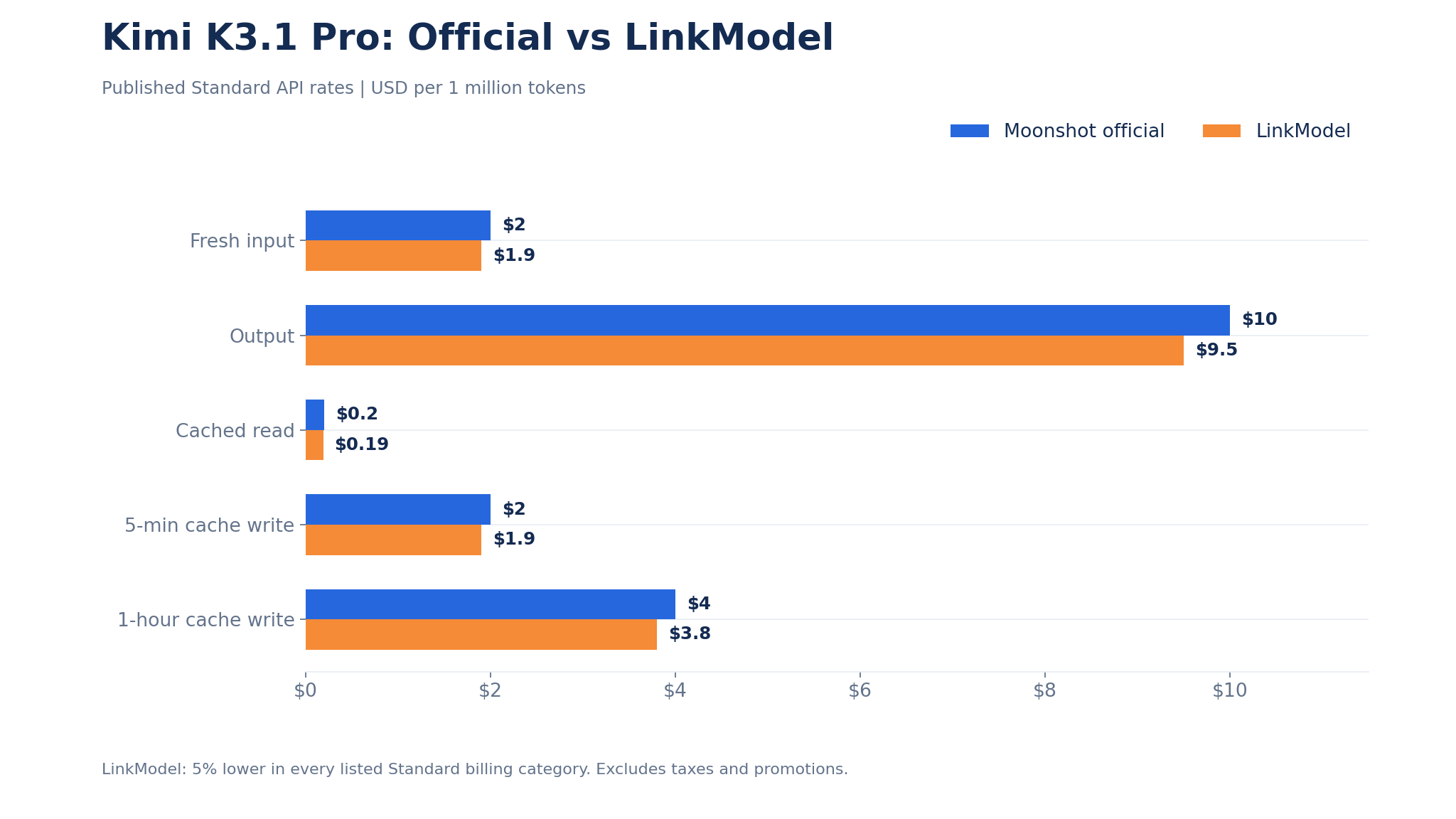
LinkModel offers Kimi K3.1 Pro Standard at 5% below Moonshot's published API rates, while eligible new users receive $1 in free Credits automatically upon registration.
This lets developers evaluate the model before depositing money or committing to recurring platform payments.
LinkModel vs Moonshot Official API Pricing
| Billing Type | Moonshot Official | LinkModel | Savings |
|---|---|---|---|
| Fresh input / 1M | $2.00 | $1.90 | 5% |
| Output / 1M | $10.00 | $9.50 | 5% |
| Cached input / 1M | $0.20 | $0.19 | 5% |
| 5-minute cache write / 1M | $2.00 | $1.90 | 5% |
| 1-hour cache write / 1M | $4.00 | $3.80 | 5% |
These prices apply to the listed Standard variant. Highspeed availability and pricing should be evaluated separately.
The 5% difference applies to matching published billing categories, not to every model on LinkModel.
How to Get $1 in Free LinkModel API Credits
New LinkModel users receive $1 in free API Credits automatically after registration.
The signup benefit has four important conditions:
- No credit card required: You do not need to provide payment card details to receive the signup credit.
- No initial deposit: You can begin with the free Credits instead of adding money to your account.
- Credits do not expire: The awarded Credits have no fixed expiration date.
- Available across supported models: The free Credits can be used toward any currently available model on LinkModel, rather than being restricted to Kimi K3.1 Pro.
The $1 signup reward is a one-time benefit for eligible new users. Existing users cannot claim it again by repeating the registration process.
To begin, create a LinkModel account, check the awarded Credits in your account, and open the model catalog or Playground to select Kimi K3.1 Pro. Developers preparing for direct integration can also review how to get an API key.
This is particularly useful for developers who want to verify API responses, explore reasoning behavior, or evaluate prompt formats before paying for larger workloads.
How Many Kimi K3.1 Pro API Calls Can $1 Cover?
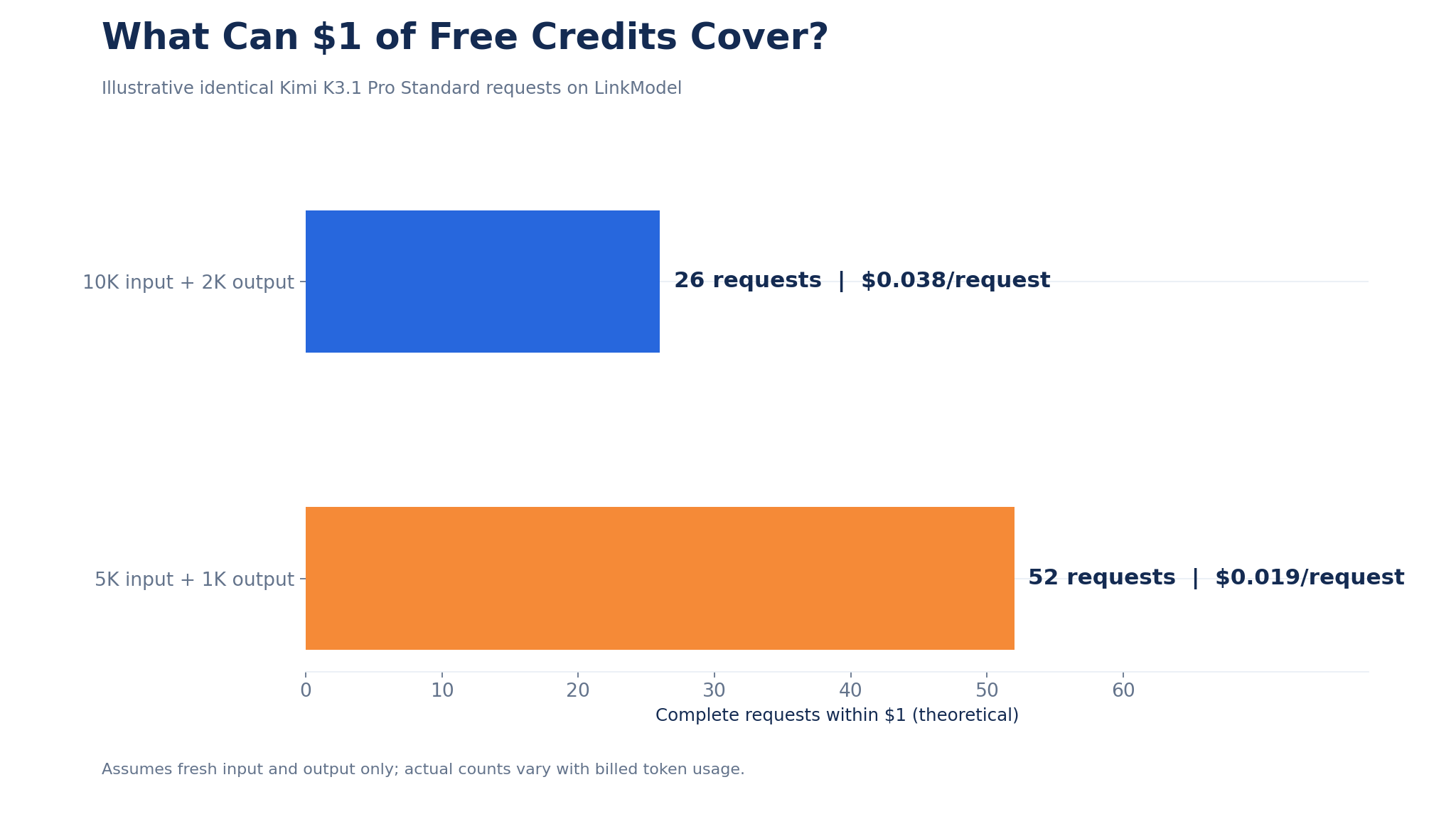
At LinkModel's published Standard rates, an illustrative request containing 10,000 fresh input tokens and 2,000 output tokens costs:
| Billing Component | Calculation | Cost |
|---|---|---|
| Input | 10K × $1.90/M | $0.019 |
| Output | 2K × $9.50/M | $0.019 |
| Total per request | $0.038 |
With $1 in available Credits:
$1 ÷ $0.038 = approximately 26 complete requests.
That means the signup credit could theoretically cover 26 requests with the same token consumption, leaving $0.012 unused.
This is a budget calculation rather than a guaranteed request allowance. Actual call counts depend on prompt length, reasoning output, caching behavior, and any other billable usage.
For a lighter request averaging 5,000 fresh input tokens and 1,000 output tokens, the cost would be $0.019, so $1 could theoretically support 52 requests at that usage level.
For developers experimenting with relatively small requests, the $1 credit provides an opportunity to test multiple prompts and settings before spending their own money.
Monthly Cost Comparison: Moonshot vs LinkModel
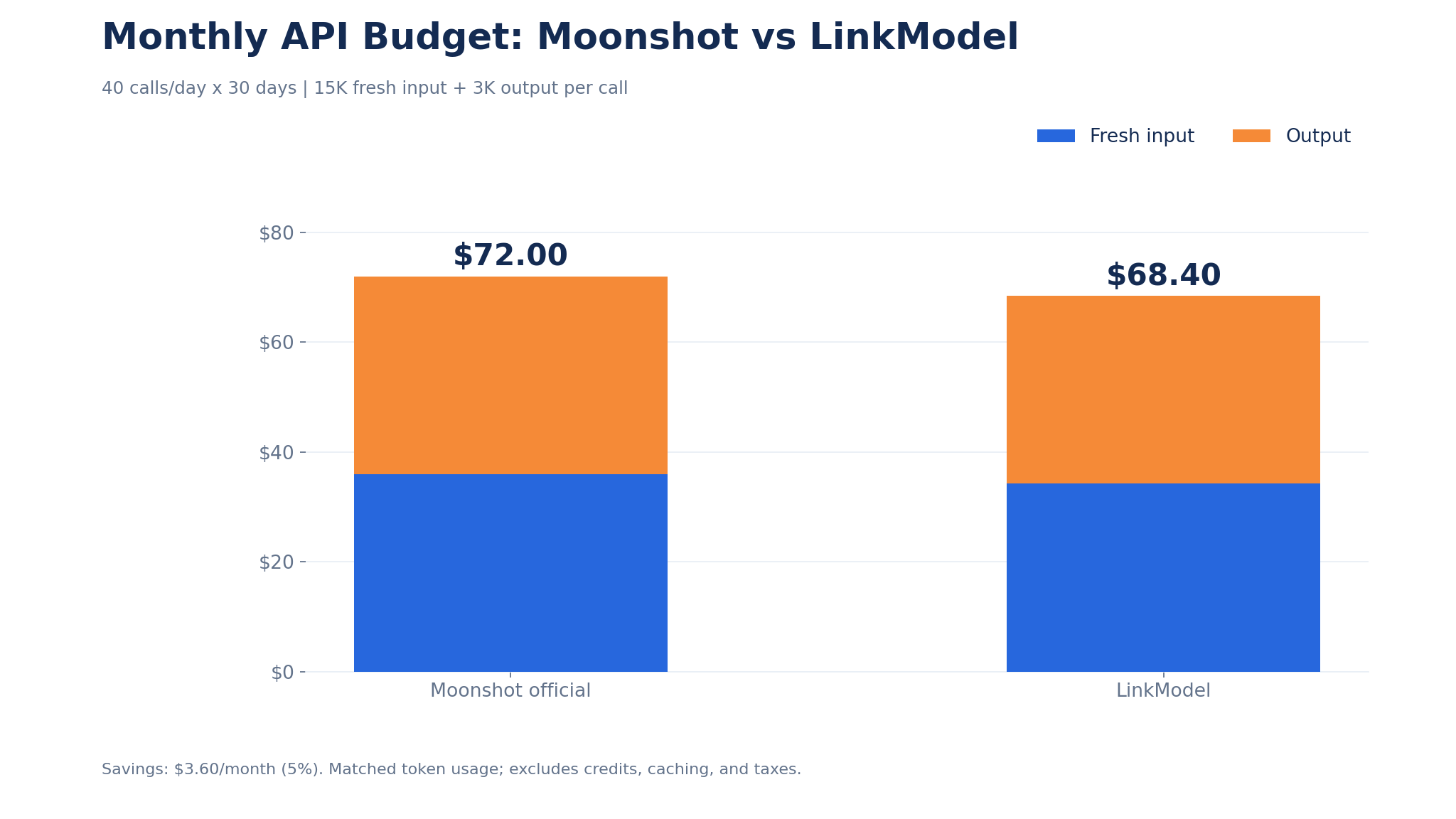
Consider a development team making an average of 40 API calls per day over 30 days.
Assume:
- 15,000 fresh input tokens per call
- 3,000 output tokens per call
- No cached-token charges in the estimate
That produces 18 million fresh input tokens and 3.6 million output tokens per month.
| Monthly Cost | Moonshot | LinkModel |
|---|---|---|
| Input: 18M tokens | $36.00 | $34.20 |
| Output: 3.6M tokens | $36.00 | $34.20 |
| Total | $72.00 | $68.40 |
| Monthly savings | — | $3.60 |
This calculation uses identical token consumption and excludes any promotional credits.
For a small prototype, the dollar difference may be modest. As usage grows, the absolute savings increase proportionally at the same rate difference.
The free signup credit makes the initial evaluation less expensive, while lower published token rates provide an ongoing benefit for Standard API usage.
Why Choose LinkModel for Kimi K3.1 Pro?
LinkModel combines lower published Standard API prices with a flexible payment structure and access to multiple AI models through one platform.
For developers, the most relevant benefits are:
- 5% lower Kimi K3.1 Pro Standard token prices: Reduce direct token spending on equivalent workloads.
- $1 free for eligible new users: Start testing without a credit card or deposit.
- No monthly platform fee or minimum spend: Pay according to actual API usage after using any available Credits.
- One API for multiple models: Evaluate supported text, image, and video models without maintaining a separate platform account for each provider.
- Playground access: Explore model responses and available parameters before integrating them into your application.
For example, a developer may use Kimi K3.1 Pro for difficult coding tasks while evaluating a lower-cost model for simpler text processing. That is one reason to consider a multi-model application with a single API key.
LinkModel provides a unified environment for supported models, although advanced parameters such as reasoning controls, caching, and tool behavior should always be validated for the exact integration.
Want to test Kimi K3.1 Pro without paying upfront? Sign up for LinkModel, claim your automatic $1 credit, and try the model at its published discounted rates.
How to Reduce Your Kimi K3.1 Pro API Bill
The most effective cost reductions come from combining competitive token prices, efficient caching, appropriate reasoning settings, and task-level cost measurement.
Use Context Caching Without Double-Counting Tokens
Kimi's K3-series API supports automatic context caching, with a default five-minute time-to-live and a documented one-hour option.
When a cacheable prefix is written, the relevant cache-write rate applies. Subsequent matching requests can read the unexpired prefix at the lower cached-input rate.
Fresh input, cache writes, and cache reads are separate billing categories. The same input tokens should not be counted in multiple categories within one request.
Consider a request containing 80,000 cached input tokens, 20,000 fresh input tokens, and 10,000 output tokens.
| Component | Moonshot Standard | LinkModel |
|---|---|---|
| 80K cached input | $0.0160 | $0.0152 |
| 20K fresh input | $0.0400 | $0.0380 |
| 10K output | $0.1000 | $0.0950 |
| Total | $0.1560 | $0.1482 |
The calculation assumes that the cached input already qualifies for a valid cache hit and does not include the earlier cost of creating that cache.
To improve cache reuse, keep frequently repeated system instructions and reference materials in a stable prefix. Changes to the beginning of a prompt may reduce cache-hit opportunities.
Match Reasoning Effort to Task Difficulty
Kimi K3.1 Pro supports three reasoning settings.
| Task | Suggested Starting Setting |
|---|---|
| Simple classification or extraction | Low |
| Multi-file code analysis | High |
| Difficult long-running engineering agent | Max |
These are starting configurations, not guaranteed optimal settings.
Test representative tasks and compare total billed tokens, acceptable outcomes, and completion time.
A lower reasoning setting may reduce output usage on simple requests. However, if it causes more failed attempts, the overall cost per accepted task can increase.
How to Estimate Your Monthly Kimi K3.1 Pro Budget
For a workload without caching:
Monthly Cost = Monthly Calls × [(Average Fresh Input × Input Rate + Average Output × Output Rate) / 1,000,000]
Suppose an application runs 100 calls per day for 30 days, averaging 20,000 fresh input tokens and 4,000 output tokens per call.
| Monthly Metric | Amount |
|---|---|
| Total calls | 3,000 |
| Fresh input | 60M tokens |
| Output | 12M tokens |
| Moonshot Standard cost | $240.00 |
| LinkModel Standard cost | $228.00 |
| Savings before credits | $12.00 |
This example assumes all requests use the specified token quantities and excludes caching, taxes, and additional usage.
If your application uses caching, split input into fresh, cache-read, and cache-write categories before calculating spending.
For a reliable budget, include all billed usage from repeated attempts rather than only the final successful call.
Track Cost Per Accepted Result
The most useful final cost metric for AI agents is:
Cost Per Accepted Result = Total Billed Spending / Accepted Completed Tasks
Suppose an agent attempts 100 tasks, successfully completes 80, and spends $40 in API fees.
Its cost per accepted result is $0.50.
Compare that with another configuration that spends only $36 but produces 60 acceptable tasks.
| Metric | Configuration A | Configuration B |
|---|---|---|
| Total API spending | $40 | $36 |
| Accepted tasks | 80 | 60 |
| Cost per accepted result | $0.50 | $0.60 |
Configuration B has the smaller total bill but the higher cost per usable outcome.
These figures illustrate the metric rather than representing measured Kimi benchmarks.
For production applications, evaluate total spending, accepted results, reasoning settings, and retry behavior together. A discounted API rate is valuable, but reliable task completion remains essential.
Frequently Asked Questions
How much does the Kimi K3.1 Pro API cost?
Moonshot's official Standard rates are $2 per million fresh input tokens, $10 per million output tokens, and $0.20 per million cached input tokens. LinkModel lists Kimi K3.1 Pro Standard at $1.90/M input, $9.50/M output, and $0.19/M cached input.
Can I try the Kimi K3.1 Pro API for free?
Yes. Eligible new LinkModel users automatically receive $1 in free Credits after registration, without providing a credit card or making a deposit. The Credits do not expire and can be used toward available models, including Kimi K3.1 Pro. The reward is limited to first-time eligible users.
How many Kimi K3.1 Pro API requests can $1 cover?
At LinkModel's Standard rates, a request consuming 10,000 fresh input tokens and 2,000 output tokens costs $0.038. A $1 credit could therefore cover approximately 26 requests with identical usage and no additional charges. Actual results depend on token consumption.
Is Kimi K3.1 Pro Highspeed twice as expensive?
Highspeed charges twice the Standard fresh-input and output rates, but cached-input reads cost the same $0.20 per million tokens. Consequently, a cache-heavy workload can cost less than twice the equivalent Standard workload.
Is LinkModel cheaper than the official Kimi K3.1 Pro API?
Yes, for the published Standard variant. LinkModel's $1.90/M input and $9.50/M output rates are 5% below Moonshot's $2/M input and $10/M output rates. It also offers pay-as-you-go billing without a monthly platform fee.
Conclusion
Kimi K3.1 Pro's official Standard API rates start at $2/M input and $10/M output, but the real cost of coding agents depends on reasoning output, caching, repeated calls, and accepted results. Highspeed offers faster generation at higher rates, while effective context reuse can reduce spending for either variant. For developers who want lower Standard API prices and an accessible starting point, LinkModel offers Kimi K3.1 Pro at 5% below Moonshot's published rates, plus $1 in free, non-expiring Credits for eligible new users—with no card or deposit required. Use the signup credit to evaluate your workload, compare the actual cost per accepted task, and move to pay-as-you-go usage when you are ready to scale.