Claude Sonnet 5.5 works in Claude Code with a supported client version. Update the application, select claude-sonnet-5-5, and start with Medium effort for clearly scoped development. Anthropic’s standard API prices are $2 per million ordinary input tokens and $10 per million output tokens. If you use a Claude subscription, distinguish your plan allowance from API billing before interpreting session cost estimates.
That distinction matters when a coding session reads files, runs tools, and retries a fix. In a Reddit discussion about unexpected Claude Code costs, a subscriber worried that the displayed API-equivalent cost represented an additional bill. The discussion illustrates a real source of confusion; it does not establish typical spending or subscription value.
For developers evaluating coding API access, LinkModel’s Sonnet 5.5 model page lists $1.70 input and $8.50 output per million tokens, 15% below Anthropic’s standard synchronous rates. Use that comparison alongside billing conditions and endpoint validation: published API availability alone does not establish a working Claude Code integration.
How to Set Up Claude Sonnet 5.5 in Claude Code
Install Claude Code, authenticate through your intended billing route, and confirm the model before giving it a coding task.
Install and Check the Client
Anthropic’s official quickstart provides these native installation commands. Run the command in the matching terminal.
| System | Terminal command |
|---|---|
| macOS, Linux, or WSL | curl -fsSL https://claude.ai/install.sh | bash |
| Windows PowerShell | irm https://claude.ai/install.ps1 | iex |
Open a new terminal afterward and run claude --version. A successful installation prints the version; a “command not found” message means the terminal cannot locate the application.
For package-manager installations, follow the matching update method in Anthropic’s installation documentation. Homebrew users can run brew upgrade claude-code; WinGet users can run winget upgrade Anthropic.ClaudeCode.
Open the terminal in your project directory, run claude, and complete authentication.
Select Sonnet 5.5 and Set Effort
Anthropic’s model configuration documentation requires Claude Code v2.1.284 or later for Sonnet 5.5. Update an older native installation with claude update.
Inside an interactive session:
- Enter /model claude-sonnet-5-5.
- Enter /effort medium.
- Check the session header for the selected model and effort.
Typing a model or effort selection directly saves it for later sessions, subject to applicable configuration. For a temporary selection, open the corresponding picker and press s on your choice.
For a single-session launch, use claude --model claude-sonnet-5-5 --effort medium in your terminal.
Confirm the Setup with a Small Task
Before starting a large refactor, ask Claude to explain a small module and identify its existing tests. Then request one limited change with a clear acceptance condition.
For example:
“Find the function that validates session expiration. Explain the current behavior, add a test for an expired session, and run the relevant test. Report the result without changing unrelated files.”
Your first successful check should confirm the intended model, useful repository access, and a working local test environment. A fluent explanation alone does not prove that the coding workflow is ready.
Subscription vs API: What Are You Actually Paying?
A session’s API-equivalent cost estimate is not automatically your subscription bill. Determine the active authentication method and check the relevant billing account.
| Access route | What to check |
|---|---|
| Claude subscription | Plan usage, included allowances, and any enabled extra usage |
| Direct Anthropic API | API consumption and Console billing records |
| Another API provider | That provider’s rates, usage records, and purchase terms |
Anthropic’s cost-management documentation explains that /usage displays token statistics and a locally calculated cost estimate. Subscription users should interpret plan usage separately; API users should use provider billing records for authoritative charges.
This is also a practical concern in a Reddit discussion comparing Claude Code API spending with plan usage. Those comments describe individual experiences, not a universal conversion between subscription allowances and API dollars.
Check Credentials Before Investigating a Surprise Bill
Run /status inside Claude Code to inspect the active authentication method.
According to Anthropic’s authentication documentation, an approved ANTHROPIC_API_KEY can take precedence over subscription credentials in an interactive CLI session. In non-interactive mode, the key is used when present.
If you intended subscription access, inspect your terminal environment and launcher configuration for Claude API credentials. Remove an unintended credential from the relevant configuration, restart the session, and confirm /status again. Do not print or share the key itself.
Choose a subscription or API route based on your actual workflow and allowances. A discount against standard API prices does not demonstrate savings against a subscription you already use.
Claude Sonnet 5.5 API Pricing: Anthropic vs LinkModel
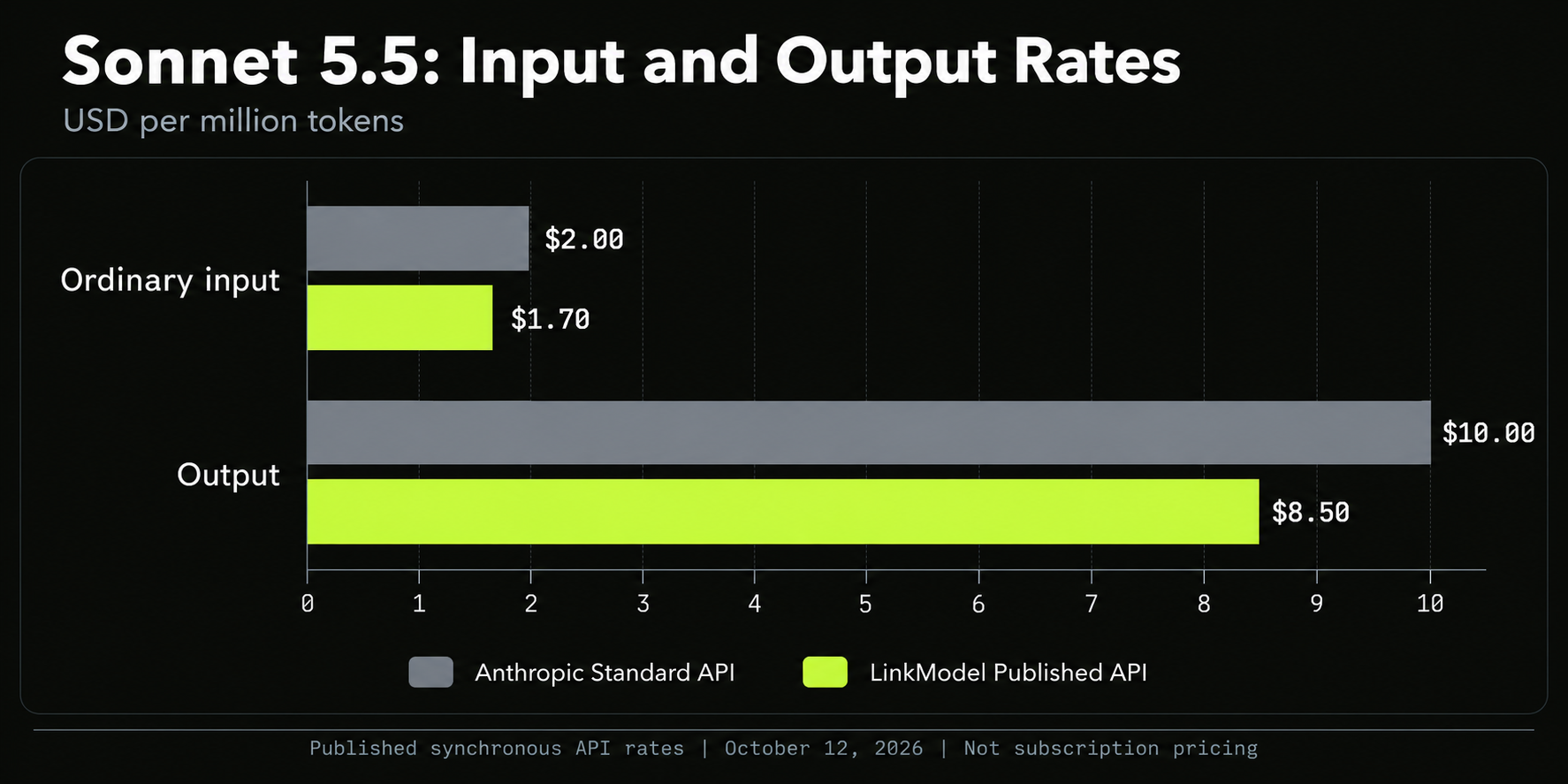
LinkModel’s published token rates are 15% below Anthropic’s standard synchronous API rates in the categories shown below.
All prices are USD per million tokens, checked on October 12, 2026.
| Billed category | Anthropic standard API | LinkModel published API |
|---|---|---|
| Ordinary input | $2.00 | $1.70 |
| Output | $10.00 | $8.50 |
| Cache read | $0.10 | $0.085 |
| Five-minute cache write | $2.50 | $2.125 |
| One-hour cache write | $4.00 | $3.40 |
The table compares Anthropic’s current pricing documentation with LinkModel’s published model rates. These are rate comparisons, not measured invoices.
Use the current $0.10 cache-read rate for Anthropic. The older Sonnet 5.5 announcement lists $0.20.
Sonnet 5.5’s one-million-token context window is available at Anthropic’s standard rates. Capacity does not make a large request inexpensive: more billed tokens still increase cost.
A Simple Cost Calculation
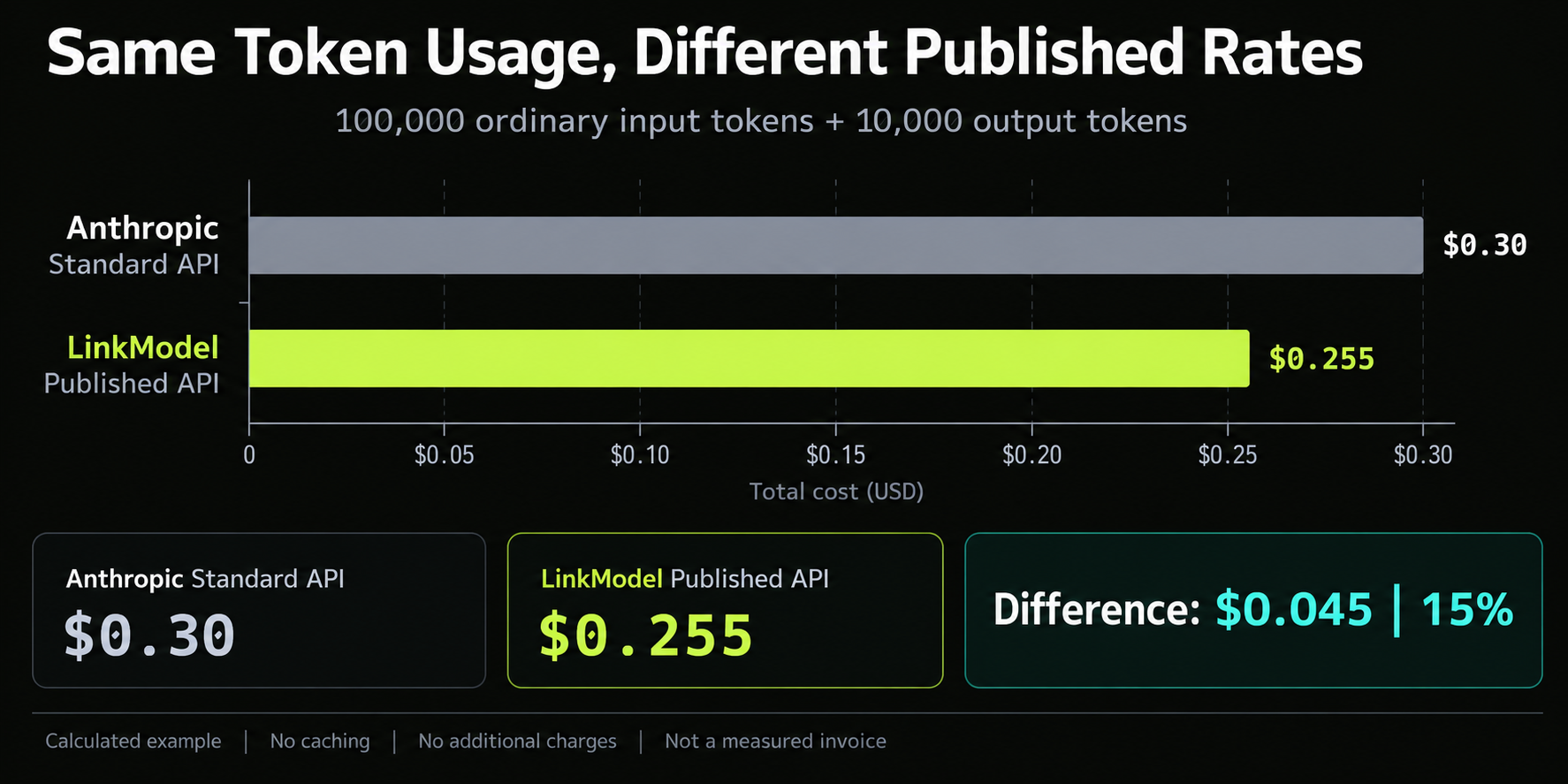
Assume 100,000 ordinary input tokens, 10,000 output tokens, no caching, and no additional charges.
| Route | Calculation | Estimated cost |
|---|---|---|
| Anthropic standard API | 0.1 × $2 + 0.01 × $10 | $0.30 |
| LinkModel published API | 0.1 × $1.70 + 0.01 × $8.50 | $0.255 |
The difference is $0.045, or 15%, for identical consumption.
At a larger scale, $100 of usage charged entirely at the compared Anthropic rates would correspond to $85 at the listed LinkModel rates. This conditional calculation excludes differences in requests, retries, other charges, and integration work.
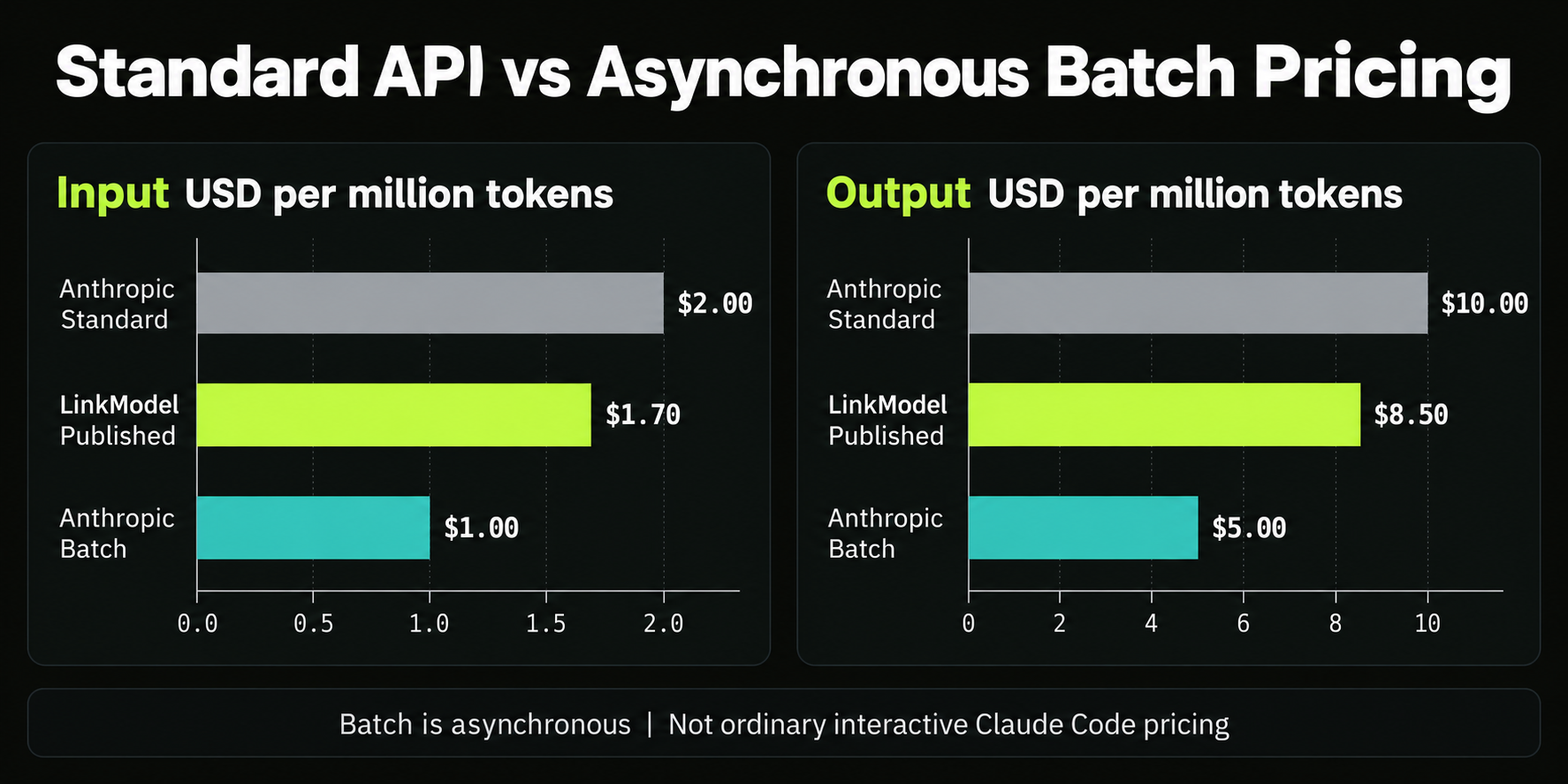
Batch Processing Is a Different Comparison
Anthropic’s asynchronous Batch API lists Sonnet 5.5 at $1 input and $5 output per million tokens. Those rates are lower than the synchronous options above.
Batch processing suits work that can run asynchronously. Do not use batch prices to estimate an ordinary interactive Claude Code session.
How Prompt Caching Changes the Bill
Calculate ordinary input, cache writes, cache reads, and output separately. A cached prefix costs money to create before subsequent requests can benefit from it.
Anthropic’s prompt caching documentation explains the cache lifecycle. Expiration, changed content, and another write can alter the result.
Consider this calculated example across two requests:
- The first request writes a 100,000-token prefix to a five-minute cache.
- The second successfully reads that same prefix before expiration.
- The two requests together produce 10,000 output tokens.
- There is no additional ordinary input or other charge.
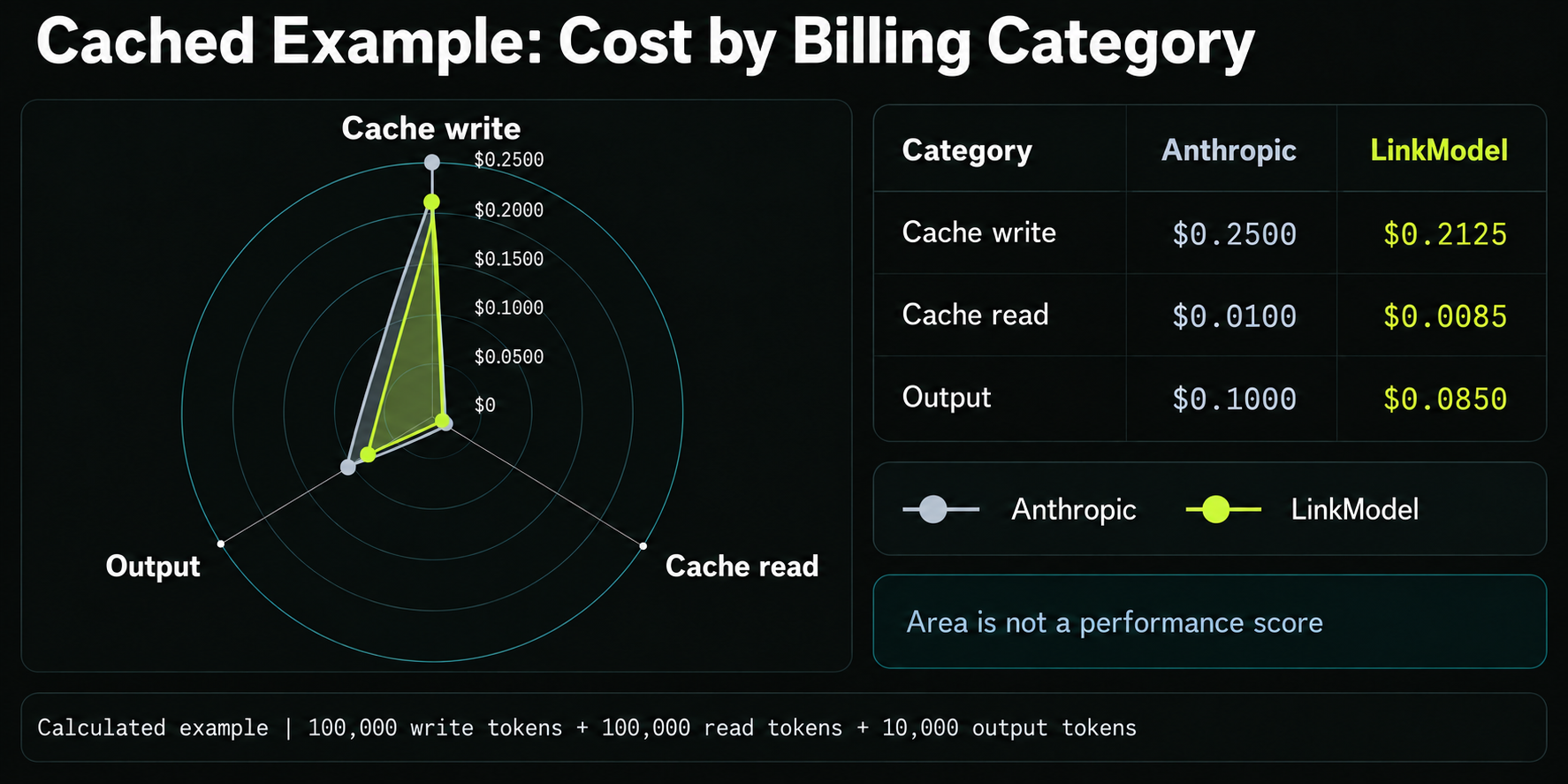
| Billed category | Anthropic cost | LinkModel cost at listed rates |
|---|---|---|
| 100,000 cache-write tokens | $0.2500 | $0.2125 |
| 100,000 cache-read tokens | $0.0100 | $0.0085 |
| 10,000 output tokens | $0.1000 | $0.0850 |
| Total | $0.3600 | $0.3060 |
Without caching, sending the same 100,000-token prefix twice would cost $0.50 on Anthropic or $0.425 at LinkModel’s listed rates, including the same output.
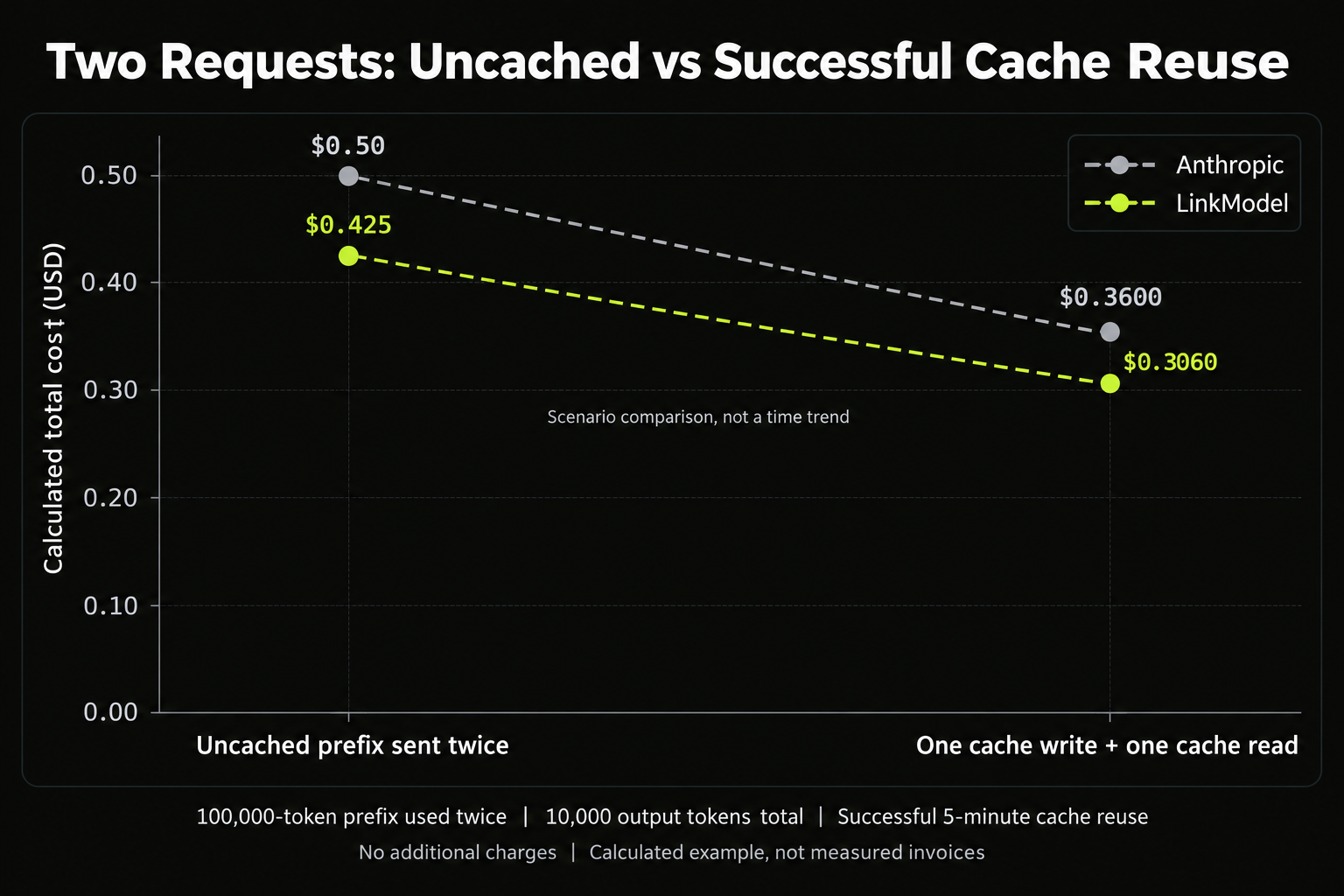
These are calculations under explicit assumptions. They do not establish that a LinkModel Claude Code session supports this cache behavior. Confirm cache usage fields and actual billing on the selected route before using the example as a budget estimate.
Best Settings for Claude Sonnet 5.5 in Claude Code
Start with Medium effort, a focused task, and an explicit verification check. Adjust the setup based on the failure you observe.
Sonnet 5.5 defaults to Medium effort in Claude Code. Higher effort allows more reasoning, but it does not repair missing requirements, broken dependencies, or an incorrect test environment.
The following recommendations are practical starting points, not results from a test conducted for this article.
| Task | Starting approach | When to adjust |
|---|---|---|
| Rename or small edit | Low or Medium; inspect the diff | Add context if the wrong files change |
| Clearly scoped feature | Medium; define acceptance tests | Try High if important cases remain unresolved |
| Difficult bug investigation | High; require evidence for the cause | Check reproduction and environment before increasing effort |
| Refactor across modules | Review a plan before implementation | Narrow scope if unrelated changes accumulate |
Give Claude a Completion Condition
Anthropic’s Claude Code best practices emphasize specific context and checks the agent can run.
A useful request is:
“Investigate why expired sessions remain authenticated. Reproduce the failure, explain the cause, implement the smallest fix, and add a regression test. Run the relevant tests and report any remaining failures.”
For a UI change, provide the expected appearance and request a visual check. For a refactor, identify behavior that must remain unchanged.
Judge settings by accepted results: correct behavior, passing checks, a reviewable diff, and observed consumption. A shorter response or lower token count alone is not sufficient.
Keep Context and Permissions Focused
Use the relevant files, error output, and constraints. Keep persistent project instructions concise, and begin a separate conversation when moving to unrelated work.
Allow the operations needed for the task while retaining review for consequential actions. Avoid treating broader permissions as a quality setting.
A large context window is useful when the evidence requires it. Selective retrieval and clear task boundaries remain valuable.
Why Is Claude Code Using the Wrong Model or Settings?
When a choice does not persist, inspect the configuration before repeating the selection.
Anthropic’s settings documentation distinguishes user, project, local, and managed sources. Run /status to inspect the settings sources that apply.
| Symptom | First check | Practical next step |
|---|---|---|
| Sonnet 5.5 request fails | Client version and account/provider access | Update, then confirm the exact model is available |
| A later session uses another model | Launch arguments, environment, project policy, or resumed session | Identify which source selected it |
| Effort differs from your choice | Explicit overrides or organization limits | Confirm the active level and applicable policy |
| claude is not recognized | Installation path and terminal session | Open a new terminal and follow the PATH guidance |
Use Anthropic’s troubleshooting guide for the actual error message. A model-access error, authentication failure, and local installation problem require different fixes.
Can You Use LinkModel with Claude Code?
LinkModel publishes Sonnet 5.5 API access; Claude Code compatibility for that exact route has not been established in this article.
Anthropic’s gateway documentation requires a supported API format and compatibility with the features Claude Code sends. A successful text request establishes only that request’s behavior.
Before migration, confirm the provider’s current endpoint instructions and validate:
- Authentication and exact model routing.
- Streaming responses and error handling.
- Tool calls followed by tool-result messages.
- Reasoning controls and cache usage reporting.
- A small repository task with a passing verification check.
Record the client version, endpoint, settings, usage fields, and failures. This is a proposed validation procedure, not a completed test.
LinkModel’s lower published rates justify an API evaluation. A recommendation to move an existing Claude Code workflow requires additional evidence.
What to Check Before Buying LinkModel Credits
Review compatibility, payment terms, and code-data handling before purchasing credits.
LinkModel’s refund policy states that credit purchases are generally final and non-refundable, including unused credits. Credits do not expire; billing errors have a separate review process.
Do not assume that an integration failure makes unused credits refundable. Confirm the intended route and read the applicable terms before deciding how much to purchase.
For private code, review LinkModel’s privacy policy and request clarification where needed. The policy describes API logging and gives broad retention wording; its uploaded-content explanation focuses on images and videos. That does not establish a precise retention period for code prompts or the complete upstream handling of repository content.
Ask for the conditions that matter to your deployment: text-request retention, upstream processing, support escalation, rate limits, and any applicable service commitment. Public prices alone cannot establish those operational properties.
Frequently Asked Questions
Which Claude Code Version Supports Sonnet 5.5?
Anthropic specifies v2.1.284 or later. Update the client and confirm that your account or provider offers the model.
How Do I Select Sonnet 5.5 and Medium Effort?
Inside Claude Code, enter /model claude-sonnet-5-5 and /effort medium, then check the session header. For a single-session launch, use the model and effort flags described above.
Does the Cost Shown in /usage Mean I Owe That Amount?
Not necessarily. It can be an API-equivalent estimate. Check your active authentication method, subscription usage, extra-usage settings, and billing records before interpreting it as a charge.
Is LinkModel 15% Cheaper Than My Claude Subscription?
The published comparison is against Anthropic’s standard synchronous API token rates. It does not establish savings against a subscription or guarantee lower total coding-task costs.
Should I Use the Highest Effort Setting?
Start with the task’s needs and verification criteria. Try higher effort when reasoning remains inadequate after supplying the relevant evidence; keep the setting that produces acceptable results at an appropriate cost.
Conclusion
Set up Claude Sonnet 5.5 by confirming the client version, selecting the exact model, and checking both effort and authentication before starting work. Use focused tasks and verification evidence to choose settings, and calculate API costs from separate billed token categories. If your subscription already fits your coding workflow, evaluate it on its own allowances; if you need API access, review Sonnet 5.5 on LinkModel for published rates and confirm compatibility, credit terms, and data handling before purchasing or migrating.