DeepSeek V4.1 Flash API pricing is based on token consumption, with separate rates for cached input, uncached input, and output. The official off-peak rates are $0.15 per million uncached input tokens, $0.003 per million cached input tokens, and $0.60 per million output tokens. During peak hours, these rates double to $0.30, $0.006, and $1.20, respectively. The current official API model ID is deepseek-flash, which serves DeepSeek-V4.1-Flash-1017.
However, the published price per million tokens is only part of the cost. Cache hit rates, reasoning consumption, peak-hour scheduling, and additional Search or Fetch requests can all change the final bill. For broader agent workflows, the cost of running an AI agent also depends on the number of model calls and external operations. A workload with the same token volume can cost significantly more depending on how and when those tokens are processed.
For developers comparing API access options, LinkModel lists DeepSeek V4.1 Flash at $0.24 per million input tokens, $0.0048 per million cached input tokens, and $0.96 per million output tokens. These rates are 20% below the corresponding official peak rates, although DeepSeek's official off-peak rates remain lower. LinkModel also provides unified API access to multiple models, a Playground for evaluation, and pay-as-you-go billing. New users automatically receive $1 in free Credits after registration, without a payment card or recharge. Existing users cannot claim the reward repeatedly, and the gifted Credits do not expire.
DeepSeek V4.1 Flash API Pricing at a Glance
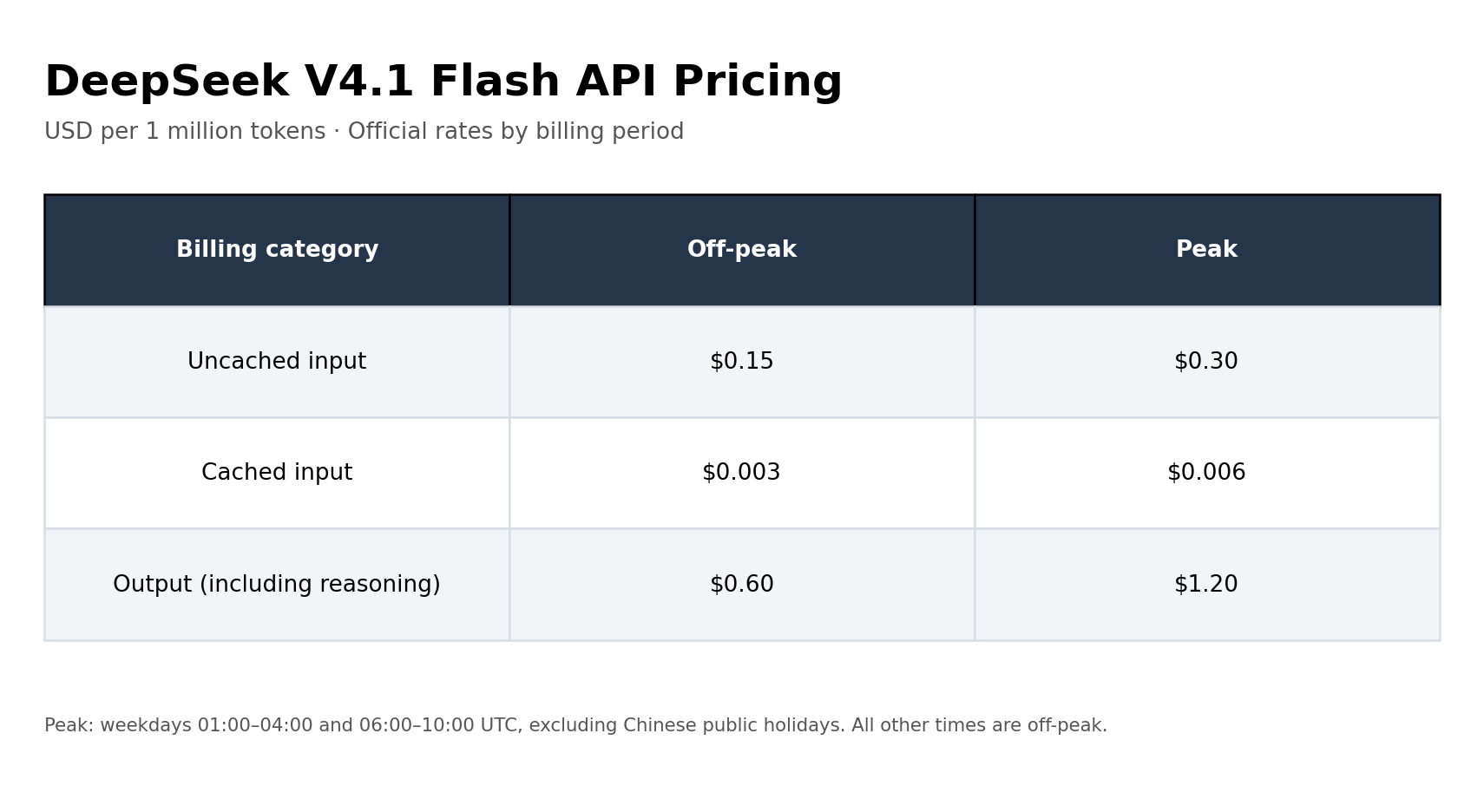
DeepSeek V4.1 Flash uses token-based pricing. The amount you pay depends on three main categories: uncached input, cached input, and output tokens.
The current official API pricing is:
| Billing Category | Off-Peak | Peak |
|---|---|---|
| Input (Cache Miss) | $0.15 | $0.30 |
| Cached Input (Cache Hit) | $0.003 | $0.006 |
| Output (Including Reasoning) | $0.60 | $1.20 |
All prices are in USD per 1 million tokens.
The official API model ID is deepseek-flash, which serves the DeepSeek-V4.1-Flash-1017 version. The 1017 designation identifies the model version, while deepseek-flash is the identifier used in official API requests.
DeepSeek V4.1 Flash 1017: Model Specifications
DeepSeek's official model documentation identifies the currently served Flash version as DeepSeek-V4.1-Flash-1017.
| Specification | Details |
|---|---|
| Official API model ID | deepseek-flash |
| Model version | DeepSeek-V4.1-Flash-1017 |
| Context window | 1 million tokens |
| Maximum output | Up to 384K tokens |
| Thinking modes | Thinking and non-thinking |
| Vision | Supported |
| Tool calling | Supported |
| JSON output | Supported |
The model supports both OpenAI-compatible and Anthropic-compatible API formats. Developers building applications around function calling and tool use should also verify that the required tools and request formats are supported. Developers can use the official model name with the corresponding API endpoint and request format.
For the latest rates and supported features, consult the official DeepSeek pricing documentation.
Peak vs. Off-Peak Pricing: When Does DeepSeek Cost More?
DeepSeek uses peak and off-peak pricing, meaning the same model and token usage can produce different costs depending on when a request is processed.
The official peak windows are:
| Day | Peak Hours (UTC) | Beijing Time (UTC+8) |
|---|---|---|
| Monday–Friday | 01:00–04:00 | 09:00–12:00 |
| Monday–Friday | 06:00–10:00 | 14:00–18:00 |
| Weekends | Off-peak all day | Off-peak all day |
| Chinese public holidays | Off-peak all day | Off-peak all day |
All other hours are off-peak. Chinese public holidays are excluded from the weekday peak schedule.
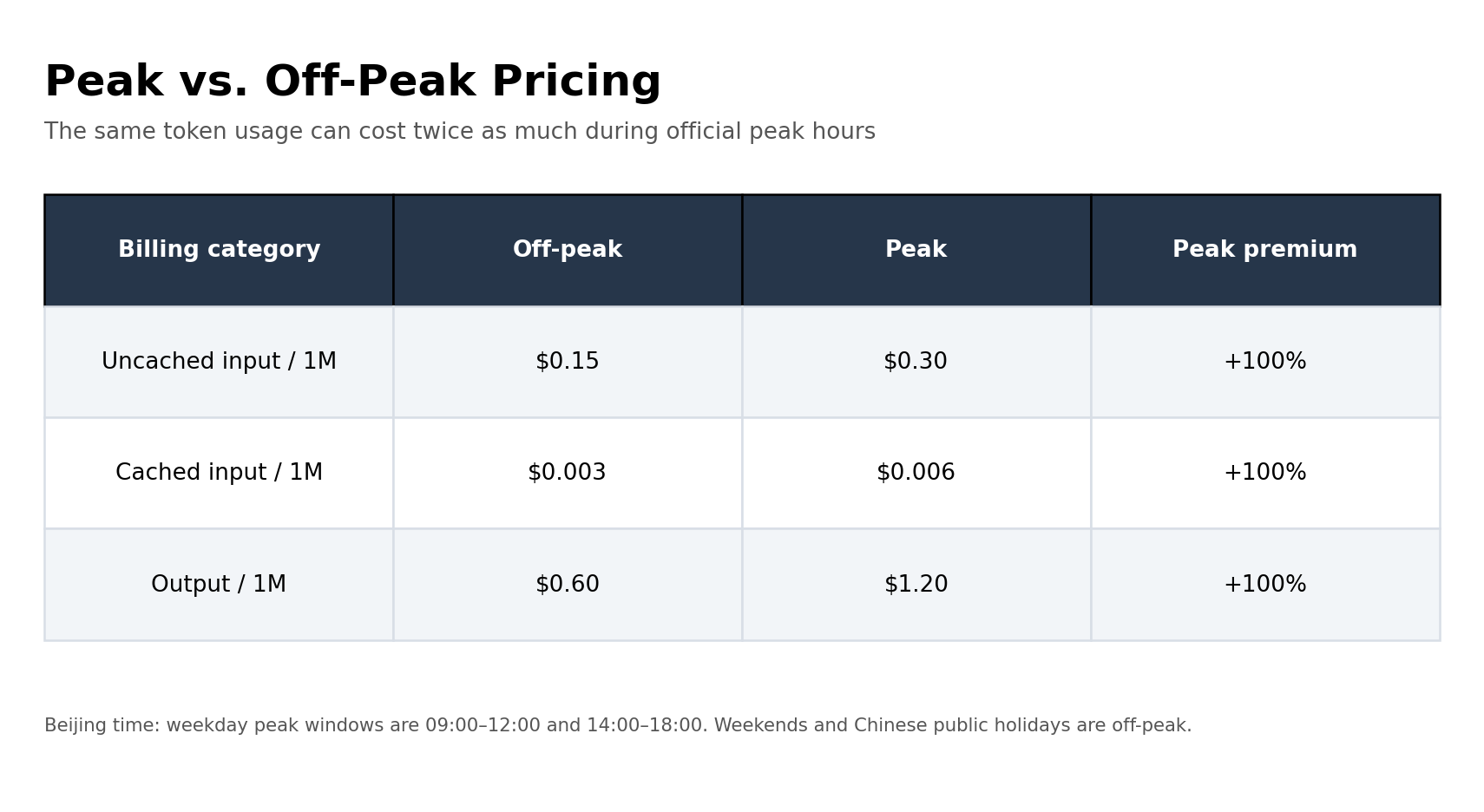
During peak periods, DeepSeek charges twice the corresponding off-peak rates. For example, one million uncached input tokens cost $0.15 off-peak but $0.30 during peak hours. One million output tokens increase from $0.60 to $1.20.
For teams running scheduled batch jobs, this creates an opportunity to reduce costs by moving flexible workloads outside peak windows. However, interactive applications and production agents may not be able to delay requests simply to obtain lower rates.
A practical approach is to separate workloads by urgency:
| Workload | Suggested Scheduling |
|---|---|
| Interactive coding assistants | Process requests when needed |
| Scheduled document analysis | Prefer off-peak hours |
| Batch content generation | Schedule flexible jobs off-peak |
| Background classification | Use off-peak windows where practical |
| Time-sensitive production agents | Prioritize response requirements |
The important distinction is that off-peak pricing is not a temporary promotional discount. It is part of DeepSeek's published billing structure. Developers should account for it when forecasting recurring API expenditure.
Cache Hit vs. Cache Miss: How Much Can You Save?
Prompt caching is one of the most important factors affecting DeepSeek V4.1 Flash API costs.
A cache miss occurs when input tokens do not qualify for an existing cached prefix. A cache hit occurs when previously processed input can be reused under the provider's caching rules.
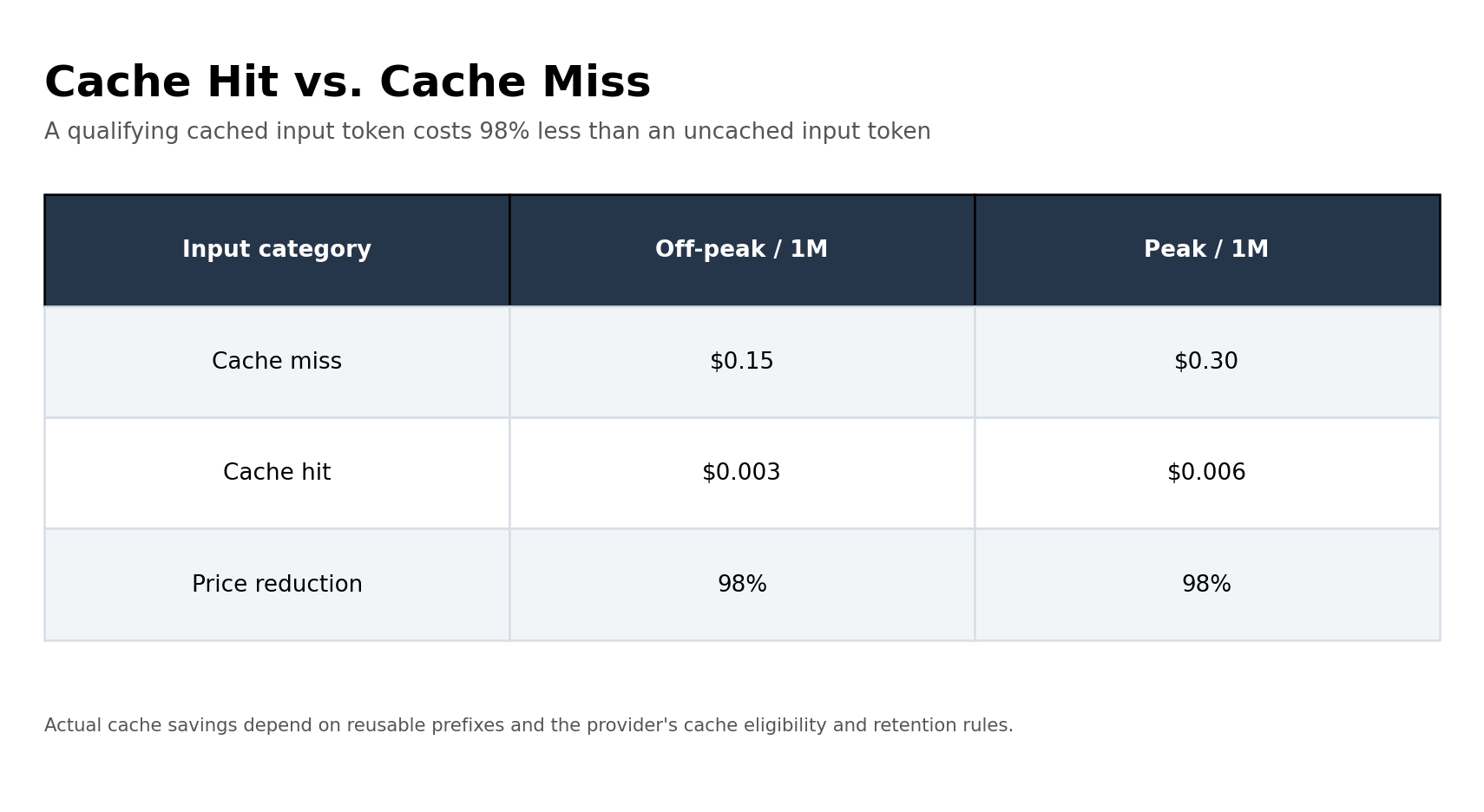
DeepSeek's official pricing makes the difference substantial:
| Input Type | Off-Peak Price | Peak Price |
|---|---|---|
| Cache Miss | $0.15/M | $0.30/M |
| Cache Hit | $0.003/M | $0.006/M |
| Cache-hit price reduction | 98% | 98% |
For the same one million input tokens, a qualifying cache hit costs just 2% of the corresponding cache-miss rate.
Why Cache Hits Matter for Coding Agents
Coding Agents frequently reuse system instructions, repository context, tool descriptions, and previous conversation history.
When a request preserves a reusable prompt prefix, the qualifying cached portion may receive the lower cache-hit rate.
This is particularly relevant to long-running agent sessions. A workflow that repeatedly sends a large, unchanged system prompt can have a very different input cost from one that sends entirely new context on every request.
Developers should pay attention to three practical factors:
1. Keep stable instructions and reusable context consistent across requests.
2. Avoid unnecessarily changing the beginning of a prompt when an existing prefix can be reused.
3. Inspect actual usage and cache-related billing information instead of assuming every repeated token qualifies for caching.
Cached input should not be counted again at the regular input rate. New or non-cached portions of the request remain subject to the applicable input pricing.
Example: One Million Input Tokens
| Scenario | Official Off-Peak | Official Peak |
|---|---|---|
| 1M cache-miss tokens | $0.15 | $0.30 |
| 1M cache-hit tokens | $0.003 | $0.006 |
The difference is especially important for applications that repeatedly process large prompts. A low cache-miss rate alone does not guarantee a low bill; the actual proportion of cached input matters.
How to Calculate DeepSeek API Costs at Different Cache Hit Rates
Real-world applications rarely achieve a 100% cache hit rate. A more useful way to estimate API spending is to calculate cached and uncached input tokens together.
Consider a workload with the following usage:
- Total input: 1 million tokens
- Cache hit rate: 80%
- Cached input: 800,000 tokens
- Uncached input: 200,000 tokens
- Output: 100,000 tokens
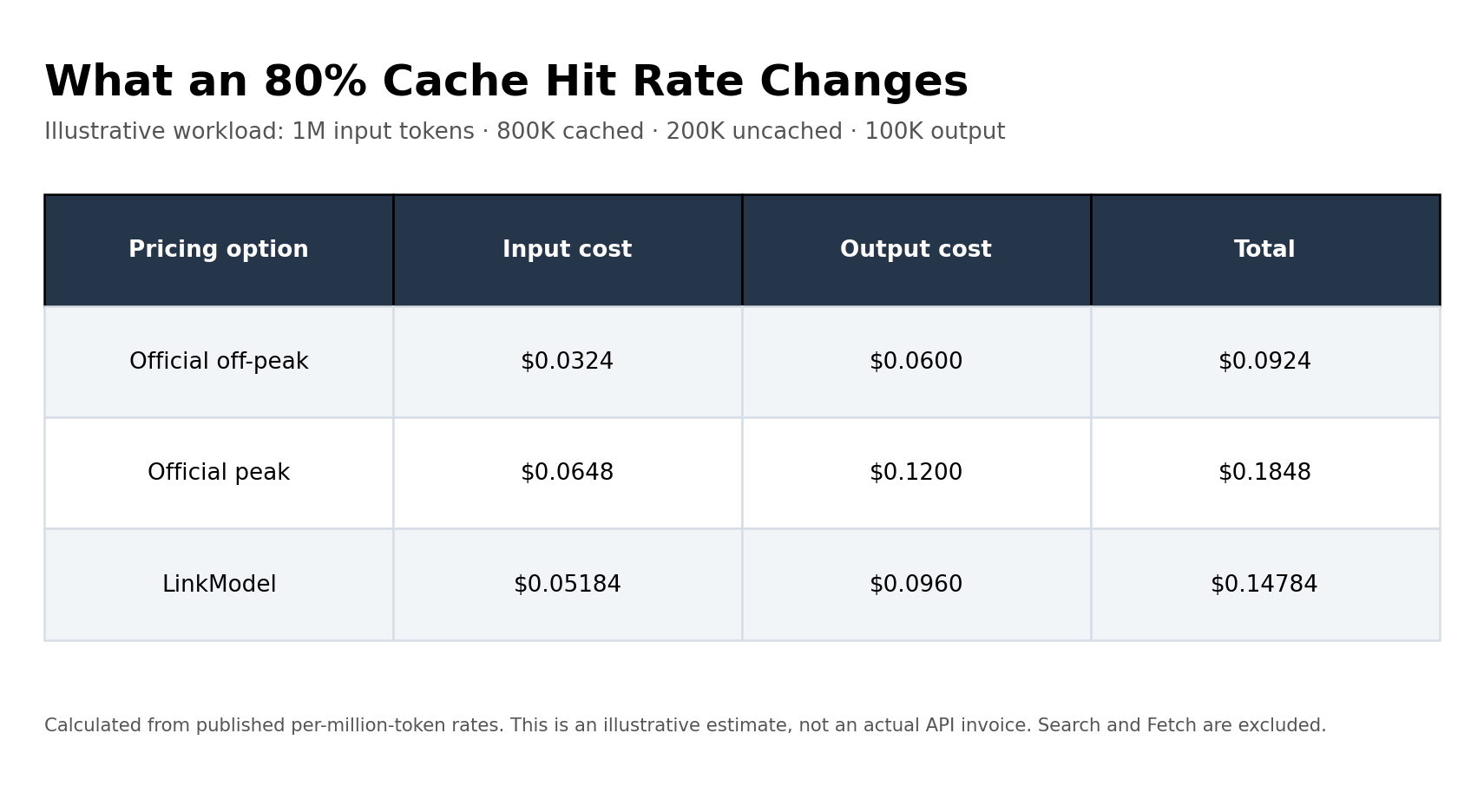
Using the published pricing rates, the estimated costs are:
| Pricing Option | Input Cost | Output Cost | Total |
|---|---|---|---|
| Official Off-Peak | $0.0324 | $0.0600 | $0.0924 |
| Official Peak | $0.0648 | $0.1200 | $0.1848 |
| LinkModel | $0.05184 | $0.0960 | $0.14784 |
Illustrative calculation based on published token rates, not an actual API invoice.
The calculation uses the following formula:
Input Cost = (Cached Input Tokens × Cache-Hit Rate) + (Uncached Input Tokens × Cache-Miss Rate)
The total model cost is then:
Total Model Cost = Input Cost + Output Cost
For this workload, LinkModel costs 20% less than the official peak-rate calculation. However, DeepSeek's official off-peak pricing remains less expensive.
The example also demonstrates why cache hit rates matter. Comparing providers using only the uncached input rate can give an incomplete picture of actual spending, particularly for applications that repeatedly reuse long prompts or conversation context.
What Does DeepSeek V4.1 Flash Cost in Real Workloads?
Token prices are only one part of API expenditure. Real workloads may also involve reasoning tokens, standalone Search and Fetch requests, repeated model calls, and retries after unsuccessful attempts.
For multi-step applications, developers should evaluate the total cost of completing a task rather than looking at an individual request in isolation, especially when estimating AI agent operating costs.
Reasoning Tokens and Unexpected API Bills
Reasoning consumption is another factor that can make actual API spending higher than expected.
Reddit discussions reviewed for this research highlight a recurring concern: some developers report unexpectedly high token consumption when using stronger reasoning settings.
One reported example describes XHigh reasoning sessions consuming approximately 10,000–20,000 thinking tokens. Other users point to repeated execution after failed tasks as another source of additional expenditure.
Reasoning tokens are part of model output usage in DeepSeek's billing structure. They should not be added a second time when the reported total output already includes them.
If 10,000–20,000 reasoning tokens are included in billable output, their corresponding cost at the official rates is:
| Billable Output Tokens | Off-Peak | Peak |
|---|---|---|
| 10,000 | $0.006 | $0.012 |
| 20,000 | $0.012 | $0.024 |
| 100,000 | $0.06 | $0.12 |
| 1,000,000 | $0.60 | $1.20 |
These calculations use the published output rates and the stated token quantities. The important point is that reasoning consumption can accumulate across multiple attempts, even when an individual request looks inexpensive.
Cost per Successful Task Is More Useful Than Cost per Request
A request that consumes tokens but fails to produce a usable result still contributes to the overall workload cost.
One user-reported text-review test provided the following comparison:
| Configuration | Successful Results | Median Time | Cost per Call |
|---|---|---|---|
| V4.1 Default | 28/30 | 33s | $0.0018 |
| V4.1 Low | 30/30 | 23s | $0.0012 |
In this particular test, Low reasoning had both a lower reported cost per call and more successful responses.
The result does not establish that Low is universally better. It shows why developers should evaluate the cost of successful completion rather than selecting a reasoning configuration based solely on its nominal token price.
A useful way to evaluate an AI coding workflow is to calculate the cost of a successfully completed task rather than looking at a single request in isolation.
Cost per Successful Task = Total Cost of All Attempts ÷ Number of Successfully Completed Tasks
Total cost should include:
- Input and cached input tokens across all attempts.
- Output tokens, including reasoning consumption.
- Any separately billed Search and Fetch requests.
- Additional model calls made during retries.
This metric is especially useful when comparing reasoning configurations. A cheaper individual request does not necessarily produce a cheaper completed task if it requires more attempts or fails more frequently.
For developers evaluating different configurations, the most useful comparison combines task completion rate, total execution time, token consumption, and cost per successful result.
Search and Fetch Costs: The Extra Charges Beyond Tokens
DeepSeek provides standalone Search and Fetch APIs for agents and applications that need live web content.
Unlike model inference, these APIs are billed per successful request rather than by token consumption.
| API | Billing Unit | Official Price |
|---|---|---|
| Search | 1,000 successful requests | $0.75 |
| Fetch | 1,000 successful requests | $0.75 |
A Search request is billable when it returns HTTP 200 and a non-empty results array. A Fetch request is billable when it returns HTTP 200 and page content.
Failed requests, empty Search results, and timeouts are not billed under DeepSeek's documented rules. The Search result count does not change the per-request price.
For example, an application that makes 1,000 successful Search requests and 500 successful Fetch requests incurs:
- Search: 1,000 ÷ 1,000 × $0.75 = $0.75
- Fetch: 500 ÷ 1,000 × $0.75 = $0.375
- Total additional cost: $1.125
These fees are separate from DeepSeek V4.1 Flash input and output token charges. Developers building web-enabled agents should therefore include both model usage and successful Search or Fetch requests when estimating total expenditure.
This distinction matters because a workflow can consume relatively few model tokens while making a large number of external Search and Fetch requests. Looking only at the model's per-million-token rates may therefore underestimate the total cost of an agent workflow.
These prices apply to DeepSeek's documented standalone Search and Fetch APIs. They should not automatically be applied to LinkModel requests without corresponding documentation of those charges.
For complete billing conditions, see the official DeepSeek Search and Fetch documentation.
DeepSeek Official API vs. LinkModel Pricing
The right API pricing comparison depends on the time window and token category.
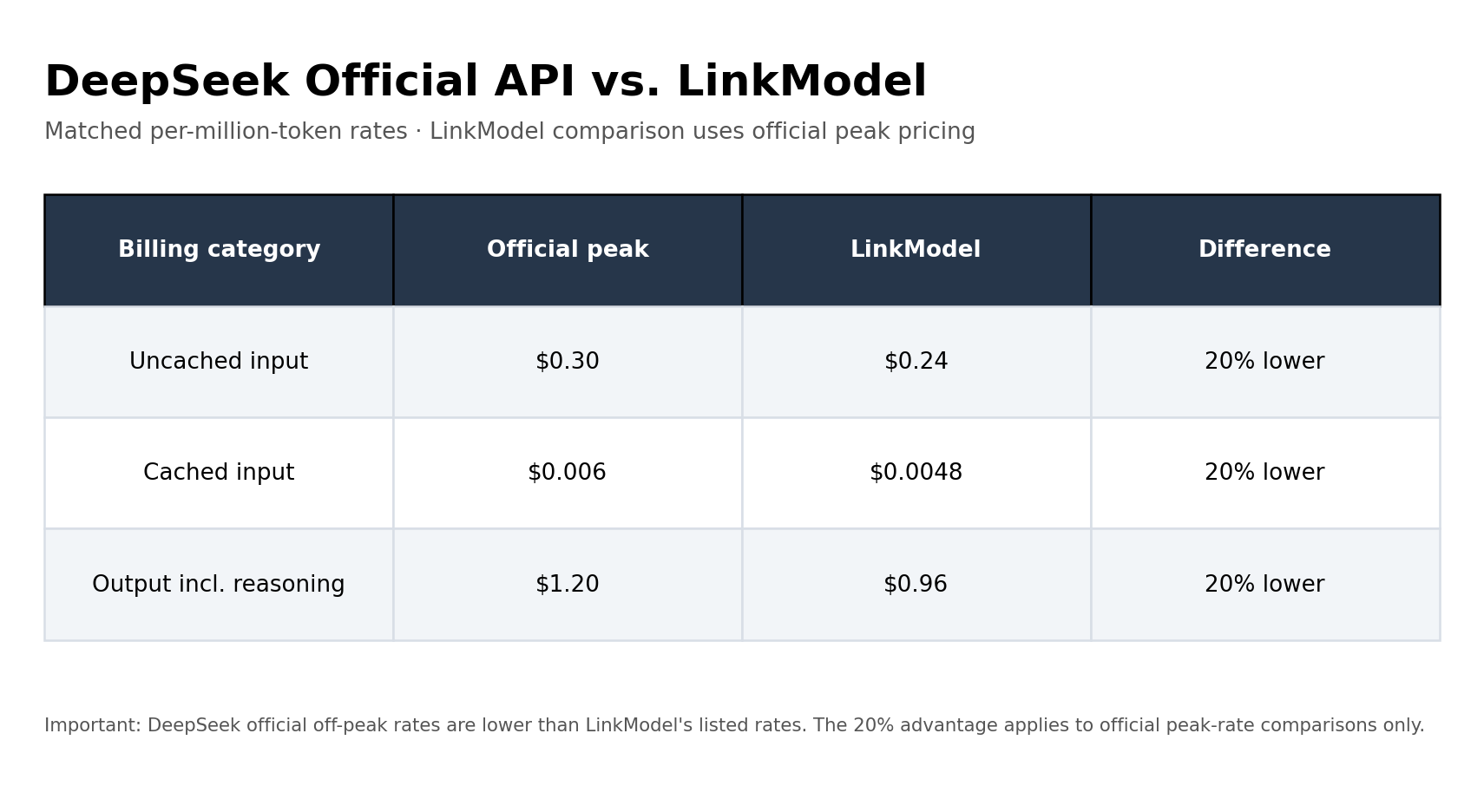
LinkModel's displayed DeepSeek V4.1 Flash 1017 rates are:
| Billing Category | DeepSeek Official Peak | LinkModel | Difference |
|---|---|---|---|
| Input | $0.30 | $0.24 | 20% lower |
| Cached Input | $0.006 | $0.0048 | 20% lower |
| Output (Including Reasoning) | $1.20 | $0.96 | 20% lower |
USD per 1 million tokens. LinkModel figures reflect the supplied model-pricing information.
At these matched peak-rate comparisons, LinkModel's listed prices are 20% lower across the displayed categories.
LinkModel displays reasoning output as a separate row at the same rate as ordinary output. DeepSeek publishes a unified output-token rate. Reasoning tokens should not be counted twice when they are already included in total billable output usage.
However, DeepSeek's off-peak rates are half of its peak rates. The comparison changes when requests can be scheduled outside peak hours.
| Billing Category | DeepSeek Official Off-Peak | LinkModel |
|---|---|---|
| Input | $0.15 | $0.24 |
| Cached Input | $0.003 | $0.0048 |
| Output (Including Reasoning) | $0.60 | $0.96 |
This means LinkModel's listed rates are higher than DeepSeek's direct off-peak rates. Developers who can consistently schedule work during off-peak periods should include this difference in their purchasing decision.
Example: Comparing the Cost of a Realistic Workload
Assume a workload uses one million uncached input tokens and one million output tokens.
| Pricing Option | Cost Breakdown | Total |
|---|---|---|
| DeepSeek Official Off-Peak | $0.15 + $0.60 | $0.75 |
| DeepSeek Official Peak | $0.30 + $1.20 | $1.50 |
| LinkModel | $0.24 + $0.96 | $1.20 |
At the same token usage, LinkModel saves $0.30 compared with the official peak-rate calculation. Against the official off-peak calculation, however, the same workload costs $0.45 more.
The best option therefore depends on when your requests run and whether your application can take advantage of off-peak pricing.
Monthly DeepSeek API Cost Estimates
Per-million-token prices are useful for comparing providers, but developers also need to understand how those rates translate into monthly budgets.
The following scenarios illustrate how workload size and cache hit rate affect recurring API expenditure.
Assumptions:
- Light usage: 10M input tokens and 2M output tokens per month.
- Medium usage: 100M input tokens and 20M output tokens per month.
- High usage: 1B input tokens and 200M output tokens per month.
- Cache hit rates: 0% and 80%.
- Output volume remains unchanged across both cache scenarios.
- Search, Fetch, and other separately billed services are excluded.
| Workload | Cache Hit Rate | Official Off-Peak | Official Peak | LinkModel |
|---|---|---|---|---|
| Light | 0% | $2.70 | $5.40 | $4.32 |
| Light | 80% | $1.524 | $3.048 | $2.4384 |
| Medium | 0% | $27.00 | $54.00 | $43.20 |
| Medium | 80% | $15.24 | $30.48 | $24.384 |
| High | 0% | $270.00 | $540.00 | $432.00 |
| High | 80% | $152.40 | $304.80 | $243.84 |
All amounts are illustrative monthly estimates in USD, calculated from published per-million-token rates. They are not actual invoices.
The results show two important patterns.
First, an 80% cache hit rate substantially reduces monthly input costs because cached input is priced much lower than uncached input.
Second, the official off-peak option remains the least expensive of the three pricing scenarios under these assumptions. LinkModel's listed rates are 20% below official peak rates, but they are higher than the official off-peak rates.
For developers managing recurring workloads, this distinction matters more than a headline discount. Monthly spending depends on the total token volume, cache hit rate, and time of request.
Why Consider LinkModel?
The choice between DeepSeek's official API and LinkModel depends on more than the lowest available token rate.
Developers who can schedule flexible workloads during DeepSeek's off-peak hours may find the official API more economical. However, applications that need to run during peak hours can compare LinkModel's published rates, which are 20% below the corresponding official peak rates across the displayed input, cached input, and output categories.
LinkModel also provides a unified API interface for supported models from multiple providers. Its documentation lists DeepSeek chat integration through:
- POST /chat/completions for OpenAI-compatible chat requests.
- POST /messages for Anthropic-compatible Messages requests.
The LinkModel model catalog currently lists deepseek-v4-flash as its DeepSeek Flash model identifier. DeepSeek's official documentation also confirms that this legacy name is still accepted and that requests using it are served by DeepSeek-V4.1-Flash-1017 at the current Flash price.
This means the two identifiers have different roles in the documentation, but the LinkModel-listed identifier is not necessarily a different underlying model version. Developers should use the model identifier shown in the current documentation for their selected API provider.
Useful resources:
- DeepSeek V4.1 Flash 1017 on LinkModel
- LinkModel Models Documentation
- DeepSeek Official API Documentation
For developers already working with several AI providers, a unified integration and billing workflow can reduce the need to maintain separate platform configurations. Individual model capabilities, supported parameters, and billing categories should still be checked before migration.
New users also automatically receive $1 in free Credits after registration, without a payment card or recharge. Existing users cannot claim this benefit repeatedly. The gifted Credits do not expire and apply to all models currently available on LinkModel.
The most practical approach is to compare the exact model, the relevant token categories, and the expected request schedule before committing to a recurring workload.
How to Control Your DeepSeek API Spending
Developers can make their API budgets more predictable by managing the main variables that determine token consumption and additional request charges.
Schedule Flexible Workloads Off-Peak
If a task does not require an immediate response, schedule it outside the official peak windows. This reduces the corresponding DeepSeek token rates by 50% compared with peak pricing.
Improve Cache Reuse
Keep stable system instructions and reusable prompt prefixes consistent. Check actual cache usage to determine whether the expected savings are occurring.
Match Reasoning Effort to Task Complexity
Simple extraction, classification, and formatting tasks may not need the same reasoning configuration as complex debugging or multi-step engineering work.
Start with an appropriate lower-cost configuration and evaluate whether the result meets the task's acceptance criteria before increasing reasoning effort.
Track Retries and Successful Results
Do not measure API expenditure solely by the number of successful HTTP requests. Track failed attempts, repeated model calls, and the actual cost of a completed task.
This is especially important for agents that execute multiple steps autonomously.
Monitor Additional API Usage Separately
For applications using DeepSeek's standalone Search and Fetch APIs, monitor successful requests independently from model tokens. Their request-based billing should be included in the total budget when those services are used.
Compare the Complete Billing Structure
Before selecting an API provider, compare the following factors:
| Factor | What to Check |
|---|---|
| Model identity | Is the current 1017 model being served? |
| Input pricing | Are cache-hit and cache-miss rates separate? |
| Output pricing | How are reasoning tokens represented in usage? |
| Time-based pricing | Are peak and off-peak rates different? |
| Usage limits | Are concurrency and request limits suitable? |
| Additional costs | Are Search, Fetch, or external services billed separately? |
| Billing | Is usage charged per token, per request, or through a subscription? |
A lower advertised input rate does not necessarily mean a lower total bill. The relevant comparison is the cost of completing the same workload under equivalent conditions.
A Complete DeepSeek API Cost Formula
For workloads that use DeepSeek's standalone Search and Fetch APIs, the estimated total cost can be calculated as:
Total Cost = Uncached Input Cost + Cached Input Cost + Output Cost + Search Cost + Fetch Cost
Where:
- Uncached Input Cost = Cache-miss tokens × cache-miss rate
- Cached Input Cost = Cache-hit tokens × cache-hit rate
- Output Cost = Billable output tokens × output rate
- Search Cost = Successful Search requests × $0.00075
- Fetch Cost = Successful Fetch requests × $0.00075
For token-only workloads, exclude Search and Fetch costs if those APIs are not used.
For multi-step agent workflows, include all billable attempts rather than counting only the final successful response. This produces a more realistic estimate of the total cost of completing a task.
These Search and Fetch rates apply to DeepSeek's documented standalone APIs. Do not automatically apply them to LinkModel requests without a corresponding documented LinkModel charge.
Frequently Asked Questions
How much does DeepSeek V4.1 Flash API cost per 1M tokens?
DeepSeek V4.1 Flash costs $0.15 per million uncached input tokens, $0.003 per million cached input tokens, and $0.60 per million output tokens during off-peak hours. During peak hours, the corresponding rates are $0.30, $0.006, and $1.20.
When is DeepSeek API pricing cheapest?
DeepSeek offers its lower off-peak rates outside the published weekday peak windows. Weekends and Chinese public holidays are off-peak throughout the day. In Beijing time, weekday peak periods are 09:00–12:00 and 14:00–18:00.
Why is my DeepSeek API bill higher than expected?
Common reasons include increased reasoning-token consumption, cache misses, repeated requests, retries after unsuccessful tasks, and standalone Search or Fetch requests. Checking actual input, cached input, output, and request-based usage can help identify the source of the increase.
Does DeepSeek V4.1 Flash support cached input pricing?
Yes. DeepSeek publishes separate cache-hit and cache-miss input rates. A qualifying cache-hit input token costs substantially less than an uncached input token. The official Flash cache-hit price is $0.003 per million tokens off-peak and $0.006 during peak hours.
What is the DeepSeek V4.1 Flash API model ID?
The official DeepSeek API model ID is deepseek-flash, which serves DeepSeek-V4.1-Flash-1017. LinkModel's model documentation currently lists deepseek-v4-flash. DeepSeek confirms that this legacy identifier is still accepted and routed to the current 1017 model. Use the identifier documented by your chosen API provider.
Is LinkModel cheaper than the official DeepSeek API?
LinkModel's listed DeepSeek V4.1 Flash rates are 20% below the corresponding official peak rates. However, DeepSeek's official off-peak prices are lower than the listed LinkModel rates. The more economical option depends on your request schedule, token distribution, and workload requirements.
Conclusion
DeepSeek V4.1 Flash offers competitive token-based API pricing, but the actual cost depends on more than the published input and output rates. Peak and off-peak scheduling, cache-hit ratios, reasoning consumption, Search and Fetch requests, and repeated task execution all influence the final bill. Developers who can schedule flexible workloads should take advantage of DeepSeek's official off-peak rates, while those comparing managed API access can evaluate LinkModel's 20% lower listed rates against official peak pricing, together with its unified API and pay-as-you-go billing. The most reliable purchasing decision comes from comparing the complete cost of the same workload rather than relying on a single headline price.