To use GLM 5.3 Flash with OpenCode for free, download the OpenCode desktop app, open a project, and select GLM-5.3-Flash from the free model list. You can start without purchasing an API key or using terminal commands. However, free access is subject to message allowances and model availability, making it important to understand AI API rate limits when considering paid alternatives.
For developers new to AI coding agents, getting started is only part of the challenge. You also need to know what to do when a model is missing, how to make OpenCode work on actual project files, why free messages run out, and when a paid API makes more sense. Different access methods may offer different context limits, quotas, and billing arrangements.
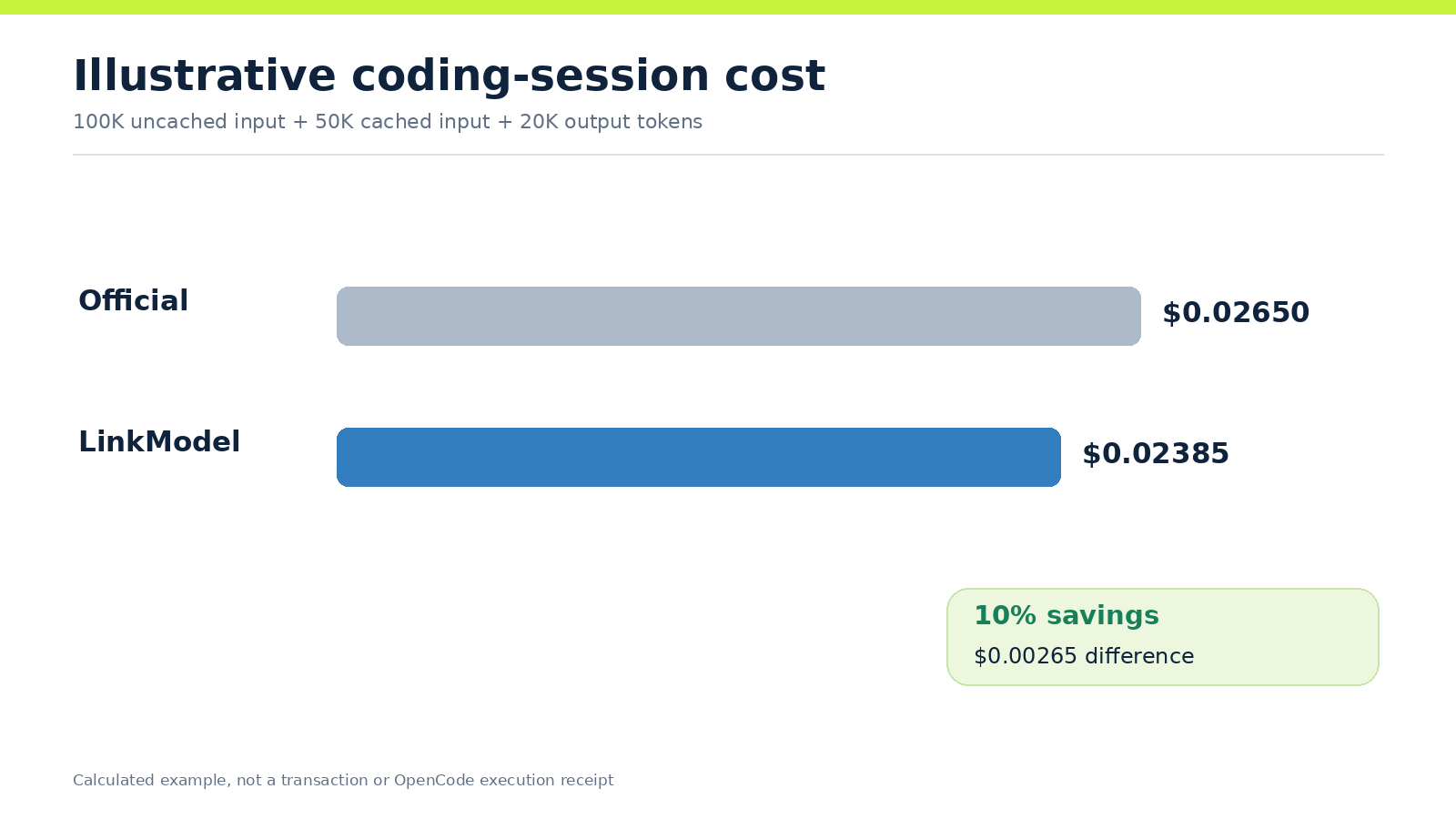
If you need paid access beyond the free offering, LinkModel lists GLM 5.3 Flash at $0.135 per 1M input tokens and $0.45 per 1M output tokens, both 10% below the corresponding official published rates. With $0 minimum spend and $0 monthly platform fee, its pay-as-you-go API provides an alternative for developers who want usage-based costs without an additional monthly platform subscription. You can also explore supported models through the LinkModel Playground before choosing an API workflow.
What Is GLM 5.3 Flash in OpenCode?
OpenCode is an open-source AI coding agent that can inspect project files, suggest edits, run development commands, and coordinate multi-step programming tasks.
GLM 5.3 Flash is an AI model developed by Z.ai. It can provide the reasoning and code-generation capabilities used by OpenCode to analyze projects, debug problems, write code, and plan development work.
The distinction is straightforward:
- OpenCode: The application that manages project access, user interaction, and tool execution.
- GLM 5.3 Flash: The AI model that interprets instructions and generates responses.
- Model provider: The service that handles inference, access limits, and billing.
Installing OpenCode does not automatically provide unlimited access to GLM 5.3 Flash.
What Can GLM 5.3 Flash Do?
GLM 5.3 Flash is designed for coding and agent workflows, including code explanation, debugging, implementation, testing, and multi-step task planning.
LinkModel's published model information lists support for function calling, multimodal inputs, and a model context capacity of up to 1 million tokens.
However, the model's advertised maximum capabilities are not necessarily identical to the limits available through every OpenCode provider or free offering.
Actual file editing, command execution, and other agent functions also depend on the client's tools, permissions, and the upstream service.
OpenCode Desktop vs Terminal: Which Should You Use?
OpenCode is available as both a desktop application and a terminal-based coding agent.
| Feature | OpenCode Desktop | OpenCode Terminal |
|---|---|---|
| Installation | Download an application | Install a command-line tool |
| Interface | Graphical user interface | Terminal interface |
| Model selection | Model selection menu | Model commands |
| Project access | Open a local project | Launch inside a project directory |
| AI coding tasks | Supported | Supported |
| Custom API providers | Configurable | Configurable |
| Recommended for | Beginners and GUI users | Developers comfortable with terminals |
For most first-time users, the desktop application is the easier starting point.
You do not need to install the terminal version before using OpenCode Desktop.
How to Use GLM 5.3 Flash in OpenCode for Free
You can start using GLM 5.3 Flash in OpenCode Desktop in four steps: install the application, open a project, select the free model, and submit a coding request.
Download and Install OpenCode Desktop
Visit the official OpenCode download page:
https://opencode.ai/download
Find the OpenCode Desktop section and choose the appropriate installer:
- Windows x64 for most Windows computers with Intel or AMD processors.
- Windows ARM64 for ARM-based Windows devices.
- macOS according to your processor architecture.
- A supported Linux installation format for your distribution.
Download and install the application, then launch OpenCode.
The desktop installer does not require you to install the OpenCode CLI with npm first.
Open a Project Folder
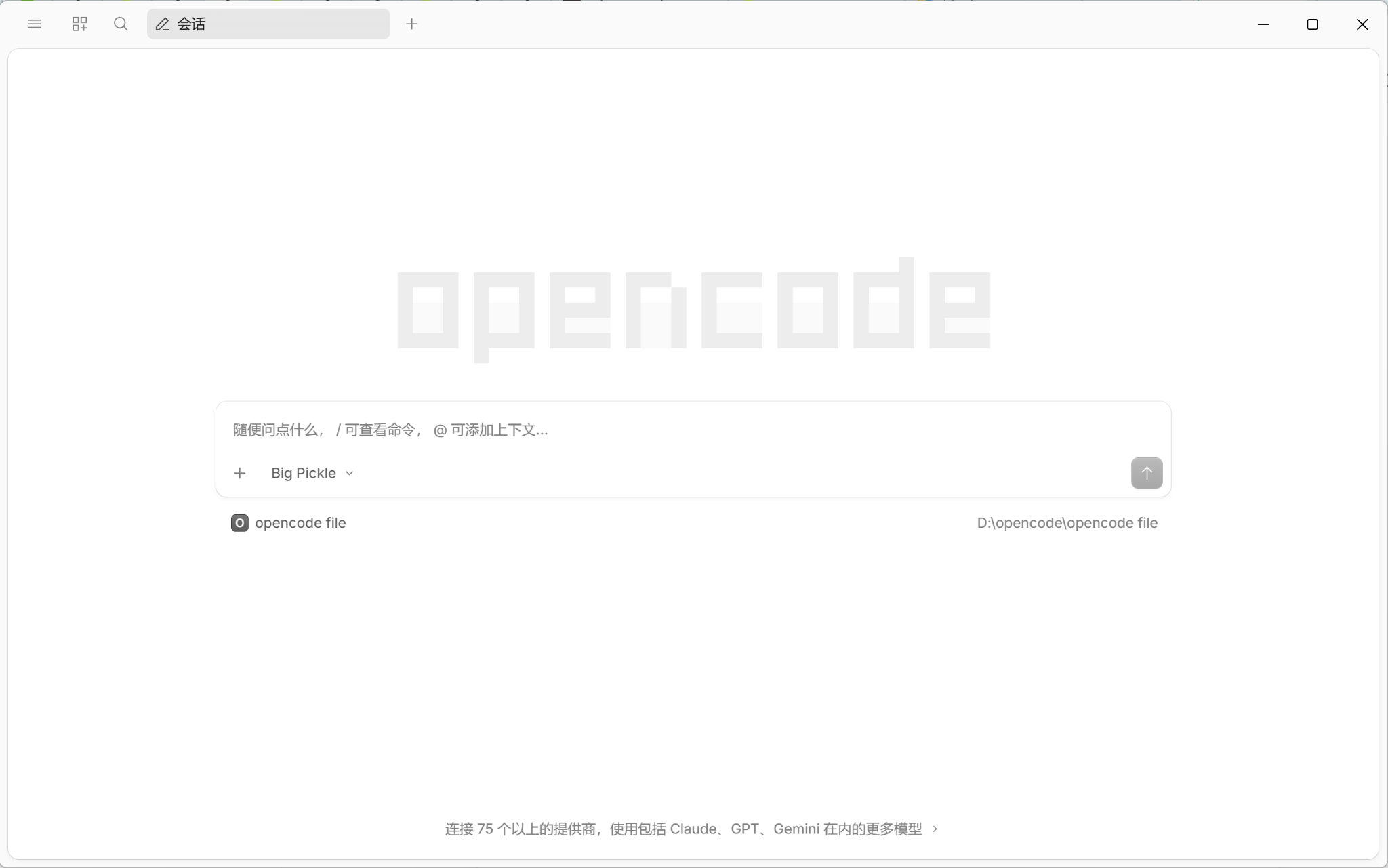
When OpenCode launches, open a local project directory.
If you are experimenting for the first time, create a separate folder for practice, such as:
D:\opencode\practice-project
Using a dedicated practice directory helps keep experimental AI-generated files away from important projects.
Once the workspace is open, you should see the conversation area and a model selector near the message input.
You can begin with the free model without connecting a paid API provider.
Select GLM 5.3 Flash Free
Click the current model name or the dropdown arrow beside it.
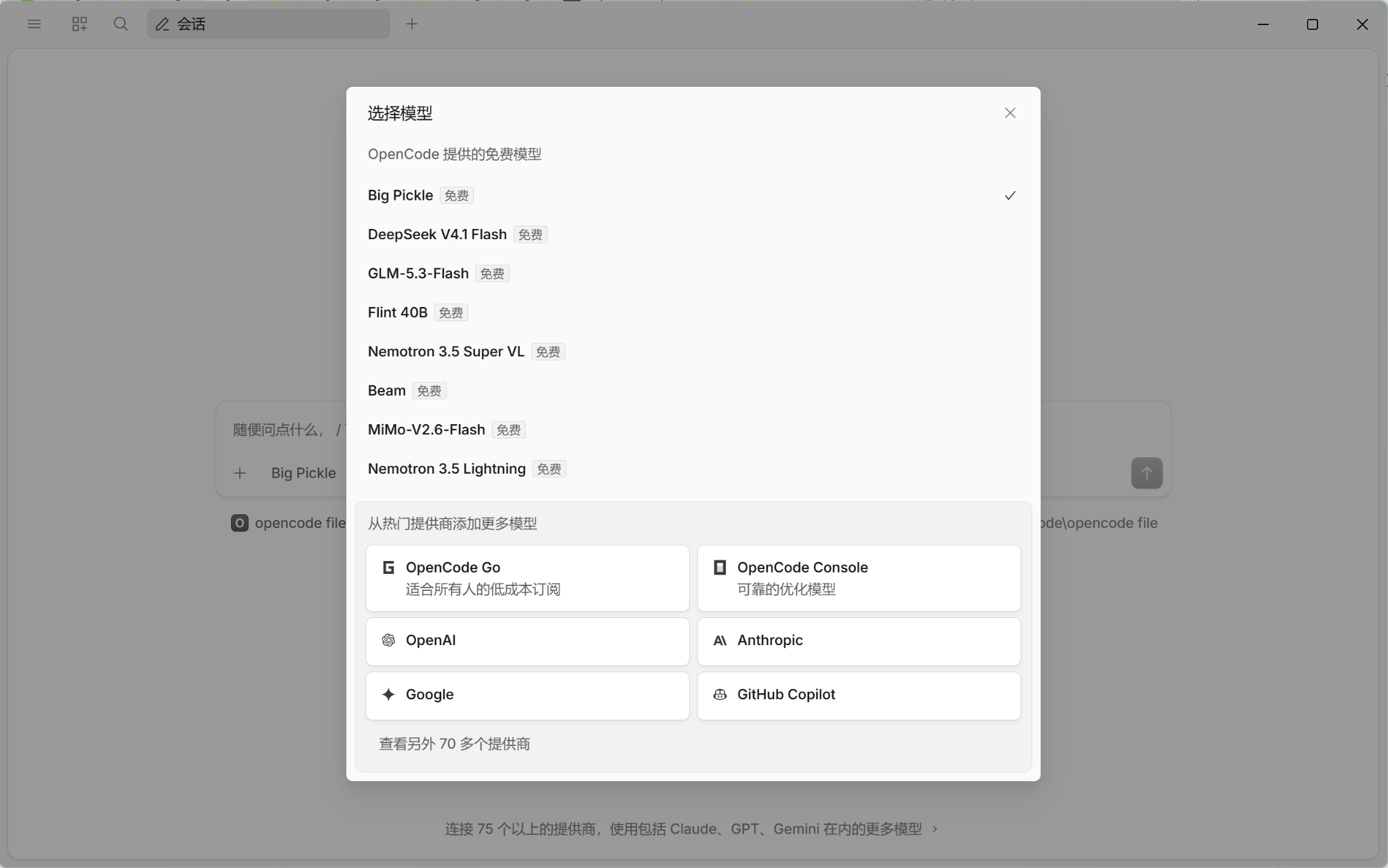
In the model selection window, look for the list of free models provided by OpenCode.
In a November 2, 2026, desktop interface check, GLM-5.3-Flash appeared in the free model list and carried a Free label.
Select GLM-5.3-Flash.
The selected model name should then appear in the conversation input area.
This is the most direct way to use the free model in the desktop application.
Free model availability, naming, and usage restrictions may change. Always confirm the model's current status in the application rather than assuming that free access is permanent.
Run Your First OpenCode Task
Start with a task that does not change any project files:
Inspect this project and explain its structure. Identify the main entry point, list the existing tests, and suggest one improvement. Do not modify any files.
This prompt asks the model to inspect the project, identify its entry point, describe existing tests, and suggest an improvement without writing changes.
If the directory is empty, a correct response should recognize that no source files are present rather than inventing file names.
If OpenCode requests permission to run a command, inspect the command before approving it.
This initial exercise helps confirm that you can select the model and interact with the workspace. It does not replace a complete test of code editing or tool execution.
How to Use GLM 5.3 Flash for Real Coding Tasks
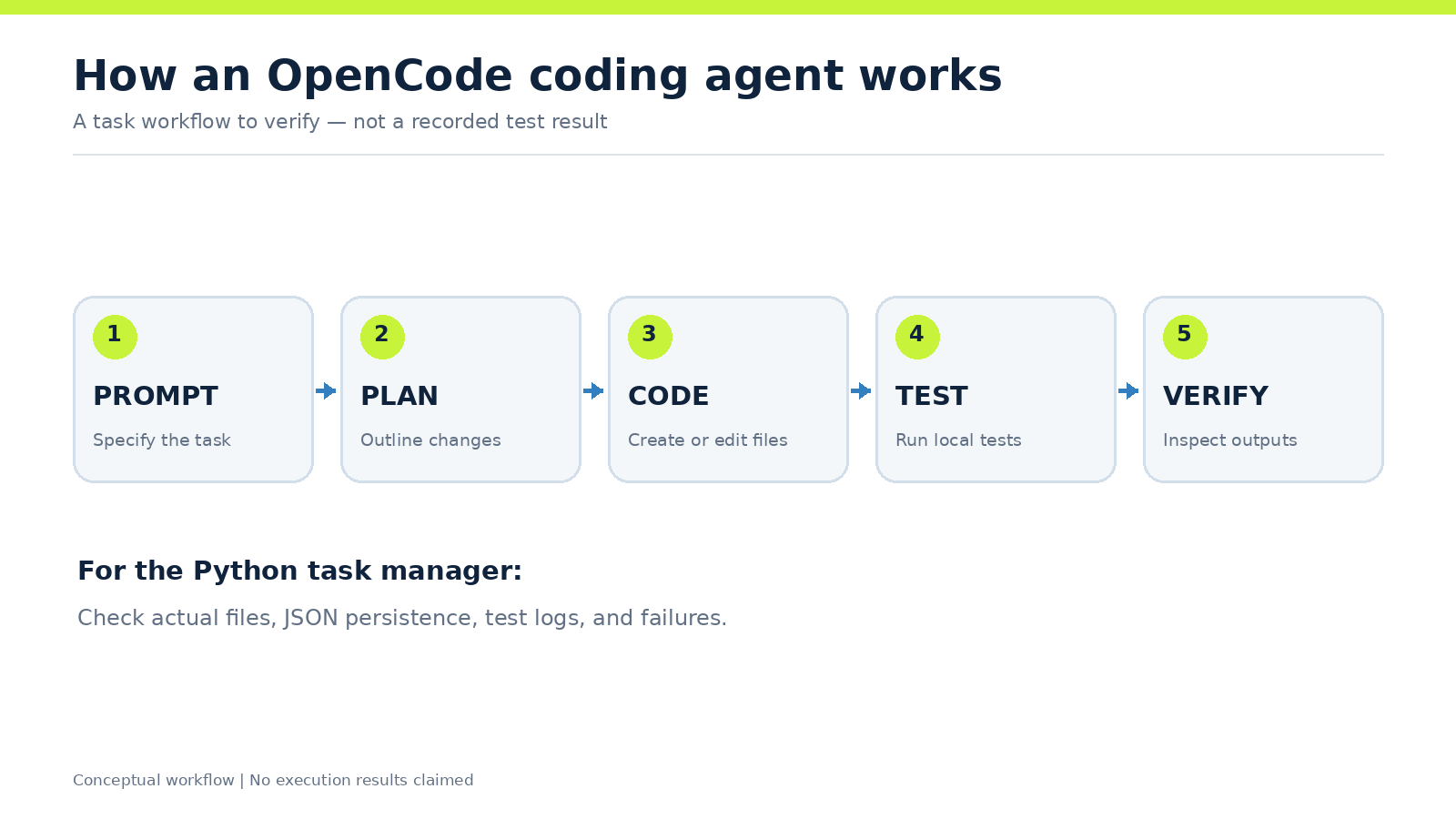
OpenCode is useful for more than answering programming questions. With appropriate permissions and available tools, a coding agent can attempt to create files, execute commands, inspect outputs, and iterate on a task.
A meaningful evaluation should therefore focus on the files and execution results rather than only the quality of the final written response.
Example: Build a Python Task Manager with OpenCode
A practical way to evaluate GLM 5.3 Flash in OpenCode is to ask it to build a small Python command-line task manager. Unlike a simple coding question, this task involves generating a working application, handling user input, storing data, writing automated tests, and checking whether the program runs correctly.
The task manager should support four basic operations: adding tasks, listing existing tasks, marking tasks as completed, and deleting tasks. It should also save tasks in a local JSON file so they remain available after the program restarts.
Use the following prompt in OpenCode:
Build a small Python command-line task manager in the current project folder. Requirements: 1. Create a working program named task_manager.py. 2. Allow users to add tasks, list tasks, mark tasks as completed, and delete tasks. 3. Save tasks to a local JSON file so they persist after restarting the program. 4. Handle invalid commands, missing task IDs, and empty task lists gracefully. 5. Create automated unit tests covering the main features and important edge cases. 6. Run the tests, identify failures, and fix the code if necessary. 7. Use only the Python standard library. Do not install external packages. 8. Do not modify or delete unrelated files. When finished, report the files created, the commands required to run the program, the actual test results, and any issues encountered. Do not claim that tests passed unless they were executed.
This prompt evaluates whether the coding agent can interpret functional requirements, create related project files, implement persistent data storage, and coordinate testing and debugging.
Python must be available in the local execution environment for OpenCode to run the application and its tests. If Python is missing, the agent may still generate code, but successful local execution cannot be assumed.
How to Evaluate the Task Manager
A useful evaluation checks the actual program rather than relying only on the agent's final explanation.
| Evaluation area | What to verify |
|---|---|
| File creation | A real task_manager.py file exists |
| Task operations | Users can add, list, complete, and delete tasks |
| Data persistence | Tasks remain available after restarting the program |
| Error handling | Invalid commands and missing task IDs are handled |
| Automated testing | The agent creates and executes tests |
| Debugging | Failed tests are investigated and corrected when possible |
| Final report | The agent accurately describes created files and executed commands |
For example, add two tasks, mark one as completed, and restart the application. The saved JSON data should preserve the correct task descriptions and completion states.
Next, try an invalid task ID and an unsupported command. The application should display understandable error messages rather than crashing unexpectedly.
Finally, inspect the test runner's output. A statement such as "all tests passed" is not sufficient unless the tests were actually executed.
This is a reproducible OpenCode coding exercise, not a claim that GLM 5.3 Flash successfully completed the task in a recorded benchmark. It demonstrates what readers can test and how to evaluate the results.
What Our Review of Developer Feedback Found
Our review of OpenCode community discussions identified three recurring concerns.
Context management: Some developers working on large repositories find the roughly 200K-token free context insufficient. One user described workloads requiring approximately 400K–600K tokens. Community suggestions included splitting tasks, managing conversation history, and using subagents.
Variable response speed: Developers report different response-time experiences. Reasoning requirements, provider conditions, and tool execution can all affect how long a coding-agent request takes. The Flash name alone does not guarantee a fast response to every task.
Planning and implementation workflows: Some users prefer GLM for planning or difficult debugging while assigning implementation tasks to another model. This reflects individual experience rather than a universal performance ranking.
For multi-step tasks, a practical approach is to separate planning, execution, and validation. Review actual file changes and command results at each stage.
Is GLM 5.3 Flash Free in OpenCode? Limits Explained
GLM 5.3 Flash can be available as a free model inside OpenCode, but free access does not mean unlimited messages or unrestricted API usage.
Free Message Allowances and Reset Times
In the OpenCode desktop model selector reviewed on November 2, 2026, GLM-5.3-Flash was explicitly labeled Free.
However, free usage can be subject to message allowances.
When an account reaches its allowance, OpenCode may display a notification that the day's free messages have been used and provide a reset time.
This means a user can successfully install OpenCode and select the model but still be unable to complete another request immediately.
The displayed reset time depends on the service's current rules and account state. A single account notification should not be interpreted as a guaranteed daily request count for every user.
Free Context Limits vs the Full API
OpenCode community discussions describe an approximately 200K-token context allowance for the free GLM 5.3 Flash offering.
By comparison, LinkModel publishes a model-level context capacity of up to 1 million tokens for the full GLM 5.3 Flash API model.
| Feature | OpenCode free offering | Full GLM 5.3 Flash API |
|---|---|---|
| Access | Select the free model inside OpenCode | Use an API credential |
| Message allowance | Subject to free-service rules | Usage-based API billing |
| Context | Around 200K tokens in community reports | Model capability up to 1M tokens |
| Payment | No separate paid API required for free usage | Charges based on actual usage |
| Suitable for | Exploration and smaller projects | API-driven coding workflows |
Actual usable context depends on the provider, client, output reservation, and request content.
A larger context window also does not guarantee a higher task completion rate.
When Should You Move to a Paid API?
Continue using the free model when it is available and meets your development needs.
A paid API becomes worth considering when free usage is exhausted, the free offering is discontinued, the workload needs more context, or you want usage-based billing for regular work.
Paid access does not automatically guarantee faster responses or better tool compatibility. Those qualities should be evaluated using the tasks that matter to your project.
GLM 5.3 Flash API Pricing: LinkModel vs Official Rates
LinkModel publishes GLM 5.3 Flash token rates that are 10% lower than the corresponding official prices shown in its pricing comparison.
GLM 5.3 Flash Token Pricing
| Token type | LinkModel per 1M tokens | Official per 1M tokens | Difference | Savings |
|---|---|---|---|---|
| Input | $0.135 | $0.150 | $0.015 | 10% |
| Cached input | $0.027 | $0.030 | $0.003 | 10% |
| Output | $0.450 | $0.500 | $0.050 | 10% |
These prices match LinkModel's published GLM 5.3 Flash listing as of November 2, 2026.
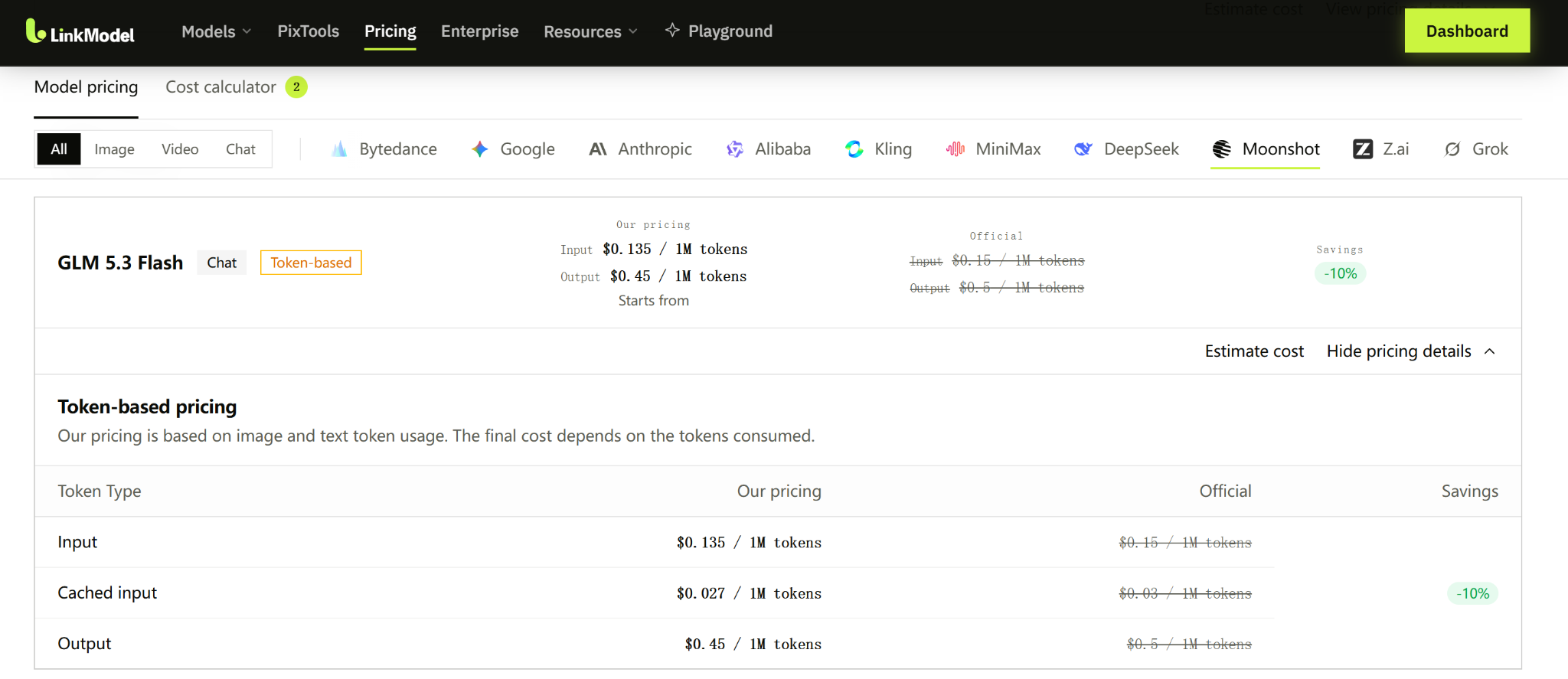
They are API token rates, not OpenCode software installation charges or OpenCode Go subscription fees.
How Much Could a Coding Task Cost?
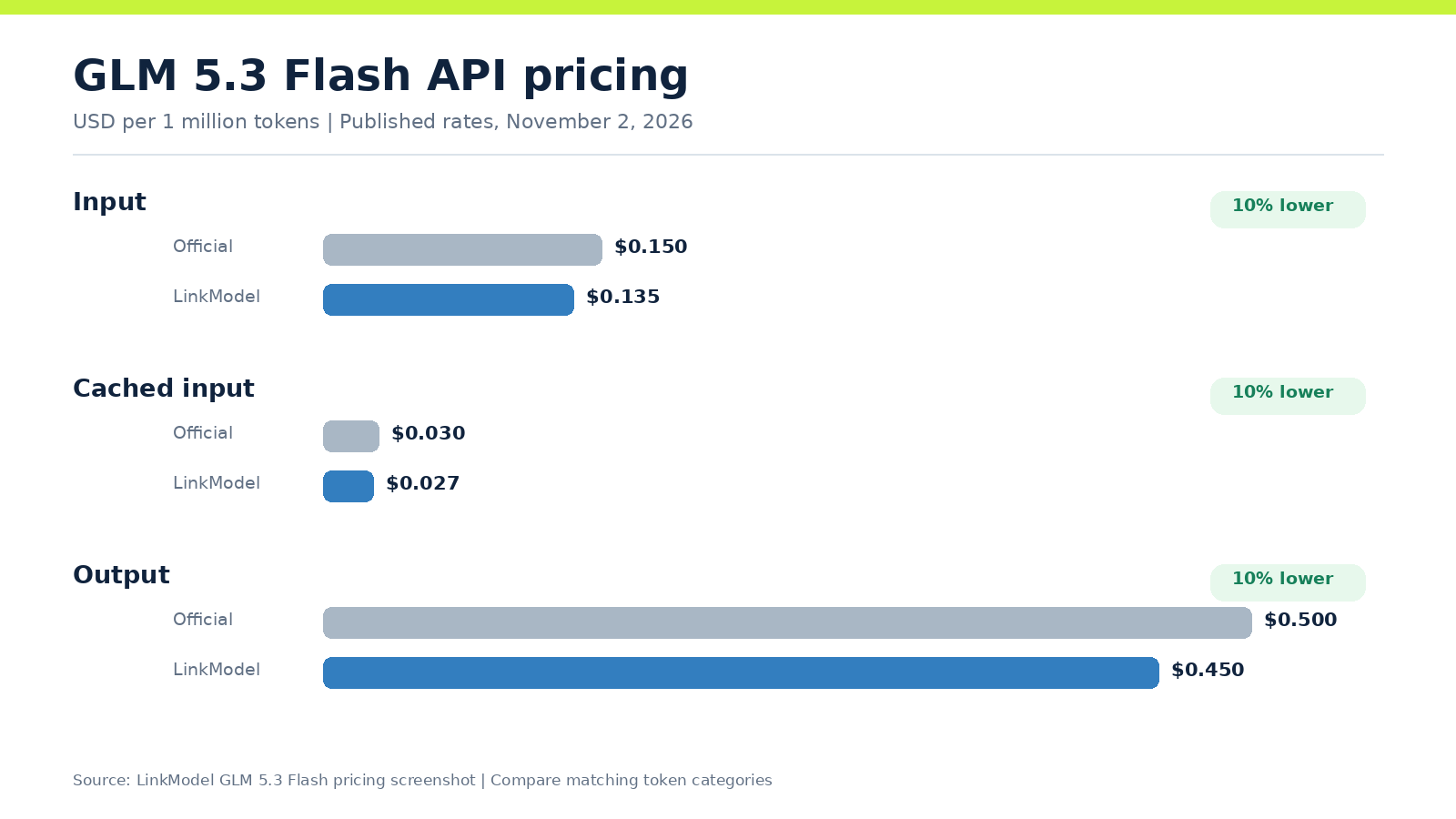
Consider an illustrative multi-step coding session consuming:
- 100,000 uncached input tokens.
- 50,000 cached input tokens.
- 20,000 output tokens.
At LinkModel's published rates:
| Token category | Calculation | Cost |
|---|---|---|
| Input | 0.1 × $0.135 | $0.01350 |
| Cached input | 0.05 × $0.027 | $0.00135 |
| Output | 0.02 × $0.450 | $0.00900 |
| Total | $0.02385 |
At the corresponding official rates, the same token usage would cost $0.02650.
That gives an estimated difference of $0.00265, equivalent to 10% of the comparable token bill.
This is a calculation based on published token rates, not a recorded coding-session receipt. Failed attempts, additional tool output, accumulated context, and other applicable charges can affect the final cost.
Why Consider Pay-as-You-Go Billing?
Developers with irregular usage may prefer paying for actual model consumption rather than committing to a fixed platform subscription.
LinkModel offers $0 minimum spend and $0 monthly platform fee, along with a unified API and billing experience for its available models.
New users also automatically receive $1 in free Credits after signup, with no payment card or deposit required. This is a one-time benefit for new users; existing accounts cannot claim it again. The gifted Credits do not expire and apply to all models currently available on LinkModel.
You can review the GLM 5.3 Flash pricing before deciding whether paid API access fits your workflow.
How to Connect GLM 5.3 Flash to OpenCode Using the LinkModel API
OpenCode supports custom model providers, while LinkModel provides an OpenAI-compatible API. This enables developers to prepare a custom provider configuration for paid GLM 5.3 Flash access.
You do not need to complete this section to use the free OpenCode model.
Get Your LinkModel API Key
Sign in to LinkModel and create an API key through the account's API management interface.
Open the GLM 5.3 Flash model page and check the current API model identifier and endpoint.
Keep your key private. Do not publish it in source files, screenshots, or example code.
Configure a Custom Provider in OpenCode v2
The OpenCode v2 documentation uses the providers, package, and settings.baseURL fields for custom provider definitions.
Create an opencode.json file in your project directory:
{
  "$schema": "https://opencode.ai/config.json",
  "providers": {
    "linkmodel": {
      "name": "LinkModel",
      "env": ["LINKMODEL_API_KEY"],
      "package": "@opencode/ai/providers/openai-compatible",
      "settings": {
        "baseURL": "https://api.linkmodel.ai/v1"
      },
      "models": {
        "glm-5.3-flash": {
          "name": "GLM 5.3 Flash"
        }
      }
    }
  }
}
The model key in this example must match the identifier supported by LinkModel's current API. Verify it before sending requests.
For Windows PowerShell, you can define the key for the current terminal session:
$env:LINKMODEL_API_KEY = "YOUR_LINKMODEL_API_KEY"On macOS or Linux:
export LINKMODEL_API_KEY="YOUR_LINKMODEL_API_KEY"Replace the placeholder with your actual credential locally.
Launch OpenCode from the environment that contains the credential.
For desktop users, remember that setting an environment variable in a separate terminal does not automatically make it available to an already-running desktop application. The application must be launched with access to the credential.
Check the Provider Before Running a Large Task
After configuring the provider, reopen your project and check whether LinkModel and GLM 5.3 Flash appear in the model selector.
Try a short, read-only task first.
If the provider does not appear, inspect the configuration file, credential availability, model identifier, and endpoint.
The example above is based on published provider documentation. Full compatibility with tool execution, streaming, reasoning output, and other advanced agent behaviors should be checked in the actual environment.
How to Fix Common GLM 5.3 Flash OpenCode Errors
Most setup and usage problems can be narrowed down by checking model availability, free usage allowances, provider configuration, and context handling.
GLM 5.3 Flash Is Missing from the Model List
Reopen the model selector and inspect the currently available models.
If the free offering has changed or is no longer listed, reinstalling OpenCode may not restore it.
For a custom paid provider, verify that the project configuration was loaded and the correct model ID was specified.
OpenCode Says the Free Messages Are Used Up
This means the current account has reached the free service's usage allowance.
If OpenCode displays a reset time, check availability again after that time. Alternatively, consider another available model or an appropriately configured paid API provider.
Do not assume that a free label means unlimited usage.
LinkModel API Authentication or Connection Fails
Check the following:
- Whether the API key is valid.
- Whether the model ID matches LinkModel's current documentation.
- Whether the base URL is correct.
- Whether the configuration fields match your OpenCode version.
- Whether the desktop application can access the credential.
- Whether the upstream API supports the requested operation.
If basic text generation works but agent tool calls fail, investigate tool-call formatting and provider compatibility separately.
GLM 5.3 Flash Is Slow or Truncates Responses
Slow requests may reflect reasoning effort, provider load, network conditions, long prompts, or repeated tool operations.
If output is truncated, inspect the available context, output limits, accumulated conversation history, and tool-generated content.
For large projects, use smaller tasks, focused file selections, and intermediate validation instead of indefinitely expanding one conversation.
Frequently Asked Questions
Is GLM 5.3 Flash Really Free in OpenCode?
On November 2, 2026, GLM-5.3-Flash appeared with a Free label in the OpenCode desktop model selector. However, free access is subject to message allowances and availability restrictions. It should not be treated as an unlimited, permanent free API.
Do I Need to Install the OpenCode CLI to Use the Desktop App?
No. You can download and install OpenCode Desktop directly. It provides a graphical interface for projects, conversations, and model selection. The terminal version is an alternative, not a prerequisite for desktop use.
What Happens When I Run Out of Free GLM 5.3 Flash Messages?
OpenCode may show a notification with the next reset time. You can check availability again after the stated time or consider another available model or a paid provider. The specific allowance depends on the current service rules.
Can GLM 5.3 Flash Build a Complete Python Project in OpenCode?
GLM 5.3 Flash can be used to attempt multi-step Python development tasks in OpenCode, including writing application code, creating tests, and debugging. Actual completion depends on model performance, tool permissions, and the local Python environment. Verify the generated files and test results before treating the project as successful.
How Can I Use GLM 5.3 Flash with LinkModel in OpenCode?
Prepare a custom OpenAI-compatible provider configuration using LinkModel's current API key, endpoint, and supported model ID. LinkModel's published GLM 5.3 Flash input, cached-input, and output token rates are each 10% below the corresponding official prices. Verify basic connectivity and tool-enabled behavior before regular use.
Conclusion
The easiest way to use GLM 5.3 Flash with OpenCode is to install the desktop app, select the free model when available, and begin with a small coding project before attempting more complex agent workflows. Free access is useful for getting started, but message allowances, context limits, and model availability can affect continued use. If you need paid API access, LinkModel offers GLM 5.3 Flash token rates 10% below the corresponding official published prices, with $0 minimum spend, $0 monthly platform fee, and an OpenAI-compatible custom-provider configuration path. Choose the access method that fits your actual workload, and verify tool compatibility before scaling up.